Fixed: "Invalid value for `env_manager`: uv. Building a model container supports one of ['local', 'conda', 'virtualenv']"

I built a Docker image of a model with mlflow models build-docker --env-manager uv, the same environment manager that served the model on my Mac, and after three minutes the build failed inside the image: mlflow.exceptions.MlflowException: Invalid value for env_manager: uv. Building a model container supports one of ['local', 'conda', 'virtualenv']. The CLI reference lists uv for the command, but the code that runs in the image doesn't take it. --env-manager local fixed it.
What I Was Doing
In Part 9 of the MLflow series, I had served the shopper project's champion model with mlflow models serve ... --env-manager uv, and next I wanted the same model in a Docker image. The project is a uv project on MLflow 3.18.0, and Docker Desktop 4.100.1 runs on an Apple silicon Mac.
The CLI reference for mlflow models build-docker lists the same choices for --env-manager as serve does:
- local: use the local environment
- virtualenv: use venv (and pyenv for Python version management)
- uv: use uv
- conda: use conda
If unspecified, default to virtualenv.
So I kept uv:
- macOS / Linux
- Windows (PowerShell)
export MLFLOW_TRACKING_URI=http://127.0.0.1:8080
uv run mlflow models build-docker -m "models:/shopper-purchase-prediction@champion" -n shopper-purchase-prediction --env-manager uv
$env:MLFLOW_TRACKING_URI = "http://127.0.0.1:8080"
uv run mlflow models build-docker -m "models:/shopper-purchase-prediction@champion" -n shopper-purchase-prediction --env-manager uv
What I Expected
An image named shopper-purchase-prediction that serves the champion.
What I Got
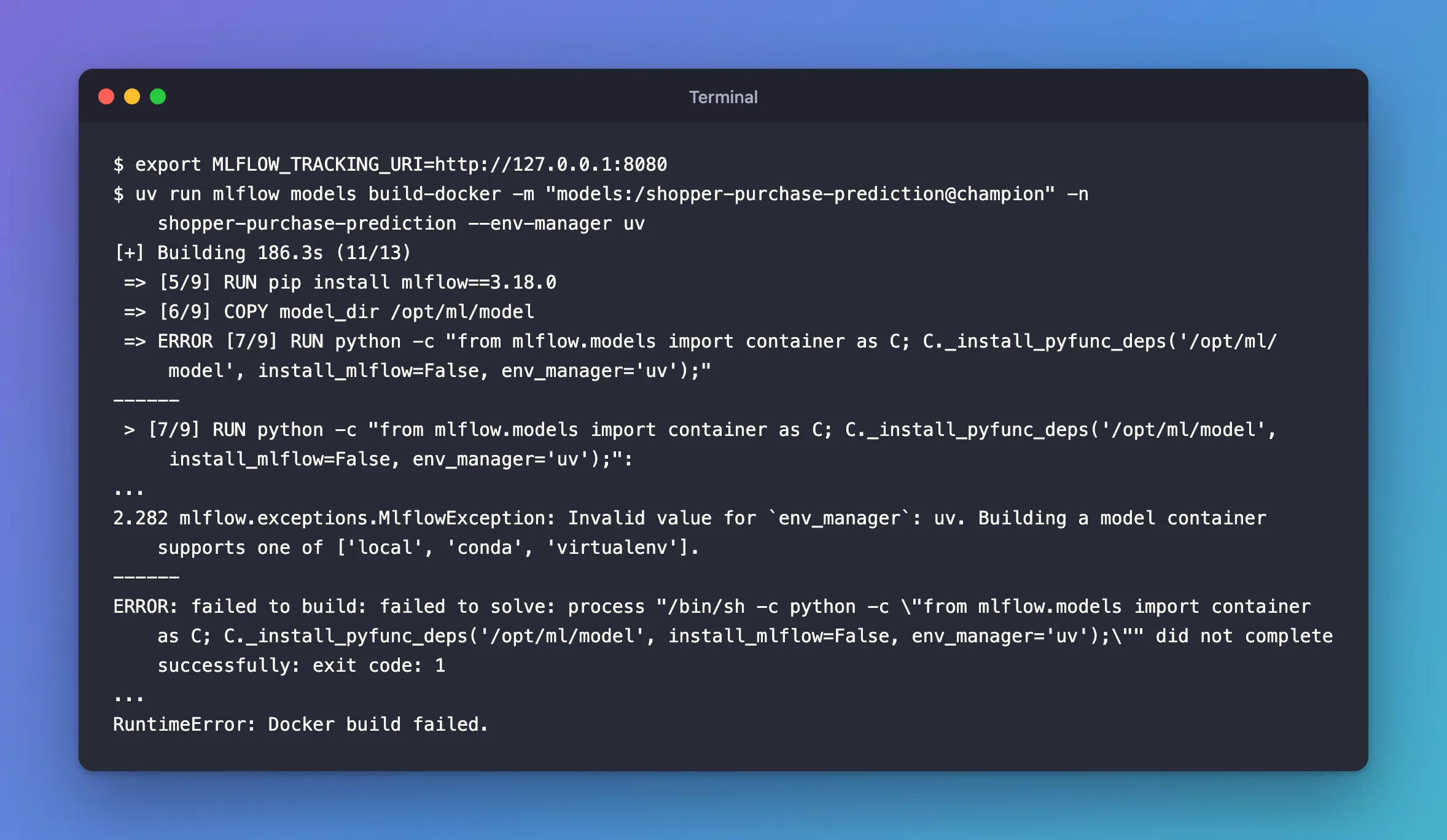
The build pulled the Python image, installed nginx and MLflow, copied the model in, and failed at the step that installs the model's packages, after 186 seconds:
[+] Building 186.3s (11/13)
 => [5/9] RUN pip install mlflow==3.18.0
 => [6/9] COPY model_dir /opt/ml/model
 => ERROR [7/9] RUN python -c "from mlflow.models import container as C; C._install_pyfunc_deps('/opt/ml/model', install_mlflow=False, env_manager='uv');"
------
 > [7/9] RUN python -c "from mlflow.models import container as C; C._install_pyfunc_deps('/opt/ml/model', install_mlflow=False, env_manager='uv');":
...
2.282 mlflow.exceptions.MlflowException: Invalid value for `env_manager`: uv. Building a model container supports one of ['local', 'conda', 'virtualenv'].
------
ERROR: failed to build: failed to solve: process "/bin/sh -c python -c \"from mlflow.models import container as C; C._install_pyfunc_deps('/opt/ml/model', install_mlflow=False, env_manager='uv');\"" did not complete successfully: exit code: 1
...
RuntimeError: Docker build failed.
What I Checked
Where it failed. Not on my Mac but inside the image, in step 7: C._install_pyfunc_deps(..., env_manager='uv'). MLflow writes that line into the Dockerfile with the --env-manager I gave it.
What that code accepts. The error names three managers: local, conda and virtualenv. MLflow 3.18.0's mlflow/models/container/__init__.py raises it when the manager is anything else:
    # Checked before the environment file is copied below, so an unsupported manager fails
    # with this message rather than partway through a copy it was never going to use.
    if env_manager not in (em.CONDA, em.VIRTUALENV):
        raise MlflowException.invalid_parameter_value(
            f"Invalid value for `env_manager`: {env_manager}. Building a model container "
local is handled before this point, which is why the message lists three. uv works for serve and predict on your own computer, but not inside an image.
Why It Happens
build-docker passes --env-manager on to the code that installs the model's packages in the image, and that code knows only local, conda and virtualenv. The command line accepts uv because the option is shared with serve and predict, so nothing stops it until the build reaches step 7. The steps before it, such as installing MLflow, take minutes, so the error comes late.
The Fix
Use --env-manager local. In an image, local means "install the model's packages into the image's own Python": MLflow starts from a python:3.15.2-slim image, the model's own Python version, so no separate environment is needed. I ran it under a test name first:
- macOS / Linux
- Windows (PowerShell)
uv run mlflow models build-docker -m "models:/shopper-purchase-prediction@champion" -n p9-debug-shopper --env-manager local
uv run mlflow models build-docker -m "models:/shopper-purchase-prediction@champion" -n p9-debug-shopper --env-manager local
After the Fix
2026/11/26 04:11:58 INFO mlflow.pyfunc.backend: Building docker image with name p9-debug-shopper
[+] Building 47.4s (14/14) FINISHED
 => CACHED [5/9] RUN pip install mlflow==3.18.0
 => CACHED [6/9] COPY model_dir /opt/ml/model
 => [7/9] RUN python -c "from mlflow.models import container as C; C._install_pyfunc_deps('/opt/ml/model', install_mlflow=False, env_manager='local');"
 => [8/9] RUN chmod o+rwX /opt/mlflow/
 => [9/9] RUN rm -rf /var/lib/apt/lists/*
 => => naming to docker.io/library/p9-debug-shopper
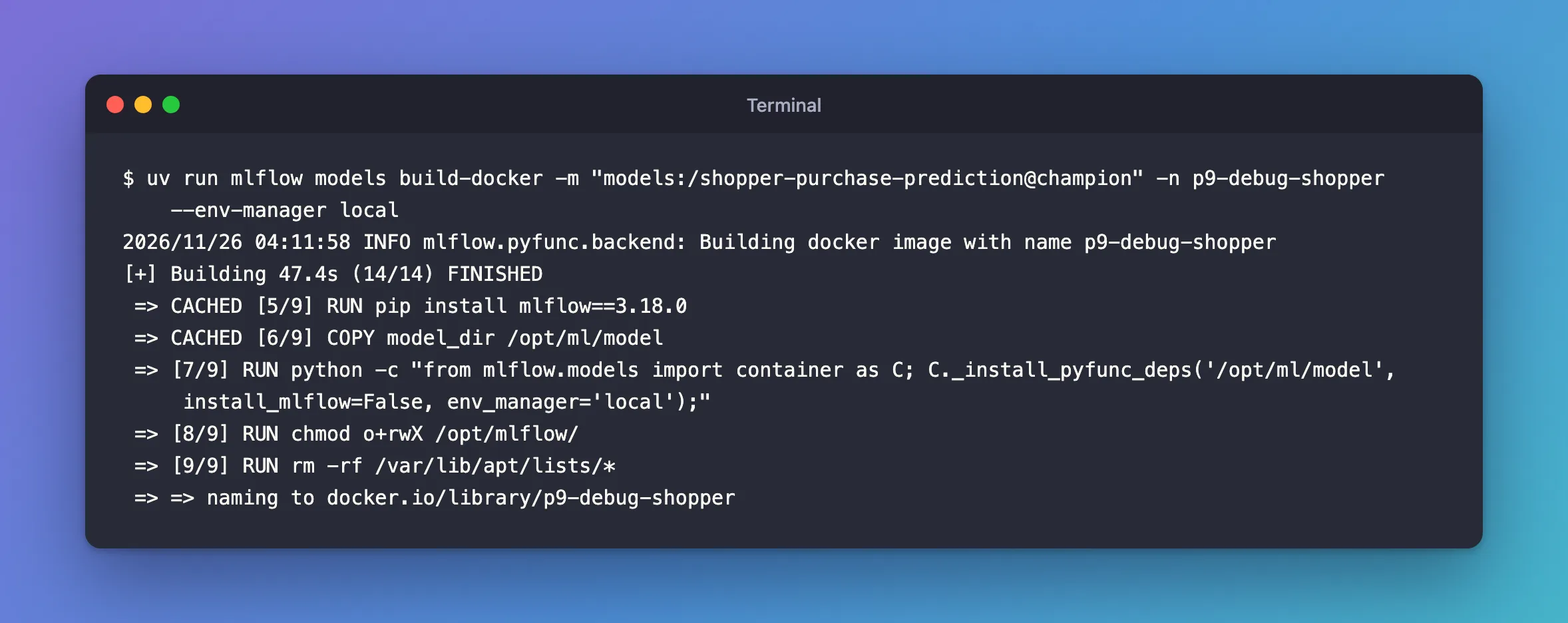
Docker reused steps 2 to 6 from the failed build, which is why they say CACHED, and step 7 installed the model's packages this time. The build finished in 47 seconds, and a container from the image answered with the champion's predictions.
Common Mistakes
| Mistake | What happens | Do this instead |
|---|---|---|
--env-manager uv for build-docker | Fails at step 7, minutes into the build | --env-manager local |
Leaving --env-manager out | The default virtualenv starts the image FROM ubuntu:24.04 and installs pyenv and Python inside it | --env-manager local, which starts from python:3.15.2-slim |
Troubleshooting
| Symptom | Likely cause | Fix |
|---|---|---|
RuntimeError: Docker build failed. with no MLflow error above it | Docker itself failed, such as Docker Desktop not running | Read the lines above it; Fixed: Cannot connect to the Docker daemon |
docker run warns that the image's platform is linux/amd64 | MLflow builds every image for linux/amd64 | Fixed: The requested image's platform does not match |
FAQ
Is local safe in an image?
Yes: there, "local" is the image's Python, not your computer's. The image gets the packages pinned in the model's requirements.txt, the same ones uv would install for serve.
Can I see the Dockerfile MLflow builds?
Yes, with mlflow models generate-dockerfile, which writes it to a folder without building: How to Generate a Dockerfile for an MLflow Model.
Conclusion
build-docker accepts --env-manager uv on the command line, but the code that installs the model's packages inside the image supports only local, conda and virtualenv, so the build failed at step 7. With --env-manager local, the packages went into the image's own Python, and the build finished.
Additional Resources
- mlflow models build-docker — the command and its options.
- MLflow Serving — how MLflow packages a model and its dependencies in a container.
- Docker build cache — why the second build reused the first steps.
