Fixed: "Invalid comparator '>' not one of" When You Search MLflow Runs by a Parameter

Filtering MLflow runs with params.n_estimators > "100" failed with Invalid comparator '>' not one of …, both in the UI's search box and in mlflow.search_runs(). MLflow stores every parameter as text, and text only takes =, !=, LIKE and ILIKE. Matching exact values works in the UI, and pandas compares the numbers in Python.
What I Was Doing
While writing How to Compare Runs in the MLflow UI, I was trying search queries on four random forest runs from the MLflow series, on MLflow 3.18.0. Each run logged its number of trees as the parameter n_estimators: 50, 100, 200 or 300. To keep only the forests with more than 100 trees, I typed this into the runs table's search box and pressed Enter:
params.n_estimators > "100"
What I Expected
Two runs: 300-trees and 200-trees-depth-16.
What I Got
No runs, and an error where the table should be:
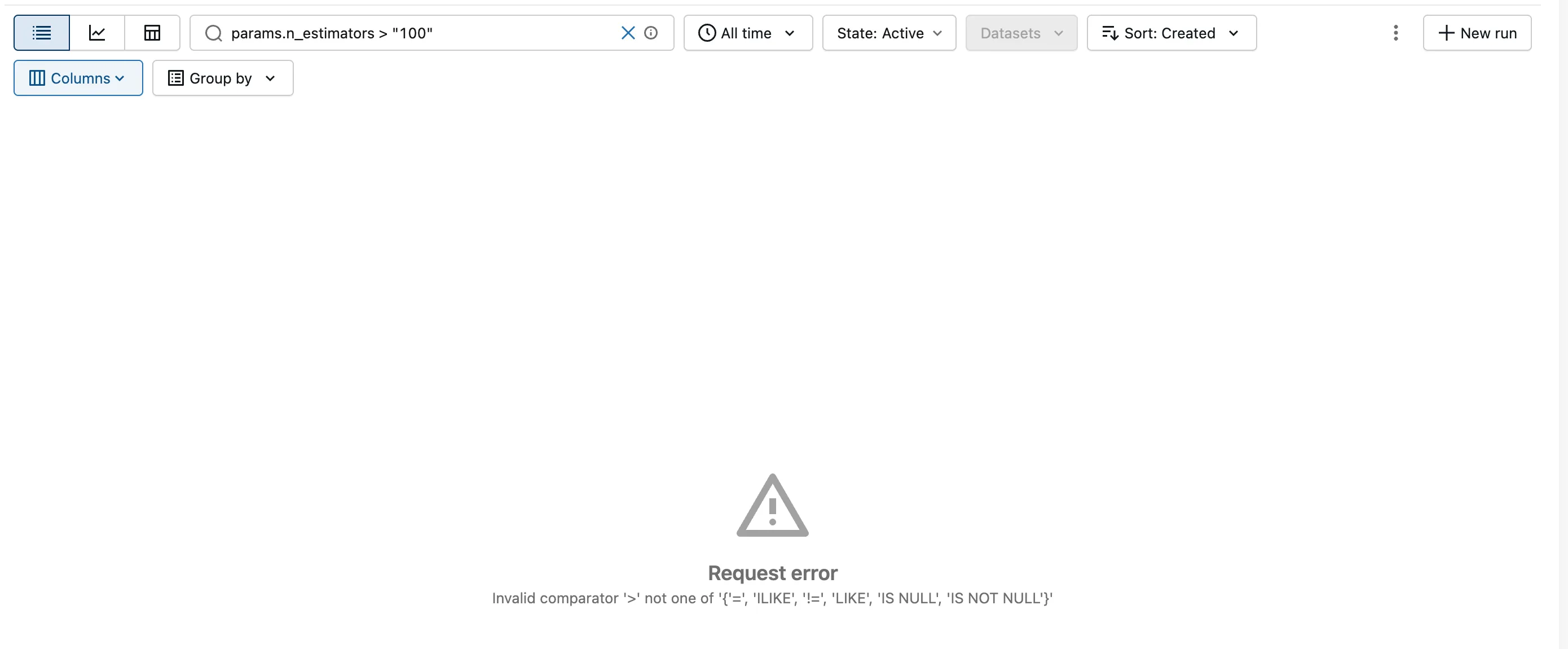
Request error
Invalid comparator '>' not one of '{'=', 'ILIKE', '!=', 'LIKE', 'IS NULL', 'IS NOT NULL'}'
The same query from Python failed too:
import mlflow

mlflow.set_tracking_uri("http://127.0.0.1:8080")

runs = mlflow.search_runs(
    experiment_names=["house-price-prediction"],
    filter_string='params.n_estimators > "100"',
)
print(runs[["tags.mlflow.runName", "params.n_estimators"]])
uv run python search_param_greater.py
  File "/Users/you/source/mlflow-demo/.venv/lib/python3.15/site-packages/mlflow/utils/rest_utils.py", line 460, in verify_rest_response
    raise RestException(json.loads(response.text))
mlflow.exceptions.RestException: INVALID_PARAMETER_VALUE: Invalid comparator '>' not one of '{'IS NOT NULL', 'IS NULL', 'LIKE', 'ILIKE', '=', '!='}'
The list of comparators came out in a different order the second time. So when you search for this error, search for its start, Invalid comparator '>' not one of.
What I Checked
MLflow's search documentation. Search Runs says parameters "are stored as strings, so you must use string comparators, such as = and !=", and that "For strings, MLflow supports =, !=, LIKE (case-sensitive) and ILIKE (case-insensitive)." It adds that "numeric values stored as parameters are cast to string in the tracking store" and that "When querying for numeric parameters, you must specify them as strings by enclosing them in double quotes." Metrics, on the other hand, "are stored as numbers, so you must use numeric comparators": =, !=, >, >=, < and <=.
How the runs stored the value. Reading a run's parameters back returns text: the number 200 comes back as '200', as How to Log Parameters in MLflow shows.
Where the message comes from. In MLflow 3.18.0, mlflow/utils/search_utils.py lists the comparators each kind of value accepts:
VALID_METRIC_COMPARATORS = {">", ">=", "!=", "=", "<", "<="}
VALID_PARAM_COMPARATORS = {"!=", "=", LIKE_OPERATOR, ILIKE_OPERATOR, "IS NULL", "IS NOT NULL"}
VALID_TAG_COMPARATORS = {"!=", "=", LIKE_OPERATOR, ILIKE_OPERATOR, "IS NULL", "IS NOT NULL"}
A parameter compared with anything outside VALID_PARAM_COMPARATORS raises Invalid comparator '…' not one of '…', with that set printed into the message. A Python set has no fixed order, which is why the list came out in two different orders.
Why It Happens
MLflow keeps every parameter as text, whatever type you logged. Text has no "greater than" in the sense you mean: compared letter by letter, "50" comes after "300". So MLflow accepts only comparisons that make sense for text, equal, not equal and patterns, and refuses >, >=, < and <= on parameters. Metrics are numbers, which is why a query such as metrics.r2 > 0.8 works.
The Fix
Pick the fix that matches what you need.
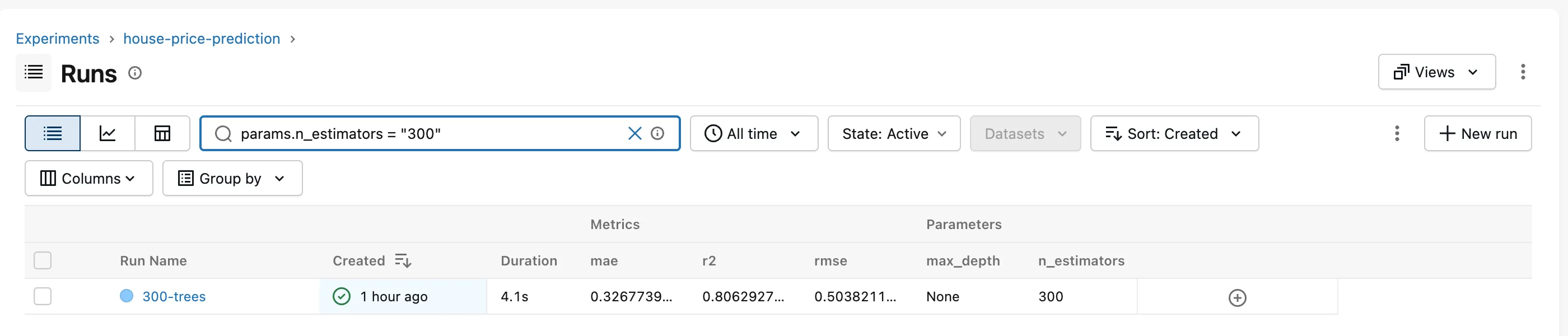
In the UI, compare parameters with = or !=. To see the 300-tree forest:
params.n_estimators = "300"
!= excludes a value in the same way, and LIKE matches a pattern. For a range, filter on a metric instead, such as metrics.rmse < 0.506.
In Python, compare the numbers in pandas. mlflow.search_runs() returns a pandas table, so fetch the runs without a parameter filter and compare there:
import mlflow

mlflow.set_tracking_uri("http://127.0.0.1:8080")

runs = mlflow.search_runs(experiment_names=["house-price-prediction"])
trees = runs["params.n_estimators"].astype(int)
more_than_100 = runs[trees > 100]
print(more_than_100[["tags.mlflow.runName", "params.n_estimators", "metrics.rmse"]].to_string(index=False))
runs["params.n_estimators"]is the column of text values, such as'300'..astype(int)turns them into whole numbers, so>compares numbers.runs[trees > 100]keeps the rows where the comparison is true.
After the Fix
The search box query found the 300-tree run:
And the Python script returned the two runs I had expected:
uv run python search_param_numeric.py
tags.mlflow.runName params.n_estimators  metrics.rmse
          300-trees                 300      0.503821
 200-trees-depth-16                 200      0.507588
Common Mistakes
| Mistake | What happens | Do this instead |
|---|---|---|
Using >, >=, < or <= on a parameter | Invalid comparator '>' not one of … | Use =, !=, LIKE or ILIKE, or compare in pandas |
| Searching the web for the whole message | The list's order changes, so exact matches miss | Search for Invalid comparator '>' not one of |
Troubleshooting
| Symptom | Likely cause | Fix |
|---|---|---|
Request error with Invalid comparator '>' not one of … in the UI | A parameter is compared with > or < | params.n_estimators = "300", or filter in Python |
RestException: INVALID_PARAMETER_VALUE: Invalid comparator … from mlflow.search_runs() | The same query in filter_string | Fetch the runs, then filter the table in pandas |
metrics.… > … works but params.… > … doesn't | Metrics are numbers; parameters are text | Compare parameters as text |
FAQ
Do tags have the same limit?
Yes. Tags are text too, and MLflow 3.18.0 accepts the same comparators for them as for parameters.
Can I list several values with OR or IN?
Not for parameters. MLflow's search documentation says the OR keyword isn't supported, and IN only works for datasets.name, datasets.digest, datasets.context and attributes.run_id.
Should I log numbers as metrics so I can filter them?
Log results, such as scores, as metrics. Settings stay parameters, even when they're numbers: they describe how the run was set up.
Conclusion
Invalid comparator '>' not one of … means a parameter was compared with >, >=, < or <=. MLflow stores parameters as text, which only takes =, !=, LIKE and ILIKE. Match exact values with params.n_estimators = "300" in the UI, or fetch the runs with mlflow.search_runs() and compare the numbers in pandas.
Additional Resources
- Search Runs — MLflow's search syntax and the comparators for each kind of value.
- mlflow.search_runs — the API reference.
- pandas.Series.astype — converting a column to another type.
