Fixed: "Incompatible Type. We Can't Evaluate Your Formula Because the Context Variable Types Are Incompatible" in Power Apps

A gallery's OnSelect passes the selected row to another screen, and Power Apps marks it as an error: Incompatible type. We can't evaluate your formula because the context variable types are incompatible with the types of values in other places in your app. In the example, Self.Selected caused it, and ThisItem fixed it.
The Error
In the Career Development Plan app, the My Plan screen lists competencies in a gallery, galMyPlanMPS. Selecting a row should open the Response screen with that competency, passed in a context variable with Navigate's third argument:
Navigate('Response Screen', ScreenTransition.None, {locPlanItem: Self.Selected})
The gallery got a red error icon, and the formula a red underline. Hovering over it showed the message:
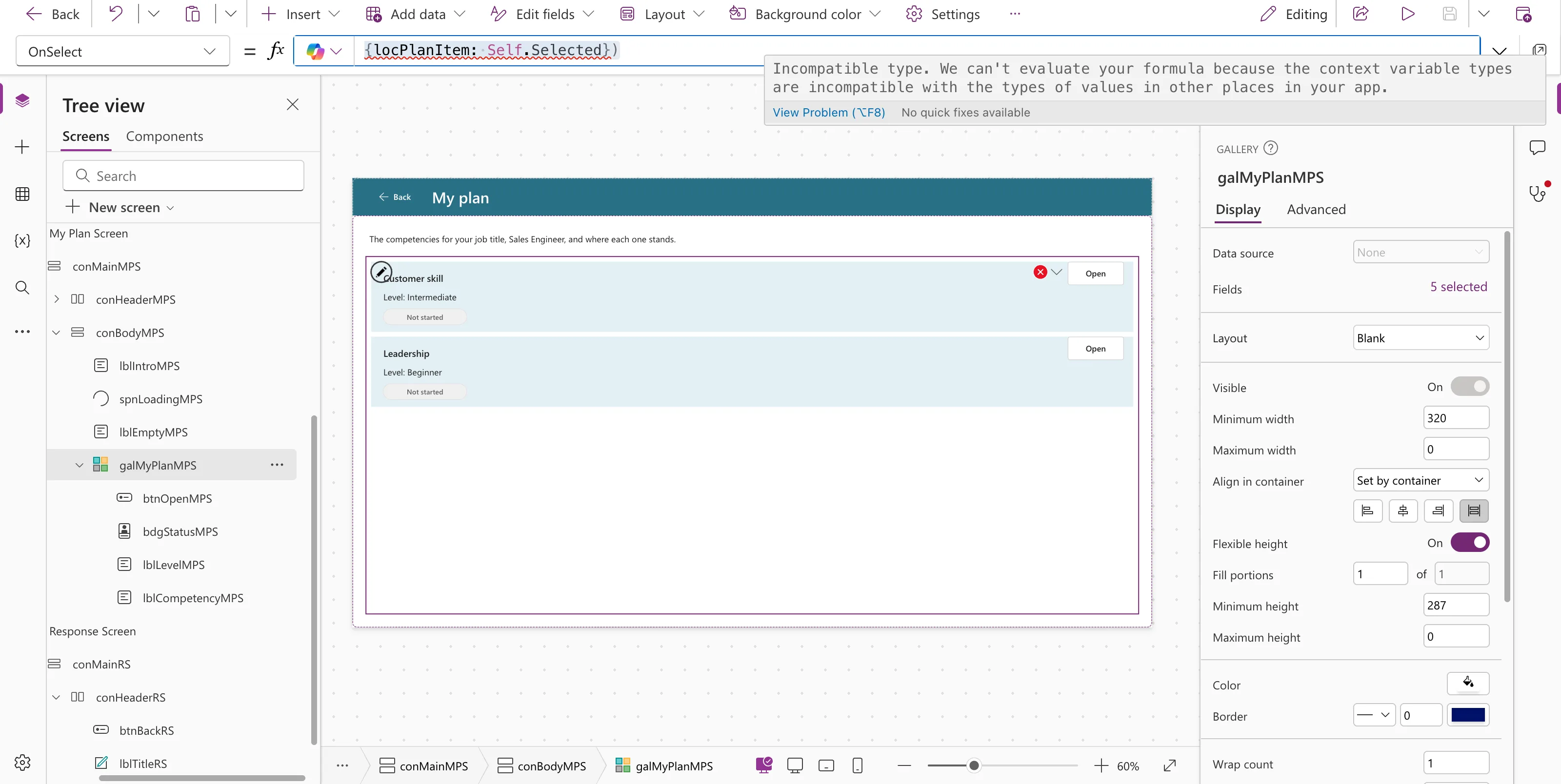
Incompatible type. We can't evaluate your formula because the context variable types are incompatible with the types of values in other places in your app.
View Problem (⌥F8)    No quick fixes available
What It Isn't
The message mentions context variables, so the first suspect is Navigate. Two quick tests in the same OnSelect ruled that out:
| Formula | Result |
|---|---|
UpdateContext({locTest: Self.Selected}) | The same red underline |
Set(gblTest, Self.Selected) | The same red underline |
So the problem was storing Self.Selected in a variable at all, whether a context variable or a global one. In this gallery the template holds modern Text, Badge and Button controls. Microsoft's documentation doesn't list this message, and Studio didn't offer a quick fix.
The Fix: Pass ThisItem
In a gallery's OnSelect, ThisItem is the row that was selected (How to Use ThisItem in a Power Apps Gallery). Pass that instead:
Navigate('Response Screen', ScreenTransition.None, {locPlanItem: ThisItem})
The error was gone at once:
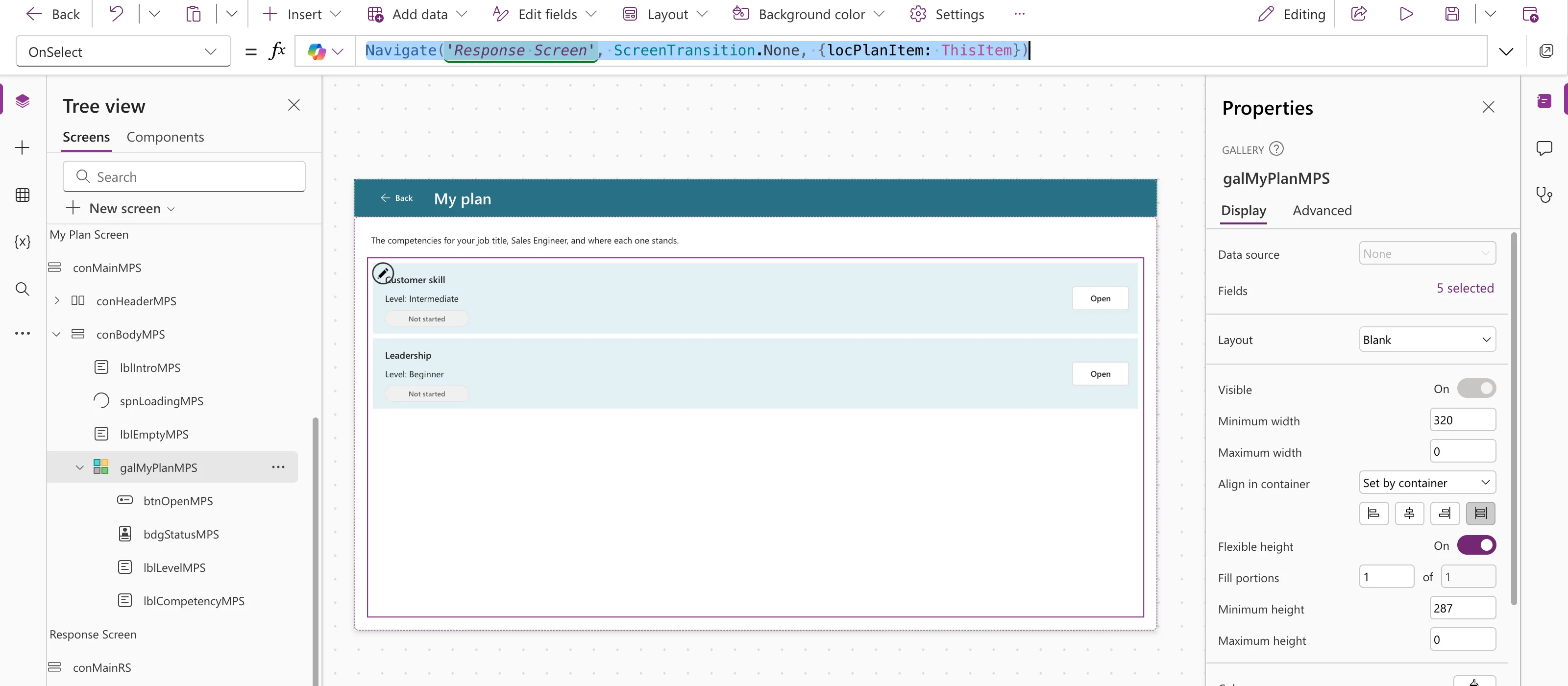
On the Response screen, locPlanItem holds the row's columns, such as locPlanItem.Competency and locPlanItem.Level.Value. In preview, selecting Customer skill opened the screen with Customer skill, and Leadership with Leadership.
Common Mistakes
| Mistake | What happens | Do this instead |
|---|---|---|
Self.Selected or galX.Selected in a variable | Incompatible type in this setup | Pass ThisItem from the gallery's OnSelect |
Reading Gallery.Selected on the next screen | It can change when the gallery's data changes | Pass the row once, when it's selected |
| Renaming the variable to make the error go away | The name isn't the problem | Change what you store, not the name |
Troubleshooting
| Symptom | Likely cause | Fix |
|---|---|---|
locPlanItem is blank on the next screen | The screen was opened another way, such as from the tree | Test in preview, starting from the screen with the gallery |
FAQ
Doesn't Microsoft recommend storing Self.Selected?
Microsoft's gallery best practices suggest Set(CurrentItem, Self.Selected) in the gallery's OnSelect to keep a stable copy. In this app, that formula showed the same error, and passing ThisItem kept the same stable copy without it.
Is ThisItem the same row as Self.Selected?
In the gallery's OnSelect, yes: it's the row that was just selected. In the example, each row opened the Response screen with its own competency.
Conclusion
When Incompatible type … context variable types are incompatible appears on a gallery's OnSelect, check what you're storing. Passing ThisItem, rather than Self.Selected, gave the next screen the selected row without the error.
Additional Resources
- Back and Navigate functions: passing context variables to a screen.
- Best practices for using the Gallery control: why Selected can change.
