Fixed: Git Shows Every Line Changed in Files from dotnet new (CRLF Line Endings)

I changed four lines of a .NET project file, and Git reported 32. The ASP.NET Core Web API template creates its files with Windows line endings (CRLF), even on a Mac, while the dotnet commands that later edit a file save it with LF. To Git, every line of such a file looked different. One .gitattributes file, as Git's own documentation describes, stores every text file with LF and ends the noise.
What I Was Doing
I was building a .NET 10 Web API solution on macOS, following How to Create a .NET C# Web API Solution with a Class Library, and committed it. Then I connected the API to MySQL, as in How to Connect a .NET C# Web API to a MySQL Database — Part 1. That added one package and one UserSecretsId line to the API's project file, through dotnet package add and dotnet user-secrets init, and a small Database section to appsettings.json. I committed again and looked at what the commit changed:
git diff --stat HEAD~1 HEAD -- src/Dewiride.Inventory.Api/Dewiride.Inventory.Api.csproj src/Dewiride.Inventory.Api/appsettings.json
What I Expected
A handful of lines: one PackageReference and one UserSecretsId in the project file, and five lines in appsettings.json.
What I Got
 src/Dewiride.Inventory.Api/Dewiride.Inventory.Api.csproj | 32 +++++++++++++++++---------------
 src/Dewiride.Inventory.Api/appsettings.json              | 23 ++++++++++++++---------
 2 files changed, 31 insertions(+), 24 deletions(-)
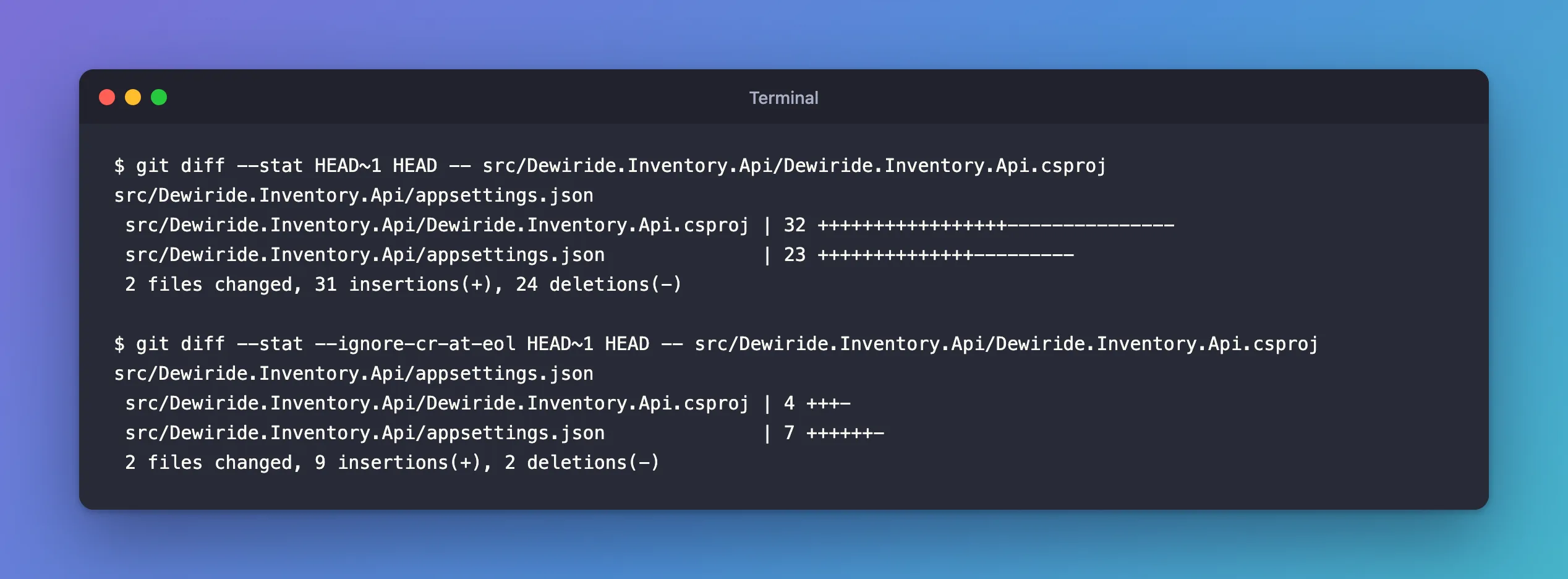
32 lines for the project file, which only has 19.
What I Checked
Is it only line endings? git diff can ignore a carriage return (CR) at the end of a line. With that option, the numbers dropped to what I expected:
git diff --stat --ignore-cr-at-eol HEAD~1 HEAD -- src/Dewiride.Inventory.Api/Dewiride.Inventory.Api.csproj src/Dewiride.Inventory.Api/appsettings.json
 src/Dewiride.Inventory.Api/Dewiride.Inventory.Api.csproj | 4 +++-
 src/Dewiride.Inventory.Api/appsettings.json              | 7 ++++++-
 2 files changed, 9 insertions(+), 2 deletions(-)
So the real changes were small. The rest was every line changing from one line ending to the other.
Which files have which endings? git ls-files --eol shows the line endings of each file in the repository (i/) and on disk (w/):
git ls-files --eol
i/lf    w/lf    attr/                 	.editorconfig
…
i/lf    w/lf    attr/                 	src/Dewiride.Inventory.Api/Dewiride.Inventory.Api.csproj
i/lf    w/lf    attr/                 	src/Dewiride.Inventory.Api/Dewiride.Inventory.Api.http
i/lf    w/lf    attr/                 	src/Dewiride.Inventory.Api/Program.cs
i/crlf  w/crlf  attr/                 	src/Dewiride.Inventory.Api/Properties/launchSettings.json
i/crlf  w/crlf  attr/                 	src/Dewiride.Inventory.Api/appsettings.Development.json
i/lf    w/lf    attr/                 	src/Dewiride.Inventory.Api/appsettings.json
…
Two template files I hadn't touched still had CRLF. The ones a tool or I had edited since were LF now. Those, the project file and appsettings.json, had been committed with CRLF the first time.
Where does the CRLF come from? Not from my Mac, which uses LF and has no core.autocrlf setting. The .NET SDK keeps its templates as NuGet packages, so I looked inside the Web API template's package:
unzip -p /usr/local/share/dotnet/templates/10.0.14/microsoft.dotnet.web.projecttemplates.10.0.10.0.14.nupkg content/WebApi-CSharp/appsettings.Development.json | od -c | head -3
0000000    {  \r  \n           "   L   o   g   g   i   n   g   "   :
0000020    {  \r  \n                   "   L   o   g   L   e   v   e   l
0000040    "   :       {  \r  \n                           "   D   e   f
od -c prints each character; \r \n is a CRLF line ending. The template's files arrive with CRLF, and dotnet new copies them as they are.
Why It Happens
Git's gitattributes documentation explains what Git does when nothing tells it how to treat line endings: if the text attribute is unspecified, "Git uses the core.autocrlf configuration variable to determine if the file should be converted". I had neither, so Git stored each file exactly as it was, CRLF or LF.
That's harmless until a tool rewrites a file with the other ending. dotnet package add and dotnet user-secrets init saved the project file with LF, so every one of its lines changed from Git's point of view. On a team, the same file can flip back and forth between machines.
The Fix
Tell Git to store text files with LF, whatever they contain on disk. The gitattributes page gives the steps for an existing repository, "From a clean working directory". Create a .gitattributes file in the repository's root folder:
# Store every text file with LF line endings in the repository, whatever the
# operating system or tool that created it. Git picks the right line endings
# for your computer when it checks the files out.
* text=auto
* text=auto applies to every file (*): Git "decides by itself whether the file is text or binary", and converts text files to LF when they're committed. On checkout, Git gives each computer its usual line endings.
Then re-save every tracked file under the new rule:
git add --renormalize .
It prints nothing. git status shows what it changed:
git status
On branch main
Changes to be committed:
  (use "git restore --staged <file>..." to unstage)
	modified:   src/Dewiride.Inventory.Api/Properties/launchSettings.json
	modified:   src/Dewiride.Inventory.Api/appsettings.Development.json

Untracked files:
  (use "git add <file>..." to include in what will be committed)
	.gitattributes
The two CRLF files are now stored with LF. Add .gitattributes itself and commit:
git add .gitattributes
git commit -m "Store text files with LF line endings"
After the Fix
git ls-files --eol
i/lf    w/lf    attr/text=auto        	.editorconfig
i/lf    w/lf    attr/text=auto        	.env.example
i/lf    w/lf    attr/text=auto        	.gitattributes
…
i/lf    w/lf    attr/text=auto        	src/Dewiride.Inventory.Api/Program.cs
i/lf    w/crlf  attr/text=auto        	src/Dewiride.Inventory.Api/Properties/launchSettings.json
i/lf    w/crlf  attr/text=auto        	src/Dewiride.Inventory.Api/appsettings.Development.json
i/lf    w/lf    attr/text=auto        	src/Dewiride.Inventory.Api/appsettings.json
…
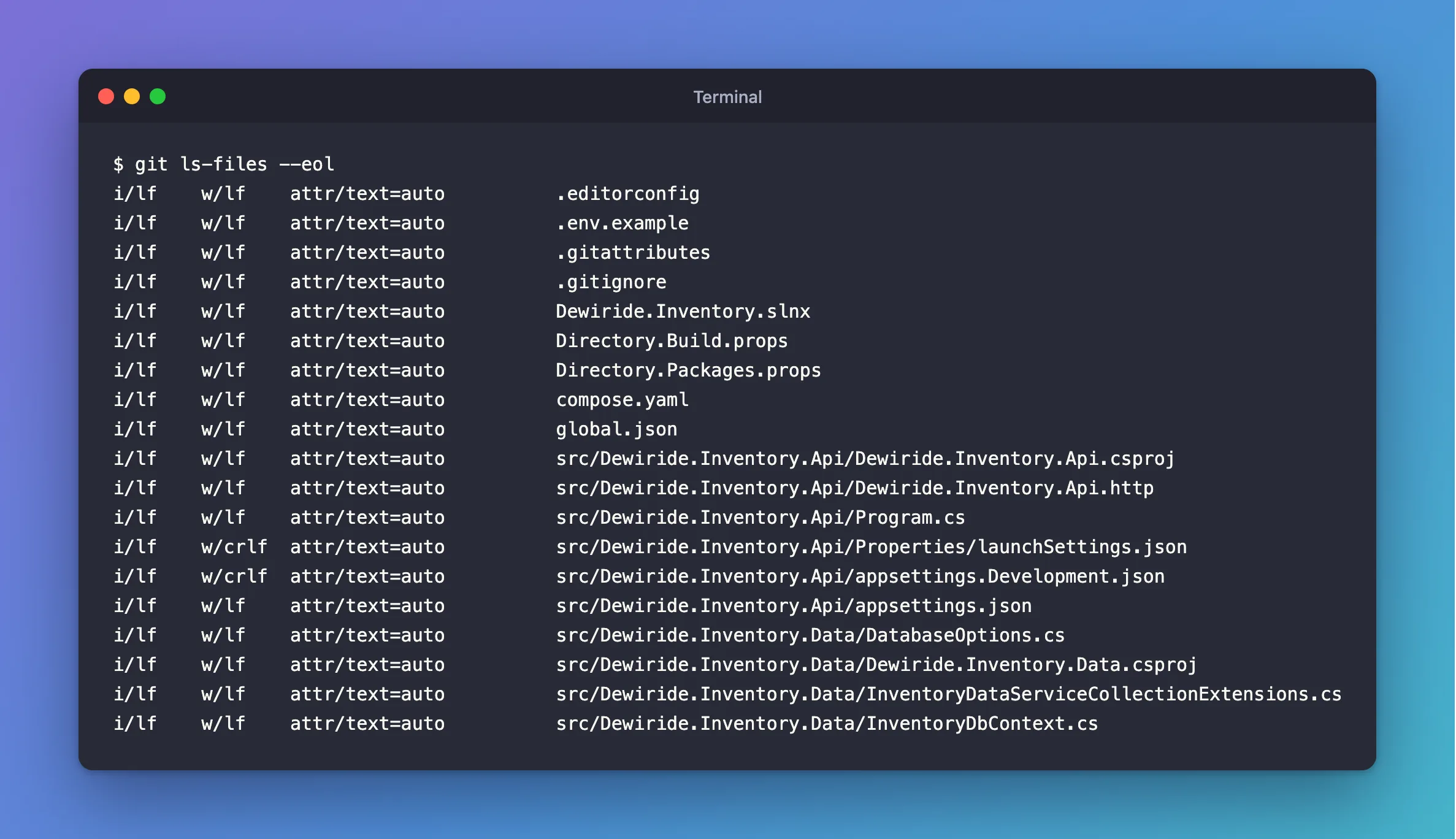
Every file is i/lf in the repository, and every line shows the new attr/text=auto. The two template files still have CRLF on my disk (w/crlf), because nothing has rewritten them yet. That doesn't matter: Git compares them as LF, and every fresh clone gets LF on a Mac or Linux and CRLF on Windows.
The warning you'll see from now on
When you add more files from a template, git add now says what it's doing:
warning: in the working copy of 'src/Dewiride.Inventory.Api/appsettings.json', CRLF will be replaced by LF the next time Git touches it
That's .gitattributes working: Git noticed the CRLF and stores the file with LF. It isn't an error, and the commit goes ahead.
Common Mistakes
| Mistake | What happens | Do this instead |
|---|---|---|
Adding .gitattributes without --renormalize | Files committed earlier keep their CRLF in the repository | Run git add --renormalize . once |
Setting core.autocrlf on your own computer only | Teammates without the setting still commit mixed endings | Commit a .gitattributes, which applies to everyone |
| Renormalizing with uncommitted work | Your changes and the line-ending change land in one commit | Start from a clean working directory, as the docs say |
Troubleshooting
| Symptom | Likely cause | Fix |
|---|---|---|
CRLF will be replaced by LF the next time Git touches it | The file has CRLF and Git stores LF | Nothing; it's expected with text=auto |
A binary file shows up after --renormalize | Git took it for text | Mark it in .gitattributes, for example *.pdf -text |
| Diffs still show every line changed | The old commits have CRLF, and you're comparing against them | Compare commits made after the fix, or use --ignore-cr-at-eol |
FAQ
Should I force LF on Windows too?
You don't have to. text=auto stores LF and lets each computer use its own endings on disk. A rule like *.sh text eol=lf forces LF on disk for files that need it, such as shell scripts.
Does this change my files?
Only how Git stores them. The files on your disk keep their line endings until Git checks them out again.
Conclusion
The noisy diffs weren't real changes: the Web API template ships CRLF line endings, and dotnet tools rewrite files with LF. A .gitattributes with * text=auto, followed once by git add --renormalize ., stores every text file with LF, so a diff shows only the lines you actually changed.
Additional Resources
- gitattributes — Git's documentation, including the
textattribute and the renormalizing steps. - git ls-files — the
--eoloption.
