Fixed: "Exception ignored on threading shutdown" KeyboardInterrupt When You Stop the MLflow Server

Pressing Ctrl+C to stop MLflow 3.18.0's tracking server printed Exception ignored on threading shutdown: and a KeyboardInterrupt traceback from Python's own threading.py. Nothing crashed: the server stopped cleanly, and the message comes from its background job runner being interrupted at exit. If you don't use MLflow's server jobs, MLFLOW_SERVER_ENABLE_JOB_EXECUTION=false makes it go away.
What I Was Doing
I was running a local tracking server for the MLflow series, on macOS with Python 3.15.2 and MLflow 3.18.0, started with:
uv run mlflow server --port 5000
When I was done, I stopped it the way its own startup line says, Uvicorn running on http://127.0.0.1:5000 (Press CTRL+C to quit): I pressed Ctrl+C in its terminal.
What I Expected
Uvicorn's shutdown lines, ending with the main process stopping.
What I Got
A traceback in the middle of the shutdown:
^CException ignored on threading shutdown:
2026/11/13 17:31:38 INFO:     Shutting down
Traceback (most recent call last):
  File "/Library/Frameworks/Python.framework/Versions/3.15/lib/python3.15/threading.py", line 1721, in _shutdown
    _thread_shutdown()
    ~~~~~~~~~~~~~~~~^^
KeyboardInterrupt
2026/11/13 17:31:38 INFO:     Shutting down
2026/11/13 17:31:38 INFO:     Shutting down
2026/11/13 17:31:38 INFO:     Shutting down
2026/11/13 17:31:38 INFO:     Waiting for application shutdown.
2026/11/13 17:31:38 INFO:     Application shutdown complete.
2026/11/13 17:31:38 INFO:     Finished server process [4357]
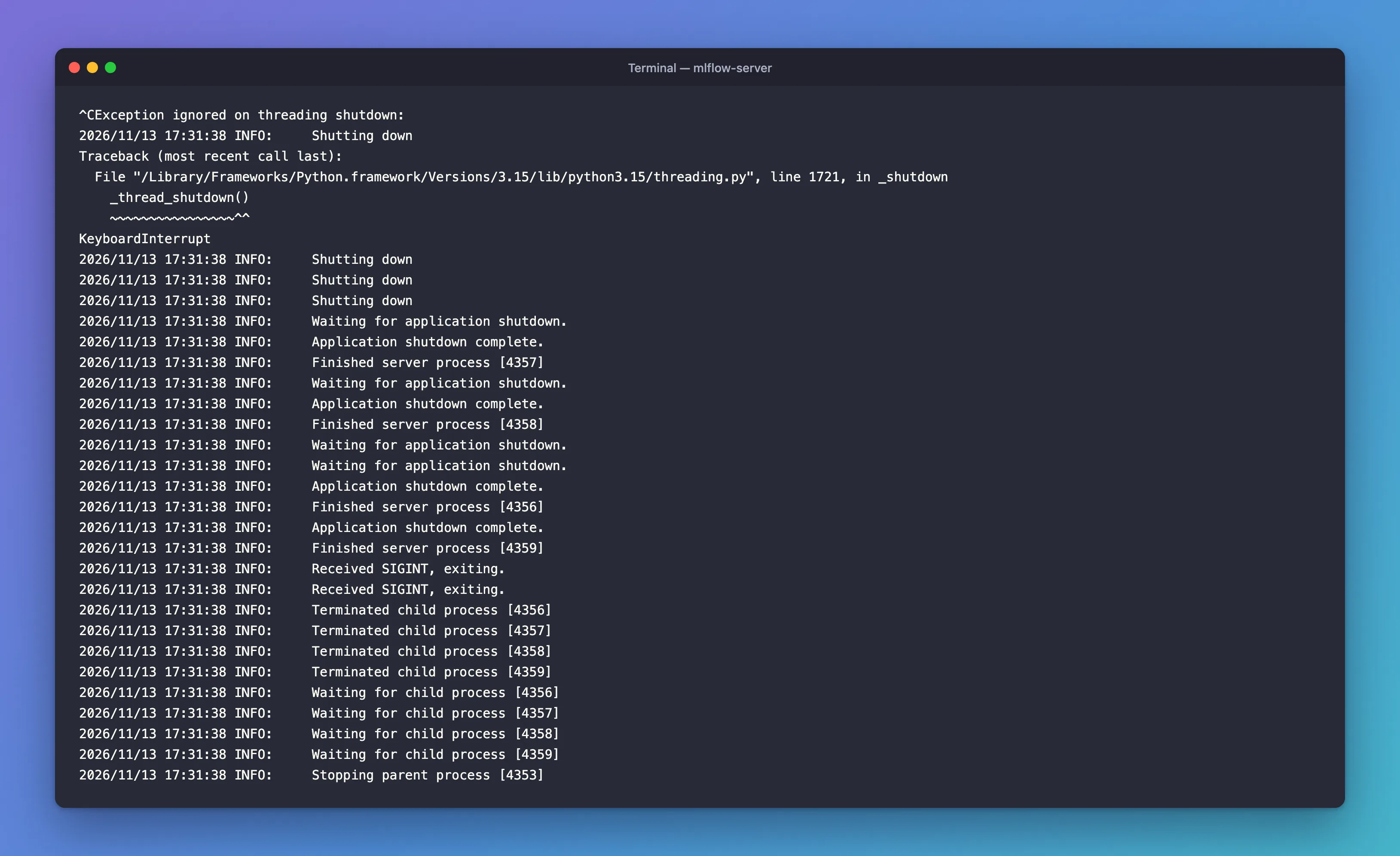
After it, the shutdown carried on: every worker reported Application shutdown complete. and Finished server process, and the log ended with Stopping parent process [4353].
Once, when I pressed Ctrl+C about a second after the server finished starting, the tracebacks looked different. Three began at once and ran through huey/bin/huey_consumer.py while it was still importing MLflow:
^C2026/11/13 17:32:40 INFO:     Shutting down
Traceback (most recent call last):
Traceback (most recent call last):
Traceback (most recent call last):
  File "<frozen runpy>", line 201, in _run_module_as_main
  File "<frozen runpy>", line 87, in _run_code
  File "/Users/you/source/mlflow-server/.venv/lib/python3.15/site-packages/huey/bin/huey_consumer.py", line 59, in <module>
    consumer_main()
    ~~~~~~~~~~~~~^^
  File "/Users/you/source/mlflow-server/.venv/lib/python3.15/site-packages/huey/bin/huey_consumer.py", line 48, in consumer_main
    huey_instance = load_huey(args[0])
...
KeyboardInterrupt
What I Checked
Where the traceback points. Both frames are in Python itself, threading.py, in _shutdown, not in MLflow or my code. When a Python program ends, it waits for its threads; the threading documentation says "The entire Python program exits when no alive non-daemon threads are left." The KeyboardInterrupt from Ctrl+C arrived during that wait.
Why "Exception ignored". At that point, no code is left to catch the exception. Python reports such exceptions instead of raising them; its documentation for sys.unraisablehook describes them as raised when "an exception has occurred but there is no way for Python to handle it."
Which part of the server owns the thread. MLflow 3.18.0's server runs background jobs, and its startup log showed them:
2026/11/13 17:30:55 INFO mlflow.server.jobs.executor_registry: Available backends after discovery: docker, local
2026/11/13 17:30:55 INFO mlflow.server.jobs.executor_registry: Job executor backend 'local' passed requirements check
2026/11/13 17:31:02 INFO mlflow.server.jobs.utils: Registered online_scoring_scheduler periodic task (runs every 1 minute)
2026/11/13 17:31:02 INFO mlflow.server.jobs.utils: Registered trace_archival_scheduler periodic task (polls every 1 minute and no-ops when trace archival is disabled or unconfigured)
2026/11/13 17:31:02 INFO mlflow.server.jobs.utils: Registered issue_detection_scheduler periodic task (polls every 15 minutes and no-ops when no experiment has a detection schedule)
The jobs run through Huey, a task queue, in worker processes of their own: that's the huey_consumer.py in the second traceback. MLflow's job runner code, mlflow/server/jobs/_executor_runner.py, notes that "the periodic-tasks consumer thread is non-daemon", the kind of thread Python waits for at exit.
The setting that controls them. mlflow/environment_variables.py in MLflow 3.18.0 describes MLFLOW_SERVER_ENABLE_JOB_EXECUTION, default True: "Specifies whether to enable job execution feature for MLflow server."
Why It Happens
Ctrl+C interrupts every process the command started, not just the web server. The job runner's process was waiting at exit for its non-daemon thread when the interrupt arrived, so Python reported a KeyboardInterrupt it couldn't hand to any code, and moved on. Stopped within a second of starting, the job workers were still importing MLflow, so the interrupt landed there instead. Either way, it's the stop signal you sent, reported noisily.
The Fix
There's nothing to repair: the server stopped completely. To make the message go away, decide whether you need MLflow's server jobs. The ones registered above, online_scoring_scheduler, trace_archival_scheduler and issue_detection_scheduler, serve GenAI features such as scoring and archiving traces. If you only track machine learning runs, turn job execution off in the terminal before you start the server:
- macOS / Linux
- Windows (PowerShell)
export MLFLOW_SERVER_ENABLE_JOB_EXECUTION=false
uv run mlflow server --port 8090
$env:MLFLOW_SERVER_ENABLE_JOB_EXECUTION = "false"
uv run mlflow server --port 8090
I used port 8090 because another server was running on 8080; use your own port. If you use GenAI features that need server jobs, leave the setting alone and ignore the message.
After the Fix
The startup had no job lines this time, and Ctrl+C stopped the server without a single traceback:
Backend store URI not provided. Using sqlite:///mlflow.db
Registry store URI not provided. Using backend store URI.
[MLflow] Security middleware enabled with default settings (localhost-only). To allow connections from other hosts, use --host 0.0.0.0 and configure --allowed-hosts and --cors-allowed-origins.
2026/11/13 17:33:14 INFO:     Uvicorn running on http://127.0.0.1:8090 (Press CTRL+C to quit)
2026/11/13 17:33:14 INFO:     Started parent process [6568]
...
2026/11/13 17:33:38 INFO:     Received SIGINT, exiting.
2026/11/13 17:33:38 INFO:     Received SIGINT, exiting.
2026/11/13 17:33:38 INFO:     Terminated child process [6570]
2026/11/13 17:33:38 INFO:     Terminated child process [6571]
2026/11/13 17:33:38 INFO:     Terminated child process [6572]
2026/11/13 17:33:38 INFO:     Terminated child process [6573]
2026/11/13 17:33:38 INFO:     Waiting for child process [6570]
2026/11/13 17:33:38 INFO:     Waiting for child process [6571]
2026/11/13 17:33:38 INFO:     Waiting for child process [6572]
2026/11/13 17:33:38 INFO:     Waiting for child process [6573]
2026/11/13 17:33:38 INFO:     Stopping parent process [6568]
The run left out one thing: the Starlette deprecation warnings, which have their own fix, still printed at startup.
Common Mistakes
| Mistake | What happens | Do this instead |
|---|---|---|
| Treating the traceback as a crash | Time spent debugging a clean stop | Check for Application shutdown complete. and Stopping parent process |
| Turning job execution off while using GenAI features that need it | Those background jobs don't run | Keep it on and ignore the message |
Force-killing the server, such as with kill -9, to avoid the message | The server doesn't get to run its shutdown | Stop it with Ctrl+C |
Troubleshooting
| Symptom | Likely cause | Fix |
|---|---|---|
Exception ignored on threading shutdown: and KeyboardInterrupt on Ctrl+C | The job runner was interrupted while Python waited for its thread | Ignore it, or set MLFLOW_SERVER_ENABLE_JOB_EXECUTION=false |
Several tracebacks through huey_consumer.py | Ctrl+C came while the job workers were still starting | The same: harmless, or turn job execution off |
| Still there with the variable set | It was set in another terminal, or after the server started | Set it in the same terminal, then start the server |
FAQ
Did the server still shut down properly?
Yes. After the message, every worker reported Application shutdown complete. and Finished server process, and the log ended with Stopping parent process.
What are MLflow server jobs?
Background tasks the tracking server runs for itself. In MLflow 3.18.0 its log registered three periodic tasks at startup: online scoring, trace archival and issue detection, which serve GenAI features such as scoring and archiving traces.
Do I need to set the variable every time?
It lasts until you close the terminal. Set it again in a new terminal, or add it to your shell's profile.
Conclusion
Exception ignored on threading shutdown: followed by KeyboardInterrupt is Python reporting that Ctrl+C interrupted the MLflow server's job runner while it waited for its thread at exit. The server still stopped cleanly. If you don't use MLflow's server jobs, MLFLOW_SERVER_ENABLE_JOB_EXECUTION=false stops them from starting, and the message with them.
Additional Resources
- threading — Thread objects — daemon and non-daemon threads.
- sys.unraisablehook — exceptions Python can't raise.
- MLflow Tracking Server — running the server.
