Fixed: Excel Table Total Row Counts Instead of Adding

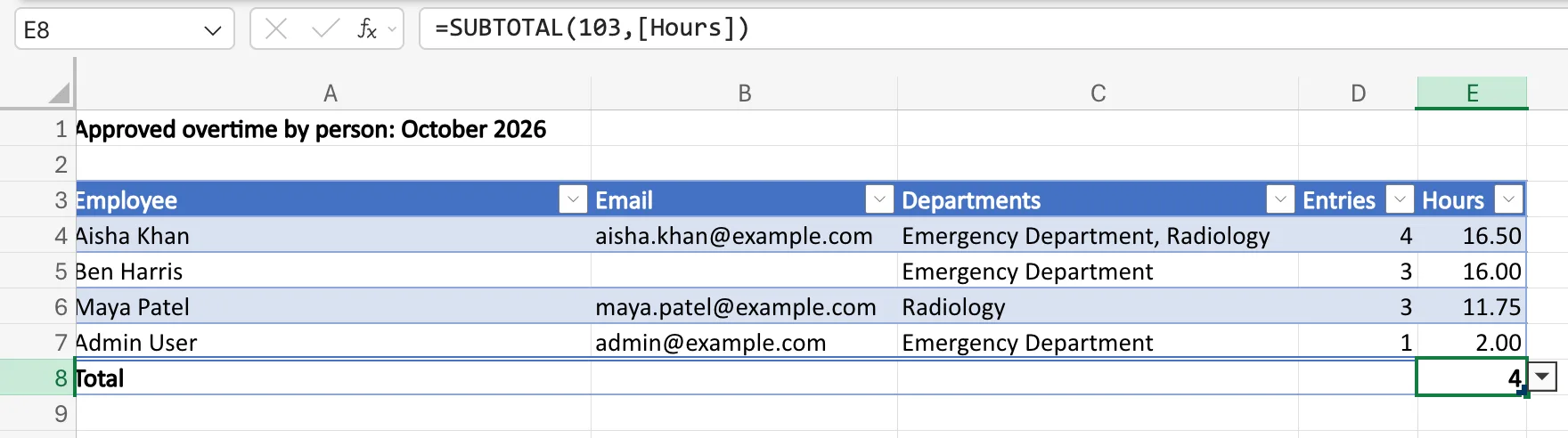
The total row of my Excel table said 4 under a column of hours that added up to 46.25. The formula was =SUBTOTAL(103,[Hours]): Excel had given that total Count when I turned the total row on in an empty table, so it counted the rows instead of adding them. Choosing a sum, =SUBTOTAL(109,[Hours]), fixed it.
What I Was Doing
I was making the payroll workbook template for Part 13 of the Overtime Timesheet series. Its Totals sheet has a table called Totals with the columns Employee, Email, Departments, Entries and Hours, and one empty row. Each month a flow copies the template, and an Office Script fills that table with one row per person. While the table was still empty, I turned on its Total Row (How to Add a Total Row to an Excel Table).
Then the flow made October's workbook from the template.
What I Expected
Under Hours, the month's approved hours: 16.50 + 16.00 + 11.75 + 2.00 = 46.25.
What I Got
4, the number of people:
What I Checked
- The formula. E8 held
=SUBTOTAL(103,[Hours]). Microsoft's SUBTOTAL function article lists 103 as COUNTA, leaving out hidden rows. COUNTA counts the cells that aren't empty, and four cells in Hours had a value. - Where the 103 came from. I hadn't picked a function for that cell. Microsoft's Total the data in an Excel table says When you apply a total row for the first time, the cells will be empty. In my empty template, Excel had instead filled the last column's total with Count, which writes 103. The template's other table, on the Entries sheet, showed the same: Excel had put
=SUBTOTAL(103,[Approved by])under its last column. - Why the template didn't show it. With no rows, Count and Sum both show 0, so the template looked right.
Why It Happens
Count in a total row's drop-down counts values; Sum adds them. When I turned on the total row in the empty table, Excel chose Count for the last column. In a table that already held numbers, the same tick gave the last column a sum, =SUBTOTAL(109,[Quantity]). Microsoft's documentation doesn't describe how Excel picks, so check each total's function rather than trusting the one it chose.
The Fix
In the template:
-
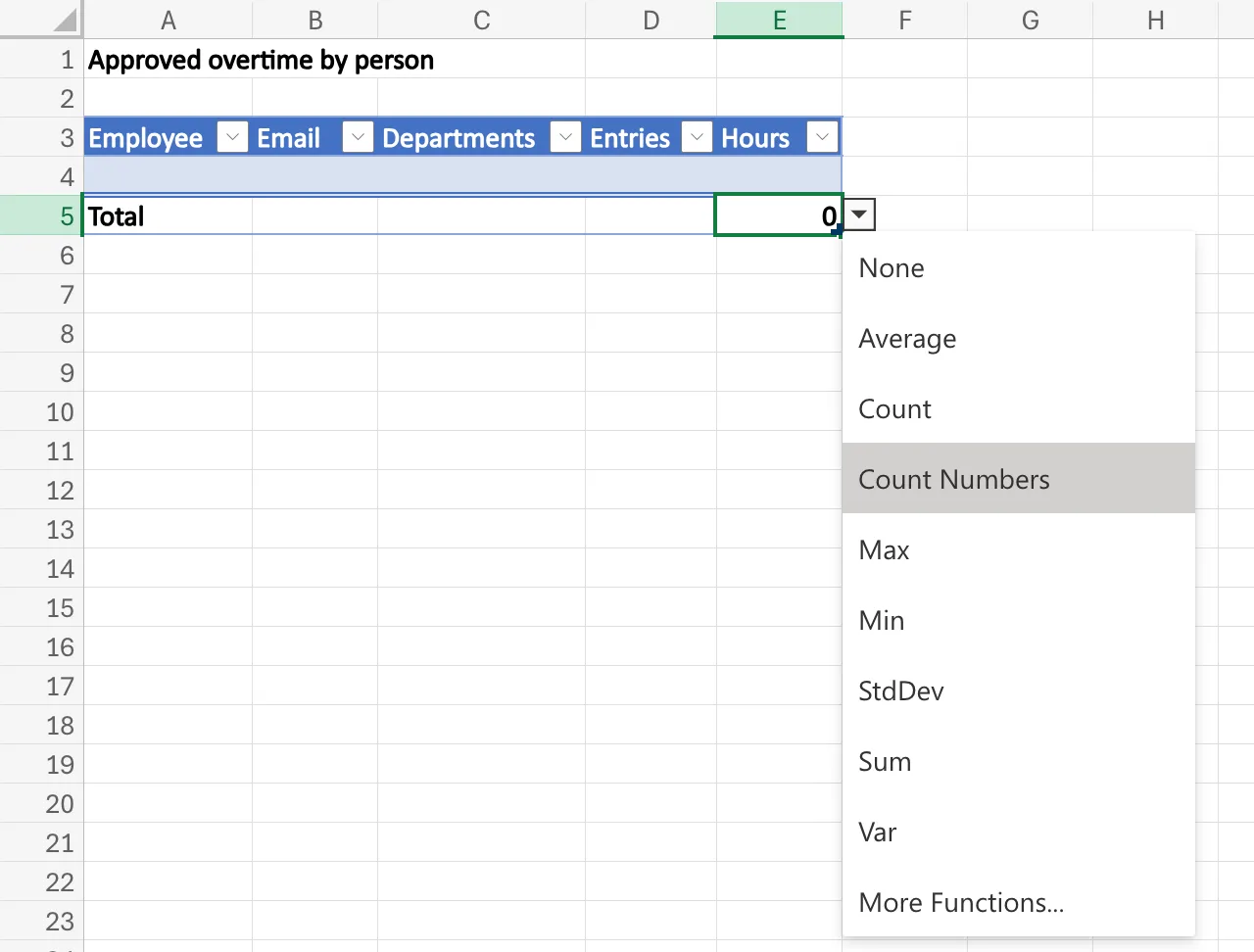
Select the total under Hours, here E5, and its drop-down arrow. Select Sum:
-
Excel for the web wrote
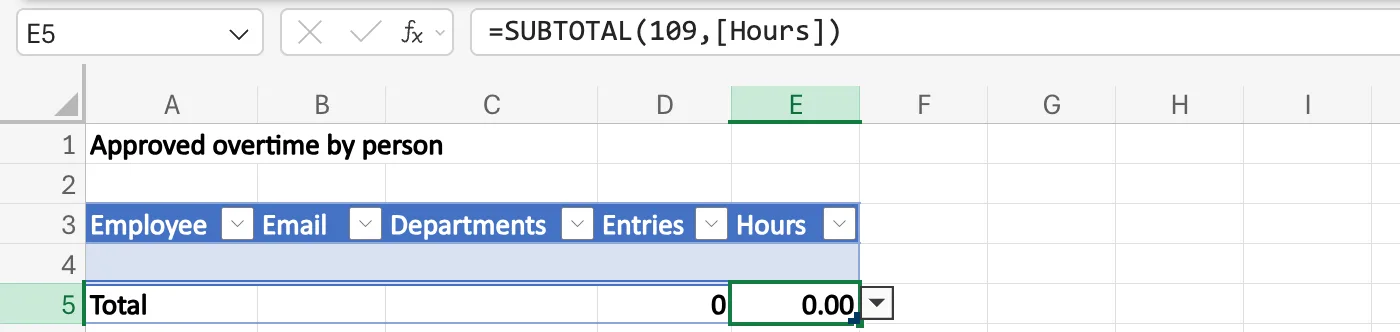
=SUBTOTAL(109,E4), a total of the one empty row's cell. The script adds its rows above that row and then deletes it, so I typed the column's name instead, which always means the whole Hours column (How to Use Structured References in an Excel Table):Totals → E5=SUBTOTAL(109,[Hours])109 is a sum that leaves out hidden rows (How to Total Only Visible Rows in Excel with SUBTOTAL).
-
I gave E5 the Number format, so it shows two decimal places, and did the same for the other totals:
=SUBTOTAL(109,[Entries])under Entries,=SUBTOTAL(109,[Hours])under the Entries sheet's Hours, and an empty cell under its Approved by.
After the Fix
The template's totals are sums now, still 0 because the table is empty:
The next October workbook the flow made showed 11 entries and 46.25 hours in its total row, as Part 13 shows.
Common Mistakes
| Mistake | What happens | Do this instead |
|---|---|---|
| Trusting the totals of a total row turned on in an empty table | A column can have Count instead of Sum, and both show 0 until there's data | Select each total and read its formula |
| Picking Count Numbers to add up | It counts the cells with numbers; it doesn't add them | Pick Sum |
| Leaving a total that refers to one cell in a table that a script fills | The total depends on how Excel moves that reference as rows come and go | Use the column's name, such as [Hours] |
Troubleshooting
| Symptom | Likely cause | Fix |
|---|---|---|
| The total equals the number of rows | The total is Count, code 103 | Choose Sum, code 109 |
| A total under a column of text, such as names, shows a number | Excel gave that column Count | Choose None in its drop-down |
| Both totals show 0 in the template | The table has no rows yet, so Count and Sum look the same | Read each total's formula in the formula bar |
FAQ
What's the difference between Count and Count Numbers?
Count writes SUBTOTAL(103, …), COUNTA, which counts every cell that isn't empty. Count Numbers writes SUBTOTAL(102, …), COUNT, which counts only the cells that hold numbers. Neither adds anything up.
Why use SUBTOTAL rather than SUM in a total row?
SUBTOTAL leaves out rows a filter hides, and with codes from 101 to 111 rows hidden with Hide Row as well, so the total matches what's on screen.
Will the total keep up when the script adds rows?
Yes. [Hours] is the whole column of the table, so it covers every row the script adds.
Conclusion
A total row that shows how many rows there are is set to Count. Excel chose that for the last column of my empty table. Select the total, choose Sum, and in a table that a script fills, refer to the column by its name: =SUBTOTAL(109,[Hours]).
