Fixed: Excel Shows Only the Date After Adding a Time to a Date

I added a time to a date with =B6+TIME(1,0,0) and Excel showed 29/03/2026, with no 01:00. The time was in the cell: its Date format just didn't show times. Excel for the web's Number Format list has no date-and-time option, but the custom format dd/mm/yyyy hh:mm shows both.
What I Was Doing
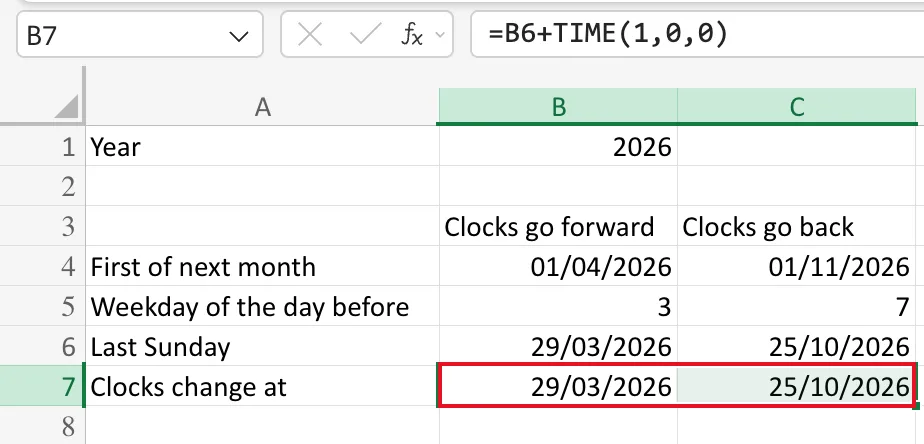
I was working out when the UK clocks change in 2026, for How to Calculate Hours Worked Across a Daylight Saving Time Change in Excel. Row 6 of the sheet holds the last Sunday of March and of October, 29/03/2026 and 25/10/2026. The clocks go forward at 01:00 and back at 02:00, so in row 7 I added those times with Excel's TIME function:
=B6+TIME(1,0,0)
=C6+TIME(2,0,0)
TIME(1,0,0) is one hour, zero minutes and zero seconds, as How to Add Hours to a Date in Excel with TIME explains.
What I Expected
29/03/2026 01:00 in B7 and 25/10/2026 02:00 in C7.
What I Got
29/03/2026 and 25/10/2026, exactly the same as row 6. With B7 selected, the formula bar showed =B6+TIME(1,0,0):
What I Checked
-
The formula. It was what I typed, and
TIME(1,0,0)is a real value: one hour is 1/24 of a day, about 0.0417. -
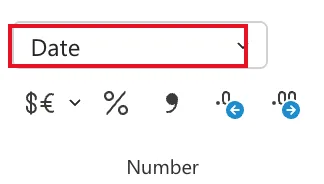
The format. The Number Format box on the Home tab said Date. I hadn't chosen it: Excel had given B7 the date-only format of B6, the date the formula started from.
-
The ready-made formats. The Number Format list offers Short Date, Long Date and Time, but nothing that shows a date and a time together:
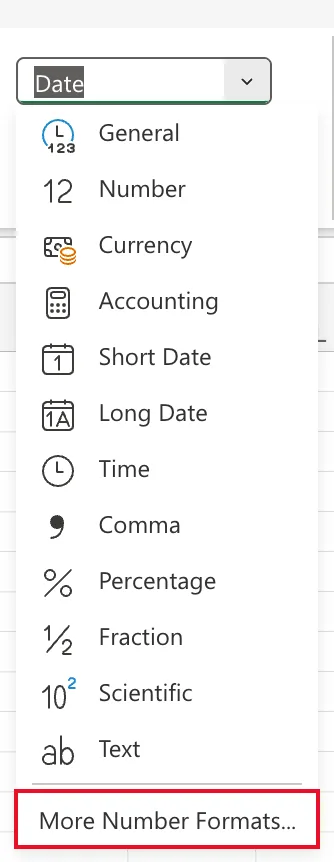
In More Number Formats, every type in the Date category was a date only, such as 14/03/2012, and every type in the Time category a time only, such as 13:30:55.
-
Microsoft's documentation. Date systems in Excel says a date is stored as a serial number, the number of days since 1 January 1900, and the TIME function page says a time is a decimal fraction of a day. A date and time together is one number: whole days for the date, a fraction for the time. What you see of it depends on the cell's format, as Format numbers as dates or times shows with its date and time codes.
Why It Happens
A Date format shows the whole-number part of the cell, the day, and ignores the fraction, the time. Excel copied that format from B6, which only ever held a date, so the hour I added was in the cell but never shown.
The Fix
Give the cells a custom format that includes the time:
- Select B7:C7.
- Open Number Format → More Number Formats.
- Set Choose Category to Custom.
- Select
dd/mm/yyyy hh:mmin the list. It's one of the built-in codes, and Excel applies it as soon as you select it.
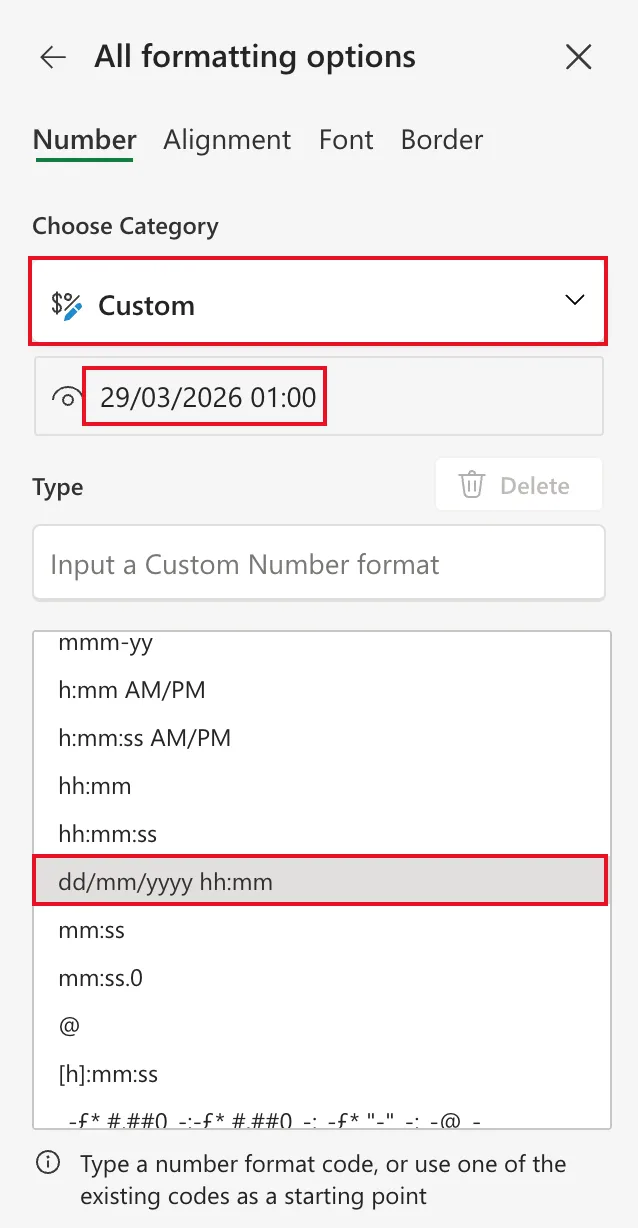
If your regional format puts the month first, use mm/dd/yyyy hh:mm instead. How to Use a Custom Number Format in Excel for the Web explains the codes.
After the Fix
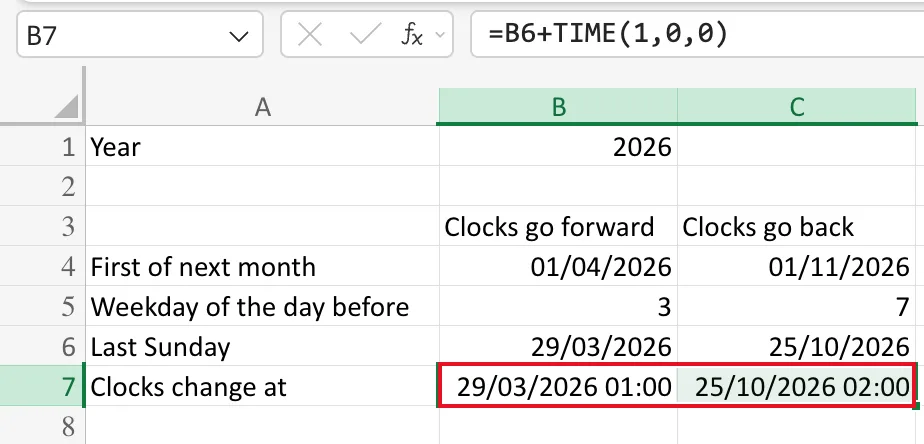
B7 shows 29/03/2026 01:00 and C7 shows 25/10/2026 02:00:
Common Mistakes
| Mistake | What happens | Do this instead |
|---|---|---|
| Rewriting the formula | It was right; the result is the same | Change the format |
| Choosing Time | You see 01:00 and lose the date | Use a custom date-and-time format |
Adding 1 for one hour | 1 is a whole day, so you get 30/03/2026 | Use TIME(1,0,0), or 1/24 |
Troubleshooting
| Symptom | Likely cause | Fix |
|---|---|---|
| A date plus a time shows only the date | The cell has a date-only format | Custom format dd/mm/yyyy hh:mm |
| The result shows only a time | The cell has a time-only format | The same custom format |
| The result shows a number like 46110.04 | The cell has the General format | The same custom format |
FAQ
Was the time lost?
No. The cell holds the date and the time; the format chose to show only the date. Any formula that uses the cell gets the full value.
Why didn't Excel pick a date-and-time format by itself?
It copies the format of the cell the formula starts from, and B6 was a date with no time.
Can I add hours without TIME?
Yes. One hour is 1/24 of a day, so =B6+1/24 gives the same result. TIME is easier to read.
Conclusion
When a date plus a time shows only the date, the time is there and the format is hiding it. Choose dd/mm/yyyy hh:mm from the Custom list in More Number Formats to see both.
