Fixed: Excel Shows ######## (Hash Signs) Instead of Dates After Pasting

I pasted fourteen rows of overtime into Excel for the web, and the whole Date column turned into ########. Nothing was wrong with the dates: the column was too narrow to show them, and AutoFit Column Width fixed it in one click.
What I Was Doing
I was building the "old" overtime timesheet for Part 1 of the Overtime Timesheet series, in a new workbook in Excel for the web. Its regional format was already set to English (United Kingdom), so dates read day first, as How to Change the Regional Format in Excel for the Web explains.
- I typed the eight headings in row 1: Employee, Department, Date, Start, Finish, Break (mins), Reason and Authorised by.
- I copied the fourteen rows of overtime as tab-separated text and pasted them into cell A2, as How to Paste Tab-Separated Data into Excel shows.
What I Expected
Each row's date in column C, such as 02/10/2026 in the first row.
What I Got
Every cell in the Date column showed ########. When I selected C2, the formula bar above the grid showed the date I had pasted, 02/10/2026:
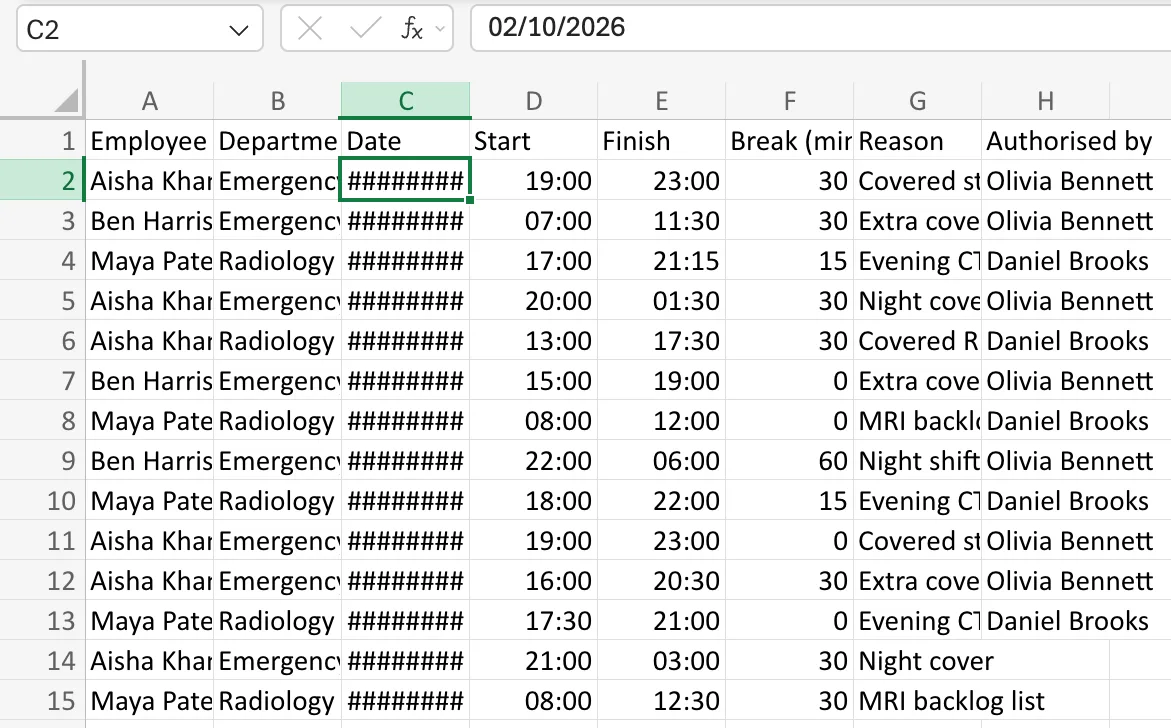
The other columns looked wrong in a different way. Text such as Emergency Department and Covered staff sickness was cut off at the edge of its cell instead of turning into hashes.
What I Checked
- Whether the dates had pasted at all. The formula bar shows a cell's real value, and it showed 02/10/2026. The data was there.
- Whether Excel had read them as dates. The times in Start and Finish were shown, and the date in the formula bar was in the day-first UK form. A date that Excel didn't recognise would have stayed as text, and text is cut off at the cell's edge, not replaced with hashes.
- Microsoft's documentation. How to correct a ##### error says Excel shows
#####when a column isn't wide enough to show everything in a cell, and that dates and times that are negative also show as#####. These dates weren't negative, which left the column width.
Why It Happens
Pasting doesn't resize columns. A new workbook's columns are narrow, and a date like 02/10/2026 needs more room than that. Excel never shows part of a number or a date, because a cut-off date could be misread as a different one. It shows ######## instead, until the column is wide enough. Text is different: it's allowed to be cut off, which is why the names and reasons looked clipped rather than hashed.
The Fix
Widen the columns to fit what's in them:
- Select columns A to H. Select the A column heading and drag across to H, or type
A:Hin the Name Box at the left of the formula bar. - On the Home tab, select Format, then Auto Fit Column Width.
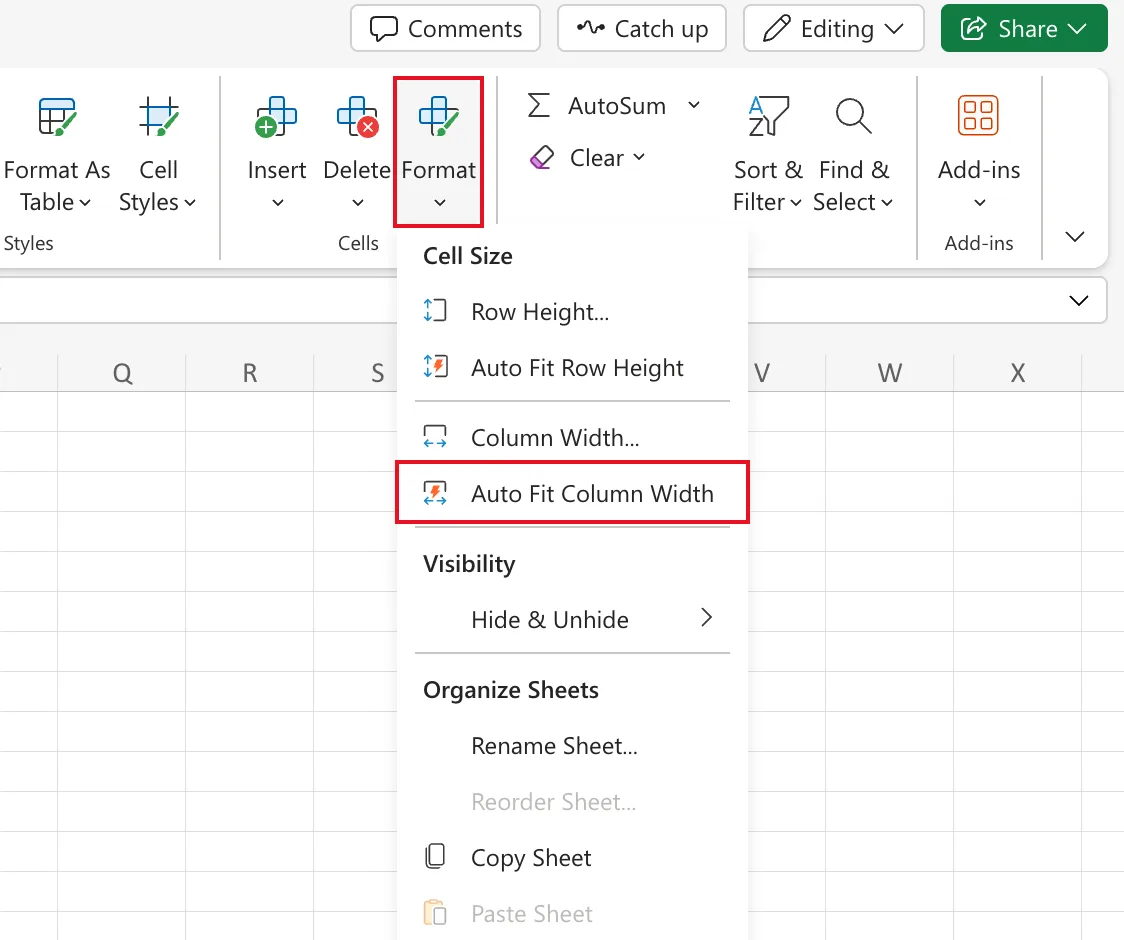
How to AutoFit Column Width in Excel for the Web has this step on its own, and shows how to do it for a single column.
After the Fix
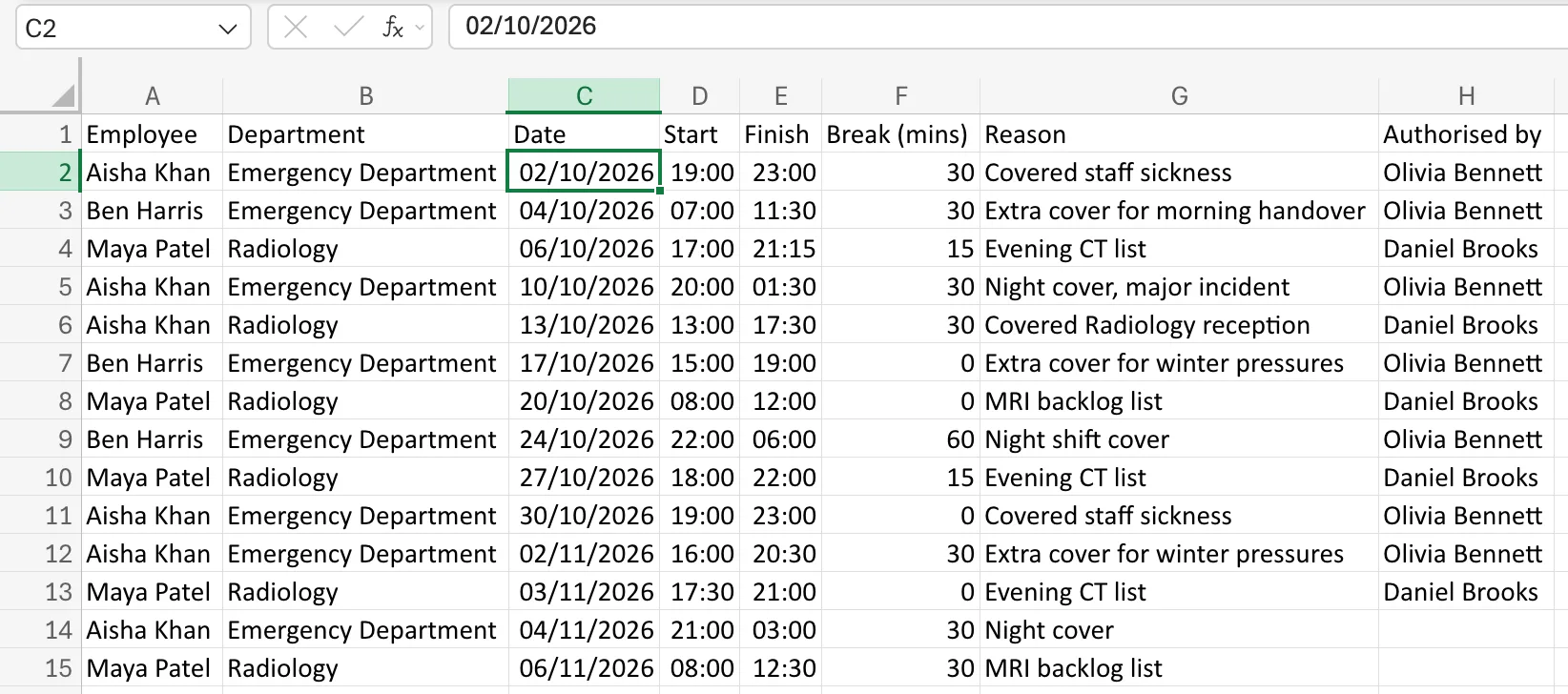
Every column took the width of its longest entry. The dates now read 02/10/2026, 04/10/2026 and so on, and the departments and reasons are no longer cut off:
Common Mistakes
| Mistake | What happens | Do this instead |
|---|---|---|
| Retyping the dates | They show ######## again, because the column is still too narrow | Widen the column; the data is fine |
| Changing the date format to make it fit | It may fit, but the date reads differently from the rest of the workbook | Keep the format and widen the column |
| Widening only column C | Text in other columns stays cut off | AutoFit every column you pasted into |
Troubleshooting
| Symptom | Likely cause | Fix |
|---|---|---|
######## in a date or number column | The column is narrower than the value | Format → Auto Fit Column Width |
######## in a time column after a subtraction | The result is a negative time | See Fixed: Excel Shows ######## for Overnight Shift Hours |
| Dates are left-aligned and never show hashes | Excel stored them as text, often because the regional format reads dates in a different order | Set the regional format before pasting, then paste again |
FAQ
Did Excel change my data?
No. The formula bar showed the full date the whole time. ######## only describes how the cell is displayed.
Why didn't the times show hashes too?
A time like 19:00 is short enough to fit a narrow column. A date with a four-digit year isn't.
Will the columns stay wide when I add more rows?
Yes. The width belongs to the column, so new rows use it. If a later entry is longer, run Auto Fit Column Width again.
Conclusion
######## in a date column means "too narrow", not "wrong". Check the formula bar to see the real value, then select the columns and use Format → Auto Fit Column Width.
