Fixed: Excel Shows ######## (Hash Signs) for Overnight Shift Hours

In my overtime timesheet, =[@Finish]-[@Start] gave the right hours for every daytime shift and ######## for every shift that ended after midnight. Those subtractions came out negative, and Excel can't show a negative time. Wrapping the subtraction in MOD(…, 1) fixed it.
What I Was Doing
The old overtime timesheet in Part 1 of the Overtime Timesheet series is an Excel table named OvertimeLog. Each row has a Date, a Start time, a Finish time and an unpaid Break (mins).
To work out the time worked, I typed Time worked in I1, next to the last heading, and Excel added it to the table as a new column. Then I typed this formula in I2:
=[@Finish]-[@Start]
[@Finish] means "the Finish value in this row"; How to Use Structured References in an Excel Table explains them. Excel filled the formula down the whole column.
What I Expected
The length of every shift: 04:00 for 19:00 to 23:00, and 05:30 for Aisha Khan's night cover from 20:00 to 01:30.
What I Got
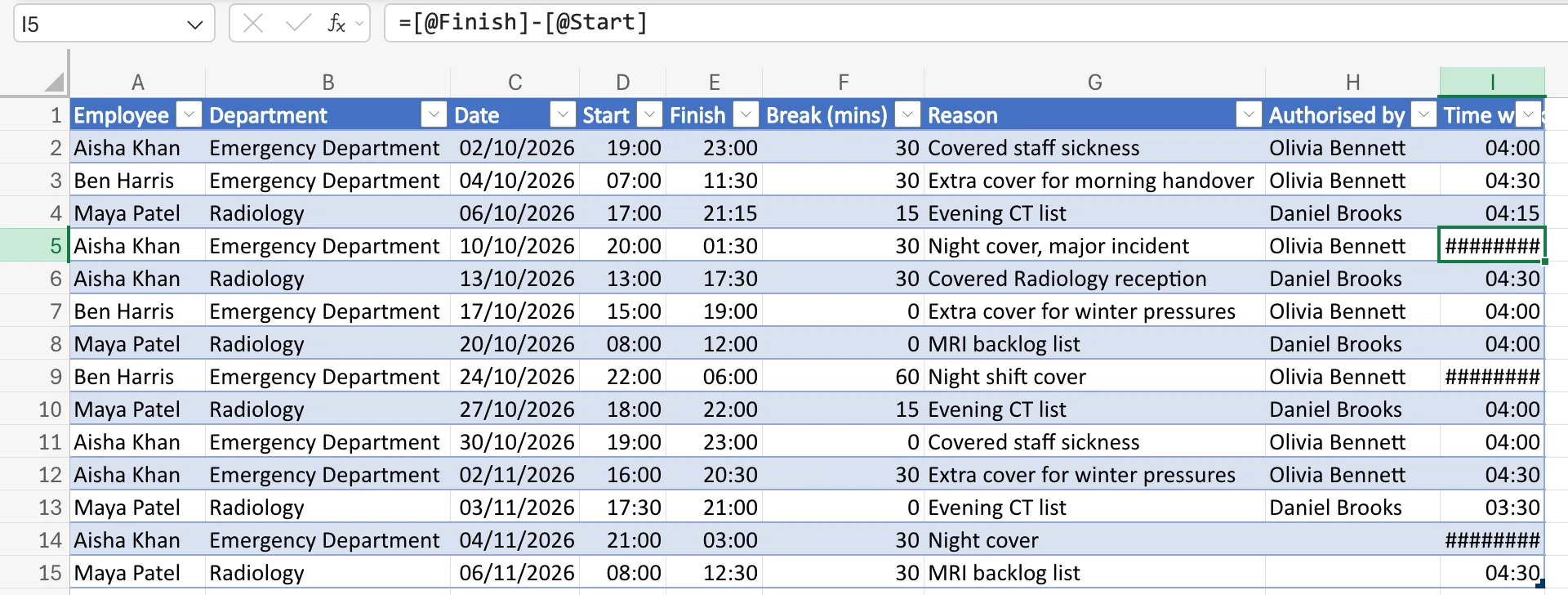
The daytime shifts were right. Three rows showed ########: rows 5, 9 and 14. With I5 selected, the formula bar showed the formula, =[@Finish]-[@Start]:
What I Checked
- The column width. Other rows in the same column showed 04:00 and 04:30, and a time is short, so the hashes weren't about width.
- The three rows. Row 5 runs from 20:00 to 01:30, row 9 from 22:00 to 06:00, and row 14 from 21:00 to 03:00. Each one ends the next morning, so its Finish is earlier in the day than its Start.
- Microsoft's documentation. How to correct a ##### error says that dates and times must be positive, and that a formula that returns a negative date or time shows
#####.
Why It Happens
Excel stores a time as a fraction of a day: 06:00 is 0.25, 12:00 is 0.5. Row 5's Finish, 01:30, is 0.0625, and its Start, 20:00, is about 0.8333. So Finish minus Start is about −0.77, a negative time, and Excel shows ########.
The row only stores times, not which day each one falls on. The person worked 5 hours 30 minutes, but the subtraction doesn't know that 01:30 was the next morning.
The Fix
MOD returns the remainder after dividing one number by another, and its result has the same sign as the number you divide by. Microsoft's MOD function page puts it that way. Dividing by 1, a whole day, turns −0.77 into 0.2292, which is 5 hours 30 minutes, and leaves a positive time like 04:00 unchanged.
I selected I2 and typed the new formula over the old one:
=MOD([@Finish]-[@Start],1)
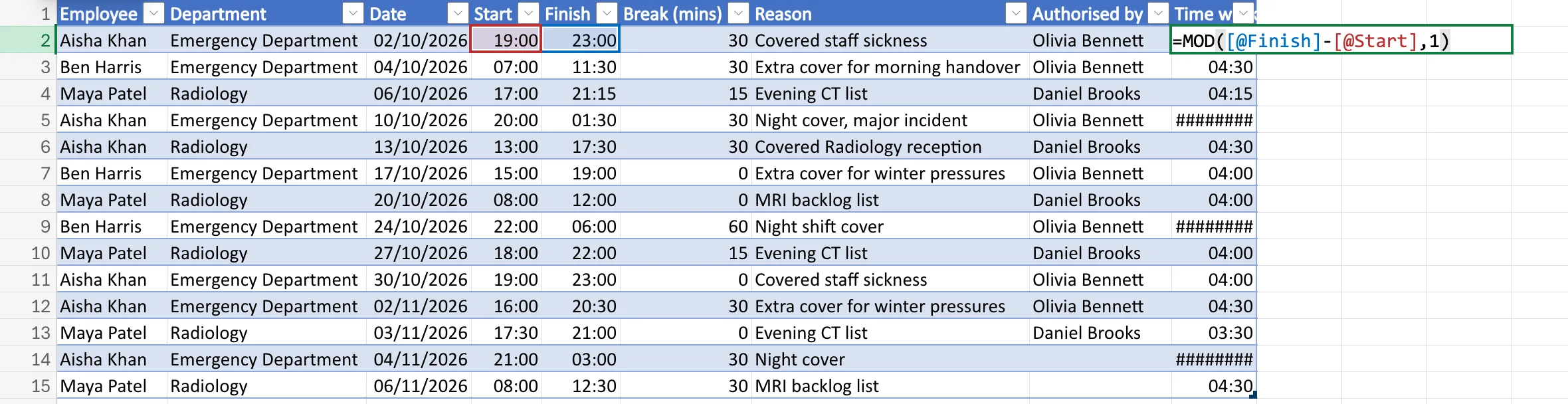
When I pressed Enter, Excel replaced the formula in the whole column, as it does for a table's calculated column. How to Calculate Hours for an Overnight Shift in Excel with MOD covers the formula on its own.
After the Fix
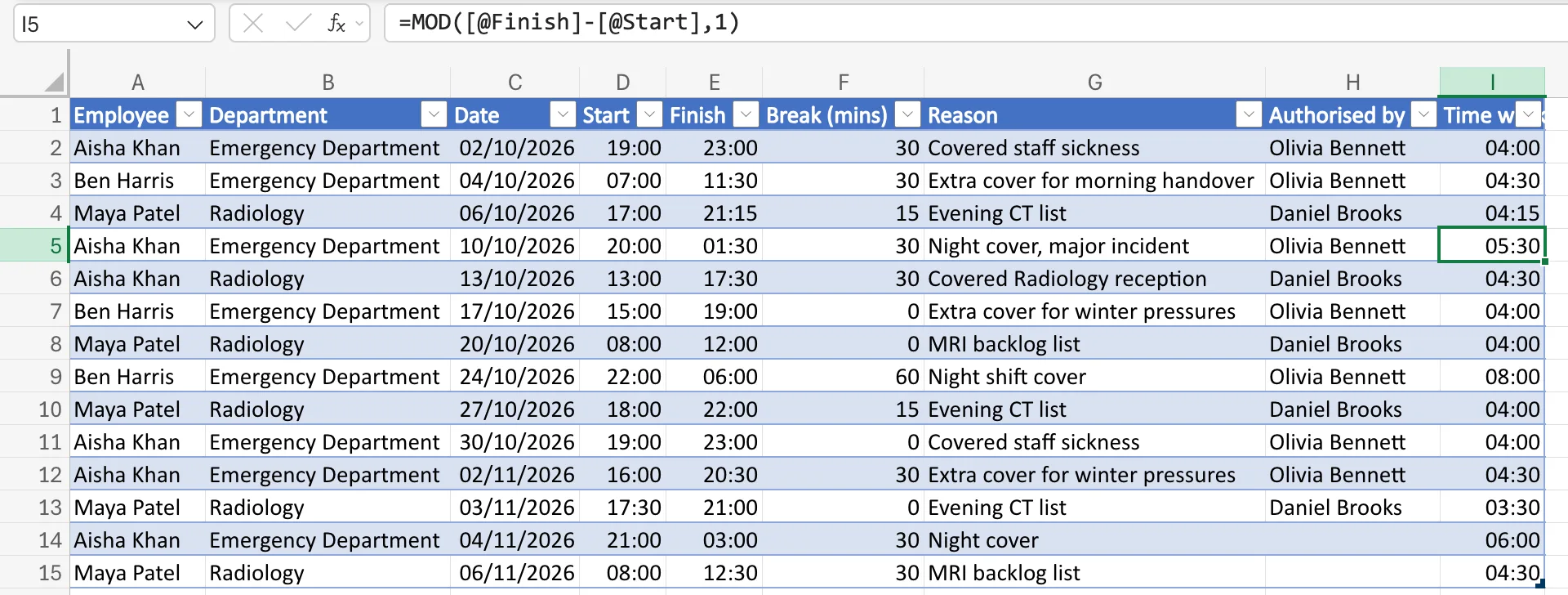
Every row now has a time. Row 5 shows 05:30, row 9 08:00 and row 14 06:00, and the daytime shifts didn't change:
The timesheet then subtracts each row's unpaid break, in How to Subtract an Unpaid Break from Hours Worked in Excel.
Common Mistakes
| Mistake | What happens | Do this instead |
|---|---|---|
| Widening the column | The hashes stay, because the value is negative, not too wide | Use MOD(Finish-Start,1) |
Using ABS(Finish-Start) | 20:00 to 01:30 becomes 18:30, the time between the two clock times the wrong way round | MOD counts forward from Start to Finish |
| Typing the next day's date into Finish | Other rows' formulas, filters and totals now mix times with dates and times | Keep times only and let MOD handle midnight |
Troubleshooting
| Symptom | Likely cause | Fix |
|---|---|---|
######## only on shifts past midnight | Finish is earlier in the day than Start | =MOD([@Finish]-[@Start],1) |
######## in every row | The column is too narrow | See Fixed: Excel Shows ######## Instead of Dates After Pasting |
| A shift from 09:00 to 09:00 shows 00:00 | MOD can't tell a full 24-hour shift from no time at all | Record shifts of 24 hours or more with dates, not times only |
FAQ
Does MOD change times that were already right?
No. A positive result smaller than a day, like 0.1667 for four hours, divided by 1 leaves itself as the remainder.
What if a shift is longer than 24 hours?
MOD can't see more than a day from two clock times. A timesheet with shifts that long needs a start and finish date as well as times.
Is the night of a clock change counted correctly?
No. Excel's arithmetic ignores daylight saving time, so a night shift across a clock change is an hour out. How to Calculate Hours Worked Across a Daylight Saving Time Change in Excel works out the correction.
Conclusion
######## on overnight shifts is a negative time, not a narrow column. =MOD([@Finish]-[@Start],1) counts forward from the start time to the finish time, past midnight if it needs to.
