Fixed: "ERROR 1451 (23000): Cannot delete or update a parent row: a foreign key constraint fails" in MySQL

ERROR 1451 (23000): Cannot delete or update a parent row: a foreign key constraint fails means the row you're deleting is still in use: another table points at it through a foreign key, and that foreign key forbids the delete. The message even tells you which table and column. This post reads it piece by piece, finds the rows that block the delete, shows two ways to clear them, and turns the error into a 409 Conflict in a .NET C# API.
What I Was Doing
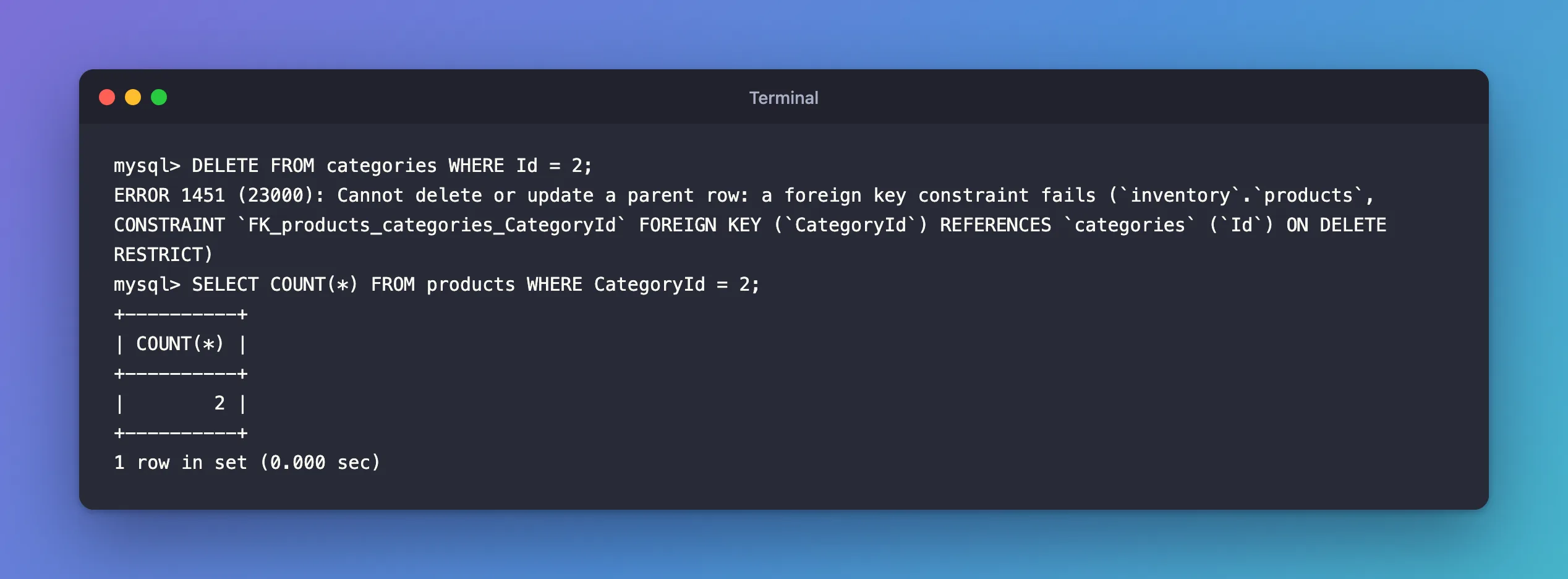
An inventory database on MySQL 9.7 has categories and products, and each product's CategoryId points to a category. The foreign key had just been changed with an EF Core migration from the default ON DELETE CASCADE, which silently deleted a category's products along with it, to ON DELETE RESTRICT. Then I deleted the Adapters category, which still had two products:
DELETE FROM categories WHERE Id = 2;
What I Expected
MySQL to refuse: that's what RESTRICT is for. Someone who doesn't know about the foreign key would expect the category to disappear, and this is the error they'd get.
What I Got
ERROR 1451 (23000): Cannot delete or update a parent row: a foreign key constraint fails (`inventory`.`products`, CONSTRAINT `FK_products_categories_CategoryId` FOREIGN KEY (`CategoryId`) REFERENCES `categories` (`Id`) ON DELETE RESTRICT)
What I Checked
The part in brackets says exactly what blocked the delete:
| Part | Meaning |
|---|---|
`inventory`.`products` | The child table: rows here point at the row you're deleting |
FK_products_categories_CategoryId | The foreign key's name |
FOREIGN KEY (`CategoryId`) REFERENCES `categories` (`Id`) | Which column points where |
ON DELETE RESTRICT | What the foreign key does on delete: refuse |
So the question is which products still use category 2:
SELECT COUNT(*) FROM products WHERE CategoryId = 2;
+----------+
| COUNT(*) |
+----------+
|        2 |
+----------+
1 row in set (0.000 sec)
Two products. If you don't know which tables point at a table, How to List the Foreign Keys of a MySQL Table shows a query that lists them.
Why It Happens
MySQL's error reference lists the error as "Error number: 1451; Symbol: ER_ROW_IS_REFERENCED_2; SQLSTATE: 23000" and explains it in one line: "InnoDB reports this error when you try to delete a parent row that has children, and a foreign key constraint fails. Delete the children first."
The manual's foreign keys page defines RESTRICT: it "Rejects the delete or update operation for the parent table." The same happens with NO ACTION, the default when no ON DELETE is given, which "For InnoDB, this is equivalent to RESTRICT". Without the foreign key, the delete would leave two products pointing at a category that no longer exists.
The error also covers updates: changing a category's Id while products point at it fails the same way, which is why the message says "delete or update".
The Fix
The error protects data, so the fix is a decision about the child rows. There are three honest answers.
Move the children to another parent
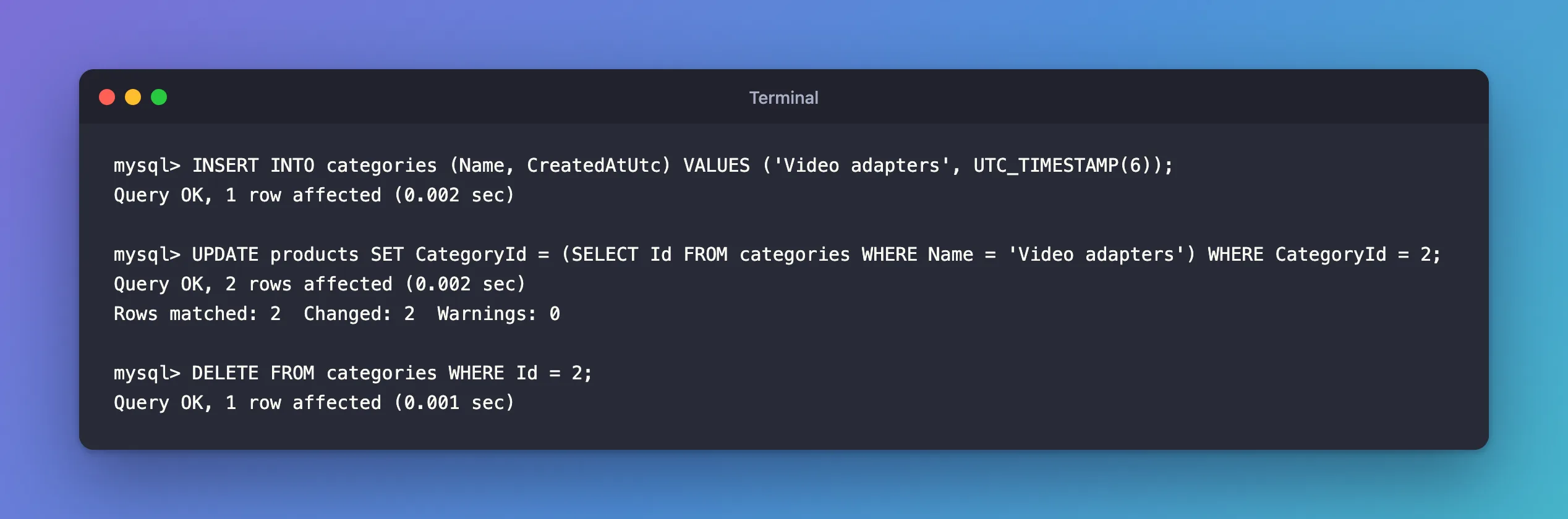
The products still exist and still belong somewhere. Here, they moved to a new category, and then the old one could go:
INSERT INTO categories (Name, CreatedAtUtc) VALUES ('Video adapters', UTC_TIMESTAMP(6));
UPDATE products SET CategoryId = (SELECT Id FROM categories WHERE Name = 'Video adapters') WHERE CategoryId = 2;
DELETE FROM categories WHERE Id = 2;
Query OK, 1 row affected (0.002 sec)

Query OK, 2 rows affected (0.002 sec)
Rows matched: 2  Changed: 2  Warnings: 0

Query OK, 1 row affected (0.001 sec)
Delete the children first
If the child rows really should go, delete them first, as the error reference suggests, and then the parent. Do both inside one transaction, so a failure halfway doesn't leave half the data deleted. But check what else points at the children: a product with stock history is itself a parent, and its delete would fail with the same error.
Don't delete at all
For data with history, such as products that appear on old orders, the usual answer is to keep the row and mark it, for example with an IsArchived column, and hide archived rows from lists. Nothing points at nothing, and the history stays readable.
Changing the foreign key to ON DELETE CASCADE makes the error disappear by deleting every child row silently. It's rarely the right fix, because a single mistaken delete then wipes out related data too.
Handle it in a .NET C# API
With EF Core, a delete that MySQL refuses arrives as a DbUpdateException from SaveChangesAsync, with MySql.Data's MySqlException inside it. Catch error number 1451 and answer 409 Conflict:
db.Categories.Remove(category);
try
{
    await db.SaveChangesAsync();
}
catch (DbUpdateException ex) when (ex.InnerException is MySqlException { Number: 1451 })
{
    // 1451: products still point at this category.
    return Results.Conflict(new { error = "This category still has products. Move or archive them first." });
}

return Results.NoContent();
curl -s -i -X DELETE "http://localhost:5190/try/categories/1"
HTTP/1.1 409 Conflict
Content-Type: application/json; charset=utf-8

{"error":"This category still has products. Move or archive them first."}
A category with no products is deleted as before, with 204 No Content.
One case doesn't reach MySQL at all: if the products were loaded into the same DbContext, EF Core refuses the delete itself, with InvalidOperationException: The association between entity types 'Category' and 'Product' has been severed…. That error has its own post.
After the Fix
The products moved to Video adapters, the old category was deleted, and the foreign key still guards every other category. The API answers a delete that would orphan products with a clear 409.
Common Mistakes
| Mistake | What happens | Do this instead |
|---|---|---|
Switching to ON DELETE CASCADE to make it go away | One delete silently removes many rows | Move, delete or archive the children on purpose |
SET foreign_key_checks = 0 before the delete | Products point at a category that doesn't exist | Keep checks on |
| Deleting children and parent without a transaction | A failure leaves half the data deleted | Wrap both in one transaction |
Catching every DbUpdateException as 409 | Other errors get the wrong answer | Filter on Number: 1451 |
Troubleshooting
| Symptom | Likely cause | Fix |
|---|---|---|
| The message has no table or constraint details | Your account lacks privileges on the parent tables, so MySQL shows a shorter message | Use an account that can see both tables, or list the foreign keys |
| 1451 when deleting a child row | That row is itself a parent for another table | Find what points at it with the foreign keys query |
1451 on an UPDATE | You changed a key that children reference | Don't change primary keys; add a new row instead |
The first row comes from the manual: "If a user does not have table-level privileges for all parent tables, more generic error messages are displayed instead".
FAQ
What's the opposite error, when inserting?
ERROR 1452 (23000): Cannot add or update a child row: you inserted a child that points at a parent that doesn't exist. It has its own post.
Where do I choose RESTRICT or CASCADE in EF Core?
With OnDelete on the relationship. How to Choose What Happens on Delete in EF Core: Cascade or Restrict compares them with real output.
Conclusion
ERROR 1451 (23000): Cannot delete or update a parent row means child rows still reference the row you're deleting, and the foreign key forbids leaving them orphaned. The bracketed part names the child table and column: count the children, then move them to another parent, delete them first, or archive the parent instead. In a .NET C# API, catch MySqlException number 1451 and return 409 Conflict.
Additional Resources
- Server Error Message Reference — error 1451.
- FOREIGN KEY Constraints — referential actions, including RESTRICT and CASCADE.
