Fixed: "ERROR 1064 (42000): You have an error in your SQL syntax … near 'IF NOT EXISTS(SELECT * FROM `__EFMigrationsHistory`'" in an EF Core Idempotent Migration Script

An EF Core migration script made with dotnet ef migrations script --idempotent failed in MySQL 9.7 at line 8 with ERROR 1064 (42000). Oracle's EF Core provider for MySQL writes the script's "skip what's already applied" checks as SQL Server-style IF NOT EXISTS(…) BEGIN … END blocks, and MySQL accepts that kind of block only inside stored procedures and other stored programs. The fix is a plain script that starts at the database's last applied migration.
What I Was Doing
The project is the .NET 10 Web API from How to Connect a .NET C# Web API to a MySQL Database — Part 2. It uses EF Core 10.0.14 with Oracle's provider, MySql.EntityFrameworkCore 10.0.12, and MySQL 9.7.4 running in Docker. The project had three migrations, and the database had the first two:
20261103030957_CreateCatalogTables   applied
20261103031745_AddStockMovements     applied
20261103033027_AddOrders             not applied yet
I wanted one SQL file that brings any copy of this database up to date, whatever migrations it already has: the kind of file you hand to a database administrator or keep with a release. EF Core's Applying Migrations page describes exactly that as an idempotent script, which checks "which migrations have already been applied (via the migrations history table), and only apply missing ones". The page adds that this is "useful if you don't exactly know what the last migration applied to the database was".
So I generated one, into the artifacts folder, which the standard .NET .gitignore leaves out of Git:
dotnet ef migrations script --idempotent --output artifacts/idempotent.sql --project src/Dewiride.Inventory.Data --startup-project src/Dewiride.Inventory.Api
Build started...
Build succeeded.
Then I ran the file with the mysql client inside the MySQL container, as shown in How to Connect to MySQL in a Docker Container with the mysql Client:
- bash / zsh
- PowerShell
docker compose exec -T mysql sh -c 'exec mysql --user=inventory_app --password="$MYSQL_PASSWORD" inventory' < artifacts/idempotent.sql
Get-Content artifacts/idempotent.sql -Raw | docker compose exec -T mysql sh -c 'exec mysql --user=inventory_app --password="$MYSQL_PASSWORD" inventory'
What I Expected
No output: the script skips the two migrations the database already has, applies AddOrders, and records it in the history table.
What I Got
mysql: [Warning] Using a password on the command line interface can be insecure.
ERROR 1064 (42000) at line 8: You have an error in your SQL syntax; check the manual that corresponds to your MySQL server version for the right syntax to use near 'IF NOT EXISTS(SELECT * FROM `__EFMigrationsHistory` WHERE `MigrationId` = '20261' at line 1
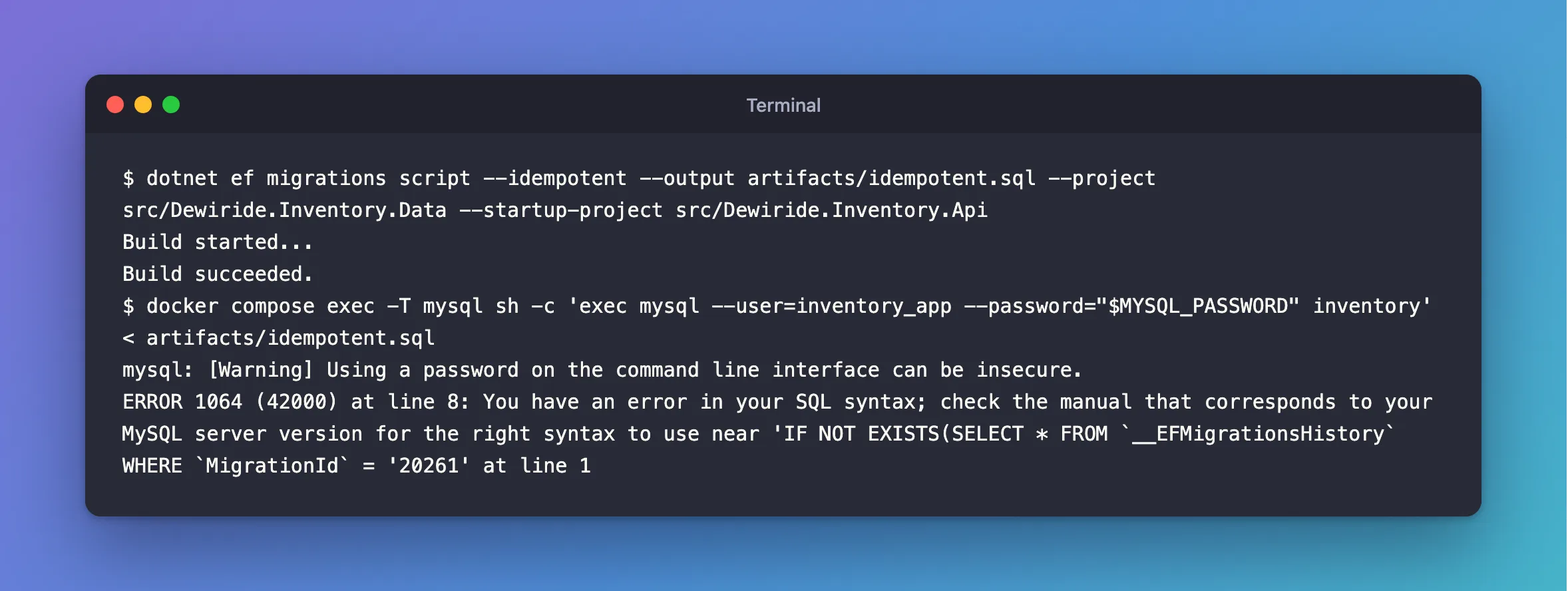
The warning on the first line is expected with this command and isn't the problem; the client prints it whenever a password is on its command line. The error is.
What I Checked
Line 8 of the script
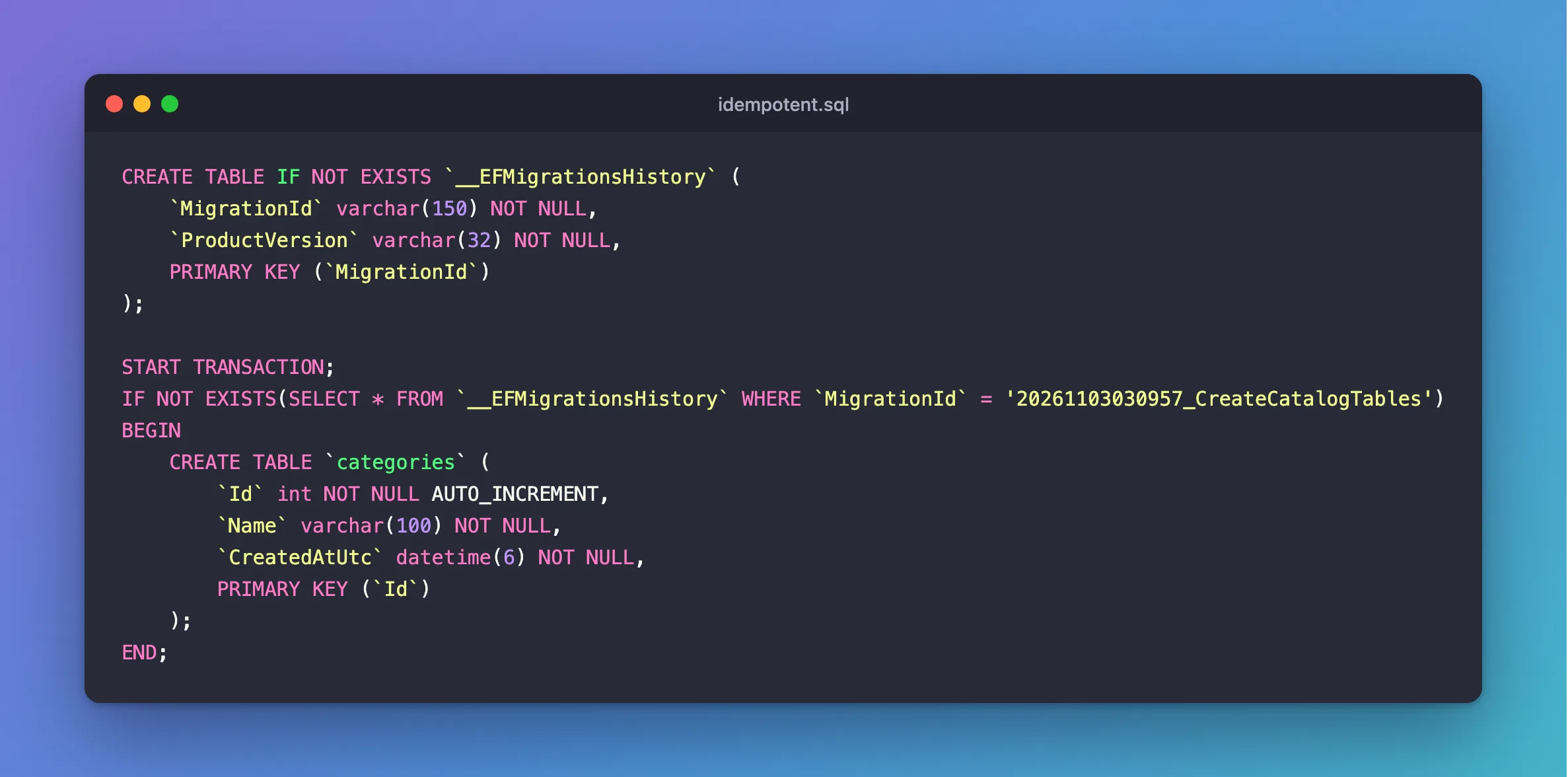
The error names line 8 of the file. These are its first 16 lines:
CREATE TABLE IF NOT EXISTS `__EFMigrationsHistory` (
    `MigrationId` varchar(150) NOT NULL,
    `ProductVersion` varchar(32) NOT NULL,
    PRIMARY KEY (`MigrationId`)
);

START TRANSACTION;
IF NOT EXISTS(SELECT * FROM `__EFMigrationsHistory` WHERE `MigrationId` = '20261103030957_CreateCatalogTables')
BEGIN
    CREATE TABLE `categories` (
        `Id` int NOT NULL AUTO_INCREMENT,
        `Name` varchar(100) NOT NULL,
        `CreatedAtUtc` datetime(6) NOT NULL,
        PRIMARY KEY (`Id`)
    );
END;
Every statement after line 7 sits in a block like this one: "if the history table has no row for this migration, run this". The whole file is 164 lines of these blocks, one per statement.
What MySQL accepts
IF NOT EXISTS(…) BEGIN … END is how SQL Server's T-SQL writes it. MySQL has both keywords, but not for plain scripts:
- The MySQL 9.7 manual's BEGIN ... END page says the syntax "is used for writing compound statements, which can appear within stored programs (stored procedures and functions, triggers, and events)."
- Its IF statement page describes "The
IFstatement for stored programs", writtenIF … THEN … END IF, notIF … BEGIN … END.
So MySQL rejects the very first block, whichever migrations the database has.
Whose code writes the blocks
EF Core asks the database provider to write these checks. The Applying Migrations page says so directly: "Idempotent script support depends on the database provider." Oracle's Connector/NET documentation for EF Core doesn't mention idempotent scripts at all. MySql.EntityFrameworkCore 10.0.12 is the newest release, so there's no newer version to try.
Whether anything changed
Nothing did. The manual's batch mode page says: "If you want the script to continue even if some of the statements in it produce errors, you should use the --force command-line option." Without it, the client stopped at line 8. Line 1 only creates the history table if it's missing, and it already existed. The transaction opened on line 7 ended with the session. The history table still ended at AddStockMovements, as the next step shows.
Why It Happens
--idempotent puts the "already applied?" logic into the SQL file itself, and Oracle's provider writes that logic in a form MySQL only allows inside stored programs. Any MySQL server rejects it, whatever its version or settings. The plain, non-idempotent script has no such blocks, so it runs; it just has to start at the right migration.
The Fix
Generate a plain script that starts at the migration the database already has. The Applying Migrations page describes the from argument this way: "The from migration should be the last migration applied to the database before running the script."
Step 1: Find the database's last migration
EF Core records every applied migration in the __EFMigrationsHistory table, and migration IDs start with a timestamp, so the highest ID is the latest one:
docker compose exec mysql mysql --user=inventory_app --password --execute="SELECT MigrationId FROM __EFMigrationsHistory ORDER BY MigrationId DESC LIMIT 1;" inventory
Enter password:
+----------------------------------+
| MigrationId                      |
+----------------------------------+
| 20261103031745_AddStockMovements |
+----------------------------------+
Step 2: Script everything after it
Pass that migration as the first argument. Without a second argument, the script runs to the newest migration:
dotnet ef migrations script AddStockMovements --output artifacts/add-orders.sql --project src/Dewiride.Inventory.Data --startup-project src/Dewiride.Inventory.Api
Build started...
Build succeeded.
The script holds only the AddOrders migration, as plain statements:
START TRANSACTION;
ALTER TABLE `stock_movements` ADD `OrderId` int NULL;

CREATE TABLE `orders` (
    `Id` int NOT NULL AUTO_INCREMENT,
    `CustomerName` varchar(200) NOT NULL,
    `CustomerEmail` varchar(254) NOT NULL,
    `Status` varchar(32) NOT NULL,
    `TotalAmount` decimal(12,2) NOT NULL,
    `IdempotencyKey` varchar(64) NULL,
    `PlacedAtUtc` datetime(6) NOT NULL,
    `FulfilledAtUtc` datetime(6) NULL,
    `CancelledAtUtc` datetime(6) NULL,
    PRIMARY KEY (`Id`),
    CONSTRAINT `CK_orders_TotalAmount` CHECK (`TotalAmount` >= 0)
);

CREATE TABLE `order_lines` (
    `Id` int NOT NULL AUTO_INCREMENT,
    `OrderId` int NOT NULL,
    `ProductId` int NOT NULL,
    `Quantity` int NOT NULL,
    `UnitPrice` decimal(12,2) NOT NULL,
    PRIMARY KEY (`Id`),
    CONSTRAINT `CK_order_lines_Quantity` CHECK (`Quantity` > 0),
    CONSTRAINT `CK_order_lines_UnitPrice` CHECK (`UnitPrice` >= 0),
    CONSTRAINT `FK_order_lines_orders_OrderId` FOREIGN KEY (`OrderId`) REFERENCES `orders` (`Id`) ON DELETE CASCADE,
    CONSTRAINT `FK_order_lines_products_ProductId` FOREIGN KEY (`ProductId`) REFERENCES `products` (`Id`) ON DELETE RESTRICT
);

CREATE INDEX `IX_stock_movements_OrderId` ON `stock_movements` (`OrderId`);

CREATE UNIQUE INDEX `IX_order_lines_OrderId_ProductId` ON `order_lines` (`OrderId`, `ProductId`);

CREATE INDEX `IX_order_lines_ProductId` ON `order_lines` (`ProductId`);

CREATE UNIQUE INDEX `IX_orders_IdempotencyKey` ON `orders` (`IdempotencyKey`);

CREATE INDEX `IX_orders_Status_PlacedAtUtc` ON `orders` (`Status`, `PlacedAtUtc`);

ALTER TABLE `stock_movements` ADD CONSTRAINT `FK_stock_movements_orders_OrderId` FOREIGN KEY (`OrderId`) REFERENCES `orders` (`Id`) ON DELETE RESTRICT;

INSERT INTO `__EFMigrationsHistory` (`MigrationId`, `ProductVersion`)
VALUES ('20261103033027_AddOrders', '10.0.14');

COMMIT;
The INSERT near the end matters: it's how EF Core will know later that this migration is applied.
The script starts with START TRANSACTION and ends with COMMIT, but in MySQL that doesn't make it all-or-nothing. The manual's implicit commit page lists data definition statements such as CREATE TABLE, ALTER TABLE and CREATE INDEX among the statements that "implicitly end any transaction active in the current session, as if you had done a COMMIT". If a statement in the middle fails, the ones before it stay applied. Read the script before running it, and run it against a backup or a copy first when the data matters.
Step 3: Run it
- bash / zsh
- PowerShell
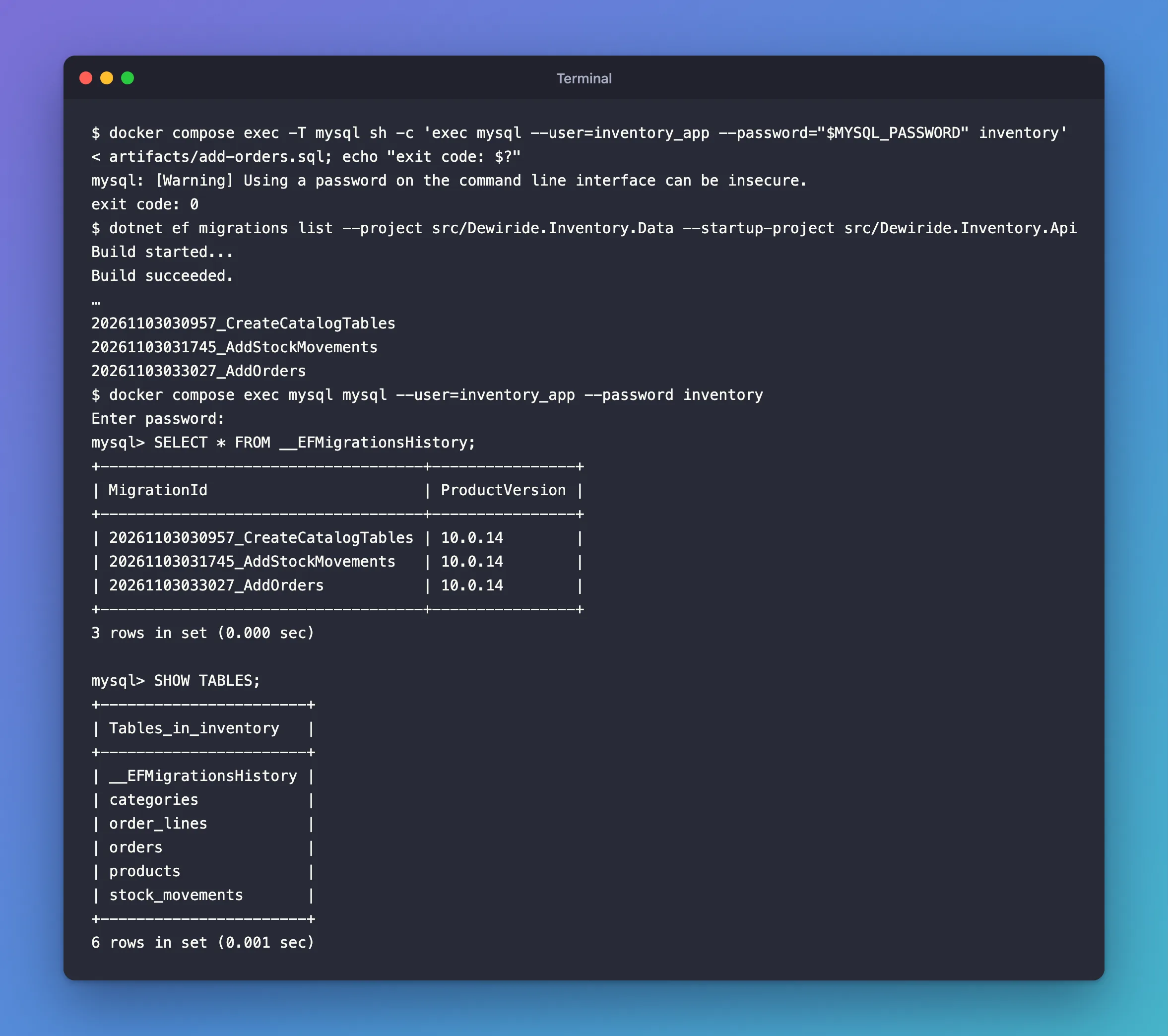
docker compose exec -T mysql sh -c 'exec mysql --user=inventory_app --password="$MYSQL_PASSWORD" inventory' < artifacts/add-orders.sql; echo "exit code: $?"
Get-Content artifacts/add-orders.sql -Raw | docker compose exec -T mysql sh -c 'exec mysql --user=inventory_app --password="$MYSQL_PASSWORD" inventory'; "exit code: $LASTEXITCODE"
After the Fix
mysql: [Warning] Using a password on the command line interface can be insecure.
exit code: 0
The client prints nothing else when every statement succeeds, and exit code 0 means it did. EF Core agrees that all three migrations are applied:
dotnet ef migrations list --project src/Dewiride.Inventory.Data --startup-project src/Dewiride.Inventory.Api
Build started...
Build succeeded.
…
20261103030957_CreateCatalogTables
20261103031745_AddStockMovements
20261103033027_AddOrders
The shortened lines are the two queries EF Core ran to read the history table. Inside MySQL, the history has a third row and the new tables exist:
+------------------------------------+----------------+
| MigrationId                        | ProductVersion |
+------------------------------------+----------------+
| 20261103030957_CreateCatalogTables | 10.0.14        |
| 20261103031745_AddStockMovements   | 10.0.14        |
| 20261103033027_AddOrders           | 10.0.14        |
+------------------------------------+----------------+
3 rows in set (0.000 sec)

+-----------------------+
| Tables_in_inventory   |
+-----------------------+
| __EFMigrationsHistory |
| categories            |
| order_lines           |
| orders                |
| products              |
| stock_movements       |
+-----------------------+
6 rows in set (0.001 sec)
When you look after several databases that are each at a different migration, generate one script per starting migration. For automated deployments, EF Core's Applying Migrations page recommends a migration bundle, a small program that reads the history table itself, instead of a SQL file.
Common Mistakes
| Mistake | What happens | Do this instead |
|---|---|---|
Running the idempotent script with --force to get past the error | Every block fails the same way, so nothing is applied | Use a plain script from the last applied migration |
Generating the plain script with no from argument | It starts at the first migration, and CREATE TABLE fails for tables that exist | Pass the database's last applied migration |
Using a migration from a different database as from | The script repeats or skips changes | Query the history table of the database you're changing |
| Running the script without reading it | A failing statement in the middle leaves the earlier ones applied | Read it, and try it on a copy first |
Running the script and then dotnet ef database update "to be sure" | Nothing; EF Core finds the migration in the history table | Use one or the other |
Troubleshooting
| Symptom | Likely cause | Fix |
|---|---|---|
ERROR 1064 … near 'IF NOT EXISTS(SELECT * FROM __EFMigrationsHistory | An idempotent script from Oracle's provider | Use a plain script, as above |
ERROR 1050 (42S01): Table '…' already exists | The script starts at an older migration than the database has | Check the from migration against the history table |
ERROR 1146 (42S02): Table 'inventory.__EFMigrationsHistory' doesn't exist | The database has never had a migration | Generate the script with no from argument, which starts at the beginning |
Enter password: ERROR 1045 (28000): Access denied … (using password: YES) when running the file | --password without a value read the file's first line as the password | Use the command above, which reads the container's own password variable |
FAQ
Does dotnet ef database update have the same problem?
No. database update reads the history table itself, in C#, and sends MySQL plain statements. It applied this project's first two migrations without errors.
Is this a MySQL version problem?
No. MySQL allows BEGIN … END and IF only inside stored programs, so the server's version and settings make no difference.
Should I edit the idempotent script by hand?
No. Rewriting 164 lines of blocks invites mistakes, and you'd have to redo it for every release. The plain script from the right migration is shorter and is what EF Core generates without changes.
Conclusion
ERROR 1064 near IF NOT EXISTS(SELECT * FROM __EFMigrationsHistory comes from an EF Core idempotent script made with Oracle's MySQL provider: it uses IF … BEGIN … END blocks, which MySQL only accepts inside stored programs. Query the database's last migration, generate the script from that migration with dotnet ef migrations script <from>, read it, and run it. The history table records the new migration, so EF Core and the database stay in step.
Additional Resources
- Applying Migrations — SQL scripts, idempotent scripts, bundles and the
fromandtoarguments. - Entity Framework Core tools reference: dotnet ef migrations script — every option of the command.
- BEGIN ... END Compound Statement and IF Statement — where MySQL allows these blocks.
- Statements That Cause an Implicit Commit — why a MySQL migration script isn't all-or-nothing.
Related
- How to Connect a .NET C# Web API to a MySQL Database — Part 2: Create MySQL Tables with EF Core Migrations
- How to Connect to MySQL in a Docker Container with the mysql Client
- Fixed: "ERROR 1045 (28000): Access denied for user 'inventory_app'@'localhost' (using password: YES)" in a MySQL Docker Container
