Fixed: "ERROR 1045 (28000): Access denied for user 'inventory_app'@'localhost' (using password: YES)" in a MySQL Docker Container

I changed a password in my .env file, restarted MySQL with Docker Compose, and MySQL rejected the new password with ERROR 1045 (28000): Access denied. The container had the new value, but MySQL was still expecting the old one. This post shows why that happens with the official MySQL image, and how I fixed it without deleting any data.
What I Was Doing
I was setting up the local database for the series How to Connect a .NET C# Web API to a MySQL Database. MySQL 9.7 runs in Docker, started by a compose.yaml file (How to Run MySQL in Docker with Docker Compose). The passwords live in a git-ignored .env file (How to Keep Passwords Out of compose.yaml with an .env File). These are the lines of compose.yaml that matter here:
    environment:
      MYSQL_DATABASE: inventory
      MYSQL_USER: inventory_app
      MYSQL_PASSWORD: ${MYSQL_PASSWORD:?Set MYSQL_PASSWORD in the .env file}
      MYSQL_ROOT_PASSWORD: ${MYSQL_ROOT_PASSWORD:?Set MYSQL_ROOT_PASSWORD in the .env file}
MySQL had already been running for a few minutes, with data in its volume. Then I generated a new password for the inventory_app account, put it after MYSQL_PASSWORD= in .env, and ran the usual start command so the container would pick it up:
docker compose up -d --wait
 Container dewiride-inventory-mysql-1 Recreate
 Container dewiride-inventory-mysql-1 Recreated
 Container dewiride-inventory-mysql-1 Starting
 Container dewiride-inventory-mysql-1 Started
 Container dewiride-inventory-mysql-1 Waiting
 Container dewiride-inventory-mysql-1 Healthy
Docker Compose noticed that the settings had changed, so it recreated the container with the new value, and the container came back healthy.
What I Expected
I expected to sign in as inventory_app with the new password, using the mysql client inside the container (How to Connect to MySQL in a Docker Container with the mysql Client).
What I Got
docker compose exec mysql mysql --user=inventory_app --password inventory
I pasted the new password at the prompt:
Enter password:
ERROR 1045 (28000): Access denied for user 'inventory_app'@'localhost' (using password: YES)
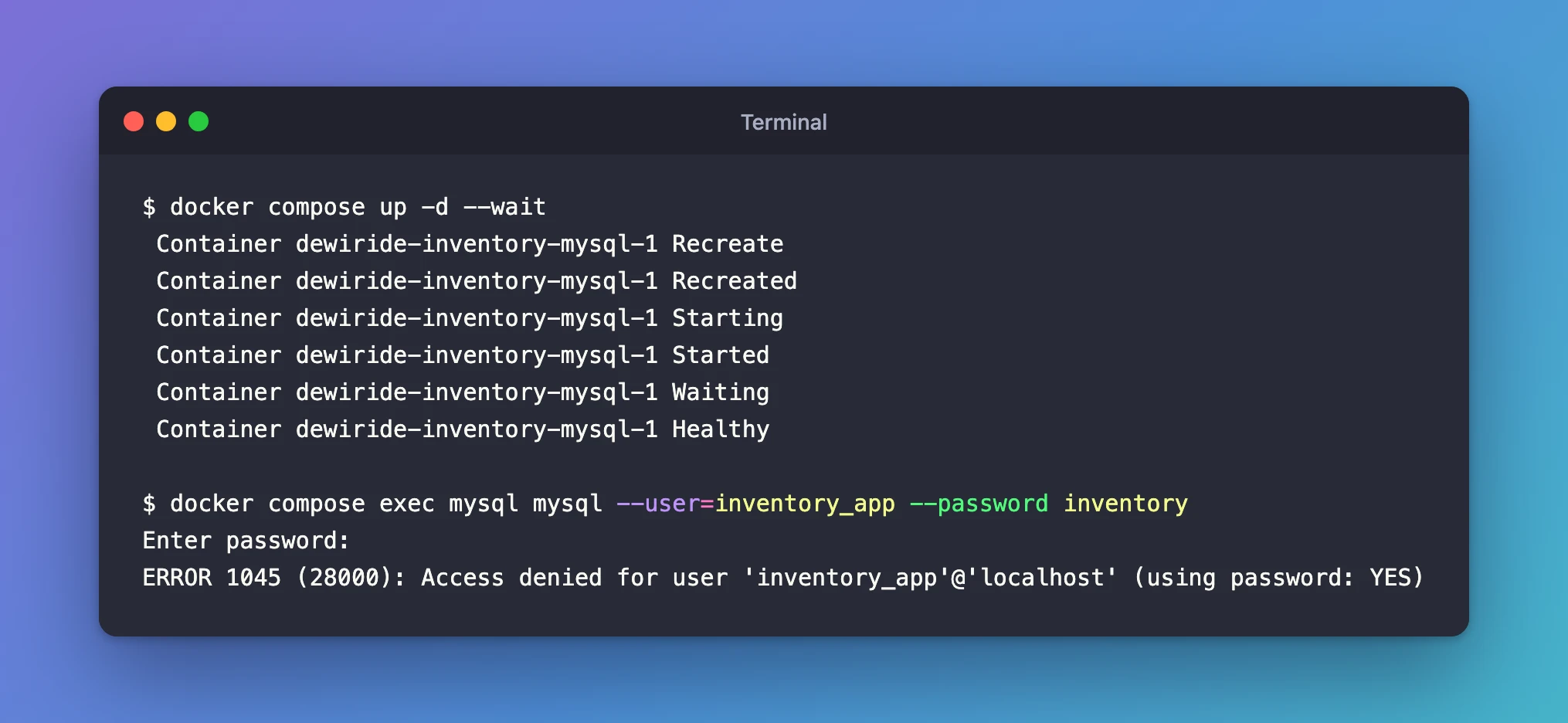
(using password: YES) means a password was sent, but it wasn't the one MySQL has stored for that account.
What I Checked
The container really had the new value. I compared the MYSQL_PASSWORD inside the running container with the one in .env (by hash, so neither password was printed), and they matched. The Recreate line above says the same thing: Compose rebuilt the container with the new setting.
The image's documentation. The official MySQL image page on Docker Hub says this at the top of its Environment Variables section:
Do note that none of the variables below will have any effect if you start the container with a data directory that already contains a database: any pre-existing database will always be left untouched on container startup.
The image's start-up script. The image's docker-entrypoint.sh creates the database and the user only when DATABASE_ALREADY_EXISTS is empty, which is true only for an empty data volume. The logs confirm it. On the very first start, MySQL printed these lines:
mysql-1  | 2026-11-02 14:48:46+00:00 [Note] [Entrypoint]: Initializing database files
mysql-1  | 2026-11-02 14:48:51+00:00 [Note] [Entrypoint]: Creating database inventory
mysql-1  | 2026-11-02 14:48:51+00:00 [Note] [Entrypoint]: Creating user inventory_app
mysql-1  | 2026-11-02 14:48:51+00:00 [Note] [Entrypoint]: Giving user inventory_app access to schema inventory
After my password change, the recreated container skipped all of that:
docker compose logs mysql | grep -E "Entrypoint|ready for connections"
mysql-1  | 2026-11-02 14:51:35+00:00 [Note] [Entrypoint]: Entrypoint script for MySQL Server 9.7.4-1.el9 started.
mysql-1  | 2026-11-02 14:51:35+00:00 [Note] [Entrypoint]: Switching to dedicated user 'mysql'
mysql-1  | 2026-11-02 14:51:35+00:00 [Note] [Entrypoint]: Entrypoint script for MySQL Server 9.7.4-1.el9 started.
mysql-1  | 2026-11-02T14:51:36.573197Z 0 [System] [MY-011323] [Server] X Plugin ready for connections. Bind-address: '::' port: 33060, socket: /var/run/mysqld/mysqlx.sock
mysql-1  | 2026-11-02T14:51:36.573241Z 0 [System] [MY-010931] [Server] /usr/sbin/mysqld: ready for connections. Version: '9.7.4'  socket: '/var/run/mysqld/mysqld.sock'  port: 3306  MySQL Community Server - GPL.
No "Initializing", no "Creating user". MySQL simply started with the data, and the passwords, that were already in the volume.
MySQL's manual for changing a password. The ALTER USER page shows the statement ALTER USER 'jeffrey'@'localhost' IDENTIFIED BY 'new_password'. It also says that changing another account's password needs the CREATE USER privilege, which root has.
Why It Happens
MYSQL_DATABASE, MYSQL_USER, MYSQL_PASSWORD and MYSQL_ROOT_PASSWORD are first-start settings. The image reads them once, to set up an empty data volume, and writes the accounts and their passwords into MySQL's own tables inside that volume.
Recreating the container doesn't touch the volume, which is exactly why your data survives restarts (How to Stop, Start and Remove Docker Compose Containers Without Losing Data). So after the change, .env says one password and MySQL's stored account says another, and MySQL only ever checks its stored account.
The Fix
Change the password inside MySQL so that it matches .env again. This keeps every database, table and row.
1. Sign in as root. The root password in .env hasn't changed, so it still works:
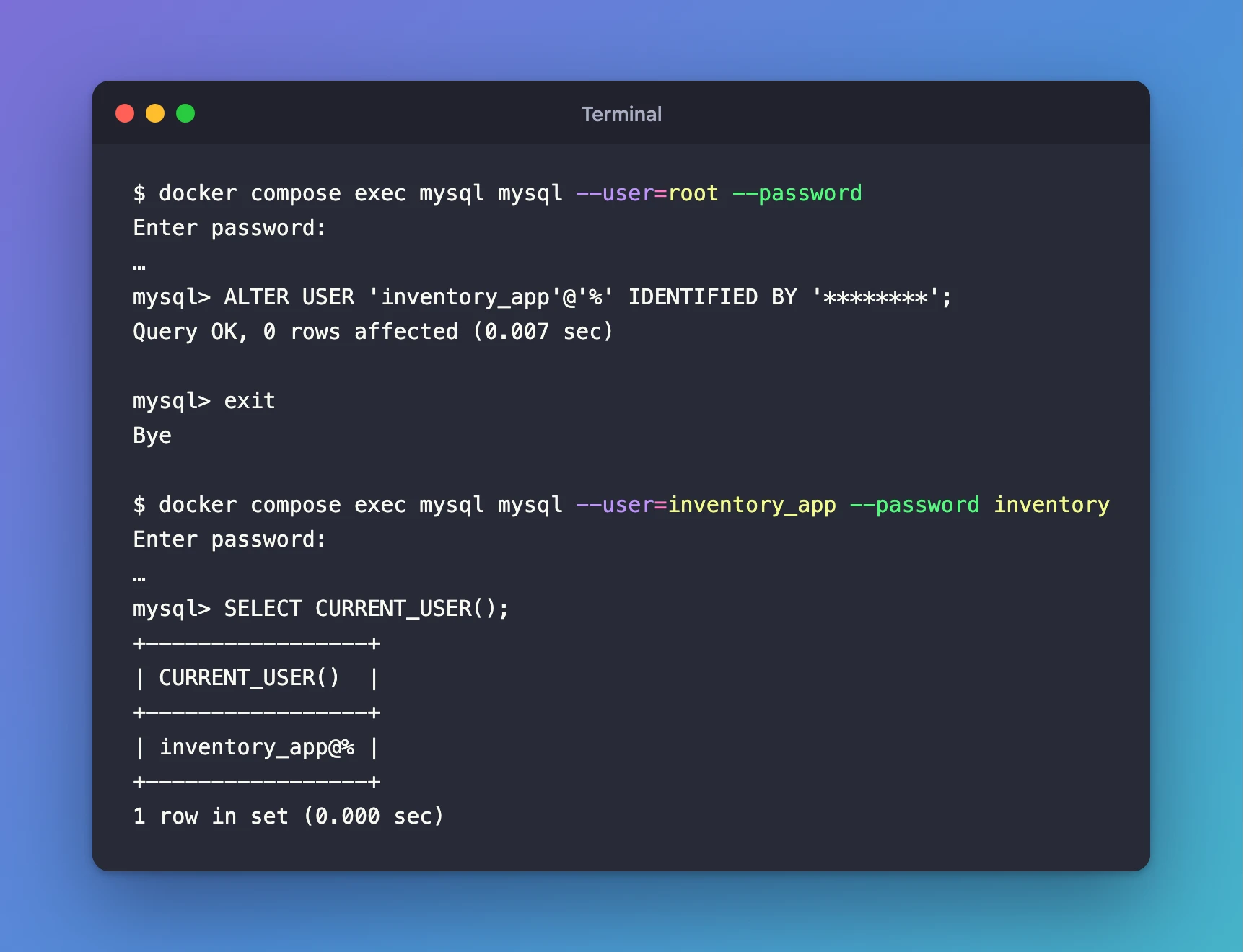
docker compose exec mysql mysql --user=root --password
Paste the value of MYSQL_ROOT_PASSWORD from your .env file at the Enter password: prompt. Nothing appears while you paste, and that's normal.
2. Find the exact account name. A MySQL account is a user name and a host, and you must name both:
SELECT user, host FROM mysql.user;
+------------------+-----------+
| user             | host      |
+------------------+-----------+
| inventory_app    | %         |
| root             | %         |
| mysql.infoschema | localhost |
| mysql.session    | localhost |
| mysql.sys        | localhost |
| root             | localhost |
+------------------+-----------+
6 rows in set (0.001 sec)
The image created inventory_app with the host %, which means "from any host". The error message said 'inventory_app'@'localhost', but that is only where I connected from. If you use it in ALTER USER, MySQL looks for an account that doesn't exist:
mysql> ALTER USER 'inventory_app'@'localhost' IDENTIFIED BY 'not-a-real-password';
ERROR 1396 (HY000): Operation ALTER USER failed for 'inventory_app'@'localhost' (User account does not exist)
3. Set the new password on the real account. Type this at the mysql> prompt, with the new MYSQL_PASSWORD value from your .env file between the quotes:
ALTER USER 'inventory_app'@'%' IDENTIFIED BY 'paste-the-new-MYSQL_PASSWORD-value-here';
Query OK, 0 rows affected (0.007 sec)
4. Leave the client with exit.
Other ways out
- Put the old password back in
.env, if you still have it, and rundocker compose up -d --waitagain. Everything matches again, and nothing in MySQL changes. - Start over with an empty database (development only).
docker compose down -vdeletes the data volume, and the nextdocker compose up -d --waitinitializes MySQL from scratch with the new values.
Use the start-over option only on a development database that holds nothing you need. There is no undo.
After the Fix
Signing in as inventory_app with the new password now works:
docker compose exec mysql mysql --user=inventory_app --password inventory
mysql> SELECT CURRENT_USER();
+-----------------+
| CURRENT_USER()  |
+-----------------+
| inventory_app@% |
+-----------------+
1 row in set (0.000 sec)
Common Mistakes
| Mistake | What happens | Do this instead |
|---|---|---|
Changing MYSQL_PASSWORD in .env and expecting MySQL to follow | ERROR 1045 for the new password | Run ALTER USER as root so MySQL matches .env |
Using the host from the error message, 'inventory_app'@'localhost' | ERROR 1396: User account does not exist | Check SELECT user, host FROM mysql.user; and use '%' |
Running docker compose down -v to "reset the password" | Every database in the volume is deleted | Use down -v only on throwaway development data |
Changing MYSQL_ROOT_PASSWORD at the same time | Root can't sign in either, so you can't run ALTER USER | Change one password at a time, and keep the old value until MySQL matches |
Troubleshooting
| Symptom | Likely cause | Fix |
|---|---|---|
ERROR 1045 (28000) for inventory_app after editing .env | The volume still holds the old password | ALTER USER 'inventory_app'@'%' IDENTIFIED BY '…' as root |
ERROR 1045 (28000) for root after editing .env | MYSQL_ROOT_PASSWORD changed after the first start | Sign in with the old root password; on throwaway data, recreate the volume |
ERROR 1396 (HY000) from ALTER USER | The user and host don't name an existing account | List the accounts with SELECT user, host FROM mysql.user; |
Changing MYSQL_USER gives ERROR 1045 for the new name | The new account was never created; first-start settings were skipped | Create it with CREATE USER and GRANT, or recreate the volume on throwaway data |
FAQ
Why didn't Docker Compose change the password for me?
Compose passed the new value to the container, and that part worked. But the official MySQL image only uses these values to set up an empty data volume. Once MySQL has data, the image leaves it untouched on every start, as its documentation says.
Will ALTER USER delete or change my data?
No. It only changes the password stored for that one account. Your databases, tables and rows stay exactly as they were.
Does the same thing happen with MYSQL_DATABASE and MYSQL_USER?
Yes. Renaming either one after the first start creates nothing. The old database and the old account stay, and the new names don't exist until you create them yourself.
How do I change the password safely next time?
Change it inside MySQL first with ALTER USER, then update .env to the same value. Then every app and tool that reads .env uses a password MySQL already accepts.
Conclusion
The new password was rejected because the official MySQL image applies MYSQL_* settings only to an empty data volume. After that, MySQL keeps the accounts it stored on the first start. One ALTER USER statement, run as root against the real account 'inventory_app'@'%', brought MySQL back in line with .env without touching any data.
Additional Resources
- MySQL image on Docker Hub — environment variables, and what happens with an existing data directory.
- docker-entrypoint.sh in docker-library/mysql — the start-up script that skips set-up when a database already exists.
- ALTER USER Statement (MySQL 9.7) — the syntax and the privileges needed to change a password.
- Account Names (MySQL 9.7) — why an account is a user name plus a host.
Related
- How to Run MySQL in Docker with Docker Compose
- How to Keep Passwords Out of compose.yaml with an .env File
- How to Connect to MySQL in a Docker Container with the mysql Client
- How to Stop, Start and Remove Docker Compose Containers Without Losing Data
- How to Connect a .NET C# Web API to a MySQL Database — Part 1
