Fixed: Environment Variable Export Value Switches Back to Yes in Power Apps

I set an environment variable's Export value to No and saved. When I opened the variable again, the switch said Yes, and the exported solution still held my SharePoint site's address. The switch can't be trusted on its own, the zip file is the real test, and the Power Platform CLI takes the values out.
What I Was Doing
Part 12 of the Career Development Plan series exports the app's solution so other organizations can install it. The solution has three environment variables, one for the SharePoint site and one for each list (Part 3). Their current values point at my site and my lists.
A solution that's going to other environments shouldn't take those values along. Microsoft's FAQ answers Should I include the value in my solution? with No: the values belong to each environment (Environment variables overview). The same article says that when you import a solution, a variable with no value asks for one, while a variable that has a value is filled in with it.
Microsoft's way to take a value out is in the same FAQ: open the variable and, under Current Value, select ... > Remove from this solution. The variable's panel in Power Apps no longer has that .... Its Advanced section has a switch instead, Export value, and when I created the variables in Part 3 I had set it to No on all three (How to Create Environment Variables for a SharePoint Site and List).
What I Expected
The panel explains the switch itself. With No selected, it says:
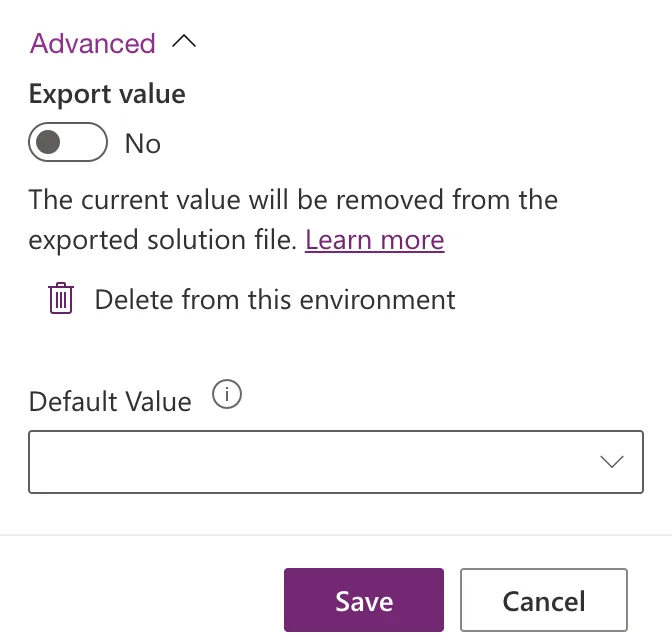
The current value will be removed from the exported solution file.
So I expected the variables to say No, and an exported solution without their values.
What I Got
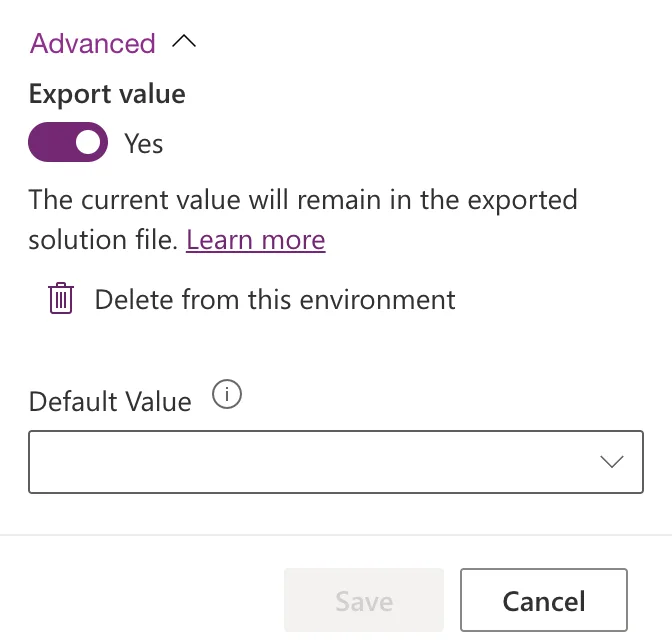
I opened Solutions → Career Development Plan → Career Development Plan Site and expanded Advanced. The switch said Yes:
I switched it to No. The text changed and Save became available:
I selected Save. The panel closed after 3 seconds, with no message. I opened the variable again, and the switch was back on Yes:
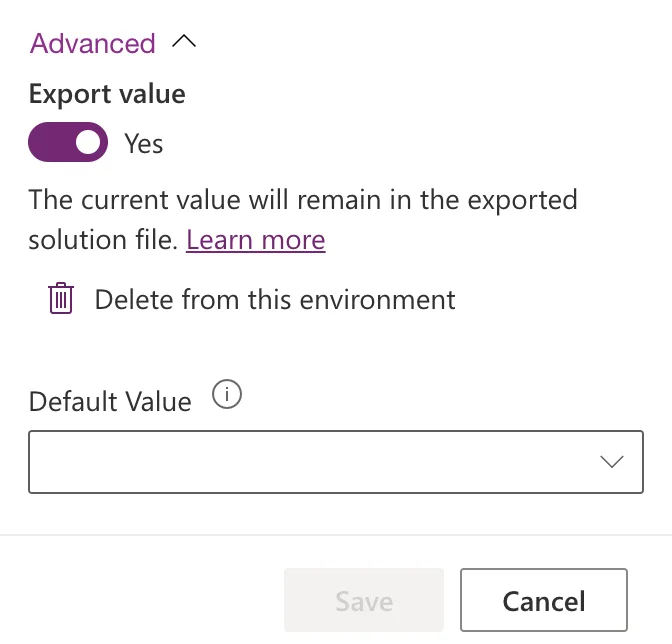
The switch was either wrong, or right and ignoring my change. The exported file decides. I exported the solution with the Power Platform CLI, which doesn't change its version (How to Export a Solution in Power Apps):
pac solution export --name CareerDevelopmentPlan --path CareerDevelopmentPlan_check2.zip
Then I listed the files in the zip whose names mention environment variables:
$ unzip -l CareerDevelopmentPlan_check2.zip | grep environmentvariable
      170  10-29-2026 05:17   environmentvariabledefinitions/dewiride_RoleCompetenciesList/environmentvariablevalues.json
      870  10-29-2026 05:17   environmentvariabledefinitions/dewiride_RoleCompetenciesList/environmentvariabledefinition.xml
      197  10-29-2026 05:17   environmentvariabledefinitions/dewiride_CareerDevelopmentPlanSite/environmentvariablevalues.json
      785  10-29-2026 05:17   environmentvariabledefinitions/dewiride_CareerDevelopmentPlanSite/environmentvariabledefinition.xml
      170  10-29-2026 05:17   environmentvariabledefinitions/dewiride_CompetencyResponsesList/environmentvariablevalues.json
      891  10-29-2026 05:17   environmentvariabledefinitions/dewiride_CompetencyResponsesList/environmentvariabledefinition.xml
Each variable has two files: its definition, and an environmentvariablevalues.json with this environment's value. All three values were there, including the site variable's, saved as No a minute earlier. The site's value file holds my site's address (masked here):
{
  "environmentvariablevalues": {
    "environmentvariablevalue": {
      "iscustomizable": "1",
      "value": "https://contoso.sharepoint.com/sites/CareerDevelopmentPlan"
    }
  }
}
The two list files hold the lists' IDs. How to See What's Inside a Power Platform Solution Zip File shows how to list a zip yourself.
What I Checked
- The documented step. Microsoft's FAQ How do I remove a value from an environment variable? describes the ... under Current Value. The panel has no such button. Both Learn more links in the panel lead to that same article.
- The other commands on the variable. With the variable selected, the solution's command bar has Remove → Remove from this solution and Delete from this environment, and Advanced has Add required objects, Show dependencies, See solution layers, Managed properties, Remove active customizations and Add to solution. Remove works on the whole variable, and nothing else there acts on its value alone.
- The solution's objects. Environment variables (3) lists the three variables, not their values, so there's no value to select and remove.
- The classic solution explorer, which Microsoft's Export solutions article still describes. Switch to classic asked me to enter my password again before it would open, so I didn't go further.
- What Microsoft says about the files. The same overview article says the values are separated into separate JSON files within the exported solution.zip file and can be edited offline, and that the Solution Packager can pack a solution with different value files.
Why It Happens
I couldn't find the Export value switch in Microsoft's documentation. What the evidence shows: saving No didn't take the value out of the solution, and the switch said Yes afterwards, which matches what the export contained. The switch reports the truth, but changing it didn't change the solution. The same happened in Part 3, where all three variables were saved as No and all three values were exported.
The Fix
Take the value files out of the exported zips, the offline route Microsoft's article describes. With the Power Platform CLI, unpack the managed and unmanaged exports into one folder, delete the three environmentvariablevalues.json files, and pack both zips again:
pac solution unpack --zipfile exported/CareerDevelopmentPlan_1_0_0_0.zip --folder source --packagetype Both
rm source/environmentvariabledefinitions/*/environmentvariablevalues.json
pac solution pack --zipfile release/CareerDevelopmentPlan_1_0_0_0.zip --folder source --packagetype Both
How to Keep Environment Variable Values Out of an Exported Solution has every step, with the PowerShell commands for Windows and the output of each.
The values aren't touched in your own environment: the app keeps working with them. Only the files you share change.
After the Fix
The new zips have the three definitions and no values:
$ unzip -l release/CareerDevelopmentPlan_1_0_0_0.zip | grep -c environmentvariablevalues
0
Everything else is unchanged: the app file inside is byte for byte the one Power Apps exported, and the version is still 1.0.0.0. With no values in the zips, Microsoft's article says an import asks for each variable's value, so whoever installs the app picks their own site and lists. Part 13 of the series installs these zips in a new environment, and the import did ask for the site and both lists.
Common Mistakes
| Mistake | What happens | Do this instead |
|---|---|---|
| Trusting Export value: No | The values go out with the solution | Check the exported zip for environmentvariablevalues.json |
| Choosing Remove → Remove from this solution on the variable | The whole variable leaves the solution, and the app depends on it | Leave the variable in; remove only the value files |
| Choosing Delete from this environment | Your environment loses the value, and the app stops finding its data | Never delete; work on the exported files |
| Deleting the definition files too | The app's data sources have no variables to use | Delete only environmentvariablevalues.json |
Troubleshooting
| Symptom | Likely cause | Fix |
|---|---|---|
| Export value shows Yes after you saved No | The change didn't take effect | Check the zip, then remove the value files |
| Import fills in your values instead of asking | The zip still has environmentvariablevalues.json files | Pack the solution without them |
pac solution unpack --packagetype Both fails | Both needs the managed zip next to the unmanaged one, named with _managed | Export both types with the same version, into the same folder |
FAQ
Does this delete the values in my environment?
No. You change files on your computer, not your environment. Microsoft's FAQ describes the same result for its documented step: the value stays in your development environment and isn't exported.
Why not leave the values in?
Microsoft's own answer is no. The values are your site's address and your lists' IDs, so they'd be wrong everywhere else, and an installer wouldn't be asked for their own.
Do I need to do this for every release?
Yes, while the switch behaves like this: every export I made from Power Apps and from the CLI included the values. Check each zip before you share it.
Conclusion
The Export value switch didn't keep the values out: saved as No, it showed Yes again, and the exported zip held all three values. The zip is the check that counts, and the Power Platform CLI removes the value files from both zips in three commands, while the values stay in your own environment.
Additional Resources
- Environment variables for Power Platform overview: current values, import prompts and the value FAQ.
- SolutionPackager tool: unpacking and packing managed and unmanaged solutions together.
