Fixed: "Endpoint is unsecured. Untrusted apps can send telemetry to the dashboard." in the Aspire Dashboard

I started the Aspire Dashboard with the Aspire CLI to watch an ASP.NET Core API's telemetry, and a red banner sat on top of the page: Endpoint is unsecured. Untrusted apps can send telemetry to the dashboard. The dashboard's telemetry endpoint accepts data from any app until you give it an API key. A key removed the banner, and from then on the API had to send the same key, or its telemetry was turned away without a single error in the API.
What I Was Doing
I started the dashboard on its own, without an Aspire AppHost, using version 17.0.0 of the Aspire CLI:
npx -y @microsoft/aspire-cli@17.0.0 dashboard run
Then I opened the sign-in link it printed. The plan was to watch an ASP.NET Core API that sends its logs, traces and metrics over OpenTelemetry to http://localhost:4317, the dashboard's OTLP/gRPC address.
What I Expected
The dashboard's pages, empty until the API started sending telemetry, and nothing else.
What I Got
A red banner above the page:

The dashboard itself worked: the banner is a warning, not an error. But it said something I didn't want to be true.
What I Checked
Where More information leads. The link, https://aka.ms/aspire/api-endpoint-unsecured, opens the Secure telemetry endpoint section of Aspire's security documentation. It explains the banner: It's important that you can trust this information, and a warning is displayed in the dashboard UI if telemetry isn't secured. And for a dashboard started by hand, as mine was: when the dashboard is run in standalone mode, additional configuration is required to enable and secure these endpoints.
What standalone mode secures. The same page lists the defaults for a dashboard started with aspire dashboard run or as a container: the browser frontend is authenticated with a browser token, but Incoming telemetry is unsecured. Warnings are displayed in the console and dashboard UI. That's why the sign-in link carries a token and the telemetry endpoint asks for nothing.
What an untrusted app could do. The documentation names two risks. A sender can submit large volumes of telemetry or maliciously shaped telemetry, which costs bandwidth, CPU and memory. And it can also perform telemetry spoofing by claiming another app's identity: logs or traces that look as if they came from your API, but didn't.
The setting behind the banner. Aspire's configuration reference documents four OTLP settings:
| Setting | Default | What it does |
|---|---|---|
Dashboard:Otlp:AuthMode | Unsecured | ApiKey, ClientCertificate or Unsecured. Unsecured should only be used during local development. |
Dashboard:Otlp:PrimaryApiKey | null | The key. The API key can be any text, but a value with at least 128 bits of entropy is recommended. This value is required if auth mode is API key. |
Dashboard:Otlp:SecondaryApiKey | null | An optional second key. A request can match either one. |
Dashboard:Otlp:SuppressUnsecuredMessage | false | Hides the banner, and only that. This message should only be suppressed if an external frontdoor proxy is securing access to the endpoint. |
With ApiKey, the reference says, each OTLP request must have a valid x-otlp-api-key header value. It must match either the primary or secondary key. So turning on SuppressUnsecuredMessage would hide the warning and leave the endpoint open. The fix is a key.
Why It Happens
Started on its own, the dashboard runs its OTLP endpoint with Dashboard:Otlp:AuthMode at its default, Unsecured: any app that can reach ports 4317 and 4318 can send it logs, traces and metrics, and the banner says so. When an Aspire AppHost starts the dashboard, the key is set up for you. The documentation: The OTLP endpoint is automatically secured with an API key when the dashboard is started by Aspire tooling. Additional configuration is required for standalone mode.
The Fix
Give the dashboard an API key, then give the same key to every app that sends it telemetry.
Step 1: Create a Key
- macOS / Linux
- Windows (PowerShell)
openssl rand -hex 32
OpenSSL's rand command generates num random bytes using a cryptographically secure pseudo random number generator, here 32 of them, and -hex prints them as a hex string: 64 characters from 0 to 9 and a to f.
[Convert]::ToHexString([System.Security.Cryptography.RandomNumberGenerator]::GetBytes(32))
RandomNumberGenerator.GetBytes(32) Creates an array of bytes with a cryptographically strong random sequence of values, 32 of them, and Convert.ToHexString turns them into text encoded with uppercase hex characters: 64 characters. Microsoft's API reference lists GetBytes(Int32) for .NET 6 and later, so the command needs PowerShell 7.2 or later, the first version built on .NET 6. Windows PowerShell 5.1 is built on .NET Framework and doesn't have it. I ran it in PowerShell 7.6.
Either command prints a new key on one line every time you run it. 32 random bytes are 256 bits, well above the 128 bits Aspire recommends as a minimum. Copy the key: the dashboard and your app both need it. Treat it like a password, and keep it out of files you commit.
Step 2: Require the Key in the Dashboard
Stop the dashboard with Ctrl+C, then start it again with two settings: AuthMode set to ApiKey, and the key. As environment variables, the configuration reference says, The : delimiter should be replaced with double underscore (__) in environment variable names, so Dashboard:Otlp:AuthMode becomes Dashboard__Otlp__AuthMode. In the commands below, replace <your-key> with the key from Step 1:
- macOS / Linux
- Windows (PowerShell)
export Dashboard__Otlp__AuthMode=ApiKey
export Dashboard__Otlp__PrimaryApiKey=<your-key>
npx -y @microsoft/aspire-cli@17.0.0 dashboard run
export sets each variable for this terminal and every command started from it, so the dashboard gets both.
$env:Dashboard__Otlp__AuthMode = "ApiKey"
$env:Dashboard__Otlp__PrimaryApiKey = "<your-key>"
npx -y @microsoft/aspire-cli@17.0.0 dashboard run
$env: sets each variable for this PowerShell window and the commands started from it, so the dashboard gets both.
Aspire's documentation passes the same two settings as arguments instead, --Dashboard:Otlp:AuthMode=ApiKey and --Dashboard:Otlp:PrimaryApiKey=... after aspire dashboard run. Its configuration reference lists command line arguments and environment variables as two of the ways to configure the dashboard.
The dashboard starts as before. The CLI prints the same addresses, and the key appears nowhere in them:
   Dashboard:  http://localhost:18888/login?t=<token>

   OTLP/gRPC:  http://localhost:4317

   OTLP/HTTP:  http://localhost:4318

        Logs:  /Users/you/.aspire/logs/cli_20261128T120223_8f899857.log
The token in the Dashboard link is new at every start, so sign in with this link, not the old one. The red banner is gone. The grey welcome note under the tabs is a request for feedback, and it stays:

Step 3: Send the Same Key from Your App
Before giving the API the key, I restarted it the way it was, to see what an app without the key gets. It started normally: its console printed exactly the same startup lines as it did later with the key, with no warning and no error. The dashboard received nothing:

The API said nothing about it, and the dashboard's page said nothing either. The dashboard's own log did. The CLI prints that log's path when it starts, on the Logs line, and searching it for the header's name finds every request it turned away. Use the path your dashboard printed:
- macOS / Linux
- Windows (PowerShell)
grep -n 'x-otlp-api-key' ~/.aspire/logs/cli_20261128T120223_8f899857.log
grep -n prints each line of the file that contains x-otlp-api-key, with its line number in front:
174:[2026-11-28 12:03:04.390] [INFO] [Dashboard]       OtlpApiKey was not authenticated. Failure message: API key from 'x-otlp-api-key' header is missing.
176:[2026-11-28 12:03:04.390] [INFO] [Dashboard]       OtlpComposite was not authenticated. Failure message: API key from 'x-otlp-api-key' header is missing.
182:[2026-11-28 12:03:04.637] [INFO] [Dashboard]       OtlpApiKey was not authenticated. Failure message: API key from 'x-otlp-api-key' header is missing.
184:[2026-11-28 12:03:04.637] [INFO] [Dashboard]       OtlpComposite was not authenticated. Failure message: API key from 'x-otlp-api-key' header is missing.
214:[2026-11-28 12:03:21.075] [INFO] [Dashboard]       OtlpApiKey was not authenticated. Failure message: API key from 'x-otlp-api-key' header is missing.
216:[2026-11-28 12:03:21.075] [INFO] [Dashboard]       OtlpComposite was not authenticated. Failure message: API key from 'x-otlp-api-key' header is missing.
222:[2026-11-28 12:03:21.084] [INFO] [Dashboard]       OtlpApiKey was not authenticated. Failure message: API key from 'x-otlp-api-key' header is missing.
224:[2026-11-28 12:03:21.084] [INFO] [Dashboard]       OtlpComposite was not authenticated. Failure message: API key from 'x-otlp-api-key' header is missing.
Select-String -Path ~/.aspire/logs/cli_20261128T120223_8f899857.log -Pattern 'x-otlp-api-key'
Select-String prints each line of the file that matches the pattern, after the file's path and the line number:
/Users/you/.aspire/logs/cli_20261128T120223_8f899857.log:174:[2026-11-28 12:03:04.390] [INFO] [Dashboard]       OtlpApiKey was not authenticated. Failure message: API key from 'x-otlp-api-key' header is missing.
/Users/you/.aspire/logs/cli_20261128T120223_8f899857.log:176:[2026-11-28 12:03:04.390] [INFO] [Dashboard]       OtlpComposite was not authenticated. Failure message: API key from 'x-otlp-api-key' header is missing.
/Users/you/.aspire/logs/cli_20261128T120223_8f899857.log:182:[2026-11-28 12:03:04.637] [INFO] [Dashboard]       OtlpApiKey was not authenticated. Failure message: API key from 'x-otlp-api-key' header is missing.
/Users/you/.aspire/logs/cli_20261128T120223_8f899857.log:184:[2026-11-28 12:03:04.637] [INFO] [Dashboard]       OtlpComposite was not authenticated. Failure message: API key from 'x-otlp-api-key' header is missing.
/Users/you/.aspire/logs/cli_20261128T120223_8f899857.log:214:[2026-11-28 12:03:21.075] [INFO] [Dashboard]       OtlpApiKey was not authenticated. Failure message: API key from 'x-otlp-api-key' header is missing.
/Users/you/.aspire/logs/cli_20261128T120223_8f899857.log:216:[2026-11-28 12:03:21.075] [INFO] [Dashboard]       OtlpComposite was not authenticated. Failure message: API key from 'x-otlp-api-key' header is missing.
/Users/you/.aspire/logs/cli_20261128T120223_8f899857.log:222:[2026-11-28 12:03:21.084] [INFO] [Dashboard]       OtlpApiKey was not authenticated. Failure message: API key from 'x-otlp-api-key' header is missing.
/Users/you/.aspire/logs/cli_20261128T120223_8f899857.log:224:[2026-11-28 12:03:21.084] [INFO] [Dashboard]       OtlpComposite was not authenticated. Failure message: API key from 'x-otlp-api-key' header is missing.
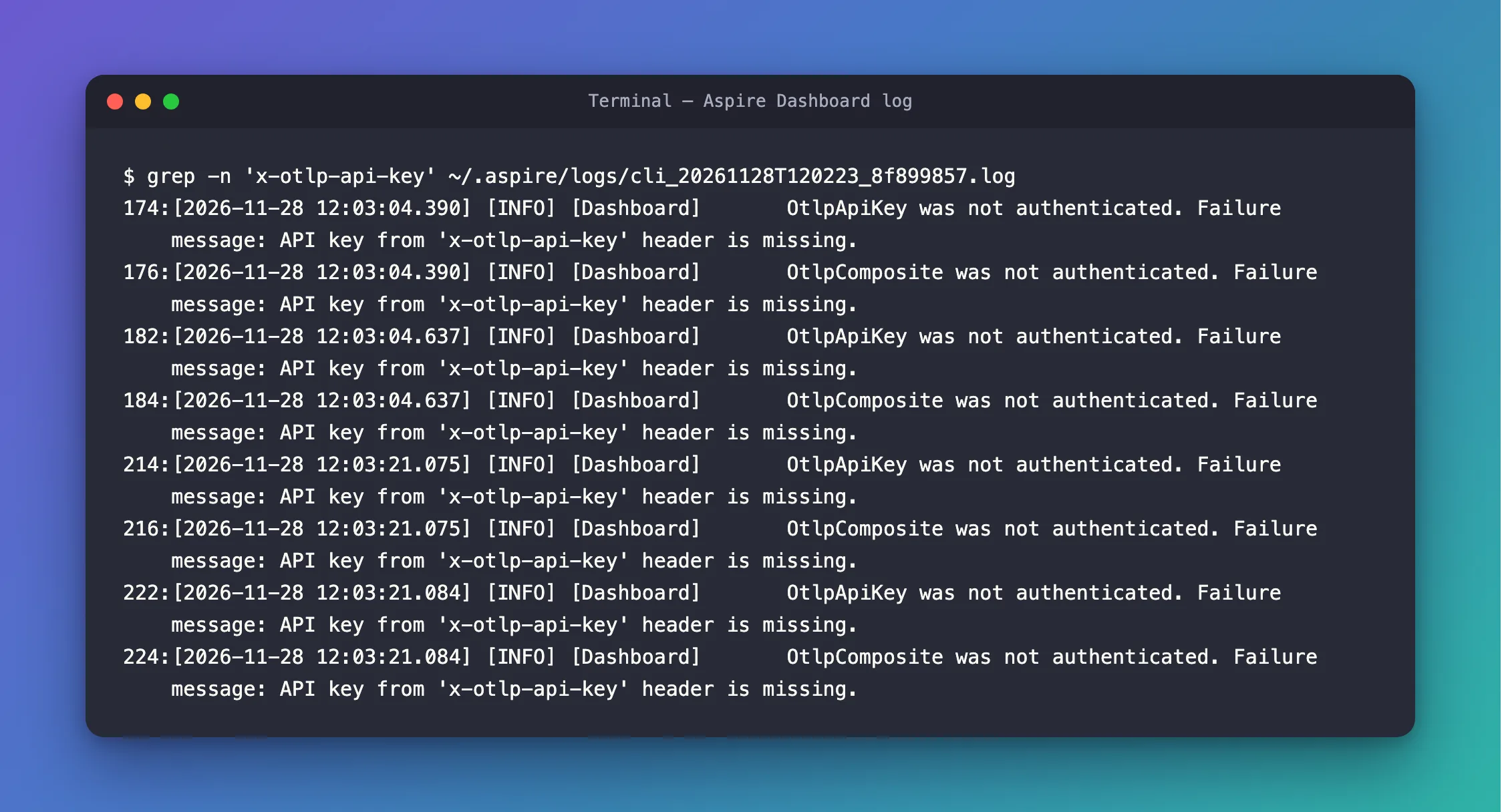
API key from 'x-otlp-api-key' header is missing is the dashboard turning a request away. That is the trap of this fix: secure the dashboard, forget one app, and that app simply looks like an app with nothing to report.
The app sends the header through OTEL_EXPORTER_OTLP_HEADERS, a standard OpenTelemetry variable: A list of headers to apply to all outgoing data (traces, metrics, and logs). Its value is a list of name=value pairs, so here it's one pair, x-otlp-api-key= and the key. Aspire's documentation recommends it for any language: Passing the OTEL_EXPORTER_OTLP_HEADERS environment variable to apps is a universal way to configure the header across all languages.
In the app's folder, in its own terminal, set the variable and start the app. Replace <your-key> with the same key:
- macOS / Linux
- Windows (PowerShell)
export OTEL_EXPORTER_OTLP_HEADERS="x-otlp-api-key=<your-key>"
dotnet run
$env:OTEL_EXPORTER_OTLP_HEADERS = "x-otlp-api-key=<your-key>"
dotnet run
dotnet run builds and starts the app, and the app's OpenTelemetry exporter adds the header to every request it sends. Keep the key in the terminal, not in appsettings.json or launchSettings.json, where it would end up in source control with the code.
After the Fix
With the header, the API appeared under Telemetry sources, and its startup logs arrived: the page listed four structured logs from one source. The first three are in the image:

The dashboard's log agreed: the API's requests were now OtlpComposite was successfully authenticated, and the first one was followed by Processed logs export. Success count: 4, failure count: 0. The banner stays away for as long as the dashboard starts with the two settings.
Common Mistakes
| Mistake | What happens | Do this instead |
|---|---|---|
Turning on SuppressUnsecuredMessage | The banner goes, and any app can still send telemetry | Set Dashboard:Otlp:AuthMode to ApiKey |
| Securing the dashboard and not the app | The app's telemetry is turned away, and the app prints nothing about it | Send the key with OTEL_EXPORTER_OTLP_HEADERS |
Leaving out x-otlp-api-key= in the variable | The request has no x-otlp-api-key header, which is what the dashboard checks | Set the whole pair: x-otlp-api-key= and the key |
Putting the key in appsettings.json or launchSettings.json | Everyone who can read the repository has the key | Set it in the terminal |
Troubleshooting
| Symptom | Likely cause | Fix |
|---|---|---|
| No logs, traces or metrics arrive, and the app shows no error | The app doesn't send x-otlp-api-key | Set OTEL_EXPORTER_OTLP_HEADERS in the app's terminal and restart the app |
| The dashboard's log says API key from 'x-otlp-api-key' header is missing. | The same | The same |
| The red banner is back after a restart | The dashboard started without the two settings | Set both variables in the terminal that starts the dashboard |
FAQ
Do I need this on my own computer?
Microsoft's configuration reference allows Unsecured for exactly that case: it should only be used during local development. The banner warns about a risk, not a fault. A key costs two settings in the dashboard and one variable per app, and after that only apps that send the key can send telemetry.
Does the key change how I sign in?
No. The key covers only the telemetry endpoint, the Dashboard:Otlp settings. The browser still signs in with the token in the Dashboard link: after the restart, the CLI printed a sign-in link with a token as before.
Can the dashboard accept two keys?
Yes, with Dashboard:Otlp:SecondaryApiKey. The configuration reference: If a second API key is specified, then the incoming x-otlp-api-key header value can match either the primary or secondary key.
Does this work for the dashboard in Docker?
The configuration reference says so: If you're running the standalone dashboard as a container image, configure the same values with environment variables. I applied the fix to the dashboard started with the Aspire CLI only.
Conclusion
Endpoint is unsecured. Untrusted apps can send telemetry to the dashboard. means the standalone Aspire Dashboard's OTLP endpoint runs with Dashboard:Otlp:AuthMode at Unsecured, and accepts telemetry from any app. Start the dashboard with Dashboard__Otlp__AuthMode=ApiKey and a random key in Dashboard__Otlp__PrimaryApiKey, then send the same key from every app with OTEL_EXPORTER_OTLP_HEADERS="x-otlp-api-key=...". An app without the key is turned away in silence, so when nothing arrives, look in the dashboard's log.
Additional Resources
- Aspire dashboard security considerations — standalone defaults, the risks of an open endpoint, and the API key.
- Aspire dashboard configuration — every
Dashboard:Otlpsetting, and the__rule for environment variables. - OTLP Exporter Configuration —
OTEL_EXPORTER_OTLP_HEADERSand the other exporter variables. - openssl-rand — the
openssl randcommand and its-hexoption. - RandomNumberGenerator.GetBytes — random bytes in .NET.
