Fixed: EF Core UseCollation() Doesn't Change the MySQL Column Collation with Oracle's MySql.EntityFrameworkCore

I gave a column a case-sensitive collation with EF Core's UseCollation("utf8mb4_0900_as_cs"), created the migration, applied it, and dotnet ef printed Done. The column was still utf8mb4_0900_ai_ci, and MySQL still refused desks as a duplicate of Desks. Oracle's MySQL provider for EF Core leaves UseCollation out of the SQL it generates. Here's how I found that, what Oracle documents instead, and the migration that does change the column.
What I Was Doing
In a .NET 10 Web API with EF Core 10, Oracle's MySql.EntityFrameworkCore 10.0.12 and MySQL 9.7, category names have a unique index. With MySQL's default collation, utf8mb4_0900_ai_ci, the index ignores case, so a second category called desks collides with Desks:
INSERT INTO categories (Name, CreatedAtUtc) VALUES ('desks', UTC_TIMESTAMP(6));
ERROR 1062 (23000): Duplicate entry 'desks' for key 'categories.IX_categories_Name'
That's usually what you want. For these category names, I wanted the other behaviour: names that differ only in case count as different. That needs a case-sensitive collation on the column, such as utf8mb4_0900_as_cs (accent-sensitive, case-sensitive). EF Core has a method for exactly that; its API reference describes UseCollation as: "Configures the property to use the given collation. The database column will be created with the given collation, and it will be used implicitly in all collation-sensitive operations."
builder.Property(c => c.Name)
    .HasMaxLength(100)
    .UseCollation("utf8mb4_0900_as_cs");
dotnet ef migrations add MakeCategoryNameCaseSensitive --project src/Dewiride.Inventory.Data --startup-project src/Dewiride.Inventory.Api
The generated migration looked right; it carries the collation:
migrationBuilder.AlterColumn<string>(
    name: "Name",
    table: "categories",
    type: "varchar(100)",
    maxLength: 100,
    nullable: false,
    collation: "utf8mb4_0900_as_cs",
    oldClrType: typeof(string),
    oldType: "varchar(100)",
    oldMaxLength: 100);
What I Expected
ALTER TABLE … COLLATE utf8mb4_0900_as_cs, and desks accepted next to Desks.
What I Got
The migration applied:
Applying migration '20261103053614_MakeCategoryNameCaseSensitive'.
      ALTER TABLE `categories` MODIFY `Name` varchar(100) NOT NULL;
Done.
But nothing had changed. SHOW FULL COLUMNS includes each column's collation:
SHOW FULL COLUMNS FROM categories LIKE 'Name';
INSERT INTO categories (Name, CreatedAtUtc) VALUES ('desks', UTC_TIMESTAMP(6));
+-------+--------------+--------------------+------+-----+---------+-------+---------------------------------+---------+
| Field | Type         | Collation          | Null | Key | Default | Extra | Privileges                      | Comment |
+-------+--------------+--------------------+------+-----+---------+-------+---------------------------------+---------+
| Name  | varchar(100) | utf8mb4_0900_ai_ci | NO   | UNI | NULL    |       | select,insert,update,references |         |
+-------+--------------+--------------------+------+-----+---------+-------+---------------------------------+---------+
1 row in set (0.002 sec)

ERROR 1062 (23000): Duplicate entry 'desks' for key 'categories.IX_categories_Name'
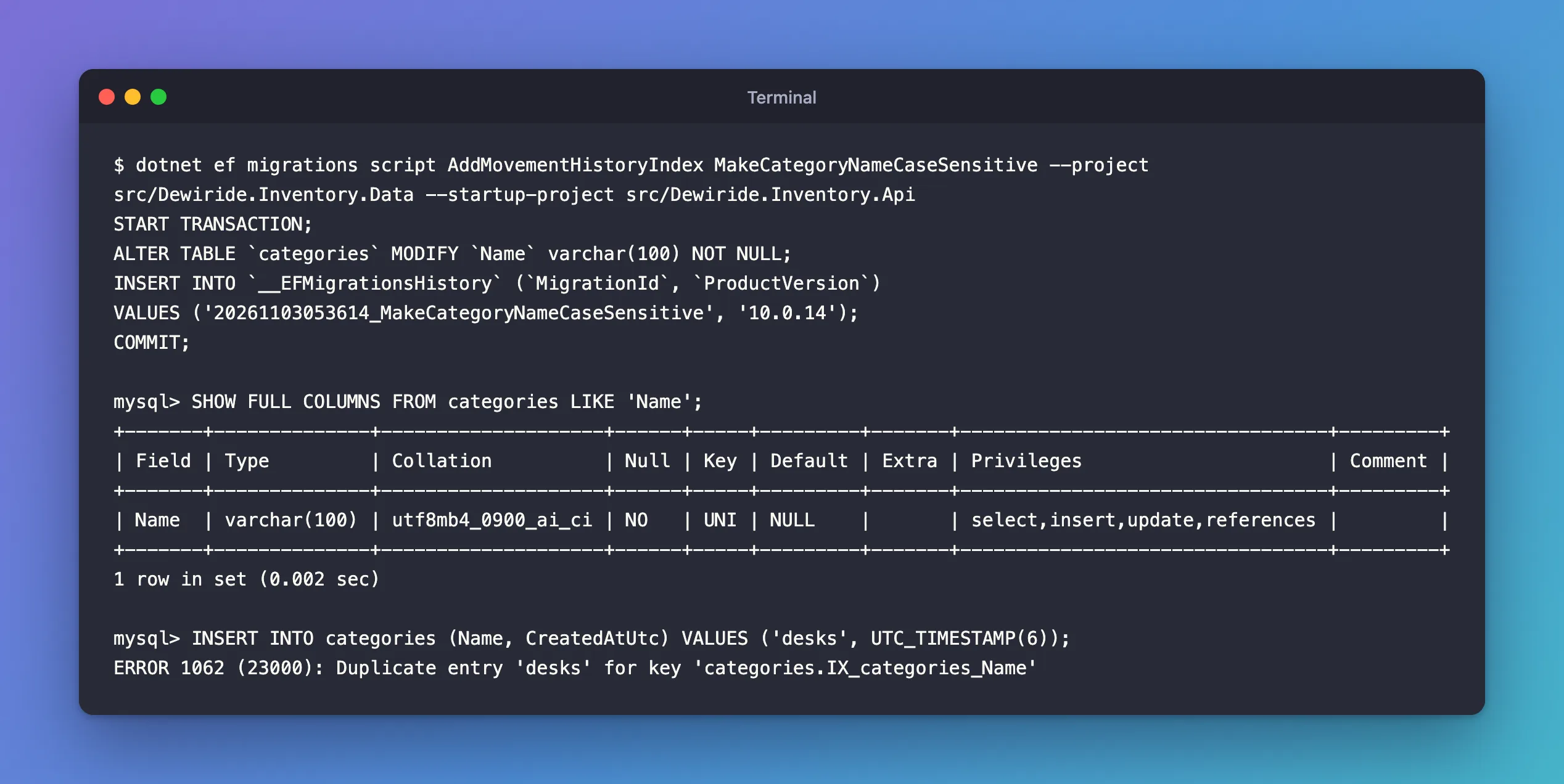
Still utf8mb4_0900_ai_ci, still a duplicate. No error, no warning: the migration did nothing useful.
What I Checked
The SQL itself. The ALTER TABLE in the log already gave it away: no COLLATE. dotnet ef migrations script shows the same SQL without touching the database:
dotnet ef migrations script AddMovementHistoryIndex MakeCategoryNameCaseSensitive --project src/Dewiride.Inventory.Data --startup-project src/Dewiride.Inventory.Api
START TRANSACTION;
ALTER TABLE `categories` MODIFY `Name` varchar(100) NOT NULL;

INSERT INTO `__EFMigrationsHistory` (`MigrationId`, `ProductVersion`)
VALUES ('20261103053614_MakeCategoryNameCaseSensitive', '10.0.14');

COMMIT;
The C# migration has collation: "utf8mb4_0900_as_cs"; the SQL the provider turns it into doesn't. EF Core passes the collation along, and Oracle's provider drops it when it writes the SQL.
Whether it works for new tables. dotnet ef dbcontext script prints the CREATE TABLE statements for the current model, without running anything. With UseCollation in the configuration:
CREATE TABLE `categories` (
    `Id` int NOT NULL AUTO_INCREMENT,
    `Name` varchar(100) NOT NULL,
    `CreatedAtUtc` datetime(6) NOT NULL,
    PRIMARY KEY (`Id`)
);
No COLLATE there either: with this provider, UseCollation is ignored completely.
What Oracle documents. Oracle's Connector/NET guide has a page on this, Configuring Character Sets and Collations in EF Core. It doesn't mention UseCollation at all. Its fluent example "uses the ForMySQLHasCharset and ForMySQLHasCollation methods", for example:
e.Property(p => p.CollationColumnFA).ForMySQLHasCollation("utf8_bin"); // defining collation in a property
Whether the provider's own method does better. I swapped UseCollation for ForMySQLHasCollation, which needs using MySql.EntityFrameworkCore.Extensions;, and checked both cases:
- New tables: yes.
dotnet ef dbcontext scriptnow printed`Name` varchar(100) COLLATE utf8mb4_0900_as_cs NOT NULL. - Existing columns: no.
dotnet ef migrations addcreated a migration with emptyUpandDownmethods. The model snapshot recorded the change, as.HasAnnotation("MySQL:Collation", "utf8mb4_0900_as_cs"), but no operation came with it, so applying that migration would leave the column as it is.
Why It Happens
EF Core hands the collation to the provider, and Oracle's provider leaves it out of the SQL it writes, in ALTER TABLE and in CREATE TABLE alike, without an error or a warning. The provider's own method, ForMySQLHasCollation, is used only when a table is created; for a column that already exists, the migration gets no operation at all. So with this provider, an existing column's collation changes only with SQL you write yourself.
The Fix
Use both: the provider's method in the model, so new tables get the collation and the model says what the column is; and the ALTER TABLE written into the migration for the column that already exists.
1. Declare the collation with Oracle's method:
using MySql.EntityFrameworkCore.Extensions;

// ...

builder.Property(c => c.Name)
    .HasMaxLength(100)
    .ForMySQLHasCollation("utf8mb4_0900_as_cs");
2. Create the migration, and write the statements yourself. dotnet ef migrations add MakeCategoryNameCaseSensitive creates an empty migration; fill in both directions:
protected override void Up(MigrationBuilder migrationBuilder)
{
    // The model's ForMySQLHasCollation is only used when a table is created, so
    // change the existing column here. utf8mb4_0900_as_cs compares case and accents.
    migrationBuilder.Sql(
        "ALTER TABLE `categories` MODIFY `Name` varchar(100) NOT NULL COLLATE utf8mb4_0900_as_cs;");
}

protected override void Down(MigrationBuilder migrationBuilder)
{
    migrationBuilder.Sql(
        "ALTER TABLE `categories` MODIFY `Name` varchar(100) NOT NULL COLLATE utf8mb4_0900_ai_ci;");
}
migrationBuilder.Sqlruns your statement as part of the migration, in order, and in any script you generate from it.- Repeat the whole column definition. The ALTER TABLE manual says that with
MODIFY, "the definition must include the data type and all attributes that should apply to the new column", and "Attributes present in the original definition but not specified for the new definition are not carried forward." Sovarchar(100)andNOT NULLmust be in the statement, or they're gone. Downrestores the collation it had,utf8mb4_0900_ai_ci, so the migration can be reverted.
The script now has the clause:
START TRANSACTION;
ALTER TABLE `categories` MODIFY `Name` varchar(100) NOT NULL COLLATE utf8mb4_0900_as_cs;

INSERT INTO `__EFMigrationsHistory` (`MigrationId`, `ProductVersion`)
VALUES ('20261103071049_MakeCategoryNameCaseSensitive', '10.0.14');

COMMIT;
After the Fix
Applying migration '20261103071049_MakeCategoryNameCaseSensitive'.
      ALTER TABLE `categories` MODIFY `Name` varchar(100) NOT NULL COLLATE utf8mb4_0900_as_cs;
Done.
+-------+--------------+--------------------+------+-----+---------+-------+---------------------------------+---------+
| Field | Type         | Collation          | Null | Key | Default | Extra | Privileges                      | Comment |
+-------+--------------+--------------------+------+-----+---------+-------+---------------------------------+---------+
| Name  | varchar(100) | utf8mb4_0900_as_cs | NO   | UNI | NULL    |       | select,insert,update,references |         |
+-------+--------------+--------------------+------+-----+---------+-------+---------------------------------+---------+
1 row in set (0.005 sec)

mysql> INSERT INTO categories (Name, CreatedAtUtc) VALUES ('desks', UTC_TIMESTAMP(6));
Query OK, 1 row affected (0.002 sec)

mysql> SELECT Id, Name FROM categories ORDER BY Id;
+----+-------+
| Id | Name  |
+----+-------+
|  1 | Desks |
|  8 | desks |
+----+-------+
2 rows in set (0.000 sec)
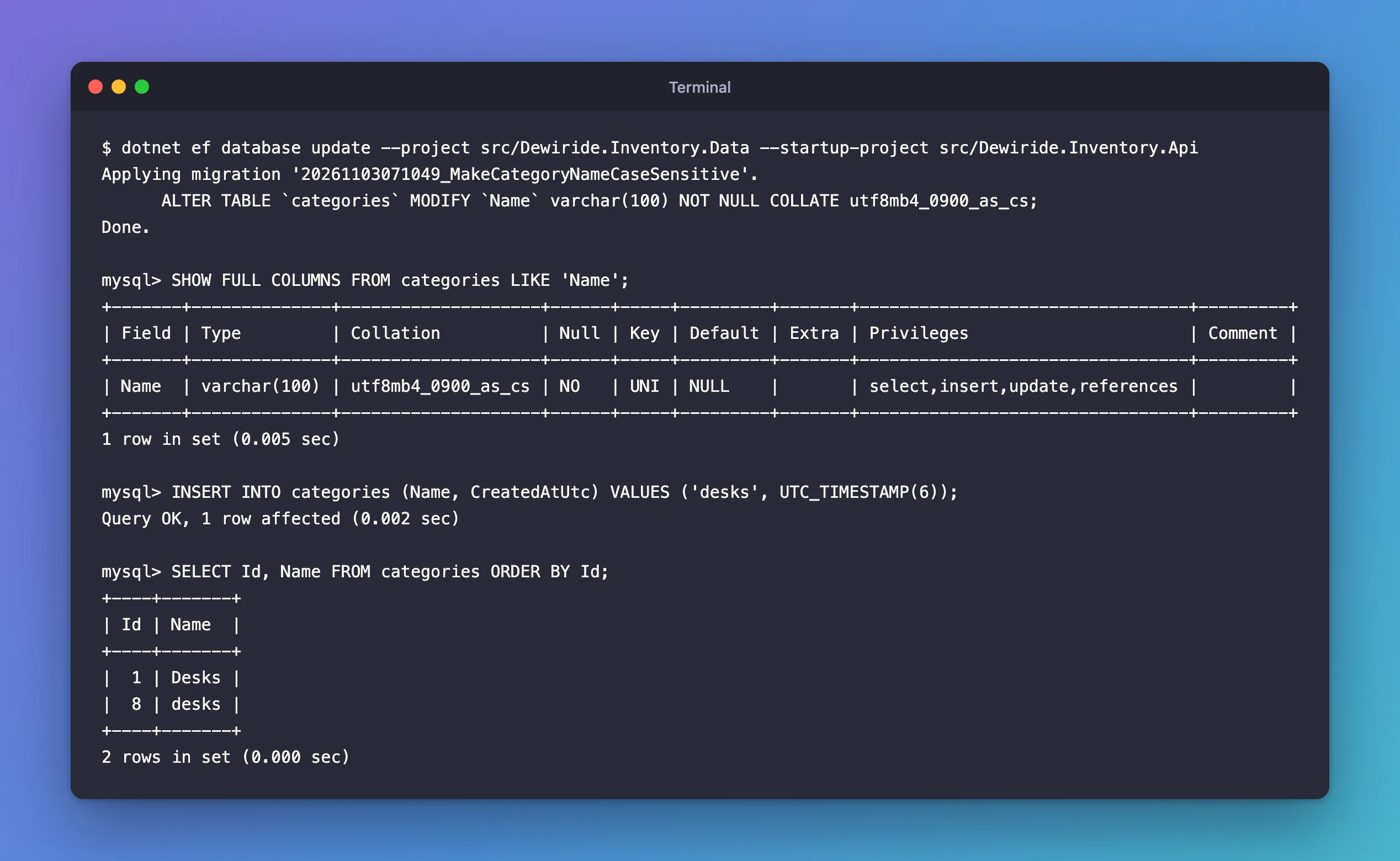
The column is utf8mb4_0900_as_cs, and desks is a new category. dotnet ef migrations has-pending-model-changes answered "No changes have been made to the model since the last migration.", so the model and the migrations agree.
Going Back Needs the Data to Fit
The Down method works only while the data allows it. In an earlier run of the same change, I reverted with Desks and desks both in the table:
Reverting migration '20261103053614_MakeCategoryNameCaseSensitive'.
      ALTER TABLE `categories` MODIFY `Name` varchar(100) NOT NULL COLLATE utf8mb4_0900_ai_ci;
MySql.Data.MySqlClient.MySqlException (0x80004005): Duplicate entry 'desks' for key 'categories.IX_categories_Name'
Under the case-insensitive collation, the unique index can't hold both names. Decide what happens to such pairs before you revert: rename or merge them. Here, desks was a row I had just added, so I deleted it, and the revert went through.
Common Mistakes
| Mistake | What happens | Do this instead |
|---|---|---|
Trusting Done. after a collation change | The column keeps its old collation | Check with SHOW FULL COLUMNS |
Expecting ForMySQLHasCollation to change an existing column | The migration is empty | Write the ALTER TABLE in the migration |
A MODIFY that leaves out part of the column's definition | Whatever you left out, such as NOT NULL, is dropped | Repeat the column's full definition |
Leaving Down empty | The migration can't be reverted | Write the statement that restores the old collation |
Troubleshooting
| Symptom | Likely cause | Fix |
|---|---|---|
UseCollation has no effect on a MySQL column | Oracle's provider leaves COLLATE out of the SQL | Write the ALTER TABLE … COLLATE with migrationBuilder.Sql |
The migration after ForMySQLHasCollation has empty Up and Down methods | The provider's method only applies when a table is created | Fill in both methods with migrationBuilder.Sql |
SHOW FULL COLUMNS still shows the old collation after Done. | The migration ran without a COLLATE clause | Read the output of dotnet ef migrations script before applying |
Reverting fails with Duplicate entry | Names that differ only in case exist, and the case-insensitive index can't hold both | Rename or merge those rows, then revert |
FAQ
Is this the same with the Pomelo provider?
I didn't test Pomelo: it has no release for EF Core 10, which this project uses. Everything here is about Oracle's MySql.EntityFrameworkCore 10.0.12.
Can I set the collation for the whole database instead?
EF Core's modelBuilder.UseCollation(…) sets it at database level for providers that support it. I didn't test it with Oracle's provider. With MySQL you can also set the default when creating the database, with CREATE DATABASE … COLLATE …, before any table exists.
Why not just query with a case-sensitive comparison?
You can, but EF Core's collations page warns that "Specifying an explicit collation in a query will generally prevent that query from using an index defined on that column", and a query collation doesn't change what the unique index allows. Set it on the column.
Conclusion
With Oracle's MySQL provider for EF Core, UseCollation never reaches the SQL: the migration applies with Done., and the column keeps its collation. Use the provider's own ForMySQLHasCollation, which works when a table is created, and for a column that already exists, write the ALTER TABLE … MODIFY … COLLATE … into the migration with migrationBuilder.Sql, in Up and in Down. Then check the result with SHOW FULL COLUMNS, not with Done.
Additional Resources
- Configuring Character Sets and Collations in EF Core — Oracle's Connector/NET guide.
- Collations and Case Sensitivity — EF Core's documentation.
