Fixed: dotnet run -e Staging Still Starts the App in Development

Microsoft's page on ASP.NET Core environments says dotnet run -e Staging sets the environment. I ran it, and my API started in Development anyway, with no error and no warning. -e sets an environment variable, so it needs a name and a value: -e ASPNETCORE_ENVIRONMENT=Staging does what the short form promises.
What I Was Doing
In Part 4 of the Microsoft Agent Framework series, the Dewiride Service Desk API registers a session store only in the Development environment (How to Run Code Only in Development in ASP.NET Core). To check the other branch, I needed to start the API in a different environment for a single run. Its launch profile, Properties/launchSettings.json, sets ASPNETCORE_ENVIRONMENT to Development.
ASP.NET Core runtime environments has a section for exactly this, Set the environment in a command shell when the app is run, with one example: dotnet run -e Staging. From the solution folder, I ran:
dotnet run --project src/Dewiride.ServiceDesk.Api -e Staging
What I Expected
Hosting environment: Staging in the startup log.
What I Got
Using launch settings from src/Dewiride.ServiceDesk.Api/Properties/launchSettings.json...
Building...
info: Microsoft.Hosting.Lifetime[14]
      Now listening on: http://localhost:5180
info: Microsoft.Hosting.Lifetime[0]
      Application started. Press Ctrl+C to shut down.
info: Microsoft.Hosting.Lifetime[0]
      Hosting environment: Development
info: Microsoft.Hosting.Lifetime[0]
      Content root path: /Users/you/source/DewirideServiceDesk/src/Dewiride.ServiceDesk.Api
Hosting environment: Development. The API accepted the command without a word and ignored my Staging.
What I Checked
The command's own help. dotnet run --help, from .NET SDK 10.0.403, describes -e like this:
  -e, --environment <NAME="VALUE">        Sets the value of an environment variable.
                                          Creates the variable if it does not exist, overrides if it does.
                                          This argument can be specified multiple times to provide multiple variables.
So -e doesn't set the ASP.NET Core environment. It sets an environment variable of the app's process, and it expects a name, an equals sign and a value.
The dotnet run reference. dotnet run agrees: -e|--environment <KEY=VALUE> sets the specified environment variable in the process that will be run by the command, and values passed this way take precedence over the environmentVariables of the chosen launch profile.
Which variable decides. The environments page says ASP.NET Core reads the environment from DOTNET_ENVIRONMENT and ASPNETCORE_ENVIRONMENT. My -e Staging named neither.
Why It Happens
Staging on its own isn't a NAME=VALUE pair, so it doesn't set ASPNETCORE_ENVIRONMENT. That variable kept the value from the launch profile, Development, and the app started in Development. The short form on the environments page is the mistake; the option itself works as its reference describes.
The Fix
Give -e the variable's full name and the value:
dotnet run --project src/Dewiride.ServiceDesk.Api -e ASPNETCORE_ENVIRONMENT=Staging
The command works unchanged in bash, zsh and PowerShell. Because -e values override the launch profile, you don't have to edit launchSettings.json or pass --no-launch-profile.
Another way: an argument for the app
ASP.NET Core also reads the environment from the command line. WebApplication and WebApplicationBuilder lists --environment as the command-line argument for the environment name, and since .NET 7 command-line arguments win over ASPNETCORE_ variables. Put it after --, so dotnet run hands it to the app instead of reading it as its own option:
dotnet run --project src/Dewiride.ServiceDesk.Api -- --environment Staging
I ran this one in zsh, and checked in PowerShell 7 that -- reaches dotnet unchanged.
After the Fix
Both commands started the API in Staging. The -e ASPNETCORE_ENVIRONMENT=Staging run:
Using launch settings from src/Dewiride.ServiceDesk.Api/Properties/launchSettings.json...
Building...
info: Microsoft.Hosting.Lifetime[14]
      Now listening on: http://localhost:5180
info: Microsoft.Hosting.Lifetime[0]
      Application started. Press Ctrl+C to shut down.
info: Microsoft.Hosting.Lifetime[0]
      Hosting environment: Staging
info: Microsoft.Hosting.Lifetime[0]
      Content root path: /Users/you/source/DewirideServiceDesk/src/Dewiride.ServiceDesk.Api
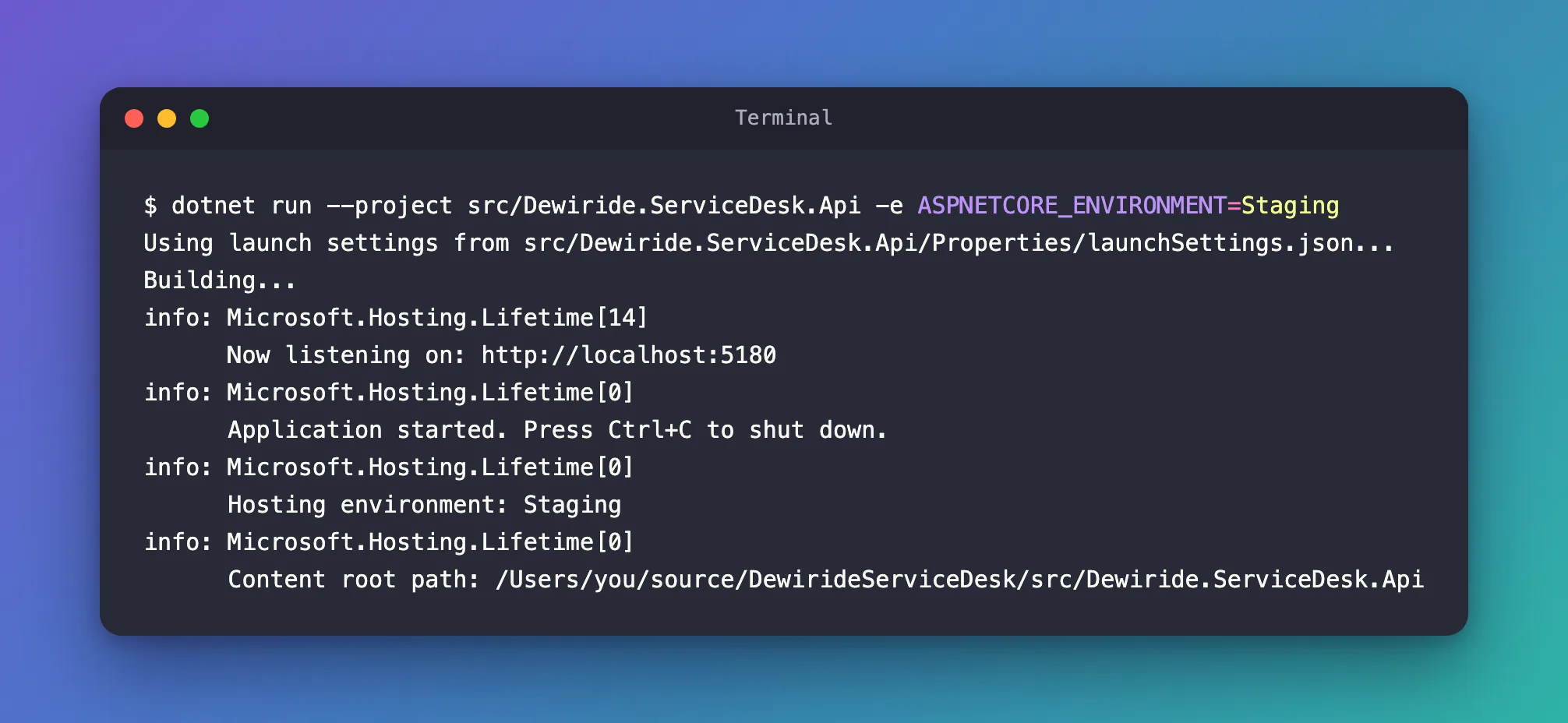
The -- --environment Staging run printed the same log. Press Ctrl+C to stop the app. The next plain dotnet run uses the launch profile again, so you're back in Development.
Common Mistakes
| Mistake | What happens | Do this instead |
|---|---|---|
dotnet run -e Staging | The app starts in Development, silently | dotnet run -e ASPNETCORE_ENVIRONMENT=Staging |
dotnet run --environment Staging (without --) | dotnet run reads --environment as its own -e option, with the same problem | Use -e ASPNETCORE_ENVIRONMENT=Staging, or put --environment Staging after -- |
Setting ASPNETCORE_ENVIRONMENT in the shell before dotnet run | The launch profile's value overrides the shell's | Use -e, or --no-launch-profile as Microsoft describes |
Troubleshooting
| Symptom | Likely cause | Fix |
|---|---|---|
Hosting environment: Development after -e Staging | -e got a value without a variable name | Name the variable: -e ASPNETCORE_ENVIRONMENT=Staging |
Hosting environment: Production when you expected Development | No launch profile was used, and Production is the default | Run without --no-launch-profile, or set the environment explicitly |
FAQ
Is the environments page simply wrong?
For the .NET SDK I used, 10.0.403, yes: -e Staging didn't change the environment, while the dotnet run reference and dotnet run --help both describe -e as NAME=VALUE. The fix above follows the reference.
Does DOTNET_ENVIRONMENT work too?
The environments page says ASP.NET Core reads both, and that DOTNET_ENVIRONMENT wins over ASPNETCORE_ENVIRONMENT in apps built with WebApplication. I used ASPNETCORE_ENVIRONMENT, the variable the project's launch profile already sets.
Can I change the environment while the app is running?
No. The environments page says the environment can't be changed while the app runs. Stop the app and start it again with the new value.
Conclusion
dotnet run -e sets an environment variable, so -e Staging sets nothing useful and the launch profile's Development stays. Use dotnet run -e ASPNETCORE_ENVIRONMENT=Staging, or pass -- --environment Staging to the app, and check the Hosting environment line in the startup log.
Additional Resources
- dotnet run — the
-e|--environment <KEY=VALUE>option and how environment variables are layered. - ASP.NET Core runtime environments — the variables that decide the environment, and the startup log line.
- WebApplication and WebApplicationBuilder — the
--environmentcommand-line argument.
