Fixed: "dotnet package update --vulnerable: error: Restore failed. Unhandled exception: Specified method is not supported."

dotnet package update --vulnerable is .NET 10's way to move vulnerable packages to a fixed version in one command. In my solution it printed error: Restore failed, then Unhandled exception: Specified method is not supported., and stopped. The crash message is misleading; the cause is documented: the command restores to do its work, and TreatWarningsAsErrors turned NuGet's own vulnerability warning into a restore error.
What I Was Doing
A .NET 10 solution uses Central Package Management and sets TreatWarningsAsErrors in Directory.Build.props. The web API referenced Newtonsoft.Json 12.0.3, which has a known high-severity vulnerability, so every restore failed with error NU1903. That's exactly the situation the command's --vulnerable option is for:
dotnet package update --vulnerable --project src/Dewiride.Inventory.Api/Dewiride.Inventory.Api.csproj
What I Expected
What the documentation's example shows: a line like "Updating System.Text.Json 8.0.0 to 8.0.5." for my package.
What I Got
Updating packages with security advisories in /Users/you/projects/dewiride-inventory-api/src/Dewiride.Inventory.Api/Dewiride.Inventory.Api.csproj
error: Restore failed
Unhandled exception: Specified method is not supported.
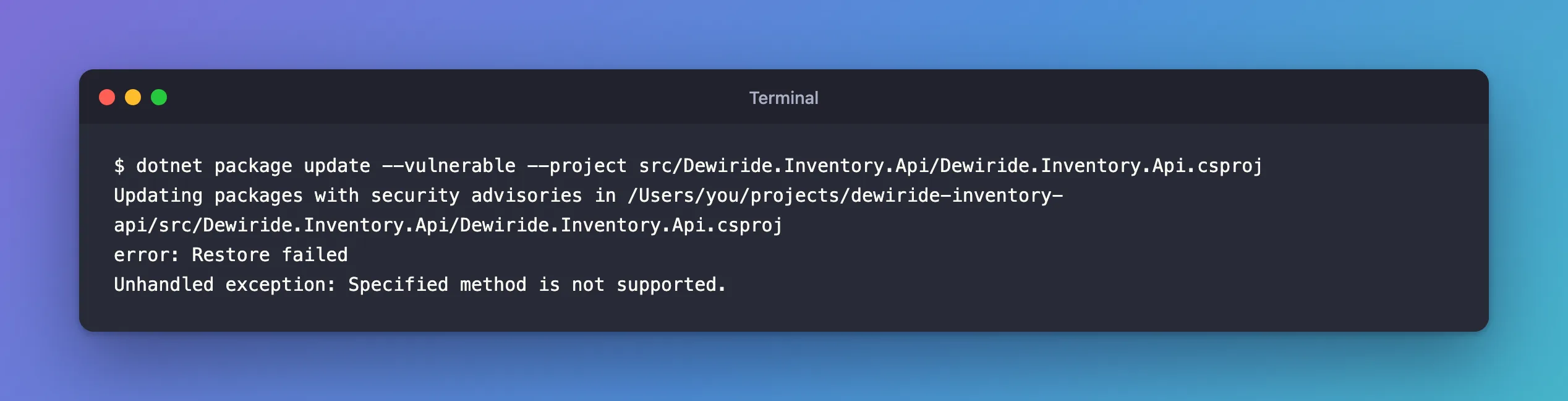
Directory.Packages.props still said 12.0.3: nothing had changed.
What I Checked
The documentation. The "Warnings as Errors" section of the dotnet package update reference describes this case: "dotnet package update does implicit restores to check if the resulting package graph is free of errors. Using --vulnerable also does an implicit restore to find NuGetAudit warnings. However, if your project uses WarningsAsErrors or TreatWarningsAsErrors, NuGet's restore warnings can cause restore to fail, preventing the update from completing."
The page links a NuGet feature request for a proper fix.
The documented workaround. The same section: "We recommend taking advantage of MSBuild conditions and environment variables as a workaround until this feature request is implemented. For example, set <TreatWarningsAsErrors Condition="'$(CustomCondition)' == ''">true</TreatWarningsAsErrors> in your project, and then on most Linux and Mac shells you can run CustomCondition=true dotnet package update."
An environment variable is visible to MSBuild as a property of the same name, so the condition switches TreatWarningsAsErrors off only for a command run with that variable set.
Why It Happens
dotnet package update runs restores of its own: one to check that the result is free of errors, and, with --vulnerable, one to find NuGet's audit warnings. With TreatWarningsAsErrors on, the audit's NU1903 is an error, so that restore failed on the very warning the command was supposed to fix. The command then crashed on the failure, with "Unhandled exception: Specified method is not supported.", instead of explaining it.
The Fix
1. Make the setting conditional, in Directory.Build.props. I used a clearer name than the docs' example, UpdatingPackages:
<TreatWarningsAsErrors Condition="'$(UpdatingPackages)' == ''">true</TreatWarningsAsErrors>
Normal builds don't set UpdatingPackages, so the condition is true and warnings stay errors.
2. Run the update with the variable set:
- bash / zsh
- PowerShell
UpdatingPackages=true dotnet package update --vulnerable --project src/Dewiride.Inventory.Api/Dewiride.Inventory.Api.csproj
$env:UpdatingPackages = "true"
dotnet package update --vulnerable --project src/Dewiride.Inventory.Api/Dewiride.Inventory.Api.csproj
Remove-Item Env:UpdatingPackages
In bash and zsh, NAME=value command sets the variable for that one command only. PowerShell needs the three separate steps the docs describe: set, run, remove. I ran the bash form on macOS, and the PowerShell form in PowerShell 7 on macOS, where MSBuild saw UpdatingPackages as true and Remove-Item cleared it afterwards.
After the Fix
Updating packages with security advisories in /Users/you/projects/dewiride-inventory-api/src/Dewiride.Inventory.Api/Dewiride.Inventory.Api.csproj
  Dewiride.Inventory.Api:
    Updating Newtonsoft.Json 12.0.3 to 13.0.1.
Updated 1 packages in 19 scanned packages.
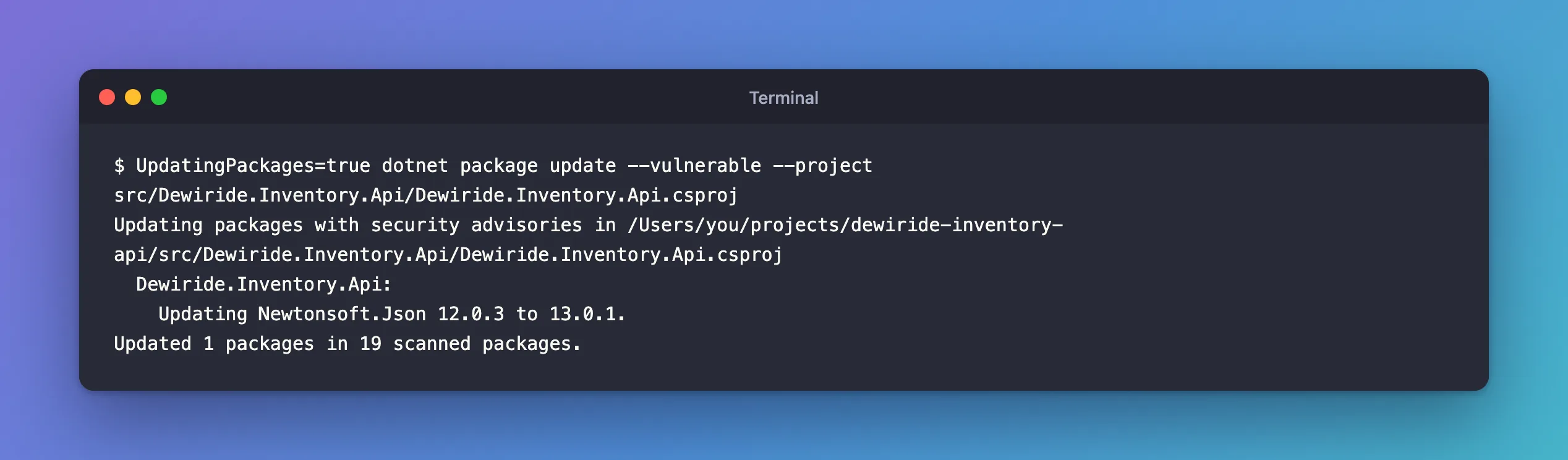
It moved to 13.0.1: --vulnerable picks "the lowest version that is higher than the currently referenced version, that does not have any known vulnerabilities". To get the newest, I ran the update once more for that package, with the same variable:
Updating outdated packages in /Users/you/projects/dewiride-inventory-api/src/Dewiride.Inventory.Api/Dewiride.Inventory.Api.csproj.
  Dewiride.Inventory.Api:
    Updating Newtonsoft.Json 13.0.1 to 13.0.4.
Updated 1 packages in 1 scanned packages.
A normal dotnet build, without the variable and so with warnings as errors, then succeeded, and dotnet package list --vulnerable reported nothing.
Common Mistakes
| Mistake | What happens | Do this instead |
|---|---|---|
Removing TreatWarningsAsErrors to make the update work | Every build stops failing on warnings | Make it conditional, as above |
| Setting the variable for the whole session and forgetting it | Later builds pass with warnings | Set it for one command, or remove it afterwards |
Stopping at the version --vulnerable picked | You get the first fixed version, not the newest | Update once more to the newest stable |
| Reading "Specified method is not supported" as a missing feature | You give up on the command | Check whether restore fails on warnings |
Troubleshooting
| Symptom | Likely cause | Fix |
|---|---|---|
error: Restore failed, then Unhandled exception: Specified method is not supported. | The command's own restore fails on a warning that TreatWarningsAsErrors turns into an error | Make TreatWarningsAsErrors conditional, and run the update with the variable set |
| The update moved to an older fixed version, not the newest | --vulnerable picks the lowest version without known vulnerabilities | Run dotnet package update for that package once more |
| Builds pass with warnings after the update | The variable is still set in your shell | Remove it, with Remove-Item Env:UpdatingPackages in PowerShell |
FAQ
Is there another way without editing Directory.Build.props?
dotnet package add <id> --version <safe version> updates one package even while restore fails on the audit warning, as long as you name the version yourself. Fixed: "NU1903" shows that route.
Will this be fixed?
The documentation calls the conditional property a workaround "until this feature request is implemented", and links the request on NuGet's GitHub. Check the page when you update the SDK.
Conclusion
"error: Restore failed" followed by "Unhandled exception: Specified method is not supported." from dotnet package update means the command's own restore failed, typically because TreatWarningsAsErrors turned a NuGet warning into an error. Follow Microsoft's documented workaround: put a condition on TreatWarningsAsErrors that an environment variable can switch off, run the update with that variable set, and keep warnings as errors for everything else.
