Fixed: Delegation Warning. The "Trim" Part of This Formula Might Not Work Correctly on Large Data Sets

Power Apps Studio flagged two delegation warnings on a formula that only filtered a SharePoint list with =: The "Filter" part and The "Trim" part of this formula might not work correctly on large data sets. The Trim call inside the condition caused both. Trimming the name first, with With, and comparing the column with the result removed both warnings.
What I Was Doing
I was building the screen where admins add and edit departments in the Overtime Timesheet app. The departments live in a SharePoint list, Departments, whose Department column is a single line of text.
Before saving, the screen checks the form with a function in App → Formulas, DepartmentProblem (How to Create a User-Defined Function in Power Apps). It returns the first problem as a sentence, or an empty text when there's none. One check looks for another department with the same name (How to Prevent Duplicate Items in a SharePoint List from Power Apps).
My first version worked out the trimmed name before the Filter, and Studio had no complaints. When I shortened the function, I moved Trim into the Filter condition instead:
DepartmentProblem(Name: Text, HasApprovers: Boolean, DepartmentId: Number): Text =
    With(
        {SameNames: Filter(Departments, Department = Trim(Name))},
        With(
            {SameName: LookUp(SameNames, ID <> DepartmentId)},
            If(
                !IsBlank(SameName) && SameName.IsActive, $"There's already a department called {SameName.Department}.",
                !IsBlank(SameName), $"There's already an inactive department called {SameName.Department}. Edit it and turn Active back on.",
                !HasApprovers, "Choose at least one approver.",
                ""
            )
        )
    );
Trim removes spaces at the start and end and doubled spaces in between (How to Remove Extra Spaces in Power Apps with Trim and TrimEnds), so Radiology typed with a trailing space still matches. The LookUp then skips the department being edited (How to Exclude the Item Being Edited from a LookUp in Power Apps).
What I Expected
Comparing a text column with = is something SharePoint can do itself, so I expected Studio to accept the formula with no warnings, as it had before I moved Trim.
What I Got
The formula bar said 2 formula errors exist within the formula. Press F8 to access. Pressing F8 in the formula listed both:
1 of 2 problems
Delegation warning. The "Filter" part of this formula might not work correctly on large data sets.

2 of 2 problems
Delegation warning. The "Trim" part of this formula might not work correctly on large data sets.
In the expanded formula bar, = Trim(Name)) had a yellow squiggle under it, and pointing at it showed the second warning:

What I Checked
Microsoft's delegation overview lists what can be used inside Filter and LookUp with the columns of a table. It names TrimEnds but not Trim, and it allows Constant values that are the same across all records, like control properties, and global and context variables.
The SharePoint connector's table says = on a Text column can be delegated. It doesn't list Trim or TrimEnds.
So the comparison itself was fine. What Power Apps couldn't send to SharePoint was the Trim call inside the condition, even though Trim(Name) gives the same value for every row. It flagged the Trim and the Filter that contains it.
Why It Happens
Power Apps sends a Filter to SharePoint only when every part of its condition is something SharePoint can run. When one part isn't, Power Apps fetches rows and filters them on the device instead, and only up to the Data row limit: 500 by default (Nondelegable limits). With more departments than that, a duplicate could be missed without any error.
The Fix
Work out the trimmed name first, then compare the column with that value. With holds it as CleanName for the rest of the formula (How to Use the With Function in Power Apps):
DepartmentProblem(Name: Text, HasApprovers: Boolean, DepartmentId: Number): Text =
    With(
        {CleanName: Trim(Name)},
        With(
            {SameNames: Filter(Departments, Department = CleanName)},
            With(
                {SameName: LookUp(SameNames, ID <> DepartmentId)},
                If(
                    !IsBlank(SameName) && SameName.IsActive, $"There's already a department called {SameName.Department}.",
                    !IsBlank(SameName), $"There's already an inactive department called {SameName.Department}. Edit it and turn Active back on.",
                    !HasApprovers, "Choose at least one approver.",
                    ""
                )
            )
        )
    );
The condition is now a column compared with = against one value, which SharePoint can run.
After the Fix
The formula bar said No formula errors present, and the squiggles were gone:

The check still did its job. On the Add department screen, typing radiology in lower case showed the message for the existing Radiology department, and Save stayed disabled:
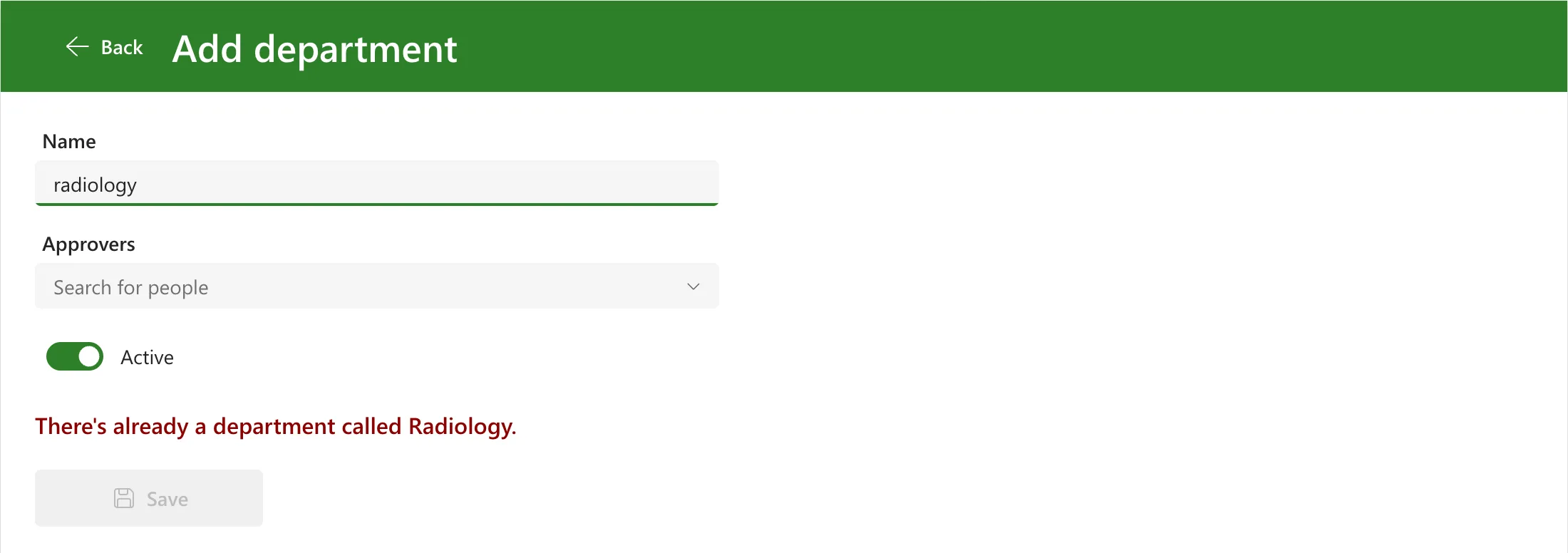
SharePoint matched radiology with Radiology: Microsoft notes that SharePoint compares text without regard to case by default (EndsWith and StartsWith functions).
Common Mistakes
| Mistake | What happens | Do this instead |
|---|---|---|
| Calling Trim on the value inside the Filter condition | Two delegation warnings, and the filter runs on the device | Trim it first with With, then compare |
Trimming the column instead, Trim(Department) = Name | A function on a column can't be delegated either | Save names already trimmed, and compare the column as it is |
| Raising the Data row limit to quiet the warning | Only the first rows are still checked | Make the condition delegable |
Troubleshooting
| Symptom | Likely cause | Fix |
|---|---|---|
| The "Trim" part of this formula might not work correctly on large data sets | Trim inside a Filter or LookUp condition | Work the value out first with With |
| The "Filter" part listed beside it | The same Trim, inside that Filter | The same fix removes both |
| No warning, but a name with extra spaces isn't found | A saved name has extra spaces | Trim names when you save them, as Patch with Trim(...) does |
FAQ
Is a delegation warning an error?
The app still runs. Studio counts the warnings in its formula errors line, and on a list bigger than the data row limit the results can be incomplete without telling anyone (Fixed: Delegation Warning. The "Filter" Part of This Formula Might Not Work Correctly on Large Data Sets).
Does the trimmed name need its own variable?
It needs to be a value worked out before the Filter, not a function call inside it. With does that within one formula. A context or global variable would work too, since the delegation overview lists them as constant values.
Conclusion
A delegation warning on a simple = comparison came from the Trim call inside the condition. Working out the trimmed name first with With and comparing the column with that value removed both warnings, and the duplicate check still found Radiology when I typed radiology.
Additional Resources
- Delegation overview: delegable functions: what Filter and LookUp can send to a data source.
- Delegable functions and operations for SharePoint: SharePoint's table.
- Trim and TrimEnds functions: what each removes.
