Fixed: Delegation Warning. The Named Formula Is Not Delegable So Its Usage in This Formula Might Not Work Correctly on Large Data Sets

Power Apps kept one delegation warning even after the filter behind it was fixed: Delegation warning. The named formula MyApproverDepartments is not delegable so its usage in this formula might not work correctly on large data sets. The named formula returned a table built from a SharePoint list. Returning what the app needed, a line of text, cleared it.
What I Was Doing
Part 5 of the Overtime Timesheet series works out whether the signed-in person approves overtime for any department. Two named formulas in App.Formulas do it: MyApproverDepartments, the active departments whose Approvers column includes the person, and IsApprover, whether there are any.
My first version filtered the SharePoint list directly, and Studio raised two delegation warnings. The first was about in, which SharePoint can't run on a multi-person column. I fixed that one by letting SharePoint return the active departments and checking the approvers in the app with With: Fixed: Delegation Warning. The Highlighted Part of This Formula Might Not Work Correctly on Large Data Sets. The formulas were then:
MyApproverDepartments = With(
    {ActiveDepartments: Filter(Departments, IsActive = true)},
    Filter(ActiveDepartments, MyEmail in Approvers.Email)
);
IsApprover = !IsEmpty(MyApproverDepartments);
What I Expected
No warnings. The filter that SharePoint couldn't run now ran on a collection, and Microsoft's delegation overview says collections made by With don't show a delegation warning.
What I Got
The second warning stayed. It had appeared together with the first one, under the MyApproverDepartments inside IsApprover, as this hover from before the change shows:

The App checker (stethoscope icon, right end of Studio's command bar) → Formulas had listed it from the start, as the second of two warnings on App → .Formulas:
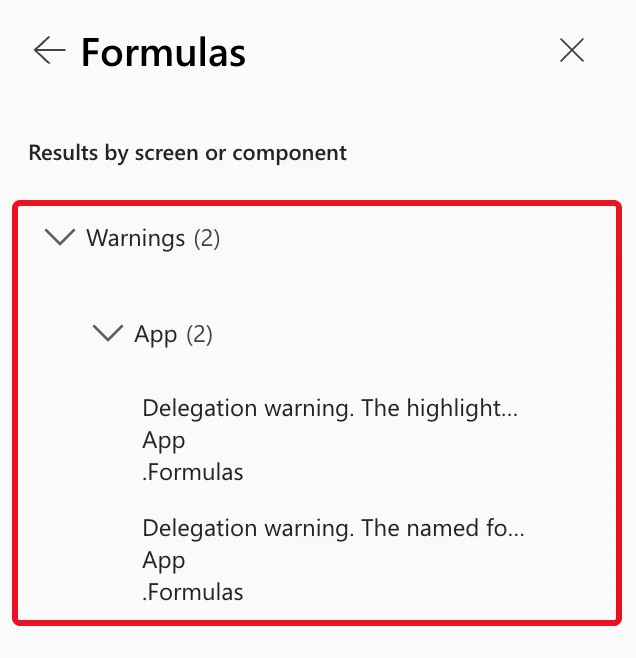
After the change it was the only one left, under the same MyApproverDepartments inside IsEmpty(...). Its Details:
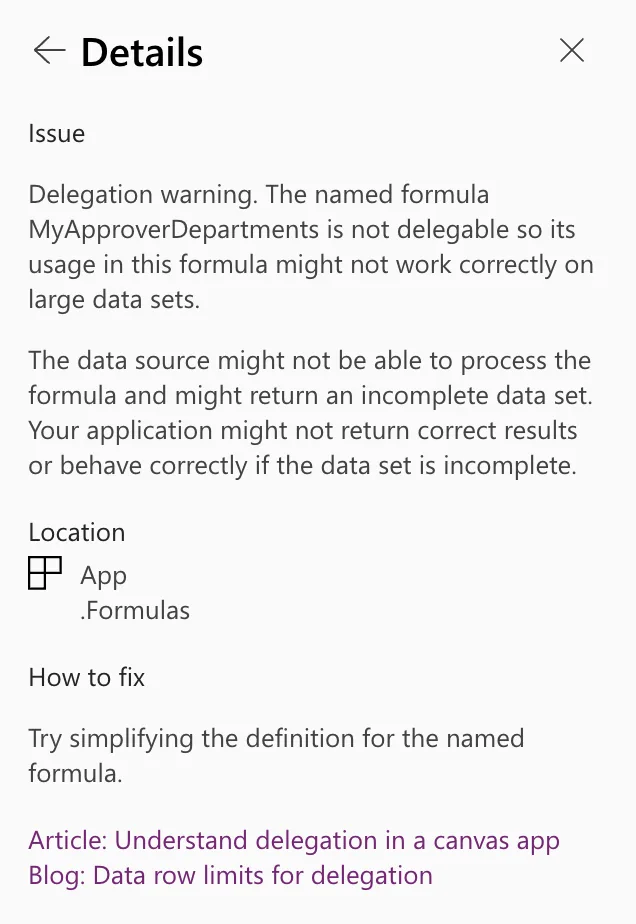
Issue
Delegation warning. The named formula MyApproverDepartments is not delegable so its usage in this formula might not work correctly on large data sets.

The data source might not be able to process the formula and might return an incomplete data set. Your application might not return correct results or behave correctly if the data set is incomplete.

Location
App
.Formulas

How to fix
Try simplifying the definition for the named formula.
What I Checked
- Microsoft's documentation. I searched Microsoft Learn for the message. The delegation articles explain delegation warnings in general, which functions delegate, and that With, Set and UpdateContext make collections. None of them describes this message.
- The App checker's advice. One suggestion only: Try simplifying the definition for the named formula.
- What the app needs from it. The Home screen uses
MyApproverDepartmentsfor one line of text, You approve overtime for Emergency Department., andIsApproverto show or hide two buttons. Neither needs a table.
Why It Happens
Microsoft doesn't document this warning, so this is a reading of the message itself. It says the named formula is not delegable: its result is a table built from a SharePoint list, and that table can't be handed to SharePoint. Wherever another formula uses it, here IsEmpty(MyApproverDepartments), Studio can't promise the table is complete, so it warns at that use. Fixing the filter inside didn't change the kind of result the named formula returned: still a table from the list. A named formula that returns text, a number or true/false leaves no table for the warning to be about.
The Fix: Return Text Instead of a Table
Join the matching department names into one text with Concat, and test the text with IsBlank:
MyApproverDepartments = With(
    {ActiveDepartments: Filter(Departments, IsActive = true)},
    Concat(Filter(ActiveDepartments, MyEmail in Approvers.Email), Department, ", ")
);
IsApprover = !IsBlank(MyApproverDepartments);
- Concat joins the Department column of the matching items with a comma and a space between them:
Emergency Department, orEmergency Department, Radiologyfor someone who approves two. With no matches, it returns empty text. How to Join Table Values into Text in Power Apps with Concat covers it. - IsBlank is true for empty text, so
!IsBlank(...)is true when the person approves at least one department. IsEmpty is for tables, and the result isn't a table any more: IsBlank vs IsEmpty in Power Apps (and the Blank Function).
Microsoft lists Concat among the functions that never delegate. That's fine here: it runs on ActiveDepartments, which With already holds in the app.
After the Fix
No squiggles in App.Formulas, and the App checker's Formulas category has no count:
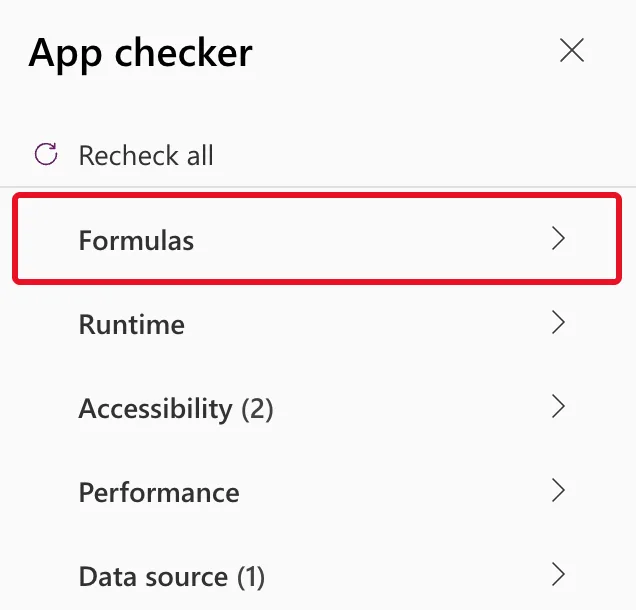
The Accessibility and Data source counts are about the Home screen's heading and a list no formula uses yet, which Part 5 covers. For the app's maker, who approves no department, MyApproverDepartments is empty and IsApprover is false. With the email of Olivia Bennett, the approver for the Emergency Department, it returns Emergency Department: How to Check If the Current User Is in a SharePoint Person Column in Power Apps.
Common Mistakes
| Mistake | What happens | Do this instead |
|---|---|---|
| Returning a whole table from a named formula only to test it | Every formula that uses it gets the warning | Return what the screens use: text, a number or true/false |
| Wrapping Concat around the first version, without With | The in warning comes back, because SharePoint still can't run in | Keep With, and put Concat around the second Filter |
Keeping !IsEmpty(...) after the result becomes text | IsEmpty expects a table | Use !IsBlank(...) |
Troubleshooting
| Symptom | Likely cause | Fix |
|---|---|---|
| The warning stays after the change | Another named formula still returns a table from the list | Check each named formula that reads a SharePoint list |
IsApprover is false for an approver | The department is inactive, or the email in Approvers differs from MyEmail | Check IsActive, and compare the two emails |
| The text shows a trailing comma | The separator was added with & instead of Concat's third argument | Pass ", " as Concat's separator argument |
FAQ
Is this warning an error?
No. The app runs and gives the right answer while the list is small. It's a warning about results on large data sets.
Why not set a variable in App.OnStart instead?
Microsoft's delegation overview says Set also makes a collection, so it would avoid the warning too. Named formulas are calculated when something needs them and stay up to date without code in App.OnStart, which is why the series uses them: How to Use Named Formulas in Power Apps (App.Formulas).
Does the list still have to be small?
Yes. The fix changes what the named formula returns, not what SharePoint delegates. The active departments are still downloaded up to the data row limit, 500 by default, which suits a list with one item per department.
Conclusion
The named formula … is not delegable so its usage in this formula might not work correctly on large data sets followed a named formula that returned a table built from a SharePoint list. Microsoft doesn't document it, and the App checker's advice, simplify the definition, worked: the named formula now returns the department names as text, and IsApprover tests that text with IsBlank.
Additional Resources
- Understand delegation in a canvas app: non-delegable functions such as Concat, and collections made by With.
- Concat and Concatenate functions: joining a column into text with a separator.
- Blank, Coalesce, IsBlank, and IsEmpty functions: IsBlank for empty text.
