Fixed: DbUpdateConcurrencyException "The database operation was expected to affect 1 row(s), but actually affected 0 row(s)" in EF Core

The database operation was expected to affect 1 row(s), but actually affected 0 row(s); data may have been modified or deleted since entities were loaded. EF Core expected its UPDATE to change one row, and MySQL said none. I got this message three different ways while building an API, and each needs a different answer. Telling them apart takes one look at the SQL.
What I Was Doing
In a .NET 10 Web API with EF Core 10, Oracle's MySQL provider and MySQL 9.7, products have a Version column configured with IsConcurrencyToken(). Clients send back the version they read, and an update tells EF Core to compare against it:
db.Entry(product).Property(p => p.Version).OriginalValue = request.Version;

// …set the new values…
product.Version = request.Version + 1;

await db.SaveChangesAsync(cancellationToken);
Two clients read a product at version 0. The first one saved, which moved it to version 1. Then the second one saved, still sending version 0.
What I Expected
That the second save wouldn't overwrite the first. That's the point of the token, and it's what happened, but I hadn't decided yet what the client should see.
What I Got
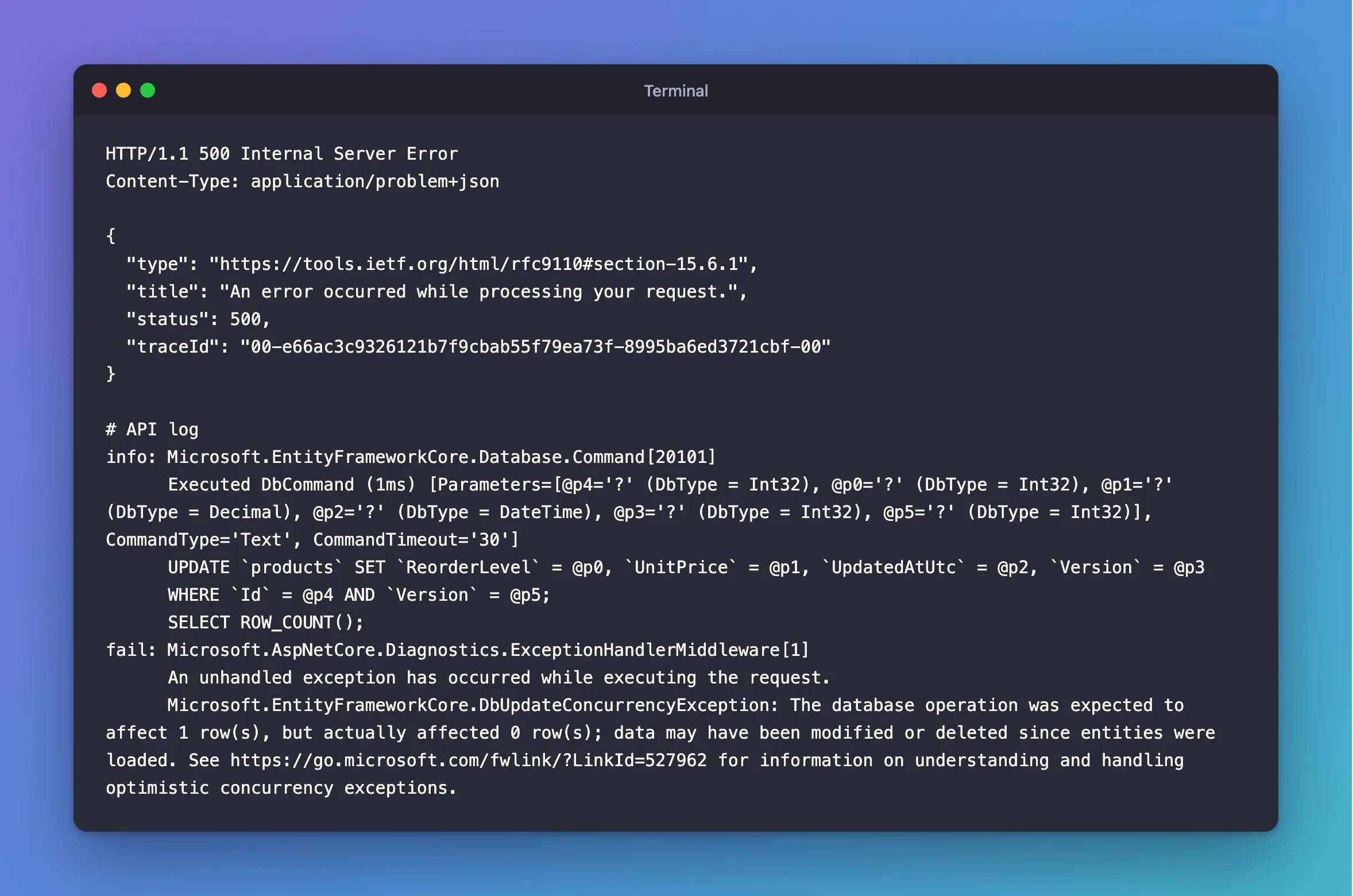
HTTP/1.1 500 Internal Server Error
Content-Type: application/problem+json

{
  "type": "https://tools.ietf.org/html/rfc9110#section-15.6.1",
  "title": "An error occurred while processing your request.",
  "status": 500,
  "traceId": "00-e66ac3c9326121b7f9cbab55f79ea73f-8995ba6ed3721cbf-00"
}
info: Microsoft.EntityFrameworkCore.Database.Command[20101]
      Executed DbCommand (1ms) [Parameters=[@p4='?' (DbType = Int32), @p0='?' (DbType = Int32), @p1='?' (DbType = Decimal), @p2='?' (DbType = DateTime), @p3='?' (DbType = Int32), @p5='?' (DbType = Int32)], CommandType='Text', CommandTimeout='30']
      UPDATE `products` SET `ReorderLevel` = @p0, `UnitPrice` = @p1, `UpdatedAtUtc` = @p2, `Version` = @p3
      WHERE `Id` = @p4 AND `Version` = @p5;
      SELECT ROW_COUNT();
fail: Microsoft.AspNetCore.Diagnostics.ExceptionHandlerMiddleware[1]
      An unhandled exception has occurred while executing the request.
      Microsoft.EntityFrameworkCore.DbUpdateConcurrencyException: The database operation was expected to affect 1 row(s), but actually affected 0 row(s); data may have been modified or deleted since entities were loaded. See https://go.microsoft.com/fwlink/?LinkId=527962 for information on understanding and handling optimistic concurrency exceptions.
What I Checked
The SELECT ROW_COUNT(). Every UPDATE and DELETE from SaveChangesAsync comes with it. EF Core reads the number and compares it with how many rows it meant to change. The WHERE clause shows what had to match: Id and Version. The row exists, but with version 1, so nothing matched.
What the documentation says. EF Core's concurrency page describes this: "if a concurrent update occurred, the UPDATE fails to find any matching rows and reports that zero were affected. As a result, EF Core's SaveChanges() throws a DbUpdateConcurrencyException, which the application must catch and handle appropriately."
Whether it needs a concurrency token. No. I got the same exception from two other situations, on a table with no token at all. Here's the categories table, where the row was deleted between loading and saving:
info: Microsoft.EntityFrameworkCore.Database.Command[20101]
      Executed DbCommand (1ms) [Parameters=[@p1='?' (DbType = Int32), @p0='?' (Size = 100)], CommandType='Text', CommandTimeout='30']
      UPDATE `categories` SET `Name` = @p0
      WHERE `Id` = @p1;
      SELECT ROW_COUNT();
fail: Microsoft.AspNetCore.Diagnostics.ExceptionHandlerMiddleware[1]
      An unhandled exception has occurred while executing the request.
      Microsoft.EntityFrameworkCore.DbUpdateConcurrencyException: The database operation was expected to affect 1 row(s), but actually affected 0 row(s); data may have been modified or deleted since entities were loaded. See https://go.microsoft.com/fwlink/?LinkId=527962 for information on understanding and handling optimistic concurrency exceptions.
And here's Update on an object I made myself, for an ID that doesn't exist:
var updated = new Category { Id = id, Name = "Renamed without loading", CreatedAtUtc = createdAt };
db.Categories.Update(updated);
await db.SaveChangesAsync();
info: Microsoft.EntityFrameworkCore.Database.Command[20101]
      Executed DbCommand (1ms) [Parameters=[@p2='?' (DbType = Int32), @p0='?' (DbType = DateTime), @p1='?' (Size = 100)], CommandType='Text', CommandTimeout='30']
      UPDATE `categories` SET `CreatedAtUtc` = @p0, `Name` = @p1
      WHERE `Id` = @p2;
      SELECT ROW_COUNT();
fail: Microsoft.AspNetCore.Diagnostics.ExceptionHandlerMiddleware[1]
      An unhandled exception has occurred while executing the request.
      Microsoft.EntityFrameworkCore.DbUpdateConcurrencyException: The database operation was expected to affect 1 row(s), but actually affected 0 row(s); data may have been modified or deleted since entities were loaded. See https://go.microsoft.com/fwlink/?LinkId=527962 for information on understanding and handling optimistic concurrency exceptions.
Why It Happens
SaveChangesAsync always checks how many rows each statement changed. Zero means the row it meant to change isn't there in the state it expected:
| What happened | How to recognise it |
|---|---|
| Someone changed the row, and the token no longer matches | Version = @p in the WHERE, and the row still exists |
| Someone deleted the row after you loaded it | Only Id = @p in the WHERE, and you loaded it first |
| The row never existed | You called Update or Remove on an object you made yourself |
One more cause to know about on MySQL: a connection string with UseAffectedRows=True makes ROW_COUNT() report changed rows, not matched ones, so a statement that writes the same values reports 0. Oracle's connector defaults to false, and What UseAffectedRows Does shows the difference.
The Fix
Catch it, and answer what it means for your API. For a stale token, that's 409 Conflict:
try
{
    await db.SaveChangesAsync(cancellationToken);
}
catch (DbUpdateConcurrencyException)
{
    return TypedResults.Problem(
        title: "Someone else changed this product.",
        detail: "Read the product again to get its current values and version, then repeat your change.",
        statusCode: StatusCodes.Status409Conflict);
}
Catch it before any catch (DbUpdateException), because DbUpdateConcurrencyException is a kind of DbUpdateException.
For the third case, don't call Update on an object you made. Load the row first, answer 404 if it isn't there, and change the loaded object:
var category = await db.Categories
    .FirstOrDefaultAsync(c => c.Id == id, cancellationToken);

if (category is null)
{
    return TypedResults.NotFound();
}

category.Name = request.Name.Trim();
After the Fix
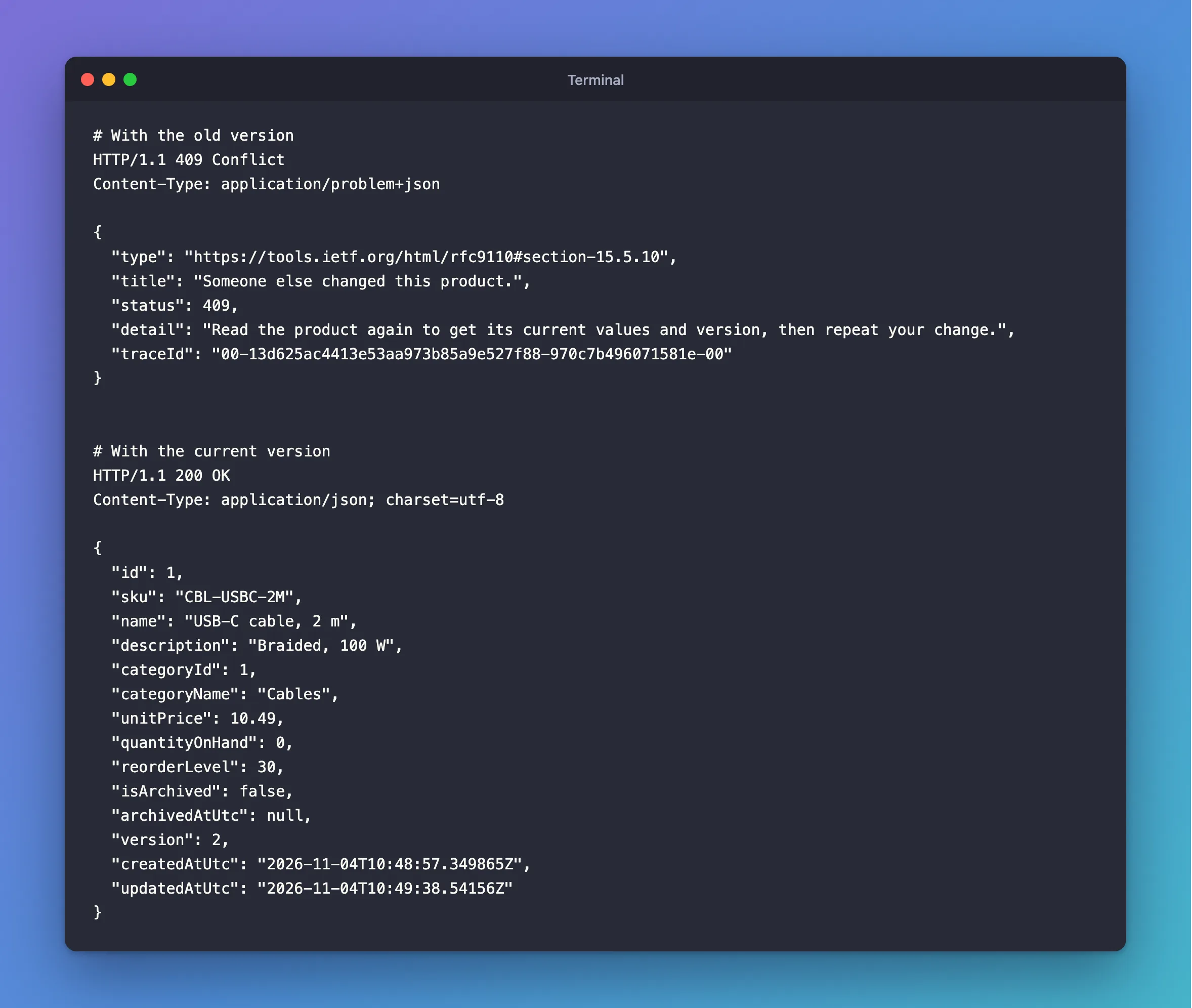
The same stale request:
HTTP/1.1 409 Conflict
Content-Type: application/problem+json

{
  "type": "https://tools.ietf.org/html/rfc9110#section-15.5.10",
  "title": "Someone else changed this product.",
  "status": 409,
  "detail": "Read the product again to get its current values and version, then repeat your change.",
  "traceId": "00-13d625ac4413e53aa973b85a9e527f88-970c7b496071581e-00"
}
The stored row is unchanged, and when the client reads it again and sends the new version, the update goes through:
HTTP/1.1 200 OK
Content-Type: application/json; charset=utf-8

{
  "id": 1,
  "sku": "CBL-USBC-2M",
  "name": "USB-C cable, 2 m",
  "description": "Braided, 100 W",
  "categoryId": 1,
  "categoryName": "Cables",
  "unitPrice": 10.49,
  "quantityOnHand": 0,
  "reorderLevel": 30,
  "isArchived": false,
  "archivedAtUtc": null,
  "version": 2,
  "createdAtUtc": "2026-11-04T10:48:57.349865Z",
  "updatedAtUtc": "2026-11-04T10:49:38.54156Z"
}
Common Mistakes
| Mistake | What happens | Do this instead |
|---|---|---|
| Catching it and saving again with no checks | The other person's change is overwritten after all | Ask the client to read again |
Answering 500 | A normal event looks like a server failure | Answer 409 |
catch (DbUpdateException) above it | Your duplicate-key message answers a concurrency conflict | Catch the concurrency one first |
Calling Update on a new object without checking | A missing row gives this exception instead of a 404 | Load first, or use ExecuteUpdateAsync and check its count |
Adding UseAffectedRows=True to the connection string | Saving identical values throws this exception | Leave it at the default |
Troubleshooting
| Symptom | Likely cause | Fix |
|---|---|---|
| The exception on a table with a token, and the row exists | A stale version | Answer 409 |
| The exception, and the row is gone | Deleted between load and save | Answer 404 or 409 |
The exception on Update of a new object | No row has that ID | Load it first |
| The exception when nothing else is writing, and the values are the same | UseAffectedRows=True in the connection string | Remove it |
FAQ
Is this an error in my code?
Often not. On a table with a token, it's the feature working: two people changed the same row, and it stopped one of them from overwriting the other.
Should I retry automatically?
Only if your code can recompute the change from fresh values. EF Core's page shows that pattern. For a person editing a form, tell them, so they can decide.
Does EnableRetryOnFailure retry this?
No. A concurrency conflict isn't a temporary error, and the exception reached the endpoint on the first attempt here. With Oracle's provider, retries need a list of error numbers anyway.
Conclusion
"Expected to affect 1 row(s), but actually affected 0 row(s)" means ROW_COUNT() came back as 0: the row changed, disappeared, or never existed. The WHERE clause in the log tells you which. On a table with a concurrency token, answer 409 and let the client read again. Elsewhere, load the row first and answer 404 when it's missing.
Additional Resources
- Handling Concurrency Conflicts — tokens and how to resolve conflicts.
- DbUpdateConcurrencyException Class — the API reference.
