Fixed: "Data too long for column 'Name' at row 2" When Applying an EF Core Migration to MySQL

EF Core warned me that a migration "may result in the loss of data", and on MySQL that warning turned into an error: "Data too long for column 'Name' at row 2". Worse, the migration had already changed one column before it failed. This post shows how to find the values that don't fit, see exactly what the failed migration did, fix the data, and apply the migration again.
What I Was Doing
In a .NET 10 solution with EF Core 10 and Oracle's MySQL provider, the products table had been created without maximum lengths, so its text columns were longtext. I gave them sensible limits in the model:
modelBuilder.Entity<Product>().Property(p => p.Sku).HasMaxLength(32);
modelBuilder.Entity<Product>().Property(p => p.Name).HasMaxLength(200);
and created the migration:
dotnet ef migrations add SetMaxLengths --project src/Dewiride.Inventory.Data --startup-project src/Dewiride.Inventory.Api
Build started...
Build succeeded.
An operation was scaffolded that may result in the loss of data. Please review the migration for accuracy.
Done. To undo this action, use 'ef migrations remove'
The table held real-looking data, including one product with a 246-character marketing name, longer than the new 200-character limit. Then I applied the migration:
dotnet ef database update --project src/Dewiride.Inventory.Data --startup-project src/Dewiride.Inventory.Api
What I Expected
The three columns changed to varchar, and Done.
What I Got
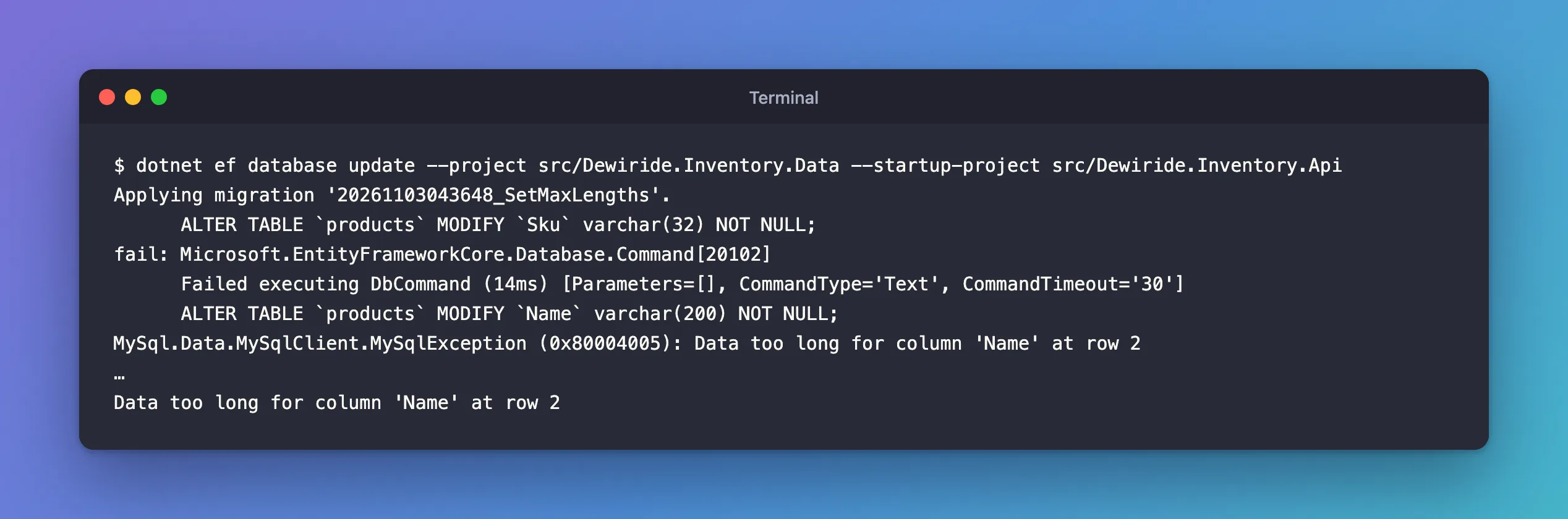
Applying migration '20261103043648_SetMaxLengths'.
      ALTER TABLE `products` MODIFY `Sku` varchar(32) NOT NULL;
fail: Microsoft.EntityFrameworkCore.Database.Command[20102]
      Failed executing DbCommand (14ms) [Parameters=[], CommandType='Text', CommandTimeout='30']
      ALTER TABLE `products` MODIFY `Name` varchar(200) NOT NULL;
MySql.Data.MySqlClient.MySqlException (0x80004005): Data too long for column 'Name' at row 2
…
Data too long for column 'Name' at row 2
What I Checked
Which rows are too long? The message says "row 2", which is the second row MySQL processed, not an Id. Search for the values instead:
SELECT Id, Sku, CHAR_LENGTH(Name) AS NameLength FROM products WHERE CHAR_LENGTH(Name) > 200;
+----+-------------+------------+
| Id | Sku         | NameLength |
+----+-------------+------------+
|  4 | ADP-HDMI-02 |        246 |
+----+-------------+------------+
1 row in set (0.000 sec)
CHAR_LENGTH counts characters, which is what varchar(200) limits.
What did the failed migration already do? The log shows that the Sku statement ran before the Name statement failed. The table and EF Core's history table confirm it:
SHOW COLUMNS FROM products WHERE Field IN ('Sku', 'Name');
SELECT MigrationId FROM __EFMigrationsHistory;
+-------+-------------+------+-----+---------+-------+
| Field | Type        | Null | Key | Default | Extra |
+-------+-------------+------+-----+---------+-------+
| Sku   | varchar(32) | NO   |     | NULL    |       |
| Name  | longtext    | NO   |     | NULL    |       |
+-------+-------------+------+-----+---------+-------+
2 rows in set (0.003 sec)

+------------------------------------+
| MigrationId                        |
+------------------------------------+
| 20261103043401_CreateCatalogTables |
| 20261103043533_LowercaseTableNames |
+------------------------------------+
2 rows in set (0.000 sec)
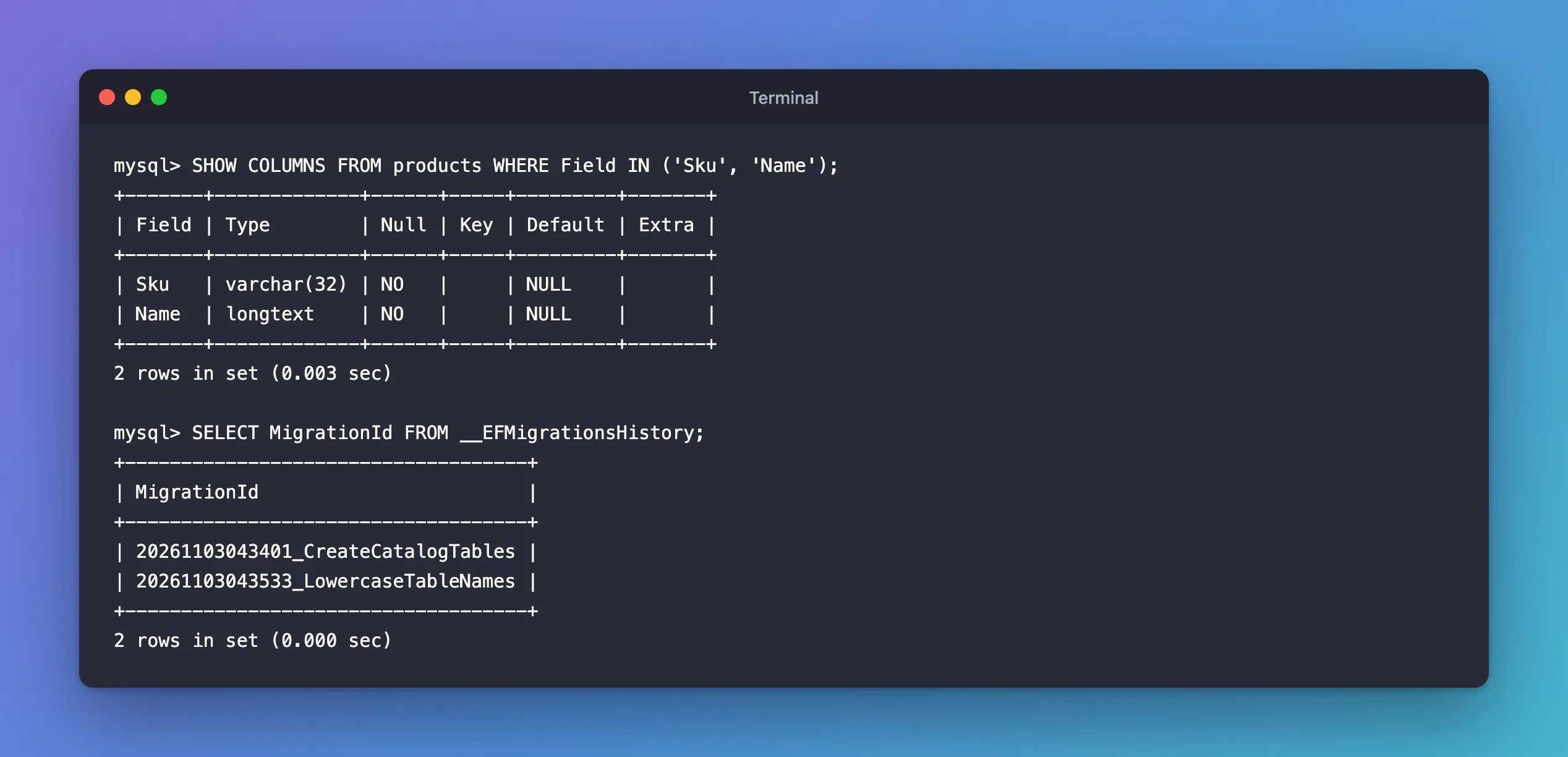
Half-applied: Sku is already varchar(32), Name is still longtext, and the migration isn't recorded as applied.
Why It Happens
Two MySQL behaviours meet here.
Strict mode refuses to cut text. MySQL 9.7 runs in strict SQL mode by default, and the manual's CHAR and VARCHAR page explains what that means for a column that gets shorter: "if strict mode is enabled, values that exceed the column length are not stored, and an error results." Without strict mode, MySQL would have silently cut the name at 200 characters. The error reference lists it as "Error number: 1406; Symbol: ER_DATA_TOO_LONG; SQLSTATE: 22001".
Schema changes can't be rolled back. EF Core wraps a migration in a transaction, but MySQL's ALTER TABLE ends any open transaction. The manual's atomic DDL page is blunt: "Atomic DDL is not transactional DDL. DDL statements, atomic or otherwise, implicitly end any transaction that is active in the current session". So the Sku change stayed when the Name change failed, and the history row, which comes last, was never written.
That's what EF Core's warning was about: shortening a column can lose data. On MySQL, in strict mode, it fails instead of losing it.
The Fix
1. Fix the long values. Decide with whoever owns the data what each one should become; don't just cut them. The 246-character name became a short product name:
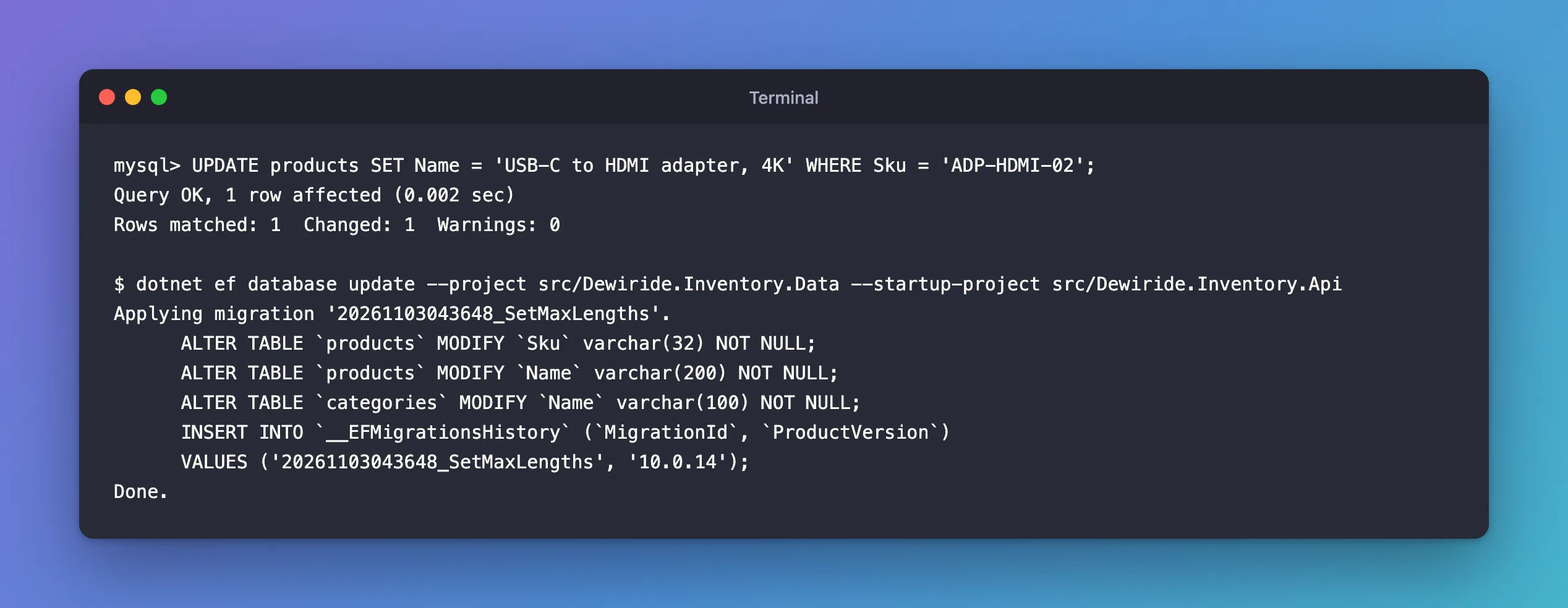
UPDATE products SET Name = 'USB-C to HDMI adapter, 4K' WHERE Sku = 'ADP-HDMI-02';
Query OK, 1 row affected (0.002 sec)
Rows matched: 1  Changed: 1  Warnings: 0
If long values are legitimate, the limit is wrong instead: raise HasMaxLength, remove the unapplied migration with dotnet ef migrations remove, and add it again.
2. Apply the migration again. It's not in the history, so EF Core runs it from the start, including the Sku statement that already ran. Changing a column to the type it already has is harmless:
dotnet ef database update --project src/Dewiride.Inventory.Data --startup-project src/Dewiride.Inventory.Api
Applying migration '20261103043648_SetMaxLengths'.
      ALTER TABLE `products` MODIFY `Sku` varchar(32) NOT NULL;
      ALTER TABLE `products` MODIFY `Name` varchar(200) NOT NULL;
      ALTER TABLE `categories` MODIFY `Name` varchar(100) NOT NULL;
      INSERT INTO `__EFMigrationsHistory` (`MigrationId`, `ProductVersion`)
      VALUES ('20261103043648_SetMaxLengths', '10.0.14');
Done.
After the Fix
All three columns are varchar with the new limits, the migration is recorded, and no data was cut. Next time, run the length check from What I Checked before applying a migration that shortens a column: it turns a half-applied migration into a five-second query.
Common Mistakes
| Mistake | What happens | Do this instead |
|---|---|---|
| Ignoring "An operation was scaffolded that may result in the loss of data" | The migration fails, or cuts data where strict mode is off | Read the migration and check the data first |
| Turning off strict mode to make it pass | Values are cut silently | Fix the data or the limit |
Reading "row 2" as Id = 2 | You look at the wrong row | Search with CHAR_LENGTH(...) > limit |
| Editing the history table to skip the migration | The database and the model disagree | Apply the migration properly |
Troubleshooting
| Symptom | Likely cause | Fix |
|---|---|---|
| The rerun fails on another column | That column has long values too | Run the length check for every column the migration shortens |
| The rerun fails on a statement that already ran | Some changes can't be run twice, unlike MODIFY | Undo that statement by hand, or edit the migration, then rerun |
Data too long when saving from the app | A value is longer than the column | Validate lengths in the app with the same limits as the model |
FAQ
Why didn't EF Core roll back the Sku change?
It couldn't: MySQL commits each ALTER TABLE on its own. SQL Server can roll back schema changes inside a transaction; MySQL can't.
Does CHAR_LENGTH or LENGTH matter?
CHAR_LENGTH counts characters, LENGTH counts bytes. A varchar(200) limits characters, so use CHAR_LENGTH. With utf8mb4, one character can be up to 4 bytes.
Conclusion
"Data too long for column 'Name' at row 2" during an EF Core migration means MySQL, in strict mode, refused to shorten a column that holds longer values. Because MySQL can't roll back ALTER TABLE, the statements before the failure stay applied while the migration isn't recorded. Find the long values with CHAR_LENGTH, fix them or raise the limit, and run dotnet ef database update again.
Additional Resources
- The CHAR and VARCHAR Types — what strict mode does with values that don't fit.
- Atomic Data Definition Statement Support — why DDL can't be rolled back.
- Managing Migrations — reviewing generated migrations.
