Fixed: contains() Returns False for a SharePoint Number in Power Automate

My flow checked whether a SharePoint Number column was in an array of list item IDs with contains(), and it never matched: the run showed the array as [2] and the number as 2, and contains() still said false. equals() matched the same two values. Converting the number with int(string(...)) fixed it.
What I Was Doing
I was building Get Waiting Approvals, the flow behind the Waiting for Approval screen of the Overtime Timesheet app. It works out which departments the person running it approves, and keeps their list item IDs in an array variable, MyDepartmentIds (How to Add Items to an Array Variable in Power Automate).
Each overtime entry stores its department's ID in DepartmentId, a SharePoint Number column with 0 decimal places. A Filter array action named Entries waiting for the caller keeps the pending entries whose department is in the array and that the caller didn't write (How to Filter an Array by Two Conditions in Power Automate):
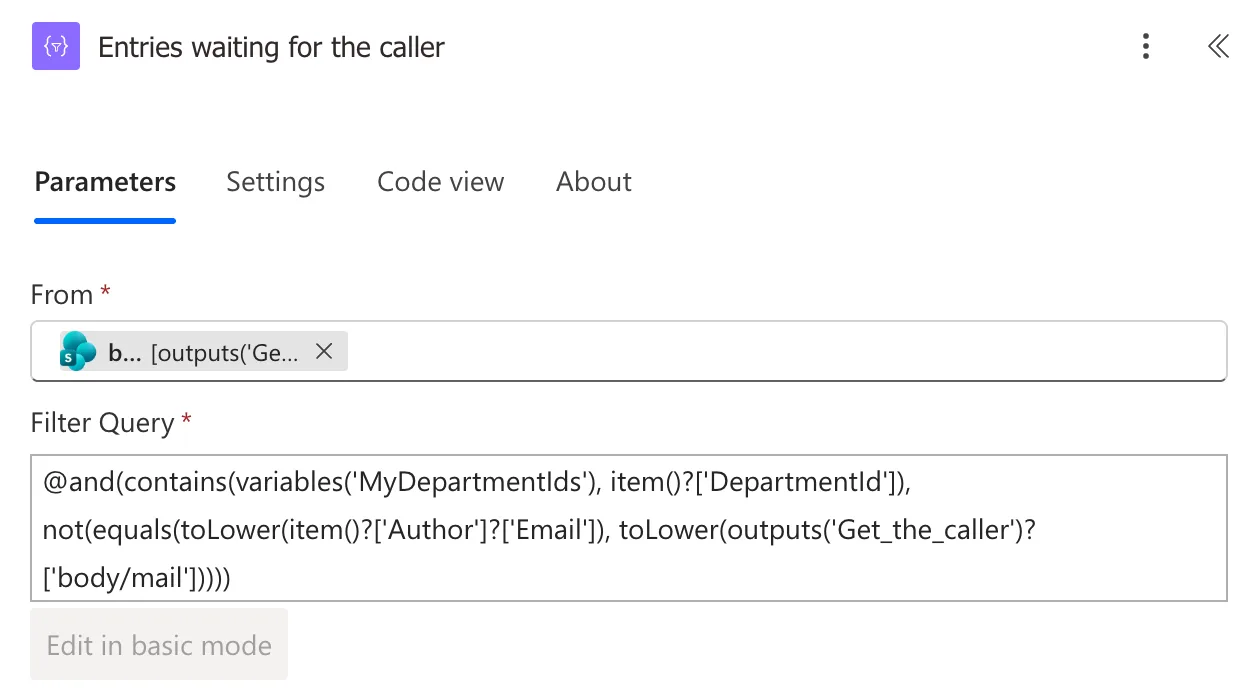
@and(contains(variables('MyDepartmentIds'), item()?['DepartmentId']), not(equals(toLower(item()?['Author']?['Email']), toLower(outputs('Get_the_caller')?['body/mail']))))
What I Expected
Daniel approves Radiology. Two Radiology entries were pending: one of mine and one of his own. His screen should have listed mine.
What I Got
His screen said Nothing is waiting for your decision. Select Refresh to check again. The flow's run had succeeded, and its Filter array had returned an empty array, [].
What I Checked
The run's inputs. In the run, Get the caller was Daniel. MyDepartmentIds held [2], the ID of Radiology. The pending entries were IDs 6 and 9 with DepartmentId 1, and IDs 10 and 11 with DepartmentId 2. Entry 10 matched both conditions on paper.
Each piece of the condition, with a temporary action. I added a Select named Debug department check after the pending entries, with From set to them and Map, in text mode, set to one expression that puts several values side by side (How to Keep Several Fields from Each Item with Select in Power Automate).
My first try used createObject(), a function I expected to exist. It doesn't: the run failed with The template function 'createObject' is not defined or not valid. createArray() does exist, so I used it instead:
createArray(item()?['ID'], item()?['DepartmentId'], contains(variables('MyDepartmentIds'), item()?['DepartmentId']), contains(createArray(2), item()?['DepartmentId']), variables('MyDepartmentIds'))
The output, one row per entry: the ID, the department ID, contains() against the variable, contains() against an array I built with a literal 2, and the variable:
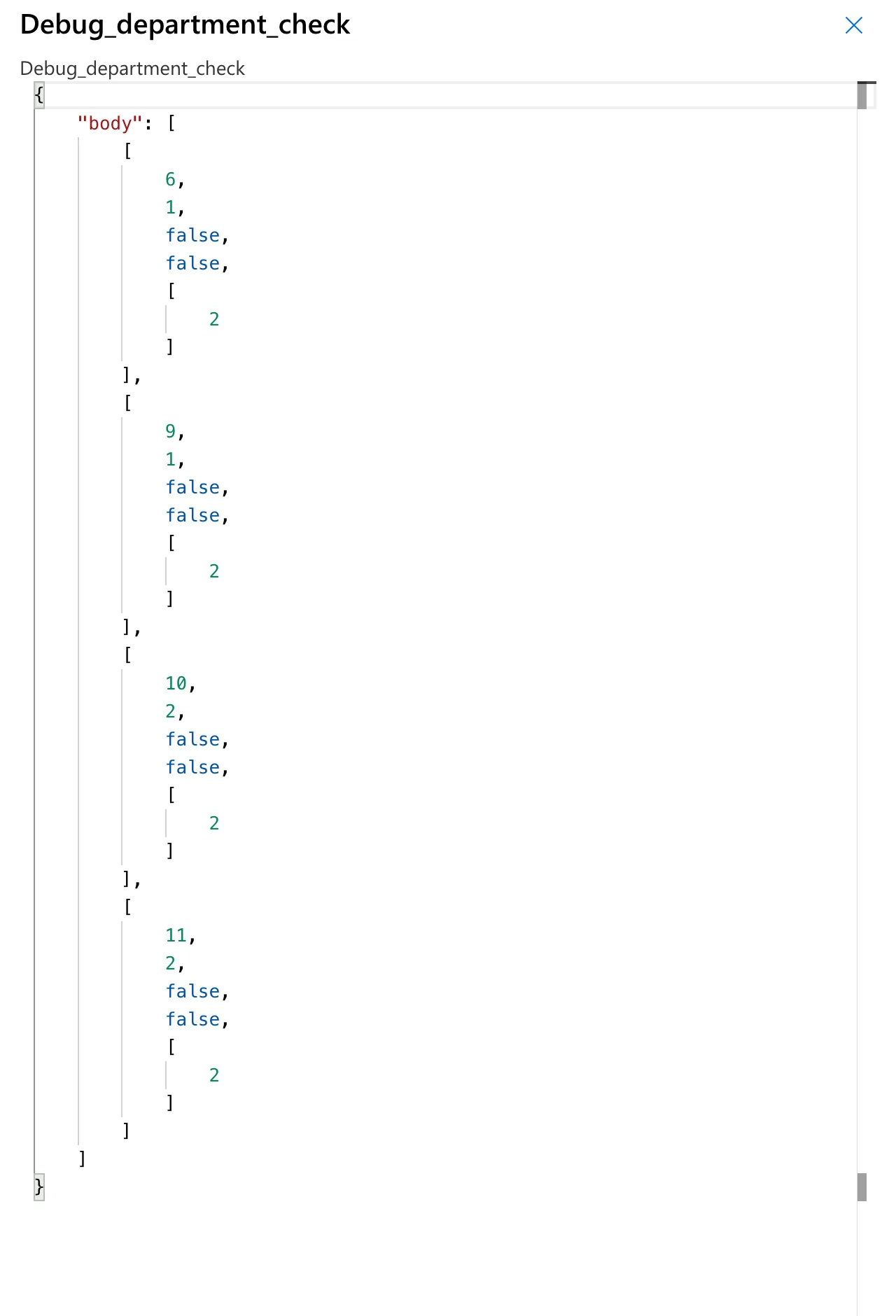
Entries 10 and 11 have DepartmentId 2, and contains() was false even against createArray(2). So the variable wasn't the problem: contains() didn't find this value in an array of 2s.
Then I compared the same value with equals() and looked at it as text:
createArray(item()?['ID'], item()?['DepartmentId'], string(item()?['DepartmentId']), equals(item()?['DepartmentId'], 2), isInt(string(item()?['DepartmentId'])), variables('MyDepartmentIds'))
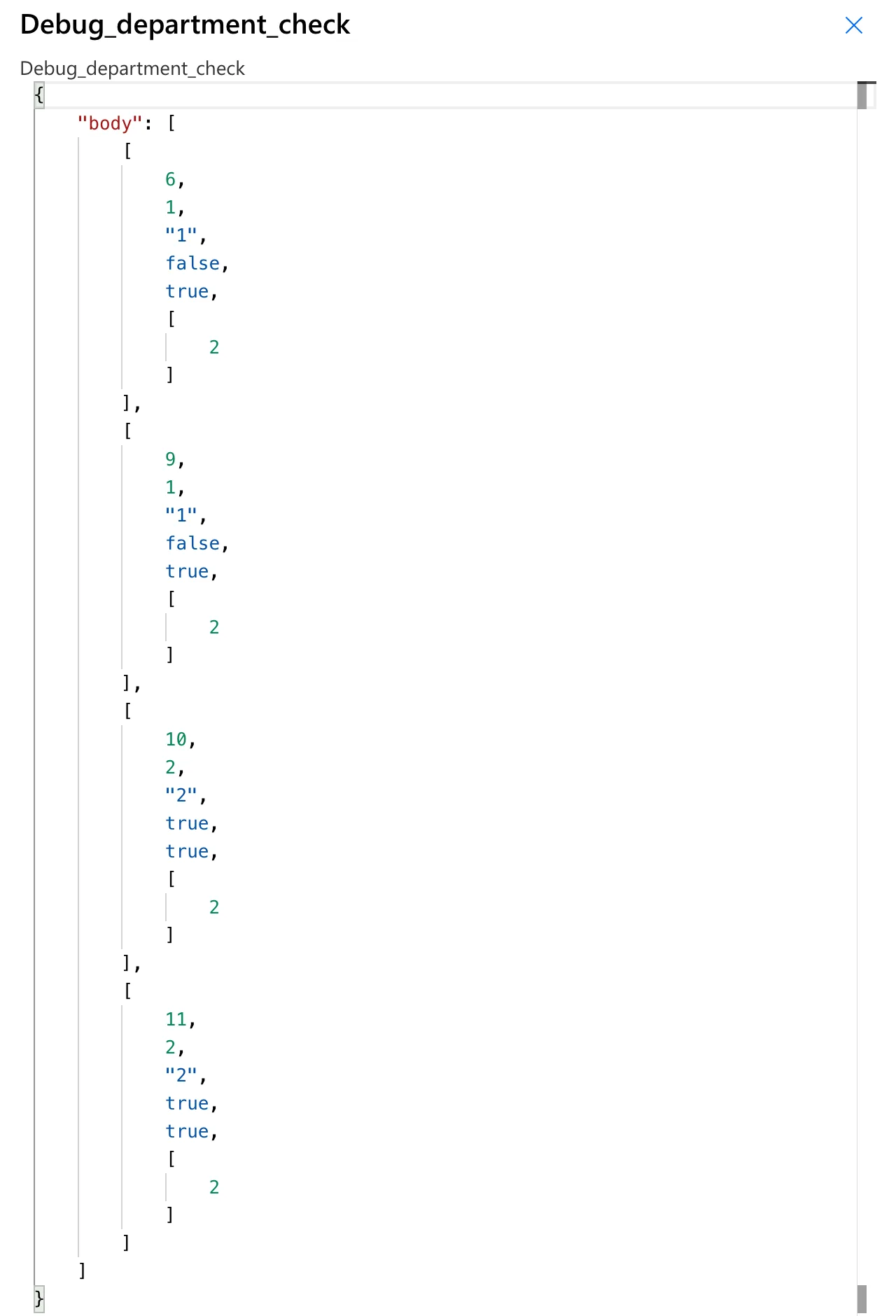
equals(item()?['DepartmentId'], 2) was true for entries 10 and 11, the text version was "2", and isInt() said that text is a whole number.
Microsoft's documentation. The functions reference says:
contains()checks whether a collection has a specific item, and on an array it looks for a value;equals()checks whether both values, expressions, or objects are equivalent;strongEquals()accepts a mix of integer and floating-point numbers, so the expression language has separate types for whole numbers (integers) and decimals (floats);int()converts the string version for an integer to an integer, andstring(10)returns"10".
The reference also lists the inputs of createArray() as Any, but not mixed. My diagnostic mixed numbers, text, true or false values and arrays, and the run returned it as shown.
Why It Happens
The documentation doesn't say how contains() compares numbers of different types. My reading of the evidence: a SharePoint Number column can hold decimals, so the value reaches the flow as a decimal number that's displayed as 2. equals() treats it as equivalent to the whole number 2, and contains() doesn't treat it as the same item. Turning the value into text and back into a whole number gives contains() a value of the same type as the IDs in the array.
The Fix
-
Convert the number before comparing it. In Entries waiting for the caller, I changed the first condition to:
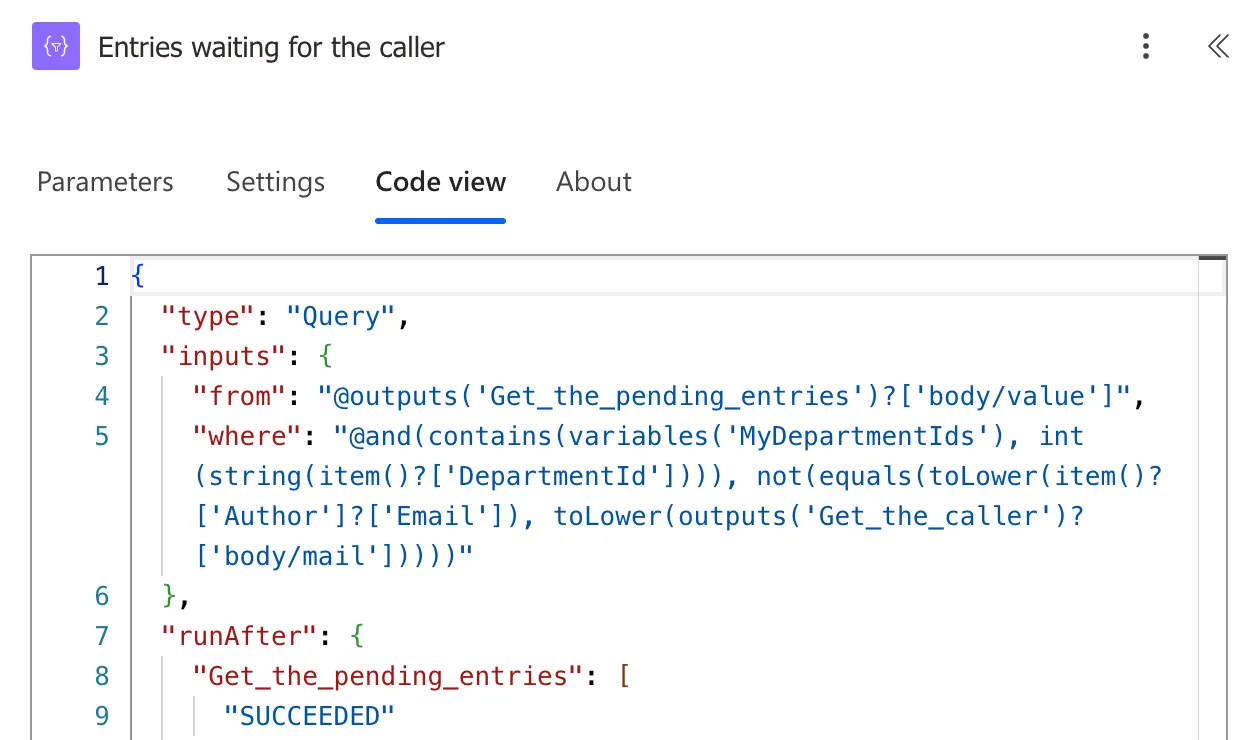
Entries waiting for the caller → Filter Query@and(contains(variables('MyDepartmentIds'), int(string(item()?['DepartmentId']))), not(equals(toLower(item()?['Author']?['Email']), toLower(outputs('Get_the_caller')?['body/mail']))))string()turns the number into"2", andint(), which takes text, turns that into the whole number2. When I edited the expression in place and selected Update, Code view still showed the old one, so I removed the expression with its × and inserted the new one. -
Remove the diagnostic action. On Debug department check, I selected More commands (…) > Delete, and OK to confirm.
-
Publish the flow (How to Save a Draft and Publish a Flow in Power Automate).
Code view of the fixed action:
After the Fix
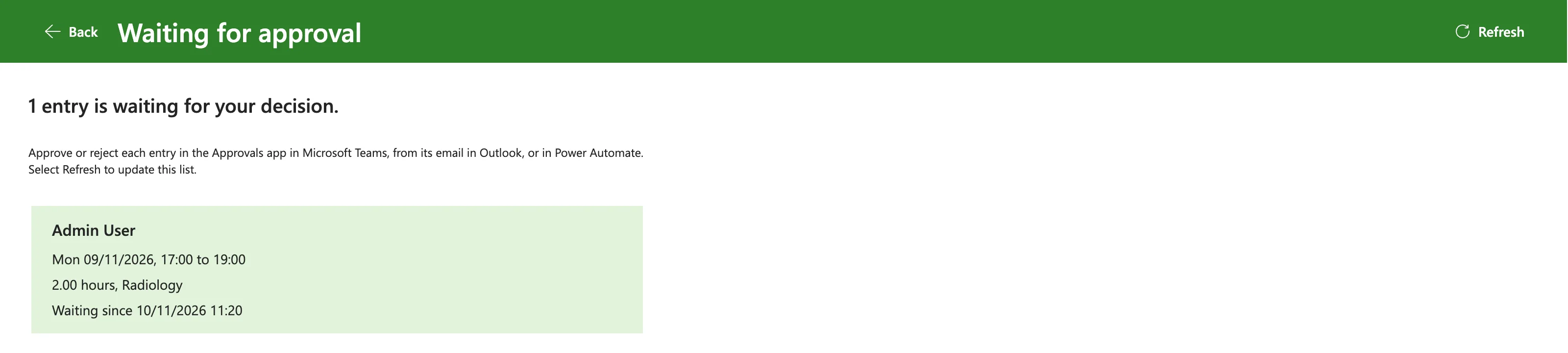
Daniel selected Refresh, and the screen listed my Radiology entry. His own entry stayed off the list, because the second condition leaves out what the caller wrote:
Common Mistakes
| Mistake | What happens | Do this instead |
|---|---|---|
| Trusting how the run shows a number | 2 in the run doesn't say whether it's a whole number or a decimal | Convert before comparing |
| Debugging the whole condition at once | You can't tell which part fails | Put each part side by side with createArray() |
Using createObject() | The template function 'createObject' is not defined or not valid | createArray() |
| Leaving the diagnostic action in the flow | It runs on every call | Delete it once you have the answer |
Troubleshooting
| Symptom | Likely cause | Fix |
|---|---|---|
Filter array returns [] though items look like they match | One condition is false | Show each part with a diagnostic Select |
contains() is false, equals() is true for the same number | A SharePoint Number compared with whole numbers | int(string(...)) |
int() fails on a number | int() takes text | Wrap the value in string() first |
| The expression didn't change after Update | The edit didn't reach the action | Check Code view; remove and insert the expression again |
FAQ
Would equals() work instead of contains()?
For one ID, yes. With an array of IDs, contains() checks them all at once, which is why the flow uses it.
Does this affect the ID column too?
The array held list item IDs, and contains() matched them once the Number column was converted. The conversion is needed on the Number column's side.
Will int() break on decimal values?
int() converts text that's a whole number. DepartmentId has 0 decimal places, so its text is always a whole number. A column that holds decimals needs a different comparison.
Conclusion
contains() didn't find a SharePoint Number value in an array of list item IDs, though equals() matched it. A temporary Select with createArray() showed each part of the condition, and int(string(item()?['DepartmentId'])) made the comparison work.
Additional Resources
- Reference guide to functions in expressions:
contains(),equals(),strongEquals(),int(),string()andcreateArray(). - Use data operations in Power Automate: the Filter array and Select actions.
