Fixed: cannot load such file -- bigdecimal (LoadError)

A one-line Ruby script that used the humanize gem stopped with cannot load such file -- bigdecimal (LoadError) on Ruby 4.0. Since Ruby 3.4, bigdecimal no longer comes as a default gem, and under Bundler a program can only load gems the project lists. Adding bigdecimal to the Gemfile fixes it.
What I Was Doing
I was writing How to Add a Gem to a Ruby Project with bundle add, and my first choice of example gem was humanize, which spells numbers out in words. I created a project and added the gem:
mkdir number-words
cd number-words
bundle init
bundle add humanize
Then I wrote main.rb:
require 'humanize'

puts 42.humanize
And ran it with Bundler:
bundle exec ruby main.rb
What I Expected
forty-two
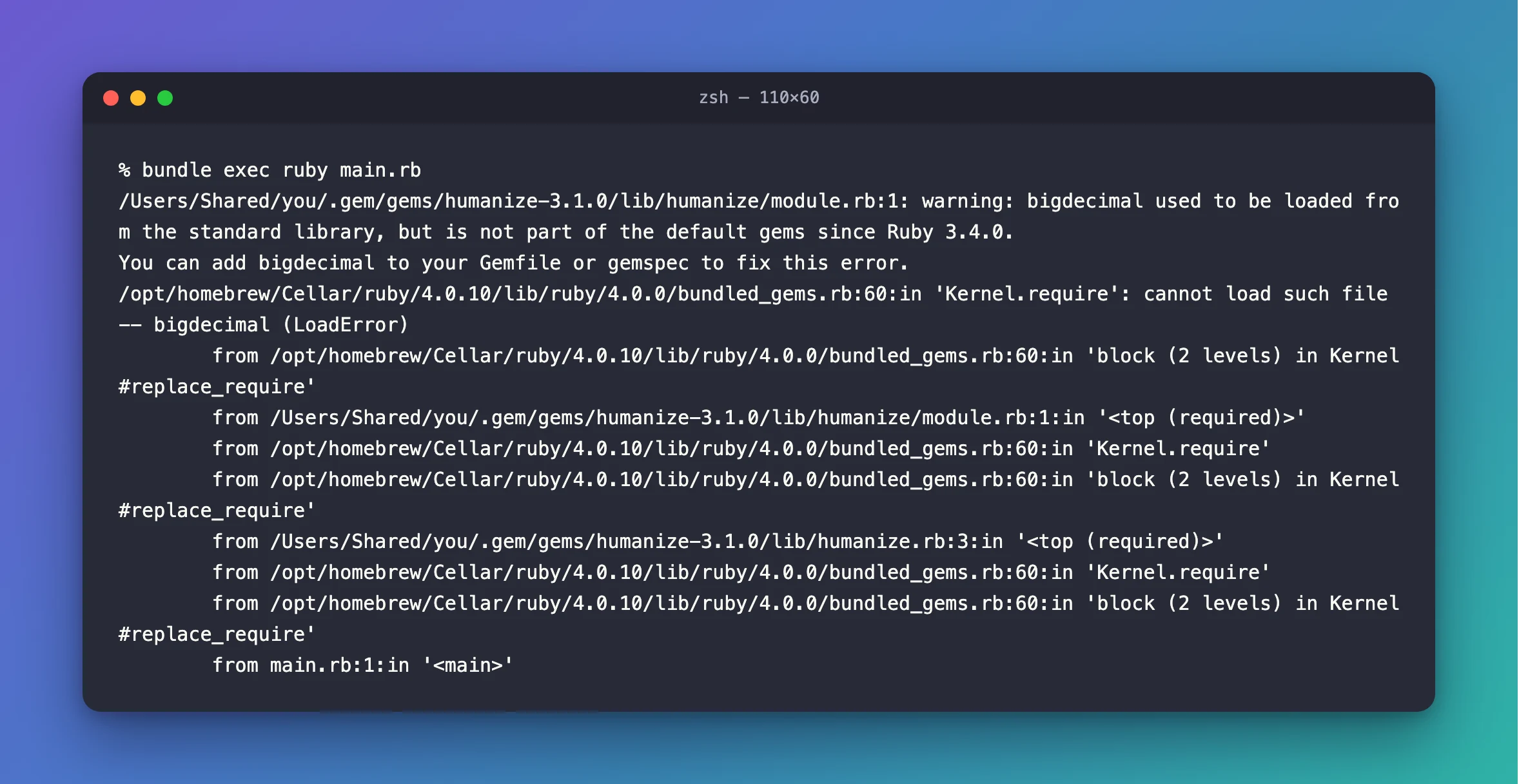
What I Got
/Users/Shared/you/.gem/gems/humanize-3.1.0/lib/humanize/module.rb:1: warning: bigdecimal used to be loaded from the standard library, but is not part of the default gems since Ruby 3.4.0.
You can add bigdecimal to your Gemfile or gemspec to fix this error.
/opt/homebrew/Cellar/ruby/4.0.10/lib/ruby/4.0.0/bundled_gems.rb:60:in 'Kernel.require': cannot load such file -- bigdecimal (LoadError)
        from /opt/homebrew/Cellar/ruby/4.0.10/lib/ruby/4.0.0/bundled_gems.rb:60:in 'block (2 levels) in Kernel#replace_require'
        from /Users/Shared/you/.gem/gems/humanize-3.1.0/lib/humanize/module.rb:1:in '<top (required)>'
        from /opt/homebrew/Cellar/ruby/4.0.10/lib/ruby/4.0.0/bundled_gems.rb:60:in 'Kernel.require'
        from /opt/homebrew/Cellar/ruby/4.0.10/lib/ruby/4.0.0/bundled_gems.rb:60:in 'block (2 levels) in Kernel#replace_require'
        from /Users/Shared/you/.gem/gems/humanize-3.1.0/lib/humanize.rb:3:in '<top (required)>'
        from /opt/homebrew/Cellar/ruby/4.0.10/lib/ruby/4.0.0/bundled_gems.rb:60:in 'Kernel.require'
        from /opt/homebrew/Cellar/ruby/4.0.10/lib/ruby/4.0.0/bundled_gems.rb:60:in 'block (2 levels) in Kernel#replace_require'
        from main.rb:1:in '<main>'
What I Checked
Which file asked for bigdecimal. The trace points at the gem, not my script: humanize-3.1.0/lib/humanize/module.rb, line 1, requires bigdecimal.
What the warning says. Ruby explains the cause itself: bigdecimal "used to be loaded from the standard library, but is not part of the default gems since Ruby 3.4.0", and it names the fix, adding bigdecimal to the Gemfile.
Ruby's release notes. The Ruby 3.4.0 NEWS file lists bigdecimal under "The following bundled gems are promoted from default gems." A default gem is part of Ruby and always loadable. A bundled gem still comes with Ruby, but it's an ordinary gem, and Bundler treats it like any other.
What the gem declares. RubyGems.org shows that humanize 3.1.0, released in May 2024, has no runtime dependencies. It requires bigdecimal without listing it, which worked while bigdecimal was a default gem.
Why It Happens
bundle exec limits what a program can load to the gems in the project's Gemfile.lock and Ruby's default gems. bigdecimal was a default gem until Ruby 3.4, so gems used it without declaring it. From Ruby 3.4 it's a bundled gem, so under Bundler it loads only when the Gemfile lists it, either directly or through a gem that declares it. humanize doesn't declare it, and nothing else in this project brings it in.
The Fix
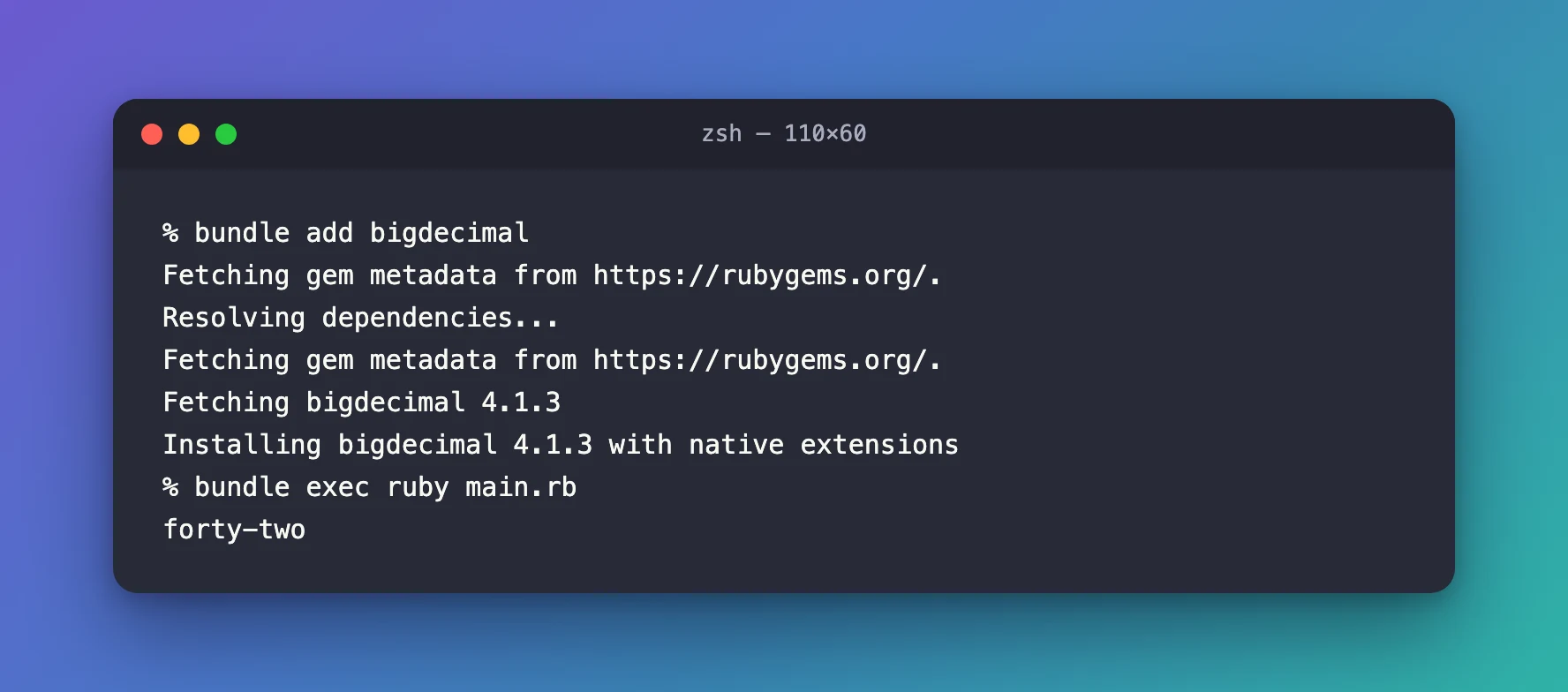
Add bigdecimal to the project yourself:
bundle add bigdecimal
Fetching gem metadata from https://rubygems.org/.
Resolving dependencies...
Fetching gem metadata from https://rubygems.org/.
Fetching bigdecimal 4.1.3
Installing bigdecimal 4.1.3 with native extensions
bigdecimal contains C code, so Bundler compiled it while installing, which is what "with native extensions" means. The command is the same in zsh, bash and PowerShell.
After the Fix
bundle exec ruby main.rb
forty-two
Common Mistakes
| Mistake | What happens | Do this instead |
|---|---|---|
Installing it with gem install bigdecimal instead | bundle exec still can't load it, because the Gemfile doesn't list it | Use bundle add bigdecimal |
| Changing the gem's own files | The change is lost the next time it's installed | Add the dependency to your Gemfile |
Assuming only bigdecimal is affected | Other former default gems moved too, such as base64, mutex_m and drb | Add whichever gem the warning names |
Troubleshooting
| Symptom | Likely cause | Fix |
|---|---|---|
cannot load such file -- bigdecimal (LoadError) with a warning about default gems | A gem needs bigdecimal without declaring it | bundle add bigdecimal |
The same error for another name, such as base64 | The same change in Ruby 3.4 for that gem | bundle add <that name> |
bundle add bigdecimal fails while compiling | No C compiler on the computer | Install your system's developer tools, then try again |
FAQ
Should the gem fix this itself?
Yes. A gem that needs bigdecimal should list it as a dependency in its gemspec. Until it does, adding bigdecimal to your own Gemfile is the fix.
Why did it work without Bundler?
Plain ruby main.rb can load any installed gem, including the bundled bigdecimal. Bundler is stricter on purpose: under bundle exec, only the gems the project lists are available.
Conclusion
cannot load such file -- bigdecimal (LoadError) under bundle exec on Ruby 3.4 or later means a gem uses bigdecimal without declaring it, and bigdecimal stopped being a default gem in Ruby 3.4.0. bundle add bigdecimal lists it in the project, and the program runs.
Additional Resources
- Ruby 3.4.0 NEWS, including the gems promoted from default gems to bundled gems.
- bundle exec, on how Bundler limits the gems a program can load.
- humanize on RubyGems.org, the gem from this example.
