Fixed: Cannot get the value of a token type 'String' as a boolean when reading Adaptive Card values in C#

My Microsoft 365 Agents SDK agent answered an Adaptive Card's Book desk button with The JSON value could not be converted to DeskBooking.DeskRequest. Path: $.monitor, followed by Cannot get the value of a token type 'String' as a boolean. The card's check box had sent the text "true", not the value true, and the JSON reader won't turn text into a bool. The fix is to read every value a card sends as the string it is.
What I Was Doing
I was building the desk-booking agent for Part 5 of the Microsoft 365 Agents SDK Fundamentals, on Agents SDK 1.9.205 and .NET 10. The agent sends an Adaptive Card with a date, a choice of floor and a check box:
    {
      "type": "Input.Date",
      "id": "date",
      "label": "Day",
      "isRequired": true,
      "errorMessage": "Pick the day you need a desk."
    },
    {
      "type": "Input.ChoiceSet",
      "id": "floor",
      "label": "Floor",
      "style": "expanded",
      "isRequired": true,
      "errorMessage": "Pick a floor.",
      "choices": [
        { "title": "Floor 1: quiet area", "value": "1" },
        { "title": "Floor 2: team area", "value": "2" },
        { "title": "Floor 3: next to the meeting rooms", "value": "3" }
      ]
    },
    {
      "type": "Input.Toggle",
      "id": "monitor",
      "title": "I need a second monitor"
    }
  ],
  "actions": [
    {
      "type": "Action.Submit",
      "title": "Book desk",
      "style": "positive",
      "data": {
        "verb": "bookDesk"
      }
    }
  ]
For the button, I registered a submit route and read what it sent into a record, with a type for each value: a date for the day, text for the floor, and a bool for the check box:
namespace DeskBooking;

public record DeskRequest(DateOnly Date, string Floor, bool Monitor);
        AdaptiveCards.OnActionSubmit("bookDesk", BookDeskAsync);

    // ...

    private async Task BookDeskAsync(ITurnContext turnContext, ITurnState turnState, object data, CancellationToken cancellationToken)
    {
        DeskRequest request = ProtocolJsonSerializer.ToObject<DeskRequest>(data);

        string monitor = request.Monitor ? ", with a second monitor" : "";
        await turnContext.SendActivityAsync($"You asked for a desk on floor {request.Floor} on {Day(request.Date)}{monitor}.", cancellationToken: cancellationToken);
    }
data is the submit's value, and ProtocolJsonSerializer.ToObject<T> is the SDK's own way of turning it into a type of yours.
What I Expected
I ran the agent with the Microsoft 365 Agents Playground, sent book, picked Monday 23 November 2026, floor 2 and the check box, and selected Book desk. I expected You asked for a desk on floor 2 on Monday 23 November 2026, with a second monitor.
What I Got
This came back instead:
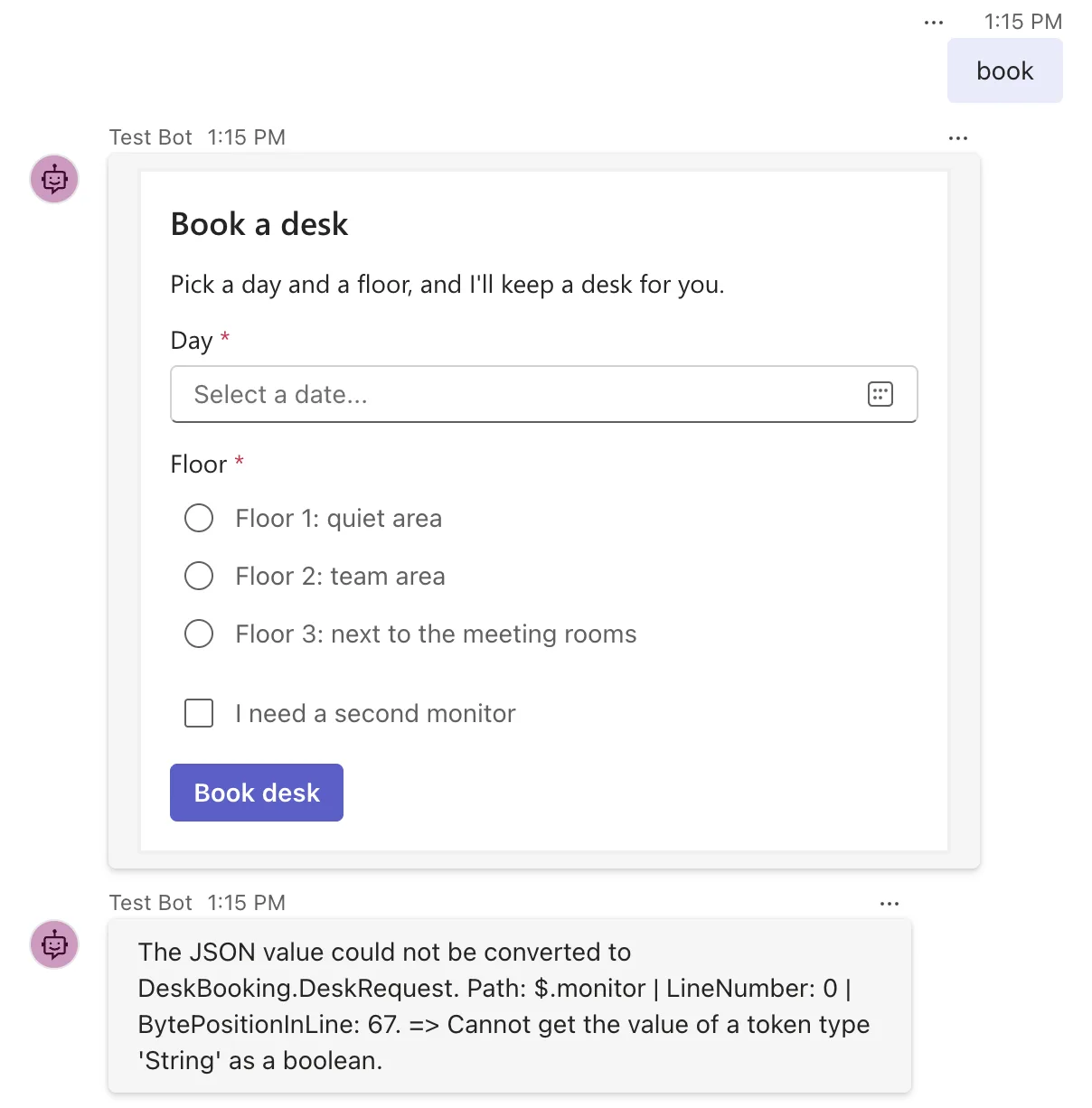
The agent's terminal had the same message, with the exception behind it:
fail: Microsoft.Agents.Hosting.AspNetCore.CloudAdapter[0]
      Unhandled exception during turn processing. The JSON value could not be converted to DeskBooking.DeskRequest. Path: $.monitor | LineNumber: 0 | BytePositionInLine: 67. => Cannot get the value of a token type 'String' as a boolean.
      System.Text.Json.JsonException: The JSON value could not be converted to DeskBooking.DeskRequest. Path: $.monitor | LineNumber: 0 | BytePositionInLine: 67.
       ---> System.InvalidOperationException: Cannot get the value of a token type 'String' as a boolean.
         at System.Text.Json.ThrowHelper.ThrowInvalidOperationException_ExpectedBoolean(JsonTokenType tokenType)
         at System.Text.Json.Utf8JsonReader.GetBoolean()
         at Microsoft.Agents.Core.Serialization.ProtocolJsonSerializer.ToObject[T](Object value, Func`1 defaultFactory)
         at DeskBooking.DeskBookingAgent.BookDeskAsync(ITurnContext turnContext, ITurnState turnState, Object data, CancellationToken cancellationToken) in /Users/you/source/DeskBooking/DeskBookingAgent.cs:line 36
The person saw the exception's own message because the SDK's default error handling sends it to the chat, as Part 3: Turn Events, Error Handling and Middleware explains.
What I Checked
Which value failed. The message says it: Path: $.monitor, the check box. The date before it had been read without trouble.
What the card had sent. The Playground's Log Panel shows every activity it sends. The submit's value was:
"value": {
  "verb": "bookDesk",
  "date": "2026-11-23",
  "floor": "2",
  "monitor": "true"
}
"true" is in quotes: it's a string, not the JSON value true. So were the floor and the date.
What the Adaptive Card format says. In the schema for Input.Toggle, the check box, the properties value, valueOn and valueOff are all of type string, and their defaults are "true" and "false". A check box doesn't have a true-or-false value. It has two pieces of text, and sends one of them.
What the SDK's reader accepts. ProtocolJsonSerializer.ToObject<T> reads with the SDK's own JSON settings, which include JsonNumberHandling.AllowReadingFromString. Microsoft's reference for that setting says: Numbers can be read from String tokens. Numbers, and nothing else. There is no setting that reads a bool from a string, so Utf8JsonReader.GetBoolean, the method in the stack trace, threw when it met one.
Why It Happens
An Adaptive Card sends every input's value as text. A record that declares a check box as bool asks the JSON reader to turn the text "true" into a bool, which it refuses to do. The DateOnly worked because .NET reads dates from strings anyway, and a number would have worked because of the SDK's setting for numbers. The check box was simply the first value that needed a conversion the reader doesn't make.
The Fix
Read the values as what the card sends, strings, and convert them yourself. The record:
namespace DeskBooking;

public record DeskRequest(string? Date, string? Floor, string? Monitor);
Each property can be null, because a card leaves out inputs that were empty and not required. In the handler, compare the check box's text:
    private async Task BookDeskAsync(ITurnContext turnContext, ITurnState turnState, object data, CancellationToken cancellationToken)
    {
        DeskRequest request = ProtocolJsonSerializer.ToObject<DeskRequest>(data);

        string monitor = request.Monitor == "true" ? ", with a second monitor" : "";
        await turnContext.SendActivityAsync($"You asked for a desk on floor {request.Floor} on {request.Date}{monitor}.", cancellationToken: cancellationToken);
    }
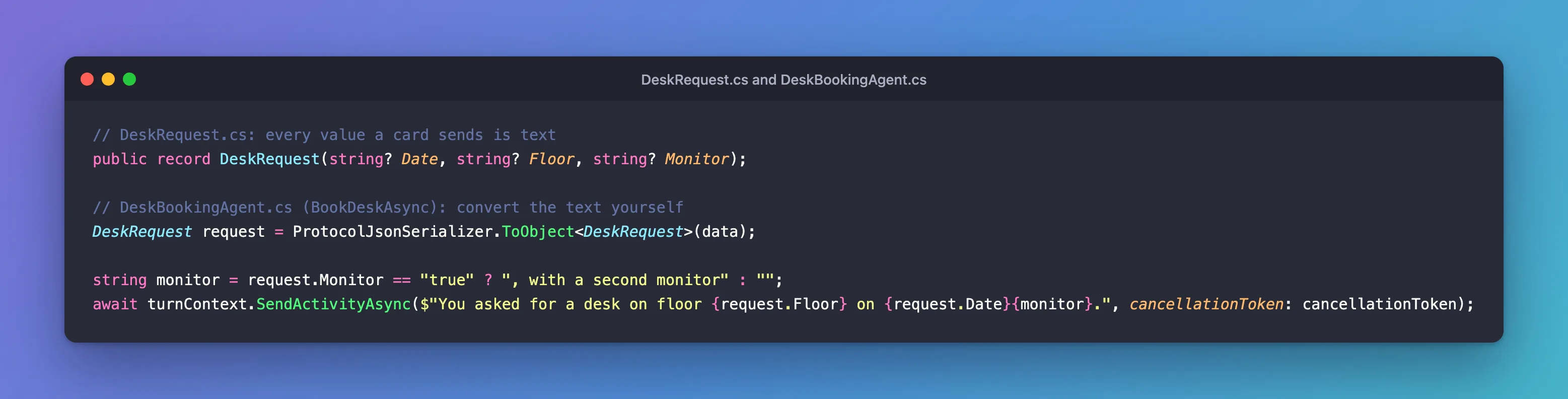
"true" is the check box's default valueOn. If a card sets its own valueOn, compare with that. Turning the other values into real types works the same way: DateOnly.TryParseExact for the date, for example, which also lets you answer a missing or malformed date with a message instead of an exception. Part 5 does that in its next step.
After the Fix
I built and ran the agent again, and booked a different desk: Tuesday 24 November 2026, floor 3, no second monitor:
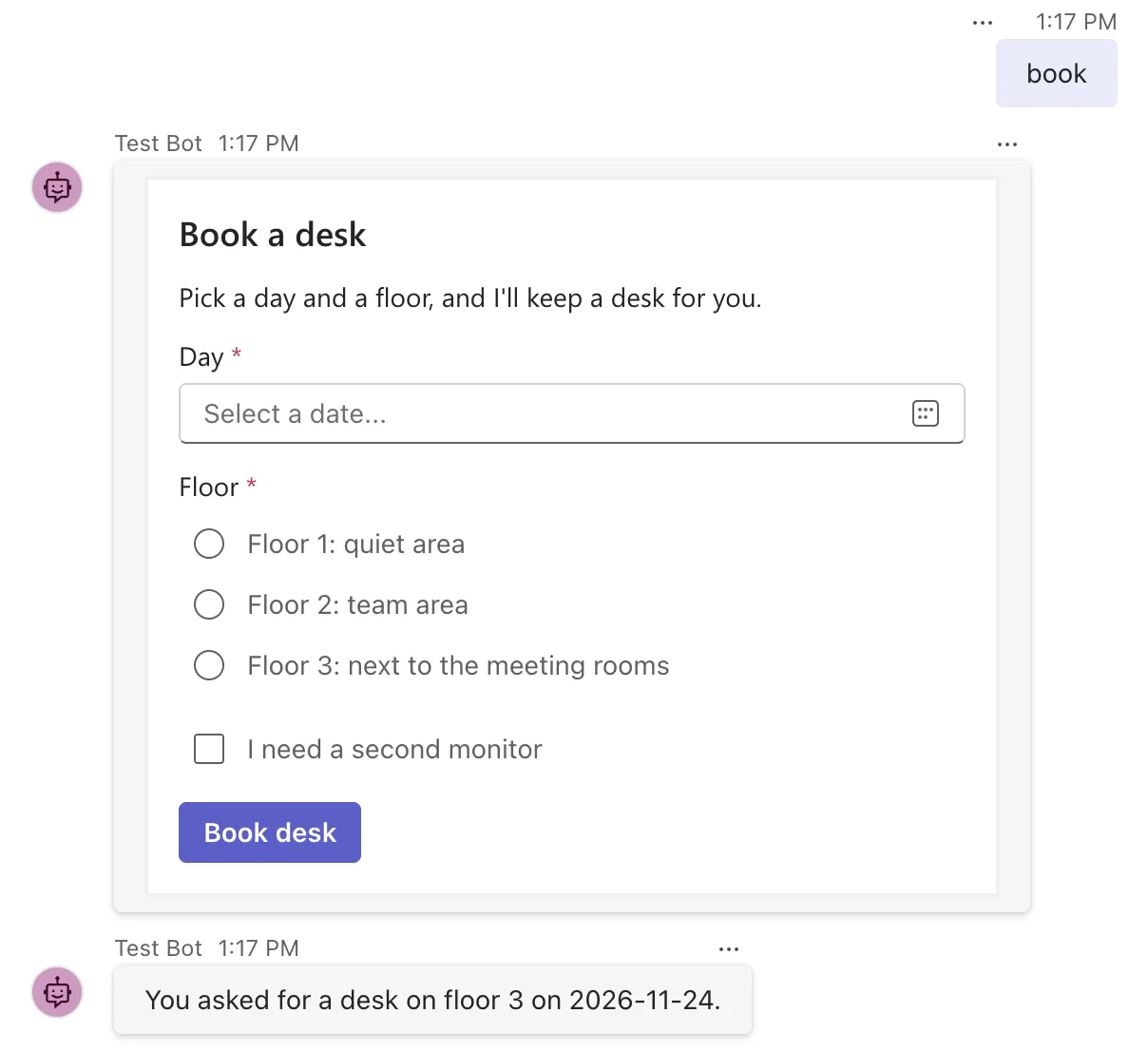
The submit reached the handler and the values came through, with no exception in the terminal.
Common Mistakes
| Mistake | What happens | Do this instead |
|---|---|---|
Declaring a check box as bool | This error on every submit | Declare it as string and compare it with the card's valueOn |
| Declaring a value that may be missing as a non-nullable type | A missing date becomes 0001-01-01 without any error | Use nullable strings and check them |
Troubleshooting
| Symptom | Likely cause | Fix |
|---|---|---|
| Cannot get the value of a token type 'String' as a boolean | A card value is read into a bool | Read it as a string |
The JSON value could not be converted to your record, with Path: $.date | A date in a form other than YYYY-MM-DD, for example typed into a text input | Read it as a string and use DateOnly.TryParseExact |
| The person sees the exception's message in the chat | The SDK's default error handling sends it | Handle errors as Part 3 shows |
FAQ
Why does a number field work when a check box doesn't?
Because the SDK's JSON settings allow reading numbers from strings, and nothing similar exists for bool. Microsoft's reference for JsonNumberHandling.AllowReadingFromString limits it to numbers.
Does every channel send the check box as text?
The Adaptive Card format defines the check box's values as strings, and this page's tests were in the Agents Playground. Reading the values as strings works whichever form arrives, as long as it's text.
Can I make the check box send something other than "true" and "false"?
Yes. Set valueOn and valueOff on the Input.Toggle, such as "yes" and "no", and compare with those.
Conclusion
Cannot get the value of a token type 'String' as a boolean means the JSON reader met text where your type expected true or false. With an Adaptive Card, that's every check box, because cards send every input's value as text. Read card values into a record of nullable strings, convert them in your handler, and the submit reaches your code with nothing left to fail on.
Additional Resources
- Input.Toggle — the check box input, with
value,valueOnandvalueOffas strings. - JsonNumberHandling enum —
AllowReadingFromStringand what it covers. - Use adaptive cards in agents — cards and their actions in the Agents SDK.
