Fixed: "Cannot drop index 'IX_stock_movements_ProductId': needed in a foreign key constraint" in an EF Core Migration on MySQL

I added a two-column index to a table, and EF Core's migration failed on MySQL with "Cannot drop index 'IX_stock_movements_ProductId': needed in a foreign key constraint". The new index starts with the foreign key column, so EF Core decided the old single-column index was no longer needed and dropped it first. MySQL needs an index behind every foreign key at every moment. Swapping two calls in the migration, in both directions, fixes it.
What I Was Doing
In a .NET 10 solution with EF Core 10 and Oracle's MySql.EntityFrameworkCore on MySQL 9.7, a stock_movements table records every change to a product's stock. Its ProductId is a foreign key to products, so EF Core had created the index IX_stock_movements_ProductId for it. A product's history is read newest first, so I added an index on ProductId and the time:
// A product's history is read by product, newest first. This index serves that
// query and also covers the foreign key, so EF Core creates no separate index for it.
builder.HasIndex(m => new { m.ProductId, m.OccurredAtUtc });
dotnet ef migrations add AddMovementHistoryIndex --project src/Dewiride.Inventory.Data --startup-project src/Dewiride.Inventory.Api
dotnet ef database update --project src/Dewiride.Inventory.Data --startup-project src/Dewiride.Inventory.Api
What I Expected
The new index created and the old one gone, since the new one covers the foreign key.
What I Got
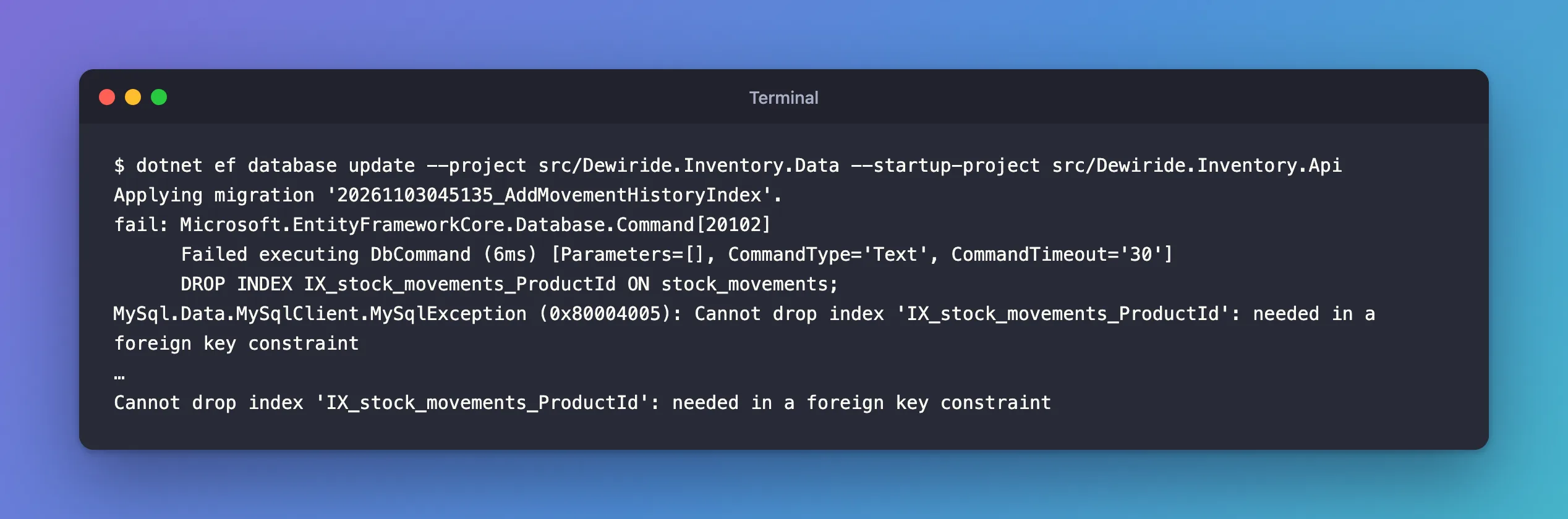
Applying migration '20261103045135_AddMovementHistoryIndex'.
fail: Microsoft.EntityFrameworkCore.Database.Command[20102]
      Failed executing DbCommand (6ms) [Parameters=[], CommandType='Text', CommandTimeout='30']
      DROP INDEX IX_stock_movements_ProductId ON stock_movements;
MySql.Data.MySqlClient.MySqlException (0x80004005): Cannot drop index 'IX_stock_movements_ProductId': needed in a foreign key constraint
…
Cannot drop index 'IX_stock_movements_ProductId': needed in a foreign key constraint
What I Checked
The migration EF Core generated drops first and creates second:
migrationBuilder.DropIndex(
    name: "IX_stock_movements_ProductId",
    table: "stock_movements");

migrationBuilder.CreateIndex(
    name: "IX_stock_movements_ProductId_OccurredAtUtc",
    table: "stock_movements",
    columns: new[] { "ProductId", "OccurredAtUtc" });
The SQL script says the same, in that order:
DROP INDEX IX_stock_movements_ProductId ON stock_movements;

CREATE INDEX `IX_stock_movements_ProductId_OccurredAtUtc` ON `stock_movements` (`ProductId`, `OccurredAtUtc`);
Between those two statements, the foreign key on ProductId would have no index at all.
Why It Happens
MySQL insists on that index. The manual's foreign keys page says: "MySQL requires indexes on foreign keys and referenced keys so that foreign key checks can be fast and not require a table scan." The error reference describes this exact situation: "InnoDB reports this error when you attempt to drop the last index that can enforce a particular referential constraint."
And it tells you what is allowed: "It is still OK to drop the index if there is another index that can be used to enforce the same constraint." An index whose first column is ProductId can enforce it, so once the two-column index exists, the old one can go. EF Core was right that the old index becomes unnecessary; it just ordered the two steps the wrong way for MySQL. The failing statement was the first one, so nothing changed and nothing was recorded.
The Fix
EF Core's documentation expects you to review and adjust generated migrations: "you should always review the code and make sure it corresponds to the desired change; in some cases, it is even necessary to do so." Here, swap the two calls: create first, then drop.
protected override void Up(MigrationBuilder migrationBuilder)
{
    // MySQL needs an index for the foreign key at every moment, so create the new
    // index first. It starts with ProductId, so it can serve the foreign key, and
    // then the old one-column index can go.
    migrationBuilder.CreateIndex(
        name: "IX_stock_movements_ProductId_OccurredAtUtc",
        table: "stock_movements",
        columns: new[] { "ProductId", "OccurredAtUtc" });

    migrationBuilder.DropIndex(
        name: "IX_stock_movements_ProductId",
        table: "stock_movements");
}

protected override void Down(MigrationBuilder migrationBuilder)
{
    // The same rule in reverse: bring back the one-column index before dropping
    // the index the foreign key uses now.
    migrationBuilder.CreateIndex(
        name: "IX_stock_movements_ProductId",
        table: "stock_movements",
        column: "ProductId");

    migrationBuilder.DropIndex(
        name: "IX_stock_movements_ProductId_OccurredAtUtc",
        table: "stock_movements");
}
Down needs the same swap. As generated, it dropped the two-column index first, which at that point is the only index behind the foreign key, so reverting would fail the same way.
After the Fix
dotnet ef database update --project src/Dewiride.Inventory.Data --startup-project src/Dewiride.Inventory.Api
Applying migration '20261103045135_AddMovementHistoryIndex'.
      CREATE INDEX `IX_stock_movements_ProductId_OccurredAtUtc` ON `stock_movements` (`ProductId`, `OccurredAtUtc`);
      DROP INDEX IX_stock_movements_ProductId ON stock_movements;
Done.
I ran Down too, by reverting to the previous migration, and then applied the migration again:
Reverting migration '20261103045135_AddMovementHistoryIndex'.
      CREATE INDEX `IX_stock_movements_ProductId` ON `stock_movements` (`ProductId`);
      DROP INDEX IX_stock_movements_ProductId_OccurredAtUtc ON stock_movements;
Done.
Applying migration '20261103045135_AddMovementHistoryIndex'.
      CREATE INDEX `IX_stock_movements_ProductId_OccurredAtUtc` ON `stock_movements` (`ProductId`, `OccurredAtUtc`);
      DROP INDEX IX_stock_movements_ProductId ON stock_movements;
Done.
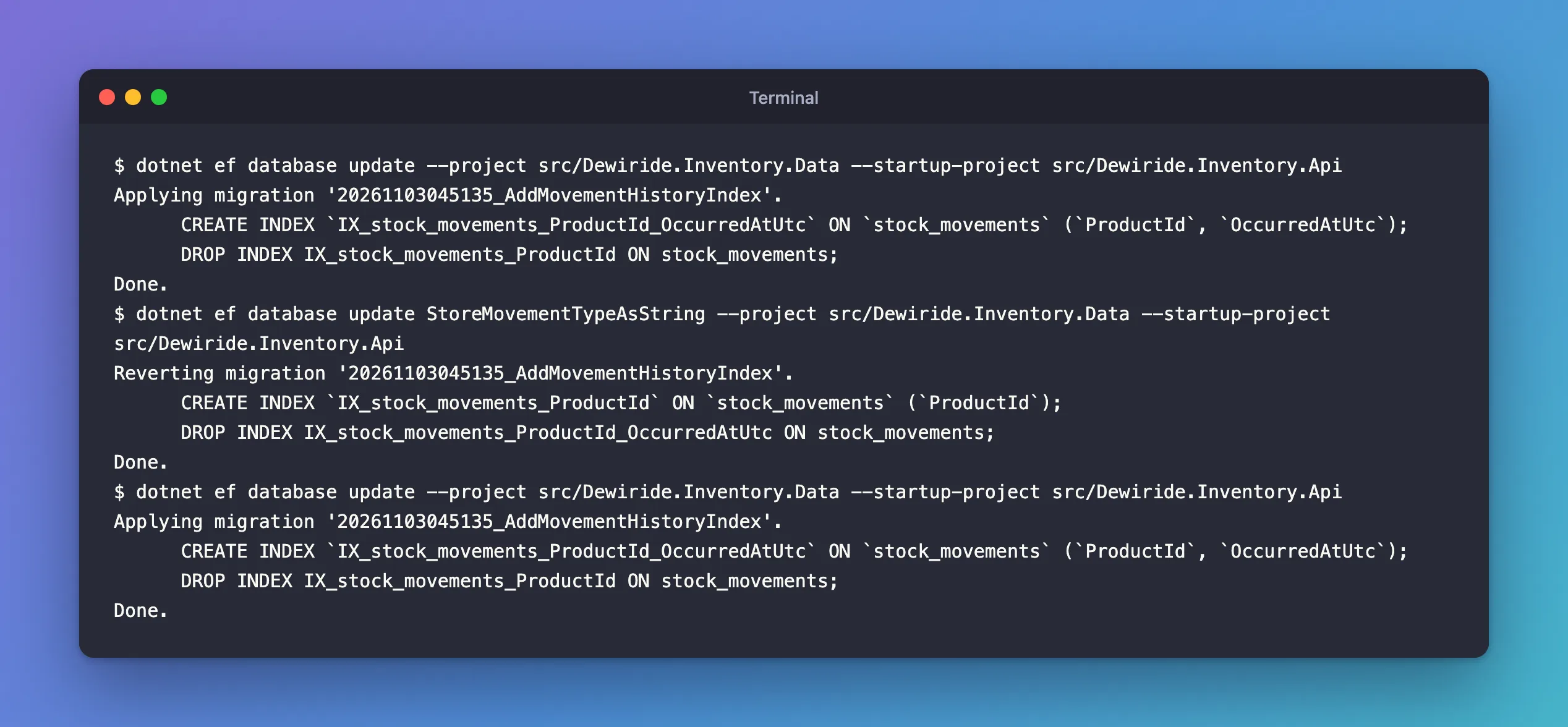
Both directions work. The table now has one index that serves both the foreign key and the history query: How to List the Indexes of a MySQL Table shows it, and EXPLAIN confirms MySQL uses it.
Common Mistakes
| Mistake | What happens | Do this instead |
|---|---|---|
Fixing Up only | Reverting the migration fails with the same error | Swap the calls in Down too |
Removing the DropIndex to make it pass | The table keeps a redundant index that slows every write | Keep the drop, after the create |
Turning off foreign_key_checks around the migration | Doesn't change the index requirement, and hides real problems | Reorder the operations |
| Making the new index start with another column | It can't serve the foreign key, so MySQL keeps needing the old one | Put the foreign key column first |
Troubleshooting
| Symptom | Likely cause | Fix |
|---|---|---|
| The same error when dropping a foreign key and its index together | The index is dropped before the foreign key | Drop the foreign key first, then the index |
| Error 1553 in a hand-written script | Same rule | Create the replacement index first |
| The new index exists but MySQL still refuses | It doesn't start with the foreign key column | Check SHOW INDEX: the column must have Seq_in_index 1 |
FAQ
Why does EF Core drop the old index at all?
Its convention creates an index for each foreign key only when no other index covers it. The new two-column index starts with ProductId, so the separate one is no longer part of the model, and the migration removes it.
Do new tables have this problem?
No. When a table is created with the two-column index from the start, there's never a separate foreign key index to drop. It only happens when the index is added to an existing table.
Conclusion
"Cannot drop index '…': needed in a foreign key constraint" in an EF Core migration means the migration drops the index a foreign key relies on before creating its replacement. MySQL allows the drop only when another index can enforce the constraint. Swap CreateIndex before DropIndex in Up, do the same in Down, and the migration applies and reverts cleanly.
Additional Resources
- FOREIGN KEY Constraints — why MySQL needs an index for each foreign key.
- Server Error Message Reference — error 1553.
- Managing Migrations — editing generated migration code.
