Fixed: Biome "The elements with this role can be changed to the following elements: <fieldset>"

I built a card with two buttons as a <div> with role="group" and an aria-label, and biome check refused it: lint/a11y/useSemanticElements, The elements with this role can be changed to the following elements: <fieldset>. A <fieldset> already is a group. With it and a <legend>, the check passed, and the card got something the <div> never had: one attribute that disables both buttons.
What I Was Doing
In Part 14 of the Microsoft Agent Framework series, the Next.js chat app shows an approval card when the agent wants to reset an employee's password: a title, what the agent wants to do, and Approve and Reject. The title and the buttons belong together, so my first version grouped them with ARIA, the attributes that tell assistive technology what an element is:
function ApprovalCard({ action, disabled, onAnswer }: ApprovalCardProps) {
  return (
    <div className={styles.approval} role="group" aria-label="Approval needed">
      <p className={styles.approvalTitle}>Approval needed</p>
      <p>{action}</p>
      <div className={styles.approvalButtons}>
        <button type="button" onClick={() => onAnswer(true)} disabled={disabled}>
          Approve
        </button>
        <button
          type="button"
          className={styles.reject}
          onClick={() => onAnswer(false)}
          disabled={disabled}
        >
          Reject
        </button>
      </div>
    </div>
  );
}
Then I ran the app's lint script, which runs Biome, the linter and formatter the app uses:
npm run lint
What I Expected
A clean check. role="group" with an aria-label is a valid way to give a set of controls a name, and the code compiled.
What I Got
One error, on the role attribute:
npm notice run agent-chat-ui@0.1.0 lint
npm notice run biome check
app/chat.tsx:347:38 lint/a11y/useSemanticElements ━━━━━━━━━━━━━━━━━━━━━━━━━━━━━━━━━━━━━━━━━━━━━━━━━━

  ✖ The elements with this role can be changed to the following elements:
    <fieldset>

    345 │ function ApprovalCard({ action, disabled, onAnswer }: ApprovalCardProps) {
    346 │   return (
  > 347 │     <div className={styles.approval} role="group" aria-label="Approval needed">
        │                                      ^^^^^^^^^^^^
    348 │       <p className={styles.approvalTitle}>Approval needed</p>
    349 │       <p>{action}</p>

  ℹ For examples and more information, see WAI-ARIA Roles

  ℹ Replace with one of these elements:

  - <fieldset>


Checked 18 files in 74ms. No fixes applied.
Found 1 error.
check ━━━━━━━━━━━━━━━━━━━━━━━━━━━━━━━━━━━━━━━━━━━━━━━━━━━━━━━━━━━━━━━━━━━━━━━━━━━━━━━━━━━━━━━━━━━━━

  ✖ Some errors were emitted while running checks.
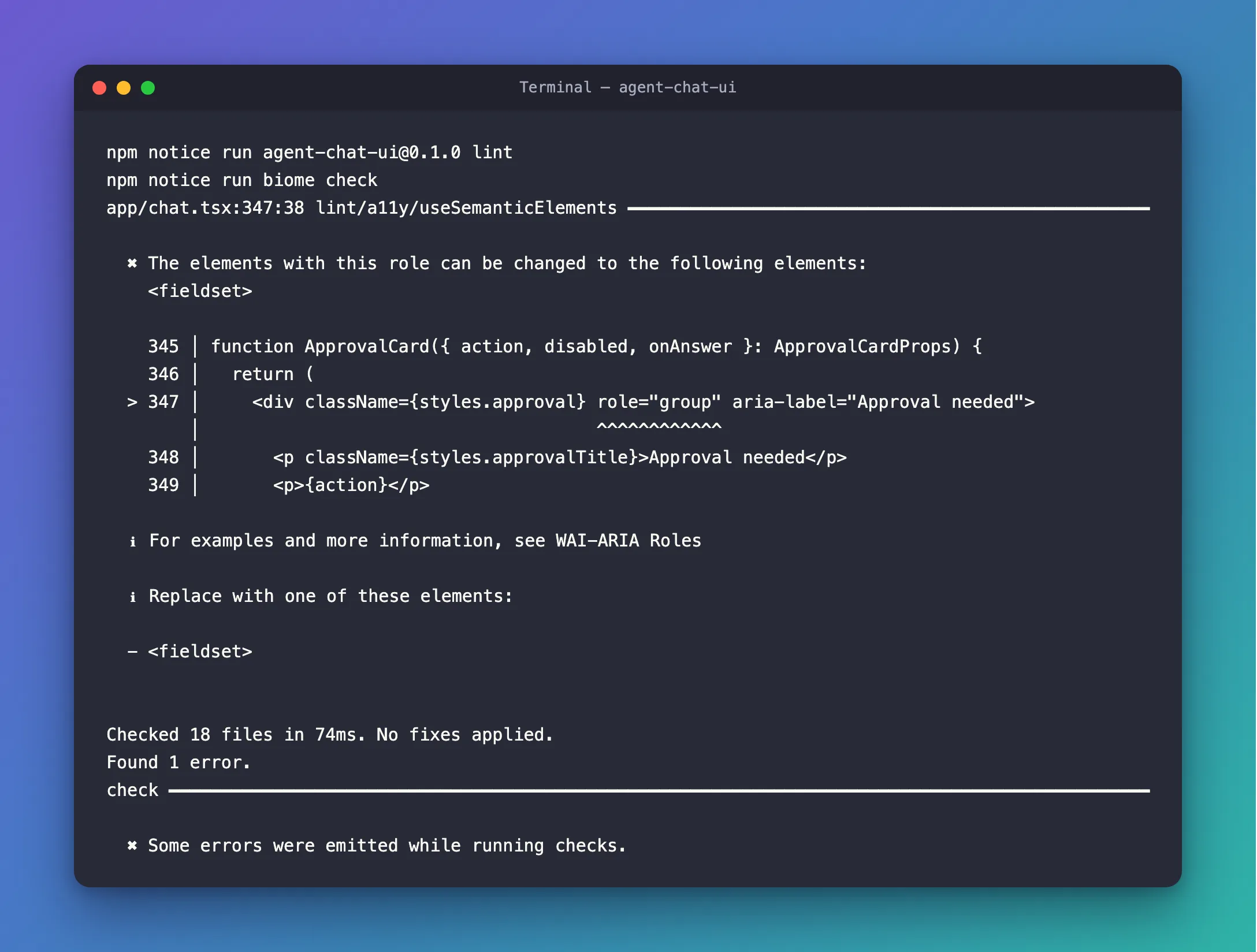
The ^^^^^^^^^^^^ marks exactly role="group". The aria-label wasn't the problem.
What I Checked
The rule's documentation. Biome's page for useSemanticElements says it Enforces using semantic DOM elements over the ARIA role property, and that The role attribute is used to define the purpose of an element, but it should be used as a last resort. Using semantic elements like <button>, <nav> and others are more accessible and provide better semantics. The rule is recommended, so it's on by default, its severity is error, and it has no automatic fix: Biome tells you which element to use, and you change the markup yourself.
What a <fieldset> is. MDN's page on the fieldset element lists its implicit ARIA role as group, the same role I had written by hand. It provides a grouping for a part of an HTML form, with a nested <legend> element providing a caption. And it has a disabled attribute: If this Boolean attribute is set, all form controls that are descendants of the <fieldset>, are disabled.
What the card needed. A group, a name for it, and a way to turn off both buttons while the chat waits for the agent. The <div> did that with three attributes and a disabled on each button. A <fieldset> does it with its own element, its <legend> and one disabled.
Why It Happens
ARIA roles are for elements that have no meaning of their own, such as <div>. When an HTML element already has the role, Biome's useSemanticElements asks for that element instead, because the browser gives it the behavior and meaning for free. role="group" is the implicit role of <fieldset>, so the rule suggests it. Because the rule is recommended with error severity, biome check fails until the markup changes.
The Fix
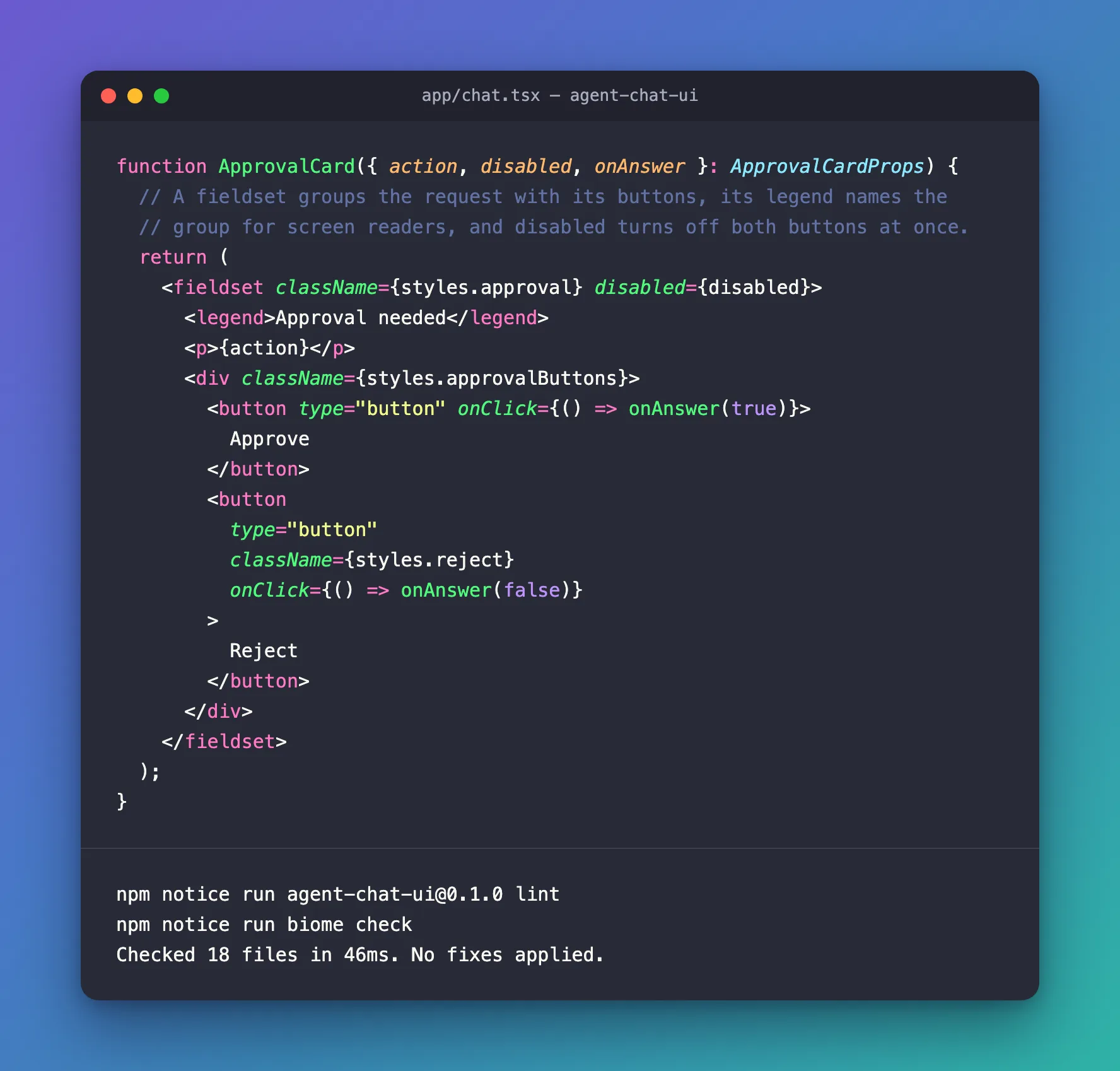
Make the card a <fieldset>. The title becomes its <legend>, which also gives the group its name, so the aria-label goes. The disabled moves from the buttons to the fieldset:
function ApprovalCard({ action, disabled, onAnswer }: ApprovalCardProps) {
  // A fieldset groups the request with its buttons, its legend names the
  // group for screen readers, and disabled turns off both buttons at once.
  return (
    <fieldset className={styles.approval} disabled={disabled}>
      <legend>Approval needed</legend>
      <p>{action}</p>
      <div className={styles.approvalButtons}>
        <button type="button" onClick={() => onAnswer(true)}>
          Approve
        </button>
        <button
          type="button"
          className={styles.reject}
          onClick={() => onAnswer(false)}
        >
          Reject
        </button>
      </div>
    </fieldset>
  );
}
A fieldset comes with its own look: MDN describes a 2px groove border and a minimum width of min-content. The card's CSS sets its own border, styles the legend instead of the old title paragraph, and removes the minimum width so the card keeps its max-width:
.approval {
  align-self: flex-start;
  display: flex;
  flex-direction: column;
  gap: 8px;
  min-width: 0;
  max-width: 85%;
  padding: 10px 16px 14px;
  border: 1px solid var(--accent);
  border-radius: 14px;
  background: var(--surface);
  line-height: 1.5;
}

.approval legend {
  padding: 0 6px;
  color: var(--muted);
  font-size: 0.875rem;
  font-weight: 600;
}
After the Fix
npm run lint
npm notice run agent-chat-ui@0.1.0 lint
npm notice run biome check
Checked 18 files in 46ms. No fixes applied.
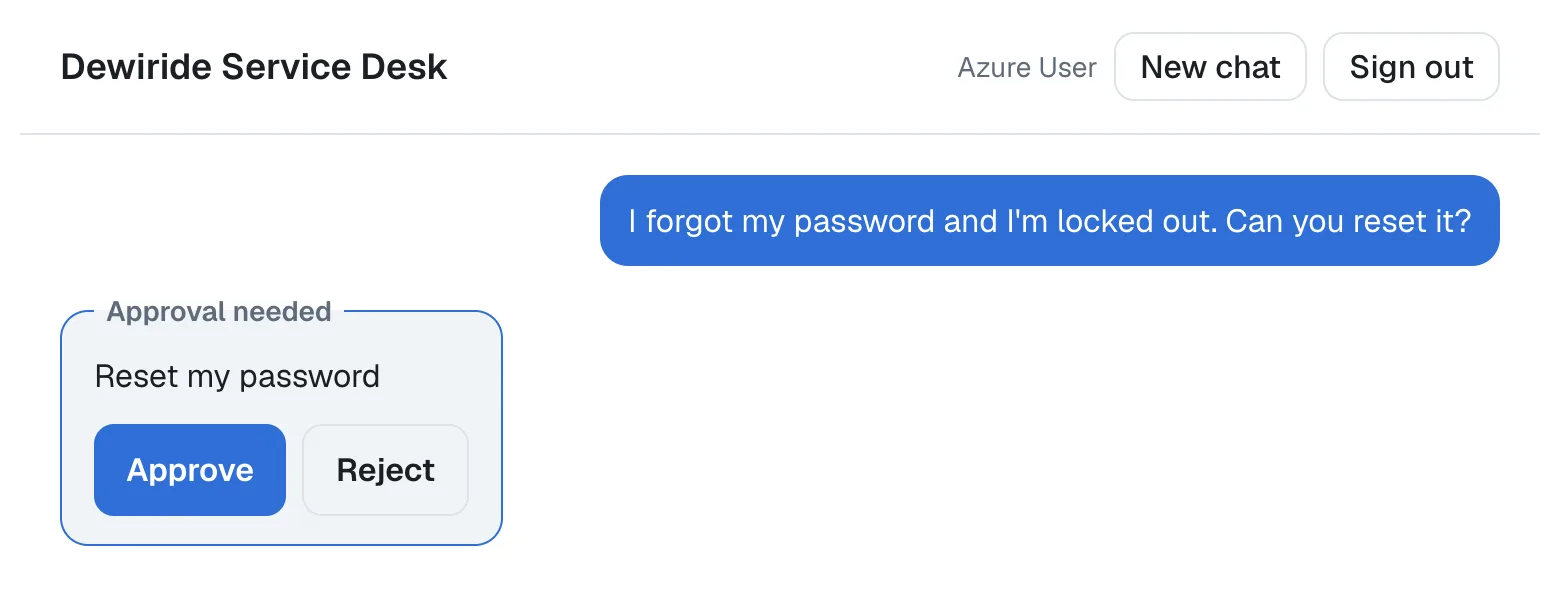
In the chat, the legend sits in the card's top border, where a fieldset puts it:
Common Mistakes
| Mistake | What happens | Do this instead |
|---|---|---|
Adding role="group" to the <fieldset> too | The role repeats what the element already is | Leave the role out |
Keeping the title as a <p> and adding an aria-label | Two names to keep in step, and the visible title isn't the group's name | Make the title the <legend> |
Keeping disabled on each button | It works, but every new button needs it too | Put disabled on the fieldset |
| Not styling the fieldset | The browser's groove border and padding appear | Set your own border, padding and min-width |
Troubleshooting
| Symptom | Likely cause | Fix |
|---|---|---|
lint/a11y/useSemanticElements on a role attribute | An element has a role that an HTML element already has | Use the element Biome lists under Replace with one of these elements |
| The card is wider than expected | A fieldset's default min-inline-size is min-content | Set min-width: 0 |
| The legend overlaps the card's border | That's where a fieldset puts its legend | Style the legend, or place it inside with your own CSS |
FAQ
Is a div with role="group" wrong?
It works with assistive technology, but it's the last resort: Biome's documentation says a role should be used as a last resort, and here an element with that role exists. The fieldset also brings disabled for the whole group, which a <div> can't do.
Does a fieldset have to be inside a form?
No. The card's buttons are type="button" and do their work in onClick, with no form around them, and the fieldset still groups and disables them.
Conclusion
The elements with this role can be changed to the following elements: <fieldset> is Biome's useSemanticElements rule asking for the HTML element that already has the role you wrote. Replace the <div role="group"> with a <fieldset>, turn the title into its <legend>, move disabled to the fieldset, and give it your own border and min-width. The check passes, and the group behaves better than before.
Additional Resources
- Biome: useSemanticElements — what the rule checks, and its severity.
- MDN: The fieldset element — grouping, the legend,
disabledand the default styles. - MDN: ARIA group role — the role a fieldset has without being told.
