Fixed: "BadHttpRequestException: Failed to read parameter from the request body as JSON" Returns 500 Instead of 400 in a Minimal API

A request with broken JSON got a 500 Internal Server Error from my minimal API, and the log said BadHttpRequestException: Failed to read parameter "CategoryRequest request" from the request body as JSON. The client's request was wrong, so it should have been a 400. It turned out to depend on the environment: in Development the bad request throws, and UseExceptionHandler turns anything thrown into a 500 unless you tell it otherwise.
What I Was Doing
A .NET 10 Web API returns every error as problem details, the way Microsoft's error handling page sets it up:
builder.Services.AddProblemDetails();

// …

app.UseExceptionHandler();
app.UseStatusCodePages();
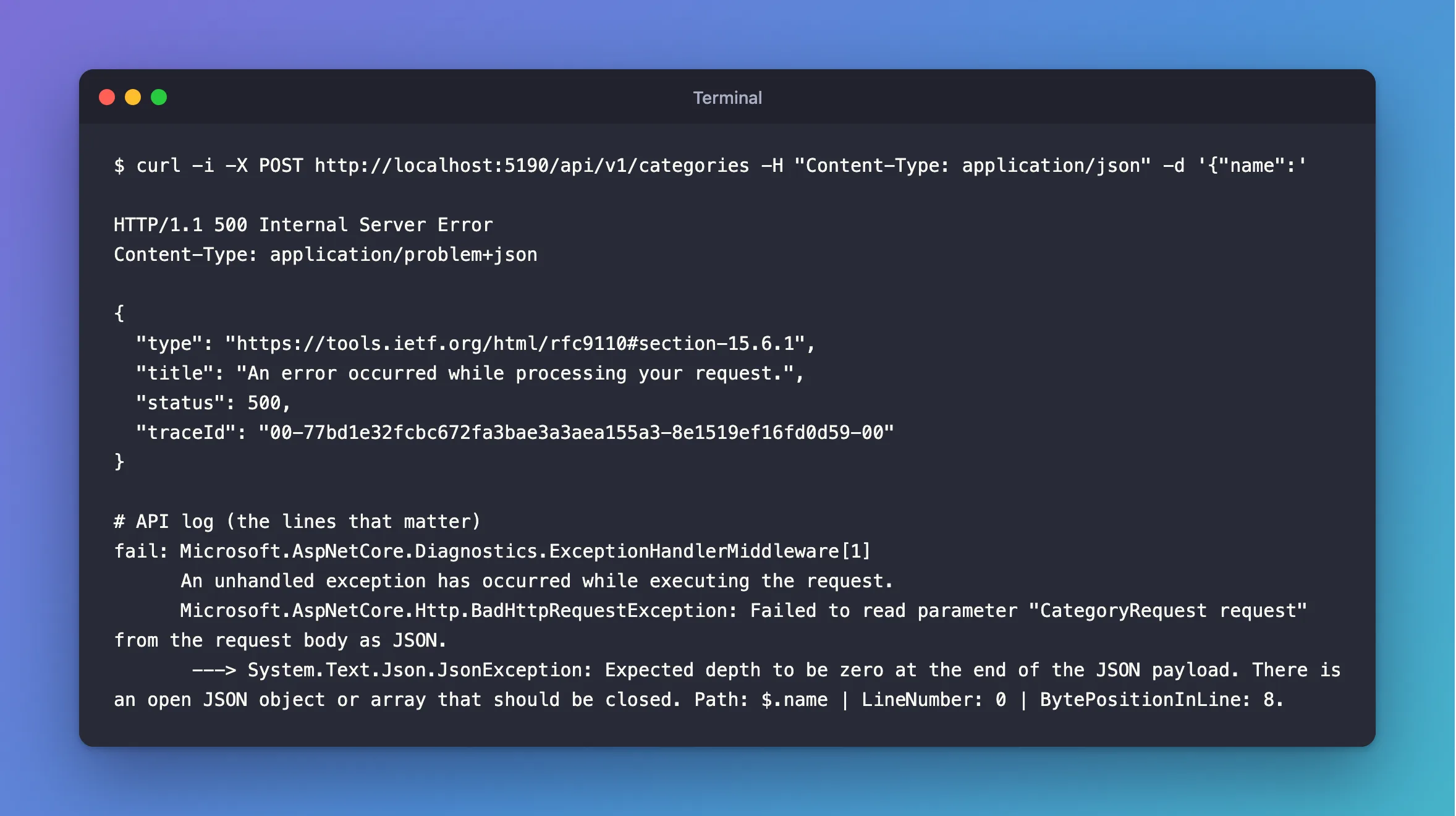
Then I sent a create request whose JSON was cut off, running the API with dotnet run as usual:
curl -i -X POST http://localhost:5190/api/v1/categories -H "Content-Type: application/json" -d '{"name":'
What I Expected
400 Bad Request: the JSON can't be read, and that's the client's mistake.
What I Got
HTTP/1.1 500 Internal Server Error
Content-Type: application/problem+json

{
  "type": "https://tools.ietf.org/html/rfc9110#section-15.6.1",
  "title": "An error occurred while processing your request.",
  "status": 500,
  "traceId": "00-77bd1e32fcbc672fa3bae3a3aea155a3-8e1519ef16fd0d59-00"
}
fail: Microsoft.AspNetCore.Diagnostics.ExceptionHandlerMiddleware[1]
      An unhandled exception has occurred while executing the request.
      Microsoft.AspNetCore.Http.BadHttpRequestException: Failed to read parameter "CategoryRequest request" from the request body as JSON.
       ---> System.Text.Json.JsonException: Expected depth to be zero at the end of the JSON payload. There is an open JSON object or array that should be closed. Path: $.name | LineNumber: 0 | BytePositionInLine: 8.
The same happened with a wrong type in the JSON, "categoryId":"one", and with a query string the API couldn't convert, ?page=abc:
Microsoft.AspNetCore.Http.BadHttpRequestException: Failed to bind parameter "int Page" from "abc".
What I Checked
Whether Production does the same. I ran the same build as Production, with the connection string in an environment variable, and sent the same request:
HTTP/1.1 400 Bad Request
Content-Type: application/problem+json

{
  "type": "https://tools.ietf.org/html/rfc9110#section-15.5.1",
  "title": "Bad Request",
  "status": 400,
  "traceId": "00-385e69a5f35bdc5f43796dc8673552a6-5689644b7b29a820-00"
}
A 400. So this depends on the environment.
What the documentation says. The error handling page explains both halves:
- "In the Development environment,
ThrowOnBadRequestdefaults totrue. Bad-request binding failures throw aBadHttpRequestException". - "In non-Development environments (such as Production),
ThrowOnBadRequestdefaults tofalse. Bad-request binding failures write a 400 Bad Request status code directly without throwing an exception".
And it names this exact problem: "In ASP.NET Core 11 and later, UseExceptionHandler preserves BadHttpRequestException.StatusCode by default in problem details responses. In ASP.NET Core 10 and earlier, unhandled exceptions default to 500 Internal Server Error unless the handler explicitly preserves BadHttpRequestException.StatusCode".
Why It Happens
In Development, ASP.NET Core throws BadHttpRequestException for a request it can't read, which is meant to help you debug. The exception carries the right status, StatusCode = 400. But UseExceptionHandler in ASP.NET Core 10 doesn't look at it: to the middleware, it's just another unhandled exception, so it answers 500.
Without the exception handler, this wouldn't show: the exception would go to the developer exception page. It's the combination of the two that turns a client's mistake into a server error.
The Fix
Tell the middleware which status code an exception should get. ExceptionHandlerOptions.StatusCodeSelector takes the exception and returns the status:
// Turn unhandled exceptions into a problem response, with no stack trace outside Development.
app.UseExceptionHandler(new ExceptionHandlerOptions
{
    // In Development, a request the endpoint can't read, such as broken JSON, throws
    // BadHttpRequestException. That's the client's mistake, so keep its 400 instead of a 500.
    StatusCodeSelector = exception => exception is BadHttpRequestException badRequest
        ? badRequest.StatusCode
        : StatusCodes.Status500InternalServerError,
});
Keeping the exception's own StatusCode also covers any other status it carries, such as 415.
After the Fix
The same request, in Development:
HTTP/1.1 400 Bad Request
Content-Type: application/problem+json

{
  "type": "https://tools.ietf.org/html/rfc9110#section-15.5.1",
  "title": "Bad Request",
  "status": 400,
  "traceId": "00-0f7387affdd8e54b66c37ea116b974ad-6ba74bd0ea9933d0-00"
}
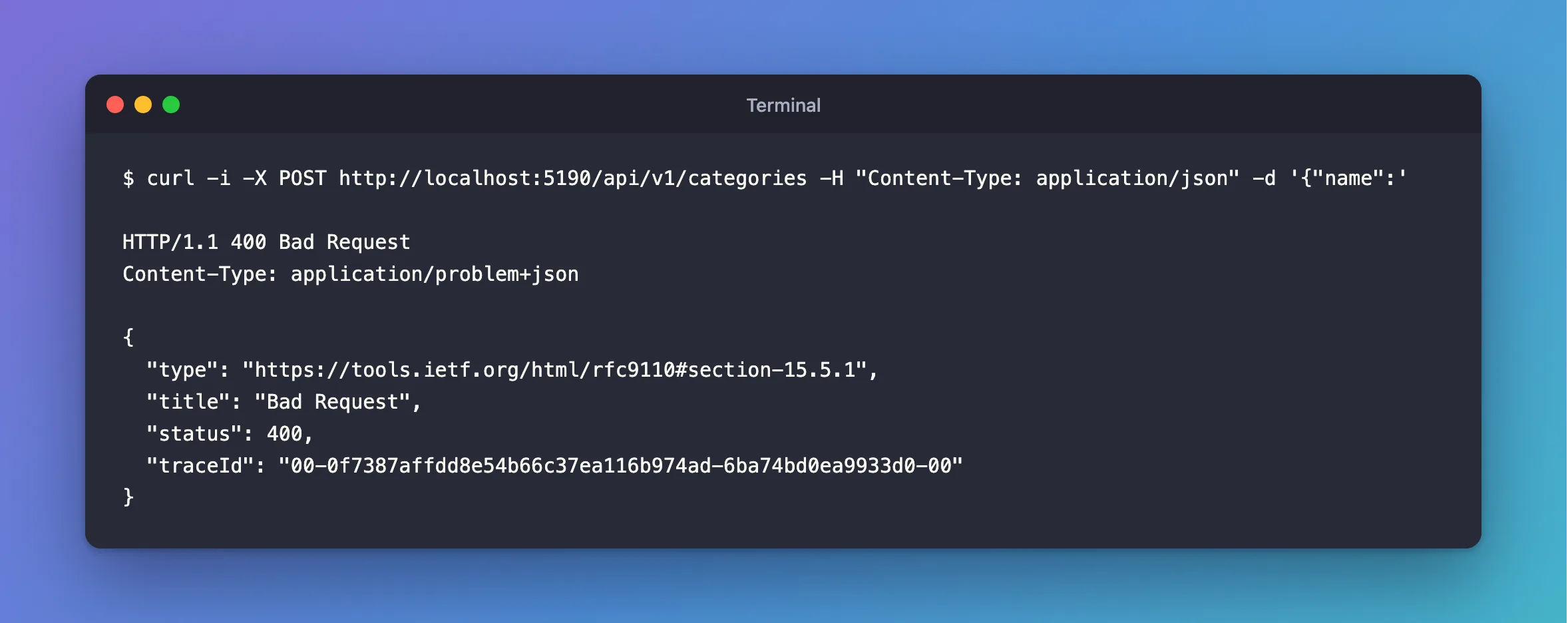
?page=abc and "categoryId":"one" answer 400 too, and a real server error still answers 500. The log keeps the fail: entry with the full exception in Development, which is handy while you're building.
Common Mistakes
| Mistake | What happens | Do this instead |
|---|---|---|
Setting ThrowOnBadRequest to false in Development | The 400 returns, but you lose the exception that says what was wrong | Keep it, and use StatusCodeSelector |
| Testing error responses only in Development | Production answers differently | Try the bad requests in both |
Catching Exception in every endpoint | Binding happens before your code runs, so it's never caught | Handle it in the middleware |
| Returning the exception's message to clients | It describes your code's parameter names | Keep it in the logs |
Troubleshooting
| Symptom | Likely cause | Fix |
|---|---|---|
500 with Failed to read parameter … from the request body as JSON in the log | Broken JSON, in Development | Use StatusCodeSelector |
500 with Failed to bind parameter "int Page" from "abc" | A value that can't be converted, in Development | The same |
The field Page must be between 1 and 1000000 for ?page=abc in Production | Binding left the default, then validation refused it | Nothing to fix: it's still a 400 |
415 Unsupported Media Type | No Content-Type: application/json | See the 415 post |
FAQ
Will this still be needed in .NET 11?
The page says ASP.NET Core 11 keeps the status code by default. StatusCodeSelector does no harm there, and this API runs on .NET 10, the newest generally available version.
Can the response say what's wrong with the JSON?
Not by default, and in Production nothing is thrown at all. The detail stays in the Development log. Validation attributes are the way to give clients field-by-field messages.
Conclusion
In ASP.NET Core 10, a request that can't be read throws BadHttpRequestException in Development, and UseExceptionHandler answers 500 for anything thrown, even though the exception carries a 400. Production answers 400 without throwing. A one-line StatusCodeSelector makes both environments agree.
Additional Resources
- Handle errors in ASP.NET Core APIs —
ThrowOnBadRequestand problem details. - ExceptionHandlerOptions.StatusCodeSelector — the API reference.
