Fixed: AG-UI Agent Receives the Conversation Twice in Microsoft Agent Framework

I continued a conversation the way many chat clients do — by sending the whole conversation again — and the Microsoft Agent Framework agent read its first question and its own first answer twice. The answer still looked fine, which is what makes this easy to miss. Foundry's stored input showed the duplicates, and sending only the new message fixed it.
What I Was Doing
In Part 4 of the Microsoft Agent Framework series, the Dewiride Service Desk API got a session store, so the server keeps each conversation between requests (How to Keep Conversation History in a Microsoft Agent Framework AG-UI Server). Many chat clients work the other way round: they keep the conversation themselves and send all of it with every request. So I tested what happens when a client like that talks to a server that remembers.
On a fresh conversation, thread-5, I sent the Wi-Fi question. The agent asked which operating system the laptop runs. Then I sent the follow-up the way a history-keeping client would — the question, the agent's answer (with the message ID the agent had given it) and the new message:
{
  "threadId": "thread-5",
  "runId": "run-2",
  "parentRunId": "run-1",
  "messages": [
    {
      "id": "message-1",
      "role": "user",
      "content": "My laptop won't connect to the office Wi-Fi. What should I do?"
    },
    {
      "id": "msg_041e73b69604ead8006ae3715207a88193b63d4f8befb5c1e3",
      "role": "assistant",
      "content": "Is your laptop running Windows or macOS?"
    },
    {
      "id": "message-2",
      "role": "user",
      "content": "It's a Windows 11 laptop."
    }
  ]
}
What I Expected
The server already had the first two messages, so the question was whether it would notice. If it did, the model would read each message once.
What I Got
The answer looked perfectly normal: seven Windows 11 steps for the office Wi-Fi. Two other things did not.
The token count. RUN_FINISHED reported "inputTokens":378. The same follow-up, sent the right way in another conversation whose first answer was the same question, used 327.
Foundry's stored input. I asked Foundry which input it had used for this answer (How to See the Conversation History Microsoft Foundry Stored for a Response):
Item       Role       Text
---------  ---------  --------------------------------------------------------------
message    user       My laptop won't connect to the office Wi-Fi. What should I do?
reasoning
message    assistant  Is your laptop running Windows or macOS?
message    user       My laptop won't connect to the office Wi-Fi. What should I do?
message    assistant  Is your laptop running Windows or macOS?
message    user       It's a Windows 11 laptop.
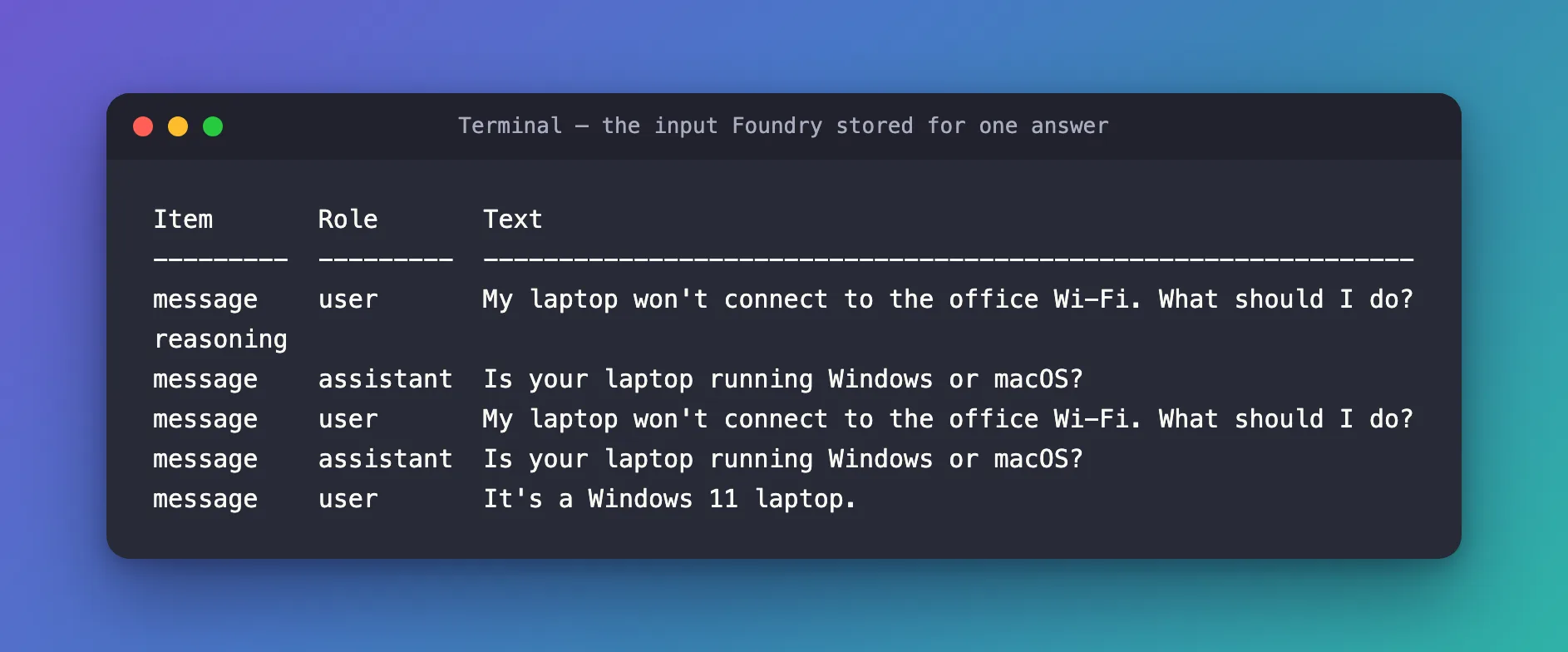
The question and the answer are there twice: once from the conversation Foundry had stored, once from my request.
What I Checked
Microsoft's AG-UI guide. Getting Started with AG-UI is explicit: Send only the new messages in a continuation request. It also explains when resending is right: Without hosted session persistence, each request receives a new server session; the client can instead resend conversation history. So resending suits a server without a session store, and my server had one.
The AG-UI .NET SDK's source. The method that turns an AG-UI request into agent input, ToChatRequestContext in AGUI.Server 1.0.0, converts every message in the request with input.Messages.AsChatMessages().ToList(). It doesn't compare message IDs with anything the server already has.
Where the server's copy lives. With Microsoft Foundry's Responses API, each answer is stored, and the agent's session keeps the ID of the latest one. On the next turn, Foundry adds the stored conversation in front of whatever the request brings.
Why It Happens
Two parts each did their job. The session continued the conversation that Foundry had stored, and the request supplied the conversation again as new input. Nothing in between removes the overlap, so the model got both copies.
It didn't confuse the model this time, but it isn't free. The overlap grows with every turn — a client that resends everything repeats more on each request — and it makes the model's view of the conversation stranger than it needs to be.
The Fix
When the server keeps the conversation, a follow-up carries only the new message. Keep the threadId, give the run a new runId, and name the previous run in parentRunId (How to Continue an AG-UI Conversation with threadId and parentRunId):
{
  "threadId": "thread-2",
  "runId": "run-2",
  "parentRunId": "run-1",
  "messages": [
    {
      "id": "message-2",
      "role": "user",
      "content": "It's a Windows 11 laptop."
    }
  ]
}
A chat page still shows the whole conversation, but it keeps that copy for display only. If your client library sends the full history on its own, put a trusted server in front of the agent that forwards only the newest user message. Microsoft recommends that server anyway, so browsers never talk to the AG-UI endpoint directly.
After the Fix
The same follow-up, sent with only the new message on thread-2. Foundry's input for that answer now holds each item once:
Item       Role       Text
---------  ---------  --------------------------------------------------------------
message    user       My laptop won't connect to the office Wi-Fi. What should I do?
reasoning
message    assistant  Which operating system is your laptop using: Windows or macOS?
message    user       It's a Windows 11 laptop.
RUN_FINISHED reported "inputTokens":327, and the agent answered with Windows 11 steps — the conversation intact, without the copy.
Common Mistakes
| Mistake | What happens | Do this instead |
|---|---|---|
| Resending the whole conversation to a server with a session store | Earlier messages reach the model twice | Send only the new message |
| Sending only the new message to a server without a store | The agent forgets the conversation | Add a session store, or resend the history to that server |
| Trusting the answer alone | The answer can look fine while the input is doubled | Check inputTokens and the stored input |
Troubleshooting
| Symptom | Likely cause | Fix |
|---|---|---|
inputTokens jumps more than the new message explains | The request repeats earlier messages | Send only the new message |
| The stored input lists the same messages twice | Same cause | Same fix |
| The agent forgets the conversation after you stop resending | The server keeps no sessions | Check that a session store is registered |
FAQ
Doesn't the server skip messages it already has, by their IDs?
Not in the versions I tested: Microsoft.Agents.AI.Hosting.AGUI.AspNetCore 1.26.0-preview and AGUI.Server 1.0.0. Every message in the request becomes input.
Is resending the history ever right?
Yes — for an AG-UI server without a session store, as Microsoft's guide says. Then the client is the only one who has the conversation.
Why does this matter for security?
When the client resends the history, it controls the history. Microsoft's AG-UI security guidance warns that an untrusted client can slip fake assistant or system messages into the list. Sending only the new message, from a trusted server, keeps the history in the server's hands.
Conclusion
A server with a session store already has the conversation. A follow-up that resends it makes the model read the earlier turns twice — visible in inputTokens and in Foundry's stored input. Send only the new message, with the same threadId, a new runId and the previous run as parentRunId.
Additional Resources
- Getting Started with AG-UI: Conversation continuity — sending only the new messages.
- Security considerations for AG-UI — message list injection and the trusted frontend server.
