Fixed: "Access to localhost was denied" HTTP ERROR 403 When You Open the MLflow UI on a Mac

On a Mac, mlflow server --port 5000 started without a single error, but opening http://localhost:5000 showed Chrome's Access to localhost was denied page with HTTP ERROR 403. MLflow never saw the request: macOS's AirPlay Receiver also listens on port 5000, and localhost reached it first. http://127.0.0.1:5000 opened the MLflow UI, and moving MLflow to port 8080 ended the clash.
What I Was Doing
I was setting up the MLflow series on macOS 26.7.3 with MLflow 3.18.0. In a new mlflow-server folder, I started a tracking server on port 5000, the port MLflow's documentation uses:
uv run mlflow server --port 5000
Backend store URI not provided. Using sqlite:///mlflow.db
Registry store URI not provided. Using backend store URI.
2026/11/13 17:30:54 INFO mlflow.store.db.utils: Creating initial MLflow database tables...
2026/11/13 17:30:54 INFO mlflow.store.db.utils: Updating database tables
[MLflow] Security middleware enabled with default settings (localhost-only). To allow connections from other hosts, use --host 0.0.0.0 and configure --allowed-hosts and --cors-allowed-origins.
2026/11/13 17:30:55 INFO mlflow.server.jobs.executor_registry: Available backends after discovery: docker, local
2026/11/13 17:30:55 INFO mlflow.server.jobs.executor_registry: Job executor backend 'local' passed requirements check
2026/11/13 17:30:55 INFO:     Uvicorn running on http://127.0.0.1:5000 (Press CTRL+C to quit)
The server started. Then I opened http://localhost:5000 in Chrome.
What I Expected
The MLflow UI's home page.
What I Got
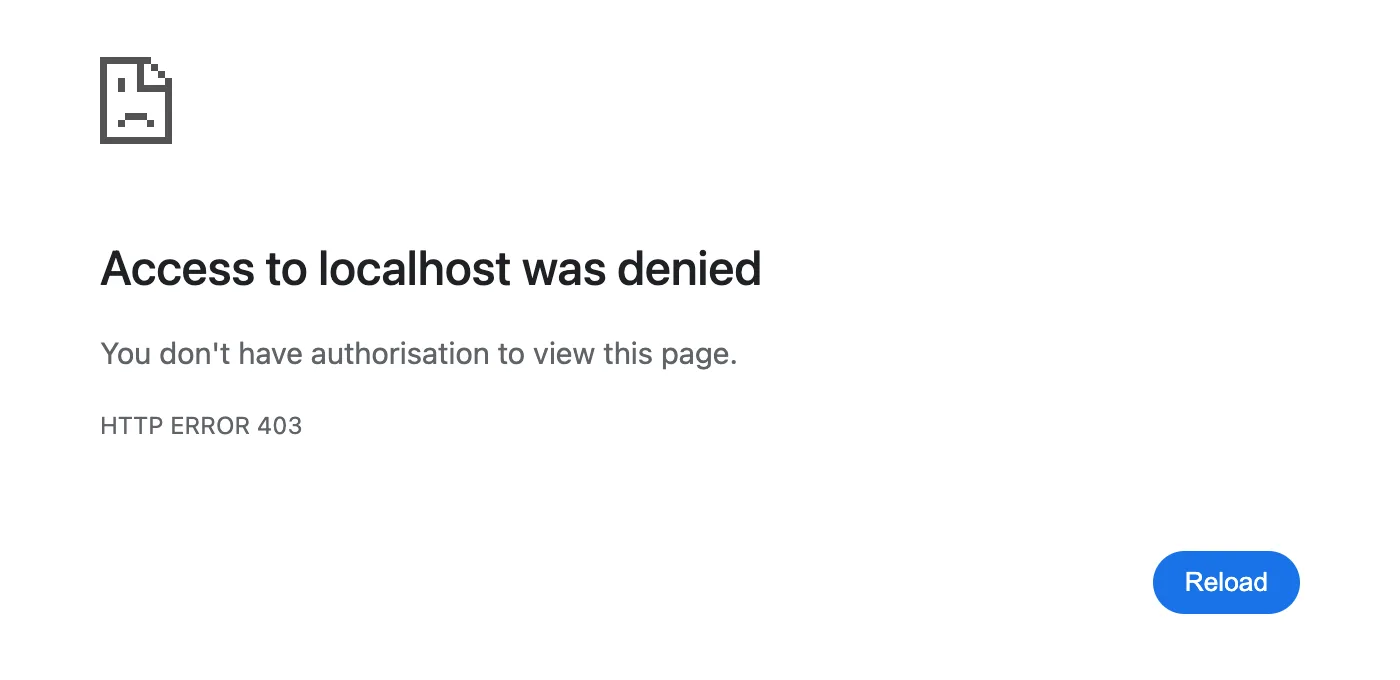
Access to localhost was denied
You don't have authorisation to view this page.
HTTP ERROR 403
MLflow's terminal showed no request for it at all.
What I Checked
What's listening on port 5000. lsof lists the programs that have a network port open. -nP shows numbers instead of names, -iTCP:5000 picks port 5000, and -sTCP:LISTEN keeps only programs waiting for connections:
lsof -nP -iTCP:5000 -sTCP:LISTEN
COMMAND    PID USER   FD   TYPE             DEVICE SIZE/OFF NODE NAME
ControlCe  668 you   12u  IPv4 0xba539dab5c5126a9      0t0  TCP *:5000 (LISTEN)
ControlCe  668 you   13u  IPv6 0x6fabc60f419337a0      0t0  TCP *:5000 (LISTEN)
Python    4353 you    3u  IPv4 0x83f5e505da080198      0t0  TCP 127.0.0.1:5000 (LISTEN)
Python    4356 you    3u  IPv4 0x83f5e505da080198      0t0  TCP 127.0.0.1:5000 (LISTEN)
Python    4357 you    3u  IPv4 0x83f5e505da080198      0t0  TCP 127.0.0.1:5000 (LISTEN)
Python    4358 you    3u  IPv4 0x83f5e505da080198      0t0  TCP 127.0.0.1:5000 (LISTEN)
Python    4359 you    3u  IPv4 0x83f5e505da080198      0t0  TCP 127.0.0.1:5000 (LISTEN)
Two programs shared the port. The five Python rows are MLflow, a main process and four workers, listening on 127.0.0.1, the IPv4 address of this computer. ControlCe, shortened from ControlCenter, is part of macOS, and it listened on *:5000: every address, IPv4 (IPv4) and IPv6 (IPv6).
Who answers localhost. curl -i prints a response's headers, including the Server header that names the software answering:
curl -i http://localhost:5000/
HTTP/1.1 403 Forbidden
Content-Length: 0
Server: AirTunes/960.13.25
X-Apple-ProcessingTime: 1
X-Apple-RequestReceivedTimestamp: 30080183
AirTunes, Apple's AirPlay service, sent the 403, not MLflow. curl -sv shows which address it connected to:
curl -sv http://localhost:5000/ 2>&1 | grep -E "Trying|Connected|< HTTP|< Server"
*   Trying [::1]:5000...
* Connected to localhost (::1) port 5000
< HTTP/1.1 403 Forbidden
< Server: AirTunes/960.13.25
localhost became ::1, the IPv6 address of this computer, where only ControlCenter was listening.
The same request by IPv4 address. MLflow answers /version with its version number:
curl -i http://127.0.0.1:5000/version
HTTP/1.1 200 OK
date: Fri, 13 Nov 2026 12:01:02 GMT
server: uvicorn
content-type: text/html; charset=utf-8
content-length: 6
x-content-type-options: nosniff
x-frame-options: SAMEORIGIN
vary: Origin

3.18.0
server: uvicorn is MLflow's web server, and 3.18.0 its version. Through 127.0.0.1, port 5000 reached MLflow.
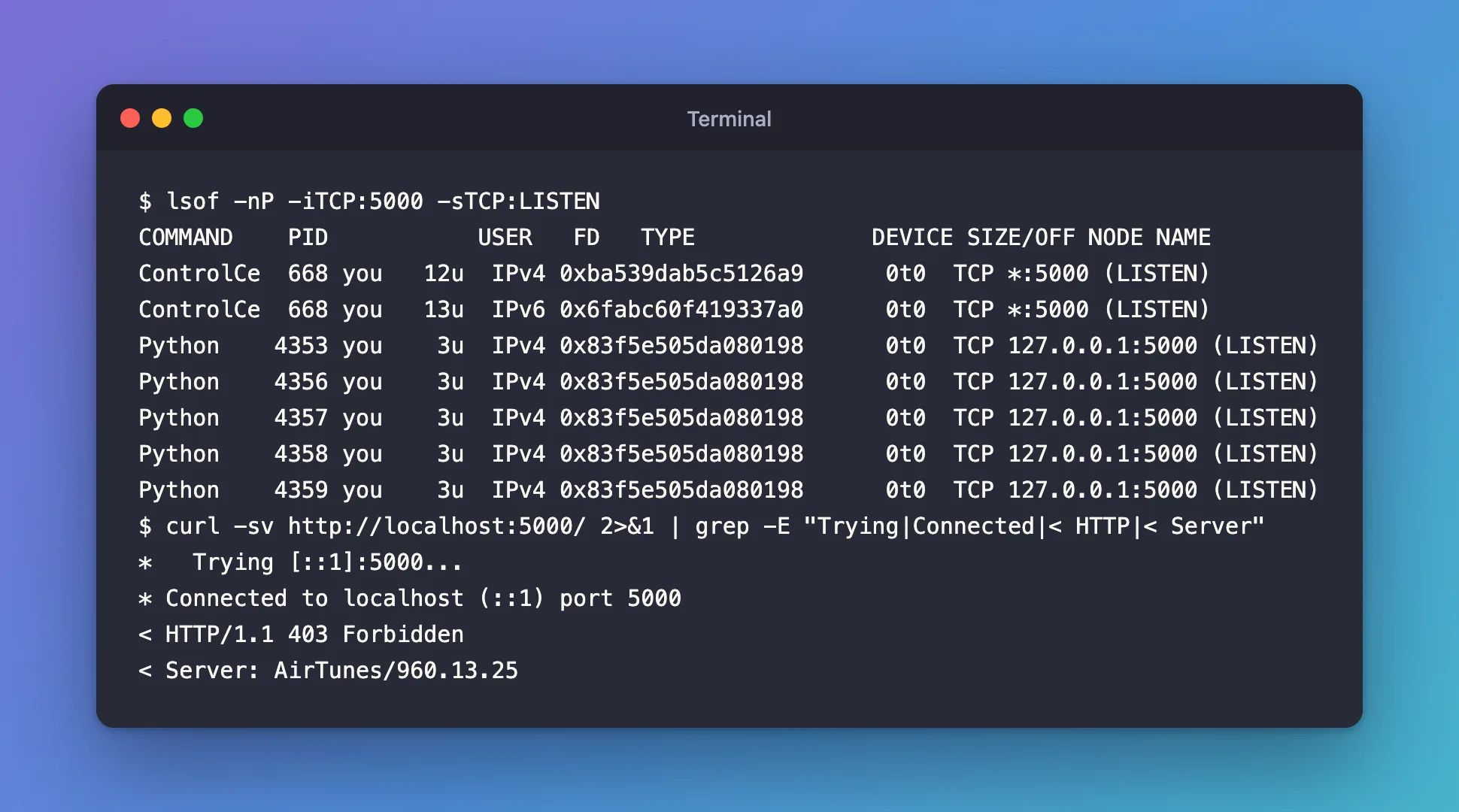
Apple's documentation. TCP and UDP ports used by Apple software products lists port 5000, TCP, as used by AirPlay. The macOS User Guide puts the switch for receiving AirPlay in System Settings › General › AirDrop & Continuity › AirPlay Receiver.
Why It Happens
macOS's AirPlay Receiver lets other Apple devices play to your Mac, and it listens on port 5000 on every address. MLflow listens only on 127.0.0.1, so both could start without a conflict error. The name localhost stands for both ::1 (IPv6) and 127.0.0.1 (IPv4). curl tried ::1 first, where only AirPlay was listening, and AirPlay refused the request with 403; Chrome got the same 403. A request to 127.0.0.1 went to MLflow.
The Fix
Pick one; the first two leave AirPlay alone.
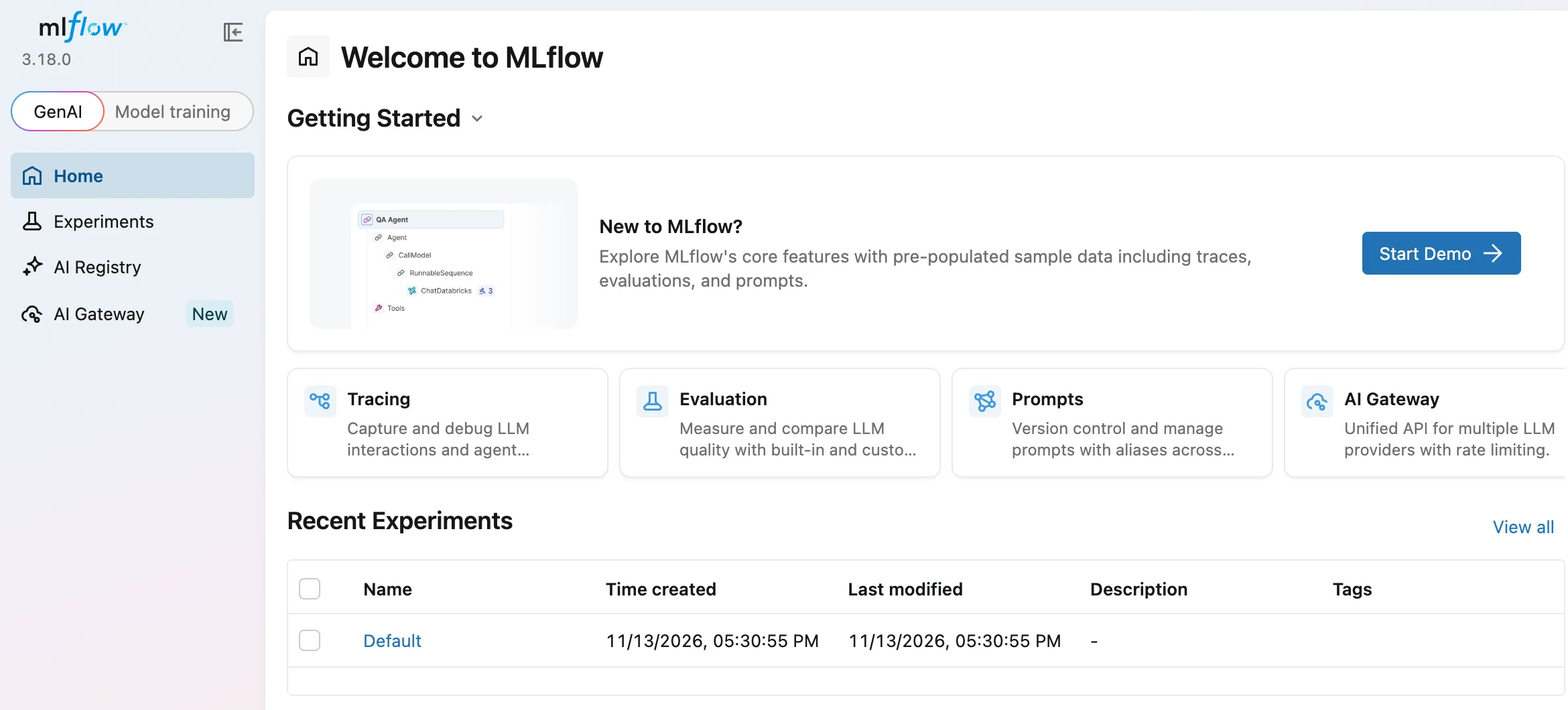
Open the UI by its IPv4 address. http://127.0.0.1:5000 opened MLflow on the same port, with nothing to change:
Move MLflow to another port. This is what the MLflow series does, with port 8080. Stop the server with Ctrl+C (if that prints a traceback, see Fixed: "Exception ignored on threading shutdown" KeyboardInterrupt When You Stop the MLflow Server), then start it again:
uv run mlflow server --port 8080
Check that nothing else uses a port before you pick it: How to Change the MLflow Server Port.
Or turn off AirPlay Receiver in System Settings › General › AirDrop & Continuity. That frees port 5000 but also stops other devices from playing to your Mac. I didn't change it on this Mac.
After the Fix
On port 8080, nothing else was listening, so even localhost reached MLflow. curl's first try, ::1, was refused, and its second, 127.0.0.1, connected:
curl -sv http://localhost:8080/version 2>&1 | grep -E "Trying|Connected|connect to|< HTTP|< server"
*   Trying [::1]:8080...
* connect to ::1 port 8080 from ::1 port 54707 failed: Connection refused
*   Trying 127.0.0.1:8080...
* Connected to localhost (127.0.0.1) port 8080
< HTTP/1.1 200 OK
< server: uvicorn
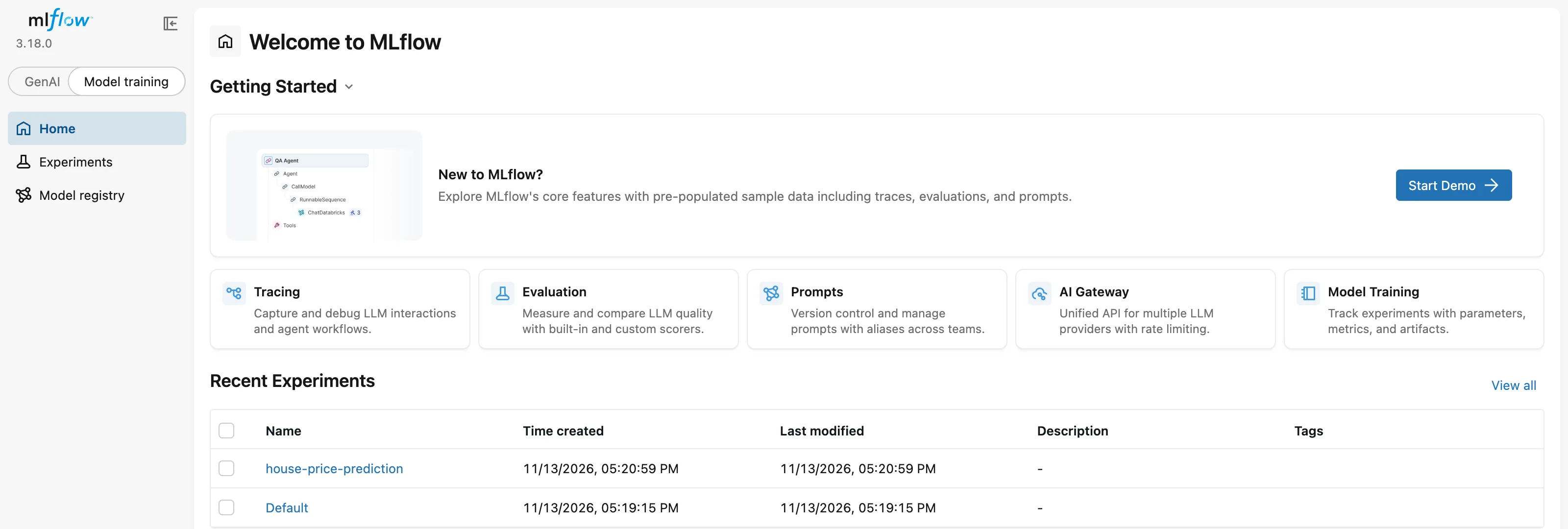
The UI opened at http://127.0.0.1:8080, the address the series uses everywhere:
Common Mistakes
| Mistake | What happens | Do this instead |
|---|---|---|
| Debugging MLflow's settings | Nothing changes: the 403 doesn't come from MLflow | Check the Server header with curl -i |
| Assuming the port is free because the server started | AirPlay keeps answering localhost | Check the port with lsof -nP -iTCP:5000 -sTCP:LISTEN |
| Turning off AirPlay Receiver without need | Other devices can't play to your Mac | Use 127.0.0.1 or another port |
Troubleshooting
| Symptom | Likely cause | Fix |
|---|---|---|
403 with Server: AirTunes/… | AirPlay Receiver answered on port 5000 | Use http://127.0.0.1:5000 or another port |
127.0.0.1:5000 doesn't load either | The MLflow server isn't running | Start it and wait for Uvicorn running on… |
FAQ
Is this a Chrome problem?
No. curl got the same 403 from the same localhost address, so any program that tries ::1 first reaches AirPlay.
Why didn't MLflow complain that port 5000 was taken?
It listens on 127.0.0.1 only, while AirPlay listens on *, every address. macOS let both listen at once, as the lsof output shows.
How can I tell which program sent a 403?
Look at the Server header with curl -i. AirPlay answered with AirTunes/960.13.25; MLflow's web server answers with uvicorn.
Conclusion
Access to localhost was denied, HTTP ERROR 403, came from macOS's AirPlay Receiver, not MLflow. lsof showed both on port 5000, and curl -sv showed localhost reaching AirPlay over IPv6. Opening http://127.0.0.1:5000 reached MLflow, and running MLflow on port 8080 ended the clash for good.
Additional Resources
- TCP and UDP ports used by Apple software products — port 5000 for AirPlay.
- Stream video and audio with AirPlay — where to find AirPlay Receiver.
- MLflow Tracking Server — starting the server and choosing its port.
