Fixed: "AADSTS9002313: Invalid request. Request is malformed or invalid." When the Azure CLI Gets a Token for Your Own API

az account get-access-token refused to give me a token for the scope of an API I had just registered, with AADSTS9002313: Invalid request. Request is malformed or invalid. My Azure CLI sign-in was fine. The --debug log showed the real cause, AADSTS65001: nobody had consented to the Microsoft Azure CLI using that scope. Adding the Azure CLI as an authorized client application of the API fixed it.
What I Was Doing
In Part 8 of the Microsoft Agent Framework series, the agent's API gets protected with Microsoft Entra ID. I had registered the API in the Microsoft Entra admin center as Dewiride Service Desk API, given it the Application ID URI api:// plus its client ID, and added a scope named access_as_user. To test the API from an .http file, I needed an access token for that scope, and the Azure CLI was already signed in. I looked up the API's client ID and asked for a token:
- macOS / Linux
- Windows (PowerShell)
API_CLIENT_ID=$(az ad app list --display-name "Dewiride Service Desk API" --query "[0].appId" --output tsv)
az account get-access-token --scope "api://$API_CLIENT_ID/access_as_user" --query expiresOn -o tsv
$apiClientId = az ad app list --display-name "Dewiride Service Desk API" --query "[0].appId" --output tsv
az account get-access-token --scope "api://$apiClientId/access_as_user" --query expiresOn -o tsv
--query expiresOn -o tsv prints only the new token's expiry time, so the token itself never appears on the screen.
What I Expected
The token's expiry time — the Azure CLI gets tokens for any resource my account may use, and this API belongs to my own organization.
What I Got
ERROR: AADSTS9002313: Invalid request. Request is malformed or invalid. Trace ID: 00000000-0000-0000-0000-000000000000 Correlation ID: 00000000-0000-0000-0000-000000000000 Timestamp: 2026-11-19 10:44:34Z
Run the command below to authenticate interactively; additional arguments may be added as needed:
az logout
az login --tenant "11111111-1111-1111-1111-111111111111" --scope "api://22222222-2222-2222-2222-222222222222/access_as_user"
The command ended with exit code 1 and no token.
What I Checked
Whether my sign-in still worked. It did: the az ad app list on the line before had just found the registration through the same sign-in. The problem was specific to the new scope.
What the error code means. Microsoft's authentication and authorization error codes describe AADSTS9002313 as InvalidRequest - Request is malformed or invalid. That names no cause, and the request was an ordinary one.
The debug log. I ran the same command with --debug and kept only the lines about the token request:
az account get-access-token --scope "api://$API_CLIENT_ID/access_as_user" --query expiresOn -o tsv --debug
DEBUG: cli.azure.cli.core.auth.msal_credentials: UserCredential.acquire_token: scopes=['api://22222222-2222-2222-2222-222222222222/access_as_user'], claims_challenge=None, kwargs={}
DEBUG: msal.application: Cache attempts an RT
DEBUG: msal.application: Refresh failed. invalid_grant: AADSTS65001: The user or administrator has not consented to use the application with ID '04b07795-8ddb-461a-bbee-02f9e1bf7b46' named 'Microsoft Azure CLI'. Send an interactive authorization request for this user and resource. Trace ID: 00000000-0000-0000-0000-000000000000 Correlation ID: 00000000-0000-0000-0000-000000000000 Timestamp: 2026-11-19 10:44:34Z
DEBUG: msal.application: Cache attempts an RT
DEBUG: msal.application: Refresh failed. invalid_grant: AADSTS9002313: Invalid request. Request is malformed or invalid. Trace ID: 00000000-0000-0000-0000-000000000000 Correlation ID: 00000000-0000-0000-0000-000000000000 Timestamp: 2026-11-19 10:44:34Z
The Azure CLI tried twice with a stored refresh token (RT), the long-lived token it exchanges for short-lived access tokens. The first attempt failed with AADSTS65001: The user or administrator has not consented to use the application with ID '04b07795-8ddb-461a-bbee-02f9e1bf7b46' named 'Microsoft Azure CLI'. The second failed with AADSTS9002313, and only that last error reached the screen.
What the Azure CLI is to Microsoft Entra ID. The Azure CLI is itself an app, with the client ID 04b07795-8ddb-461a-bbee-02f9e1bf7b46 — the ID Microsoft's documentation lists for Microsoft Azure CLI. For it to call my API as me, the API's access_as_user permission must be granted to that app. Nobody had granted it: the API was minutes old. (Fixed: AADSTS65001 - The User or Administrator Has Not Consented to Use the Application with ID covers the consent error itself in depth.)
What Microsoft's documentation recommends. Configure an application to expose a web API describes authorized client applications: To suppress prompting for consent by users of your app to the scopes you've defined, you can pre-authorize the client application to access your web API. Pre-authorize only those client applications you trust since your users won't have the opportunity to decline consent. The Foundry Local authentication guide does exactly this for the Azure CLI: Authorize the Azure CLI as a client application so your team can acquire tokens by using az account get-access-token, with the client ID above.
Why It Happens
An access token for a delegated scope is issued to a particular app acting for a particular user, and Microsoft Entra ID issues it only when that app may use the scope — through consent, or because the API pre-authorized it. A new API has neither for the Azure CLI. So the Azure CLI's silent request with its refresh token is refused with AADSTS65001, and its retry ends in AADSTS9002313, the error it prints. Your sign-in is fine; the permission between the Azure CLI and your API is missing.
The Fix
Authorize the Azure CLI as a client application of your API:
- In the Microsoft Entra admin center, browse to Entra ID > App registrations and open your API's registration.
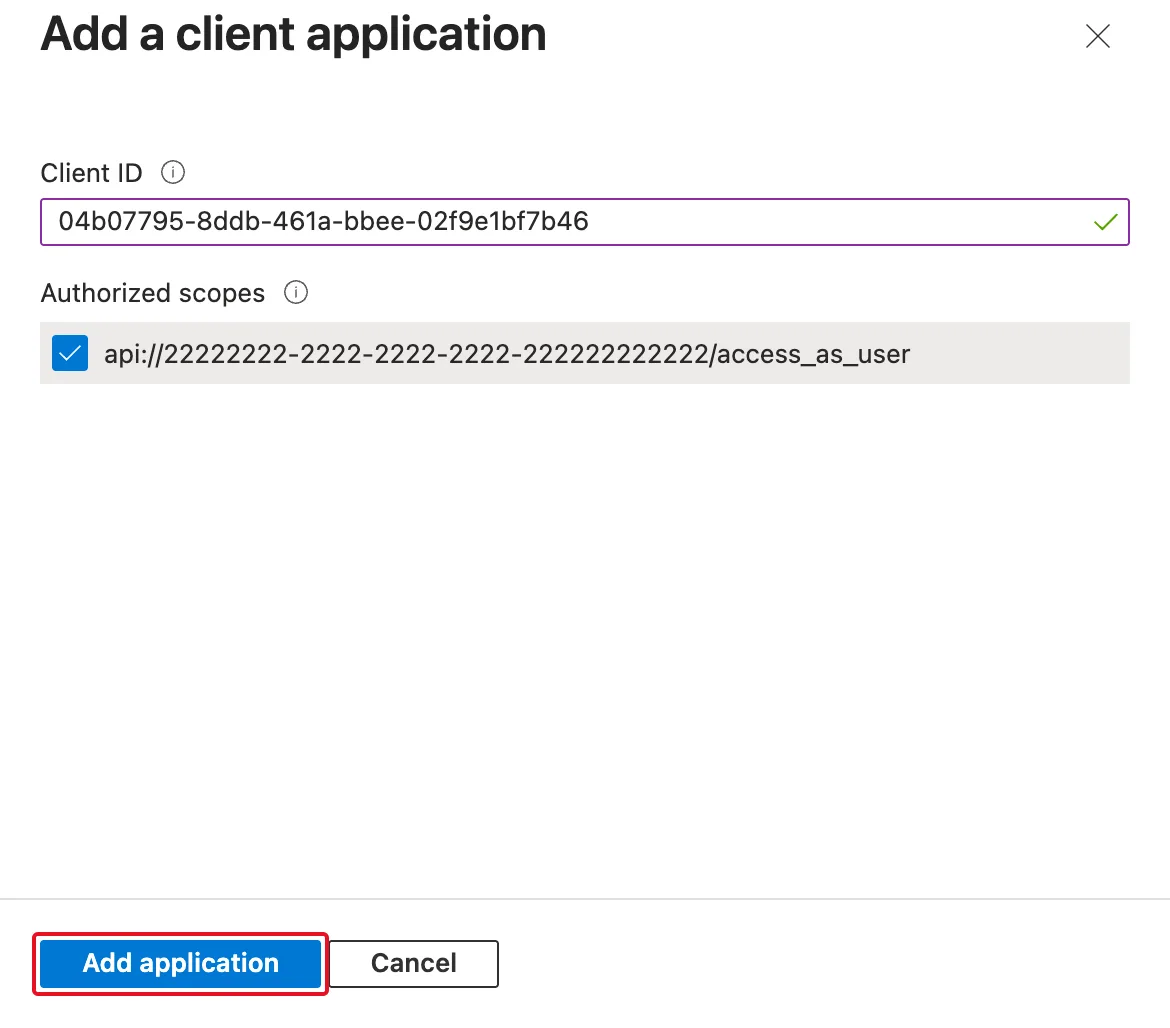
- Select Expose an API. Under Authorized client applications, select Add a client application. The link stays dimmed until the API has at least one scope.
- Enter the Azure CLI's client ID,
04b07795-8ddb-461a-bbee-02f9e1bf7b46, and select your scope under Authorized scopes:
- Select Add application. The Azure CLI now appears under Authorized client applications, with one scope:
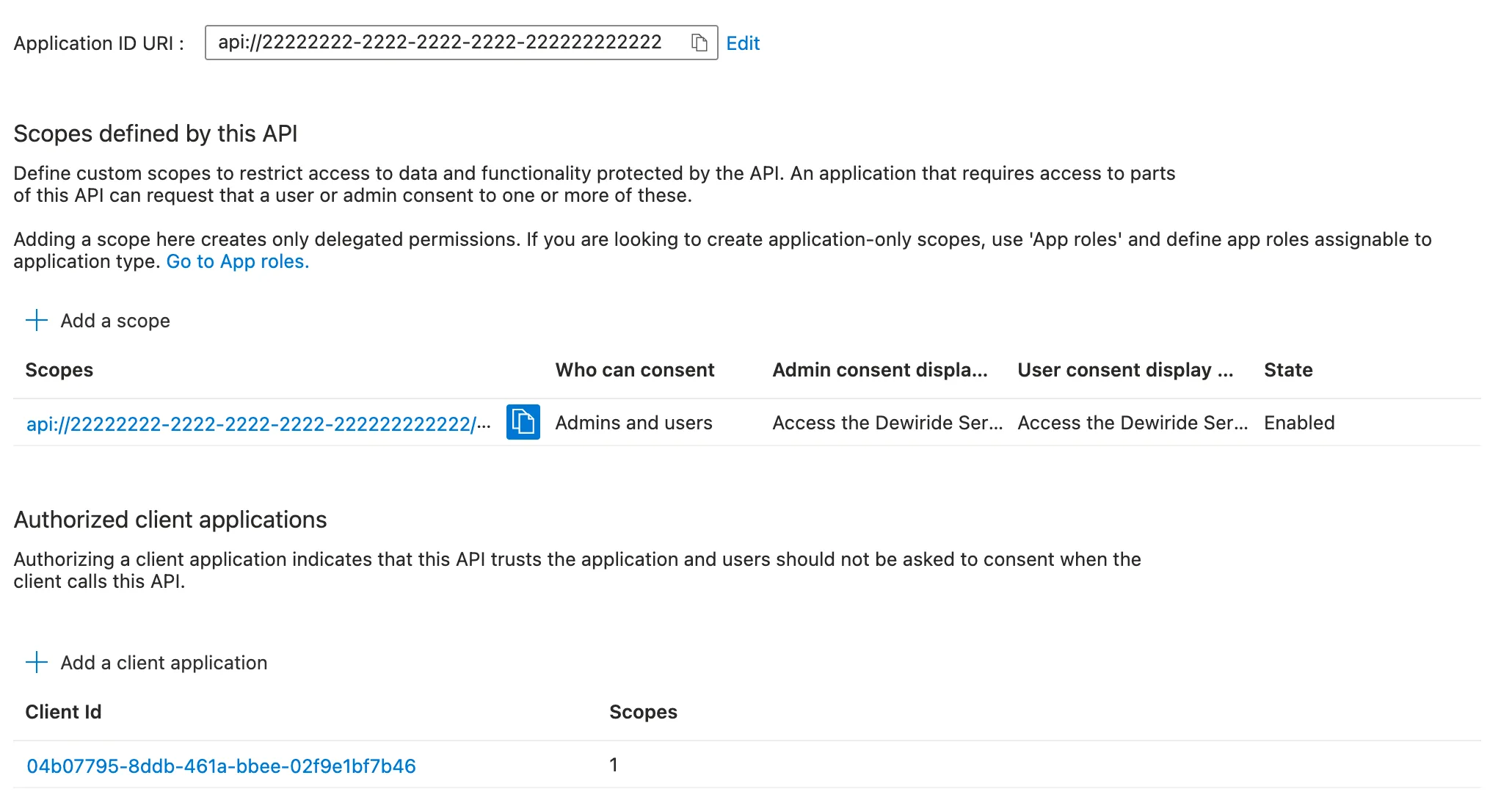
Pre-authorizing works for every member of your organization who uses the Azure CLI, and nobody sees a consent prompt. As Microsoft's guidance says, do it only for clients you trust; the Azure CLI is a tool for the developers who build and test the API. The same steps, for your own apps too and with the Azure CLI, are in How to Pre-Authorize a Client Application for Your API in Microsoft Entra ID.
The error message itself suggests a different route: az logout, then az login with --scope for your API, which asks for the token during an interactive sign-in. I fixed it on the API's side instead, as Microsoft's documentation describes, so that it works the same for everyone on the team.
After the Fix
The same command printed the token's expiry time, in local time:
az account get-access-token --scope "api://$API_CLIENT_ID/access_as_user" --query expiresOn -o tsv
2026-11-19 17:29:09.000000
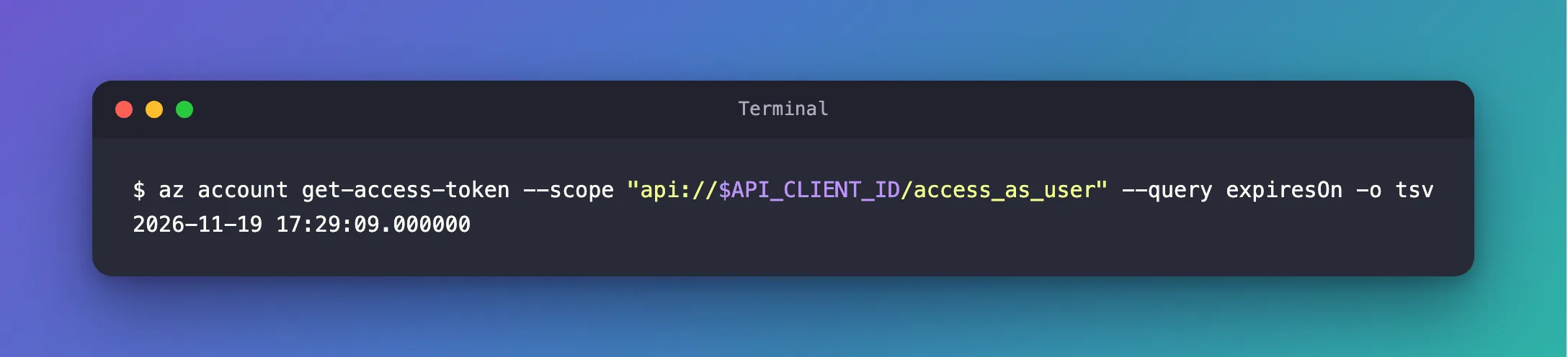
No consent prompt, no new sign-in. The API accepted the token: its agent endpoint answered 200 OK from then on.
Common Mistakes
| Mistake | What happens | Do this instead |
|---|---|---|
| Assuming the sign-in expired | You sign in again without learning what failed | Run the command with --debug and read the first failure |
| Adding the Azure CLI before the API has a scope | Add a client application is dimmed | Add the scope first |
| Authorizing the client without selecting the scope | The Azure CLI still has no permission for that scope | Select the scope under Authorized scopes |
Asking for the token without --scope, or with another API's scope | You get a token, but your API refuses it with 401 | Use api://<client ID>/<scope name> |
Troubleshooting
| Symptom | Likely cause | Fix |
|---|---|---|
AADSTS9002313 from az account get-access-token --scope api://… | The Azure CLI isn't consented or authorized for the scope | Authorize the Azure CLI's client ID on the API |
AADSTS9002313 from every Azure CLI command | The sign-in itself expired | az login (Fixed: AADSTS9002313 in Azure CLI) |
| Add a client application can't be selected | The API has no scope yet | Add the scope first |
FAQ
Why did the Azure CLI print AADSTS9002313 instead of AADSTS65001?
It tried twice, and printed the error of its last attempt. The first attempt's error, AADSTS65001, only appears in the --debug log.
Is it safe to authorize the Azure CLI?
It lets anyone in your organization who uses the Azure CLI get a token for your API's scope without a consent prompt. The API still decides what each signed-in person may do. Authorize only the scopes the Azure CLI needs, and remove the client when your team no longer tests with it.
Do I need this for my own apps that call the API?
Each app that calls the API needs the same permission, either through consent or as an authorized client. In the series, the chat app is authorized the same way in Part 9.
Conclusion
AADSTS9002313 from az account get-access-token --scope api://… doesn't mean the request was broken. Here, the Azure CLI simply had no permission to use the new API's scope; --debug showed AADSTS65001. Adding the Azure CLI's client ID, 04b07795-8ddb-461a-bbee-02f9e1bf7b46, under Authorized client applications with the scope selected fixed it for everyone in the organization.
Additional Resources
- Configure an application to expose a web API — scopes and authorized client applications.
- Microsoft Entra authentication and authorization error codes — what each
AADSTScode means. - az account get-access-token — the command and its
--scopeparameter.
Related
- How to Pre-Authorize a Client Application for Your API in Microsoft Entra ID
- How to Get an Access Token for Your Own API with the Azure CLI
- Fixed: AADSTS65001 - The User or Administrator Has Not Consented to Use the Application with ID
- Fixed: "AADSTS9002313: Invalid request. Request is malformed or invalid." in Azure CLI
