Fixed: "A compatible .NET SDK was not found" (Requested SDK Version from global.json)

After I edited a project's global.json, every dotnet command in the folder stopped working with "A compatible .NET SDK was not found", even though a newer .NET 10 SDK was installed. The message itself names the file that caused it. The fix was one word in global.json: the rollForward value decides whether a newer SDK may stand in for the requested one.
What I Was Doing
I was pinning a project's .NET SDK version with global.json, as in How to Pin the .NET SDK Version with global.json in a .NET C# Project. The computer has exactly one SDK, 10.0.403. I set the project's global.json to ask for 10.0.100, the first .NET 10 SDK and the version Microsoft's own examples use, with latestPatch, which sounds like "the latest patch, please":
{
  "sdk": {
    "rollForward": "latestPatch",
    "version": "10.0.100"
  }
}
Then I checked which SDK the folder would use:
dotnet --version
What I Expected
10.0.403. It's newer than 10.0.100 and it's the same .NET 10, so it seemed a natural stand-in.
What I Got
The command could not be loaded, possibly because:
  * You intended to execute a .NET application:
      The application '--version' does not exist or is not a managed .dll or .exe.
  * You intended to execute a .NET SDK command:
      A compatible .NET SDK was not found.

Requested SDK version: 10.0.100
global.json file: /Users/you/projects/dewiride-inventory-api/global.json

Installed SDKs:
10.0.403 [/usr/local/share/dotnet/sdk]

Install the [10.0.100] .NET SDK or update [/Users/you/projects/dewiride-inventory-api/global.json] to match an installed SDK.

Learn about SDK resolution:
https://aka.ms/dotnet/sdk-not-found
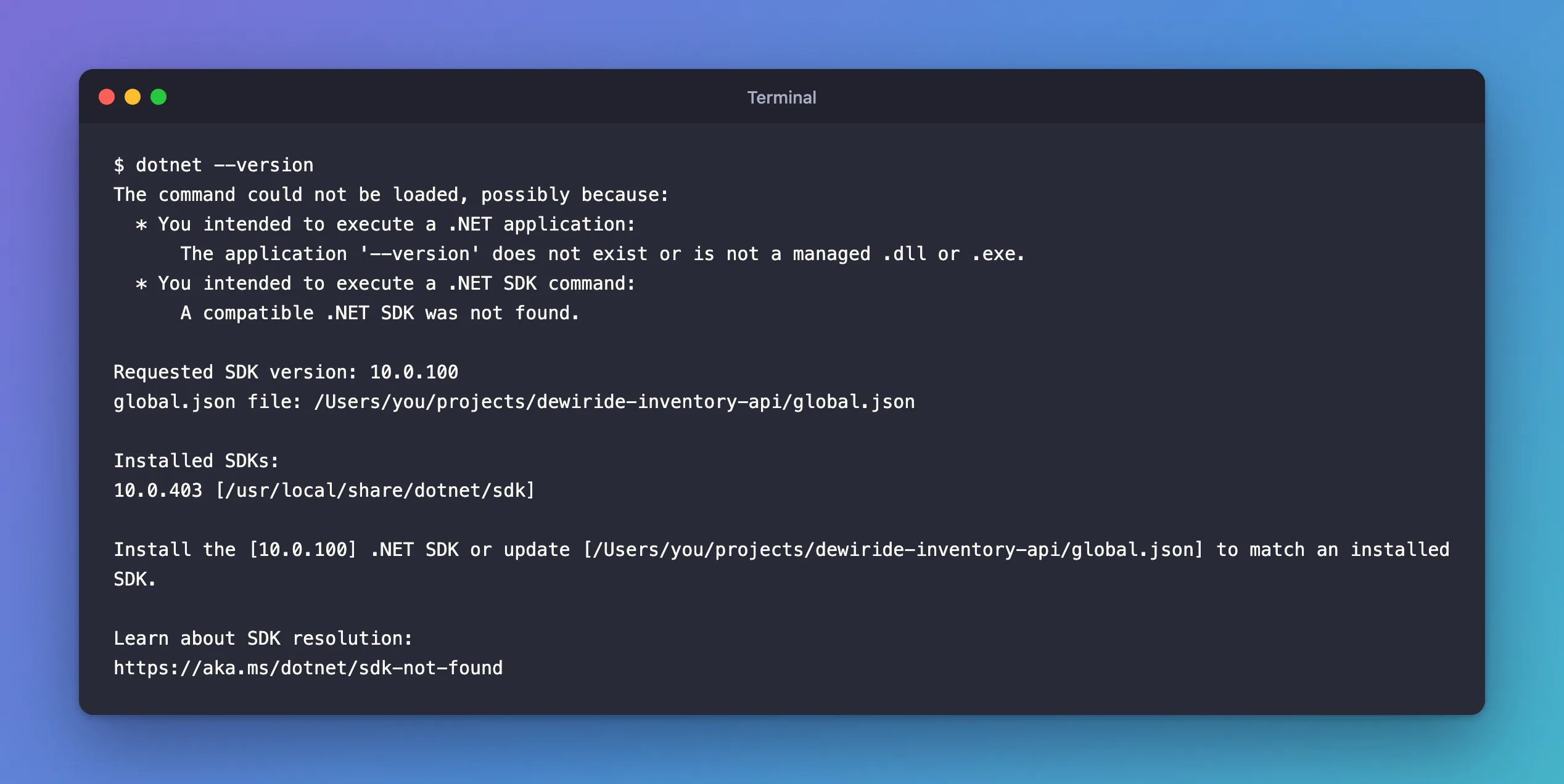
It isn't only --version: dotnet build, dotnet run and dotnet ef fail the same way, because every SDK command starts by picking an SDK.
What I Checked
The message holds everything needed:
Requested SDK version: 10.0.100: whatglobal.jsonasked for.global.json file:: which file asked. The search goes up through parent folders, so it can be a file you didn't know about, higher up.Installed SDKs:: what's available, here only 10.0.403.
The first two lines about "a .NET application" are a red herring: dotnet also runs apps, and since no SDK could load, it guessed that --version might be an app's name. dotnet --list-sdks still worked, because listing doesn't need an SDK to be chosen.
The short link at the end leads to Microsoft's version selection page, which opens with a tip for exactly this case: "If you reached this page from a "compatible .NET SDK was not found" build error, download the .NET SDK to install the required version. Alternatively, update your global.json file to match a version that's already installed."
Why It Happens
rollForward decides how far from the requested version the SDK may be. The global.json overview defines latestPatch as: "Uses the latest installed patch level that matches the requested major, minor, and feature band with a patch level that's greater than or equal to the specified value. If not found, fails."
The feature band is the hundreds digit of the last number. 10.0.100 is in the 1xx band, and 10.0.403 is in the 4xx band. latestPatch only accepts 10.0.1xx versions, and none is installed, so it fails, exactly as the text says.
Two common ways to end up here without touching global.json yourself:
- You cloned a repository whose
global.jsonnames an SDK band you don't have. - Visual Studio was updated. The overview warns: "Visual Studio only ever installs a single copy of the .NET SDK. So if you upgrade your Visual Studio version, it removes the previous version of the .NET SDK it had used to install the new version." A strict
global.jsonthat matched the old SDK stops matching.
The Fix
I wanted to keep 10.0.100 as the minimum and let any newer .NET 10 SDK do the work. latestFeature says exactly that: the overview defines it as "Uses the highest installed feature band and patch level that matches the requested major and minor with a feature band and patch level that's greater than or equal to the specified value."
{
  "sdk": {
    "rollForward": "latestFeature",
    "version": "10.0.100"
  }
}
The other two fixes, from the same tip, are just as valid. Pick by what your team needs:
| Fix | When |
|---|---|
Change rollForward to latestFeature | Any newer SDK of the same .NET version is fine |
Change version to an installed SDK, such as 10.0.403 | The team agrees to move to the SDK you have |
| Install the requested SDK band from the .NET download page | The repository really needs that band, for example to match its build server |
After the Fix
dotnet --version
10.0.403
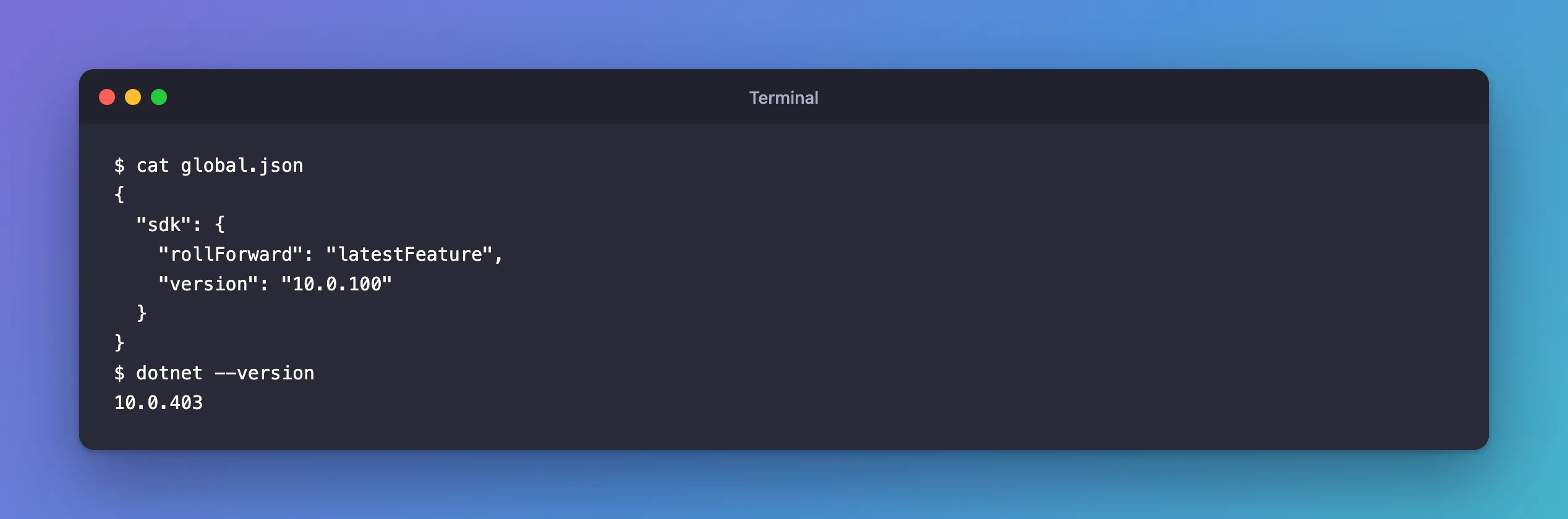
The folder uses 10.0.403 again, and dotnet build and dotnet run work.
Common Mistakes
| Mistake | What happens | Do this instead |
|---|---|---|
Deleting global.json from a shared repository to make the error go away | The team loses its agreed SDK, and builds start to differ | Change rollForward or version, and commit the change |
Reading latestPatch as "the newest SDK" | It only accepts patches of the same feature band | Use latestFeature for "any newer SDK of this .NET version" |
| Fixing the wrong file | The error keeps coming | Edit the file named after global.json file: |
| Installing a whole new .NET version | Doesn't help when rollForward forbids it | Install the band the message asks for, or change the rule |
Troubleshooting
| Symptom | Likely cause | Fix |
|---|---|---|
The error names a global.json in a parent folder | A file higher up wins | Fix or move that file |
NETSDK1141: Unable to resolve the .NET SDK version as specified in the global.json | The same problem, reported by a build | Apply the same fix |
FAQ
Is it safe to use latestFeature?
Yes, for most projects. It never moves the project to a new major version, such as .NET 11. It allows newer feature bands and patches of the version you name.
Why didn't the SDK just use 10.0.403?
Because global.json told it not to. Without a global.json, the newest installed SDK is always used.
Conclusion
"A compatible .NET SDK was not found" means a global.json asked for an SDK that its rollForward rule can't match with anything installed. The message names the requested version, the file and the installed SDKs. latestPatch only accepts the same feature band, so 10.0.100 can't use 10.0.403. Changing it to latestFeature, or pointing version at an installed SDK, fixes every dotnet command at once.
Additional Resources
- Select the .NET version to use — how the SDK is chosen, and the tip for this error.
- global.json overview — every
rollForwardvalue. - NETSDK1141 — the same problem as a build error.
