EF Core Entity States Explained: Detached, Added, Unchanged, Modified and Deleted

EF Core decides what SQL to send by looking at each entity's state. There are five states, and once you know them, SaveChangesAsync stops being mysterious. This guide follows one entity through all of them, printing the state at each step and showing the SQL each save sends.
The Five States
EF Core's change tracking page defines them:
| State | Meaning | SaveChangesAsync sends |
|---|---|---|
Detached | "not being tracked by the DbContext" | Nothing |
Added | "new and have not yet been inserted into the database" | INSERT |
Unchanged | "have not been changed since they were queried from the database" | Nothing |
Modified | "have been changed since they were queried from the database" | UPDATE |
Deleted | Exists in the database, and will be removed | DELETE |
Prerequisites
- A .NET C# project with EF Core. The examples use EF Core 10, Oracle's
MySql.EntityFrameworkCore, MySQL 9.7, and acategoriestable.
Follow One Entity
db.Entry(category).State returns the state of any object. This endpoint prints it after each step:
app.MapPost("/demo/states", async (InventoryDbContext db, TimeProvider clock) =>
{
    var now = clock.GetUtcNow().UtcDateTime;
    var category = new Category { Name = $"States {now:HHmmssfff}", CreatedAtUtc = now };
    var log = new List<string> { $"new object: {db.Entry(category).State}" };

    db.Categories.Add(category);
    log.Add($"after Add: {db.Entry(category).State}, Id={category.Id}");

    await db.SaveChangesAsync();
    log.Add($"after SaveChanges: {db.Entry(category).State}, Id={category.Id}");

    category.Name += " renamed";
    db.ChangeTracker.DetectChanges();
    log.Add($"after changing Name: {db.Entry(category).State}");

    await db.SaveChangesAsync();
    log.Add($"after SaveChanges: {db.Entry(category).State}");

    db.Categories.Remove(category);
    log.Add($"after Remove: {db.Entry(category).State}");

    await db.SaveChangesAsync();
    log.Add($"after SaveChanges: {db.Entry(category).State}");

    return Results.Text(string.Join('\n', log) + "\n");
});
new object: Detached
after Add: Added, Id=0
after SaveChanges: Unchanged, Id=57
after changing Name: Modified
after SaveChanges: Unchanged
after Remove: Deleted
after SaveChanges: Detached
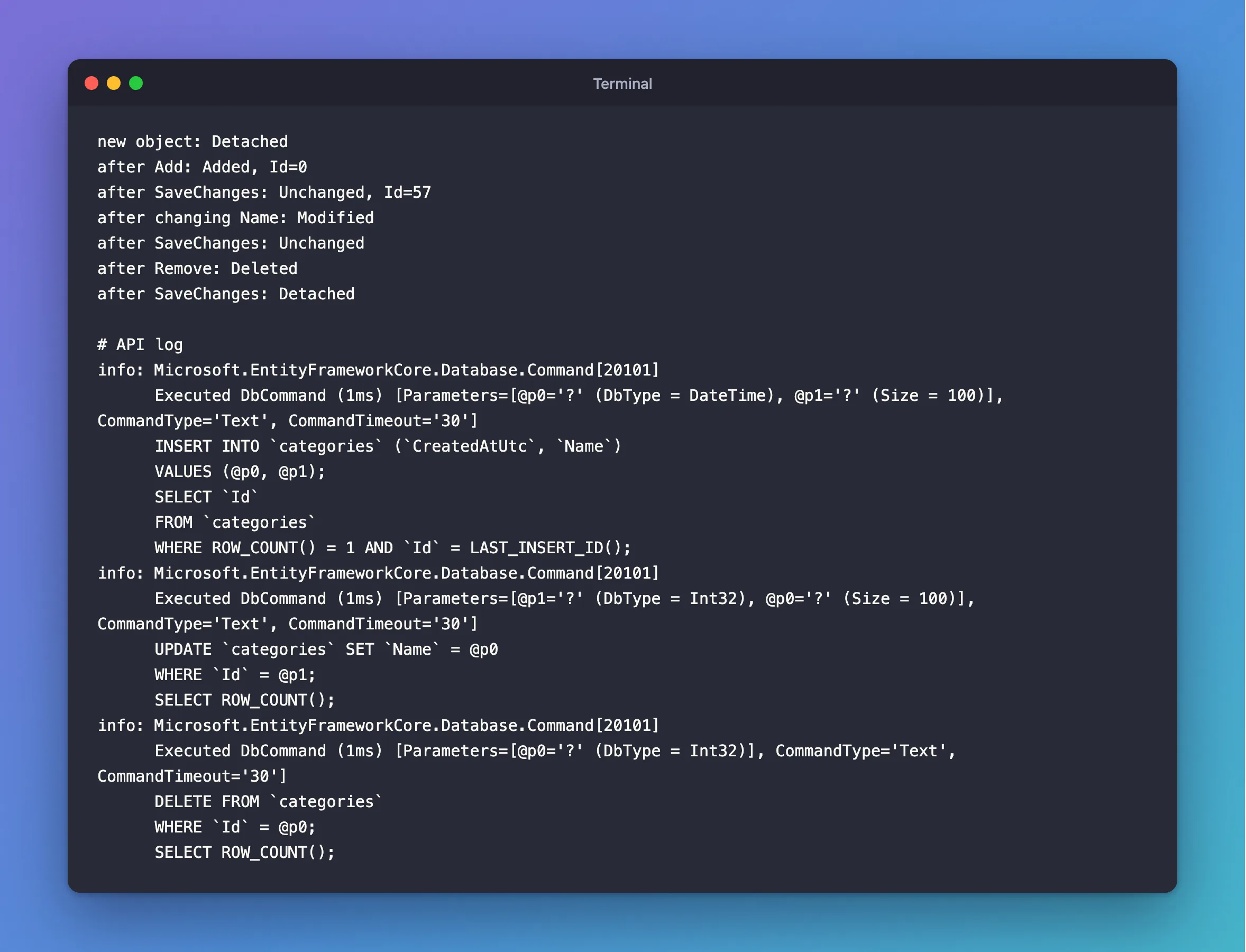
And the three saves sent three statements, one for each state that needed one:
info: Microsoft.EntityFrameworkCore.Database.Command[20101]
      Executed DbCommand (1ms) [Parameters=[@p0='?' (DbType = DateTime), @p1='?' (Size = 100)], CommandType='Text', CommandTimeout='30']
      INSERT INTO `categories` (`CreatedAtUtc`, `Name`)
      VALUES (@p0, @p1);
      SELECT `Id`
      FROM `categories`
      WHERE ROW_COUNT() = 1 AND `Id` = LAST_INSERT_ID();
info: Microsoft.EntityFrameworkCore.Database.Command[20101]
      Executed DbCommand (1ms) [Parameters=[@p1='?' (DbType = Int32), @p0='?' (Size = 100)], CommandType='Text', CommandTimeout='30']
      UPDATE `categories` SET `Name` = @p0
      WHERE `Id` = @p1;
      SELECT ROW_COUNT();
info: Microsoft.EntityFrameworkCore.Database.Command[20101]
      Executed DbCommand (1ms) [Parameters=[@p0='?' (DbType = Int32)], CommandType='Text', CommandTimeout='30']
      DELETE FROM `categories`
      WHERE `Id` = @p0;
      SELECT ROW_COUNT();
After each save, the entity settles: Added and Modified become Unchanged, because the object now matches the database. A deleted one goes back to Detached, because there's nothing left to track.
What This Explains
- Why
Addsends nothing. It only sets the state. - Why changing a loaded object is enough. EF Core compares it with the original values, and marks it
Modified. - Why saving twice sends nothing the second time. After the first save, everything is
Unchanged. - Why a
Selectresult can't be saved. It'sDetached, and it isn't even an entity.
Common Mistakes
| Mistake | What happens | Do this instead |
|---|---|---|
Changing an object from AsNoTracking | It's Detached, so nothing is saved | Load it with tracking |
Setting State = Modified by hand on a whole entity | Every column gets written | Change properties on a tracked entity |
Reading the state right after a change, without DetectChanges | It can still say Unchanged | Call DetectChanges, or SaveChangesAsync does it |
Calling Remove and not saving | The row stays, and the state is only Deleted in memory | Call SaveChangesAsync |
FAQ
Does ExecuteUpdateAsync change any of this?
No. ExecuteUpdateAsync and ExecuteDeleteAsync don't touch the change tracker at all, as this post shows, so a tracked object can end up different from its row.
How do I see all tracked entities?
db.ChangeTracker.DebugView.LongView, as in this post.
Conclusion
Every entity is Detached, Added, Unchanged, Modified or Deleted, and SaveChangesAsync sends SQL by state: INSERT for added, UPDATE for modified and DELETE for deleted. After a save, the object settles into Unchanged, or Detached if it was deleted. db.Entry(x).State tells you where any object stands.
Additional Resources
- Change Tracking in EF Core — entity states and tracking.
- Explicitly Tracking Entities — setting states yourself.
