How to Connect a .NET C# Web API to a MySQL Database — Part 4: Transactions, Row Locks and Retries with MySQL

Part 3 changed one row at a time. Real work changes several: take the stock, record why, create the order. In this part, those become one unit, you'll watch what MySQL's row locks do when two people buy the last item, and the API learns to survive deadlocks, a MySQL restart and a dropped connection. Some of it surprised me: with Oracle's provider, the retries from Part 1 retry nothing, and a short CommandTimeout can make a request hang for good.
This is Part 4 of a 5-part series.
- Part 1: Connect with EF Core and a Secure Connection String
- Part 2: Create MySQL Tables with EF Core Migrations
- Part 3: Read and Write MySQL Data with EF Core
- Part 4: Transactions, Row Locks and Retries with MySQL (you are here)
- Part 5: Production Checklist for the MySQL Connection
Every command and output on this page is real, captured while building the project.
Get the Source Code
Get the complete source code of Inventory and Orders API for .NET C# and MySQL on Dewiride Store →
Use it to skip ahead, or to compare your code with the finished project, and this post gets it running. Every step is still shown here, for free.
Where the App Is Now
The example is a small inventory API. After Part 3, it reads and writes categories and products. It has a stock_movements table that nothing writes to yet, and every product's quantityOnHand is 0.
This part puts that table to work, adds orders, and each request teaches one piece:
| Request | What it teaches |
|---|---|
POST /api/v1/products/{id}/stock/receipts | Two writes as one unit: a transaction |
POST /api/v1/orders | Row locks: who gets the last item |
| Orders listing products in opposite orders | Deadlocks, and how to end them |
| Any request while MySQL restarts | Retries that really retry |
| An order for a row someone else holds | Time limits that really stop |
| Any change when MySQL is down | Telling the client to come back |
A request whose COMMIT reply is lost | Making a retry safe |
A few more endpoints came along while building this, using the same patterns: stock adjustments and history, the order list, and fulfilling and cancelling an order. They're in the complete files, and How to Change a Status Only Once with a Conditional Update in EF Core covers the last ideas they use.
What a Transaction Is and How Row Locks Work
A transaction groups statements so that they all happen, or none do. You start one, do your work, and either COMMIT, which makes it permanent, or ROLLBACK, which undoes it. Until the commit, nobody else sees your changes.
A row lock is how MySQL keeps two transactions off the same row. When you change a row, InnoDB, MySQL's storage engine, locks that row until your transaction ends, and anyone else who wants to change it waits:
Plain SELECTs don't wait for any of this: they read a snapshot. That single fact explains a lot of what follows. How to Use a Transaction in MySQL and How to Lock a Row in MySQL with SELECT FOR UPDATE go further, in MySQL alone.
Versions Used
| Piece | Version |
|---|---|
| .NET SDK / runtime | 10.0.403 / 10.0.14 (C# 14) |
| EF Core and dotnet-ef | 10.0.14 |
| MySql.EntityFrameworkCore (Oracle's provider) | 10.0.12 |
| MySql.Data | 26.10.0 |
| MySQL Community Server | 9.7.4 LTS, in Docker |
Every version is the newest generally available release, checked on 5 November 2026. .NET 11 is still a release candidate. Nothing in this part costs anything: it all runs on your computer.
Prerequisites
- Part 3, finished: Part 3: Read and Write MySQL Data with EF Core. You need its endpoints and its rows.
- A way to send requests. This part uses the project's
.httpfile, as Part 3 did. - Three terminals. Step 6 needs them side by side.
- For the simultaneous requests:
curlandxargson macOS and Linux, or PowerShell 7 on Windows. I tested the PowerShell commands in version 7.6.6 on macOS, not on Windows.
Run every command from the project folder, dewiride-inventory-api.
Step 1: Start MySQL
docker compose up -d --wait
 Container dewiride-inventory-mysql-1 Starting
 Container dewiride-inventory-mysql-1 Started
 Container dewiride-inventory-mysql-1 Waiting
 Container dewiride-inventory-mysql-1 Healthy
Step 2: Add the Tables for Orders
Orders need two more tables: orders, and order_lines for the products in each order. stock_movements also gets a link to the order behind a sale. This is the same work as Part 2, so here are the new files, all in src/Dewiride.Inventory.Data:
namespace Dewiride.Inventory.Data.Entities;

/// <summary>Where an order is in its life. Stored as its name, such as "Placed".</summary>
public enum OrderStatus
{
    /// <summary>The order took its stock and waits to be sent.</summary>
    Placed,

    /// <summary>The order was sent to the customer.</summary>
    Fulfilled,

    /// <summary>The order was cancelled and its stock was put back.</summary>
    Cancelled,
}
namespace Dewiride.Inventory.Data.Entities;

/// <summary>
/// A customer's order for one or more products. Stored in the orders table.
/// </summary>
public sealed class Order
{
    public int Id { get; set; }

    public required string CustomerName { get; set; }

    /// <summary>The customer's email address. Personal data: never write it to logs.</summary>
    public required string CustomerEmail { get; set; }

    public OrderStatus Status { get; set; }

    /// <summary>The sum of every line's quantity times its unit price.</summary>
    public decimal TotalAmount { get; set; }

    /// <summary>
    /// Identifies the request that placed the order: the client's Idempotency-Key, or one the API
    /// makes up for the request. A repeat with the same key returns this order instead of placing another.
    /// </summary>
    public string? IdempotencyKey { get; set; }

    public DateTime PlacedAtUtc { get; set; }

    public DateTime? FulfilledAtUtc { get; set; }

    public DateTime? CancelledAtUtc { get; set; }

    public ICollection<OrderLine> Lines { get; } = [];
}
namespace Dewiride.Inventory.Data.Entities;

/// <summary>
/// One product in an order, with its quantity. Stored in the order_lines table.
/// </summary>
public sealed class OrderLine
{
    public int Id { get; set; }

    public int OrderId { get; set; }

    public Order Order { get; set; } = null!;

    public int ProductId { get; set; }

    public Product Product { get; set; } = null!;

    public int Quantity { get; set; }

    /// <summary>The product's price when the order was placed, kept even if the price changes later.</summary>
    public decimal UnitPrice { get; set; }
}
using Dewiride.Inventory.Data.Entities;
using Microsoft.EntityFrameworkCore;
using Microsoft.EntityFrameworkCore.Metadata.Builders;

namespace Dewiride.Inventory.Data.Configurations;

/// <summary>
/// How the Order class maps to the orders table in MySQL.
/// </summary>
public sealed class OrderConfiguration : IEntityTypeConfiguration<Order>
{
    public void Configure(EntityTypeBuilder<Order> builder)
    {
        ArgumentNullException.ThrowIfNull(builder);

        builder.ToTable("orders", table =>
            table.HasCheckConstraint("CK_orders_TotalAmount", "`TotalAmount` >= 0"));

        builder.HasKey(o => o.Id);

        builder.Property(o => o.CustomerName)
            .HasMaxLength(200);

        // 254 characters is the longest email address that can actually be delivered.
        builder.Property(o => o.CustomerEmail)
            .HasMaxLength(254);

        builder.Property(o => o.IdempotencyKey)
            .HasMaxLength(64);

        // MySQL allows many NULLs in a unique index, so orders placed without a key never clash.
        builder.HasIndex(o => o.IdempotencyKey)
            .IsUnique();

        // Orders are listed by status, newest first.
        builder.HasIndex(o => new { o.Status, o.PlacedAtUtc });
    }
}
using Dewiride.Inventory.Data.Entities;
using Microsoft.EntityFrameworkCore;
using Microsoft.EntityFrameworkCore.Metadata.Builders;

namespace Dewiride.Inventory.Data.Configurations;

/// <summary>
/// How the OrderLine class maps to the order_lines table in MySQL.
/// </summary>
public sealed class OrderLineConfiguration : IEntityTypeConfiguration<OrderLine>
{
    public void Configure(EntityTypeBuilder<OrderLine> builder)
    {
        ArgumentNullException.ThrowIfNull(builder);

        builder.ToTable("order_lines", table =>
        {
            table.HasCheckConstraint("CK_order_lines_Quantity", "`Quantity` > 0");
            table.HasCheckConstraint("CK_order_lines_UnitPrice", "`UnitPrice` >= 0");
        });

        builder.HasKey(l => l.Id);

        // A product appears at most once per order. The index also covers the OrderId foreign key.
        builder.HasIndex(l => new { l.OrderId, l.ProductId })
            .IsUnique();

        builder.HasOne(l => l.Order)
            .WithMany(o => o.Lines)
            .HasForeignKey(l => l.OrderId)
            .OnDelete(DeleteBehavior.Cascade);

        builder.HasOne(l => l.Product)
            .WithMany()
            .HasForeignKey(l => l.ProductId)
            .OnDelete(DeleteBehavior.Restrict);
    }
}
Three things in there matter later:
UnitPriceon the line is the price at the time of the sale, so a later price change doesn't rewrite old orders.- The unique index on
OrderIdandProductIdallows each product once per order. IdempotencyKeyis for Step 13.
Add the two tables to InventoryDbContext, below StockMovements:
public DbSet<Order> Orders => Set<Order>();

public DbSet<OrderLine> OrderLines => Set<OrderLine>();
Add the link to StockMovement, below Reference:
/// <summary>The order that took or returned the stock, for sales and cancelled sales.</summary>
public int? OrderId { get; set; }

public Order? Order { get; set; }
And its foreign key to StockMovementConfiguration, at the end of Configure:
builder.HasOne(m => m.Order)
    .WithMany()
    .HasForeignKey(m => m.OrderId)
    .OnDelete(DeleteBehavior.Restrict);
Create the migration, and apply it, as in Part 2:
dotnet ef migrations add AddOrders --project src/Dewiride.Inventory.Data --startup-project src/Dewiride.Inventory.Api
dotnet ef database update --project src/Dewiride.Inventory.Data --startup-project src/Dewiride.Inventory.Api
Build started...
Build succeeded.
Done. To undo this action, use 'ef migrations remove'
ALTER TABLE `stock_movements` ADD `OrderId` int NULL;
Applying migration '20261105072625_AddOrders'.
CREATE TABLE `order_lines` (
CREATE TABLE `orders` (
Done.
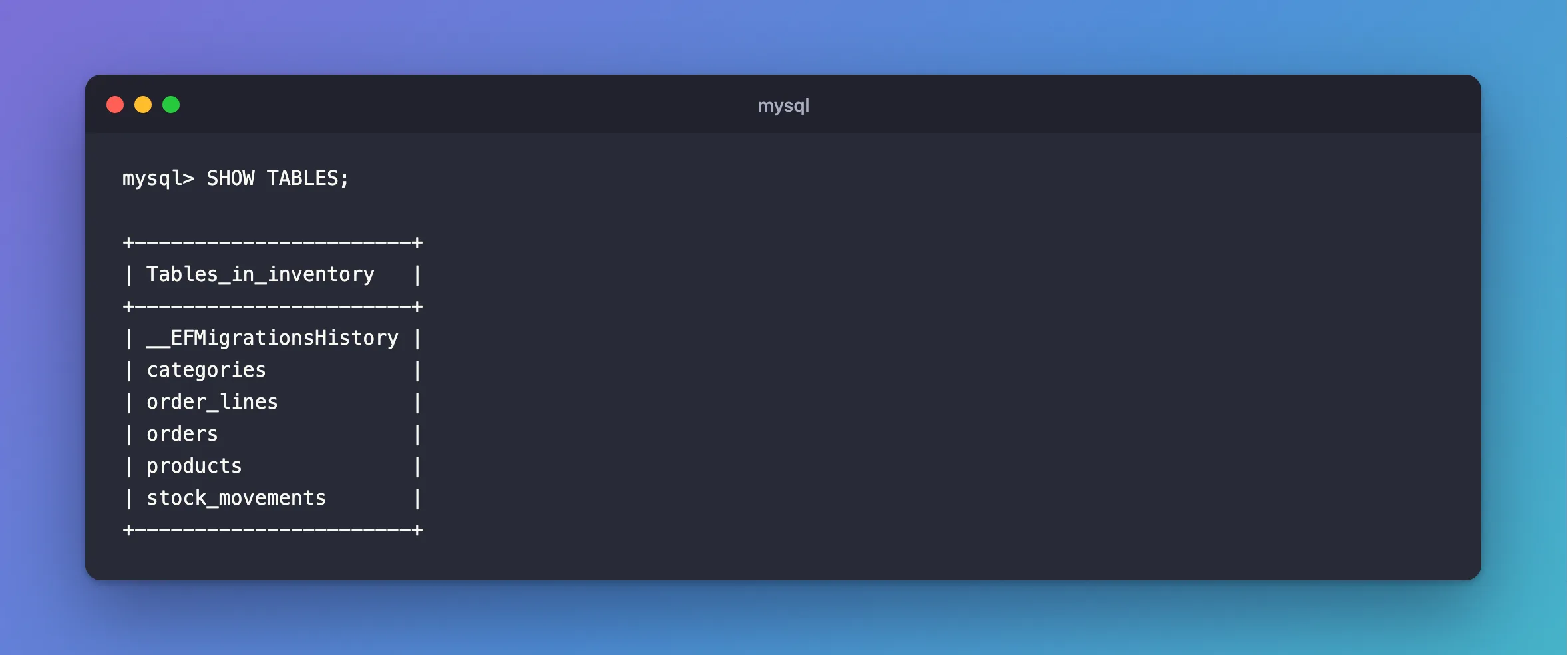
SHOW TABLES;
+-----------------------+
| Tables_in_inventory   |
+-----------------------+
| __EFMigrationsHistory |
| categories            |
| order_lines           |
| orders                |
| products              |
| stock_movements       |
+-----------------------+
Step 3: See the Transaction EF Core Already Gives You
You already use transactions, without knowing it. To see them, turn on one more log category in development:
{
  "Logging": {
    "LogLevel": {
      "Default": "Information",
      "Microsoft.AspNetCore": "Warning",
      "Microsoft.EntityFrameworkCore.Database.Command": "Information",
      "Microsoft.EntityFrameworkCore.Database.Transaction": "Debug"
    }
  }
}
Start the API, and create a category:
dotnet run --project src/Dewiride.Inventory.Api
POST {{baseUrl}}/api/v1/categories
Content-Type: application/json

{"name":"Docks"}
dbug: Microsoft.EntityFrameworkCore.Database.Transaction[20209]
      Beginning transaction with isolation level 'Unspecified'.
dbug: Microsoft.EntityFrameworkCore.Database.Transaction[20200]
      Began transaction with isolation level 'Unspecified'.
info: Microsoft.EntityFrameworkCore.Database.Command[20101]
      Executed DbCommand (5ms) [Parameters=[@p0='?' (DbType = DateTime), @p1='?' (Size = 100)], CommandType='Text', CommandTimeout='30']
      INSERT INTO `categories` (`CreatedAtUtc`, `Name`)
      VALUES (@p0, @p1);
      SELECT `Id`
      FROM `categories`
      WHERE ROW_COUNT() = 1 AND `Id` = LAST_INSERT_ID();
dbug: Microsoft.EntityFrameworkCore.Database.Transaction[20210]
      Committing transaction.
dbug: Microsoft.EntityFrameworkCore.Database.Transaction[20202]
      Committed transaction.
dbug: Microsoft.EntityFrameworkCore.Database.Transaction[20204]
      Disposing transaction.
SaveChangesAsync began a transaction, ran the INSERT, and committed. That's why one call is all or nothing: Does EF Core's SaveChanges Use a Transaction? proves it. The next step is about what that doesn't cover.
Step 4: Make Two Writes With No Transaction
When stock arrives, two things must change: the product's quantity, and a new row in stock_movements saying why. Start with the request and the response, in a new file:
using System.ComponentModel.DataAnnotations;
using System.Linq.Expressions;
using Dewiride.Inventory.Data.Entities;

namespace Dewiride.Inventory.Api.Features.Stock;

/// <summary>What a client sends when stock arrives.</summary>
public sealed record ReceiveStockRequest(
    [Range(1, 1_000_000)] int Quantity,
    string? Reason,
    string? Reference);

/// <summary>One change to a product's stock.</summary>
public sealed record StockMovementResponse(
    long Id,
    int ProductId,
    StockMovementType Type,
    int QuantityChange,
    string? Reason,
    string? Reference,
    int? OrderId,
    DateTime OccurredAtUtc)
{
    public static readonly Expression<Func<StockMovement, StockMovementResponse>> FromMovement = m =>
        new StockMovementResponse(
            m.Id,
            m.ProductId,
            m.Type,
            m.QuantityChange,
            m.Reason,
            m.Reference,
            m.OrderId,
            m.OccurredAtUtc);
}

/// <summary>What a stock change returns: the new movement, and how much is on hand now.</summary>
public sealed record StockChangeResponse(
    StockMovementResponse Movement,
    int QuantityOnHand);
Then the endpoint, with the obvious two writes, also in a new file:
using Dewiride.Inventory.Data;
using Dewiride.Inventory.Data.Entities;
using Microsoft.AspNetCore.Http.HttpResults;
using Microsoft.EntityFrameworkCore;

namespace Dewiride.Inventory.Api.Features.Stock;

/// <summary>
/// The HTTP endpoints that change a product's stock and read its history.
/// </summary>
public static class StockEndpoints
{
    public static IEndpointRouteBuilder MapStockEndpoints(this IEndpointRouteBuilder routes)
    {
        var group = routes.MapGroup("/products/{productId:int}/stock").WithTags("Stock");

        group.MapPost("/receipts", ReceiveAsync).WithSummary("Record stock that arrived");

        return routes;
    }

    private static async Task<Results<Created<StockChangeResponse>, NotFound>> ReceiveAsync(
        int productId,
        ReceiveStockRequest request,
        InventoryDbContext db,
        TimeProvider clock,
        CancellationToken cancellationToken)
    {
        var now = clock.GetUtcNow().UtcDateTime;

        // First write: add to the quantity on hand.
        var changed = await db.Products
            .Where(p => p.Id == productId)
            .ExecuteUpdateAsync(
                setters => setters
                    .SetProperty(p => p.QuantityOnHand, p => p.QuantityOnHand + request.Quantity)
                    .SetProperty(p => p.UpdatedAtUtc, now),
                cancellationToken);

        if (changed == 0)
        {
            return TypedResults.NotFound();
        }

        // Second write: record why it changed.
        var movement = new StockMovement
        {
            ProductId = productId,
            Type = StockMovementType.Receipt,
            QuantityChange = request.Quantity,
            Reason = request.Reason,
            Reference = request.Reference,
            OccurredAtUtc = now,
        };

        db.StockMovements.Add(movement);
        await db.SaveChangesAsync(cancellationToken);

        var quantityOnHand = await db.Products
            .Where(p => p.Id == productId)
            .Select(p => p.QuantityOnHand)
            .FirstAsync(cancellationToken);

        return TypedResults.Created(
            $"/api/v1/products/{productId}/stock/movements",
            new StockChangeResponse(ToResponse(movement), quantityOnHand));
    }

    private static StockMovementResponse ToResponse(StockMovement movement) =>
        new(
            movement.Id,
            movement.ProductId,
            movement.Type,
            movement.QuantityChange,
            movement.Reason,
            movement.Reference,
            movement.OrderId,
            movement.OccurredAtUtc);
}
And map it in Program.cs, next to the others:
var api = app.MapGroup("/api/v1");
api.MapCategoryEndpoints();
api.MapProductEndpoints();
api.MapStockEndpoints();
Restart the API, create a product, and record a delivery of 10:
POST {{baseUrl}}/api/v1/products
Content-Type: application/json

{"sku":"DCK-USBC-LTD","name":"USB-C dock, limited edition","categoryId":4,"unitPrice":89.00,"reorderLevel":2}

###

POST {{baseUrl}}/api/v1/products/9/stock/receipts
Content-Type: application/json

{"quantity":10,"reason":"First delivery","reference":"PO-1001"}
The product's ID comes from the first response, so use your own in the second request. Mine is 9.
HTTP/1.1 201 Created
Content-Type: application/json; charset=utf-8
Location: /api/v1/products/9/stock/movements

{
  "movement": {
    "id": 1,
    "productId": 9,
    "type": 0,
    "quantityChange": 10,
    "reason": "First delivery",
    "reference": "PO-1001",
    "orderId": null,
    "occurredAtUtc": "2026-11-05T05:11:52.204666Z"
  },
  "quantityOnHand": 10
}
It works, and "type": 0 isn't very readable. The next step fixes that.
Now a delivery whose Reason is too long for its column, which holds 200 characters:
HTTP/1.1 500 Internal Server Error
Content-Type: application/problem+json

{
  "type": "https://tools.ietf.org/html/rfc9110#section-15.6.1",
  "title": "An error occurred while processing your request.",
  "status": 500,
  "traceId": "00-66d61688ad178fbd1893747253e082f2-f75d24ba4f5125ce-00"
}
A failed request should change nothing. Compare the quantity with the sum of the movements, which should always match:
SELECT p.QuantityOnHand,
       (SELECT COALESCE(SUM(m.QuantityChange),0) FROM stock_movements m WHERE m.ProductId=p.Id) AS SumOfMovements
FROM products p WHERE p.Id=9;
+----------------+----------------+
| QuantityOnHand | SumOfMovements |
+----------------+----------------+
|             20 |             10 |
+----------------+----------------+
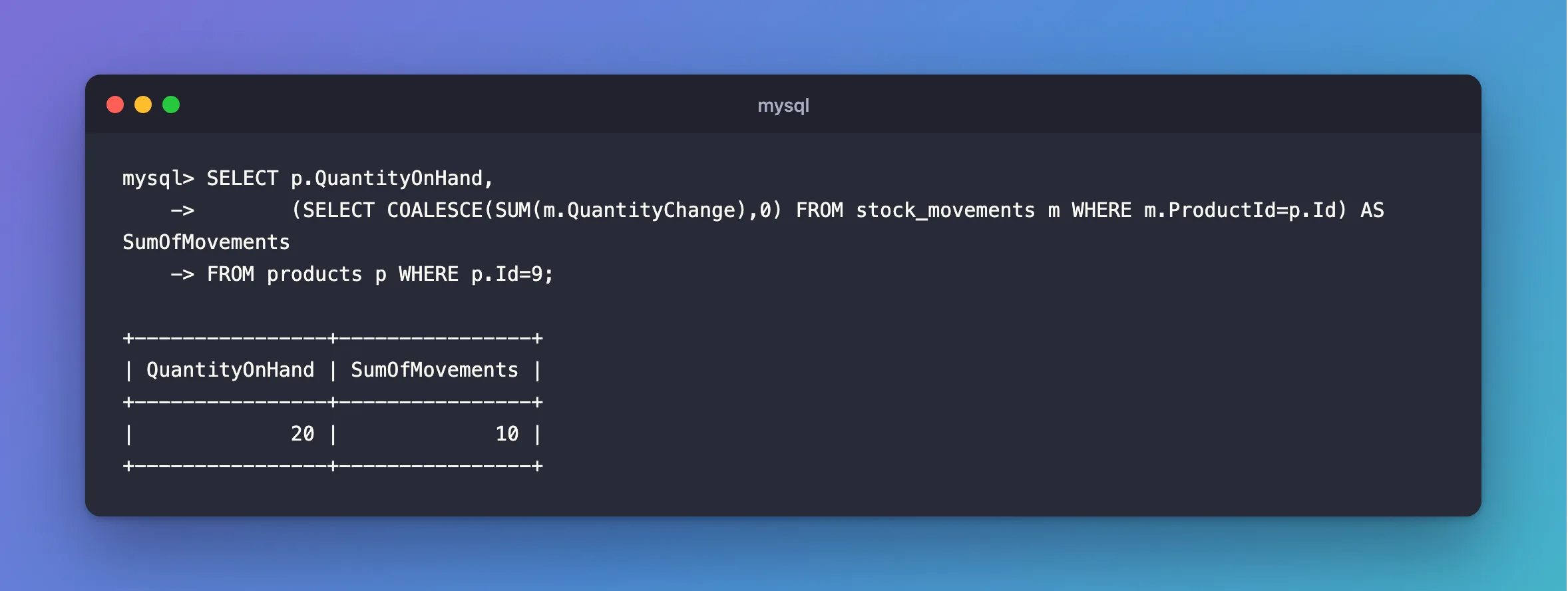
There are 20 on hand, and the history explains only 10. The first write stuck, because ExecuteUpdateAsync runs immediately, and the second failed.
Step 5: Put the Two Writes in a Transaction
Wrap them, following How to Use a Transaction in EF Core with BeginTransactionAsync:
var now = clock.GetUtcNow().UtcDateTime;

// Nothing below is permanent until CommitAsync. Leaving this method without
// committing rolls everything back, when "await using" disposes of the transaction.
await using var transaction = await db.Database.BeginTransactionAsync(cancellationToken);
And await transaction.CommitAsync(cancellationToken); as the last thing before the return.
While you're here, fix that "type": 0, in Program.cs, using JsonStringEnumConverter:
// Enums travel as their names, such as "Receipt", not as numbers.
builder.Services.ConfigureHttpJsonOptions(options =>
    options.SerializerOptions.Converters.Add(new JsonStringEnumConverter()));
It needs using System.Text.Json.Serialization; at the top of the file. Restart, and send a delivery. It fails:
System.InvalidOperationException: The configured execution strategy 'MySQLRetryingExecutionStrategy' does not support user-initiated transactions. Use the execution strategy returned by 'DbContext.Database.CreateExecutionStrategy()' to execute all the operations in the transaction as a retriable unit.
Part 1 turned on a retrying execution strategy. It can't retry a transaction it doesn't know about, so it refuses. The fixes post has the docs on this. The answer is to give the strategy the whole unit:
var strategy = db.Database.CreateExecutionStrategy();

return await strategy.ExecuteAsync(
    async ct =>
    {
        // ...the transaction and the two writes, using ct...
    },
    cancellationToken);
Which doesn't compile:
src/Dewiride.Inventory.Api/Features/Stock/StockEndpoints.cs(51,21): error CS8031: Async lambda expression converted to a 'Task' returning delegate cannot return a value
src/Dewiride.Inventory.Api/Features/Stock/StockEndpoints.cs(75,17): error CS8031: Async lambda expression converted to a 'Task' returning delegate cannot return a value
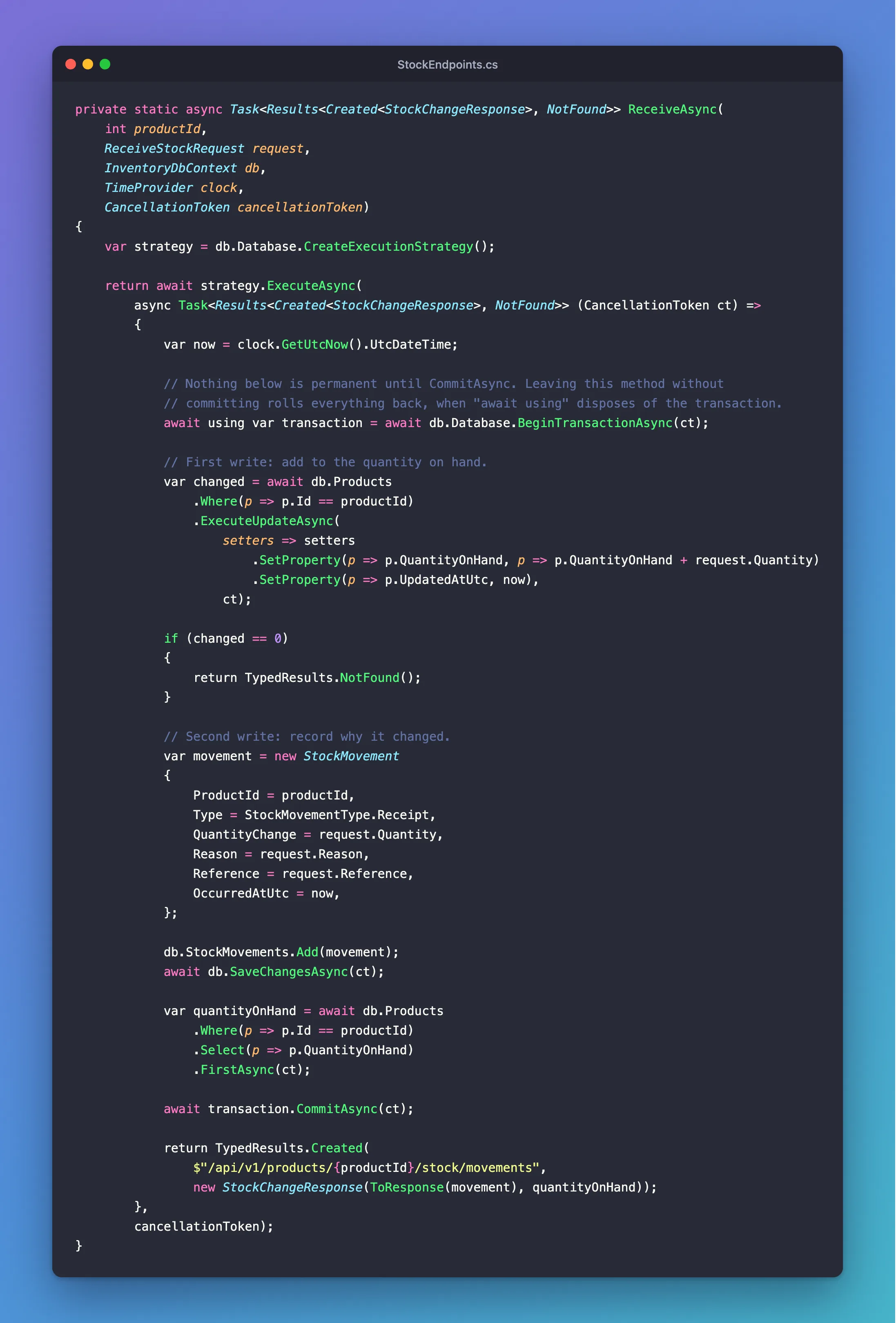
The two returns have different types, so the compiler can't work out one for the lambda. Fixed: error CS8031 explains it. State the type on the lambda:
private static async Task<Results<Created<StockChangeResponse>, NotFound>> ReceiveAsync(
    int productId,
    ReceiveStockRequest request,
    InventoryDbContext db,
    TimeProvider clock,
    CancellationToken cancellationToken)
{
    var strategy = db.Database.CreateExecutionStrategy();

    return await strategy.ExecuteAsync(
        async Task<Results<Created<StockChangeResponse>, NotFound>> (CancellationToken ct) =>
        {
            var now = clock.GetUtcNow().UtcDateTime;

            // Nothing below is permanent until CommitAsync. Leaving this method without
            // committing rolls everything back, when "await using" disposes of the transaction.
            await using var transaction = await db.Database.BeginTransactionAsync(ct);

            // First write: add to the quantity on hand.
            var changed = await db.Products
                .Where(p => p.Id == productId)
                .ExecuteUpdateAsync(
                    setters => setters
                        .SetProperty(p => p.QuantityOnHand, p => p.QuantityOnHand + request.Quantity)
                        .SetProperty(p => p.UpdatedAtUtc, now),
                    ct);

            if (changed == 0)
            {
                return TypedResults.NotFound();
            }

            // Second write: record why it changed.
            var movement = new StockMovement
            {
                ProductId = productId,
                Type = StockMovementType.Receipt,
                QuantityChange = request.Quantity,
                Reason = request.Reason,
                Reference = request.Reference,
                OccurredAtUtc = now,
            };

            db.StockMovements.Add(movement);
            await db.SaveChangesAsync(ct);

            var quantityOnHand = await db.Products
                .Where(p => p.Id == productId)
                .Select(p => p.QuantityOnHand)
                .FirstAsync(ct);

            await transaction.CommitAsync(ct);

            return TypedResults.Created(
                $"/api/v1/products/{productId}/stock/movements",
                new StockChangeResponse(ToResponse(movement), quantityOnHand));
        },
        cancellationToken);
}
Restart, and send the same deliveries. A good one:
HTTP/1.1 201 Created
Content-Type: application/json; charset=utf-8
Location: /api/v1/products/9/stock/movements

{
  "movement": {
    "id": 2,
    "productId": 9,
    "type": "Receipt",
    "quantityChange": 5,
    "reason": "Second delivery",
    "reference": "PO-1003",
    "orderId": null,
    "occurredAtUtc": "2026-11-05T05:12:38.543732Z"
  },
  "quantityOnHand": 15
}
dbug: Microsoft.EntityFrameworkCore.Database.Transaction[20200]
      Began transaction with isolation level 'Unspecified'.
dbug: Microsoft.EntityFrameworkCore.Database.Transaction[20202]
      Committed transaction.
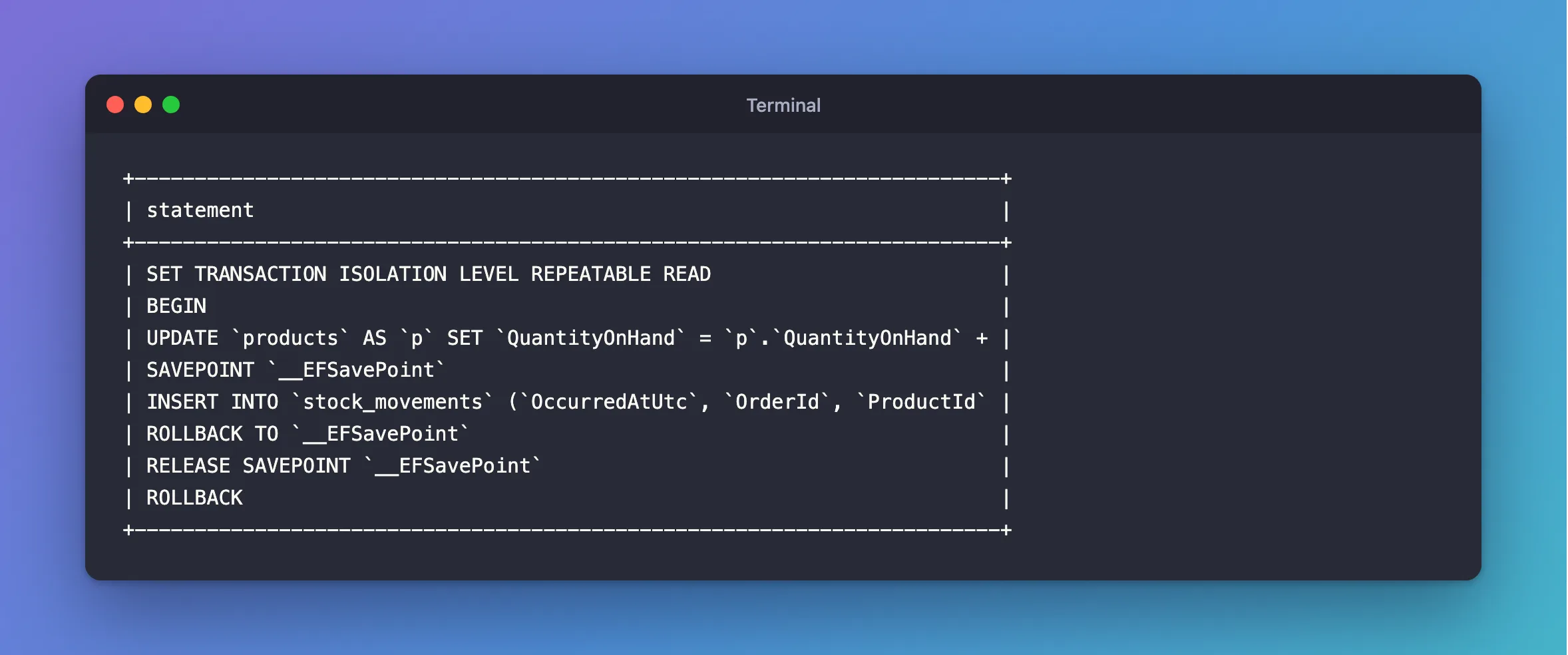
And the one with the long Reason. MySQL's own record, from the general query log, shows the UPDATE, the failed INSERT and a ROLLBACK:
+------------------------------------------------------------------------+
| statement                                                              |
+------------------------------------------------------------------------+
| SET TRANSACTION ISOLATION LEVEL REPEATABLE READ                        |
| BEGIN                                                                  |
| UPDATE `products` AS `p` SET `QuantityOnHand` = `p`.`QuantityOnHand` + |
| SAVEPOINT `__EFSavePoint`                                              |
| INSERT INTO `stock_movements` (`OccurredAtUtc`, `OrderId`, `ProductId` |
| ROLLBACK TO `__EFSavePoint`                                            |
| RELEASE SAVEPOINT `__EFSavePoint`                                      |
| ROLLBACK                                                               |
+------------------------------------------------------------------------+
For a new product, the numbers now agree, whatever fails:
+----------------+----------------+
| QuantityOnHand | SumOfMovements |
+----------------+----------------+
|             10 |             10 |
+----------------+----------------+
Leaving the await using block without committing is what rolled it back, so there's no catch to write. The SAVEPOINT lines are EF Core's own, and How to Use Savepoints in EF Core explains them.
How to Use a Transaction with a Retrying Execution Strategy in EF Core has more on this pattern. Everything inside that delegate can run more than once, so nothing inside it should send an email or call another service.
Step 6: Watch a Row Lock in Three Terminals
Now see a lock with your own eyes. Open three terminals in the project folder. In the first two, connect as the application's account, and in the third, as root, because only root can read the lock tables here:
docker compose exec mysql mysql --user=inventory_app --password inventory
docker compose exec mysql mysql --user=root --password
In terminal 1, begin a transaction and change a row. Don't commit:
mysql> START TRANSACTION;
Query OK, 0 rows affected (0.000 sec)

mysql> UPDATE products SET Description = 'Changed in terminal 1' WHERE Id = 9;
Query OK, 1 row affected (0.002 sec)
Rows matched: 1  Changed: 1  Warnings: 0

mysql> SELECT Description FROM products WHERE Id = 9;
+-----------------------+
| Description           |
+-----------------------+
| Changed in terminal 1 |
+-----------------------+
1 row in set (0.001 sec)
In terminal 2, read that row, then try to change it:
mysql> SELECT Description FROM products WHERE Id = 9;
+-------------+
| Description |
+-------------+
| NULL        |
+-------------+
1 row in set (0.001 sec)

mysql> UPDATE products SET Description = 'Changed in terminal 2' WHERE Id = 9;
The SELECT answers straight away, with the old value, because terminal 1 hasn't committed. The UPDATE just sits there, waiting.
In terminal 3, ask MySQL who's waiting for whom. \G prints each column on its own line:
mysql> SELECT waiting_pid, waiting_query, blocking_pid, blocking_query, wait_age FROM sys.innodb_lock_waits\G
*************************** 1. row ***************************
   waiting_pid: 34
 waiting_query: UPDATE products SET Descriptio ... ed in terminal 2' WHERE Id = 9
  blocking_pid: 33
blocking_query: NULL
      wait_age: 00:00:04
1 row in set (0.011 sec)

mysql> SELECT THREAD_ID, OBJECT_NAME, INDEX_NAME, LOCK_TYPE, LOCK_MODE, LOCK_STATUS, LOCK_DATA FROM performance_schema.data_locks;
+-----------+-------------+------------+-----------+---------------+-------------+-----------+
| THREAD_ID | OBJECT_NAME | INDEX_NAME | LOCK_TYPE | LOCK_MODE     | LOCK_STATUS | LOCK_DATA |
+-----------+-------------+------------+-----------+---------------+-------------+-----------+
|       137 | products    | NULL       | TABLE     | IX            | GRANTED     | NULL      |
|       138 | products    | NULL       | TABLE     | IX            | GRANTED     | NULL      |
|       137 | products    | PRIMARY    | RECORD    | X,REC_NOT_GAP | GRANTED     | 9         |
|       138 | products    | PRIMARY    | RECORD    | X,REC_NOT_GAP | WAITING     | 9         |
+-----------+-------------+------------+-----------+---------------+-------------+-----------+
4 rows in set (0.001 sec)
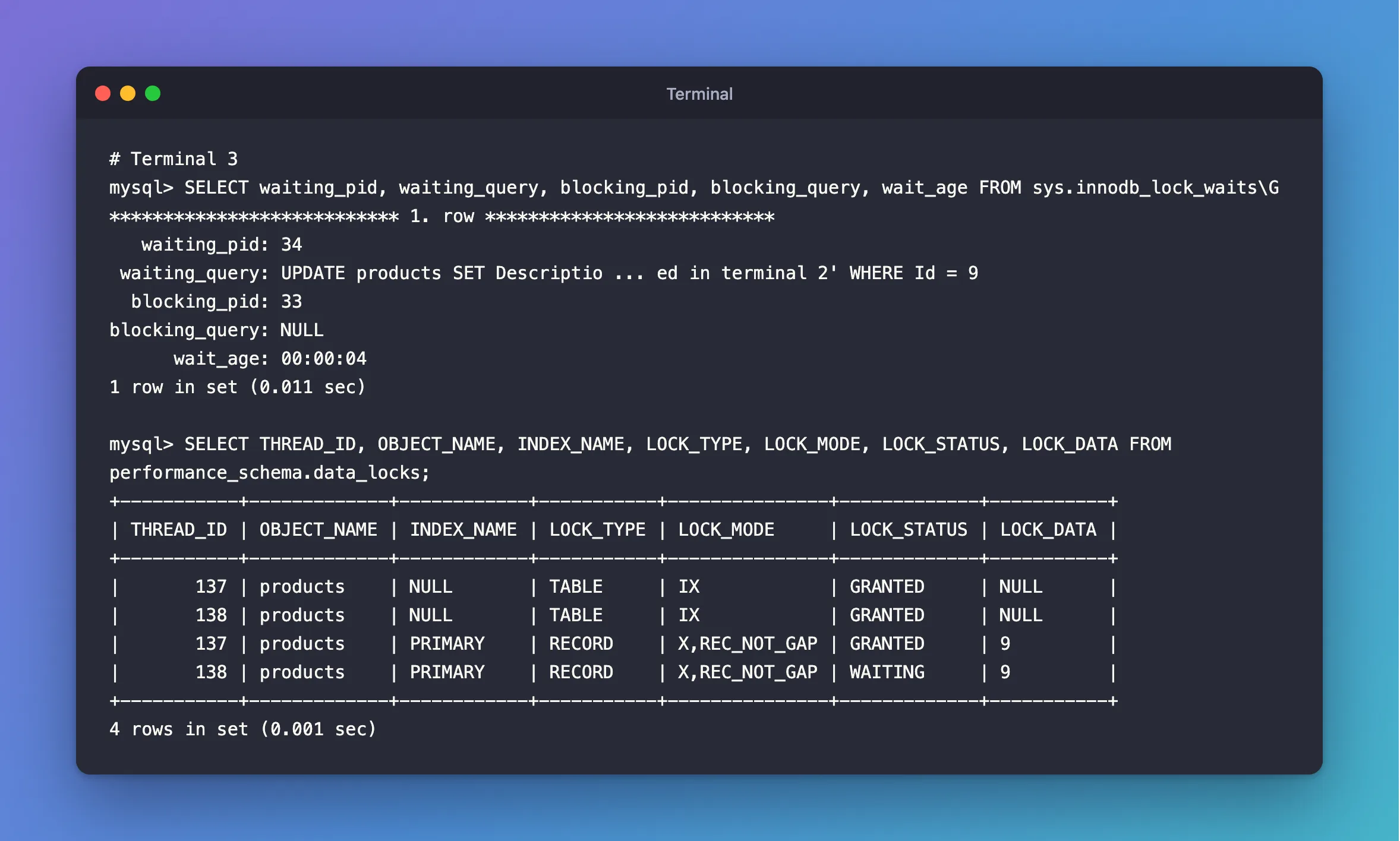
Read the last two rows. Terminal 1's thread holds an exclusive lock on the PRIMARY key at row 9, marked GRANTED. Terminal 2's wants the same one, marked WAITING. IX is a table-level note that says "I intend to lock rows in here", and it doesn't block anyone. How to See the Locks a MySQL Transaction Holds goes through every column.
Now commit in terminal 1:
mysql> COMMIT;
Query OK, 0 rows affected (0.008 sec)
Terminal 2's UPDATE finishes by itself, and reports how long it waited:
Query OK, 1 row affected (12.192 sec)
Rows matched: 1  Changed: 1  Warnings: 0
Type exit in all three when you're done. If the application's account can't read those tables on your server, you'll get ERROR 1142, and How to Let a MySQL User See Locks and Transactions sets up an account for it.
Step 7: Place an Order, the Obvious Way
Time for orders. The request has a list of lines, with validation for the list and for each line, as How to Validate a List Inside a Minimal API Request explains:
using System.ComponentModel.DataAnnotations;
using System.Linq.Expressions;
using Dewiride.Inventory.Data.Entities;

namespace Dewiride.Inventory.Api.Features.Orders;

/// <summary>What a client sends to place an order.</summary>
public sealed record PlaceOrderRequest(
    [Required, StringLength(200)] string CustomerName,
    [Required, EmailAddress, StringLength(254)] string CustomerEmail,
    [Required, MinLength(1), MaxLength(50)] IReadOnlyList<PlaceOrderLine> Lines);

/// <summary>One product in an order, with how many the customer wants.</summary>
public sealed record PlaceOrderLine(
    [Range(1, int.MaxValue)] int ProductId,
    [Range(1, 10_000)] int Quantity);

/// <summary>One line of an order, as the API returns it.</summary>
public sealed record OrderLineResponse(
    int ProductId,
    int Quantity,
    decimal UnitPrice);

/// <summary>What the API returns for an order.</summary>
public sealed record OrderResponse(
    int Id,
    string CustomerName,
    string CustomerEmail,
    OrderStatus Status,
    decimal TotalAmount,
    DateTime PlacedAtUtc,
    DateTime? FulfilledAtUtc,
    DateTime? CancelledAtUtc,
    IReadOnlyList<OrderLineResponse> Lines)
{
    /// <summary>EF Core turns this into SQL: one query for the order, and its lines with it.</summary>
    public static readonly Expression<Func<Order, OrderResponse>> FromOrder = o =>
        new OrderResponse(
            o.Id,
            o.CustomerName,
            o.CustomerEmail,
            o.Status,
            o.TotalAmount,
            o.PlacedAtUtc,
            o.FulfilledAtUtc,
            o.CancelledAtUtc,
            o.Lines
                .OrderBy(l => l.ProductId)
                .Select(l => new OrderLineResponse(l.ProductId, l.Quantity, l.UnitPrice))
                .ToList());
}
The endpoint looks careful. For each line, it reads the product, checks the stock in C#, and changes it, all in a transaction:
foreach (var line in request.Lines)
{
    // Read the product, check its stock in C#, then change it.
    var product = await db.Products
        .FirstOrDefaultAsync(p => p.Id == line.ProductId && !p.IsArchived, ct);

    if (product is null)
    {
        return TypedResults.Problem(
            title: "The product doesn't exist.",
            detail: $"There is no product with Id {line.ProductId}.",
            statusCode: StatusCodes.Status400BadRequest);
    }

    if (product.QuantityOnHand < line.Quantity)
    {
        return TypedResults.Problem(
            title: "There isn't enough stock.",
            detail: $"Product {line.ProductId} has {product.QuantityOnHand} on hand, and the order asks for {line.Quantity}.",
            statusCode: StatusCodes.Status409Conflict);
    }

    product.QuantityOnHand -= line.Quantity;
    product.UpdatedAtUtc = now;

    order.TotalAmount += product.UnitPrice * line.Quantity;
    order.Lines.Add(new OrderLine
    {
        ProductId = line.ProductId,
        Quantity = line.Quantity,
        UnitPrice = product.UnitPrice,
    });

    db.StockMovements.Add(new StockMovement
    {
        ProductId = line.ProductId,
        Order = order,
        Type = StockMovementType.Sale,
        QuantityChange = -line.Quantity,
        OccurredAtUtc = now,
    });
}
The rest of that file is the same shape as StockEndpoints.cs, and the complete version is in Step 13. Map it with api.MapOrderEndpoints();, restart, and place an order:
POST {{baseUrl}}/api/v1/orders
Content-Type: application/json

{"customerName":"Ana Costa","customerEmail":"ana@example.com","lines":[{"productId":9,"quantity":2}]}
HTTP/1.1 201 Created
Content-Type: application/json; charset=utf-8
Location: /api/v1/orders/1

{
  "id": 1,
  "customerName": "Ana Costa",
  "customerEmail": "ana@example.com",
  "status": "Placed",
  "totalAmount": 178.00,
  "placedAtUtc": "2026-11-05T05:13:48.56817Z",
  "fulfilledAtUtc": null,
  "cancelledAtUtc": null,
  "lines": [
    {
      "productId": 9,
      "quantity": 2,
      "unitPrice": 89.00
    }
  ]
}
Asking for too many gets a 409:
HTTP/1.1 409 Conflict
Content-Type: application/problem+json

{
  "type": "https://tools.ietf.org/html/rfc9110#section-15.5.10",
  "title": "There isn't enough stock.",
  "status": 409,
  "detail": "Product 9 has 13 on hand, and the order asks for 100.",
  "traceId": "00-b5bb957e9857ba81aff8037293734de6-383692fce22f03a3-00"
}
It all looks right. Then I created a new product, gave it one unit with a receipt, and sent 5 orders at the same moment. These commands are explained in How to Test a Race Condition in a Web API from the Terminal. Change productId to your own product's ID:
- macOS / Linux
- Windows (PowerShell 7)
seq 5 | xargs -P 5 -I{} curl -s -o /dev/null -w "%{http_code}\n" -X POST http://localhost:5190/api/v1/orders -H "Content-Type: application/json" -d '{"customerName":"Buyer {}","customerEmail":"buyer{}@example.com","lines":[{"productId":13,"quantity":1}]}'
1..5 | ForEach-Object -Parallel {
    $body = @{ customerName = "Buyer $_"; customerEmail = "buyer$_@example.com"; lines = @(@{ productId = 12; quantity = 1 }) } | ConvertTo-Json -Depth 3
    (Invoke-WebRequest -Uri http://localhost:5190/api/v1/orders -Method Post -ContentType application/json -Body $body -SkipHttpErrorCheck).StatusCode
} -ThrottleLimit 5
The first round looked correct:
201
409
409
409
409
I gave it one more unit, and sent 5 more:
201
201
201
201
201
Five orders for one unit, each told 201 Created. Compare the numbers, using your product's ID:
SELECT p.QuantityOnHand,
       (SELECT COALESCE(SUM(m.QuantityChange),0) FROM stock_movements m WHERE m.ProductId=p.Id) AS SumOfMovements,
       (SELECT COUNT(*) FROM order_lines l WHERE l.ProductId=p.Id) AS OrdersPlaced
FROM products p WHERE p.Id=10;
+----------------+----------------+--------------+
| QuantityOnHand | SumOfMovements | OrdersPlaced |
+----------------+----------------+--------------+
|              0 |             -4 |            6 |
+----------------+----------------+--------------+
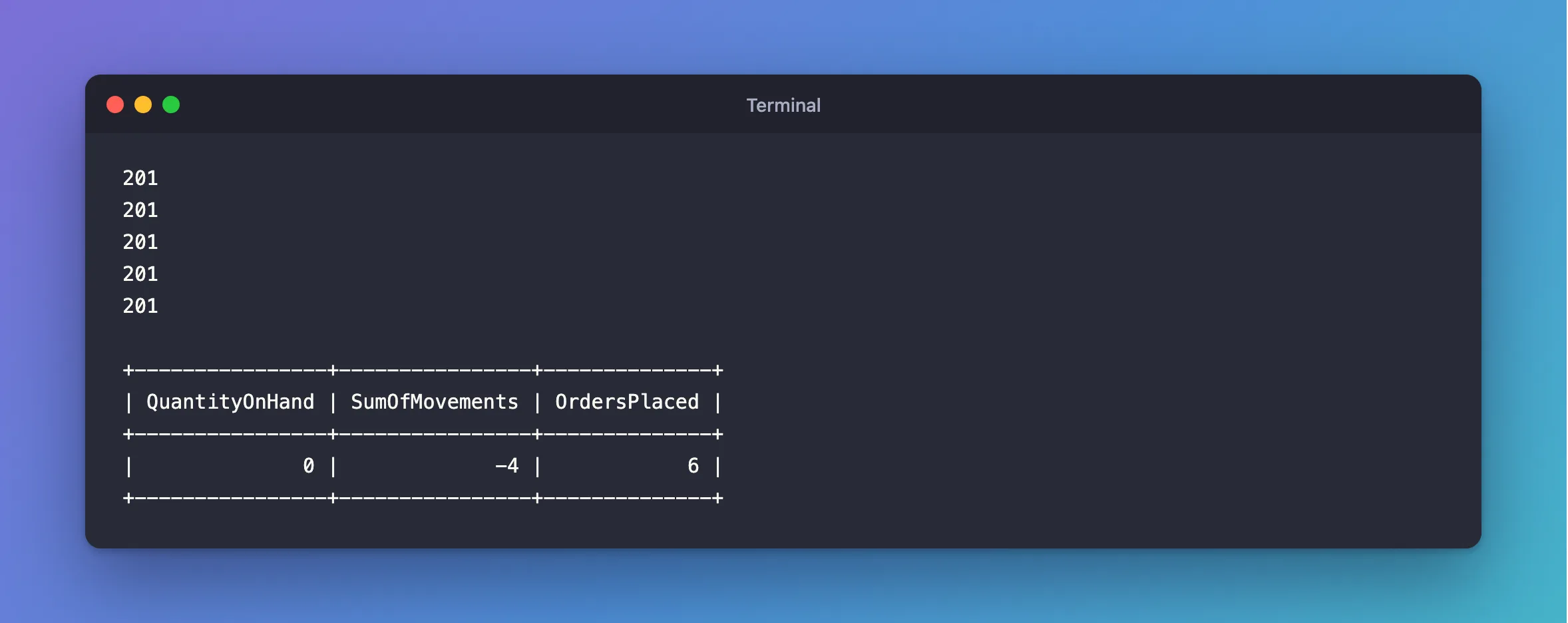
The transaction did nothing to stop this. MySQL's log shows why:
+------------+--------------------------------------------------------------+
| connection | statement                                                    |
+------------+--------------------------------------------------------------+
|         51 | SELECT `p`.`Id`, `p`.`ArchivedAtUtc`, `p`.`CategoryId`, `p`. |
|         43 | SELECT `p`.`Id`, `p`.`ArchivedAtUtc`, `p`.`CategoryId`, `p`. |
|         51 | UPDATE `products` SET `QuantityOnHand` = 0, `UpdatedAtUtc` = |
|         43 | UPDATE `products` SET `QuantityOnHand` = 0, `UpdatedAtUtc` = |
|         51 | COMMIT                                                       |
|         43 | COMMIT                                                       |
+------------+--------------------------------------------------------------+
Each connection read the row with a plain SELECT, which doesn't wait for locks, and saw 1. Each then wrote the 0 it had worked out in C#. The second UPDATE waited for the first one's lock, and then wrote 0 again. The first round only looked right because its requests didn't happen to overlap there, and that's why this bug passes a quick test. Fixed: Two Requests Buy the Last Item in EF Core has the whole investigation.
Step 8: Let MySQL Decide Who Gets the Last Item
The check and the write have to be one statement, so that MySQL does both while it holds the row. Replace the read and the C# check with this:
foreach (var line in request.Lines)
{
    // MySQL locks the row, checks the condition and changes the row in one
    // statement. A second buyer waits here, then sees the new quantity.
    var taken = await db.Products
        .Where(p => p.Id == line.ProductId && !p.IsArchived && p.QuantityOnHand >= line.Quantity)
        .ExecuteUpdateAsync(
            setters => setters
                .SetProperty(p => p.QuantityOnHand, p => p.QuantityOnHand - line.Quantity)
                .SetProperty(p => p.UpdatedAtUtc, now),
            ct);

    if (taken == 0)
    {
        // Leaving without a commit rolls back the stock already taken.
        return await ExplainRefusalAsync(db, line, ct);
    }
}
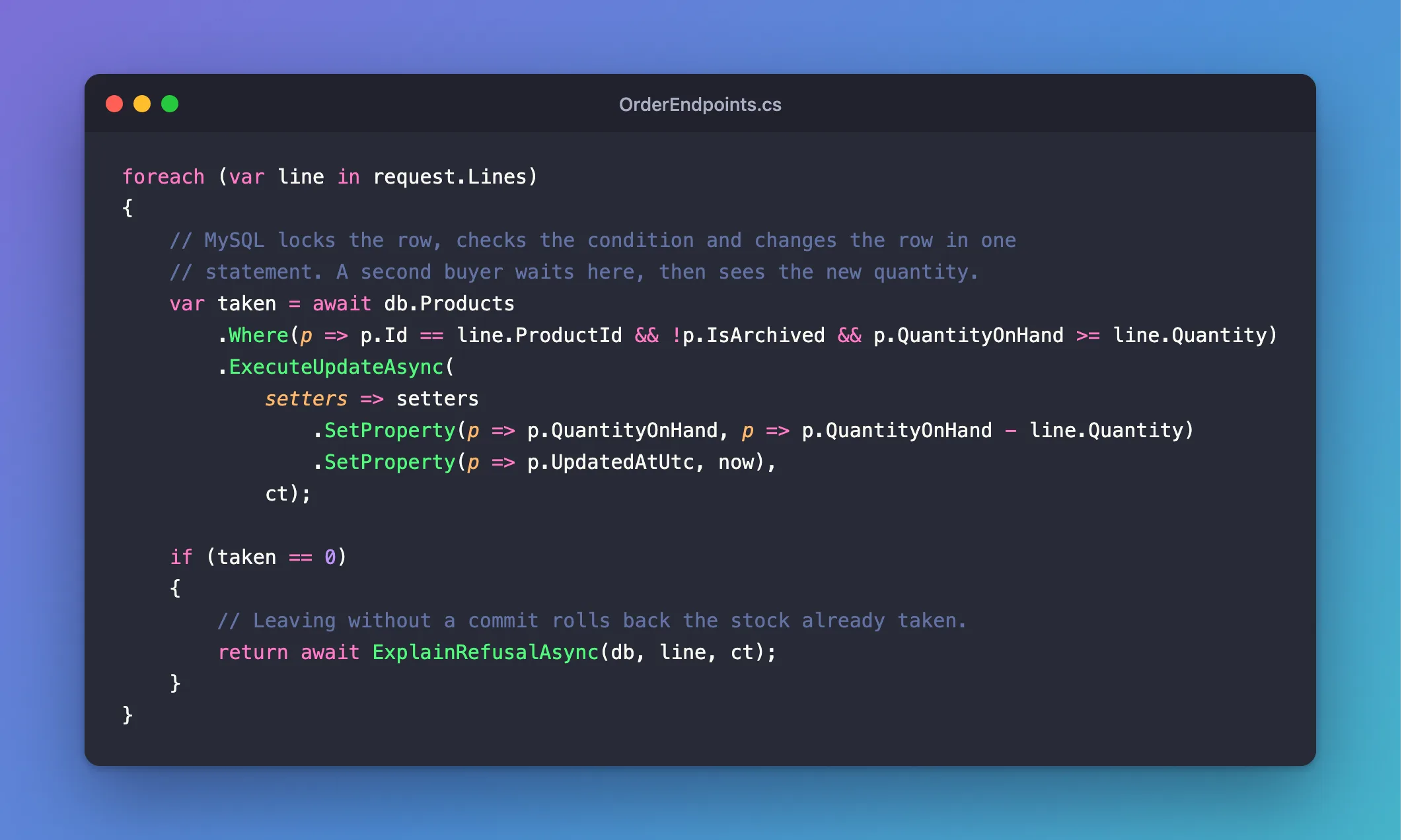
taken is the number of rows changed. 0 means the WHERE didn't match, and ExplainRefusalAsync, in the complete file, looks up why, so the client gets a useful answer. Leaving the method without a commit gives back any stock already taken for earlier lines.
Restart, and race it, on a new product with one unit:
201
409
409
409
409
+----------------+----------------+--------------+
| QuantityOnHand | SumOfMovements | OrdersPlaced |
+----------------+----------------+--------------+
|              0 |              0 |            1 |
+----------------+----------------+--------------+
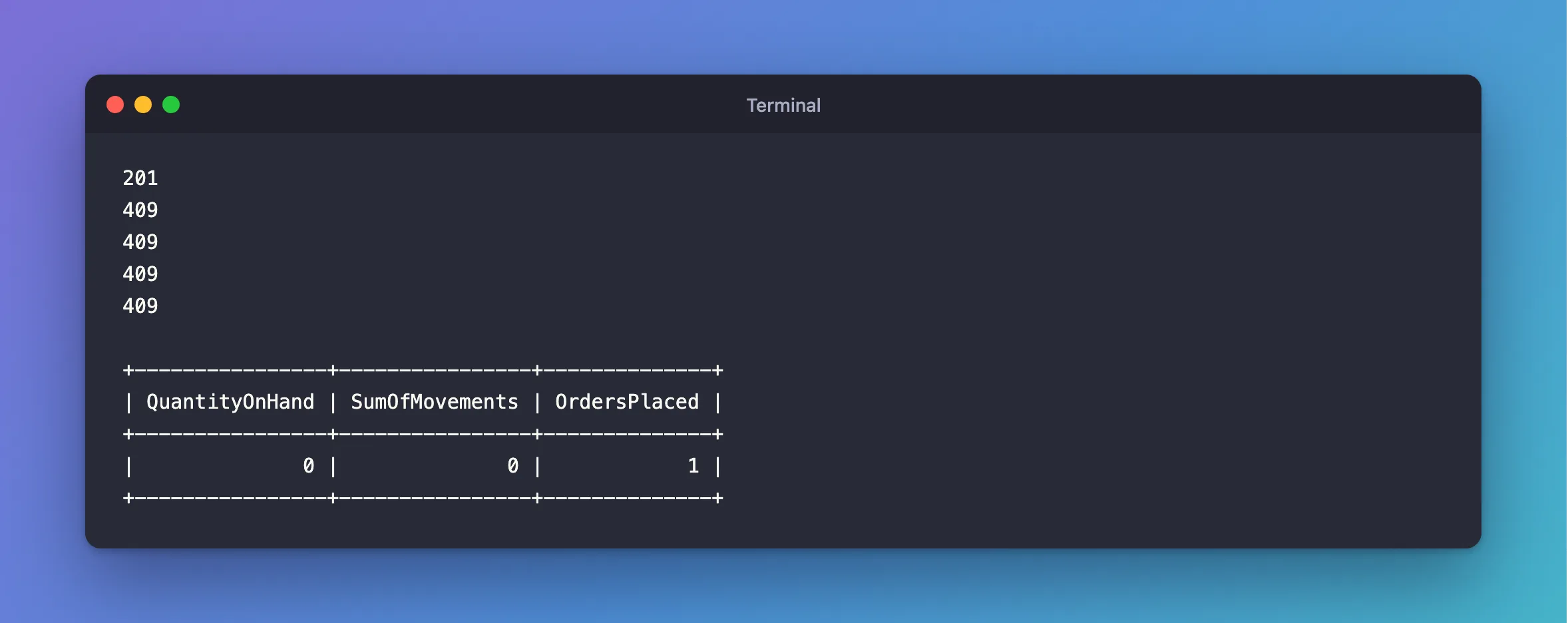
One order, and the numbers agree. It gave the same result on every round.
To watch the second buyer wait, I took the last unit in a mysql session and didn't commit, then sent an order through the API. Another session showed it waiting:
mysql> SELECT waiting_query, blocking_pid, wait_age FROM sys.innodb_lock_waits\G
*************************** 1. row ***************************
waiting_query: UPDATE `products` AS `p` SET ` ... ND (`p`.`QuantityOnHand` >= 1)
 blocking_pid: 87
     wait_age: 00:00:04
1 row in set (0.008 sec)
When the session committed, the API's statement finished, having waited 6 seconds, and matched nothing:
info: Microsoft.EntityFrameworkCore.Database.Command[20101]
      Executed DbCommand (6,033ms) [Parameters=[@line_Quantity='?' (DbType = Int32), @p='?' (DbType = DateTime), @line_ProductId='?' (DbType = Int32)], CommandType='Text', CommandTimeout='30']
      UPDATE `products` AS `p`
      SET `QuantityOnHand` = `p`.`QuantityOnHand` - @line_Quantity,
          `UpdatedAtUtc` = @p
      WHERE ((`p`.`Id` = @line_ProductId) AND NOT (`p`.`IsArchived`)) AND (`p`.`QuantityOnHand` >= @line_Quantity)
HTTP/1.1 409 Conflict
Content-Type: application/problem+json

{
  "type": "https://tools.ietf.org/html/rfc9110#section-15.5.10",
  "title": "There isn't enough stock.",
  "status": 409,
  "detail": "Product 13 has 0 on hand, and the order asks for 1.",
  "traceId": "00-110ee5beb526309ea2c360741ddd73f9-05f38dbeba82a661-00"
}
There are other ways to do this, and I tried them. SELECT ... FOR UPDATE works when the decision doesn't fit in a WHERE. A concurrency token refuses sales with plenty of stock left. How to Prevent Overselling with a Conditional UPDATE in EF Core goes into this one.
Step 9: End the Deadlocks
Row locks bring a new failure. Give products 1 and 2 plenty of stock, with a receipt each:
POST {{baseUrl}}/api/v1/products/1/stock/receipts
Content-Type: application/json

{"quantity":500,"reason":"Delivery"}

###

POST {{baseUrl}}/api/v1/products/2/stock/receipts
Content-Type: application/json

{"quantity":500,"reason":"Delivery"}
Then send 30 orders, half listing products 1 then 2, and half the other way round:
- macOS / Linux
- Windows (PowerShell 7)
(seq 15 | xargs -P 15 -I{} curl -s -o /dev/null -w "%{http_code}\n" -X POST http://localhost:5190/api/v1/orders -H "Content-Type: application/json" -d '{"customerName":"Buyer {}","customerEmail":"buyer{}@example.com","lines":[{"productId":1,"quantity":1},{"productId":2,"quantity":1}]}' &
seq 15 | xargs -P 15 -I{} curl -s -o /dev/null -w "%{http_code}\n" -X POST http://localhost:5190/api/v1/orders -H "Content-Type: application/json" -d '{"customerName":"Buyer {}","customerEmail":"buyer{}@example.com","lines":[{"productId":2,"quantity":1},{"productId":1,"quantity":1}]}' &
wait) | sort | uniq -c
1..30 | ForEach-Object -Parallel {
    $lines = if ($_ % 2) {
        @(@{ productId = 1; quantity = 1 }, @{ productId = 2; quantity = 1 })
    } else {
        @(@{ productId = 2; quantity = 1 }, @{ productId = 1; quantity = 1 })
    }
    $body = @{ customerName = "Buyer $_"; customerEmail = "buyer$_@example.com"; lines = $lines } | ConvertTo-Json -Depth 3
    (Invoke-WebRequest -Uri http://localhost:5190/api/v1/orders -Method Post -ContentType application/json -Body $body -SkipHttpErrorCheck).StatusCode
} -ThrottleLimit 30 | Group-Object | Select-Object Count, Name
  15 201
  15 500
MySql.Data.MySqlClient.MySqlException (0x80004005): Deadlock found when trying to get lock; try restarting transaction
One order holds product 1 and wants 2. Another holds 2 and wants 1. Neither can go on, so MySQL rolls one back. SHOW ENGINE INNODB STATUS reports the cycle:
*** (1) TRANSACTION:
UPDATE `products` AS `p`
WHERE ((`p`.`Id` = 2) AND NOT (`p`.`IsArchived`)) AND (`p`.`QuantityOnHand` >= 1)
*** (1) HOLDS THE LOCK(S):
*** (1) WAITING FOR THIS LOCK TO BE GRANTED:
*** (2) TRANSACTION:
UPDATE `products` AS `p`
WHERE ((`p`.`Id` = 1) AND NOT (`p`.`IsArchived`)) AND (`p`.`QuantityOnHand` >= 1)
*** (2) HOLDS THE LOCK(S):
*** (2) WAITING FOR THIS LOCK TO BE GRANTED:
*** WE ROLL BACK TRANSACTION (2)
The fix is one line, before the transaction: every order locks its products in the same order.
// Every order locks its products in the same order, lowest ID first, so two orders
// for the same products can't each hold what the other one needs.
var lines = request.Lines.OrderBy(l => l.ProductId).ToList();
Then loop over lines instead of request.Lines. Now the second order waits at its first product while holding nothing, so no cycle can form:
30 201

From 15 failures to none. Two related fixes belong here:
- The same product twice in one order gave a
500, from a duplicate key inorder_lines. It's the client's mistake, so the request now checks for it, withIValidatableObject:
public sealed record PlaceOrderRequest(
    [Required, StringLength(200)] string CustomerName,
    [Required, EmailAddress, StringLength(254)] string CustomerEmail,
    [Required, MinLength(1), MaxLength(50)] IReadOnlyList<PlaceOrderLine> Lines) : IValidatableObject
{
    public IEnumerable<ValidationResult> Validate(ValidationContext validationContext)
    {
        // The order_lines table allows a product once per order.
        if (Lines is not null && Lines.Select(l => l.ProductId).Distinct().Count() != Lines.Count)
        {
            yield return new ValidationResult(
                "Each product can appear only once in an order.",
                [nameof(Lines)]);
        }
    }
}
- A child row inserted before its parent is updated deadlocks too, through the foreign key's shared lock. That's why the
UPDATEs here come first.
Deadlocks are out of the way, and the failures left come from outside the app.
Step 10: Survive a MySQL Restart
MySQL gets restarted: upgrades, new settings, a crash. Part 1 turned on EnableRetryOnFailure, so I expected a short wait. I sent 96 orders, 8 at a time, and restarted MySQL in the middle:
for round in 1 2 3 4 5 6 7 8 9 10 11 12; do
  seq 8 | xargs -P 8 -I{} curl -s -o /dev/null -w "%{http_code}\n" -X POST http://localhost:5190/api/v1/orders -H "Content-Type: application/json" -d '{"customerName":"Buyer {}","customerEmail":"buyer{}@example.com","lines":[{"productId":1,"quantity":1}]}'
  sleep 0.5
done | sort | uniq -c
docker compose restart mysql
  40 201
  56 500
56 failures, and not one will be retried line in the log. So I went through why, and the driver's source has the answer:
public static bool ShouldRetryOn([NotNull] Exception ex)
  => ex is MySqlException mySqlException
  ? mySqlException.IsTransient
  : ex is TimeoutException;
MySqlException never overrides IsTransient, which stays false, so with errorNumbersToAdd: [], Oracle's provider retries no MySQL error at all. Fixed: EnableRetryOnFailure Doesn't Retry MySQL Errors has the evidence.
Listing the numbers helps, and it isn't quite enough. It got to 88 of 96, and the other 8 hit a NullReferenceException, because a retry picked up a connection the driver had left marked as open. A retry list also can't tell a dropped connection from a full connection pool, which share one number. A small class of your own fixes both. It's a new file:
using System.Data;
using Microsoft.EntityFrameworkCore;
using Microsoft.EntityFrameworkCore.Storage;
using MySql.Data.MySqlClient;

namespace Dewiride.Inventory.Data;

/// <summary>
/// Decides which MySQL errors are worth repeating an operation for. Oracle's provider has its own
/// strategy, but it treats no MySQL error as temporary unless it's listed, and it can retry on a
/// connection the driver has left broken. This one lists the errors and starts each retry clean.
/// </summary>
public sealed class MySqlRetryStrategy(
    ExecutionStrategyDependencies dependencies,
    int maxRetryCount,
    TimeSpan maxRetryDelay)
    : ExecutionStrategy(dependencies, maxRetryCount, maxRetryDelay)
{
    // Number 0 is the driver's own error. It's a dropped connection when an inner exception says
    // why, and a full connection pool when there's none: a retry would only wait for the pool again.
    protected override bool ShouldRetryOn(Exception exception) =>
        exception is MySqlException { Number: 0, InnerException: not null }
            or MySqlException
            {
                Number:
                    1040 or // Too many connections.
                    1042 or // Unable to connect to any of the specified MySQL hosts.
                    1053 or // Server shutdown in progress.
                    1213    // Deadlock found: MySQL rolled the transaction back.
            };

    protected override void OnRetry()
    {
        // When a connection fails while it's being opened, MySql.Data can leave it marked as open.
        // The next attempt would then use it and fail with a NullReferenceException.
        var connection = Dependencies.CurrentContext.Context.Database.GetDbConnection();

        if (connection.State != ConnectionState.Closed)
        {
            connection.Close();
        }
    }
}
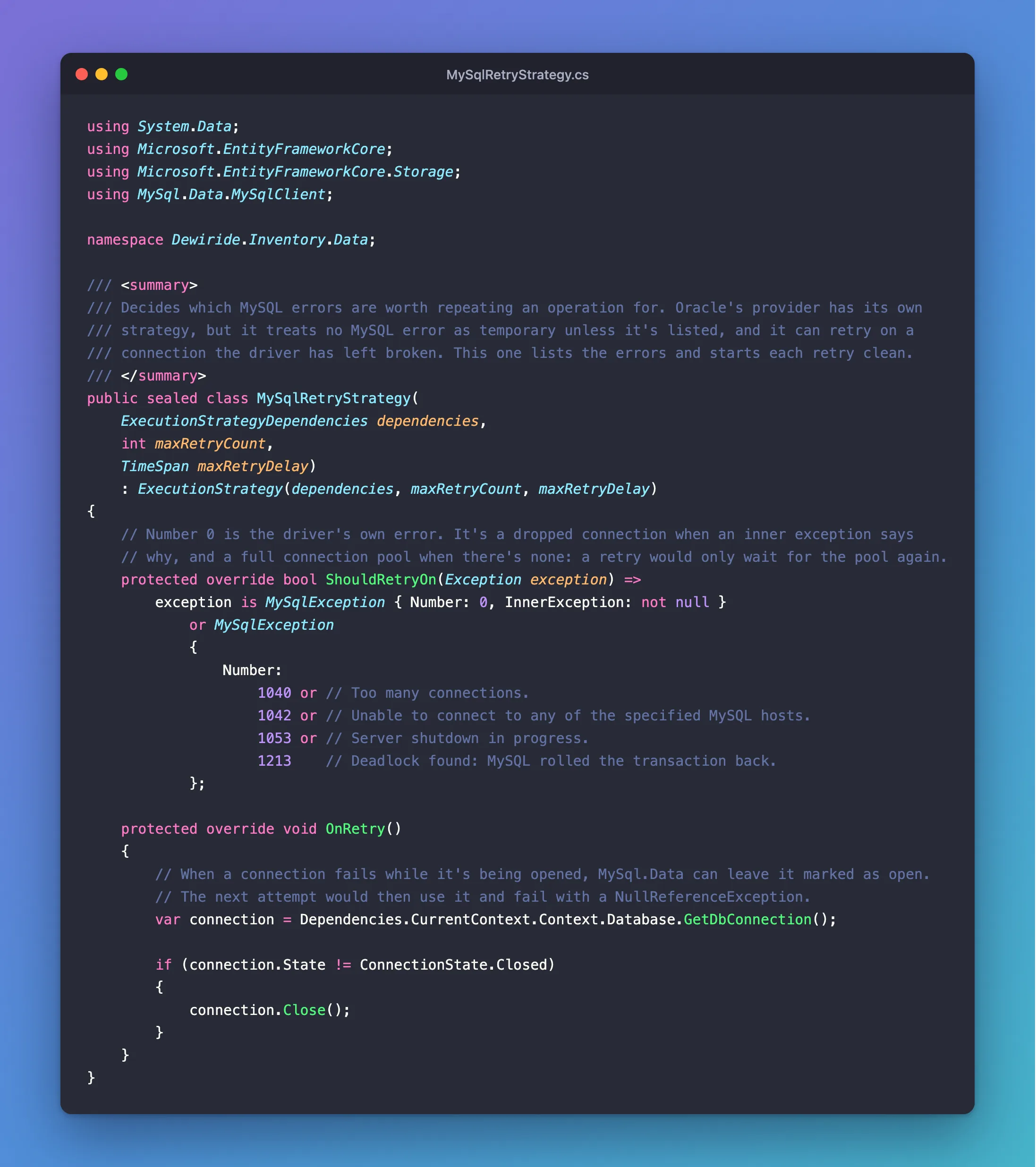
ShouldRetryOnnames the errors worth another try, including a deadlock, for the rare one that sorting doesn't prevent.OnRetrycloses the connection before each new attempt, so EF Core opens a working one.
Use it in AddInventoryData, in place of EnableRetryOnFailure:
// Repeat an operation that failed with a temporary error, such as a deadlock
// or a dropped connection.
mySql.ExecutionStrategy(dependencies => new MySqlRetryStrategy(
    dependencies,
    database.MaxRetryCount,
    TimeSpan.FromSeconds(database.MaxRetryDelaySeconds)));
One more thing now that retries really happen. The delegate runs again on the same DbContext, and the first attempt's entities are still in it, which saves them twice. So start each attempt clean, in both StockEndpoints.cs and OrderEndpoints.cs:
return await strategy.ExecuteAsync(
    async Task<Results<Created<OrderResponse>, ProblemHttpResult>> (CancellationToken ct) =>
    {
        db.ChangeTracker.Clear();

        var now = clock.GetUtcNow().UtcDateTime;

        await using var transaction = await db.Database.BeginTransactionAsync(ct);
The same 96 orders, and the same restart:
96 201
A transient exception occurred during execution. The operation will be retried after 0ms.
A transient exception occurred during execution. The operation will be retried after 0ms.
A transient exception occurred during execution. The operation will be retried after 0ms.
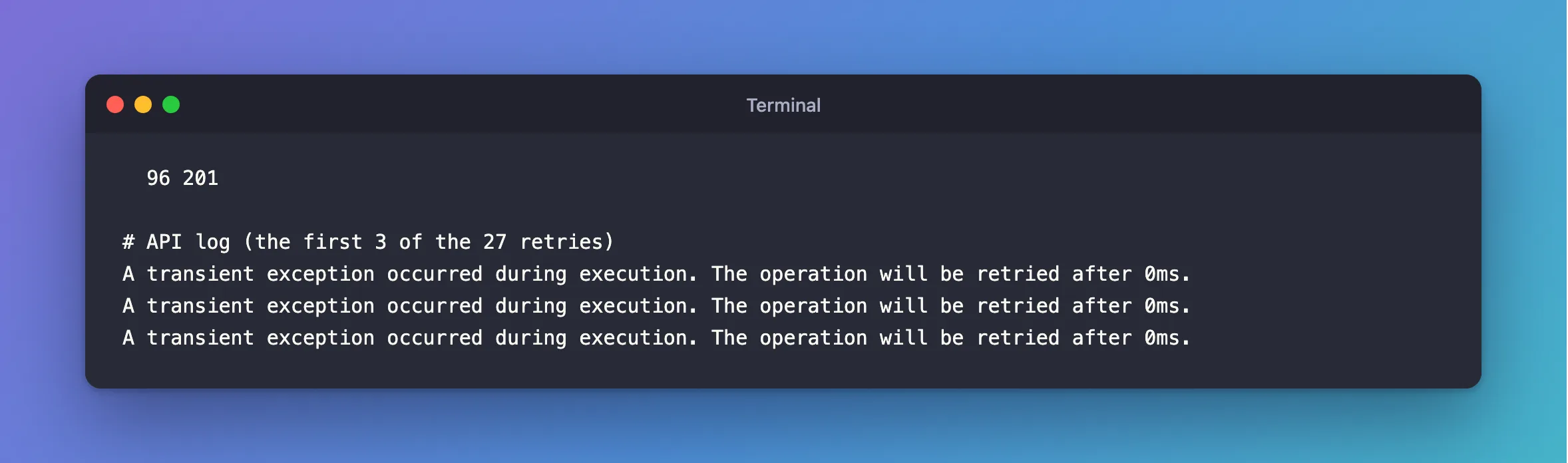
All 96 got through, with 27 retries. The clients just saw some slow requests. How to Write a Custom Execution Strategy in EF Core for MySQL goes through the class line by line.
Step 11: Set Time Limits That Really Stop
What if a row stays locked? MySQL's default wait is 50 seconds, which is far too long, and Part 1 set a CommandTimeout of 30. To see it fire without waiting, I lowered it to 2 seconds, and held a row in a mysql session:
- macOS / Linux
- Windows (PowerShell)
export Database__CommandTimeoutSeconds=2
dotnet run --project src/Dewiride.Inventory.Api
$env:Database__CommandTimeoutSeconds = 2
dotnet run --project src/Dewiride.Inventory.Api
START TRANSACTION;
UPDATE products SET Description = 'Held for a while' WHERE Id = 2;
An order for that product should fail after 2 seconds. --max-time makes curl stop waiting at 25:
curl -s --max-time 25 -w "\ncurl exit %{exitcode}, %{time_total} s\n" -X POST http://localhost:5190/api/v1/orders -H "Content-Type: application/json" -d '{"customerName":"Ana Costa","customerEmail":"ana@example.com","lines":[{"productId":2,"quantity":1}]}'
curl exit 28, 25.003506 s
It never answered. I rolled back the other session after 6 seconds, and it still never answered, with the connection idle in MySQL:
mysql> SELECT PROCESSLIST_ID, PROCESSLIST_COMMAND, PROCESSLIST_TIME, LEFT(PROCESSLIST_INFO, 30) AS statement FROM performance_schema.threads WHERE PROCESSLIST_USER = 'inventory_app';
+----------------+---------------------+------------------+-----------+
| PROCESSLIST_ID | PROCESSLIST_COMMAND | PROCESSLIST_TIME | statement |
+----------------+---------------------+------------------+-----------+
|             26 | Sleep               |               10 | NULL      |
|             28 | Sleep               |                4 | NULL      |
+----------------+---------------------+------------------+-----------+
2 rows in set (0.005 sec)
This took some digging. With MySql.Data's async calls, CommandTimeout doesn't stop at the limit. The read waits for the answer, then the driver notices the time, sends KILL QUERY for a statement that's finished, and waits for a reply that never comes. The connection never goes back to the pool, and in a transaction it keeps its row locks, so the next order for that product hangs too. That post has the driver's source, and the timing from MySQL's log.
So turn the driver's limit off, and put the limits on the server. MySQL has one for waiting on a lock, and one for a slow SELECT. Add both to the settings, in place of CommandTimeoutSeconds:
using System.ComponentModel.DataAnnotations;

namespace Dewiride.Inventory.Data;

/// <summary>
/// Settings for how the app talks to MySQL, read from the "Database" configuration section.
/// The connection string itself is kept separately, in ConnectionStrings:Inventory.
/// </summary>
public sealed class DatabaseOptions
{
    /// <summary>The configuration section these settings are read from.</summary>
    public const string SectionName = "Database";

    /// <summary>How many times EF Core repeats an operation that failed with a retryable MySQL error.</summary>
    [Range(0, 10)]
    public int MaxRetryCount { get; set; } = 3;

    /// <summary>The longest wait, in seconds, between two retries.</summary>
    [Range(1, 30)]
    public int MaxRetryDelaySeconds { get; set; } = 5;

    /// <summary>How long, in seconds, a statement may wait for a row lock before MySQL refuses it with error 1205.</summary>
    [Range(1, 60)]
    public int LockWaitTimeoutSeconds { get; set; } = 5;

    /// <summary>How long, in seconds, a SELECT may run before MySQL stops it with error 3024.</summary>
    [Range(1, 300)]
    public int QueryTimeoutSeconds { get; set; } = 30;
}
{
  "Logging": {
    "LogLevel": {
      "Default": "Information",
      "Microsoft.AspNetCore": "Warning",
      "Microsoft.EntityFrameworkCore.Database.Command": "Warning"
    }
  },
  "AllowedHosts": "*",
  "Database": {
    "MaxRetryCount": 3,
    "MaxRetryDelaySeconds": 5,
    "LockWaitTimeoutSeconds": 5,
    "QueryTimeoutSeconds": 30
  }
}
These are session settings, so they have to be set on each connection. A connection interceptor does that, in a new file:
using System.Data.Common;
using Microsoft.EntityFrameworkCore.Diagnostics;

namespace Dewiride.Inventory.Data.Interceptors;

/// <summary>
/// Sets MySQL's own time limits on every connection the app opens. The limits have to be on the
/// server: MySql.Data's async calls don't stop at CommandTimeout.
/// </summary>
public sealed class MySqlSessionLimitsInterceptor(int lockWaitTimeoutSeconds, int queryTimeoutSeconds)
    : DbConnectionInterceptor
{
    private readonly string _setLimits =
        $"SET SESSION innodb_lock_wait_timeout = {lockWaitTimeoutSeconds}, " +
        $"max_execution_time = {queryTimeoutSeconds * 1000}";

    public override void ConnectionOpened(DbConnection connection, ConnectionEndEventData eventData)
    {
        ArgumentNullException.ThrowIfNull(connection);

        using var command = connection.CreateCommand();
        command.CommandText = _setLimits;
        command.ExecuteNonQuery();
    }

    public override async Task ConnectionOpenedAsync(
        DbConnection connection,
        ConnectionEndEventData eventData,
        CancellationToken cancellationToken = default)
    {
        ArgumentNullException.ThrowIfNull(connection);

        await using var command = connection.CreateCommand();
        command.CommandText = _setLimits;
        await command.ExecuteNonQueryAsync(cancellationToken);
    }
}
And here's the complete registration:
using Dewiride.Inventory.Data.Interceptors;
using Microsoft.EntityFrameworkCore;
using Microsoft.Extensions.Configuration;
using Microsoft.Extensions.DependencyInjection;
using Microsoft.Extensions.Options;

namespace Dewiride.Inventory.Data;

/// <summary>
/// Registers the inventory database with dependency injection.
/// </summary>
public static class InventoryDataServiceCollectionExtensions
{
    /// <summary>The name of the connection string, read from ConnectionStrings:Inventory.</summary>
    public const string ConnectionStringName = "Inventory";

    /// <summary>
    /// Adds <see cref="InventoryDbContext"/>, connected to MySQL through Oracle's EF Core provider,
    /// and validates the <see cref="DatabaseOptions"/> when the app starts.
    /// </summary>
    public static IServiceCollection AddInventoryData(
        this IServiceCollection services,
        IConfiguration configuration)
    {
        ArgumentNullException.ThrowIfNull(services);
        ArgumentNullException.ThrowIfNull(configuration);

        services.AddOptions<DatabaseOptions>()
            .Bind(configuration.GetSection(DatabaseOptions.SectionName))
            .ValidateDataAnnotations()
            .ValidateOnStart();

        // Fail at startup with a clear message, not on the first request.
        var connectionString = configuration.GetConnectionString(ConnectionStringName);
        if (string.IsNullOrWhiteSpace(connectionString))
        {
            throw new InvalidOperationException(
                $"The connection string 'ConnectionStrings:{ConnectionStringName}' is missing. " +
                "In development, set it with dotnet user-secrets. Everywhere else, set the " +
                $"ConnectionStrings__{ConnectionStringName} environment variable.");
        }

        services.AddDbContext<InventoryDbContext>((serviceProvider, options) =>
        {
            var database = serviceProvider.GetRequiredService<IOptions<DatabaseOptions>>().Value;

            options.UseMySQL(connectionString, mySql =>
            {
                // Repeat an operation that failed with a temporary error, such as a deadlock
                // or a dropped connection.
                mySql.ExecutionStrategy(dependencies => new MySqlRetryStrategy(
                    dependencies,
                    database.MaxRetryCount,
                    TimeSpan.FromSeconds(database.MaxRetryDelaySeconds)));

                // No time limit in the driver: an async statement that runs past it never returns.
                // MySqlSessionLimitsInterceptor sets the limits on the server instead.
                mySql.CommandTimeout(0);
            });

            options.AddInterceptors(new MySqlSessionLimitsInterceptor(
                database.LockWaitTimeoutSeconds,
                database.QueryTimeoutSeconds));
        });

        return services;
    }
}
MySQL's log shows the interceptor at work, before each request's first statement. On my machine, it costs about 0.07 ms per request:
+--------------+----------------------------------------------------------------------------+
| command_type | statement                                                                  |
+--------------+----------------------------------------------------------------------------+
| Init DB      | inventory                                                                  |
| Query        | SET SESSION innodb_lock_wait_timeout = 5, max_execution_time = 30000       |
| Query        | SELECT `p`.`Id`, `p`.`Sku`, `p`.`Name`, `p`.`Description`, `p`.`CategoryId |
+--------------+----------------------------------------------------------------------------+
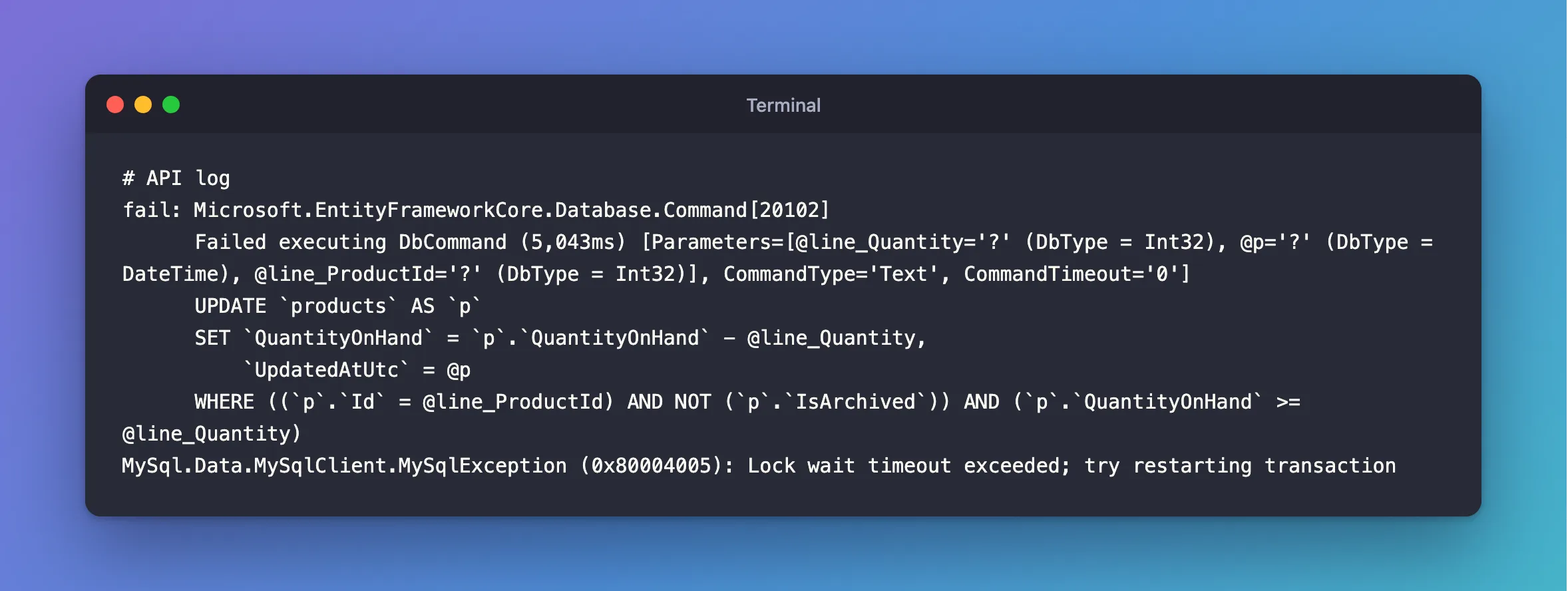
Close that terminal, so the environment variable is gone, and start the API again. The same held row now gives a clear failure, at 5 seconds, from MySQL itself:
fail: Microsoft.EntityFrameworkCore.Database.Command[20102]
      Failed executing DbCommand (5,043ms) [Parameters=[@line_Quantity='?' (DbType = Int32), @p='?' (DbType = DateTime), @line_ProductId='?' (DbType = Int32)], CommandType='Text', CommandTimeout='0']
      UPDATE `products` AS `p`
      SET `QuantityOnHand` = `p`.`QuantityOnHand` - @line_Quantity,
          `UpdatedAtUtc` = @p
      WHERE ((`p`.`Id` = @line_ProductId) AND NOT (`p`.`IsArchived`)) AND (`p`.`QuantityOnHand` >= @line_Quantity)
MySql.Data.MySqlClient.MySqlException (0x80004005): Lock wait timeout exceeded; try restarting transaction
Step 12: Tell the Client to Come Back
That error still gives the client a 500, which says the server has a bug. The truth is "not right now". An exception handler can say so with a 503 and a Retry-After, in a new file:
using System.Globalization;
using Dewiride.Inventory.Data;
using Microsoft.AspNetCore.Diagnostics;
using Microsoft.AspNetCore.Mvc;
using Microsoft.EntityFrameworkCore.Storage;

namespace Dewiride.Inventory.Api.Infrastructure;

/// <summary>
/// Answers 503 Service Unavailable with a Retry-After header when the database can't do the work
/// right now, so a client knows to try again. Any other exception stays a 500.
/// </summary>
public sealed class DatabaseUnavailableExceptionHandler(IProblemDetailsService problemDetails)
    : IExceptionHandler
{
    private const int RetryAfterSeconds = 5;

    public async ValueTask<bool> TryHandleAsync(
        HttpContext httpContext,
        Exception exception,
        CancellationToken cancellationToken)
    {
        if (!IsTemporary(exception))
        {
            return false;
        }

        httpContext.Response.StatusCode = StatusCodes.Status503ServiceUnavailable;
        httpContext.Response.Headers.RetryAfter = RetryAfterSeconds.ToString(CultureInfo.InvariantCulture);

        return await problemDetails.TryWriteAsync(new ProblemDetailsContext
        {
            HttpContext = httpContext,
            Exception = exception,
            ProblemDetails = new ProblemDetails
            {
                Status = StatusCodes.Status503ServiceUnavailable,
                Title = "The database can't do this right now.",
                Detail = $"Try again in {RetryAfterSeconds} seconds. Send the same Idempotency-Key, so a change can't be applied twice.",
            },
        });
    }

    private static bool IsTemporary(Exception exception) =>
        exception is RetryLimitExceededException
        || exception.FindMySqlException() is { Number: 0 or 1205 or 3024 };
}
IsTemporary covers the retries running out, a lock wait, a query over its limit, and a full connection pool. It needs a helper that finds the MySqlException wherever it sits, because SaveChangesAsync wraps it, and ExecuteUpdateAsync doesn't. Add this method to DbUpdateExceptionExtensions.cs:
/// The MySqlException behind any exception: EF Core wraps it in a DbUpdateException when
/// saving, and in a RetryLimitExceededException when the retries run out.
/// </summary>
public static MySqlException? FindMySqlException(this Exception exception)
{
    for (var current = exception; current is not null; current = current.InnerException)
    {
        if (current is MySqlException mySqlException)
        {
            return mySqlException;
        }
    }

    return null;
}
Register the handler in Program.cs:
// Answers 503 when the database can't do the work right now.
builder.Services.AddExceptionHandler<DatabaseUnavailableExceptionHandler>();
The same held row:
HTTP/1.1 503 Service Unavailable
Content-Type: application/problem+json

{
  "type": "https://tools.ietf.org/html/rfc9110#section-15.6.4",
  "title": "The database can't do this right now.",
  "status": 503,
  "detail": "Try again in 5 seconds. Send the same Idempotency-Key, so a change can't be applied twice.",
  "traceId": "00-be9c3937ef6ae66c81c2ae2a3339273f-670d2b6b06441546-00"
}
And with MySQL stopped, after 3 retries:
HTTP/1.1 503 Service Unavailable
Content-Type: application/problem+json

{
  "type": "https://tools.ietf.org/html/rfc9110#section-15.6.4",
  "title": "The database can't do this right now.",
  "status": 503,
  "detail": "Try again in 5 seconds. Send the same Idempotency-Key, so a change can't be applied twice.",
  "traceId": "00-0d0b17fbe59f130e78f5555cbee67b94-a6ae5b85e2201e17-00"
}
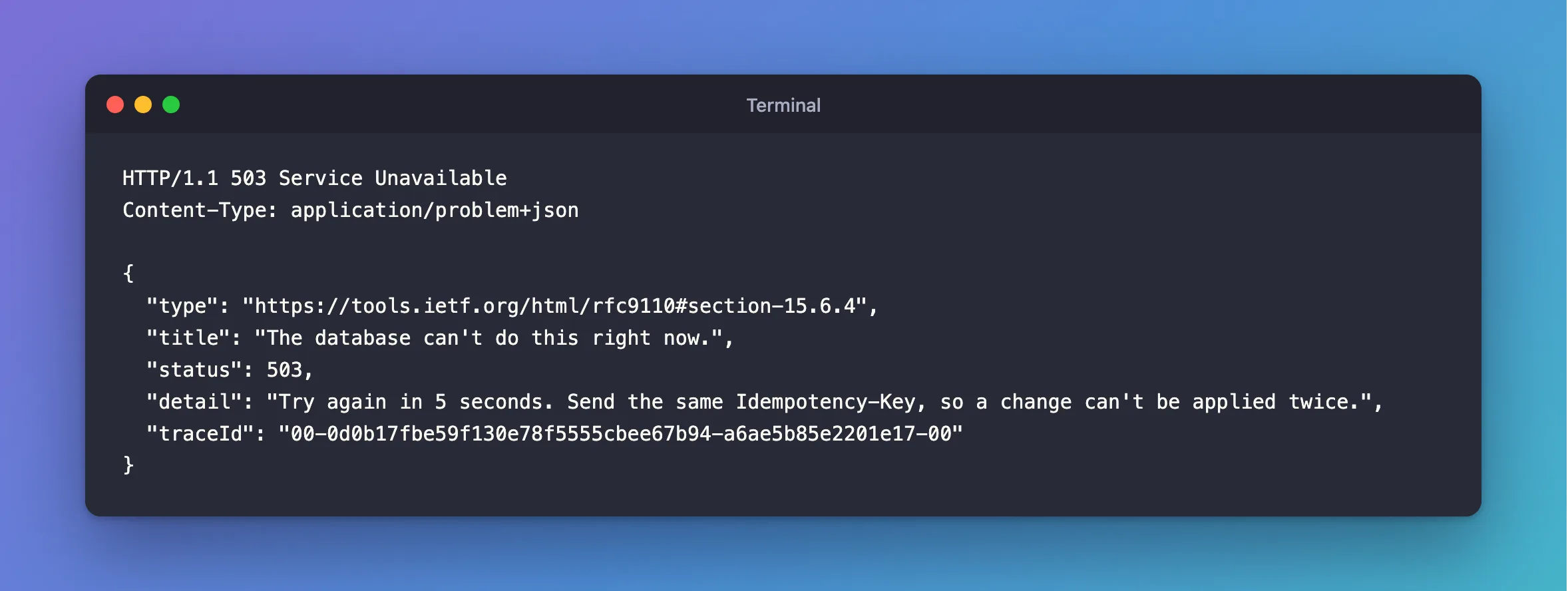
There's one thing to add. Since .NET 10, an exception a handler has answered isn't logged by the middleware, and you want an outage in your logs. Add this option to UseExceptionHandler, shown in full below:
using System.Text.Json.Serialization;
using Dewiride.Inventory.Api.Features.Categories;
using Dewiride.Inventory.Api.Features.Orders;
using Dewiride.Inventory.Api.Features.Products;
using Dewiride.Inventory.Api.Features.Stock;
using Dewiride.Inventory.Api.Infrastructure;
using Dewiride.Inventory.Data;
using Microsoft.AspNetCore.Diagnostics.HealthChecks;
using Scalar.AspNetCore;

var builder = WebApplication.CreateBuilder(args);

// Add services to the container.
// Learn more about configuring OpenAPI at https://aka.ms/aspnet/openapi
builder.Services.AddOpenApi();

// Answers every error with the same JSON shape, the standard "problem details" format.
builder.Services.AddProblemDetails();

// Checks the validation attributes on request records before an endpoint runs.
builder.Services.AddValidation();

// The clock. Code asks for it instead of calling DateTime.UtcNow directly.
builder.Services.AddSingleton(TimeProvider.System);

// Enums travel as their names, such as "Receipt", not as numbers.
builder.Services.ConfigureHttpJsonOptions(options =>
    options.SerializerOptions.Converters.Add(new JsonStringEnumConverter()));

// Answers 503 when the database can't do the work right now.
builder.Services.AddExceptionHandler<DatabaseUnavailableExceptionHandler>();

// The MySQL database, through EF Core. The connection string comes from configuration:
// dotnet user-secrets in development, an environment variable everywhere else.
builder.Services.AddInventoryData(builder.Configuration);

// The "mysql" check opens a connection to MySQL. Only the readiness endpoint runs it.
builder.Services.AddHealthChecks()
    .AddDbContextCheck<InventoryDbContext>(name: "mysql", tags: ["ready"]);

var app = builder.Build();

// Turn unhandled exceptions into a problem response, with no stack trace outside Development.
app.UseExceptionHandler(new ExceptionHandlerOptions
{
    // In Development, a request the endpoint can't read, such as broken JSON, throws
    // BadHttpRequestException. That's the client's mistake, so keep its 400 instead of a 500.
    StatusCodeSelector = exception => exception is BadHttpRequestException badRequest
        ? badRequest.StatusCode
        : StatusCodes.Status500InternalServerError,

    // Keep logging the exceptions an IExceptionHandler answers, so an outage shows up in the logs.
    SuppressDiagnosticsCallback = _ => false,
});

// Give error responses without a body, such as a plain 404, a problem details body.
app.UseStatusCodePages();

// Configure the HTTP request pipeline.
if (app.Environment.IsDevelopment())
{
    app.MapOpenApi();

    // Interactive API documentation at /scalar/v1, built from the OpenAPI document.
    app.MapScalarApiReference();
}

// Liveness: the API process is running. It runs no checks.
app.MapHealthChecks("/health/live", new HealthCheckOptions
{
    Predicate = _ => false,
});

// Readiness: the API can reach MySQL, so it's ready for requests.
app.MapHealthChecks("/health/ready", new HealthCheckOptions
{
    Predicate = check => check.Tags.Contains("ready"),
});

// Every data endpoint lives under /api/v1.
var api = app.MapGroup("/api/v1");
api.MapCategoryEndpoints();
api.MapProductEndpoints();
api.MapStockEndpoints();
api.MapOrderEndpoints();

app.Run();
An outage now reaches the client as an honest answer, and it reaches your log as an error.
Step 13: Make a Retry Safe
There's one failure left, and it's the subtle one. Say the connection drops just after MySQL commits, and just before your app hears about it. The driver sees a dropped connection, the strategy retries, and every statement in the delegate is valid a second time.
That's rare, so to test it I used a small proxy that lets one COMMIT reach MySQL and throws away the answer. How to Test What Happens When the Reply to a COMMIT Is Lost has the script. A product with 10 on hand, and one order for 1:
+----------------+----------------+--------------+
| QuantityOnHand | SumOfMovements | OrdersPlaced |
+----------------+----------------+--------------+
|             10 |             10 |            0 |
+----------------+----------------+--------------+
HTTP/1.1 201 Created
Content-Type: application/json; charset=utf-8
Location: /api/v1/orders/281

{
  "id": 281,
  "customerName": "Ana Costa",
  "customerEmail": "ana@example.com",
  "status": "Placed",
  "totalAmount": 89.00,
  "placedAtUtc": "2026-11-05T05:21:45.017979Z",
  "fulfilledAtUtc": null,
  "cancelledAtUtc": null,
  "lines": [
    {
      "productId": 14,
      "quantity": 1,
      "unitPrice": 89.00
    }
  ]
}
+----------------+----------------+--------------+
| QuantityOnHand | SumOfMovements | OrdersPlaced |
+----------------+----------------+--------------+
|              8 |              8 |            2 |
+----------------+----------------+--------------+
+-----+--------------+--------+-------------+
| Id  | CustomerName | Status | TotalAmount |
+-----+--------------+--------+-------------+
| 280 | Ana Costa    | Placed |       89.00 |
| 281 | Ana Costa    | Placed |       89.00 |
+-----+--------------+--------+-------------+
One request, one 201, two orders, and two units gone. The EF Core docs cover this: "if the connection is dropped while the transaction is being committed the resulting state of the transaction is unknown."
The fix is to give each request a key, save it with the work, and look for it at the start of every attempt. Orders already have an IdempotencyKey column with a unique index, from Step 2. Stock movements need one too, for receipts and adjustments. Add this property to StockMovement:
/// Identifies the request that made this change, so a repeat of the request can't count the
/// stock twice. It's the client's Idempotency-Key, or one the API makes up for the request.
/// Empty for movements that belong to an order: the order has its own key.
/// </summary>
public string? IdempotencyKey { get; set; }
And this to StockMovementConfiguration:
builder.Property(m => m.IdempotencyKey)
    .HasMaxLength(64);

// MySQL allows many NULLs in a unique index, so movements without a key never clash.
builder.HasIndex(m => m.IdempotencyKey)
    .IsUnique();
Then a migration, as in Part 2:
dotnet ef migrations add AddStockMovementIdempotencyKey --project src/Dewiride.Inventory.Data --startup-project src/Dewiride.Inventory.Api
dotnet ef database update --project src/Dewiride.Inventory.Data --startup-project src/Dewiride.Inventory.Api
ALTER TABLE `stock_movements` ADD `IdempotencyKey` varchar(64) NULL;
CREATE UNIQUE INDEX `IX_stock_movements_IdempotencyKey` ON `stock_movements` (`IdempotencyKey`);
Done.
The key comes from an optional Idempotency-Key header, and if the client doesn't send one, the API makes one up, once per request, which still protects the request from its own retries:
// Every attempt below shares this key. With no key from the client, it still protects
// the request from itself when a retry repeats an attempt that really did commit.
var key = idempotencyKey ?? Guid.NewGuid().ToString("N");

var strategy = db.Database.CreateExecutionStrategy();

return await strategy.ExecuteAsync(
    async Task<Results<Created<OrderResponse>, Ok<OrderResponse>, ProblemHttpResult>> (CancellationToken ct) =>
    {
        db.ChangeTracker.Clear();

        // A repeat of a request that already worked returns the same order. This is what
        // makes a retry safe when the connection dropped before the COMMIT's reply arrived.
        if (await FindByIdempotencyKeyAsync(db, key, ct) is { } existing)
        {
            return TypedResults.Ok(existing);
        }
The unique index settles two requests that overlap, and the catch handles the loser:
db.Orders.Add(order);

try
{
    await db.SaveChangesAsync(ct);
}
catch (DbUpdateException exception) when (exception.IsDuplicateKey())
{
    // Another request with the same key committed first. Undo this attempt,
    // including the stock it took, and return the order that request placed.
    await transaction.RollbackAsync(ct);

    var placedFirst = await FindByIdempotencyKeyAsync(db, key, ct);

    return TypedResults.Ok(placedFirst!);
}
The same lost reply:
HTTP/1.1 200 OK
Content-Type: application/json; charset=utf-8

{
  "id": 282,
  "customerName": "Ana Costa",
  "customerEmail": "ana@example.com",
  "status": "Placed",
  "totalAmount": 89.00,
  "placedAtUtc": "2026-11-05T05:21:58.620388Z",
  "fulfilledAtUtc": null,
  "cancelledAtUtc": null,
  "lines": [
    {
      "productId": 14,
      "quantity": 1,
      "unitPrice": 89.00
    }
  ]
}
+----------------+----------------+--------------+
| QuantityOnHand | SumOfMovements | OrdersPlaced |
+----------------+----------------+--------------+
|              7 |              7 |            3 |
+----------------+----------------+--------------+
One more order and one more unit, and the answer is 200, because the retry found the first attempt's order and returned it. A receipt of 10 now adds 10, where it used to add 20.
Clients can use the same key for themselves, when they get no answer and try again:
POST {{baseUrl}}/api/v1/orders
Content-Type: application/json
Idempotency-Key: order-0001

{"customerName":"Ben Silva","customerEmail":"ben@example.com","lines":[{"productId":14,"quantity":1}]}
The first time, it's 201 Created, order 283. The second time, it's 200 OK, with the same order. And 6 at the same moment, with one key:
201
200
200
200
200
200
+----------------+----------------+--------------+
| QuantityOnHand | SumOfMovements | OrdersPlaced |
+----------------+----------------+--------------+
|             15 |             15 |            5 |
+----------------+----------------+--------------+
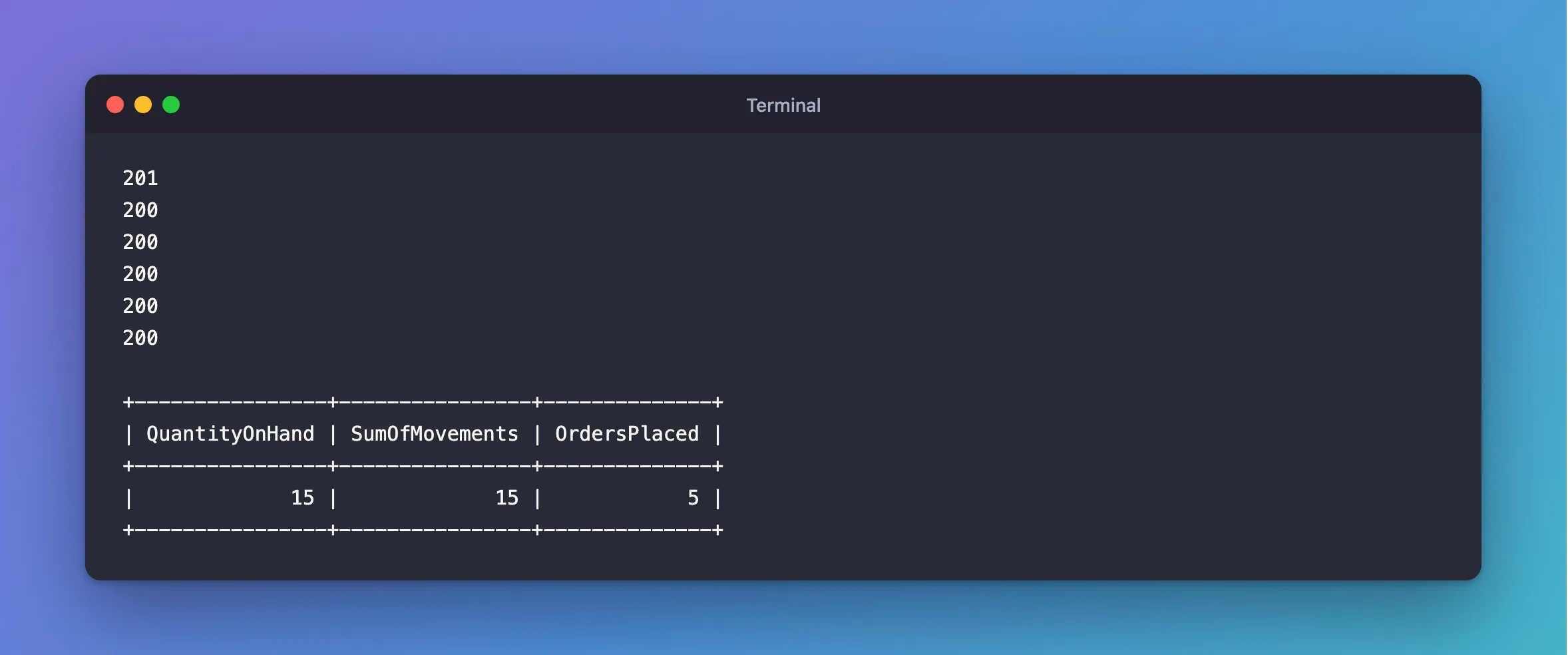
How to Add an Idempotency-Key Header to a POST Endpoint in ASP.NET Core has the details. Here are the finished files for orders and stock, which include the endpoints I mentioned at the start:
using System.ComponentModel.DataAnnotations;
using System.Linq.Expressions;
using Dewiride.Inventory.Data.Entities;

namespace Dewiride.Inventory.Api.Features.Orders;

/// <summary>What a client sends to place an order.</summary>
public sealed record PlaceOrderRequest(
    [Required, StringLength(200)] string CustomerName,
    [Required, EmailAddress, StringLength(254)] string CustomerEmail,
    [Required, MinLength(1), MaxLength(50)] IReadOnlyList<PlaceOrderLine> Lines) : IValidatableObject
{
    public IEnumerable<ValidationResult> Validate(ValidationContext validationContext)
    {
        // The order_lines table allows a product once per order.
        if (Lines is not null && Lines.Select(l => l.ProductId).Distinct().Count() != Lines.Count)
        {
            yield return new ValidationResult(
                "Each product can appear only once in an order.",
                [nameof(Lines)]);
        }
    }
}

/// <summary>One product in an order, with how many the customer wants.</summary>
public sealed record PlaceOrderLine(
    [Range(1, int.MaxValue)] int ProductId,
    [Range(1, 10_000)] int Quantity);

/// <summary>The filter and page of the order list, read from the query string.</summary>
public sealed record OrderListQuery(
    [property: EnumDataType(typeof(OrderStatus))] OrderStatus? Status = null,
    [property: Range(1, 1_000_000)] int Page = 1,
    [property: Range(1, 100)] int PageSize = 20);

/// <summary>One line of an order, as the API returns it.</summary>
public sealed record OrderLineResponse(
    int ProductId,
    int Quantity,
    decimal UnitPrice);

/// <summary>What the API returns for an order.</summary>
public sealed record OrderResponse(
    int Id,
    string CustomerName,
    string CustomerEmail,
    OrderStatus Status,
    decimal TotalAmount,
    DateTime PlacedAtUtc,
    DateTime? FulfilledAtUtc,
    DateTime? CancelledAtUtc,
    IReadOnlyList<OrderLineResponse> Lines)
{
    /// <summary>EF Core turns this into SQL: one query for the order, and its lines with it.</summary>
    public static readonly Expression<Func<Order, OrderResponse>> FromOrder = o =>
        new OrderResponse(
            o.Id,
            o.CustomerName,
            o.CustomerEmail,
            o.Status,
            o.TotalAmount,
            o.PlacedAtUtc,
            o.FulfilledAtUtc,
            o.CancelledAtUtc,
            o.Lines
                .OrderBy(l => l.ProductId)
                .Select(l => new OrderLineResponse(l.ProductId, l.Quantity, l.UnitPrice))
                .ToList());
}
using System.ComponentModel.DataAnnotations;
using Dewiride.Inventory.Api.Common;
using Dewiride.Inventory.Data;
using Dewiride.Inventory.Data.Entities;
using Microsoft.AspNetCore.Http.HttpResults;
using Microsoft.AspNetCore.Mvc;
using Microsoft.EntityFrameworkCore;

namespace Dewiride.Inventory.Api.Features.Orders;

/// <summary>
/// The HTTP endpoints that place, read, fulfil and cancel orders.
/// </summary>
public static class OrderEndpoints
{
    public static IEndpointRouteBuilder MapOrderEndpoints(this IEndpointRouteBuilder routes)
    {
        var group = routes.MapGroup("/orders").WithTags("Orders");

        group.MapPost("/", PlaceAsync)
            .WithSummary("Place an order, taking its stock")
            .ProducesProblem(StatusCodes.Status400BadRequest)
            .ProducesProblem(StatusCodes.Status409Conflict);
        group.MapGet("/", ListAsync)
            .WithSummary("List orders, newest first");
        group.MapGet("/{id:int}", GetAsync)
            .WithSummary("Get one order, with its lines");
        group.MapPost("/{id:int}/fulfil", FulfilAsync)
            .WithSummary("Mark a placed order as sent")
            .ProducesProblem(StatusCodes.Status409Conflict);
        group.MapPost("/{id:int}/cancel", CancelAsync)
            .WithSummary("Cancel a placed order and put its stock back")
            .ProducesProblem(StatusCodes.Status409Conflict);

        return routes;
    }

    private static async Task<Results<Created<OrderResponse>, Ok<OrderResponse>, ProblemHttpResult>> PlaceAsync(
        PlaceOrderRequest request,
        [FromHeader(Name = "Idempotency-Key"), StringLength(64)] string? idempotencyKey,
        InventoryDbContext db,
        TimeProvider clock,
        CancellationToken cancellationToken)
    {
        // Every order locks its products in the same order, lowest ID first, so two orders
        // for the same products can't each hold what the other one needs.
        var lines = request.Lines.OrderBy(l => l.ProductId).ToList();
        var productIds = lines.Select(l => l.ProductId).ToList();

        // Every attempt below shares this key. With no key from the client, it still protects
        // the request from itself when a retry repeats an attempt that really did commit.
        var key = idempotencyKey ?? Guid.NewGuid().ToString("N");

        var strategy = db.Database.CreateExecutionStrategy();

        return await strategy.ExecuteAsync(
            async Task<Results<Created<OrderResponse>, Ok<OrderResponse>, ProblemHttpResult>> (CancellationToken ct) =>
            {
                db.ChangeTracker.Clear();

                // A repeat of a request that already worked returns the same order. This is what
                // makes a retry safe when the connection dropped before the COMMIT's reply arrived.
                if (await FindByIdempotencyKeyAsync(db, key, ct) is { } existing)
                {
                    return TypedResults.Ok(existing);
                }

                var now = clock.GetUtcNow().UtcDateTime;

                await using var transaction = await db.Database.BeginTransactionAsync(ct);

                foreach (var line in lines)
                {
                    // MySQL locks the row, checks the condition and changes the row in one
                    // statement. A second buyer waits here, then sees the new quantity.
                    var taken = await db.Products
                        .Where(p => p.Id == line.ProductId && !p.IsArchived && p.QuantityOnHand >= line.Quantity)
                        .ExecuteUpdateAsync(
                            setters => setters
                                .SetProperty(p => p.QuantityOnHand, p => p.QuantityOnHand - line.Quantity)
                                .SetProperty(p => p.UpdatedAtUtc, now),
                            ct);

                    if (taken == 0)
                    {
                        // Leaving without a commit rolls back the stock already taken.
                        return await ExplainRefusalAsync(db, line, ct);
                    }
                }

                var prices = await db.Products
                    .Where(p => productIds.Contains(p.Id))
                    .Select(p => new { p.Id, p.UnitPrice })
                    .ToDictionaryAsync(p => p.Id, p => p.UnitPrice, ct);

                var order = new Order
                {
                    CustomerName = request.CustomerName.Trim(),
                    CustomerEmail = request.CustomerEmail.Trim(),
                    Status = OrderStatus.Placed,
                    IdempotencyKey = key,
                    PlacedAtUtc = now,
                    TotalAmount = lines.Sum(l => prices[l.ProductId] * l.Quantity),
                };

                foreach (var line in lines)
                {
                    order.Lines.Add(new OrderLine
                    {
                        ProductId = line.ProductId,
                        Quantity = line.Quantity,
                        UnitPrice = prices[line.ProductId],
                    });

                    db.StockMovements.Add(new StockMovement
                    {
                        ProductId = line.ProductId,
                        Order = order,
                        Type = StockMovementType.Sale,
                        QuantityChange = -line.Quantity,
                        OccurredAtUtc = now,
                    });
                }

                db.Orders.Add(order);

                try
                {
                    await db.SaveChangesAsync(ct);
                }
                catch (DbUpdateException exception) when (exception.IsDuplicateKey())
                {
                    // Another request with the same key committed first. Undo this attempt,
                    // including the stock it took, and return the order that request placed.
                    await transaction.RollbackAsync(ct);

                    var placedFirst = await FindByIdempotencyKeyAsync(db, key, ct);

                    return TypedResults.Ok(placedFirst!);
                }

                await transaction.CommitAsync(ct);

                return TypedResults.Created($"/api/v1/orders/{order.Id}", ToResponse(order));
            },
            cancellationToken);
    }

    private static async Task<Ok<PagedResponse<OrderResponse>>> ListAsync(
        [AsParameters] OrderListQuery query,
        InventoryDbContext db,
        CancellationToken cancellationToken)
    {
        IQueryable<Order> orders = db.Orders;

        if (query.Status is OrderStatus status)
        {
            orders = orders.Where(o => o.Status == status);
        }

        var totalCount = await orders.CountAsync(cancellationToken);

        var items = await orders
            .OrderByDescending(o => o.PlacedAtUtc)
            .ThenByDescending(o => o.Id)
            .Skip((query.Page - 1) * query.PageSize)
            .Take(query.PageSize)
            .Select(OrderResponse.FromOrder)
            .ToListAsync(cancellationToken);

        return TypedResults.Ok(new PagedResponse<OrderResponse>(items, query.Page, query.PageSize, totalCount));
    }

    private static async Task<Results<Ok<OrderResponse>, NotFound>> GetAsync(
        int id,
        InventoryDbContext db,
        CancellationToken cancellationToken)
    {
        var order = await db.Orders
            .Where(o => o.Id == id)
            .Select(OrderResponse.FromOrder)
            .FirstOrDefaultAsync(cancellationToken);

        return order is null
            ? TypedResults.NotFound()
            : TypedResults.Ok(order);
    }

    private static async Task<Results<NoContent, NotFound, ProblemHttpResult>> FulfilAsync(
        int id,
        InventoryDbContext db,
        TimeProvider clock,
        CancellationToken cancellationToken)
    {
        var now = clock.GetUtcNow().UtcDateTime;

        // Only a placed order can change, so two requests can't both win.
        var changed = await db.Orders
            .Where(o => o.Id == id && o.Status == OrderStatus.Placed)
            .ExecuteUpdateAsync(
                setters => setters
                    .SetProperty(o => o.Status, OrderStatus.Fulfilled)
                    .SetProperty(o => o.FulfilledAtUtc, now),
                cancellationToken);

        if (changed > 0)
        {
            return TypedResults.NoContent();
        }

        return await ExplainStatusAsync(db, id, "fulfilled", cancellationToken);
    }

    private static async Task<Results<NoContent, NotFound, ProblemHttpResult>> CancelAsync(
        int id,
        InventoryDbContext db,
        TimeProvider clock,
        CancellationToken cancellationToken)
    {
        var strategy = db.Database.CreateExecutionStrategy();

        return await strategy.ExecuteAsync(
            async Task<Results<NoContent, NotFound, ProblemHttpResult>> (CancellationToken ct) =>
            {
                db.ChangeTracker.Clear();

                var now = clock.GetUtcNow().UtcDateTime;

                await using var transaction = await db.Database.BeginTransactionAsync(ct);

                // The first request changes the status and keeps the row's lock until it commits.
                // A second request waits, then finds the order is no longer placed.
                var changed = await db.Orders
                    .Where(o => o.Id == id && o.Status == OrderStatus.Placed)
                    .ExecuteUpdateAsync(
                        setters => setters
                            .SetProperty(o => o.Status, OrderStatus.Cancelled)
                            .SetProperty(o => o.CancelledAtUtc, now),
                        ct);

                if (changed == 0)
                {
                    return await ExplainStatusAsync(db, id, "cancelled", ct);
                }

                var lines = await db.OrderLines
                    .Where(l => l.OrderId == id)
                    .OrderBy(l => l.ProductId)
                    .Select(l => new { l.ProductId, l.Quantity })
                    .ToListAsync(ct);

                foreach (var line in lines)
                {
                    await db.Products
                        .Where(p => p.Id == line.ProductId)
                        .ExecuteUpdateAsync(
                            setters => setters
                                .SetProperty(p => p.QuantityOnHand, p => p.QuantityOnHand + line.Quantity)
                                .SetProperty(p => p.UpdatedAtUtc, now),
                            ct);

                    db.StockMovements.Add(new StockMovement
                    {
                        ProductId = line.ProductId,
                        OrderId = id,
                        Type = StockMovementType.SaleCancelled,
                        QuantityChange = line.Quantity,
                        OccurredAtUtc = now,
                    });
                }

                await db.SaveChangesAsync(ct);

                await transaction.CommitAsync(ct);

                return TypedResults.NoContent();
            },
            cancellationToken);
    }

    private static async Task<OrderResponse?> FindByIdempotencyKeyAsync(
        InventoryDbContext db,
        string idempotencyKey,
        CancellationToken cancellationToken) =>
        await db.Orders
            .Where(o => o.IdempotencyKey == idempotencyKey)
            .Select(OrderResponse.FromOrder)
            .FirstOrDefaultAsync(cancellationToken);

    /// <summary>Taking a product's stock changed no row. This says why, in words a client can use.</summary>
    private static async Task<ProblemHttpResult> ExplainRefusalAsync(
        InventoryDbContext db,
        PlaceOrderLine line,
        CancellationToken cancellationToken)
    {
        var product = await db.Products
            .Where(p => p.Id == line.ProductId)
            .Select(p => new { p.IsArchived, p.QuantityOnHand })
            .FirstOrDefaultAsync(cancellationToken);

        if (product is null)
        {
            return TypedResults.Problem(
                title: "The product doesn't exist.",
                detail: $"There is no product with Id {line.ProductId}.",
                statusCode: StatusCodes.Status400BadRequest);
        }

        return product.IsArchived
            ? TypedResults.Problem(
                title: "The product isn't for sale.",
                detail: $"Product {line.ProductId} is archived.",
                statusCode: StatusCodes.Status409Conflict)
            : TypedResults.Problem(
                title: "There isn't enough stock.",
                detail: $"Product {line.ProductId} has {product.QuantityOnHand} on hand, and the order asks for {line.Quantity}.",
                statusCode: StatusCodes.Status409Conflict);
    }

    private static async Task<Results<NoContent, NotFound, ProblemHttpResult>> ExplainStatusAsync(
        InventoryDbContext db,
        int id,
        string wanted,
        CancellationToken cancellationToken)
    {
        var status = await db.Orders
            .Where(o => o.Id == id)
            .Select(o => (OrderStatus?)o.Status)
            .FirstOrDefaultAsync(cancellationToken);

        return status is null
            ? TypedResults.NotFound()
            : TypedResults.Problem(
                title: $"The order can't be {wanted}.",
                detail: $"Only a placed order can change. This one is {status}.",
                statusCode: StatusCodes.Status409Conflict);
    }

    private static OrderResponse ToResponse(Order order) =>
        new(
            order.Id,
            order.CustomerName,
            order.CustomerEmail,
            order.Status,
            order.TotalAmount,
            order.PlacedAtUtc,
            order.FulfilledAtUtc,
            order.CancelledAtUtc,
            order.Lines
                .OrderBy(l => l.ProductId)
                .Select(l => new OrderLineResponse(l.ProductId, l.Quantity, l.UnitPrice))
                .ToList());
}
using System.ComponentModel.DataAnnotations;
using System.Linq.Expressions;
using Dewiride.Inventory.Data.Entities;

namespace Dewiride.Inventory.Api.Features.Stock;

/// <summary>What a client sends when stock arrives.</summary>
public sealed record ReceiveStockRequest(
    [Range(1, 1_000_000)] int Quantity,
    [StringLength(200)] string? Reason,
    [StringLength(64)] string? Reference);

/// <summary>What a client sends to correct a product's count, such as after a stocktake.</summary>
public sealed record AdjustStockRequest(
    [Range(-1_000_000, 1_000_000)] int QuantityChange,
    [Required, StringLength(200)] string Reason,
    [StringLength(64)] string? Reference) : IValidatableObject
{
    public IEnumerable<ValidationResult> Validate(ValidationContext validationContext)
    {
        if (QuantityChange == 0)
        {
            yield return new ValidationResult(
                "The field QuantityChange must not be 0.",
                [nameof(QuantityChange)]);
        }
    }
}

/// <summary>The page of a product's stock history, read from the query string.</summary>
public sealed record StockMovementListQuery(
    [property: Range(1, 1_000_000)] int Page = 1,
    [property: Range(1, 100)] int PageSize = 20);

/// <summary>One change to a product's stock.</summary>
public sealed record StockMovementResponse(
    long Id,
    int ProductId,
    StockMovementType Type,
    int QuantityChange,
    string? Reason,
    string? Reference,
    int? OrderId,
    DateTime OccurredAtUtc)
{
    public static readonly Expression<Func<StockMovement, StockMovementResponse>> FromMovement = m =>
        new StockMovementResponse(
            m.Id,
            m.ProductId,
            m.Type,
            m.QuantityChange,
            m.Reason,
            m.Reference,
            m.OrderId,
            m.OccurredAtUtc);
}

/// <summary>What a stock change returns: the new movement, and how much is on hand now.</summary>
public sealed record StockChangeResponse(
    StockMovementResponse Movement,
    int QuantityOnHand);
using System.ComponentModel.DataAnnotations;
using Dewiride.Inventory.Api.Common;
using Dewiride.Inventory.Data;
using Dewiride.Inventory.Data.Entities;
using Microsoft.AspNetCore.Http.HttpResults;
using Microsoft.AspNetCore.Mvc;
using Microsoft.EntityFrameworkCore;

namespace Dewiride.Inventory.Api.Features.Stock;

/// <summary>
/// The HTTP endpoints that change a product's stock and read its history. Each change updates
/// the products table and adds a row to stock_movements, in one transaction.
/// </summary>
public static class StockEndpoints
{
    public static IEndpointRouteBuilder MapStockEndpoints(this IEndpointRouteBuilder routes)
    {
        var group = routes.MapGroup("/products/{productId:int}/stock").WithTags("Stock");

        group.MapPost("/receipts", ReceiveAsync)
            .WithSummary("Record stock that arrived");
        group.MapPost("/adjustments", AdjustAsync)
            .WithSummary("Correct a product's count")
            .ProducesProblem(StatusCodes.Status409Conflict);
        group.MapGet("/movements", ListMovementsAsync)
            .WithSummary("List a product's stock history, newest first");

        return routes;
    }

    private static Task<Results<Created<StockChangeResponse>, Ok<StockChangeResponse>, NotFound, ProblemHttpResult>> ReceiveAsync(
        int productId,
        ReceiveStockRequest request,
        [FromHeader(Name = "Idempotency-Key"), StringLength(64)] string? idempotencyKey,
        InventoryDbContext db,
        TimeProvider clock,
        CancellationToken cancellationToken) =>
        ChangeStockAsync(
            productId,
            request.Quantity,
            StockMovementType.Receipt,
            request.Reason,
            request.Reference,
            idempotencyKey,
            db,
            clock,
            cancellationToken);

    private static Task<Results<Created<StockChangeResponse>, Ok<StockChangeResponse>, NotFound, ProblemHttpResult>> AdjustAsync(
        int productId,
        AdjustStockRequest request,
        [FromHeader(Name = "Idempotency-Key"), StringLength(64)] string? idempotencyKey,
        InventoryDbContext db,
        TimeProvider clock,
        CancellationToken cancellationToken) =>
        ChangeStockAsync(
            productId,
            request.QuantityChange,
            StockMovementType.Adjustment,
            request.Reason,
            request.Reference,
            idempotencyKey,
            db,
            clock,
            cancellationToken);

    private static async Task<Results<Created<StockChangeResponse>, Ok<StockChangeResponse>, NotFound, ProblemHttpResult>> ChangeStockAsync(
        int productId,
        int quantityChange,
        StockMovementType type,
        string? reason,
        string? reference,
        string? idempotencyKey,
        InventoryDbContext db,
        TimeProvider clock,
        CancellationToken cancellationToken)
    {
        // Every attempt below shares this key. With no key from the client, it still protects
        // the request from itself when a retry repeats an attempt that really did commit.
        var key = idempotencyKey ?? Guid.NewGuid().ToString("N");

        var strategy = db.Database.CreateExecutionStrategy();

        // Everything in here runs again if MySQL reports a temporary error.
        return await strategy.ExecuteAsync(
            async Task<Results<Created<StockChangeResponse>, Ok<StockChangeResponse>, NotFound, ProblemHttpResult>> (CancellationToken ct) =>
            {
                // A new attempt starts clean: nothing is left over from the one before.
                db.ChangeTracker.Clear();

                if (await FindByIdempotencyKeyAsync(db, key, ct) is { } existing)
                {
                    return TypedResults.Ok(existing);
                }

                var now = clock.GetUtcNow().UtcDateTime;

                await using var transaction = await db.Database.BeginTransactionAsync(ct);

                // The product comes first. MySQL locks its row, checks the condition and changes
                // it in one statement, so nobody can change the quantity between the two.
                var changed = await db.Products
                    .Where(p => p.Id == productId && p.QuantityOnHand + quantityChange >= 0)
                    .ExecuteUpdateAsync(
                        setters => setters
                            .SetProperty(p => p.QuantityOnHand, p => p.QuantityOnHand + quantityChange)
                            .SetProperty(p => p.UpdatedAtUtc, now),
                        ct);

                if (changed == 0)
                {
                    // Leaving without a commit rolls the transaction back.
                    return await ExplainRefusalAsync(db, productId, quantityChange, ct);
                }

                var movement = new StockMovement
                {
                    ProductId = productId,
                    Type = type,
                    QuantityChange = quantityChange,
                    Reason = reason,
                    Reference = reference,
                    IdempotencyKey = key,
                    OccurredAtUtc = now,
                };

                db.StockMovements.Add(movement);

                try
                {
                    await db.SaveChangesAsync(ct);
                }
                catch (DbUpdateException exception) when (exception.IsDuplicateKey())
                {
                    // Another request with the same key committed first. Undo this attempt,
                    // including its change to the quantity, and return what that request did.
                    await transaction.RollbackAsync(ct);

                    var madeFirst = await FindByIdempotencyKeyAsync(db, key, ct);

                    return TypedResults.Ok(madeFirst!);
                }

                var quantityOnHand = await db.Products
                    .Where(p => p.Id == productId)
                    .Select(p => p.QuantityOnHand)
                    .FirstAsync(ct);

                await transaction.CommitAsync(ct);

                return TypedResults.Created(
                    $"/api/v1/products/{productId}/stock/movements",
                    new StockChangeResponse(ToResponse(movement), quantityOnHand));
            },
            cancellationToken);
    }

    private static async Task<Results<Ok<PagedResponse<StockMovementResponse>>, NotFound>> ListMovementsAsync(
        int productId,
        [AsParameters] StockMovementListQuery query,
        InventoryDbContext db,
        CancellationToken cancellationToken)
    {
        if (!await db.Products.AnyAsync(p => p.Id == productId, cancellationToken))
        {
            return TypedResults.NotFound();
        }

        var movements = db.StockMovements.Where(m => m.ProductId == productId);

        var totalCount = await movements.CountAsync(cancellationToken);

        var items = await movements
            .OrderByDescending(m => m.OccurredAtUtc)
            .ThenByDescending(m => m.Id)
            .Skip((query.Page - 1) * query.PageSize)
            .Take(query.PageSize)
            .Select(StockMovementResponse.FromMovement)
            .ToListAsync(cancellationToken);

        return TypedResults.Ok(new PagedResponse<StockMovementResponse>(items, query.Page, query.PageSize, totalCount));
    }

    private static async Task<StockChangeResponse?> FindByIdempotencyKeyAsync(
        InventoryDbContext db,
        string key,
        CancellationToken cancellationToken)
    {
        var movement = await db.StockMovements
            .Where(m => m.IdempotencyKey == key)
            .Select(StockMovementResponse.FromMovement)
            .FirstOrDefaultAsync(cancellationToken);

        if (movement is null)
        {
            return null;
        }

        var quantityOnHand = await db.Products
            .Where(p => p.Id == movement.ProductId)
            .Select(p => p.QuantityOnHand)
            .FirstAsync(cancellationToken);

        return new StockChangeResponse(movement, quantityOnHand);
    }

    /// <summary>The change touched no row. This says why, in words a client can use.</summary>
    private static async Task<Results<Created<StockChangeResponse>, Ok<StockChangeResponse>, NotFound, ProblemHttpResult>> ExplainRefusalAsync(
        InventoryDbContext db,
        int productId,
        int quantityChange,
        CancellationToken cancellationToken)
    {
        var quantityOnHand = await db.Products
            .Where(p => p.Id == productId)
            .Select(p => (int?)p.QuantityOnHand)
            .FirstOrDefaultAsync(cancellationToken);

        return quantityOnHand is int available
            ? TypedResults.Problem(
                title: "There isn't enough stock.",
                detail: $"The product has {available} on hand, so it can't change by {quantityChange}.",
                statusCode: StatusCodes.Status409Conflict)
            : TypedResults.NotFound();
    }

    private static StockMovementResponse ToResponse(StockMovement movement) =>
        new(
            movement.Id,
            movement.ProductId,
            movement.Type,
            movement.QuantityChange,
            movement.Reason,
            movement.Reference,
            movement.OrderId,
            movement.OccurredAtUtc);
}
Step 14: Commit Your Work
Check that the code and the database agree, then see what changed:
dotnet ef migrations has-pending-model-changes --project src/Dewiride.Inventory.Data --startup-project src/Dewiride.Inventory.Api
Build started...
Build succeeded.
No changes have been made to the model since the last migration.
git status --short
 M src/Dewiride.Inventory.Api/Dewiride.Inventory.Api.http
 M src/Dewiride.Inventory.Api/Features/Products/ProductContracts.cs
 M src/Dewiride.Inventory.Api/Features/Products/ProductEndpoints.cs
 M src/Dewiride.Inventory.Api/Program.cs
 M src/Dewiride.Inventory.Api/appsettings.Development.json
 M src/Dewiride.Inventory.Api/appsettings.json
 M src/Dewiride.Inventory.Data/Configurations/StockMovementConfiguration.cs
 M src/Dewiride.Inventory.Data/DatabaseOptions.cs
 M src/Dewiride.Inventory.Data/DbUpdateExceptionExtensions.cs
 M src/Dewiride.Inventory.Data/Entities/Order.cs
 M src/Dewiride.Inventory.Data/Entities/StockMovement.cs
 M src/Dewiride.Inventory.Data/InventoryDataServiceCollectionExtensions.cs
 M src/Dewiride.Inventory.Data/Migrations/InventoryDbContextModelSnapshot.cs
?? src/Dewiride.Inventory.Api/Features/Orders/
?? src/Dewiride.Inventory.Api/Features/Stock/
?? src/Dewiride.Inventory.Api/Infrastructure/
?? src/Dewiride.Inventory.Data/Interceptors/
?? src/Dewiride.Inventory.Data/Migrations/20261105050914_AddStockMovementIdempotencyKey.Designer.cs
?? src/Dewiride.Inventory.Data/Migrations/20261105050914_AddStockMovementIdempotencyKey.cs
?? src/Dewiride.Inventory.Data/MySqlRetryStrategy.cs
git add .
git commit -m "Change stock and orders in transactions, and survive deadlocks, restarts and lost commits"
[main 53fb82a] Change stock and orders in transactions, and survive deadlocks, restarts and lost commits
 22 files changed, 1357 insertions(+), 14 deletions(-)
 create mode 100644 src/Dewiride.Inventory.Api/Features/Orders/OrderContracts.cs
 create mode 100644 src/Dewiride.Inventory.Api/Features/Orders/OrderEndpoints.cs
 create mode 100644 src/Dewiride.Inventory.Api/Features/Stock/StockContracts.cs
 create mode 100644 src/Dewiride.Inventory.Api/Features/Stock/StockEndpoints.cs
 create mode 100644 src/Dewiride.Inventory.Api/Infrastructure/DatabaseUnavailableExceptionHandler.cs
 create mode 100644 src/Dewiride.Inventory.Data/Interceptors/MySqlSessionLimitsInterceptor.cs
 create mode 100644 src/Dewiride.Inventory.Data/Migrations/20261105050914_AddStockMovementIdempotencyKey.Designer.cs
 create mode 100644 src/Dewiride.Inventory.Data/Migrations/20261105050914_AddStockMovementIdempotencyKey.cs
 create mode 100644 src/Dewiride.Inventory.Data/MySqlRetryStrategy.cs
Your commit ID and migration timestamp will be different. Your commit will also include the files from Step 2, and the AddOrders migration.
Your Project Now Looks Like This
dewiride-inventory-api/
├── …                                       the solution files
└── src/
    ├── Dewiride.Inventory.Api/
    │   ├── Common/
    │   ├── Features/
    │   │   ├── Categories/
    │   │   ├── Orders/
    │   │   │   ├── OrderContracts.cs
    │   │   │   └── OrderEndpoints.cs       a conditional UPDATE per line, in a transaction
    │   │   ├── Products/
    │   │   └── Stock/
    │   │       ├── StockContracts.cs
    │   │       └── StockEndpoints.cs       receipts, adjustments and history
    │   ├── Infrastructure/
    │   │   └── DatabaseUnavailableExceptionHandler.cs     503 with Retry-After
    │   ├── appsettings.json                the new time limits
    │   ├── appsettings.Development.json    transactions in the log
    │   └── Program.cs
    └── Dewiride.Inventory.Data/
        ├── Configurations/
        │   ├── OrderConfiguration.cs
        │   └── OrderLineConfiguration.cs
        ├── Entities/
        │   ├── Order.cs
        │   ├── OrderLine.cs
        │   └── OrderStatus.cs
        ├── Interceptors/
        │   └── MySqlSessionLimitsInterceptor.cs     limits on every connection
        ├── Migrations/
        │   ├── …_AddOrders.cs                       the order tables
        │   └── …_AddStockMovementIdempotencyKey.cs  a key for stock movements
        ├── DatabaseOptions.cs
        ├── DbUpdateExceptionExtensions.cs
        ├── MySqlRetryStrategy.cs           which errors to retry
        └── …
In MySQL, stock_movements, orders and order_lines now hold real rows. The products from Steps 4 and 7 still show those bugs' wrong numbers, and every product after them agrees.
Stop When You're Done
Stop the API with Ctrl+C, then stop MySQL. Your rows stay in the Docker volume:
docker compose stop
 Container dewiride-inventory-mysql-1 Stopping
 Container dewiride-inventory-mysql-1 Stopped
Next time, start it with docker compose start --wait. Keep everything: Part 5 continues from here.
Common Mistakes
| Mistake | What happens | Do this instead |
|---|---|---|
Assuming EnableRetryOnFailure() retries | With Oracle's provider, nothing is retried | List the numbers, or use your own strategy |
| Reading, checking in C#, then writing | Five orders for one unit | Put the check in the UPDATE |
| Thinking a transaction stops races | Plain reads don't wait | Use a conditional UPDATE |
| Looping over lines in the client's order | Half the orders deadlocked | Sort them first |
A CommandTimeout shorter than a statement | The request hangs for good | CommandTimeout(0), and limits on the server |
Reusing a DbContext in a retry without clearing it | One request saves two rows | ChangeTracker.Clear() first |
| Doing slow work inside a transaction | Everyone else waits | Do it before or after |
Answering 500 for an outage | Clients think it's a bug | Answer 503 with Retry-After |
Troubleshooting
| Symptom | Likely cause | Fix |
|---|---|---|
does not support user-initiated transactions | The transaction is outside the strategy | The fix |
error CS8031 on a lambda | It needs a return type | The fix |
Deadlock found when trying to get lock | Rows locked in different orders | The fix |
Lock wait timeout exceeded | Another transaction held the row | The fix |
Fatal error encountered during command execution | The connection dropped | The fix |
NullReferenceException inside MySql.Data | A retry on a broken connection, or KILL QUERY | See each post |
| A request never answers | CommandTimeout on an async call | The fix |
Timeout expired ... prior to obtaining a connection from the pool | Every connection is taken | The fix |
Too many connections | The server's limit | The fix |
SELECT command denied ... for table 'data_locks' | The account can't read lock tables | The fix |
FAQ
Why not use a higher isolation level instead?
SERIALIZABLE would make the reads lock too, and two buyers would then deadlock on the write. A conditional UPDATE is simpler, and it's the one that held up here. READ COMMITTED vs REPEATABLE READ in MySQL and How to Set the Transaction Isolation Level in EF Core cover the levels.
Should I use optimistic concurrency for stock?
No. Keep the Version token from Part 3 for people editing a product. On stock, it refuses sales with plenty left.
Is Oracle's provider the problem here?
Two of these traps are specific to it and MySql.Data: the retries, and the CommandTimeout hang. I tested version 10.0.12 and 26.10.0. Check them again after an upgrade.
What if MySQL is down for longer than the retries?
The client gets a 503 with Retry-After after about 4 seconds. If it repeats a change with the same Idempotency-Key, the change can't be applied twice.
Do I need all of this for a small app?
The transaction and the conditional UPDATE, yes: those protect your data at any size. The rest is a small amount of code that you write once.
Conclusion
The API now keeps its data right under pressure, and you've seen each failure for yourself:
BeginTransactionAsync, inside the strategy'sExecuteAsync, makes several writes one unit;- a row lock lasts until the transaction ends, and plain reads don't wait for it;
- a conditional
UPDATElets MySQL decide who gets the last item, and the row count tells you who did; - sorting rows before locking them took deadlocks from 15 of 30 to none;
- with Oracle's provider, retries need a list of errors, and a small strategy of your own also survives a restart: 96 of 96;
- time limits belong on the server, because a driver
CommandTimeoutcan hang; - a
503withRetry-Aftertells clients the truth about an outage; - a key per request makes a retry safe when the reply to a
COMMITis lost.
← Previous: Part 3: Read and Write MySQL Data with EF Core
Next → Part 5: Production Checklist for the MySQL Connection. You'll verify the server's certificate, give the app an account with only the rights it needs, size the connection pool, and recap the whole series.
Additional Resources
- Using Transactions and Connection Resiliency — transactions, execution strategies and commit failures in EF Core.
- InnoDB Locking and Locks Set by Different SQL Statements — what MySQL locks, and when.
- How to Minimize and Handle Deadlocks — MySQL's advice.
- MySQL Connector/NET source, tag 26.10.0 — the driver and provider code quoted above.
- Handle errors in ASP.NET Core APIs — exception handlers.
