How to Connect a .NET C# Web API to a MySQL Database — Part 3: Read and Write MySQL Data with EF Core

Part 2 created the tables, and they're still empty. In this part the API starts using them: you'll insert, read, change and delete rows through real endpoints, and read the SQL that EF Core sends to MySQL for every one of them. You'll also turn MySQL's refusals, such as a duplicate name, into clear HTTP answers, and stop two people from silently overwriting each other's changes.
This is Part 3 of a 5-part series.
- Part 1: Connect with EF Core and a Secure Connection String
- Part 2: Create MySQL Tables with EF Core Migrations
- Part 3: Read and Write MySQL Data with EF Core (you are here)
- Part 4: Transactions, Row Locks and Retries with MySQL
- Part 5: Production Checklist for the MySQL Connection
Every command and output on this page is real, captured while building the project.
Get the Source Code
Get the complete source code of Inventory and Orders API for .NET C# and MySQL on Dewiride Store →
Use it to skip ahead, or to compare your code with the finished project, and this post gets it running. Every step is still shown here, for free.
Where the App Is Now
The example is a small inventory API. After Part 2, it has:
- a connection to MySQL, proved by a
/health/readyendpoint; - three tables,
categories,productsandstock_movements, created by EF Core migrations; - not a single row, and no endpoint that could add one.
This part adds the endpoints that read and write categories and products. The inventory itself isn't the point here. It's the example that shows each way of reading and writing:
| Request | What it teaches |
|---|---|
POST /api/v1/categories | Insert a row, and get the ID MySQL gave it |
GET /api/v1/categories, GET /api/v1/categories/{id} | Read many rows, and read one |
PUT /api/v1/categories/{id} | Update a row: EF Core works out which columns changed |
DELETE /api/v1/categories/{id} | Delete a row, unless other rows still need it |
POST /api/v1/products | Insert a row with a foreign key |
GET /api/v1/products | Join two tables, filter, search, sort and page |
PUT /api/v1/products/{id} | Stop two people overwriting each other |
POST /api/v1/products/{id}/archive, .../restore | Update a row without loading it first |
How EF Core Reads and Writes
You'll use two different paths through EF Core, one for reading and one for writing.
Reading. You write a LINQ query in C#. EF Core turns it into SQL, sends it to MySQL, and turns the rows that come back into C# objects:
Nothing goes to MySQL while you're building the query. EF Core's How Queries Work page says: "When you call LINQ operators, you're simply building up an in-memory representation of the query. The query is only sent to the database when the results are consumed." Methods such as ToListAsync and FirstOrDefaultAsync are what consume them.
Writing. You change C# objects, and EF Core's change tracker remembers what you did. Nothing goes to MySQL until you call SaveChangesAsync, which sends every pending change:
| Piece | What it does |
|---|---|
InventoryDbContext | Your session with the database. ASP.NET Core creates one for each request and disposes of it afterwards |
db.Categories, db.Products | The tables, as things you can query and add to |
| LINQ query | C# that EF Core translates to SQL |
| Change tracker | Remembers the objects you added or loaded, and works out what changed |
SaveChangesAsync | Sends all pending changes to MySQL |
ExecuteUpdateAsync | Sends one UPDATE straight away, without loading anything |
One context per request is by design. EF Core's DbContext lifetime page says a DbContext "is designed to be used for a single unit-of-work", and that "In many web applications, each HTTP request corresponds to a single unit-of-work."
Versions Used
| Piece | Version |
|---|---|
| .NET SDK / runtime | 10.0.403 / 10.0.14 (C# 14) |
| EF Core and dotnet-ef | 10.0.14 |
| MySql.EntityFrameworkCore (Oracle's provider) | 10.0.12 |
| Scalar.AspNetCore (Step 14) | 2.19.0 |
| MySQL Community Server | 9.7.4 LTS, in Docker |
Every version is the newest generally available release, checked on 4 November 2026. .NET 11 is still a release candidate. Nothing in this part costs anything: it all runs on your computer.
Prerequisites
- Part 2, finished: Part 2: Create MySQL Tables with EF Core Migrations. You need its tables, its migrations and the connection string in user-secrets.
- A way to send requests. This part sends every request from the project's
.httpfile, which Part 1 created. In VS Code, that takes the free REST Client extension; Visual Studio can do it without one. How to Send API Requests from a .http File in VS Code and Visual Studio sets it up. - An editor: VS Code or Visual Studio 2026. Every change in this part is a
dotnetcommand or a file edit, so both work the same way.
Run every command from the project folder, dewiride-inventory-api. They work unchanged in bash, zsh and PowerShell.
Step 1: Start MySQL
docker compose up -d --wait
[+] up 1/1
 ✔ Container dewiride-inventory-mysql-1 Healthy                                                           2.6s
The API will run in this terminal or in a second one, whichever you prefer. You'll start it when there's something to call, in Step 4.
Step 2: Set Up Errors, Validation and the Clock
Three things every endpoint needs go into src/Dewiride.Inventory.Api/Program.cs first. Add these services above AddInventoryData:
// Answers every error with the same JSON shape, the standard "problem details" format.
builder.Services.AddProblemDetails();

// Checks the validation attributes on request records before an endpoint runs.
builder.Services.AddValidation();

// The clock. Code asks for it instead of calling DateTime.UtcNow directly.
builder.Services.AddSingleton(TimeProvider.System);
AddProblemDetailsregisters a service that writes errors in one standard JSON shape, called problem details, so clients can read every error the same way.AddValidationis new in .NET 10. It turns attributes such as[Required]into automatic checks: a request that breaks one gets a400answer, and your code never runs. ASP.NET Core's What's new in .NET 10 page describes it as validating "properties and objects using data annotations on bound parameters and request models."TimeProvider.Systemis .NET's built-in clock. Endpoints ask for it as a service, so "now" is written in one place.
Then add these two lines right after var app = builder.Build();:
// Turn unhandled exceptions into a problem response, with no stack trace outside Development.
app.UseExceptionHandler(new ExceptionHandlerOptions
{
    // In Development, a request the endpoint can't read, such as broken JSON, throws
    // BadHttpRequestException. That's the client's mistake, so keep its 400 instead of a 500.
    StatusCodeSelector = exception => exception is BadHttpRequestException badRequest
        ? badRequest.StatusCode
        : StatusCodes.Status500InternalServerError,
});

// Give error responses without a body, such as a plain 404, a problem details body.
app.UseStatusCodePages();
UseExceptionHandler catches anything your code doesn't handle and answers with a 500, without showing a stack trace. StatusCodeSelector is there because of an ASP.NET Core 10 behaviour you'd otherwise meet in Development: broken JSON in a request comes back as a 500 instead of a 400. Fixed: BadHttpRequestException Returns 500 Instead of 400 in a Minimal API shows it.
At the end of the file, group every data endpoint under one address:
// Every data endpoint lives under /api/v1.
var api = app.MapGroup("/api/v1");
api.MapCategoryEndpoints();

app.Run();
MapCategoryEndpoints doesn't exist yet, so the project won't build until Step 4 adds it. The complete file at this point:
using Dewiride.Inventory.Api.Features.Categories;
using Dewiride.Inventory.Data;
using Microsoft.AspNetCore.Diagnostics.HealthChecks;

var builder = WebApplication.CreateBuilder(args);

// Add services to the container.
// Learn more about configuring OpenAPI at https://aka.ms/aspnet/openapi
builder.Services.AddOpenApi();

// Answers every error with the same JSON shape, the standard "problem details" format.
builder.Services.AddProblemDetails();

// Checks the validation attributes on request records before an endpoint runs.
builder.Services.AddValidation();

// The clock. Code asks for it instead of calling DateTime.UtcNow directly.
builder.Services.AddSingleton(TimeProvider.System);

// The MySQL database, through EF Core. The connection string comes from configuration:
// dotnet user-secrets in development, an environment variable everywhere else.
builder.Services.AddInventoryData(builder.Configuration);

// The "mysql" check opens a connection to MySQL. Only the readiness endpoint runs it.
builder.Services.AddHealthChecks()
    .AddDbContextCheck<InventoryDbContext>(name: "mysql", tags: ["ready"]);

var app = builder.Build();

// Turn unhandled exceptions into a problem response, with no stack trace outside Development.
app.UseExceptionHandler(new ExceptionHandlerOptions
{
    // In Development, a request the endpoint can't read, such as broken JSON, throws
    // BadHttpRequestException. That's the client's mistake, so keep its 400 instead of a 500.
    StatusCodeSelector = exception => exception is BadHttpRequestException badRequest
        ? badRequest.StatusCode
        : StatusCodes.Status500InternalServerError,
});

// Give error responses without a body, such as a plain 404, a problem details body.
app.UseStatusCodePages();

// Configure the HTTP request pipeline.
if (app.Environment.IsDevelopment())
{
    app.MapOpenApi();
}

// Liveness: the API process is running. It runs no checks.
app.MapHealthChecks("/health/live", new HealthCheckOptions
{
    Predicate = _ => false,
});

// Readiness: the API can reach MySQL, so it's ready for requests.
app.MapHealthChecks("/health/ready", new HealthCheckOptions
{
    Predicate = check => check.Tags.Contains("ready"),
});

// Every data endpoint lives under /api/v1.
var api = app.MapGroup("/api/v1");
api.MapCategoryEndpoints();

app.Run();
Step 3: Decide What Goes In and Out of the API
An endpoint could accept and return the Category entity from Part 2 directly. Don't: a client could then set any column, including ones it should never touch, and the entity's navigation properties would end up in your JSON. Why You Shouldn't Return EF Core Entities from a Web API shows both problems happening. Small classes made only for the API solve this. They're often called DTOs, data transfer objects, and C# records keep them short.
Create a Features/Categories folder in the API project, with this file:
using System.ComponentModel.DataAnnotations;

namespace Dewiride.Inventory.Api.Features.Categories;

/// <summary>What a client sends to create or rename a category.</summary>
public sealed record CategoryRequest(
    [Required, StringLength(100)] string Name);

/// <summary>What the API returns for a category.</summary>
public sealed record CategoryResponse(
    int Id,
    string Name,
    DateTime CreatedAtUtc);
CategoryRequest holds the only thing a client may choose: the name. [Required] refuses a missing, empty or whitespace-only name, and [StringLength(100)] matches the varchar(100) column from Part 2. CategoryResponse adds what the database decides: the ID and the creation time.
Step 4: Insert a Row
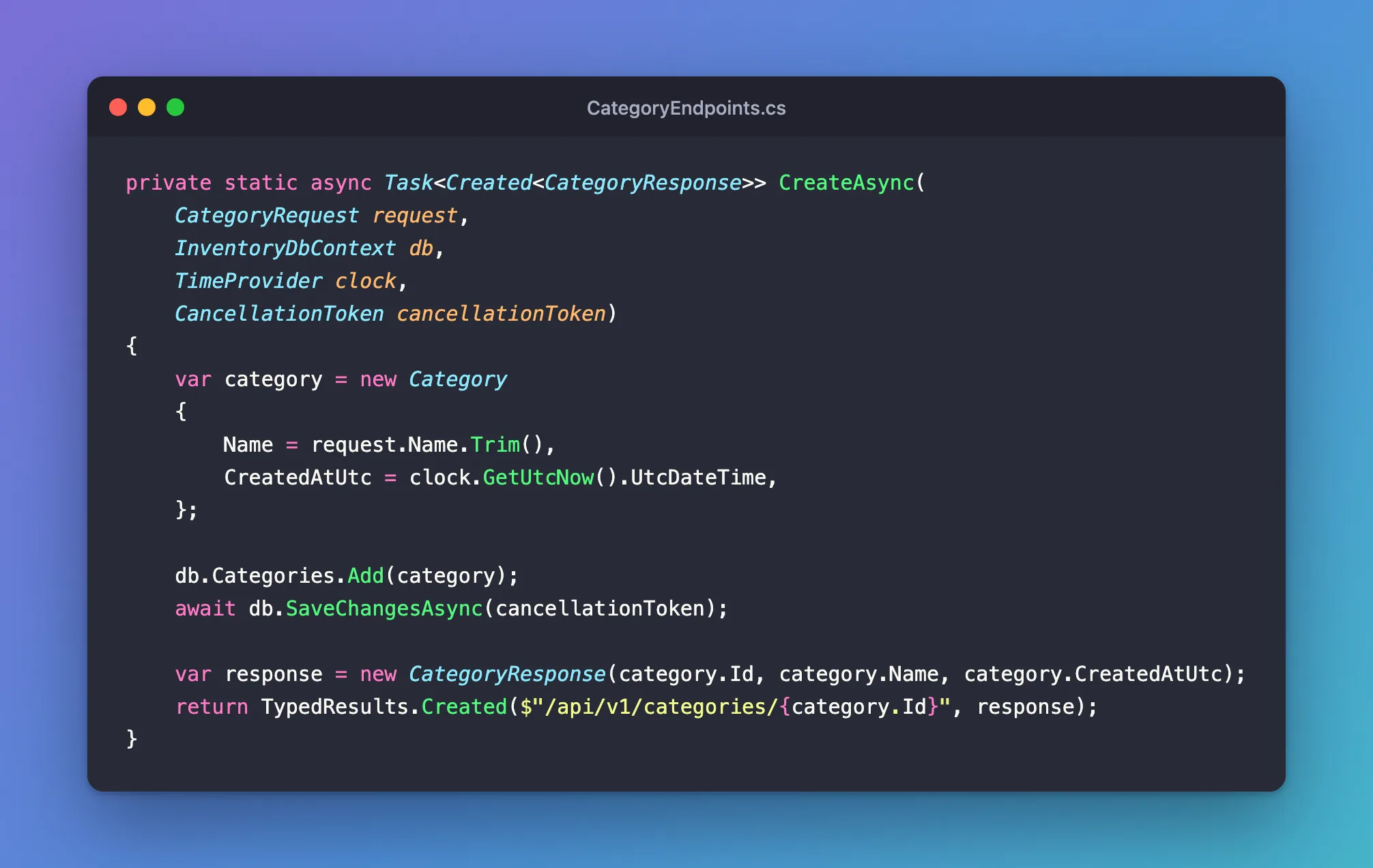
Create src/Dewiride.Inventory.Api/Features/Categories/CategoryEndpoints.cs. It starts with the method Program.cs calls, which connects addresses to methods:
public static IEndpointRouteBuilder MapCategoryEndpoints(this IEndpointRouteBuilder routes)
{
    var group = routes.MapGroup("/categories").WithTags("Categories");

    group.MapPost("/", CreateAsync).WithSummary("Create a category");

    return routes;
}
Under the /api/v1 group from Program.cs, this makes the address POST /api/v1/categories. Below it, add the method that does the work:
private static async Task<Created<CategoryResponse>> CreateAsync(
    CategoryRequest request,
    InventoryDbContext db,
    TimeProvider clock,
    CancellationToken cancellationToken)
{
    var category = new Category
    {
        Name = request.Name.Trim(),
        CreatedAtUtc = clock.GetUtcNow().UtcDateTime,
    };

    db.Categories.Add(category);
    await db.SaveChangesAsync(cancellationToken);

    var response = new CategoryResponse(category.Id, category.Name, category.CreatedAtUtc);
    return TypedResults.Created($"/api/v1/categories/{category.Id}", response);
}
Line by line:
- The parameters. ASP.NET Core fills each one in.
requestcomes from the JSON body,dbandclockare services, andcancellationTokenis tied to the request. Passing it on to EF Core means the work can stop when the client disconnects, though a MySQL statement that's already running keeps going. db.Categories.Add(category)only tells the change tracker about the new object. EF Core's Basic SaveChanges page says: "The data will be inserted into the database when you callDbContext.SaveChanges()."SaveChangesAsyncsends theINSERT. When it returns,category.Idholds the number MySQL chose.TypedResults.Createdanswers201 Created, with aLocationheader that says where the new row can be read.
The Created<CategoryResponse> return type tells ASP.NET Core exactly what this endpoint answers, which also documents it in the OpenAPI file.
The complete file so far:
using Dewiride.Inventory.Data;
using Dewiride.Inventory.Data.Entities;
using Microsoft.AspNetCore.Http.HttpResults;
using Microsoft.EntityFrameworkCore;

namespace Dewiride.Inventory.Api.Features.Categories;

/// <summary>
/// The HTTP endpoints that read and write the categories table.
/// </summary>
public static class CategoryEndpoints
{
    public static IEndpointRouteBuilder MapCategoryEndpoints(this IEndpointRouteBuilder routes)
    {
        var group = routes.MapGroup("/categories").WithTags("Categories");

        group.MapPost("/", CreateAsync).WithSummary("Create a category");

        return routes;
    }

    private static async Task<Created<CategoryResponse>> CreateAsync(
        CategoryRequest request,
        InventoryDbContext db,
        TimeProvider clock,
        CancellationToken cancellationToken)
    {
        var category = new Category
        {
            Name = request.Name.Trim(),
            CreatedAtUtc = clock.GetUtcNow().UtcDateTime,
        };

        db.Categories.Add(category);
        await db.SaveChangesAsync(cancellationToken);

        var response = new CategoryResponse(category.Id, category.Name, category.CreatedAtUtc);
        return TypedResults.Created($"/api/v1/categories/{category.Id}", response);
    }
}
Run it and send the first request
Start the API:
dotnet run --project src/Dewiride.Inventory.Api
Using launch settings from src/Dewiride.Inventory.Api/Properties/launchSettings.json...
Building...
info: Microsoft.Hosting.Lifetime[14]
      Now listening on: http://localhost:5190
info: Microsoft.Hosting.Lifetime[0]
      Application started. Press Ctrl+C to shut down.
info: Microsoft.Hosting.Lifetime[0]
      Hosting environment: Development
info: Microsoft.Hosting.Lifetime[0]
      Content root path: /Users/you/projects/dewiride-inventory-api/src/Dewiride.Inventory.Api
Keep this terminal visible: it's where the SQL appears. Each time you change code in the steps below, stop the API with Ctrl+C and run this command again.
Open src/Dewiride.Inventory.Api/Dewiride.Inventory.Api.http and add this request above the last ### line:
### Create a category
POST {{Dewiride.Inventory.Api_HostAddress}}/api/v1/categories
Content-Type: application/json

{
  "name": "Cables"
}
- VS Code
- Visual Studio
Click Send Request, which the REST Client extension shows above the POST line. The response opens in a panel beside the file.
Select the Send Request link directly above the POST line. The response opens in a pane to the right of the editor.
The response, here and on the rest of this page without the Date, Server and Transfer-Encoding headers:
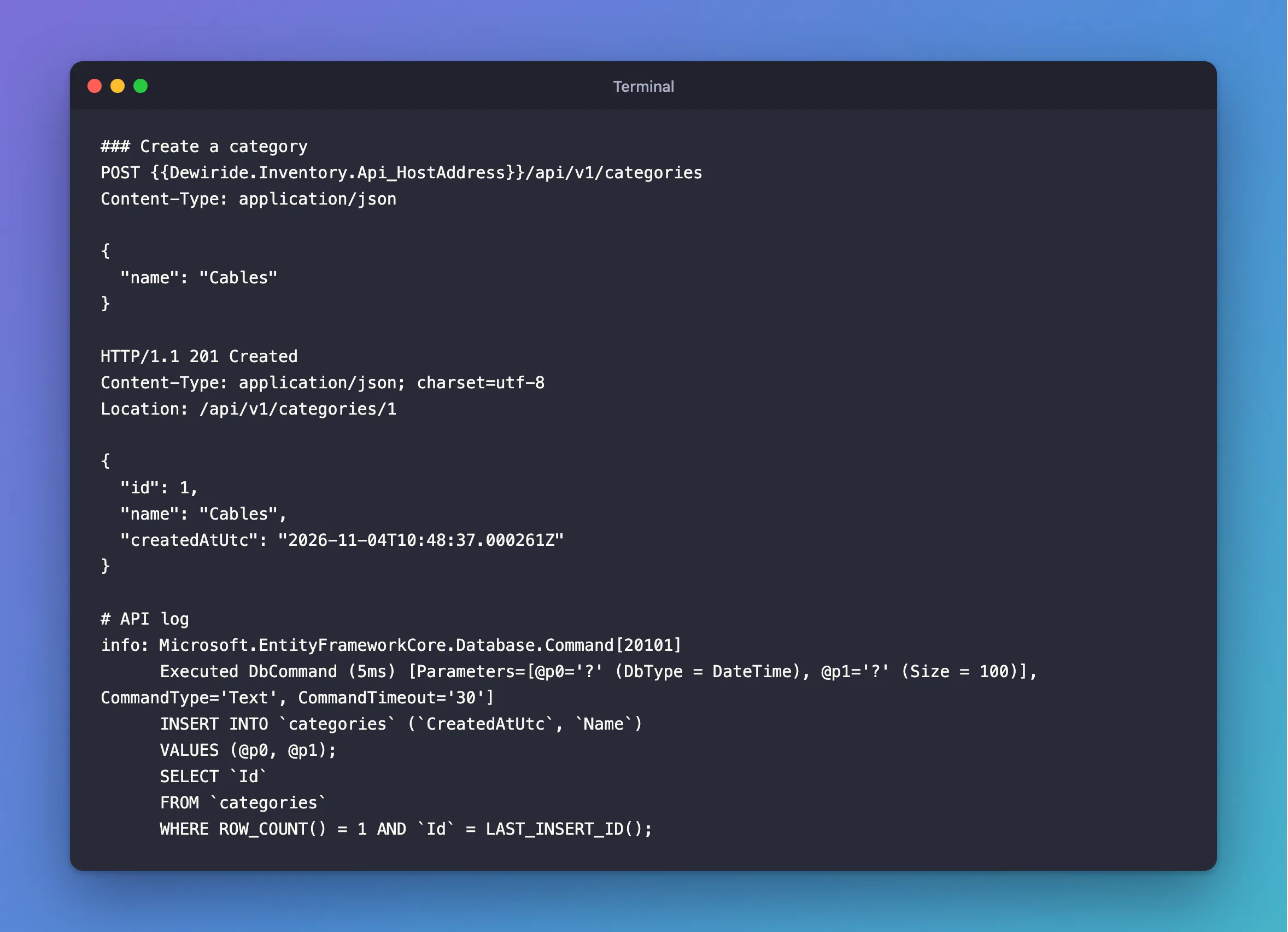
HTTP/1.1 201 Created
Content-Type: application/json; charset=utf-8
Location: /api/v1/categories/1

{
  "id": 1,
  "name": "Cables",
  "createdAtUtc": "2026-11-04T10:48:37.000261Z"
}
The row exists, with ID 1. Now look at the API's terminal:
info: Microsoft.EntityFrameworkCore.Database.Command[20101]
      Executed DbCommand (5ms) [Parameters=[@p0='?' (DbType = DateTime), @p1='?' (Size = 100)], CommandType='Text', CommandTimeout='30']
      INSERT INTO `categories` (`CreatedAtUtc`, `Name`)
      VALUES (@p0, @p1);
      SELECT `Id`
      FROM `categories`
      WHERE ROW_COUNT() = 1 AND `Id` = LAST_INSERT_ID();
This is the SQL that EF Core sent, one command with two statements:
INSERT INTO categoriesadds the row. It listsCreatedAtUtcandName, but notId, because MySQL chooses that withAUTO_INCREMENT.SELECT Id … WHERE ROW_COUNT() = 1 AND Id = LAST_INSERT_ID()reads the new ID back. The MySQL manual's information functions page saysLAST_INSERT_ID()returns "the first automatically generated value successfully inserted for anAUTO_INCREMENTcolumn as a result of the most recently executedINSERTstatement", andROW_COUNT()returns the number of rows the last statement affected.
@p0='?' and @p1='?' are parameters. Your values travel separately from the SQL text, so nothing a client types can become part of the SQL. The log shows ? instead of the values because EF Core hides data from logs by default; How to See the SQL That EF Core Sends covers how to show them while debugging.
Check the row from inside MySQL, as in Part 2:
docker compose exec mysql mysql --user=inventory_app --password inventory
SELECT * FROM categories;
+----+--------+----------------------------+
| Id | Name   | CreatedAtUtc               |
+----+--------+----------------------------+
|  1 | Cables | 2026-11-04 10:48:37.000261 |
+----+--------+----------------------------+
1 row in set (0.000 sec)
Leave the client with exit. Change Cables to Chargers in the request and send it again, so there are two rows to read: the answer is ID 2.
Step 5: Read Rows
Add two more addresses to MapCategoryEndpoints:
group.MapGet("/", ListAsync).WithSummary("List every category, by name");
group.MapGet("/{id:int}", GetAsync).WithSummary("Get one category");
{id:int} is a route constraint: this address only matches when that part is a whole number, so /categories/abc gets a 404 without running your code.
Read many rows
private static async Task<Ok<List<CategoryResponse>>> ListAsync(
    InventoryDbContext db,
    CancellationToken cancellationToken)
{
    var categories = await db.Categories
        .OrderBy(c => c.Name)
        .Select(c => new CategoryResponse(c.Id, c.Name, c.CreatedAtUtc))
        .ToListAsync(cancellationToken);

    return TypedResults.Ok(categories);
}
Read it from top to bottom, the way EF Core builds the SQL:
db.Categoriesis the table.OrderBybecomesORDER BY. MySQL doesn't promise any order without it. EF Core's pagination page warns that "relational databases do not apply any ordering by default, even on the primary key."Selectchooses what comes back. It's called a projection. EF Core sees which properties the record uses, and asks MySQL for only those columns.ToListAsyncis the line that sends the query.
Add the request:
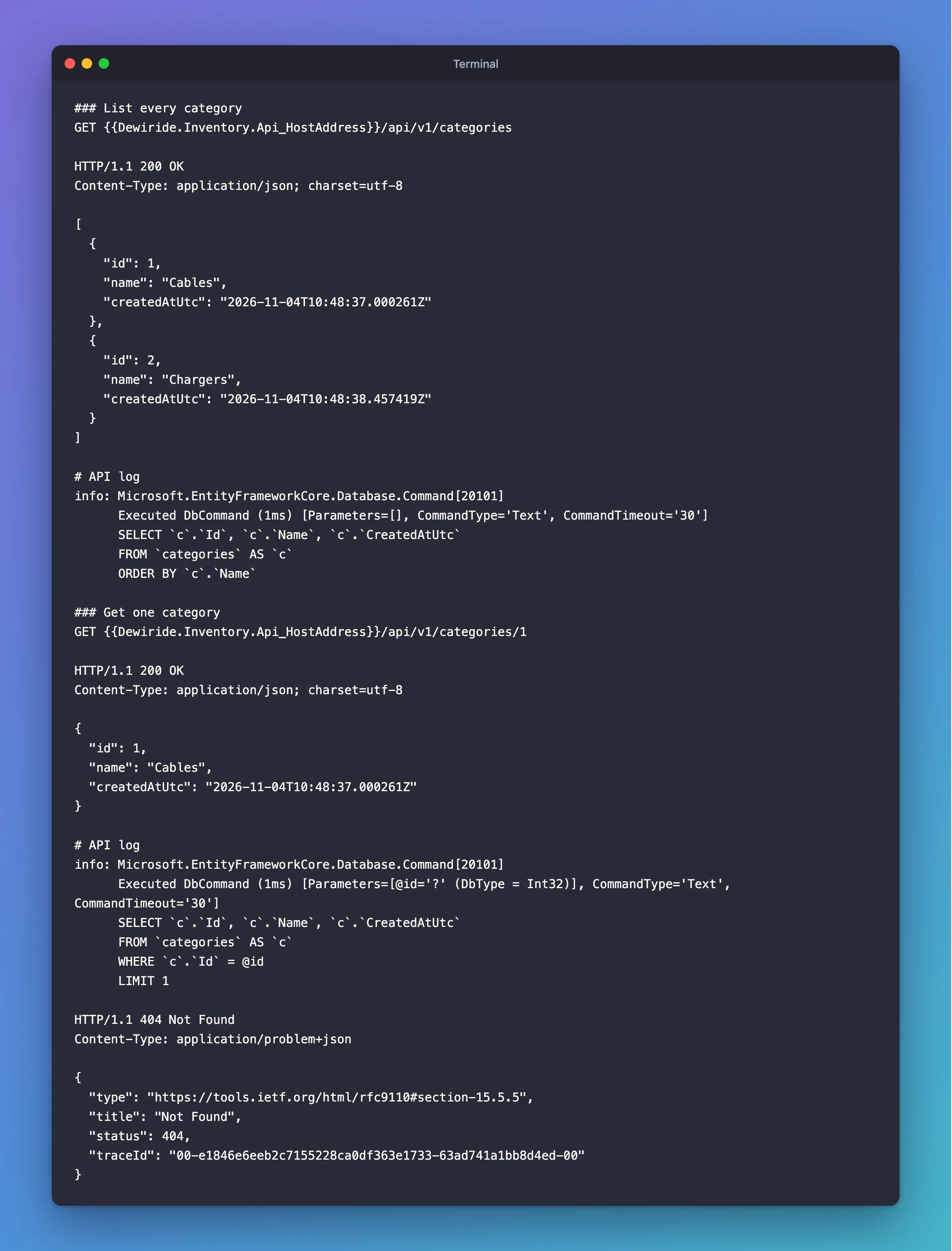
### List every category
GET {{Dewiride.Inventory.Api_HostAddress}}/api/v1/categories
HTTP/1.1 200 OK
Content-Type: application/json; charset=utf-8

[
  {
    "id": 1,
    "name": "Cables",
    "createdAtUtc": "2026-11-04T10:48:37.000261Z"
  },
  {
    "id": 2,
    "name": "Chargers",
    "createdAtUtc": "2026-11-04T10:48:38.457419Z"
  }
]
info: Microsoft.EntityFrameworkCore.Database.Command[20101]
      Executed DbCommand (1ms) [Parameters=[], CommandType='Text', CommandTimeout='30']
      SELECT `c`.`Id`, `c`.`Name`, `c`.`CreatedAtUtc`
      FROM `categories` AS `c`
      ORDER BY `c`.`Name`
The three column names come from the three properties in Select, and ORDER BY from OrderBy.
Read one row
private static async Task<Results<Ok<CategoryResponse>, NotFound>> GetAsync(
    int id,
    InventoryDbContext db,
    CancellationToken cancellationToken)
{
    var category = await db.Categories
        .Where(c => c.Id == id)
        .Select(c => new CategoryResponse(c.Id, c.Name, c.CreatedAtUtc))
        .FirstOrDefaultAsync(cancellationToken);

    return category is null
        ? TypedResults.NotFound()
        : TypedResults.Ok(category);
}
FirstOrDefaultAsync returns the first row, or null when there's none. Results<Ok<CategoryResponse>, NotFound> says this endpoint gives one of those two answers. The id parameter fills itself in from the address, because the names match.
### Get one category
GET {{Dewiride.Inventory.Api_HostAddress}}/api/v1/categories/1
HTTP/1.1 200 OK
Content-Type: application/json; charset=utf-8

{
  "id": 1,
  "name": "Cables",
  "createdAtUtc": "2026-11-04T10:48:37.000261Z"
}
info: Microsoft.EntityFrameworkCore.Database.Command[20101]
      Executed DbCommand (1ms) [Parameters=[@id='?' (DbType = Int32)], CommandType='Text', CommandTimeout='30']
      SELECT `c`.`Id`, `c`.`Name`, `c`.`CreatedAtUtc`
      FROM `categories` AS `c`
      WHERE `c`.`Id` = @id
      LIMIT 1
Where became WHERE, and FirstOrDefaultAsync added LIMIT 1, because one row is all it needs. C#'s id travels as the parameter @id. Change the 1 to 99 in the request, and you get:
HTTP/1.1 404 Not Found
Content-Type: application/problem+json

{
  "type": "https://tools.ietf.org/html/rfc9110#section-15.5.5",
  "title": "Not Found",
  "status": 404,
  "traceId": "00-e1846e6eeb2c7155228ca0df363e1733-63ad741a1bb8d4ed-00"
}
You returned a plain TypedResults.NotFound(), with no body. UseStatusCodePages from Step 2 gave it this body, so a client reads every error the same way.
What validation does
Send the create request with an empty name:
POST {{Dewiride.Inventory.Api_HostAddress}}/api/v1/categories
Content-Type: application/json

{
  "name": ""
}
HTTP/1.1 400 Bad Request
Content-Type: application/problem+json

{
  "type": "https://tools.ietf.org/html/rfc9110#section-15.5.1",
  "title": "One or more validation errors occurred.",
  "status": 400,
  "errors": {
    "Name": [
      "The Name field is required."
    ]
  },
  "traceId": "00-3a3b5e2d5ee9c88e729df453bd8b324b-771939a406ecf6bf-00"
}
The API's terminal shows nothing this time: AddValidation answered before your method ran, so MySQL never heard about it.
The complete file at this point has CreateAsync, ListAsync and GetAsync inside the class. Step 8 shows the finished one.
Step 6: Turn MySQL's Refusals into Clear Answers
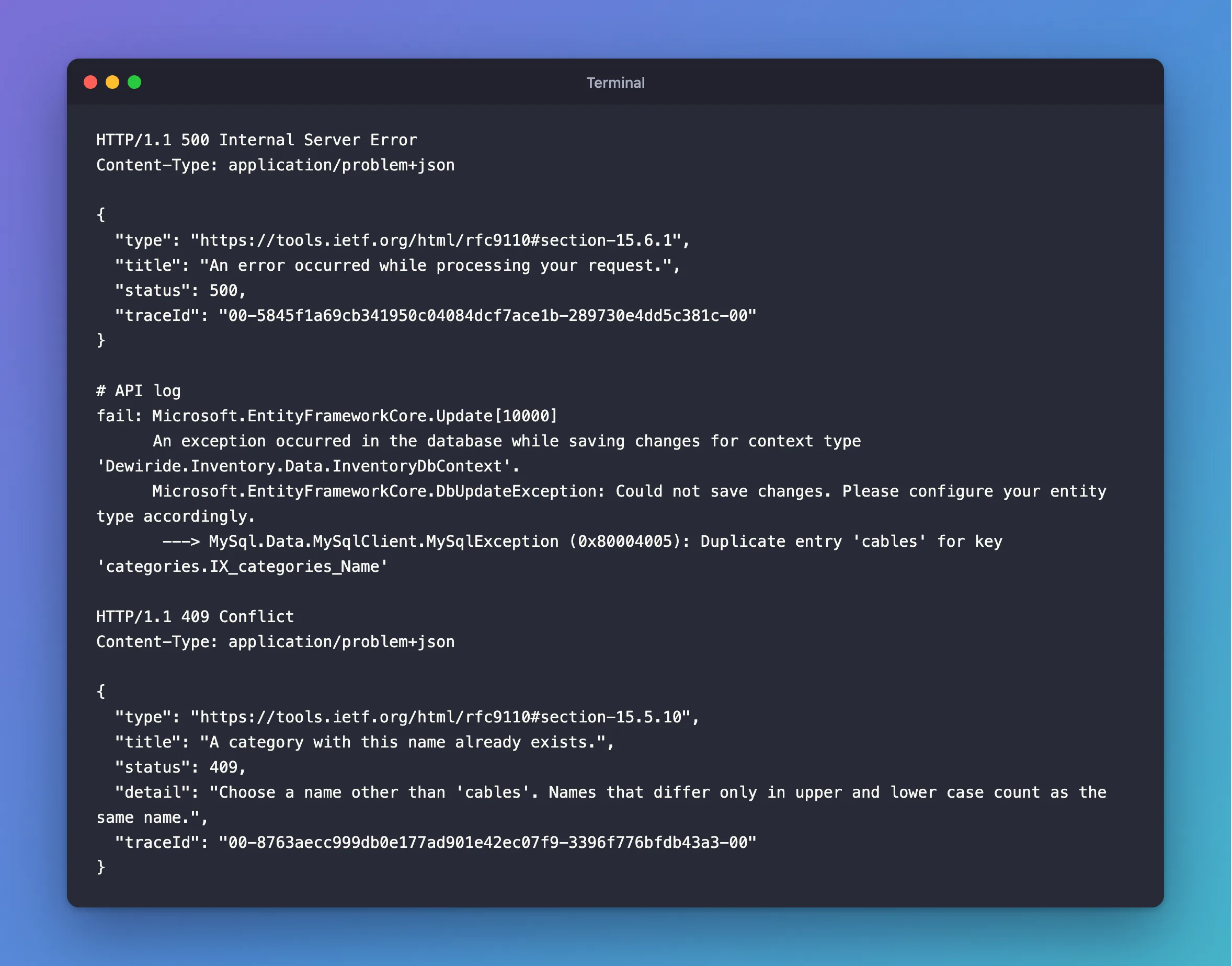
Part 2 gave categories.Name a unique index, so MySQL itself refuses a second category with the same name. See what a client gets when that happens. Send the create request with the name cables, in lowercase:
HTTP/1.1 500 Internal Server Error
Content-Type: application/problem+json

{
  "type": "https://tools.ietf.org/html/rfc9110#section-15.6.1",
  "title": "An error occurred while processing your request.",
  "status": 500,
  "traceId": "00-5845f1a69cb341950c04084dcf7ace1b-289730e4dd5c381c-00"
}
A 500 says the server broke, but nothing broke: the client asked for something that isn't allowed. The API's terminal has the details:
fail: Microsoft.EntityFrameworkCore.Update[10000]
      An exception occurred in the database while saving changes for context type 'Dewiride.Inventory.Data.InventoryDbContext'.
      Microsoft.EntityFrameworkCore.DbUpdateException: Could not save changes. Please configure your entity type accordingly.
       ---> MySql.Data.MySqlClient.MySqlException (0x80004005): Duplicate entry 'cables' for key 'categories.IX_categories_Name'
Two things to notice:
cablescounts as a duplicate ofCables. The column's collation,utf8mb4_0900_ai_ci, ignores upper and lower case.- The real reason is the inner exception.
DbUpdateExceptionsays saving failed. Its innerMySqlExceptionsays why, and carries MySQL's error number. Oracle's provider gives the outer one the same generic message for every failure, as Fixed: "Could not save changes. Please configure your entity type accordingly." shows, so ignore its advice about configuring your entity.
So catch this one error, and answer it properly. The API project shouldn't need to know about MySQL's exception types, so the check goes in the Data project, in a new file:
using Microsoft.EntityFrameworkCore;
using MySql.Data.MySqlClient;

namespace Dewiride.Inventory.Data;

/// <summary>
/// Says which MySQL error made SaveChanges fail. EF Core wraps the error from MySQL in a
/// DbUpdateException, so the MySqlException with the error number is its inner exception.
/// </summary>
public static class DbUpdateExceptionExtensions
{
    /// <summary>MySQL error 1062: a unique index already holds this value.</summary>
    public static bool IsDuplicateKey(this DbUpdateException exception) =>
        HasMySqlError(exception, MySqlErrorCode.DuplicateKeyEntry);

    /// <summary>MySQL error 1451: other rows still point at the row being deleted or changed.</summary>
    public static bool IsRowStillReferenced(this DbUpdateException exception) =>
        HasMySqlError(exception, MySqlErrorCode.RowIsReferenced2);

    /// <summary>MySQL error 1452: a foreign key points at a row that doesn't exist.</summary>
    public static bool IsMissingReferencedRow(this DbUpdateException exception) =>
        HasMySqlError(exception, MySqlErrorCode.NoReferencedRow2);

    private static bool HasMySqlError(DbUpdateException exception, MySqlErrorCode errorCode) =>
        exception.InnerException is MySqlException mySqlException
        && mySqlException.Number == (int)errorCode;
}
MySqlErrorCode is an enum in Oracle's connector that names MySQL's error numbers. Compare the number, never the message: the message contains values that change from row to row.
In CreateAsync, wrap the save:
db.Categories.Add(category);

try
{
    await db.SaveChangesAsync(cancellationToken);
}
catch (DbUpdateException exception) when (exception.IsDuplicateKey())
{
    return DuplicateName(category.Name);
}
catch … when only catches when the condition is true. Any other failure keeps going up to UseExceptionHandler, as it should. The method can now give two answers, so change its return type:
private static async Task<Results<Created<CategoryResponse>, ProblemHttpResult>> CreateAsync(
And add the answer at the end of the class:
private static ProblemHttpResult DuplicateName(string name) =>
    TypedResults.Problem(
        title: "A category with this name already exists.",
        detail: $"Choose a name other than '{name}'. Names that differ only in upper and lower case count as the same name.",
        statusCode: StatusCodes.Status409Conflict);
Restart the API and send cables again:
HTTP/1.1 409 Conflict
Content-Type: application/problem+json

{
  "type": "https://tools.ietf.org/html/rfc9110#section-15.5.10",
  "title": "A category with this name already exists.",
  "status": 409,
  "detail": "Choose a name other than 'cables'. Names that differ only in upper and lower case count as the same name.",
  "traceId": "00-8763aecc999db0e177ad901e42ec07f9-3396f776bfdb43a3-00"
}
409 Conflict means the request is fine but clashes with what's already stored, and the client can act on the message. MySQL's table and index names stay in your logs, where they belong. The log still shows EF Core's fail: lines for this request, because EF Core logs every failed save before your catch runs.
Why not check for the name with a query first? Because two requests can run that check at the same moment, both find nothing, and both insert. Only the unique index can't be fooled, so the index plus this catch is the part that has to exist.
Now create a third category, Adapters:
HTTP/1.1 201 Created
Content-Type: application/json; charset=utf-8
Location: /api/v1/categories/5

{
  "id": 5,
  "name": "Adapters",
  "createdAtUtc": "2026-11-04T10:48:45.591706Z"
}
Its ID is 5, not 3. Each refused insert still used up a number. That's normal, and gaps in IDs mean nothing: Why MySQL AUTO_INCREMENT IDs Have Gaps explains it.
Step 7: Change a Row
Add the address:
group.MapPut("/{id:int}", UpdateAsync).WithSummary("Rename a category");
And the method:
private static async Task<Results<Ok<CategoryResponse>, NotFound, ProblemHttpResult>> UpdateAsync(
    int id,
    CategoryRequest request,
    InventoryDbContext db,
    CancellationToken cancellationToken)
{
    var category = await db.Categories
        .FirstOrDefaultAsync(c => c.Id == id, cancellationToken);

    if (category is null)
    {
        return TypedResults.NotFound();
    }

    category.Name = request.Name.Trim();

    try
    {
        await db.SaveChangesAsync(cancellationToken);
    }
    catch (DbUpdateException exception) when (exception.IsDuplicateKey())
    {
        return DuplicateName(category.Name);
    }

    return TypedResults.Ok(new CategoryResponse(category.Id, category.Name, category.CreatedAtUtc));
}
This query has no Select, so it returns the Category entity itself, and the change tracker remembers it along with the values it had. You change a property like any other C# object, and there's no Update method to call. EF Core's Basic SaveChanges page says: "EF automatically detects changes made to an existing entity that is tracked by the context."
### Rename a category
PUT {{Dewiride.Inventory.Api_HostAddress}}/api/v1/categories/2
Content-Type: application/json

{
  "name": "Wall chargers"
}
HTTP/1.1 200 OK
Content-Type: application/json; charset=utf-8

{
  "id": 2,
  "name": "Wall chargers",
  "createdAtUtc": "2026-11-04T10:48:38.457419Z"
}
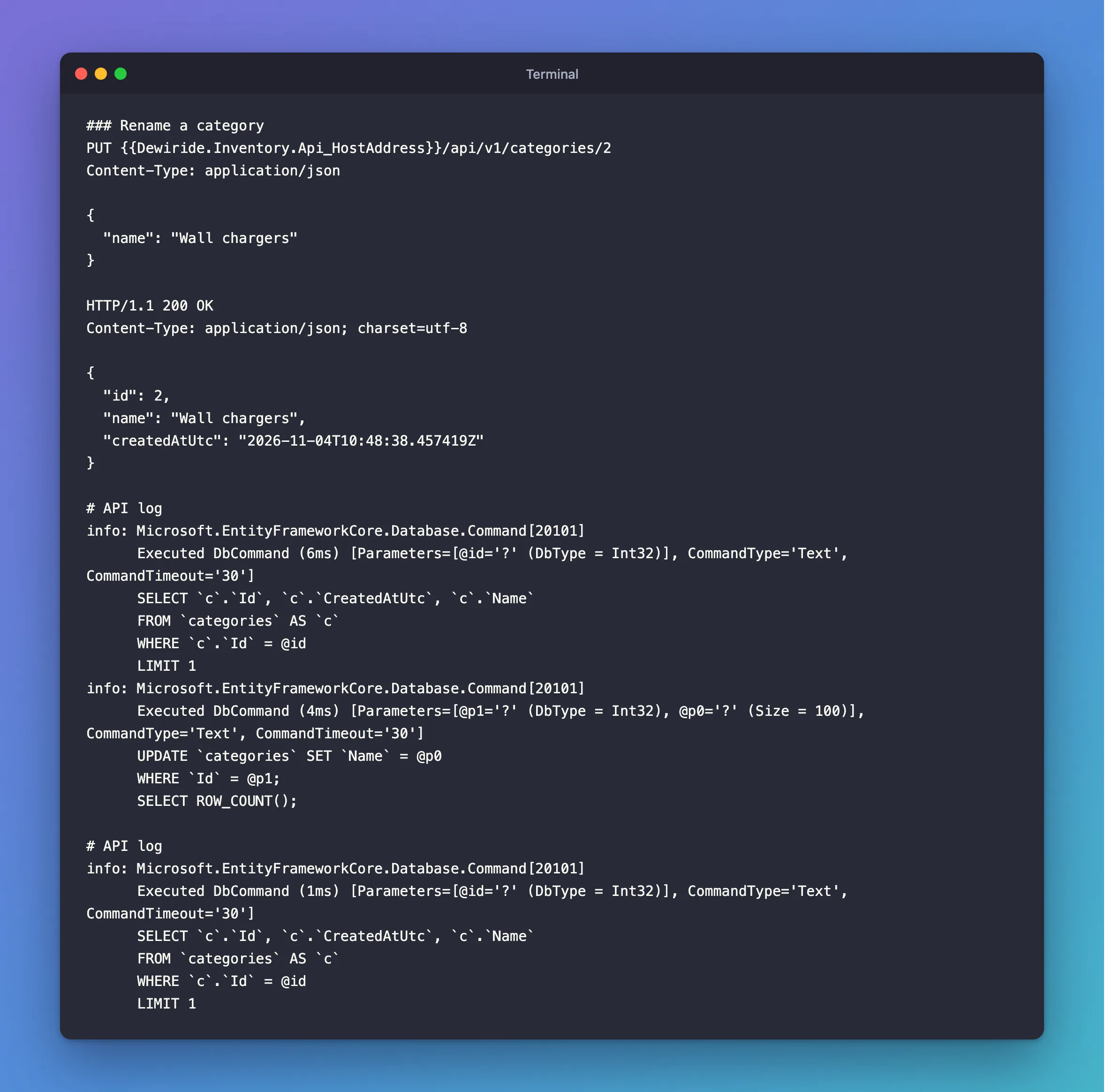
info: Microsoft.EntityFrameworkCore.Database.Command[20101]
      Executed DbCommand (6ms) [Parameters=[@id='?' (DbType = Int32)], CommandType='Text', CommandTimeout='30']
      SELECT `c`.`Id`, `c`.`CreatedAtUtc`, `c`.`Name`
      FROM `categories` AS `c`
      WHERE `c`.`Id` = @id
      LIMIT 1
info: Microsoft.EntityFrameworkCore.Database.Command[20101]
      Executed DbCommand (4ms) [Parameters=[@p1='?' (DbType = Int32), @p0='?' (Size = 100)], CommandType='Text', CommandTimeout='30']
      UPDATE `categories` SET `Name` = @p0
      WHERE `Id` = @p1;
      SELECT ROW_COUNT();
The SELECT loaded every column of the row. The UPDATE wrote only Name, the one column that changed, not CreatedAtUtc. SELECT ROW_COUNT() is EF Core checking that the update really changed one row.
Send the same request again, and the log shows only the SELECT:
info: Microsoft.EntityFrameworkCore.Database.Command[20101]
      Executed DbCommand (1ms) [Parameters=[@id='?' (DbType = Int32)], CommandType='Text', CommandTimeout='30']
      SELECT `c`.`Id`, `c`.`CreatedAtUtc`, `c`.`Name`
      FROM `categories` AS `c`
      WHERE `c`.`Id` = @id
      LIMIT 1
The name didn't change, so there was nothing to save, and SaveChangesAsync sent nothing to MySQL. Renaming Wall chargers to Cables answers the same 409 as before, because the unique index protects updates too, and an ID that doesn't exist answers 404.
Step 8: Delete a Row
group.MapDelete("/{id:int}", DeleteAsync).WithSummary("Delete a category that has no products");
private static async Task<Results<NoContent, NotFound, ProblemHttpResult>> DeleteAsync(
    int id,
    InventoryDbContext db,
    CancellationToken cancellationToken)
{
    var category = await db.Categories
        .FirstOrDefaultAsync(c => c.Id == id, cancellationToken);

    if (category is null)
    {
        return TypedResults.NotFound();
    }

    db.Categories.Remove(category);

    try
    {
        await db.SaveChangesAsync(cancellationToken);
    }
    catch (DbUpdateException exception) when (exception.IsRowStillReferenced())
    {
        return TypedResults.Problem(
            title: "The category still has products.",
            detail: $"Move the products in '{category.Name}' to another category before deleting it.",
            statusCode: StatusCodes.Status409Conflict);
    }

    return TypedResults.NoContent();
}
Remove marks the entity for deletion, and SaveChangesAsync sends the DELETE. 204 No Content means it worked and there's nothing more to say. IsRowStillReferenced covers the ON DELETE RESTRICT rule from Part 2; you'll see it answer in the next step, once a category has products.
The finished file:
using Dewiride.Inventory.Data;
using Dewiride.Inventory.Data.Entities;
using Microsoft.AspNetCore.Http.HttpResults;
using Microsoft.EntityFrameworkCore;

namespace Dewiride.Inventory.Api.Features.Categories;

/// <summary>
/// The HTTP endpoints that read and write the categories table.
/// </summary>
public static class CategoryEndpoints
{
    public static IEndpointRouteBuilder MapCategoryEndpoints(this IEndpointRouteBuilder routes)
    {
        var group = routes.MapGroup("/categories").WithTags("Categories");

        group.MapPost("/", CreateAsync).WithSummary("Create a category");
        group.MapGet("/", ListAsync).WithSummary("List every category, by name");
        group.MapGet("/{id:int}", GetAsync).WithSummary("Get one category");
        group.MapPut("/{id:int}", UpdateAsync).WithSummary("Rename a category");
        group.MapDelete("/{id:int}", DeleteAsync).WithSummary("Delete a category that has no products");

        return routes;
    }

    private static async Task<Results<Created<CategoryResponse>, ProblemHttpResult>> CreateAsync(
        CategoryRequest request,
        InventoryDbContext db,
        TimeProvider clock,
        CancellationToken cancellationToken)
    {
        var category = new Category
        {
            Name = request.Name.Trim(),
            CreatedAtUtc = clock.GetUtcNow().UtcDateTime,
        };

        db.Categories.Add(category);

        try
        {
            await db.SaveChangesAsync(cancellationToken);
        }
        catch (DbUpdateException exception) when (exception.IsDuplicateKey())
        {
            return DuplicateName(category.Name);
        }

        var response = new CategoryResponse(category.Id, category.Name, category.CreatedAtUtc);
        return TypedResults.Created($"/api/v1/categories/{category.Id}", response);
    }

    private static async Task<Ok<List<CategoryResponse>>> ListAsync(
        InventoryDbContext db,
        CancellationToken cancellationToken)
    {
        var categories = await db.Categories
            .OrderBy(c => c.Name)
            .Select(c => new CategoryResponse(c.Id, c.Name, c.CreatedAtUtc))
            .ToListAsync(cancellationToken);

        return TypedResults.Ok(categories);
    }

    private static async Task<Results<Ok<CategoryResponse>, NotFound>> GetAsync(
        int id,
        InventoryDbContext db,
        CancellationToken cancellationToken)
    {
        var category = await db.Categories
            .Where(c => c.Id == id)
            .Select(c => new CategoryResponse(c.Id, c.Name, c.CreatedAtUtc))
            .FirstOrDefaultAsync(cancellationToken);

        return category is null
            ? TypedResults.NotFound()
            : TypedResults.Ok(category);
    }

    private static async Task<Results<Ok<CategoryResponse>, NotFound, ProblemHttpResult>> UpdateAsync(
        int id,
        CategoryRequest request,
        InventoryDbContext db,
        CancellationToken cancellationToken)
    {
        var category = await db.Categories
            .FirstOrDefaultAsync(c => c.Id == id, cancellationToken);

        if (category is null)
        {
            return TypedResults.NotFound();
        }

        category.Name = request.Name.Trim();

        try
        {
            await db.SaveChangesAsync(cancellationToken);
        }
        catch (DbUpdateException exception) when (exception.IsDuplicateKey())
        {
            return DuplicateName(category.Name);
        }

        return TypedResults.Ok(new CategoryResponse(category.Id, category.Name, category.CreatedAtUtc));
    }

    private static async Task<Results<NoContent, NotFound, ProblemHttpResult>> DeleteAsync(
        int id,
        InventoryDbContext db,
        CancellationToken cancellationToken)
    {
        var category = await db.Categories
            .FirstOrDefaultAsync(c => c.Id == id, cancellationToken);

        if (category is null)
        {
            return TypedResults.NotFound();
        }

        db.Categories.Remove(category);

        try
        {
            await db.SaveChangesAsync(cancellationToken);
        }
        catch (DbUpdateException exception) when (exception.IsRowStillReferenced())
        {
            return TypedResults.Problem(
                title: "The category still has products.",
                detail: $"Move the products in '{category.Name}' to another category before deleting it.",
                statusCode: StatusCodes.Status409Conflict);
        }

        return TypedResults.NoContent();
    }

    private static ProblemHttpResult DuplicateName(string name) =>
        TypedResults.Problem(
            title: "A category with this name already exists.",
            detail: $"Choose a name other than '{name}'. Names that differ only in upper and lower case count as the same name.",
            statusCode: StatusCodes.Status409Conflict);
}
Create a category named Old stock, which answers with ID 6. Then delete it:
### Delete a category that has no products
DELETE {{Dewiride.Inventory.Api_HostAddress}}/api/v1/categories/6
HTTP/1.1 204 No Content
info: Microsoft.EntityFrameworkCore.Database.Command[20101]
      Executed DbCommand (1ms) [Parameters=[@id='?' (DbType = Int32)], CommandType='Text', CommandTimeout='30']
      SELECT `c`.`Id`, `c`.`CreatedAtUtc`, `c`.`Name`
      FROM `categories` AS `c`
      WHERE `c`.`Id` = @id
      LIMIT 1
info: Microsoft.EntityFrameworkCore.Database.Command[20101]
      Executed DbCommand (2ms) [Parameters=[@p0='?' (DbType = Int32)], CommandType='Text', CommandTimeout='30']
      DELETE FROM `categories`
      WHERE `Id` = @p0;
      SELECT ROW_COUNT();
Load, then delete: two statements. Deleting it a second time finds nothing at the SELECT and answers 404.
Step 9: Insert a Row with a Foreign Key
The same pattern works for products, with three things that are new: a foreign key that can point at nothing, a money amount that needs checking, and a response that needs data from another table.
A rule for money
The UnitPrice column is decimal(12,2). Send it a third decimal place, and MySQL doesn't refuse it. It rounds, without an error: 9.999 becomes 10.00. Fixed: MySQL Rounds 9.999 to 10.00 Without an Error shows that happening. Silently changing a price isn't acceptable, so the API refuses such a value with a small validation attribute of its own. Create a Common folder in the API project:
using System.ComponentModel.DataAnnotations;

namespace Dewiride.Inventory.Api.Common;

/// <summary>
/// An amount of money that fits a decimal(12,2) column exactly: not negative, not too large and
/// with at most two decimal places. MySQL would round a third decimal place without any error.
/// </summary>
[AttributeUsage(AttributeTargets.Parameter | AttributeTargets.Property)]
public sealed class MoneyAttribute : ValidationAttribute
{
    private const decimal Maximum = 9_999_999_999.99m;

    public MoneyAttribute()
        : base("The field {0} must be an amount from 0 to 9999999999.99, with at most 2 decimal places.")
    {
    }

    public override bool IsValid(object? value) =>
        value is null
        || (value is decimal amount
            && amount is >= 0 and <= Maximum
            && decimal.Round(amount, 2) == amount);
}
The request and the response
Create src/Dewiride.Inventory.Api/Features/Products/ProductContracts.cs:
using System.ComponentModel.DataAnnotations;
using System.Linq.Expressions;
using Dewiride.Inventory.Api.Common;
using Dewiride.Inventory.Data.Entities;

namespace Dewiride.Inventory.Api.Features.Products;

/// <summary>What a client sends to create a product.</summary>
public sealed record CreateProductRequest(
    [Required, StringLength(32)] string Sku,
    [Required, StringLength(200)] string Name,
    string? Description,
    [Range(1, int.MaxValue)] int CategoryId,
    [Required, Money] decimal? UnitPrice,
    [Range(0, int.MaxValue)] int ReorderLevel);

/// <summary>What the API returns for a product.</summary>
public sealed record ProductResponse(
    int Id,
    string Sku,
    string Name,
    string? Description,
    int CategoryId,
    string CategoryName,
    decimal UnitPrice,
    int QuantityOnHand,
    int ReorderLevel,
    bool IsArchived,
    DateTime? ArchivedAtUtc,
    DateTime CreatedAtUtc,
    DateTime UpdatedAtUtc)
{
    /// <summary>
    /// How to build a response from a product. EF Core reads this expression and turns it into
    /// SQL, so a query selects only these columns and joins categories for the category's name.
    /// </summary>
    public static readonly Expression<Func<Product, ProductResponse>> FromProduct = p =>
        new ProductResponse(
            p.Id,
            p.Sku,
            p.Name,
            p.Description,
            p.CategoryId,
            p.Category.Name,
            p.UnitPrice,
            p.QuantityOnHand,
            p.ReorderLevel,
            p.IsArchived,
            p.ArchivedAtUtc,
            p.CreatedAtUtc,
            p.UpdatedAtUtc);
}
Three details are worth a closer look:
decimal? UnitPricewith[Required]. With a plaindecimal, a request that leaves the price out quietly gets0, because that's adecimal's default, and[Required]can't tell the difference. Withdecimal?, a missing price isnull, and[Required]refuses it. Fixed: A Missing Number in a JSON Request Becomes 0 has the details.- No
QuantityOnHandin the request. Stock changes only through stock movements, the subject of Part 4. FromProductis anExpression, which is a description of code rather than compiled code. Because EF Core can read it, one definition serves every product query, and each query still asks MySQL for only these columns.p.Category.Namefollows the navigation from Part 2, so EF Core adds the join by itself.
The endpoints
Create src/Dewiride.Inventory.Api/Features/Products/ProductEndpoints.cs:
using Dewiride.Inventory.Data;
using Dewiride.Inventory.Data.Entities;
using Microsoft.AspNetCore.Http.HttpResults;
using Microsoft.EntityFrameworkCore;

namespace Dewiride.Inventory.Api.Features.Products;

/// <summary>
/// The HTTP endpoints that read and write the products table.
/// </summary>
public static class ProductEndpoints
{
    public static IEndpointRouteBuilder MapProductEndpoints(this IEndpointRouteBuilder routes)
    {
        var group = routes.MapGroup("/products").WithTags("Products");

        group.MapPost("/", CreateAsync).WithSummary("Create a product");
        group.MapGet("/{id:int}", GetAsync).WithSummary("Get one product");

        return routes;
    }

    private static async Task<Results<Created<ProductResponse>, ProblemHttpResult>> CreateAsync(
        CreateProductRequest request,
        InventoryDbContext db,
        TimeProvider clock,
        CancellationToken cancellationToken)
    {
        var now = clock.GetUtcNow().UtcDateTime;
        var product = new Product
        {
            Sku = request.Sku.Trim().ToUpperInvariant(),
            Name = request.Name.Trim(),
            Description = request.Description,
            CategoryId = request.CategoryId,
            UnitPrice = request.UnitPrice.GetValueOrDefault(),
            ReorderLevel = request.ReorderLevel,
            CreatedAtUtc = now,
            UpdatedAtUtc = now,
        };

        db.Products.Add(product);

        try
        {
            await db.SaveChangesAsync(cancellationToken);
        }
        catch (DbUpdateException exception) when (exception.IsDuplicateKey())
        {
            return DuplicateSku(product.Sku);
        }
        catch (DbUpdateException exception) when (exception.IsMissingReferencedRow())
        {
            return UnknownCategory(product.CategoryId);
        }

        var response = await db.Products
            .Where(p => p.Id == product.Id)
            .Select(ProductResponse.FromProduct)
            .FirstAsync(cancellationToken);

        return TypedResults.Created($"/api/v1/products/{product.Id}", response);
    }

    private static async Task<Results<Ok<ProductResponse>, NotFound>> GetAsync(
        int id,
        InventoryDbContext db,
        CancellationToken cancellationToken)
    {
        var product = await db.Products
            .Where(p => p.Id == id)
            .Select(ProductResponse.FromProduct)
            .FirstOrDefaultAsync(cancellationToken);

        return product is null
            ? TypedResults.NotFound()
            : TypedResults.Ok(product);
    }

    private static ProblemHttpResult DuplicateSku(string sku) =>
        TypedResults.Problem(
            title: "A product with this SKU already exists.",
            detail: $"Choose a SKU other than '{sku}'.",
            statusCode: StatusCodes.Status409Conflict);

    private static ProblemHttpResult UnknownCategory(int categoryId) =>
        TypedResults.Problem(
            title: "The category doesn't exist.",
            detail: $"There is no category with Id {categoryId}.",
            statusCode: StatusCodes.Status400BadRequest);
}
GetValueOrDefault(). Validation has already made sure the price is there. Writing.Valueinstead would stop the build, with error CS8629.- Two
catchblocks. A duplicate SKU is a conflict with what's stored, so409. An unknown category is a mistake in the request, so400. - The second query. The response needs the category's name, which the
productobject doesn't have, so it reads the row back throughFromProduct.
In Program.cs, add the using and the call:
using Dewiride.Inventory.Api.Features.Products;

// …

api.MapCategoryEndpoints();
api.MapProductEndpoints();
Send it
### Create a product
POST {{Dewiride.Inventory.Api_HostAddress}}/api/v1/products
Content-Type: application/json

{
  "sku": "cbl-usbc-2m",
  "name": "USB-C cable, 2 m",
  "description": "Braided, 100 W",
  "categoryId": 1,
  "unitPrice": 9.99,
  "reorderLevel": 10
}
HTTP/1.1 201 Created
Content-Type: application/json; charset=utf-8
Location: /api/v1/products/1

{
  "id": 1,
  "sku": "CBL-USBC-2M",
  "name": "USB-C cable, 2 m",
  "description": "Braided, 100 W",
  "categoryId": 1,
  "categoryName": "Cables",
  "unitPrice": 9.99,
  "quantityOnHand": 0,
  "reorderLevel": 10,
  "isArchived": false,
  "archivedAtUtc": null,
  "createdAtUtc": "2026-11-04T10:48:57.349865Z",
  "updatedAtUtc": "2026-11-04T10:48:57.349865Z"
}
info: Microsoft.EntityFrameworkCore.Database.Command[20101]
      Executed DbCommand (6ms) [Parameters=[@p0='?' (DbType = DateTime), @p1='?' (DbType = Int32), @p2='?' (DbType = DateTime), @p3='?' (Size = 4000), @p4='?' (DbType = SByte), @p5='?' (Size = 200), @p6='?' (DbType = Int32), @p7='?' (DbType = Int32), @p8='?' (Size = 32), @p9='?' (DbType = Decimal), @p10='?' (DbType = DateTime)], CommandType='Text', CommandTimeout='30']
      INSERT INTO `products` (`ArchivedAtUtc`, `CategoryId`, `CreatedAtUtc`, `Description`, `IsArchived`, `Name`, `QuantityOnHand`, `ReorderLevel`, `Sku`, `UnitPrice`, `UpdatedAtUtc`)
      VALUES (@p0, @p1, @p2, @p3, @p4, @p5, @p6, @p7, @p8, @p9, @p10);
      SELECT `Id`
      FROM `products`
      WHERE ROW_COUNT() = 1 AND `Id` = LAST_INSERT_ID();
info: Microsoft.EntityFrameworkCore.Database.Command[20101]
      Executed DbCommand (2ms) [Parameters=[@product_Id='?' (DbType = Int32)], CommandType='Text', CommandTimeout='30']
      SELECT `p`.`Id`, `p`.`Sku`, `p`.`Name`, `p`.`Description`, `p`.`CategoryId`, `c`.`Name`, `p`.`UnitPrice`, `p`.`QuantityOnHand`, `p`.`ReorderLevel`, `p`.`IsArchived`, `p`.`ArchivedAtUtc`, `p`.`CreatedAtUtc`, `p`.`UpdatedAtUtc`
      FROM `products` AS `p`
      INNER JOIN `categories` AS `c` ON `p`.`CategoryId` = `c`.`Id`
      WHERE `p`.`Id` = @product_Id
      LIMIT 1
INSERT lists every column, including ones you never set, such as QuantityOnHand: they go in with C#'s default values. The INNER JOIN came from p.Category.Name. You never wrote a join.
Each kind of bad request now gets its own answer. Send these by changing the request:
| Change | Status | Answer |
|---|---|---|
| The same SKU again | 409 | A product with this SKU already exists. |
"categoryId": 99 | 400 | The category doesn't exist. |
"unitPrice": -1 | 400 | The field UnitPrice must be an amount from 0 to 9999999999.99, with at most 2 decimal places. |
"unitPrice": 12.999 | 400 | The same message |
No unitPrice | 400 | The UnitPrice field is required. |
The unknown category is the one MySQL catches itself: the foreign key refuses the row with error 1452. The other validation errors never reach MySQL. And the ON DELETE RESTRICT rule from Step 8 can answer now, because Cables has a product:
DELETE {{Dewiride.Inventory.Api_HostAddress}}/api/v1/categories/1
HTTP/1.1 409 Conflict
Content-Type: application/problem+json

{
  "type": "https://tools.ietf.org/html/rfc9110#section-15.5.10",
  "title": "The category still has products.",
  "status": 409,
  "detail": "Move the products in 'Cables' to another category before deleting it.",
  "traceId": "00-11d992c8afc2f491dc328fef2a3630d7-e65a7189fa3a6581-00"
}
The next step needs more rows. Add these to the requests file and send each one. Adapters has ID 5 here; check yours with the list request if you took different steps.
### More products
POST {{Dewiride.Inventory.Api_HostAddress}}/api/v1/products
Content-Type: application/json

{ "sku": "CBL-USBC-1M", "name": "USB-C cable, 1 m", "categoryId": 1, "unitPrice": 7.50, "reorderLevel": 10 }

###
POST {{Dewiride.Inventory.Api_HostAddress}}/api/v1/products
Content-Type: application/json

{ "sku": "CBL-HDMI-2M", "name": "HDMI cable, 2 m", "categoryId": 1, "unitPrice": 12.25, "reorderLevel": 5 }

###
POST {{Dewiride.Inventory.Api_HostAddress}}/api/v1/products
Content-Type: application/json

{ "sku": "CBL-LTNG-1M", "name": "Lightning cable, 1 m", "categoryId": 1, "unitPrice": 14.00, "reorderLevel": 5 }

###
POST {{Dewiride.Inventory.Api_HostAddress}}/api/v1/products
Content-Type: application/json

{ "sku": "CHG-USBC-20W", "name": "USB-C charger, 20 W", "categoryId": 2, "unitPrice": 19.99, "reorderLevel": 8 }

###
POST {{Dewiride.Inventory.Api_HostAddress}}/api/v1/products
Content-Type: application/json

{ "sku": "CHG-USBC-65W", "name": "USB-C charger, 65 W", "categoryId": 2, "unitPrice": 39.50, "reorderLevel": 4 }

###
POST {{Dewiride.Inventory.Api_HostAddress}}/api/v1/products
Content-Type: application/json

{ "sku": "ADP-HDMI-VGA", "name": "HDMI to VGA adapter", "categoryId": 5, "unitPrice": 11.00, "reorderLevel": 3 }

###
POST {{Dewiride.Inventory.Api_HostAddress}}/api/v1/products
Content-Type: application/json

{ "sku": "ADP-USBC-USBA", "name": "USB-C to USB-A adapter", "categoryId": 5, "unitPrice": 5.25, "reorderLevel": 6 }
Step 10: Read a List: Filter, Search, Sort and Page
A product list can grow to thousands of rows, so nobody should get them all at once. This endpoint takes its options from the query string, such as ?search=usb-c&sort=-price&page=2.
Say what comes back
A page of results needs the total too, so a client knows how many pages there are. Create this next to MoneyAttribute:
namespace Dewiride.Inventory.Api.Common;

/// <summary>One page of a longer list, and how long the whole list is.</summary>
public sealed record PagedResponse<T>(
    IReadOnlyList<T> Items,
    int Page,
    int PageSize,
    int TotalCount);
Say what can be asked for
Add this record to ProductContracts.cs, above ProductResponse:
/// <summary>
/// The filters, sort order and page of the product list, read from the query string.
/// The attributes need "property:" because this record is used with [AsParameters]. On the
/// constructor parameters, they make /openapi/v1.json fail in ASP.NET Core 10.
/// </summary>
public sealed record ProductListQuery(
    string? Search,
    int? CategoryId,
    bool IncludeArchived = false,
    [property: AllowedValues("name", "-name", "price", "-price", "newest", null, ErrorMessage = "Sort must be name, -name, price, -price or newest.")]
    string? Sort = null,
    [property: Range(1, 1_000_000)] int Page = 1,
    [property: Range(1, 100)] int PageSize = 20);
[Range(1, 100)]onPageSizeis what stops a client asking for a million rows at once.[AllowedValues]onSortaccepts only the sort orders you offer.[property: …]is there because of an ASP.NET Core 10 bug: on this kind of record, the attributes withoutproperty:still validate, but they make the OpenAPI document fail with a500. Fixed: InvalidCastException in /openapi/v1.json shows how I found it.
Build the query in pieces
Add the address to MapProductEndpoints, and using Dewiride.Inventory.Api.Common; at the top of the file:
group.MapGet("/", ListAsync).WithSummary("List products, with search, filters, sorting and paging");
The method starts with the filters:
private static async Task<Ok<PagedResponse<ProductResponse>>> ListAsync(
    [AsParameters] ProductListQuery query,
    InventoryDbContext db,
    CancellationToken cancellationToken)
{
    IQueryable<Product> products = db.Products;

    if (!query.IncludeArchived)
    {
        products = products.Where(p => !p.IsArchived);
    }

    if (query.CategoryId is int categoryId)
    {
        products = products.Where(p => p.CategoryId == categoryId);
    }

    if (!string.IsNullOrWhiteSpace(query.Search))
    {
        var search = query.Search.Trim();
        products = products.Where(p => p.Name.Contains(search) || p.Sku.Contains(search));
    }
[AsParameters] tells ASP.NET Core to fill the record's properties from the query string. IQueryable<Product> is a query that hasn't run yet, so each if adds a condition to it and nothing goes to MySQL. Several Where calls in a row become one WHERE … AND ….
Next, the total, and the sort order:
    var totalCount = await products.CountAsync(cancellationToken);

    // Every sort ends with the Id, so rows with the same name or price keep a fixed order
    // and can't move between pages.
    var sorted = query.Sort switch
    {
        "-name" => products.OrderByDescending(p => p.Name).ThenBy(p => p.Id),
        "price" => products.OrderBy(p => p.UnitPrice).ThenBy(p => p.Id),
        "-price" => products.OrderByDescending(p => p.UnitPrice).ThenBy(p => p.Id),
        "newest" => products.OrderByDescending(p => p.CreatedAtUtc).ThenBy(p => p.Id),
        _ => products.OrderBy(p => p.Name).ThenBy(p => p.Id),
    };
CountAsync runs the filters alone, as SELECT COUNT(*). ThenBy(p => p.Id) matters more than it looks: EF Core's pagination page says to "always make sure that your ordering is fully unique", because rows that tie can come back in a different order on the next page, so a row could appear twice or never.
Finally, one page:
    var items = await sorted
        .Skip((query.Page - 1) * query.PageSize)
        .Take(query.PageSize)
        .Select(ProductResponse.FromProduct)
        .ToListAsync(cancellationToken);

    return TypedResults.Ok(new PagedResponse<ProductResponse>(items, query.Page, query.PageSize, totalCount));
}
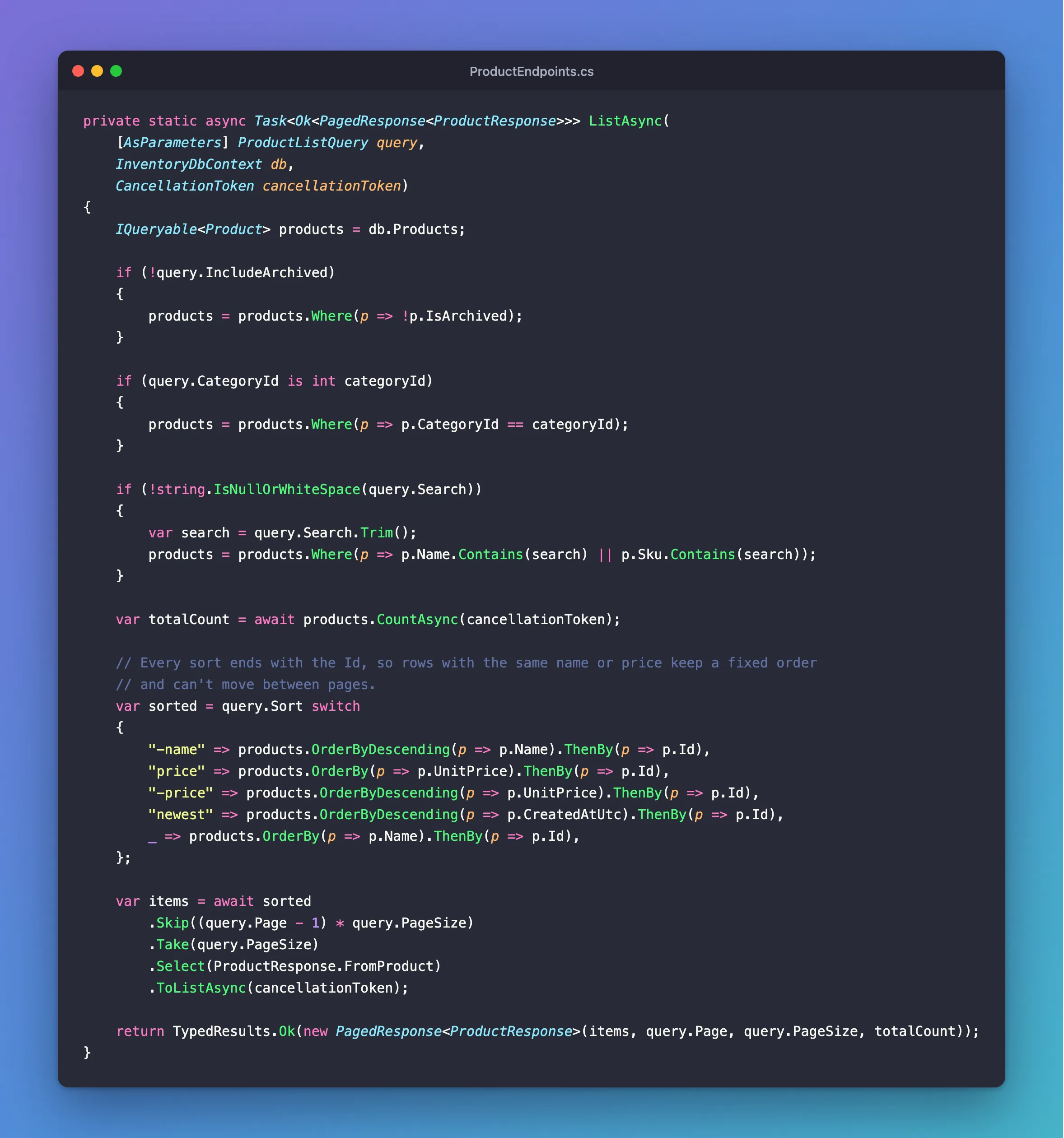
Page 2 of 3 per page skips 3 rows and takes 3. Here's the whole method at a glance:
Send it
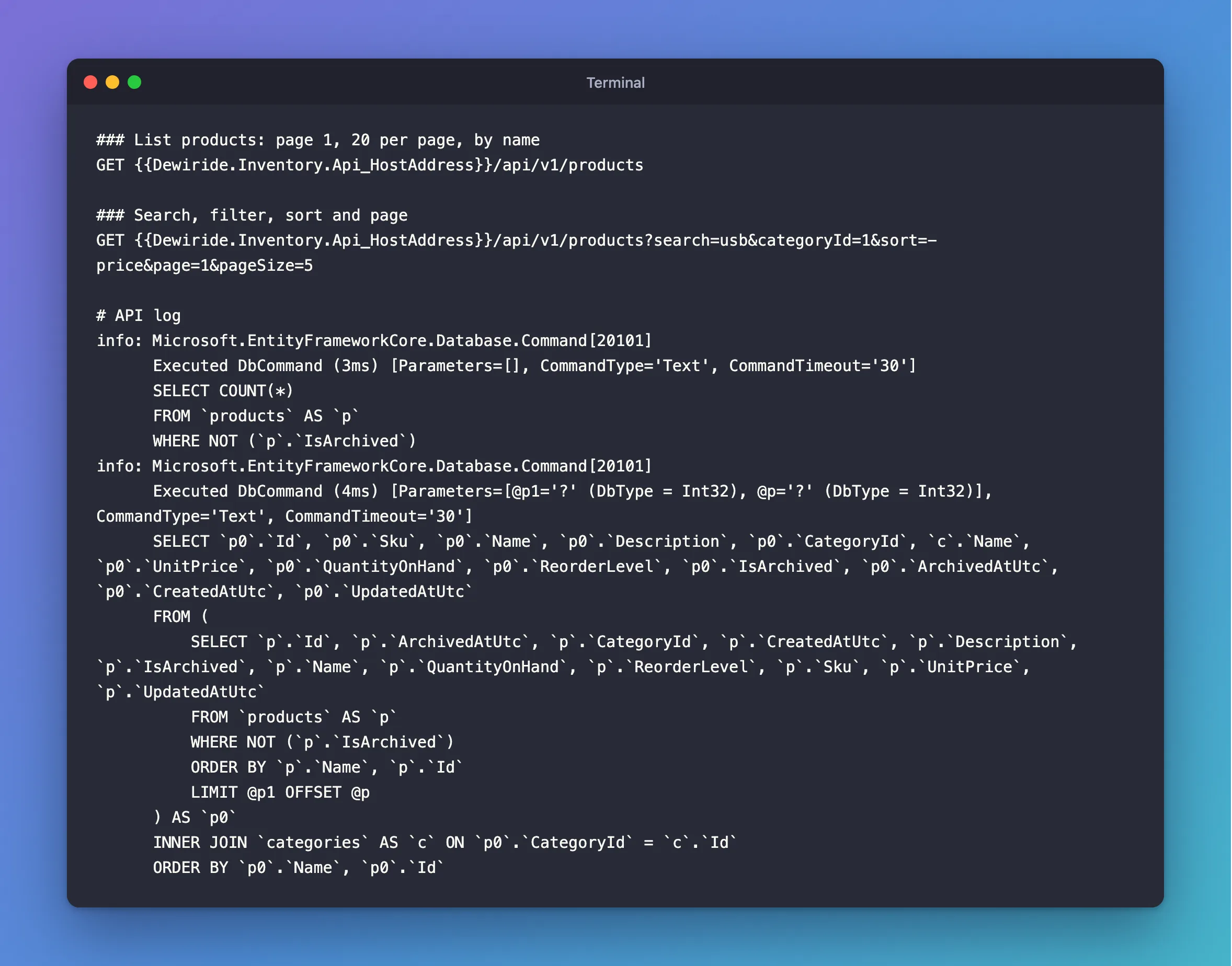
### List products: page 1, 20 per page, by name
GET {{Dewiride.Inventory.Api_HostAddress}}/api/v1/products

### Search, filter, sort and page
GET {{Dewiride.Inventory.Api_HostAddress}}/api/v1/products?search=usb&categoryId=1&sort=-price&page=1&pageSize=5
For a short answer to look at, ask for 3 per page, with ?pageSize=3:
{
  "items": [
    {
      "id": 4,
      "sku": "CBL-HDMI-2M",
      "name": "HDMI cable, 2 m",
      "description": null,
      "categoryId": 1,
      "categoryName": "Cables",
      "unitPrice": 12.25,
      "quantityOnHand": 0,
      "reorderLevel": 5,
      "isArchived": false,
      "archivedAtUtc": null,
      "createdAtUtc": "2026-11-04T10:49:02.351821Z",
      "updatedAtUtc": "2026-11-04T10:49:02.351821Z"
    }
  ],
  "page": 1,
  "pageSize": 3,
  "totalCount": 8
}
info: Microsoft.EntityFrameworkCore.Database.Command[20101]
      Executed DbCommand (3ms) [Parameters=[], CommandType='Text', CommandTimeout='30']
      SELECT COUNT(*)
      FROM `products` AS `p`
      WHERE NOT (`p`.`IsArchived`)
info: Microsoft.EntityFrameworkCore.Database.Command[20101]
      Executed DbCommand (4ms) [Parameters=[@p1='?' (DbType = Int32), @p='?' (DbType = Int32)], CommandType='Text', CommandTimeout='30']
      SELECT `p0`.`Id`, `p0`.`Sku`, `p0`.`Name`, `p0`.`Description`, `p0`.`CategoryId`, `c`.`Name`, `p0`.`UnitPrice`, `p0`.`QuantityOnHand`, `p0`.`ReorderLevel`, `p0`.`IsArchived`, `p0`.`ArchivedAtUtc`, `p0`.`CreatedAtUtc`, `p0`.`UpdatedAtUtc`
      FROM (
          SELECT `p`.`Id`, `p`.`ArchivedAtUtc`, `p`.`CategoryId`, `p`.`CreatedAtUtc`, `p`.`Description`, `p`.`IsArchived`, `p`.`Name`, `p`.`QuantityOnHand`, `p`.`ReorderLevel`, `p`.`Sku`, `p`.`UnitPrice`, `p`.`UpdatedAtUtc`
          FROM `products` AS `p`
          WHERE NOT (`p`.`IsArchived`)
          ORDER BY `p`.`Name`, `p`.`Id`
          LIMIT @p1 OFFSET @p
      ) AS `p0`
      INNER JOIN `categories` AS `c` ON `p0`.`CategoryId` = `c`.`Id`
      ORDER BY `p0`.`Name`, `p0`.`Id`
Two queries, as expected: the count, then the page. The second has a shape you might not have guessed. EF Core puts ORDER BY … LIMIT … OFFSET in an inner query, so MySQL picks the 3 rows first, and only then joins categories for those 3. NOT (IsArchived) came from the first if, and the page size and offset are parameters like everything else.
Search for usb-c, highest price first, with ?search=usb-c&sort=-price. The filter line of the SQL is the interesting part:
WHERE NOT (`p`.`IsArchived`) AND (((@search LIKE '') OR (LOCATE(@search, `p`.`Name`) > 0)) OR ((@search0 LIKE '') OR (LOCATE(@search0, `p`.`Sku`) > 0)))
With Oracle's provider, Contains becomes MySQL's LOCATE, which finds text anywhere inside a column. The @search LIKE '' part keeps an empty search matching everything, as C#'s Contains("") does. usb-c found USB-C because the collation ignores case, but don't assume that for every text method: StartsWith is case-sensitive with this provider.
The rules refuse anything else:
| Query string | Status | Answer |
|---|---|---|
?sort=drop | 400 | Sort must be name, -name, price, -price or newest. |
?pageSize=1000 | 400 | The field PageSize must be between 1 and 100. |
?page=99 | 200 | An empty items list, with "totalCount": 8 |
A page past the end isn't an error: there's just nothing on it.
Step 11: Stop Two People Overwriting Each Other
Writing a product works like writing a category, with one danger that's easy to miss. To see it, start with the plain version.
An update with no protection
Add this record to ProductContracts.cs:
/// <summary>What a client sends to change a product.</summary>
public sealed record UpdateProductRequest(
    [Required, StringLength(32)] string Sku,
    [Required, StringLength(200)] string Name,
    string? Description,
    [Range(1, int.MaxValue)] int CategoryId,
    [Required, Money] decimal? UnitPrice,
    [Range(0, int.MaxValue)] int ReorderLevel);
And this method to ProductEndpoints.cs, with its address, group.MapPut("/{id:int}", UpdateAsync):
private static async Task<Results<Ok<ProductResponse>, NotFound, ProblemHttpResult>> UpdateAsync(
    int id,
    UpdateProductRequest request,
    InventoryDbContext db,
    TimeProvider clock,
    CancellationToken cancellationToken)
{
    var product = await db.Products
        .FirstOrDefaultAsync(p => p.Id == id, cancellationToken);

    if (product is null)
    {
        return TypedResults.NotFound();
    }

    product.Sku = request.Sku.Trim().ToUpperInvariant();
    product.Name = request.Name.Trim();
    product.Description = request.Description;
    product.CategoryId = request.CategoryId;
    product.UnitPrice = request.UnitPrice.GetValueOrDefault();
    product.ReorderLevel = request.ReorderLevel;
    product.UpdatedAtUtc = clock.GetUtcNow().UtcDateTime;

    try
    {
        await db.SaveChangesAsync(cancellationToken);
    }
    catch (DbUpdateException exception) when (exception.IsDuplicateKey())
    {
        return DuplicateSku(product.Sku);
    }
    catch (DbUpdateException exception) when (exception.IsMissingReferencedRow())
    {
        return UnknownCategory(product.CategoryId);
    }

    var response = await db.Products
        .Where(p => p.Id == id)
        .Select(ProductResponse.FromProduct)
        .FirstAsync(cancellationToken);

    return TypedResults.Ok(response);
}
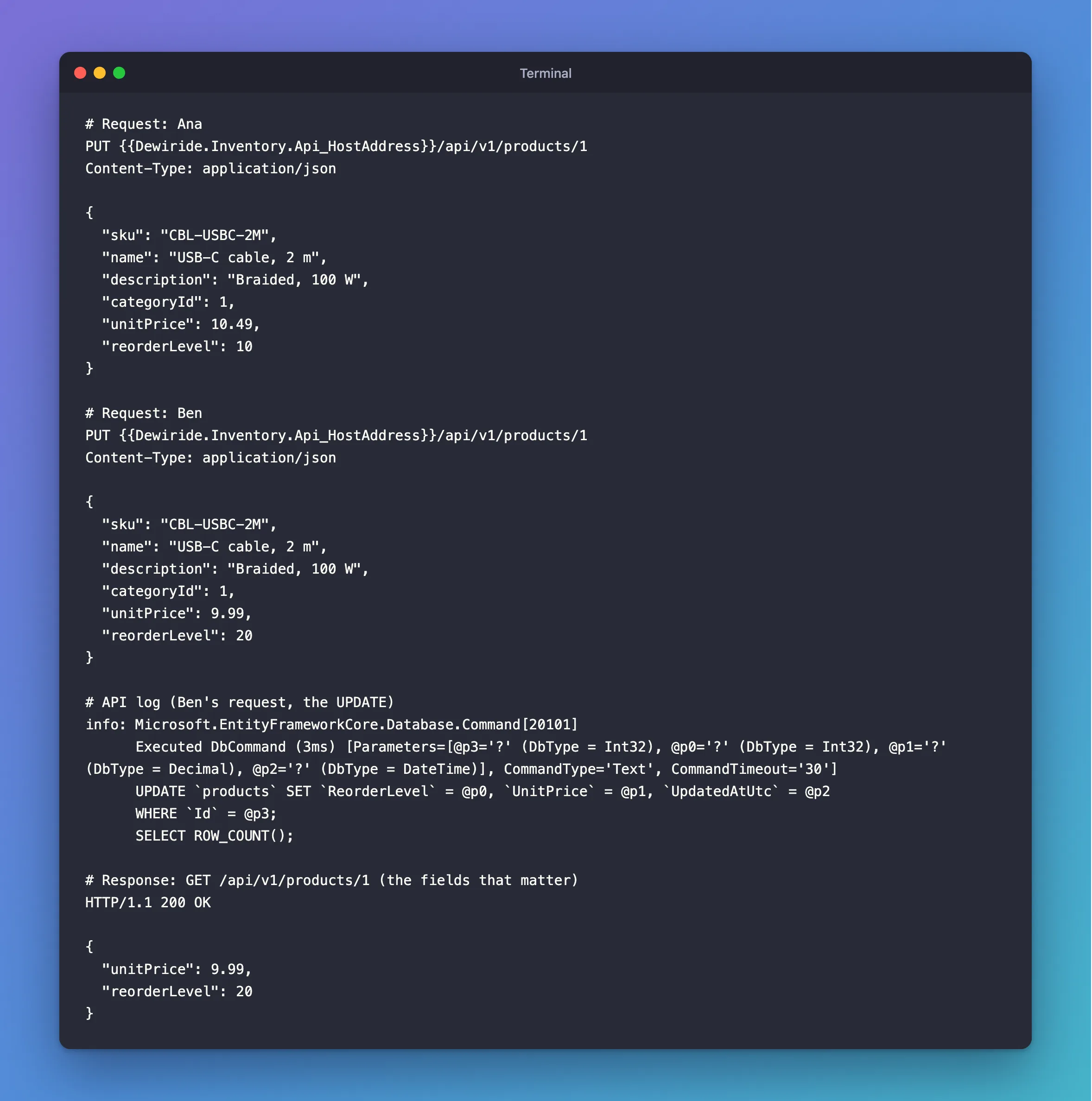
Now picture two people with the same product open: its price is 9.99 and its reorder level is 10. Ana raises the price to 10.49. Her request goes first:
PUT {{Dewiride.Inventory.Api_HostAddress}}/api/v1/products/1
Content-Type: application/json

{
  "sku": "CBL-USBC-2M",
  "name": "USB-C cable, 2 m",
  "description": "Braided, 100 W",
  "categoryId": 1,
  "unitPrice": 10.49,
  "reorderLevel": 10
}
Ben only wants the reorder level at 20, but his screen still shows the old price, and a PUT sends every field:
PUT {{Dewiride.Inventory.Api_HostAddress}}/api/v1/products/1
Content-Type: application/json

{
  "sku": "CBL-USBC-2M",
  "name": "USB-C cable, 2 m",
  "description": "Braided, 100 W",
  "categoryId": 1,
  "unitPrice": 9.99,
  "reorderLevel": 20
}
Both get 200 OK. Look at what MySQL received for Ben:
info: Microsoft.EntityFrameworkCore.Database.Command[20101]
      Executed DbCommand (3ms) [Parameters=[@p3='?' (DbType = Int32), @p0='?' (DbType = Int32), @p1='?' (DbType = Decimal), @p2='?' (DbType = DateTime)], CommandType='Text', CommandTimeout='30']
      UPDATE `products` SET `ReorderLevel` = @p0, `UnitPrice` = @p1, `UpdatedAtUtc` = @p2
      WHERE `Id` = @p3;
      SELECT ROW_COUNT();
And what's stored now:
HTTP/1.1 200 OK

{
  "unitPrice": 9.99,
  "reorderLevel": 20
}
Ana's price is gone, nobody got an error, and nobody knows. This is called a lost update. EF Core's update was correct for what it was given: Ben's request really did say 9.99.
Add a concurrency token
The fix is a number on each row that goes up with every change. A client sends back the number it read. If that number has changed since, someone else got there first. EF Core's concurrency page calls this optimistic concurrency, which "takes no locks, but arranges for the data modification to fail on save if the data has changed since it was queried." The number is a concurrency token.
Add it to the entity, in src/Dewiride.Inventory.Data/Entities/Product.cs, below ArchivedAtUtc:
/// <summary>
/// Goes up by one with every change. A client sends back the version it read, so two people
/// changing the same product can't silently overwrite each other.
/// </summary>
public int Version { get; set; }
Tell EF Core what it's for, in ProductConfiguration.cs, below the comment about Description:
// EF Core adds this column to the WHERE clause of every UPDATE and DELETE of a product,
// and throws DbUpdateConcurrencyException when the statement finds no row.
builder.Property(p => p.Version)
    .IsConcurrencyToken();
The page's example for SQL Server has the database change the token by itself, with a rowversion column. It adds that "the details on setting up an automatically-updating concurrency token differ across databases", and MySQL has no rowversion type, so this is what the page calls an application-managed token: your code changes it.
A new column needs a migration, as in Part 2. Stop the API with Ctrl+C first:
dotnet ef migrations add AddProductVersion --project src/Dewiride.Inventory.Data --startup-project src/Dewiride.Inventory.Api
Build started...
Build succeeded.
Done. To undo this action, use 'ef migrations remove'
Read its SQL before it runs:
dotnet ef migrations script AddStockMovements AddProductVersion --project src/Dewiride.Inventory.Data --startup-project src/Dewiride.Inventory.Api
START TRANSACTION;
ALTER TABLE `products` ADD `Version` int NOT NULL DEFAULT 0;

INSERT INTO `__EFMigrationsHistory` (`MigrationId`, `ProductVersion`)
VALUES ('20261104104921_AddProductVersion', '10.0.14');

COMMIT;
DEFAULT 0 gives the rows that already exist a version of 0. Apply it:
dotnet ef database update --project src/Dewiride.Inventory.Data --startup-project src/Dewiride.Inventory.Api
Applying migration '20261104104921_AddProductVersion'.
      ALTER TABLE `products` ADD `Version` int NOT NULL DEFAULT 0;
Done.
Use it
Three small changes in ProductContracts.cs. The update request gets the version the client read:
/// <summary>What a client sends to change a product, including the version it read.</summary>
public sealed record UpdateProductRequest(
    [Required, StringLength(32)] string Sku,
    [Required, StringLength(200)] string Name,
    string? Description,
    [Range(1, int.MaxValue)] int CategoryId,
    [Required, Money] decimal? UnitPrice,
    [Range(0, int.MaxValue)] int ReorderLevel,
    [Range(0, int.MaxValue)] int Version);
And ProductResponse returns it, as int Version, after DateTime? ArchivedAtUtc,, and p.Version, after p.ArchivedAtUtc, in FromProduct.
In UpdateAsync, add this above product.Sku = …:
// The version the client read goes into the WHERE clause of the UPDATE. If someone
// changed the product since then, the UPDATE finds no row and SaveChanges throws.
db.Entry(product).Property(p => p.Version).OriginalValue = request.Version;
And this above product.UpdatedAtUtc = …:
product.Version = request.Version + 1;
The first line needs explaining. EF Core compares against the original value, the one it read when it loaded the row. In a web API, that load happens a moment before saving, long after the client read the product. So you tell EF Core the version that counts is the one the client saw.
Restart the API, and repeat the story. The stored product now has version 0, and both people read that. Ana goes first, with "unitPrice": 10.49, "reorderLevel": 20, "version": 0:
info: Microsoft.EntityFrameworkCore.Database.Command[20101]
      Executed DbCommand (5ms) [Parameters=[@p3='?' (DbType = Int32), @p0='?' (DbType = Decimal), @p1='?' (DbType = DateTime), @p2='?' (DbType = Int32), @p4='?' (DbType = Int32)], CommandType='Text', CommandTimeout='30']
      UPDATE `products` SET `UnitPrice` = @p0, `UpdatedAtUtc` = @p1, `Version` = @p2
      WHERE `Id` = @p3 AND `Version` = @p4;
      SELECT ROW_COUNT();
There's the token: WHERE Id = @p3 AND Version = @p4. The row has version 0, so it matches, and the version becomes 1. Then Ben, still with version 0, wants "unitPrice": 9.99, "reorderLevel": 30:
HTTP/1.1 500 Internal Server Error
Content-Type: application/problem+json

{
  "type": "https://tools.ietf.org/html/rfc9110#section-15.6.1",
  "title": "An error occurred while processing your request.",
  "status": 500,
  "traceId": "00-e66ac3c9326121b7f9cbab55f79ea73f-8995ba6ed3721cbf-00"
}
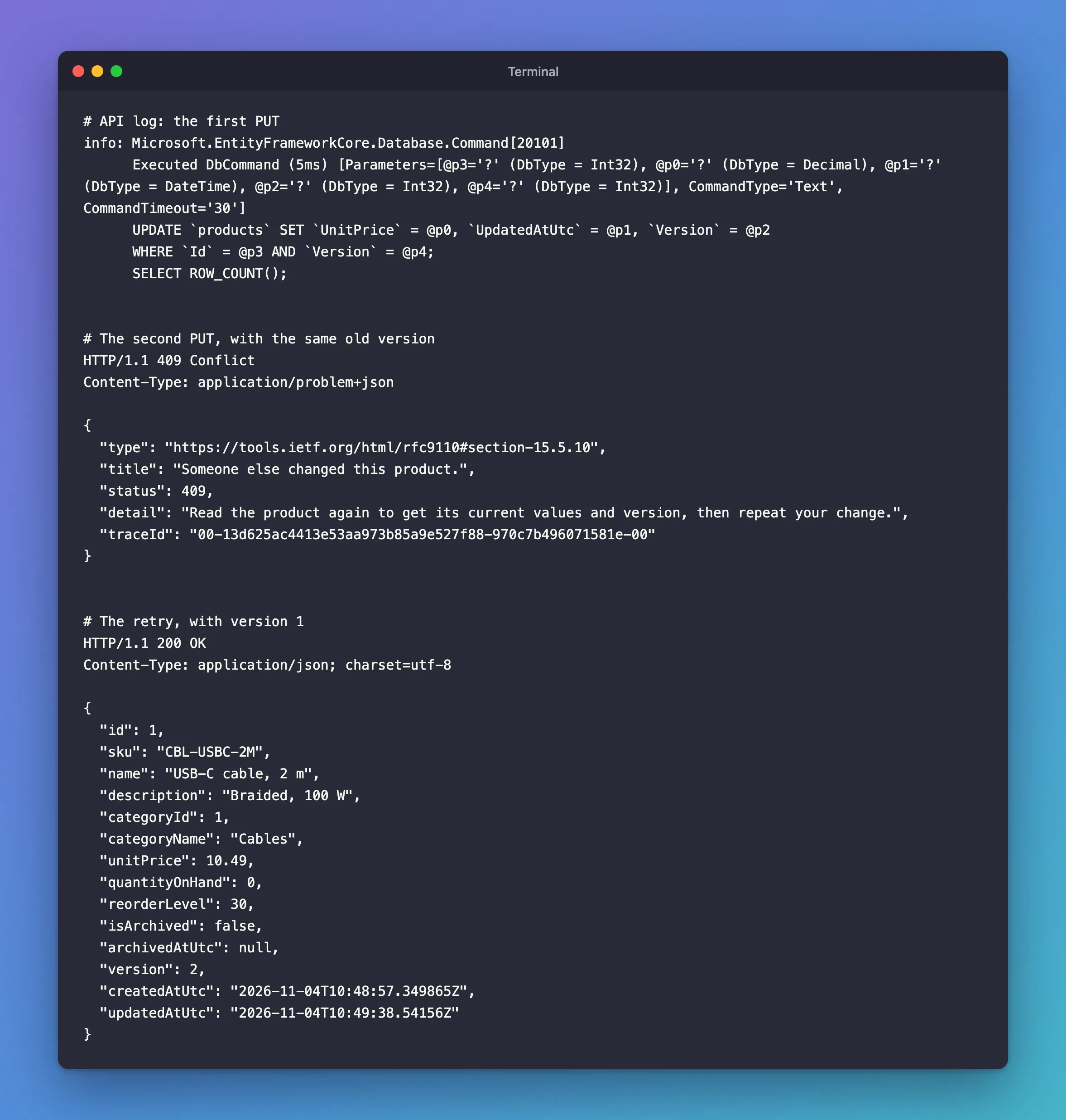
info: Microsoft.EntityFrameworkCore.Database.Command[20101]
      Executed DbCommand (1ms) [Parameters=[@p4='?' (DbType = Int32), @p0='?' (DbType = Int32), @p1='?' (DbType = Decimal), @p2='?' (DbType = DateTime), @p3='?' (DbType = Int32), @p5='?' (DbType = Int32)], CommandType='Text', CommandTimeout='30']
      UPDATE `products` SET `ReorderLevel` = @p0, `UnitPrice` = @p1, `UpdatedAtUtc` = @p2, `Version` = @p3
      WHERE `Id` = @p4 AND `Version` = @p5;
      SELECT ROW_COUNT();
fail: Microsoft.AspNetCore.Diagnostics.ExceptionHandlerMiddleware[1]
      An unhandled exception has occurred while executing the request.
      Microsoft.EntityFrameworkCore.DbUpdateConcurrencyException: The database operation was expected to affect 1 row(s), but actually affected 0 row(s); data may have been modified or deleted since entities were loaded. See https://go.microsoft.com/fwlink/?LinkId=527962 for information on understanding and handling optimistic concurrency exceptions.
The stored version is 1 now, so WHERE … AND Version = 0 finds no row. ROW_COUNT() says 0, and EF Core expected 1, so it throws DbUpdateConcurrencyException. Ana's price is safe. A 500 is the wrong answer, though: this is a normal thing to happen. Add a catch above the other two:
catch (DbUpdateConcurrencyException)
{
    return TypedResults.Problem(
        title: "Someone else changed this product.",
        detail: "Read the product again to get its current values and version, then repeat your change.",
        statusCode: StatusCodes.Status409Conflict);
}
Restart, and Ben sends the same request again:
HTTP/1.1 409 Conflict
Content-Type: application/problem+json

{
  "type": "https://tools.ietf.org/html/rfc9110#section-15.5.10",
  "title": "Someone else changed this product.",
  "status": 409,
  "detail": "Read the product again to get its current values and version, then repeat your change.",
  "traceId": "00-13d625ac4413e53aa973b85a9e527f88-970c7b496071581e-00"
}
Ben reads the product again, and sees the new price and version 1. He repeats his change on top of it, with "unitPrice": 10.49, "reorderLevel": 30, "version": 1:
HTTP/1.1 200 OK
Content-Type: application/json; charset=utf-8

{
  "id": 1,
  "sku": "CBL-USBC-2M",
  "name": "USB-C cable, 2 m",
  "description": "Braided, 100 W",
  "categoryId": 1,
  "categoryName": "Cables",
  "unitPrice": 10.49,
  "quantityOnHand": 0,
  "reorderLevel": 30,
  "isArchived": false,
  "archivedAtUtc": null,
  "version": 2,
  "createdAtUtc": "2026-11-04T10:48:57.349865Z",
  "updatedAtUtc": "2026-11-04T10:49:38.54156Z"
}
Both changes are there, and MySQL agrees:
SELECT Id, Sku, UnitPrice, ReorderLevel, Version FROM products WHERE Id = 1;
+----+-------------+-----------+--------------+---------+
| Id | Sku         | UnitPrice | ReorderLevel | Version |
+----+-------------+-----------+--------------+---------+
|  1 | CBL-USBC-2M |     10.49 |           30 |       2 |
+----+-------------+-----------+--------------+---------+
1 row in set (0.000 sec)
The complete contracts file:
using System.ComponentModel.DataAnnotations;
using System.Linq.Expressions;
using Dewiride.Inventory.Api.Common;
using Dewiride.Inventory.Data.Entities;

namespace Dewiride.Inventory.Api.Features.Products;

/// <summary>What a client sends to create a product.</summary>
public sealed record CreateProductRequest(
    [Required, StringLength(32)] string Sku,
    [Required, StringLength(200)] string Name,
    string? Description,
    [Range(1, int.MaxValue)] int CategoryId,
    [Required, Money] decimal? UnitPrice,
    [Range(0, int.MaxValue)] int ReorderLevel);

/// <summary>What a client sends to change a product, including the version it read.</summary>
public sealed record UpdateProductRequest(
    [Required, StringLength(32)] string Sku,
    [Required, StringLength(200)] string Name,
    string? Description,
    [Range(1, int.MaxValue)] int CategoryId,
    [Required, Money] decimal? UnitPrice,
    [Range(0, int.MaxValue)] int ReorderLevel,
    [Range(0, int.MaxValue)] int Version);

/// <summary>
/// The filters, sort order and page of the product list, read from the query string.
/// The attributes need "property:" because this record is used with [AsParameters]. On the
/// constructor parameters, they make /openapi/v1.json fail in ASP.NET Core 10.
/// </summary>
public sealed record ProductListQuery(
    string? Search,
    int? CategoryId,
    bool IncludeArchived = false,
    [property: AllowedValues("name", "-name", "price", "-price", "newest", null, ErrorMessage = "Sort must be name, -name, price, -price or newest.")]
    string? Sort = null,
    [property: Range(1, 1_000_000)] int Page = 1,
    [property: Range(1, 100)] int PageSize = 20);

/// <summary>What the API returns for a product.</summary>
public sealed record ProductResponse(
    int Id,
    string Sku,
    string Name,
    string? Description,
    int CategoryId,
    string CategoryName,
    decimal UnitPrice,
    int QuantityOnHand,
    int ReorderLevel,
    bool IsArchived,
    DateTime? ArchivedAtUtc,
    int Version,
    DateTime CreatedAtUtc,
    DateTime UpdatedAtUtc)
{
    /// <summary>
    /// How to build a response from a product. EF Core reads this expression and turns it into
    /// SQL, so a query selects only these columns and joins categories for the category's name.
    /// </summary>
    public static readonly Expression<Func<Product, ProductResponse>> FromProduct = p =>
        new ProductResponse(
            p.Id,
            p.Sku,
            p.Name,
            p.Description,
            p.CategoryId,
            p.Category.Name,
            p.UnitPrice,
            p.QuantityOnHand,
            p.ReorderLevel,
            p.IsArchived,
            p.ArchivedAtUtc,
            p.Version,
            p.CreatedAtUtc,
            p.UpdatedAtUtc);
}
Step 12: Update a Row Without Loading It
Every write so far had two steps: load the row, then save it. Sometimes you don't need the row at all. Archiving a product changes the same few columns whatever it holds. ExecuteUpdateAsync sends one UPDATE directly. EF Core's ExecuteUpdate page describes these methods as a way "to save data to the database without using EF's traditional change tracking and SaveChanges() method."
Add the two addresses to MapProductEndpoints:
group.MapPost("/{id:int}/archive", ArchiveAsync).WithSummary("Archive a product, so it stops appearing in lists");
group.MapPost("/{id:int}/restore", RestoreAsync).WithSummary("Bring an archived product back");
The archive method:
private static async Task<Results<NoContent, NotFound>> ArchiveAsync(
    int id,
    InventoryDbContext db,
    TimeProvider clock,
    CancellationToken cancellationToken)
{
    var now = clock.GetUtcNow().UtcDateTime;

    var changed = await db.Products
        .Where(p => p.Id == id && !p.IsArchived)
        .ExecuteUpdateAsync(
            setters => setters
                .SetProperty(p => p.IsArchived, true)
                .SetProperty(p => p.ArchivedAtUtc, now)
                .SetProperty(p => p.UpdatedAtUtc, now)
                .SetProperty(p => p.Version, p => p.Version + 1),
            cancellationToken);

    return await NoContentIfExistsAsync(changed, id, db, cancellationToken);
}
Wherechooses the rows, as in a query.!p.IsArchivedkeeps the original archive date on a product that's already archived.SetPropertynames a column and its new value. The last one uses a function of the row itself, so the SQL saysVersion = Version + 1.changedis the number of rows the statement matched.
ExecuteUpdateAsync runs at once and doesn't touch the change tracker. The same page says these methods "take effect immediately", and that they "cannot automatically apply concurrency control". So the Version line is your job: without it, a client holding the old version could still overwrite an archived product.
Zero rows has two meanings here, so the last piece tells them apart:
/// <summary>
/// Archiving an archived product changes nothing, and neither does restoring a product that
/// isn't archived. Both still count as success, as long as the product exists.
/// </summary>
private static async Task<Results<NoContent, NotFound>> NoContentIfExistsAsync(
    int changed,
    int id,
    InventoryDbContext db,
    CancellationToken cancellationToken)
{
    if (changed > 0 || await db.Products.AnyAsync(p => p.Id == id, cancellationToken))
    {
        return TypedResults.NoContent();
    }

    return TypedResults.NotFound();
}
RestoreAsync is the same with the values reversed; it's in the complete file below. Add the requests:
### Include archived products
GET {{Dewiride.Inventory.Api_HostAddress}}/api/v1/products?includeArchived=true

### Archive a product
POST {{Dewiride.Inventory.Api_HostAddress}}/api/v1/products/1/archive

### Bring an archived product back
POST {{Dewiride.Inventory.Api_HostAddress}}/api/v1/products/1/restore
Send the archive request:
HTTP/1.1 204 No Content
info: Microsoft.EntityFrameworkCore.Database.Command[20101]
      Executed DbCommand (10ms) [Parameters=[@p='?' (DbType = SByte), @p2='?' (DbType = DateTime), @p3='?' (DbType = DateTime), @id='?' (DbType = Int32)], CommandType='Text', CommandTimeout='30']
      UPDATE `products` AS `p`
      SET `IsArchived` = @p,
          `ArchivedAtUtc` = @p2,
          `UpdatedAtUtc` = @p3,
          `Version` = `p`.`Version` + 1
      WHERE (`p`.`Id` = @id) AND NOT (`p`.`IsArchived`)
No SELECT, one statement. A second archive request matches no row, so the check runs, and the answer is still 204:
info: Microsoft.EntityFrameworkCore.Database.Command[20101]
      Executed DbCommand (2ms) [Parameters=[@id='?' (DbType = Int32)], CommandType='Text', CommandTimeout='30']
      SELECT EXISTS (
          SELECT 1
          FROM `products` AS `p`
          WHERE `p`.`Id` = @id)
An ID that doesn't exist fails the same check and answers 404. The list hides the product now, and shows it again with ?includeArchived=true. Send the restore request to bring it back.
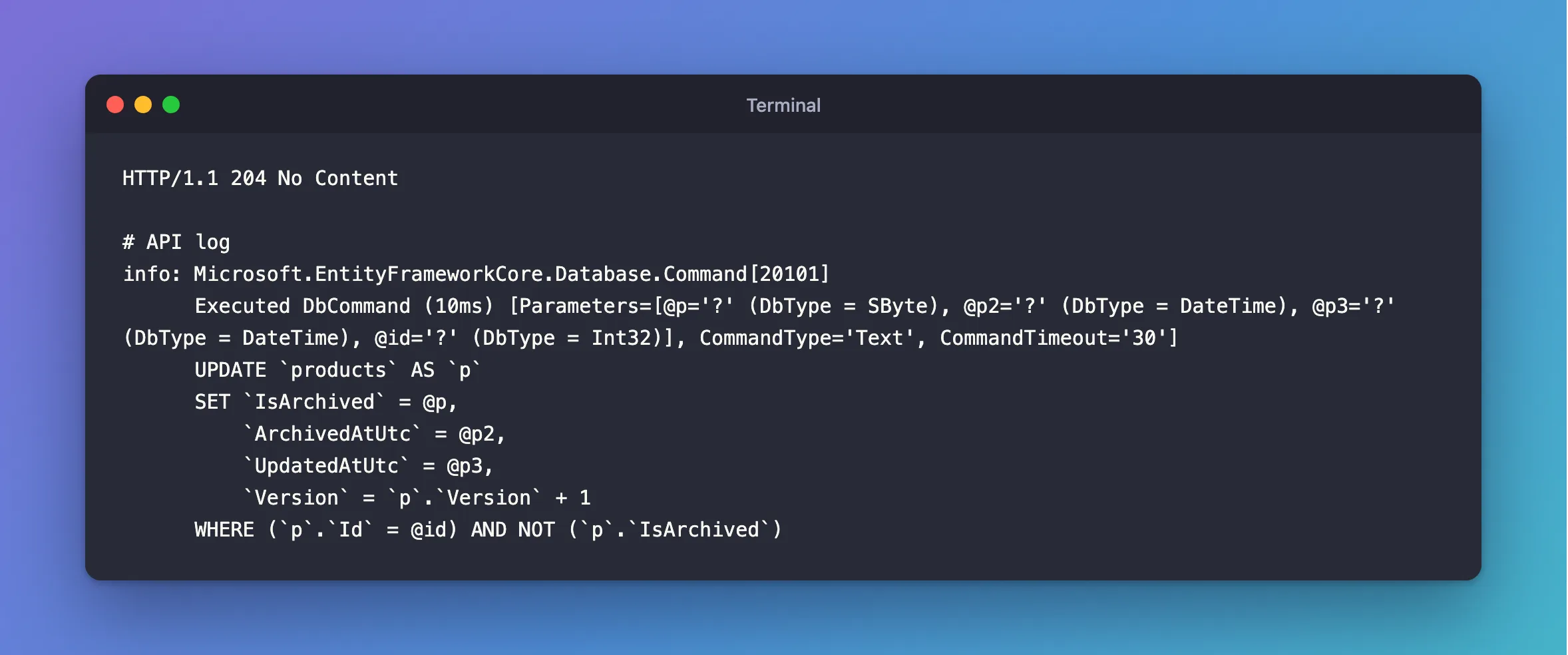
The finished endpoints file:
using Dewiride.Inventory.Api.Common;
using Dewiride.Inventory.Data;
using Dewiride.Inventory.Data.Entities;
using Microsoft.AspNetCore.Http.HttpResults;
using Microsoft.EntityFrameworkCore;

namespace Dewiride.Inventory.Api.Features.Products;

/// <summary>
/// The HTTP endpoints that read and write the products table.
/// </summary>
public static class ProductEndpoints
{
    public static IEndpointRouteBuilder MapProductEndpoints(this IEndpointRouteBuilder routes)
    {
        var group = routes.MapGroup("/products").WithTags("Products");

        group.MapPost("/", CreateAsync).WithSummary("Create a product");
        group.MapGet("/", ListAsync).WithSummary("List products, with search, filters, sorting and paging");
        group.MapGet("/{id:int}", GetAsync).WithSummary("Get one product");
        group.MapPut("/{id:int}", UpdateAsync).WithSummary("Change a product, if nobody else changed it first");
        group.MapPost("/{id:int}/archive", ArchiveAsync).WithSummary("Archive a product, so it stops appearing in lists");
        group.MapPost("/{id:int}/restore", RestoreAsync).WithSummary("Bring an archived product back");

        return routes;
    }

    private static async Task<Results<Created<ProductResponse>, ProblemHttpResult>> CreateAsync(
        CreateProductRequest request,
        InventoryDbContext db,
        TimeProvider clock,
        CancellationToken cancellationToken)
    {
        var now = clock.GetUtcNow().UtcDateTime;
        var product = new Product
        {
            Sku = request.Sku.Trim().ToUpperInvariant(),
            Name = request.Name.Trim(),
            Description = request.Description,
            CategoryId = request.CategoryId,
            UnitPrice = request.UnitPrice.GetValueOrDefault(),
            ReorderLevel = request.ReorderLevel,
            CreatedAtUtc = now,
            UpdatedAtUtc = now,
        };

        db.Products.Add(product);

        try
        {
            await db.SaveChangesAsync(cancellationToken);
        }
        catch (DbUpdateException exception) when (exception.IsDuplicateKey())
        {
            return DuplicateSku(product.Sku);
        }
        catch (DbUpdateException exception) when (exception.IsMissingReferencedRow())
        {
            return UnknownCategory(product.CategoryId);
        }

        var response = await db.Products
            .Where(p => p.Id == product.Id)
            .Select(ProductResponse.FromProduct)
            .FirstAsync(cancellationToken);

        return TypedResults.Created($"/api/v1/products/{product.Id}", response);
    }

    private static async Task<Ok<PagedResponse<ProductResponse>>> ListAsync(
        [AsParameters] ProductListQuery query,
        InventoryDbContext db,
        CancellationToken cancellationToken)
    {
        IQueryable<Product> products = db.Products;

        if (!query.IncludeArchived)
        {
            products = products.Where(p => !p.IsArchived);
        }

        if (query.CategoryId is int categoryId)
        {
            products = products.Where(p => p.CategoryId == categoryId);
        }

        if (!string.IsNullOrWhiteSpace(query.Search))
        {
            var search = query.Search.Trim();
            products = products.Where(p => p.Name.Contains(search) || p.Sku.Contains(search));
        }

        var totalCount = await products.CountAsync(cancellationToken);

        // Every sort ends with the Id, so rows with the same name or price keep a fixed order
        // and can't move between pages.
        var sorted = query.Sort switch
        {
            "-name" => products.OrderByDescending(p => p.Name).ThenBy(p => p.Id),
            "price" => products.OrderBy(p => p.UnitPrice).ThenBy(p => p.Id),
            "-price" => products.OrderByDescending(p => p.UnitPrice).ThenBy(p => p.Id),
            "newest" => products.OrderByDescending(p => p.CreatedAtUtc).ThenBy(p => p.Id),
            _ => products.OrderBy(p => p.Name).ThenBy(p => p.Id),
        };

        var items = await sorted
            .Skip((query.Page - 1) * query.PageSize)
            .Take(query.PageSize)
            .Select(ProductResponse.FromProduct)
            .ToListAsync(cancellationToken);

        return TypedResults.Ok(new PagedResponse<ProductResponse>(items, query.Page, query.PageSize, totalCount));
    }

    private static async Task<Results<Ok<ProductResponse>, NotFound>> GetAsync(
        int id,
        InventoryDbContext db,
        CancellationToken cancellationToken)
    {
        var product = await db.Products
            .Where(p => p.Id == id)
            .Select(ProductResponse.FromProduct)
            .FirstOrDefaultAsync(cancellationToken);

        return product is null
            ? TypedResults.NotFound()
            : TypedResults.Ok(product);
    }

    private static async Task<Results<Ok<ProductResponse>, NotFound, ProblemHttpResult>> UpdateAsync(
        int id,
        UpdateProductRequest request,
        InventoryDbContext db,
        TimeProvider clock,
        CancellationToken cancellationToken)
    {
        var product = await db.Products
            .FirstOrDefaultAsync(p => p.Id == id, cancellationToken);

        if (product is null)
        {
            return TypedResults.NotFound();
        }

        // The version the client read goes into the WHERE clause of the UPDATE. If someone
        // changed the product since then, the UPDATE finds no row and SaveChanges throws.
        db.Entry(product).Property(p => p.Version).OriginalValue = request.Version;

        product.Sku = request.Sku.Trim().ToUpperInvariant();
        product.Name = request.Name.Trim();
        product.Description = request.Description;
        product.CategoryId = request.CategoryId;
        product.UnitPrice = request.UnitPrice.GetValueOrDefault();
        product.ReorderLevel = request.ReorderLevel;
        product.Version = request.Version + 1;
        product.UpdatedAtUtc = clock.GetUtcNow().UtcDateTime;

        try
        {
            await db.SaveChangesAsync(cancellationToken);
        }
        catch (DbUpdateConcurrencyException)
        {
            return TypedResults.Problem(
                title: "Someone else changed this product.",
                detail: "Read the product again to get its current values and version, then repeat your change.",
                statusCode: StatusCodes.Status409Conflict);
        }
        catch (DbUpdateException exception) when (exception.IsDuplicateKey())
        {
            return DuplicateSku(product.Sku);
        }
        catch (DbUpdateException exception) when (exception.IsMissingReferencedRow())
        {
            return UnknownCategory(product.CategoryId);
        }

        var response = await db.Products
            .Where(p => p.Id == id)
            .Select(ProductResponse.FromProduct)
            .FirstAsync(cancellationToken);

        return TypedResults.Ok(response);
    }

    private static async Task<Results<NoContent, NotFound>> ArchiveAsync(
        int id,
        InventoryDbContext db,
        TimeProvider clock,
        CancellationToken cancellationToken)
    {
        var now = clock.GetUtcNow().UtcDateTime;

        var changed = await db.Products
            .Where(p => p.Id == id && !p.IsArchived)
            .ExecuteUpdateAsync(
                setters => setters
                    .SetProperty(p => p.IsArchived, true)
                    .SetProperty(p => p.ArchivedAtUtc, now)
                    .SetProperty(p => p.UpdatedAtUtc, now)
                    .SetProperty(p => p.Version, p => p.Version + 1),
                cancellationToken);

        return await NoContentIfExistsAsync(changed, id, db, cancellationToken);
    }

    private static async Task<Results<NoContent, NotFound>> RestoreAsync(
        int id,
        InventoryDbContext db,
        TimeProvider clock,
        CancellationToken cancellationToken)
    {
        var now = clock.GetUtcNow().UtcDateTime;

        var changed = await db.Products
            .Where(p => p.Id == id && p.IsArchived)
            .ExecuteUpdateAsync(
                setters => setters
                    .SetProperty(p => p.IsArchived, false)
                    .SetProperty(p => p.ArchivedAtUtc, (DateTime?)null)
                    .SetProperty(p => p.UpdatedAtUtc, now)
                    .SetProperty(p => p.Version, p => p.Version + 1),
                cancellationToken);

        return await NoContentIfExistsAsync(changed, id, db, cancellationToken);
    }

    /// <summary>
    /// Archiving an archived product changes nothing, and neither does restoring a product that
    /// isn't archived. Both still count as success, as long as the product exists.
    /// </summary>
    private static async Task<Results<NoContent, NotFound>> NoContentIfExistsAsync(
        int changed,
        int id,
        InventoryDbContext db,
        CancellationToken cancellationToken)
    {
        if (changed > 0 || await db.Products.AnyAsync(p => p.Id == id, cancellationToken))
        {
            return TypedResults.NoContent();
        }

        return TypedResults.NotFound();
    }

    private static ProblemHttpResult DuplicateSku(string sku) =>
        TypedResults.Problem(
            title: "A product with this SKU already exists.",
            detail: $"Choose a SKU other than '{sku}'.",
            statusCode: StatusCodes.Status409Conflict);

    private static ProblemHttpResult UnknownCategory(int categoryId) =>
        TypedResults.Problem(
            title: "The category doesn't exist.",
            detail: $"There is no category with Id {categoryId}.",
            statusCode: StatusCodes.Status400BadRequest);
}
Step 13: Keep the SQL Out of the Logs Outside Development
The SQL in your terminal is useful now, but appsettings.json applies everywhere, and a production log full of SQL is noise you pay to store. Set it per environment. In appsettings.json, add the last line:
{
  "Logging": {
    "LogLevel": {
      "Default": "Information",
      "Microsoft.AspNetCore": "Warning",
      "Microsoft.EntityFrameworkCore.Database.Command": "Warning"
    }
  },
  "AllowedHosts": "*",
  "Database": {
    "MaxRetryCount": 3,
    "MaxRetryDelaySeconds": 5,
    "CommandTimeoutSeconds": 30
  }
}
And in appsettings.Development.json, which wins while developing:
{
  "Logging": {
    "LogLevel": {
      "Default": "Information",
      "Microsoft.AspNetCore": "Warning",
      "Microsoft.EntityFrameworkCore.Database.Command": "Information"
    }
  }
}
Your terminal keeps showing SQL. Run as Production, with the connection string in an environment variable, and the same request logs nothing at all, while failures still appear, because they're logged above Warning. How to Set Different Log Levels per Environment goes through this in more detail.
Step 14: See the Whole API in One Page
The API has eleven operations now. Scalar is a small package that reads the OpenAPI document ASP.NET Core already generates, and turns it into a page where you can read and try every endpoint in a browser. Add it:
dotnet add src/Dewiride.Inventory.Api package Scalar.AspNetCore
info : PackageReference for package 'Scalar.AspNetCore' version '2.19.0' added to file '/Users/you/projects/dewiride-inventory-api/Directory.Packages.props'.
log  : Restored /Users/you/projects/dewiride-inventory-api/src/Dewiride.Inventory.Api/Dewiride.Inventory.Api.csproj (in 621 ms).
In Program.cs, add using Scalar.AspNetCore; and one call inside the IsDevelopment block, so it never appears in production. The finished file:
using Dewiride.Inventory.Api.Features.Categories;
using Dewiride.Inventory.Api.Features.Products;
using Dewiride.Inventory.Data;
using Microsoft.AspNetCore.Diagnostics.HealthChecks;
using Scalar.AspNetCore;

var builder = WebApplication.CreateBuilder(args);

// Add services to the container.
// Learn more about configuring OpenAPI at https://aka.ms/aspnet/openapi
builder.Services.AddOpenApi();

// Answers every error with the same JSON shape, the standard "problem details" format.
builder.Services.AddProblemDetails();

// Checks the validation attributes on request records before an endpoint runs.
builder.Services.AddValidation();

// The clock. Code asks for it instead of calling DateTime.UtcNow directly.
builder.Services.AddSingleton(TimeProvider.System);

// The MySQL database, through EF Core. The connection string comes from configuration:
// dotnet user-secrets in development, an environment variable everywhere else.
builder.Services.AddInventoryData(builder.Configuration);

// The "mysql" check opens a connection to MySQL. Only the readiness endpoint runs it.
builder.Services.AddHealthChecks()
    .AddDbContextCheck<InventoryDbContext>(name: "mysql", tags: ["ready"]);

var app = builder.Build();

// Turn unhandled exceptions into a problem response, with no stack trace outside Development.
app.UseExceptionHandler(new ExceptionHandlerOptions
{
    // In Development, a request the endpoint can't read, such as broken JSON, throws
    // BadHttpRequestException. That's the client's mistake, so keep its 400 instead of a 500.
    StatusCodeSelector = exception => exception is BadHttpRequestException badRequest
        ? badRequest.StatusCode
        : StatusCodes.Status500InternalServerError,
});

// Give error responses without a body, such as a plain 404, a problem details body.
app.UseStatusCodePages();

// Configure the HTTP request pipeline.
if (app.Environment.IsDevelopment())
{
    app.MapOpenApi();

    // Interactive API documentation at /scalar/v1, built from the OpenAPI document.
    app.MapScalarApiReference();
}

// Liveness: the API process is running. It runs no checks.
app.MapHealthChecks("/health/live", new HealthCheckOptions
{
    Predicate = _ => false,
});

// Readiness: the API can reach MySQL, so it's ready for requests.
app.MapHealthChecks("/health/ready", new HealthCheckOptions
{
    Predicate = check => check.Tags.Contains("ready"),
});

// Every data endpoint lives under /api/v1.
var api = app.MapGroup("/api/v1");
api.MapCategoryEndpoints();
api.MapProductEndpoints();

app.Run();
Restart the API and open http://localhost:5190/scalar/v1 in a browser:
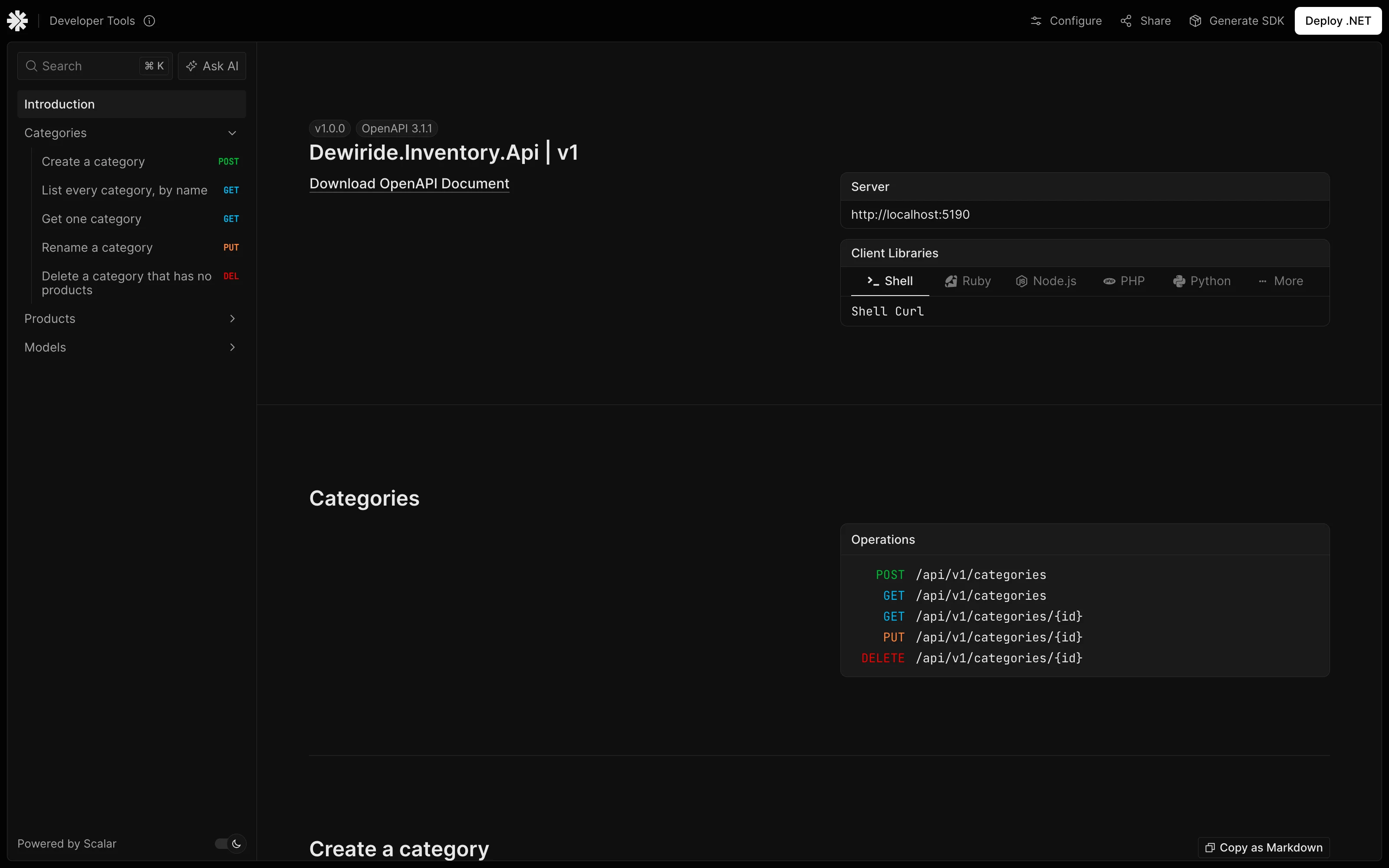
The summaries come from WithSummary, and the groups from WithTags. How to Add Scalar API Documentation to a .NET 10 Web API covers it in more detail.
The finished requests file, with sample values:
@Dewiride.Inventory.Api_HostAddress = http://localhost:5190

### Liveness: is the API process running?
GET {{Dewiride.Inventory.Api_HostAddress}}/health/live

### Readiness: can the API reach MySQL?
GET {{Dewiride.Inventory.Api_HostAddress}}/health/ready

### The OpenAPI document (Development only)
GET {{Dewiride.Inventory.Api_HostAddress}}/openapi/v1.json
Accept: application/json

### Create a category
POST {{Dewiride.Inventory.Api_HostAddress}}/api/v1/categories
Content-Type: application/json

{
  "name": "Cables"
}

### List every category
GET {{Dewiride.Inventory.Api_HostAddress}}/api/v1/categories

### Get one category
GET {{Dewiride.Inventory.Api_HostAddress}}/api/v1/categories/1

### Rename a category
PUT {{Dewiride.Inventory.Api_HostAddress}}/api/v1/categories/1
Content-Type: application/json

{
  "name": "Cables and leads"
}

### Delete a category that has no products
DELETE {{Dewiride.Inventory.Api_HostAddress}}/api/v1/categories/1

### Create a product
POST {{Dewiride.Inventory.Api_HostAddress}}/api/v1/products
Content-Type: application/json

{
  "sku": "cbl-usbc-2m",
  "name": "USB-C cable, 2 m",
  "description": "Braided, 100 W",
  "categoryId": 1,
  "unitPrice": 9.99,
  "reorderLevel": 10
}

### List products: page 1, 20 per page, by name
GET {{Dewiride.Inventory.Api_HostAddress}}/api/v1/products

### Search, filter, sort and page
GET {{Dewiride.Inventory.Api_HostAddress}}/api/v1/products?search=usb&categoryId=1&sort=-price&page=1&pageSize=5

### Include archived products
GET {{Dewiride.Inventory.Api_HostAddress}}/api/v1/products?includeArchived=true

### Get one product
GET {{Dewiride.Inventory.Api_HostAddress}}/api/v1/products/1

### Change a product. Send the version you read
PUT {{Dewiride.Inventory.Api_HostAddress}}/api/v1/products/1
Content-Type: application/json

{
  "sku": "CBL-USBC-2M",
  "name": "USB-C cable, 2 m",
  "description": "Braided, 100 W",
  "categoryId": 1,
  "unitPrice": 10.49,
  "reorderLevel": 10,
  "version": 0
}

### Archive a product
POST {{Dewiride.Inventory.Api_HostAddress}}/api/v1/products/1/archive

### Bring an archived product back
POST {{Dewiride.Inventory.Api_HostAddress}}/api/v1/products/1/restore

###
Step 15: Commit Your Work
Check that the code and the database agree, then see what changed:
dotnet ef migrations has-pending-model-changes --project src/Dewiride.Inventory.Data --startup-project src/Dewiride.Inventory.Api
Build started...
Build succeeded.
No changes have been made to the model since the last migration.
git status --short
 M Directory.Packages.props
 M src/Dewiride.Inventory.Api/Dewiride.Inventory.Api.csproj
 M src/Dewiride.Inventory.Api/Dewiride.Inventory.Api.http
 M src/Dewiride.Inventory.Api/Program.cs
 M src/Dewiride.Inventory.Api/appsettings.Development.json
 M src/Dewiride.Inventory.Api/appsettings.json
 M src/Dewiride.Inventory.Data/Configurations/ProductConfiguration.cs
 M src/Dewiride.Inventory.Data/Entities/Product.cs
 M src/Dewiride.Inventory.Data/Migrations/InventoryDbContextModelSnapshot.cs
?? src/Dewiride.Inventory.Api/Common/
?? src/Dewiride.Inventory.Api/Features/
?? src/Dewiride.Inventory.Data/DbUpdateExceptionExtensions.cs
?? src/Dewiride.Inventory.Data/Migrations/20261104104921_AddProductVersion.Designer.cs
?? src/Dewiride.Inventory.Data/Migrations/20261104104921_AddProductVersion.cs
git add .
git commit -m "Read and write categories and products with EF Core"
[main 6dd4b78] Read and write categories and products with EF Core
 18 files changed, 882 insertions(+), 2 deletions(-)
 create mode 100644 src/Dewiride.Inventory.Api/Common/MoneyAttribute.cs
 create mode 100644 src/Dewiride.Inventory.Api/Common/PagedResponse.cs
 create mode 100644 src/Dewiride.Inventory.Api/Features/Categories/CategoryContracts.cs
 create mode 100644 src/Dewiride.Inventory.Api/Features/Categories/CategoryEndpoints.cs
 create mode 100644 src/Dewiride.Inventory.Api/Features/Products/ProductContracts.cs
 create mode 100644 src/Dewiride.Inventory.Api/Features/Products/ProductEndpoints.cs
 create mode 100644 src/Dewiride.Inventory.Data/DbUpdateExceptionExtensions.cs
 create mode 100644 src/Dewiride.Inventory.Data/Migrations/20261104104921_AddProductVersion.Designer.cs
 create mode 100644 src/Dewiride.Inventory.Data/Migrations/20261104104921_AddProductVersion.cs
Your commit ID and migration timestamp will be different.
Your Project Now Looks Like This
dewiride-inventory-api/
├── Directory.Packages.props                now with Scalar.AspNetCore 2.19.0
├── …                                       the other solution files
└── src/
    ├── Dewiride.Inventory.Api/
    │   ├── Common/
    │   │   ├── MoneyAttribute.cs
    │   │   └── PagedResponse.cs
    │   ├── Features/
    │   │   ├── Categories/
    │   │   │   ├── CategoryContracts.cs
    │   │   │   └── CategoryEndpoints.cs
    │   │   └── Products/
    │   │       ├── ProductContracts.cs
    │   │       └── ProductEndpoints.cs
    │   ├── appsettings.json                SQL logs off
    │   ├── appsettings.Development.json    SQL logs on
    │   ├── Dewiride.Inventory.Api.http     a request for every endpoint
    │   └── Program.cs
    └── Dewiride.Inventory.Data/
        ├── Configurations/
        │   └── ProductConfiguration.cs     Version is a concurrency token
        ├── Entities/
        │   └── Product.cs                  now with Version
        ├── Migrations/
        │   └── …_AddProductVersion.cs      the third migration
        ├── DbUpdateExceptionExtensions.cs
        └── …
In MySQL, categories and products now hold real rows, and products has a Version column.
Stop When You're Done
Stop the API with Ctrl+C, then stop MySQL. Your rows stay in the Docker volume:
docker compose stop
[+] stop 1/1
 ✔ Container dewiride-inventory-mysql-1 Stopped                                                           1.5s
Next time, start it with docker compose start --wait. Keep everything: Part 4 continues from here. To remove only the rows, the tables or everything from this series, follow Part 2's cleanup section.
Common Mistakes
| Mistake | What happens | Do this instead |
|---|---|---|
| Accepting or returning EF Core entities in endpoints | Clients can set any column, and navigations can break the JSON with A possible object cycle was detected | Use request and response records |
Forgetting SaveChangesAsync | Add and property changes stay in memory; the client gets a success and MySQL gets nothing | Call it after every change |
Calling ToListAsync before Where or Skip | Every row comes back from MySQL, and C# filters them | Keep it IQueryable until the last line |
Skip and Take without OrderBy | EF Core warns, and pages can repeat or miss rows | Sort, and end with the key |
| Sorting only by a column that can repeat | Rows that tie can move between pages | Add .ThenBy(p => p.Id) |
| Checking for a duplicate with a query instead of a unique index | Two requests at the same moment both pass | Keep the index, and handle error 1062 |
Catching DbUpdateException with no when | Every failure looks like a duplicate | Check the MySQL error number |
Using FirstAsync for an ID a client sent | A missing row throws, and the client gets a 500 | Use FirstOrDefaultAsync and answer 404 |
Assuming ExecuteUpdateAsync checks the concurrency token | It doesn't, and a stale client overwrites the change | Change the token yourself in SetProperty |
Troubleshooting
| Symptom | Likely cause | Fix |
|---|---|---|
Unknown column 'p.Version' in 'field list' | The model has a property that the table doesn't have yet | Add and apply a migration: the fix |
The model for context 'InventoryDbContext' has pending changes. and No migrations were applied. | The migration is missing, or the tools ran on an old build | The fix |
The migration 'AddProductVersion' was not found. | --no-build used a build from before the migration | Run the command without --no-build: the fix |
Failure to infer one or more parameters with clock listed as UNKNOWN | TimeProvider isn't registered | Add the line from Step 2: the fix |
/openapi/v1.json answers 500 with Unable to cast object of type 'System.Attribute[]' | Validation attributes on an [AsParameters] record, without property: | The fix |
'DbSet<Category>' does not contain a definition for 'FirstOrDefaultAsync' | using Microsoft.EntityFrameworkCore; is missing | The fix |
The database operation was expected to affect 1 row(s), but actually affected 0 row(s) | The version is stale, or the row is gone | The fix |
415 Unsupported Media Type | The request has no Content-Type: application/json line | The fix |
The list always comes back empty for a StartsWith search | StartsWith is case-sensitive with Oracle's provider | The fix |
FAQ
When should I use SaveChangesAsync, and when ExecuteUpdateAsync?
Use SaveChangesAsync when you've loaded a row and want EF Core to work out the changes, or need several changes saved together. Use ExecuteUpdateAsync when you know the change without looking at the row, or need to change many rows with one statement. EF Core's page advises against mixing them on the same rows: they don't know about each other.
Do I need AsNoTracking on these reads?
Not on the queries with Select. EF Core's tracking page says: "If the result set doesn't contain any entity types, then no tracking is done." AsNoTracking matters when you load entities and won't change them. How to Use AsNoTracking in EF Core measures the difference.
Why is there no repository layer?
InventoryDbContext already is a thin layer over the tables, and these endpoints are short enough to read in one place. Add one if your project needs it; nothing here stops you.
Is this safe from SQL injection?
Values from the client travel as parameters, as @p0 and @search in the logs show, so they can't become SQL. EF Core's How Queries Work page adds a warning worth keeping: EF Core "does not validate inputs", so validate them yourself, as this part does.
Why is quantityOnHand always 0?
Stock changes only through stock movements, and moving stock safely takes a transaction. That's Part 4.
Why did my IDs skip numbers?
Each refused INSERT still uses up an AUTO_INCREMENT value. Why MySQL AUTO_INCREMENT IDs Have Gaps shows it.
Conclusion
The API now reads and writes real data, and you've seen the SQL behind every call:
AddandSaveChangesAsyncinsert a row, and EF Core reads the new ID back withLAST_INSERT_ID();Selectprojections read only the columns you need, and joins appear by themselves when a projection follows a navigation;- changing a loaded object and saving writes only the changed columns, or nothing at all;
DbUpdateExceptionwith awhenfilter on MySQL's error number turns refusals into409and400answers;Skip,Takeand a fully unique sort give stable pages, with the filters built up in pieces;- a
Versionconcurrency token turns a silent lost update into a409; ExecuteUpdateAsyncchanges rows in one statement, and leaves the token to you.
← Previous: Part 2: Create MySQL Tables with EF Core Migrations
Next → Part 4: Transactions, Row Locks and Retries with MySQL. You'll change stock and record the movement as one unit, see what MySQL's row locks do when two people buy the last item, and make it all survive a dropped connection.
Additional Resources
- Basic SaveChanges and ExecuteUpdate and ExecuteDelete — the two ways of writing data.
- How Queries Work and Pagination — when queries run, and how to page them.
- Handling Concurrency Conflicts — concurrency tokens, including application-managed ones.
- Handle errors in ASP.NET Core APIs — problem details and the exception handler.
- MySQL 9.7 Server Error Message Reference — every error number, such as 1062, 1451 and 1452.
