Build an AI Lead Qualification Agent with Claude and Python — Part 2: Create a Production-Grade Python Project with uv and FastAPI

Before the agent can read a single inquiry, it needs a proper home. In this part you build the project the way production teams do: one command creates it, every package version is locked, your Claude API key is loaded safely from a file Git never sees, and a running FastAPI app answers its first request.
This is Part 2 of a 7-part series.
- Part 1: Overview, Architecture and Your Claude API Key
- Part 2: Create a Production-Grade Python Project with uv and FastAPI (you are here)
- Part 3: Design the Lead Data Model with Pydantic
- Part 4: Qualify Your First Lead with Claude Structured Outputs
- Part 5: Score and Prioritize Leads You Can Explain
- Part 6: Handle Errors and Log Safely
- Part 7: Test the Lead Qualifier with pytest
There is no AI in this part yet, and that is on purpose. Everything later parts add, from the data model to the Claude call, plugs into the structure you create today. Every command and output on this page is real, captured while building the project.
What You Will Build
By the end of this part you will have this project on your computer:
dewiride-lead-qualifier/
├── .env                  your API key and settings (never committed)
├── .env.example          a template of every setting, without secrets
├── .gitignore            files Git must ignore
├── .python-version       the Python version the project uses (3.14)
├── .venv/                the project's private Python environment
├── README.md
├── pyproject.toml        the project's name, packages and tool settings
├── uv.lock               the exact version of every package
└── src/
    └── lead_qualifier/
        ├── __init__.py   the package and its version number
        ├── config.py     loads the settings from .env
        ├── main.py       creates the FastAPI app
        └── api/
            ├── __init__.py
            └── health.py the GET /health endpoint
You will also have an API running at http://127.0.0.1:8000 that answers {"status":"ok"} at /health, with an interactive test page at /docs.
Why a Production-Grade Structure?
You could put everything in one file and start coding. That works until the second developer joins, a package update breaks something, or a secret ends up in Git. Each piece below prevents one of those problems:
| Piece | What it does | Why it matters |
|---|---|---|
pyproject.toml | Describes the project: its name, Python version and packages | One standard file that every Python tool understands |
uv.lock | Records the exact version of every package, including the ones your packages need | Everyone, on every computer, installs exactly the same code |
src/ layout | Keeps your code in src/lead_qualifier/ instead of the project root | Code runs as an installed package, so it behaves the same in tests, on your machine and on a server |
| Settings module | Reads every setting in one place and checks it at startup | A missing API key stops the app immediately with a clear message, not in the middle of a customer's request |
.env + .env.example | Real values in .env (ignored by Git), a template in .env.example (committed) | Secrets never reach Git, yet everyone knows which settings exist |
| App factory + health check | One function builds the app, and /health reports that it is up | Easy to test, and hosting platforms use health checks to know your service is alive |
| Ruff | Formats the code and catches common mistakes | Consistent, readable code without arguing about style |
What This Part Costs
Nothing. This part uses only free tools on your own computer and never calls the Claude API.
Prerequisites
Finish Part 1 first. You need:
- uv and Python 3.14. Check them with
uv --versionanduv run --python 3.14 python --version. - VS Code with the Python and Ruff extensions, or another editor.
- Your Claude API key, copied somewhere safe. You paste it into the project in Step 7.
Every command on this page works the same in Terminal (macOS), PowerShell (Windows) and Linux shells, unless a step shows a tab for each.
Step 1: Create the Project with uv
Open a terminal in the folder where you keep your code, for example a source folder in your home folder. Then run:
uv init --package --name lead-qualifier --python 3.14 dewiride-lead-qualifier
Initialized project `lead-qualifier` at `/Users/you/source/dewiride-lead-qualifier`
The path in your output shows your own folder. Here is what each part of the command does:
| Part of the command | What it does |
|---|---|
uv init | Creates a new Python project |
--package | Sets the project up as a proper, installable package with a src/ folder, rather than a loose script |
--name lead-qualifier | The project's name. Python code imports it as lead_qualifier, because import names cannot contain dashes. |
--python 3.14 | The Python version the project uses |
dewiride-lead-qualifier | The folder to create |
The folder name and the project name differ on purpose. The folder carries the product's full name, while the code uses the short, generic lead_qualifier. If you later rename the product for a client, the code does not have to change.
uv also turned the folder into a Git repository, so the project's history is tracked from the start.
Move into the new folder. Every command from now on runs from here, the project root:
cd dewiride-lead-qualifier
Step 2: Open the Project in VS Code
code .
The . means "this folder". If your terminal says code is not recognized, open VS Code yourself and use File → Open Folder… to pick dewiride-lead-qualifier. On macOS you can also enable the command: open the Command Palette with Cmd+Shift+P and run Shell Command: Install 'code' command in PATH.
Then open VS Code's own terminal with Terminal → New Terminal. It starts in the project root, so you can run the rest of this part's commands there.
Step 3: Look Around the Generated Files
uv created five files. The most important is pyproject.toml:
[project]
name = "lead-qualifier"
version = "0.1.0"
description = "Add your description here"
readme = "README.md"
authors = [
    { name = "Your Name", email = "you@example.com" }
]
requires-python = ">=3.14"
dependencies = []

[project.scripts]
lead-qualifier = "lead_qualifier:main"

[build-system]
requires = ["uv_build>=0.12.22,<0.13.0"]
build-backend = "uv_build"
| Section | What it means |
|---|---|
[project] | The project's identity: name, version, a description and the authors. uv copies your name and email from your Git settings. |
requires-python | The oldest Python version the project accepts |
dependencies | The packages your code needs. Empty for now; uv fills it in Step 4. |
[project.scripts] | A sample command-line command. An API does not need one, so you remove it in Step 6. |
[build-system] | How to turn the project into an installable package. uv_build is uv's own builder. The version numbers match your uv. |
The other files:
.python-versionholds one line,3.14. uv reads it to pick the right Python.src/lead_qualifier/__init__.pymarks the folder as a Python package. For now it holds a samplemain()function that you replace in Step 9..gitignorelists files Git should ignore, such as Python's cache folders and the.venvenvironment. You add one important line to it in Step 7.README.mdis empty for now. Part 7 fills it in.
Step 4: Add the Packages the App Needs
uv add fastapi "uvicorn[standard]" pydantic-settings anthropic
Using CPython 3.14.8
Creating virtual environment at: .venv
Resolved 30 packages in 17ms
   Building lead-qualifier @ file:///Users/you/source/dewiride-lead-qualifier
      Built lead-qualifier @ file:///Users/you/source/dewiride-lead-qualifier
Prepared 1 package in 3ms
Installed 29 packages in 45ms
 + annotated-doc==0.0.5
 + annotated-types==0.8.0
 + anthropic==1.13.0
 + anyio==4.15.1
 + click==8.5.0
 + docstring-parser==0.18.0
 + fastapi==0.143.0
 + h11==0.16.0
 + httpcore2==2.13.1
 + httptools==0.9.0
 + httpx2==2.13.1
 + idna==3.20
 + jiter==0.17.0
 + lead-qualifier==0.1.0 (from file:///Users/you/source/dewiride-lead-qualifier)
 + opentelemetry-api==1.45.1
 + pydantic==2.14.1
 + pydantic-core==2.50.1
 + pydantic-settings==2.15.0
 + python-dotenv==1.2.4
 + pyyaml==6.0.3
 + sniffio==1.3.1
 + starlette==1.8.0
 + truststore==0.10.5
 + typing-extensions==4.16.0
 + typing-inspection==0.4.4
 + uvicorn==0.54.0
 + uvloop==0.23.0
 + watchfiles==1.3.0
 + websockets==17.2
Your timings, and possibly some version numbers, will differ. You asked for four packages:
| Package | What it is for |
|---|---|
fastapi | The web framework that turns Python functions into API endpoints |
uvicorn[standard] | The web server that runs a FastAPI app. [standard] adds its faster optional parts, such as automatic reloading. |
pydantic-settings | Reads settings from environment variables and .env files, and checks them |
anthropic | Anthropic's official Python SDK for calling Claude (used from Part 4) |
uv installed 29 because those four need others, which need others in turn. You never manage those by hand. uv also did three things for you:
-
It created
.venv/, a private Python environment for this project only. Packages installed here cannot clash with other projects on your computer. -
It added the four packages to
pyproject.toml, sorted alphabetically:dewiride-lead-qualifier/pyproject.toml (dependencies)dependencies = ["anthropic>=1.13.0","fastapi>=0.143.0","pydantic-settings>=2.15.0","uvicorn[standard]>=0.54.0",]>=1.13.0means "this version or newer". -
It created
uv.lock, which records the exact version and a checksum of all 29 packages. Commit this file. Anyone who clones the project gets exactly what you tested, even years later.
fastapi[standard]?FastAPI's own guide installs fastapi[standard], a bundle of optional extras. In FastAPI 0.143, the same uv add command with fastapi[standard] installed 64 packages here, including tools for FastAPI's own cloud deployment service, error tracking and telemetry that this project never uses. Installing FastAPI and Uvicorn directly gives you the same web server with 29 packages. Fewer packages means less to download, less to keep updated and less to trust. That habit pays off on every production project.
VS Code needs to use the new .venv environment. Open the Command Palette (Ctrl+Shift+P, or Cmd+Shift+P on macOS), run Python: Select Interpreter, and choose the entry whose path contains .venv.
Step 5: Add Ruff as a Development Tool
Some tools are only for you while you write code: they never run in production. uv keeps them in a separate dev group:
uv add --dev ruff
Resolved 31 packages in 3.81s
Building lead-qualifier @ file:///Users/you/source/dewiride-lead-qualifier
Built lead-qualifier @ file:///Users/you/source/dewiride-lead-qualifier
Downloading ruff (8.8MiB)
Downloaded ruff
Prepared 2 packages in 1.94s
Uninstalled 1 package in 1ms
Installed 2 packages in 3ms
~ lead-qualifier==0.1.0 (from file:///Users/you/source/dewiride-lead-qualifier)
+ ruff==0.17.0
Ruff formats your code and points out common mistakes, such as unused imports. uv recorded it in a new section of pyproject.toml:
[dependency-groups]
dev = [
"ruff>=0.17.0",
]
Step 6: Tidy Up pyproject.toml
Open pyproject.toml and make three changes:
- Replace the placeholder
descriptionwith one that says what the project does. - Delete the
[project.scripts]section (both lines). The app runs as a web server, so it needs no command of its own. - Add Ruff's settings at the end of the file:
[tool.ruff]
line-length = 100
[tool.ruff.lint]
select = ["E", "F", "I", "B", "UP"]
line-length = 100 lets lines run a little longer than Python's traditional 79 characters. select turns on five sets of rules:
| Code | Rules | Catches, for example |
|---|---|---|
E | pycodestyle | Layout problems |
F | Pyflakes | Unused imports, undefined names |
I | isort | Imports in the wrong order |
B | flake8-bugbear | Common bug patterns |
UP | pyupgrade | Old syntax that newer Python replaces |
The complete file now looks like this. Your authors line shows your own name:
[project]
name = "lead-qualifier"
version = "0.1.0"
description = "Qualify incoming sales inquiries with Claude: extract the details, classify the intent, score the lead and draft a reply."
readme = "README.md"
authors = [
{ name = "Your Name", email = "you@example.com" }
]
requires-python = ">=3.14"
dependencies = [
    "anthropic>=1.13.0",
    "fastapi>=0.143.0",
    "pydantic-settings>=2.15.0",
    "uvicorn[standard]>=0.54.0",
]
[build-system]
requires = ["uv_build>=0.12.22,<0.13.0"]
build-backend = "uv_build"
[dependency-groups]
dev = [
    "ruff>=0.17.0",
]
[tool.ruff]
line-length = 100

[tool.ruff.lint]
select = ["E", "F", "I", "B", "UP"]
Step 7: Keep Your API Key Out of Git
The project needs your Claude API key, and the key must never reach Git. Three small files make that automatic.
1. Tell Git to ignore .env. Add these two lines to the end of .gitignore:
# Secrets: your real settings stay on your computer
.env
The complete file:
# Python-generated files
__pycache__/
*.py[oc]
build/
dist/
wheels/
*.egg-info

# Virtual environments
.venv

# Secrets: your real settings stay on your computer
.env
2. Create a template. Create a new file named .env.example in the project root. It lists every setting, without any secret, and it is committed so that everyone knows what to fill in:
# Copy this file to .env, then fill in your own values.
# .env is listed in .gitignore, so your real key never reaches Git.

# Required: your Claude API key (https://platform.claude.com/settings/keys)
ANTHROPIC_API_KEY=

# Optional: these are the defaults. Remove the # from a line to change it.
# LEAD_QUALIFIER_CLAUDE_MODEL=claude-opus-5-5
# LEAD_QUALIFIER_CLAUDE_EFFORT=low
# LEAD_QUALIFIER_CLAUDE_MAX_TOKENS=16000
3. Make your own copy. Copy the template to a file named .env:
- macOS / Linux
- Windows (PowerShell)
cp .env.example .env
Copy-Item .env.example .env
Open .env in VS Code and paste your key straight after ANTHROPIC_API_KEY=, with no spaces and no quotes. Save the file. The first line should look like this, with your real key in place of sk-ant-…:
ANTHROPIC_API_KEY=sk-ant-…
The optional lines stay commented out (they start with #), so the app uses its defaults: Claude Opus 5.5, low effort and up to 16,000 output tokens per lead. Part 1 explains why those are sensible.
.env holds a secretNever commit .env, share it, or paste its contents anywhere. If you think the key has leaked, delete it in the Claude Console and create a new one.
Step 8: Load the Settings with pydantic-settings
Now the code that reads .env. Create src/lead_qualifier/config.py and build it up in four pieces.
The imports:
"""Application settings, read from environment variables and the .env file."""

from functools import lru_cache
from typing import Literal

from pydantic import Field, SecretStr
from pydantic_settings import BaseSettings, SettingsConfigDict
The settings class and where it reads from. Add below the imports:
class Settings(BaseSettings):
    """Every setting the app needs, with a safe default wherever one exists."""

    model_config = SettingsConfigDict(
        env_prefix="LEAD_QUALIFIER_",
        env_file=".env",
        env_file_encoding="utf-8",
        extra="ignore",
    )
A class that inherits from BaseSettings fills its fields from environment variables and from the .env file. When both set the same value, the environment variable wins. model_config controls how:
env_file=".env"reads the.envfile in the folder you start the app from, which is the project root.extra="ignore"skips anything in.envthat the class doesn't define, instead of failing.env_prefix="LEAD_QUALIFIER_"means each setting must start withLEAD_QUALIFIER_in.envor the environment. For example, the fieldclaude_effortis read fromLEAD_QUALIFIER_CLAUDE_EFFORT.
The prefix is there because of a real problem found while building this part. The first version used plain names like CLAUDE_EFFORT. But the terminal we tested in already had an environment variable with exactly that name, set to max: tools such as Claude Code set it in the terminals they run. Environment variables win over .env, so the app quietly switched to the slowest, most expensive effort level, and nothing in .env showed it. A prefix unique to your app prevents that whole class of surprise.
The settings themselves. Add them inside the class, below model_config:
    anthropic_api_key: SecretStr = Field(
        validation_alias="ANTHROPIC_API_KEY",
        description="Your Claude API key from the Claude Console. Required.",
    )
    claude_model: str = Field(
        default="claude-opus-5-5",
        description="The Claude model that analyzes each lead.",
    )
    claude_effort: Literal["low", "medium", "high", "xhigh", "max"] = Field(
        default="low",
        description="How much Claude thinks before answering. Higher is slower and costs more.",
    )
    claude_max_tokens: int = Field(
        default=16000,
        gt=0,
        description="The most tokens Claude may write for one lead.",
    )
Each line is a field: a name, a type, and usually a default.
anthropic_api_keyhas no default, so it is required. If it is missing, the app refuses to start.validation_alias="ANTHROPIC_API_KEY"reads it from the standard name every Anthropic tool uses, without the prefix.- Its type,
SecretStr, hides the value: printing the settings shows**********instead of the key, so it cannot leak into a log by accident.
claude_effortusesLiteral[...], so only those five words are accepted. A typo likeLEAD_QUALIFIER_CLAUDE_EFFORT=lowestops the app with an error instead of being silently used.claude_max_tokensmust be greater than 0 (gt=0).
The model, effort and token settings are used in Part 4, when the app first calls Claude. Defining them now keeps every setting in one place.
One shared copy. Add this at the end of the file, outside the class:
@lru_cache
def get_settings() -> Settings:
    """Read the settings once, then reuse the same object everywhere."""
    return Settings()
@lru_cache remembers the result of the first call. So .env is read once, and every part of the app gets the same Settings object.
The complete file:
"""Application settings, read from environment variables and the .env file."""

from functools import lru_cache
from typing import Literal

from pydantic import Field, SecretStr
from pydantic_settings import BaseSettings, SettingsConfigDict


class Settings(BaseSettings):
    """Every setting the app needs, with a safe default wherever one exists."""

    model_config = SettingsConfigDict(
        env_prefix="LEAD_QUALIFIER_",
        env_file=".env",
        env_file_encoding="utf-8",
        extra="ignore",
    )

    anthropic_api_key: SecretStr = Field(
        validation_alias="ANTHROPIC_API_KEY",
        description="Your Claude API key from the Claude Console. Required.",
    )
    claude_model: str = Field(
        default="claude-opus-5-5",
        description="The Claude model that analyzes each lead.",
    )
    claude_effort: Literal["low", "medium", "high", "xhigh", "max"] = Field(
        default="low",
        description="How much Claude thinks before answering. Higher is slower and costs more.",
    )
    claude_max_tokens: int = Field(
        default=16000,
        gt=0,
        description="The most tokens Claude may write for one lead.",
    )


@lru_cache
def get_settings() -> Settings:
    """Read the settings once, then reuse the same object everywhere."""
    return Settings()
Step 9: Give the Package a Version Number
Replace the whole content of src/lead_qualifier/__init__.py, the sample main() function uv generated, with:
"""Dewiride Lead Qualifier: qualify incoming sales inquiries with Claude."""

from importlib.metadata import version

__version__ = version("lead-qualifier")
version("lead-qualifier") reads the version from pyproject.toml (0.1.0), so the number lives in exactly one place. The interactive docs page shows it in a moment.
Step 10: Add the Health Endpoint
Endpoints live in their own folder, api/. Create the folder src/lead_qualifier/api/ and, inside it, a file named __init__.py with one line. It marks the folder as a Python package:
"""HTTP endpoints of the Lead Qualifier API."""
Next to it, create health.py. Start with the imports and a router, which groups related endpoints:
"""Health check: lets you, and any hosting platform, confirm the service is up."""

from typing import Literal

from fastapi import APIRouter
from pydantic import BaseModel

router = APIRouter(tags=["health"])
Add the shape of the answer. A Pydantic model describes exactly what the endpoint returns. Here that is one field whose only allowed value is "ok":
class HealthResponse(BaseModel):
    """The body returned by GET /health."""

    status: Literal["ok"]
Then add the endpoint itself:
@router.get("/health", summary="Check that the service is running")
async def health() -> HealthResponse:
    """Return `ok` when the service is up. It never calls Claude, so it costs nothing."""
    return HealthResponse(status="ok")
@router.get("/health") connects the function to GET /health requests. async def lets the server keep serving other requests while one waits, which will matter once requests wait seconds for Claude. The return type -> HealthResponse tells FastAPI what the response looks like, so it can check it and describe it in the docs.
The complete file:
"""Health check: lets you, and any hosting platform, confirm the service is up."""

from typing import Literal

from fastapi import APIRouter
from pydantic import BaseModel

router = APIRouter(tags=["health"])


class HealthResponse(BaseModel):
    """The body returned by GET /health."""

    status: Literal["ok"]


@router.get("/health", summary="Check that the service is running")
async def health() -> HealthResponse:
    """Return `ok` when the service is up. It never calls Claude, so it costs nothing."""
    return HealthResponse(status="ok")
Step 11: Create the FastAPI App
The last file brings everything together. Create src/lead_qualifier/main.py and start with the imports:
"""The FastAPI application: builds the app and wires its parts together."""

from collections.abc import AsyncIterator
from contextlib import asynccontextmanager

from fastapi import FastAPI

from lead_qualifier import __version__
from lead_qualifier.api.health import router as health_router
from lead_qualifier.config import get_settings
Add the lifespan function. It holds code that should run once when the app starts and once when it stops:
@asynccontextmanager
async def lifespan(app: FastAPI) -> AsyncIterator[None]:
    """Code before `yield` runs once at startup; code after it runs once at shutdown."""
    # Read the settings now, so a missing API key stops the app at startup,
    # not halfway through a customer's request.
    app.state.settings = get_settings()
    yield
This is the fail fast principle: check everything you can before accepting the first request. app.state is a place to keep shared objects. Part 4 adds the Claude client here too.
Add the app factory, a function that builds and returns the configured app:
def create_app() -> FastAPI:
    """Build and configure the FastAPI application."""
    app = FastAPI(
        title="Dewiride Lead Qualifier",
        summary="Qualify incoming sales inquiries with Claude.",
        version=__version__,
        lifespan=lifespan,
    )
    app.include_router(health_router)
    return app


app = create_app()
title, summary and version appear on the docs page. include_router plugs in the health endpoint, and each new group of endpoints later is one more include_router line. The last line creates the app object the web server looks for.
The complete file:
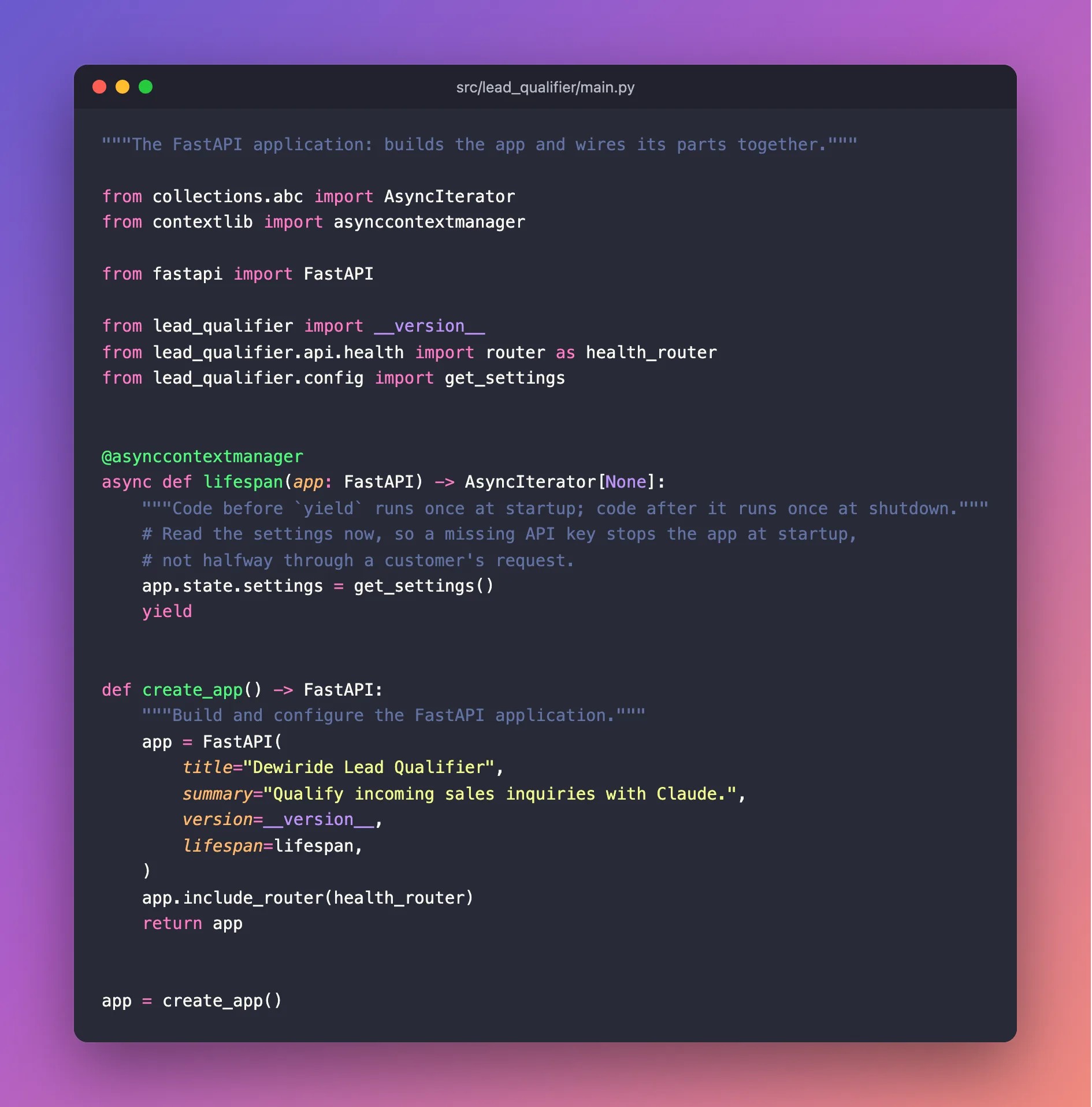
"""The FastAPI application: builds the app and wires its parts together."""

from collections.abc import AsyncIterator
from contextlib import asynccontextmanager

from fastapi import FastAPI

from lead_qualifier import __version__
from lead_qualifier.api.health import router as health_router
from lead_qualifier.config import get_settings


@asynccontextmanager
async def lifespan(app: FastAPI) -> AsyncIterator[None]:
    """Code before `yield` runs once at startup; code after it runs once at shutdown."""
    # Read the settings now, so a missing API key stops the app at startup,
    # not halfway through a customer's request.
    app.state.settings = get_settings()
    yield


def create_app() -> FastAPI:
    """Build and configure the FastAPI application."""
    app = FastAPI(
        title="Dewiride Lead Qualifier",
        summary="Qualify incoming sales inquiries with Claude.",
        version=__version__,
        lifespan=lifespan,
    )
    app.include_router(health_router)
    return app


app = create_app()
Step 12: Format and Check the Code with Ruff
Let Ruff tidy and check everything:
uv run ruff format
   Building lead-qualifier @ file:///Users/you/source/dewiride-lead-qualifier
      Built lead-qualifier @ file:///Users/you/source/dewiride-lead-qualifier
Uninstalled 1 package in 1ms
Installed 1 package in 1ms
6 files left unchanged
uv run runs a command inside the project's environment. First it checks the environment is up to date. Because you edited pyproject.toml, it rebuilt the project before running Ruff. Ruff looked at the five Python files and pyproject.toml. If you typed the code exactly as shown, nothing needed reformatting.
uv run ruff check
All checks passed!
Run these two commands whenever you finish a change. Ruff's VS Code extension also shows its findings as you type.
Step 13: Run the API
Start the web server:
uv run uvicorn lead_qualifier.main:app --reload
INFO:     Will watch for changes in these directories: ['/Users/you/source/dewiride-lead-qualifier']
INFO:     Uvicorn running on http://127.0.0.1:8000 (Press CTRL+C to quit)
INFO:     Started reloader process [83946] using WatchFiles
INFO:     Started server process [83948]
INFO:     Waiting for application startup.
INFO:     Application startup complete.
| Part of the command | What it does |
|---|---|
uvicorn | The web server you installed in Step 4 |
lead_qualifier.main:app | Where the app is: the app object in the lead_qualifier.main module, that is, src/lead_qualifier/main.py |
--reload | Restart automatically whenever you save a file. Use it only while developing. |
Application startup complete. means the lifespan function ran, so your settings were read and the API key was found. The process numbers in brackets will differ on your computer. The server keeps running in this terminal; open a second terminal for any other commands.
Step 14: Try the API in Your Browser
FastAPI writes the documentation for your API automatically. Open http://127.0.0.1:8000/docs in your browser:
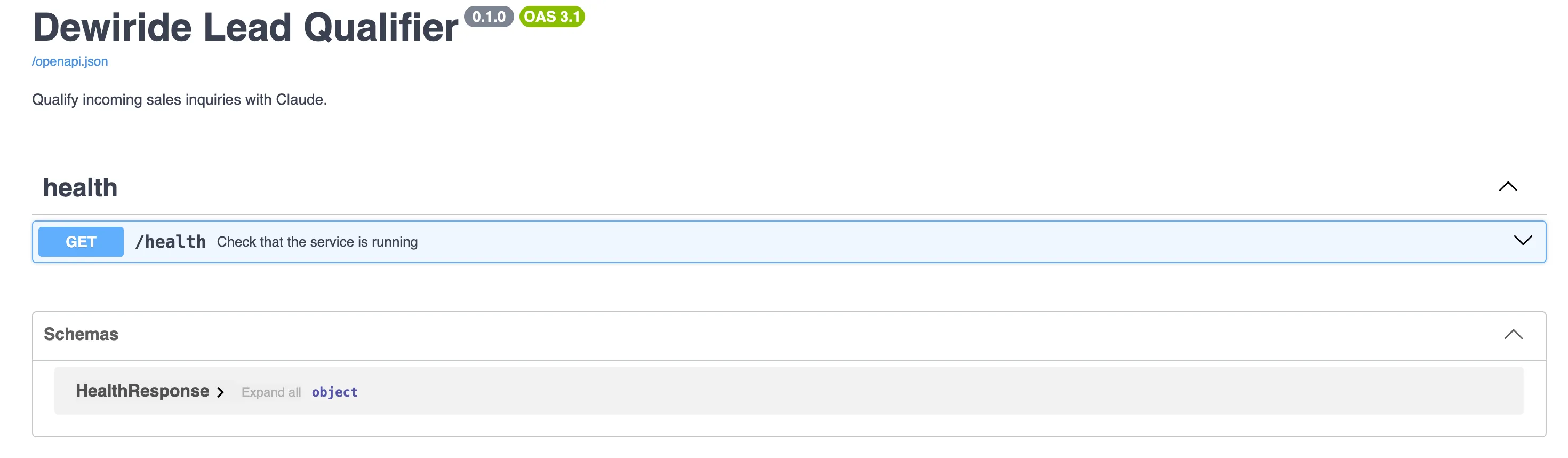
This page is called Swagger UI. Every endpoint appears here with the summary you wrote, and under Schemas you can see the HealthResponse model. The version badge, 0.1.0, comes from pyproject.toml through Step 9.
Try the endpoint:
- Select GET /health to expand it.
- Select Try it out.
- Select Execute.
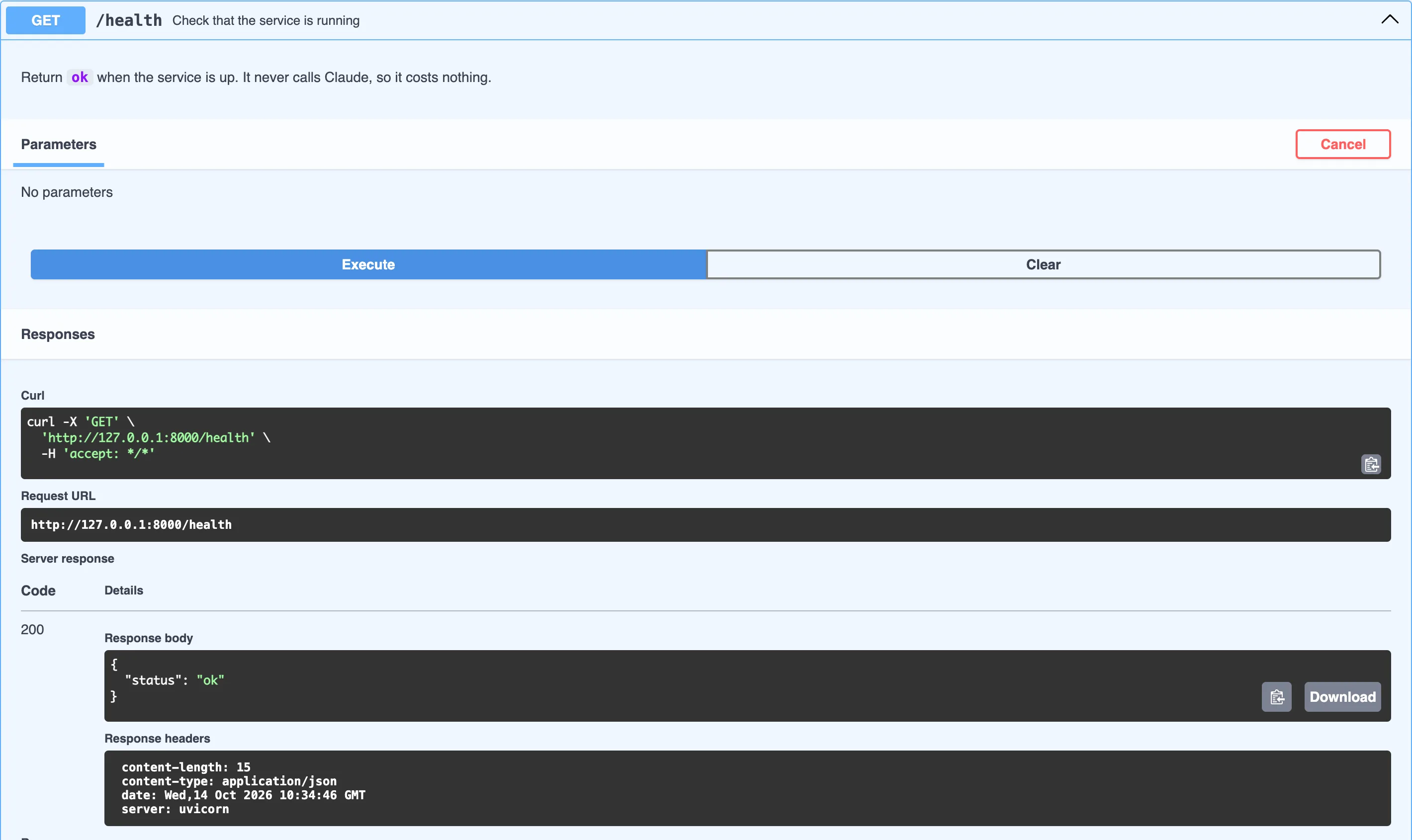
Swagger UI sent a real request to your server. The answer is code 200 (success) with the body {"status": "ok"}. In Part 4, the same page is how you will send a sales inquiry to Claude without writing any extra code.
You can also call the API from a terminal. Open a second terminal, because the first is busy running the server:
- macOS / Linux
- Windows (PowerShell)
curl http://127.0.0.1:8000/health
curl.exe http://127.0.0.1:8000/health
{"status":"ok"}
On Windows, type curl.exe, not curl: in PowerShell, plain curl is a different command with different output. The server's terminal logs each request:
INFO: 127.0.0.1:60836 - "GET /health HTTP/1.1" 200 OK
When you are done, stop the server with Ctrl+C in its terminal:
INFO:     Shutting down
INFO:     Waiting for application shutdown.
INFO:     Application shutdown complete.
INFO:     Finished server process [83948]
INFO:     Stopping reloader process [83946]
Step 15: Save Your Work with Git
uv created a Git repository in Step 1. Before the first commit, check what Git is about to include:
git status
On branch master

No commits yet

Untracked files:
  (use "git add <file>..." to include in what will be committed)
	.env.example
	.gitignore
	.python-version
	README.md
	pyproject.toml
	src/
	uv.lock

nothing added to commit but untracked files present (use "git add" to track)
Look for what is missing: .env and .venv/ are not listed, because .gitignore hides them. Your API key cannot be committed by accident. Your branch may be called main instead of master, depending on your Git settings.
Commit the project:
git add .
git commit -m "Create the project skeleton: settings, health check and FastAPI app"
[master (root-commit) 6d17f65] Create the project skeleton: settings, health check and FastAPI app
 11 files changed, 856 insertions(+)
 create mode 100644 .env.example
 create mode 100644 .gitignore
 create mode 100644 .python-version
 create mode 100644 README.md
 create mode 100644 pyproject.toml
 create mode 100644 src/lead_qualifier/__init__.py
 create mode 100644 src/lead_qualifier/api/__init__.py
 create mode 100644 src/lead_qualifier/api/health.py
 create mode 100644 src/lead_qualifier/config.py
 create mode 100644 src/lead_qualifier/main.py
 create mode 100644 uv.lock
The code after root-commit is your commit's ID, so yours will differ. If Git asks who you are, set your name and email once with git config --global user.name "Your Name" and git config --global user.email "you@example.com", then commit again.
Your Project Now Looks Like This
dewiride-lead-qualifier/
├── .env                  (ignored by Git)
├── .env.example
├── .gitignore
├── .python-version
├── .venv/                (ignored by Git)
├── README.md
├── pyproject.toml
├── uv.lock
└── src/
    └── lead_qualifier/
        ├── __init__.py
        ├── config.py
        ├── main.py
        └── api/
            ├── __init__.py
            └── health.py
Common Mistakes
| Mistake | What happens | How to avoid it |
|---|---|---|
| Running commands outside the project root | uv cannot find pyproject.toml, or the app cannot find .env | cd dewiride-lead-qualifier first, and use VS Code's terminal, which starts there |
Installing packages with pip install | The package is not recorded in pyproject.toml or uv.lock, so it is missing on the next machine | Always use uv add (or uv add --dev for developer tools) |
Committing .env | Your API key is published with your code | Add .env to .gitignore before the first commit, and check git status |
Wrapping the key in quotes or adding spaces in .env | The key is read wrongly, and Claude rejects it in Part 4 | Write ANTHROPIC_API_KEY=sk-ant-… with nothing around the key |
| Naming settings without a prefix | An environment variable from another tool silently overrides your setting | Prefix every app setting, as with LEAD_QUALIFIER_ here |
Editing uv.lock by hand | uv may refuse to use it, or install unexpected versions | Let uv manage it. Change versions with uv add or uv lock --upgrade-package. |
Troubleshooting
| Problem | Likely cause | Fix |
|---|---|---|
Startup fails with ValidationError: 1 validation error for Settings / ANTHROPIC_API_KEY / Field required, then Application startup failed. Exiting. | No .env in the folder you started from, or the key line is empty | Create .env from .env.example in the project root, paste your key, and start the server from the project root |
No module named 'lead_qualifier' | The command ran outside the project's environment | Start everything with uv run … from the project root |
| An error saying the address or port is already in use | Another program, or another copy of the server, already uses port 8000 | Stop the other copy with Ctrl+C, or add --port 8001 to the command and open http://127.0.0.1:8001/docs instead |
| VS Code underlines imports in red | VS Code is not using the project's .venv | Run Python: Select Interpreter and choose the entry in .venv |
curl in PowerShell prints something strange | PowerShell's curl is a different command | Use curl.exe |
A setting in .env seems to be ignored | An environment variable with the same name wins over .env | Check for the variable in your terminal (echo $LEAD_QUALIFIER_CLAUDE_EFFORT on macOS/Linux, $env:LEAD_QUALIFIER_CLAUDE_EFFORT in PowerShell) |
Frequently Asked Questions
Why uv instead of pip and venv?
uv does the work of several older tools at once. It installs Python, creates the environment, installs packages, records exact versions in a lock file and runs commands, and it does all of this very quickly. pip plus venv can do some of it, but has no lock file built in, so two people can end up with different versions.
Why put the code in a src folder?
With a src layout, Python can import your code only after it is installed into the environment, which uv add and uv run do for you. Tests, the web server and your editor therefore all use the code the same way it will run in production. It also stops you importing files by accident just because they happen to sit in the current folder.
Should I commit uv.lock and .env.example?
Yes, both. uv.lock makes every install identical, and .env.example documents the settings. Only .env, which holds real secrets, stays out of Git.
Why uvicorn instead of fastapi dev?
fastapi dev comes with the larger fastapi[standard] bundle, which this project skips (see the tip in Step 4). Uvicorn is the server underneath it either way, and the same command, without --reload, runs the app in production.
Can I use another editor, such as PyCharm?
Yes. Every step uses the terminal, so it works in any editor. Point your editor at the .venv folder so it finds the installed packages.
Where is the AI?
In Part 4. First, Part 3 designs the exact shape of the data Claude will return.
Conclusion
You built the foundation of the Lead Qualifier the way a production team would:
- a uv project with a
srclayout, a pinned Python version and a lock file, - four lean dependencies, plus Ruff as a development tool,
- settings loaded from
.env, with a required, hidden API key and an app-specific prefix, - a FastAPI app factory that checks its settings at startup,
- a
/healthendpoint, tested in Swagger UI and with curl, - a first Git commit that does not contain your secrets.
← Previous: Part 1: Overview, Architecture and Your Claude API Key
Next → Part 3: Design the Lead Data Model with Pydantic. You will design the exact JSON shape Claude must return, and see why every field description matters.
Additional Resources
- uv: Working on projects:
uv init,uv add,uv runand the lock file in depth. - Writing your pyproject.toml: the official guide to every
pyproject.tomlsection. - Settings management: every pydantic-settings option, including prefixes, aliases and
.envfiles. - FastAPI: Lifespan events: running code at startup and shutdown.
- FastAPI: Bigger applications: splitting an app into routers, as
api/health.pydoes. - Uvicorn settings: every option of the web server, including
--reload,--hostand--port. - Ruff rules: what each rule set checks.
