Part 18: Audit Logs and Observability
The agent answers employees, calls tools, raises tickets and resets passwords, and all you can see of it is a console that scrolls past. In this part the API sends its logs, traces and metrics out with OpenTelemetry, to the Aspire Dashboard on your machine, so you can open any request and see every step the agent took, how long each step took and how many tokens it used. The agent also writes an audit trail: who raised which ticket, who approved or rejected a password reset, what the agent remembered or forgot, and when the guard took a secret out.
This is Part 18 of a 23-part series.
- Part 1: Overview, Architecture and Azure Setup
- Part 2: Create a Production-Grade .NET Solution
- Part 3: Your First Agent API with Microsoft Foundry
- Part 4: Multi-Turn Conversations with Sessions
- Part 5: Create a Next.js Chat App for Your Agent
- Part 6: Stream the Agent Through a Trusted Next.js Route Handler
- Part 7: Build a Streaming Chat Page with the AG-UI Client
- Part 8: Secure the Agent API with Microsoft Entra ID
- Part 9: Add Microsoft Entra ID Sign-In to the Next.js Chat App
- Part 10: Give the Agent Enterprise Tools
- Part 11: Let the Agent Create Tickets
- Part 12: Connect an MCP Server
- Part 13: Human Approval for Sensitive Actions
- Part 14: Approval Cards in the Chat UI
- Part 15: Persistent Conversations
- Part 16: Memory That Knows the Employee
- Part 17: Guardrails — Keep Secrets Out of the Model
- Part 18: Audit Logs and Observability (you are here)
- Part 19: Ticket Triage Workflow (coming soon)
- Part 20: Manager Approvals and Checkpoints (coming soon)
- Part 21: Agent Harness — Weekly Problem Report (coming soon)
- Part 22: Deploy to Azure Container Apps (coming soon)
- Part 23: Bring It to Microsoft Teams (coming soon)
What You Will Build
An employee asks the agent to raise a ticket for a slow laptop that already has one. In the dashboard, that one request opens up into everything the API did for it:
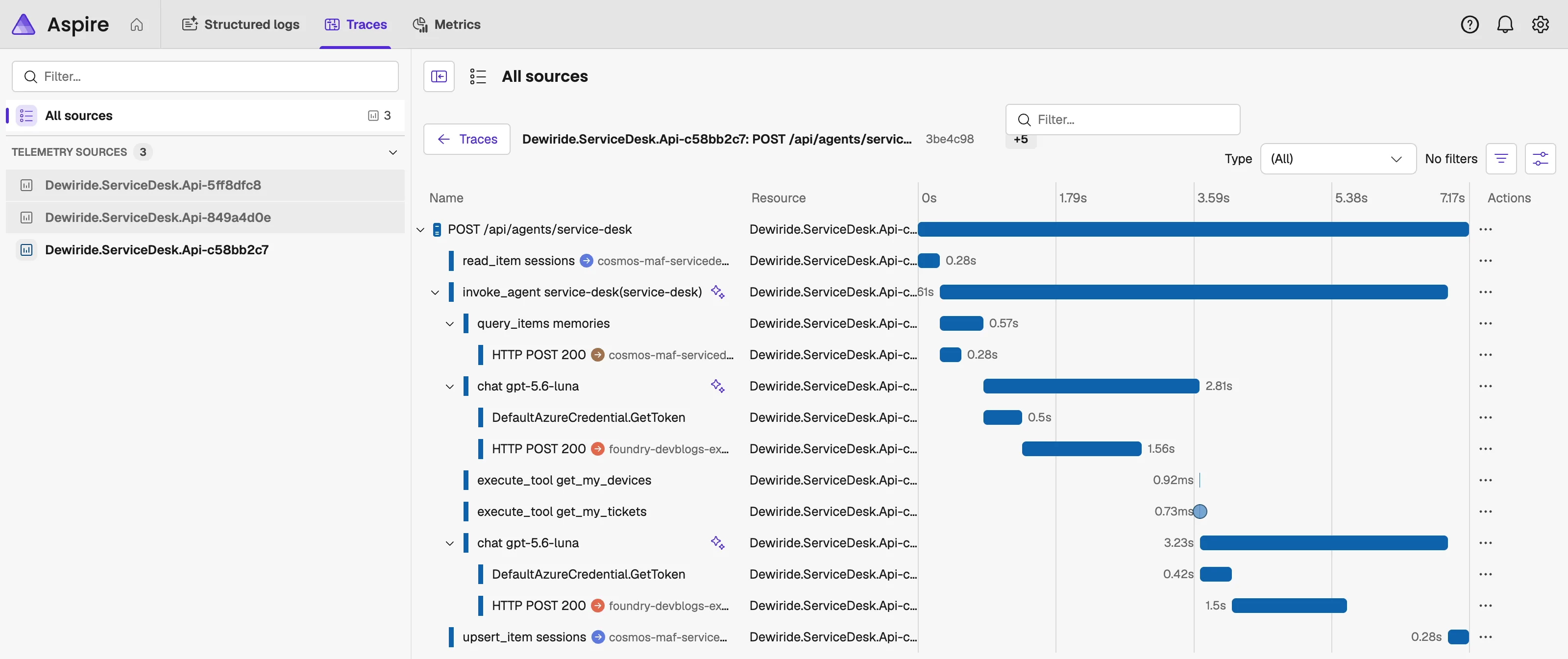
By the end of this part, the solution has:
ObservabilityExtensionsin the API, which sends logs, traces and metrics over OTLP, the OpenTelemetry protocol, whenever an OTLP endpoint is configured, and leaves health checks out of the traces.- The agent's own telemetry: a span for every run, every model call and every tool call, with token counts but without the messages themselves.
- Cosmos DB and Azure SDK spans, so conversation reads, memory queries and token requests show up in the same trace.
ServiceDeskAudit, an audit trail in its own log category: one structured entry for every ticket raised, every approval answer, every reset link sent, every memory saved or forgotten, and every secret the guard removed.
The chat app doesn't change. Everything in this part happens in the API.
Why the Agent Needs Observability
What you can see today
When an answer is slow or wrong, the console tells you little: a few startup lines, a warning from the guard, and nothing about which tool ran, which model call took the time or how many tokens the conversation cost. And an agent does a lot inside one request. It loads the conversation, reads the employee's memories, asks the model, runs tools, asks the model again and saves the conversation. You need to see those steps one by one.
Logs, traces and metrics
OpenTelemetry is the open standard .NET uses for that, and it has three kinds of signal:
- Logs are the
ILoggerentries you already write, sent with their values, such as a ticket number, as separate fields. - Traces follow one request from start to end. Each step is a span with a start, a duration and attributes, and spans nest: the agent's run sits inside the HTTP request, and each model call sits inside the run.
- Metrics are numbers measured over time, such as how long requests take or how many tokens each model call used.
Agent Framework creates all three for agents. From Microsoft's documentation: Agent Framework integrates with OpenTelemetry, and more specifically Agent Framework emits traces, logs, and metrics according to the OpenTelemetry GenAI Semantic Conventions.
Where the telemetry goes
The API doesn't store telemetry. It sends it over OTLP to whatever listens at the address it's given. On your machine that's the Aspire Dashboard, Microsoft's free local viewer. Microsoft's guide Use OpenTelemetry with OTLP and the Aspire Dashboard calls it a developer visualization tool, not a production monitoring tool: it keeps everything in memory, and it starts empty every time. In Azure, Part 22 sends the same telemetry to Azure Monitor instead, and nothing in the agent's code changes for that.
An audit trail is a different job
Observability answers what happened, and why was it slow. An audit trail answers who did what, and when, and it has to keep answering long after the debugging is over. So the audit entries in this part go to a log category of their own, Dewiride.ServiceDesk.Audit, where they can be filtered, kept and protected apart from everything else. Each entry names the signed-in employee by their object ID, never by name or email address, and the log itself records when it happened and which trace it belongs to.
What This Part Costs
Nothing new in Azure. The Aspire Dashboard runs on your machine. Its first start downloads Microsoft's Aspire CLI and the dashboard, close to 1 GB in all, into npm's cache and a folder called .aspire in your home folder.
Telemetry adds no tokens: the model never sees it. The requests this part sends, the hello in Step 4, the two in Step 7 and those in Step 10, used 58,619 input tokens and 1,847 output tokens in my runs, which is at most about 1.4 cents at the prices from Part 1.
Prerequisites
- The solution and the chat app from Part 17: Guardrails — Keep Secrets Out of the Model.
Step 1: Start the Aspire Dashboard
The dashboard comes with Microsoft's Aspire CLI, and npx can run it without installing anything: it downloads the CLI the first time, then starts it. Open a new terminal, because the dashboard keeps running in it:
npx -y @microsoft/aspire-cli@17.0.0 dashboard run
npx -ydownloads an npm package and runs it, without asking first. The series already uses Node.js for the chat app, so you havenpx.@microsoft/aspire-cli@17.0.0is Microsoft's Aspire CLI, pinned to the version this part was tested with.dashboard runstarts the dashboard and keeps it running until you press Ctrl+C.
npm first prints two lines that start with npm notice run. Then, the first time, the CLI says hello and tells you about the usage data it collects:
╭───────────────────────────────────────────────╮
│                                               │
│  Welcome to the                               │
│   █████  ███████ ██████  ██ ██████  ██████    │
│  ██▀▀▀██ ██▀▀▀▀▀ ██▀▀▀██ ██ ██▀▀▀██ ██▀▀▀▀    │
│  ███████ ███████ ██████  ██ ██████  █████     │
│  ██   ██ ▀▀▀▀▀██ ██▀▀▀   ██ ██▀▀██  ██        │
│  ██   ██ ███████ ██      ██ ██   ██ ██████    │
│  ▀▀   ▀▀ ▀▀▀▀▀▀▀ ▀▀      ▀▀ ▀▀   ▀▀ ▀▀▀▀▀▀    │
│                       CLI — version 17.0.0    │
│                                               │
╰───────────────────────────────────────────────╯


Telemetry
---------

The Aspire CLI collects usage data. It is collected by Microsoft and is used to help us improve your experience. You can opt out of telemetry by setting the ASPIRE_CLI_TELEMETRY_OPTOUT environment variable to '1' or 'true' using your preferred shell.

Read more about Aspire CLI telemetry: https://aka.ms/aspire/cli-telemetry


   Dashboard:  http://localhost:18888/login?t=<token>

   OTLP/gRPC:  http://localhost:4317

   OTLP/HTTP:  http://localhost:4318

        Logs:  /Users/you/.aspire/logs/cli_20261128T110345_23547ab4.log
Three of the addresses matter. Dashboard is the page you open; its link carries a one-time token that signs you in, and the token changes every time the dashboard starts. OTLP/gRPC and OTLP/HTTP are where apps send their telemetry. The API will use the gRPC one, http://localhost:4317.
Open the Dashboard link. The dashboard is empty, and it shows two notices:
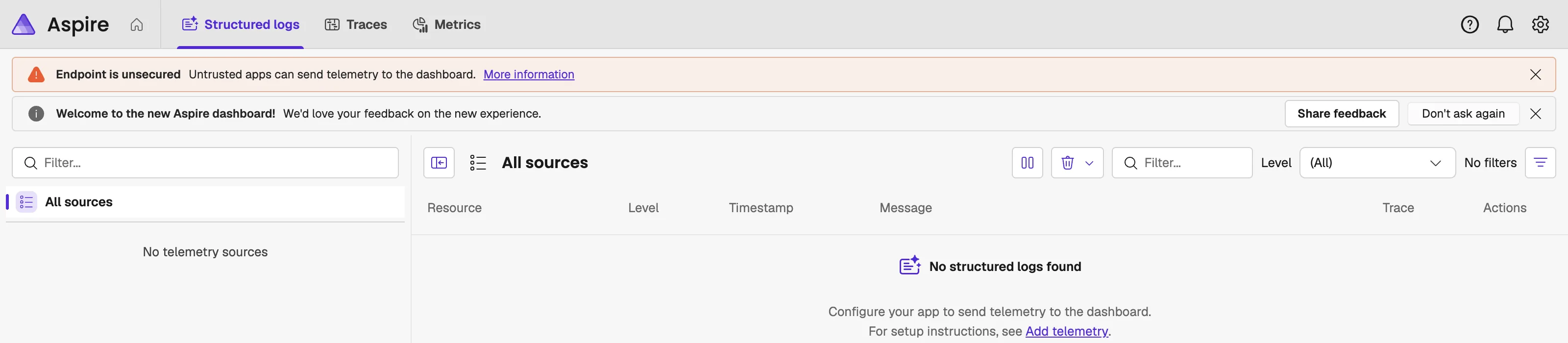
The red one says that any app on your machine can send telemetry to the dashboard, because its OTLP endpoint asks for no key. That's how the dashboard starts by default, and it's fine for this part. Fixed: "Endpoint is unsecured. Untrusted apps can send telemetry to the dashboard." in the Aspire Dashboard shows how to require a key when you want one.
How to Run the Aspire Dashboard Without Docker Using the Aspire CLI covers the dashboard itself in more depth, including how to turn off the CLI's usage data. If you'd rather use Docker, How to Run the Aspire Dashboard in Docker runs the same dashboard as a container on the same ports.
Step 2: Add the OpenTelemetry Packages
In a second terminal, in the DewirideServiceDesk folder, add four OpenTelemetry packages to the API:
dotnet add src/Dewiride.ServiceDesk.Api package OpenTelemetry.Extensions.Hosting --version 1.21.0
dotnet add src/Dewiride.ServiceDesk.Api package OpenTelemetry.Exporter.OpenTelemetryProtocol --version 1.21.0
dotnet add src/Dewiride.ServiceDesk.Api package OpenTelemetry.Instrumentation.AspNetCore --version 1.21.0
dotnet add src/Dewiride.ServiceDesk.Api package OpenTelemetry.Instrumentation.Http --version 1.21.0
| Package | What it does |
|---|---|
OpenTelemetry.Extensions.Hosting | Adds OpenTelemetry to an ASP.NET Core app with AddOpenTelemetry() |
OpenTelemetry.Exporter.OpenTelemetryProtocol | Sends logs, traces and metrics over OTLP |
OpenTelemetry.Instrumentation.AspNetCore | A span and request metrics for every request the API answers |
OpenTelemetry.Instrumentation.Http | A span and metrics for every HTTP call the API makes |
The solution manages package versions centrally (Part 2), so each command writes the version to Directory.Packages.props and a reference without a version to the API's project file. The last lines of the first command's output:
info : PackageReference for package 'OpenTelemetry.Extensions.Hosting' added to '/Users/you/source/DewirideServiceDesk/src/Dewiride.ServiceDesk.Api/Dewiride.ServiceDesk.Api.csproj' and PackageVersion added to central package management file '/Users/you/source/DewirideServiceDesk/Directory.Packages.props'.
info : PackageReference for package 'OpenTelemetry.Extensions.Hosting' version '1.21.0' added to file '/Users/you/source/DewirideServiceDesk/Directory.Packages.props'.
info : Writing assets file to disk. Path: /Users/you/source/DewirideServiceDesk/src/Dewiride.ServiceDesk.Api/obj/project.assets.json
log  : Restored /Users/you/source/DewirideServiceDesk/src/Dewiride.ServiceDesk.Api/Dewiride.ServiceDesk.Api.csproj (in 3.28 sec).
The agent's own telemetry needs no package: it's part of Agent Framework.
Step 3: Send the API's Logs, Traces and Metrics
Create src/Dewiride.ServiceDesk.Api/ObservabilityExtensions.cs. It starts with logs:
// Logs: every ILogger entry, with its finished message and its scopes.
builder.Logging.AddOpenTelemetry(logging =>
{
    logging.IncludeFormattedMessage = true;
    logging.IncludeScopes = true;
});
AddOpenTelemetryadds OpenTelemetry as a logging provider next to the console, so every log entry goes to both.IncludeFormattedMessagesends each entry's finished message, with its values filled in, as well as each value as a field of its own. It's off by default.IncludeScopessends the values ASP.NET Core adds to everything logged during a request, such as the request's path.
Then traces and metrics:
builder.Services.AddOpenTelemetry()
    // The name the dashboard shows for everything this API sends.
    .ConfigureResource(resource => resource.AddService(builder.Environment.ApplicationName))
    // Traces: every request the API answers, and every call it makes over HTTP.
    .WithTracing(tracing => tracing
        .AddAspNetCoreInstrumentation(options =>
            // Health checks run every few seconds and say nothing about the agent: leave them out.
            options.Filter = context => !context.Request.Path.StartsWithSegments("/health"))
        .AddHttpClientInstrumentation())
    // Metrics: how many requests the API answered and made, and how long they took.
    .WithMetrics(metrics => metrics
        .AddAspNetCoreInstrumentation()
        .AddHttpClientInstrumentation());
ConfigureResourcenames the service.ApplicationNameis the project's name,Dewiride.ServiceDesk.Api, and that's the name the dashboard shows.AddAspNetCoreInstrumentationcreates a span for every request the API answers. ItsFilterdecides which requests are traced: a request the filter returnsfalsefor isn't. Health checks run every few seconds in production and tell you nothing about the agent, so they stay out. How to Leave Health Checks Out of OpenTelemetry Traces in ASP.NET Core shows the difference it makes.AddHttpClientInstrumentationcreates a span for every HTTP call the API makes: to Microsoft Entra ID, Cosmos DB, Microsoft Learn and Foundry.WithMetricscounts and times the requests, those the API answers and those it makes.
Last, the exporter:
// Send it all over OTLP, but only when an endpoint is set. Without one, the API runs as before.
if (!string.IsNullOrWhiteSpace(builder.Configuration["OTEL_EXPORTER_OTLP_ENDPOINT"]))
{
    builder.Services.AddOpenTelemetry().UseOtlpExporter();
}
UseOtlpExporter sends all three signals over OTLP to the address in OTEL_EXPORTER_OTLP_ENDPOINT, the standard OpenTelemetry setting. The if keeps the API quiet wherever no endpoint is configured, instead of letting it try to reach a collector that isn't there.
The file so far, with everything wrapped in an extension method, as the solution does for everything else:
using OpenTelemetry;
using OpenTelemetry.Metrics;
using OpenTelemetry.Resources;
using OpenTelemetry.Trace;

namespace Dewiride.ServiceDesk.Api;

/// <summary>
/// Sends the API's logs, traces and metrics out with OpenTelemetry. Where they go comes from the
/// standard OTLP settings, such as OTEL_EXPORTER_OTLP_ENDPOINT. With no endpoint set, nothing is sent.
/// </summary>
internal static class ObservabilityExtensions
{
    public static IHostApplicationBuilder AddServiceDeskObservability(this IHostApplicationBuilder builder)
    {
        // Logs: every ILogger entry, with its finished message and its scopes.
        builder.Logging.AddOpenTelemetry(logging =>
        {
            logging.IncludeFormattedMessage = true;
            logging.IncludeScopes = true;
        });

        builder.Services.AddOpenTelemetry()
            // The name the dashboard shows for everything this API sends.
            .ConfigureResource(resource => resource.AddService(builder.Environment.ApplicationName))
            // Traces: every request the API answers, and every call it makes over HTTP.
            .WithTracing(tracing => tracing
                .AddAspNetCoreInstrumentation(options =>
                    // Health checks run every few seconds and say nothing about the agent: leave them out.
                    options.Filter = context => !context.Request.Path.StartsWithSegments("/health"))
                .AddHttpClientInstrumentation())
            // Metrics: how many requests the API answered and made, and how long they took.
            .WithMetrics(metrics => metrics
                .AddAspNetCoreInstrumentation()
                .AddHttpClientInstrumentation());

        // Send it all over OTLP, but only when an endpoint is set. Without one, the API runs as before.
        if (!string.IsNullOrWhiteSpace(builder.Configuration["OTEL_EXPORTER_OTLP_ENDPOINT"]))
        {
            builder.Services.AddOpenTelemetry().UseOtlpExporter();
        }

        return builder;
    }
}
Call it first in src/Dewiride.ServiceDesk.Api/Program.cs, right after the builder is created, so even the startup logs are sent:
// Logs, traces and metrics, sent with OpenTelemetry wherever the OTLP settings point.
builder.AddServiceDeskObservability();
The complete file:
using Dewiride.ServiceDesk.Agent;
using Dewiride.ServiceDesk.Agent.Memory;
using Dewiride.ServiceDesk.Agent.Sessions;
using Dewiride.ServiceDesk.Api;
using Microsoft.Agents.AI.Hosting;
using Microsoft.Agents.AI.Hosting.AGUI.AspNetCore;
using Microsoft.AspNetCore.Authentication.JwtBearer;
using Microsoft.Identity.Web;

var builder = WebApplication.CreateBuilder(args);

// Logs, traces and metrics, sent with OpenTelemetry wherever the OTLP settings point.
builder.AddServiceDeskObservability();

// Health checks answer one question: "is this API up and running?"
builder.Services.AddHealthChecks();

// Sign-in: accept only access tokens that Microsoft Entra ID issued for this API.
builder.Services.AddAuthentication(JwtBearerDefaults.AuthenticationScheme)
    .AddMicrosoftIdentityWebApi(builder.Configuration.GetSection("AzureAd"));

// Permission: the token must also carry the access_as_user scope.
builder.Services.AddAuthorization(options =>
    options.AddPolicy("ServiceDeskUser", policy => policy.RequireScope("access_as_user")));

// Every conversation belongs to the person who signed in: their object ID (the oid claim)
// becomes part of each conversation's key in the session store.
builder.Services.AddHttpContextAccessor();
builder.Services.UseClaimsBasedAgentIsolation(new ClaimsIdentityAgentIsolationKeyProviderOptions
{
    ClaimType = ClaimConstants.ObjectId,
});

// The agent's tools look up the signed-in employee's own records, by the same object ID.
builder.Services.AddSingleton<ICurrentEmployee, SignedInEmployee>();

// The Dewiride Service Desk agent, and AG-UI: the protocol that streams its answers.
// Every conversation is kept in Azure Cosmos DB, separately for each user, so it
// survives restarts and every copy of the API sees it. What the agent remembers about
// each employee is kept there too, and lasts from one conversation to the next.
var serviceDeskAgent = builder.AddServiceDeskAgent()
    .WithCosmosDbSessionStore()
    .WithCosmosDbEmployeeMemory();
builder.Services.AddAGUIServer();

var app = builder.Build();

app.MapHealthChecks("/health");
app.MapAGUIServer(serviceDeskAgent, "/api/agents/service-desk")
    .RequireAuthorization("ServiceDeskUser");

app.Run();
Then point the API at the dashboard. The setting goes in src/Dewiride.ServiceDesk.Api/appsettings.Development.json only, because the dashboard runs on your machine:
{
  "Logging": {
    "LogLevel": {
      "Default": "Information",
      "Microsoft.AspNetCore": "Warning"
    }
  },
  "OTEL_EXPORTER_OTLP_ENDPOINT": "http://localhost:4317"
}
The OTLP exporter can read its settings from the app's configuration, so the setting works in this file as well as in an environment variable. Microsoft's Use OpenTelemetry with OTLP and the Aspire Dashboard puts it in the same place: add the OTLP settings at the root of appsettings.Development.json, after the Logging section. How to Send ASP.NET Core Logs, Traces and Metrics to the Aspire Dashboard with OpenTelemetry does all of this in a small app of its own.
Step 4: Run It and Read the First Trace
Build the solution from the DewirideServiceDesk folder:
dotnet build
Restore complete (0.4s)
  Dewiride.ServiceDesk.Agent net10.0 succeeded (1.5s) → src/Dewiride.ServiceDesk.Agent/bin/Debug/net10.0/Dewiride.ServiceDesk.Agent.dll
  Dewiride.ServiceDesk.Api net10.0 succeeded (1.2s) → src/Dewiride.ServiceDesk.Api/bin/Debug/net10.0/Dewiride.ServiceDesk.Api.dll

Build succeeded in 3.2s
Start the API as in Part 17:
- VS Code
- Visual Studio
In a terminal, in the src/Dewiride.ServiceDesk.Api folder, run:
dotnet run
Make sure http is selected in the drop-down list next to the green Start button (▶), with Dewiride.ServiceDesk.Api as the startup project, and press Ctrl+F5 (Debug → Start Without Debugging).
Then, in Dewiride.ServiceDesk.Api.http, send the request that says hello to the agent with your token (Part 8). In the dashboard, open Traces:
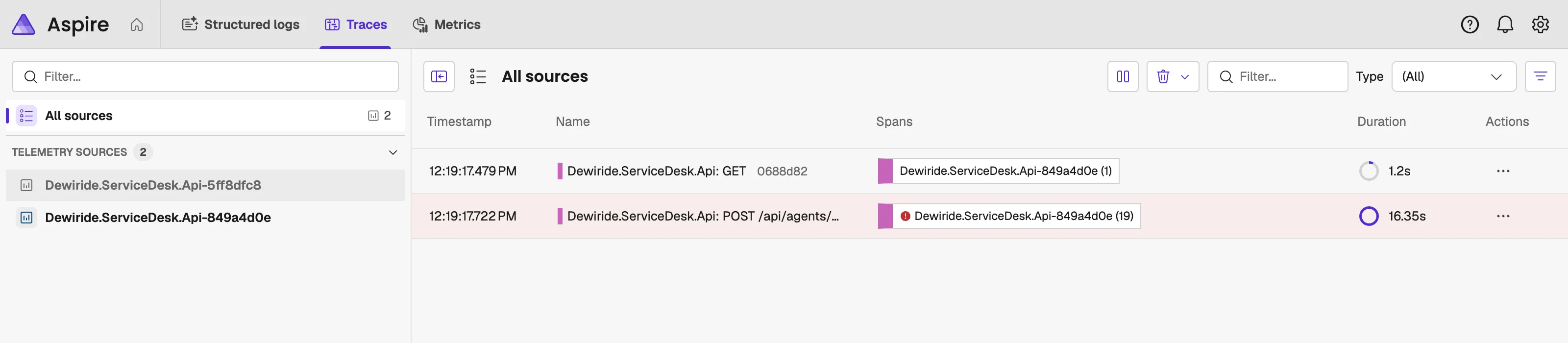
The first trace isn't a request: it's the Cosmos DB client reading the account's settings when the API starts. The second is the hello, and it took 16.35 seconds. Open it:
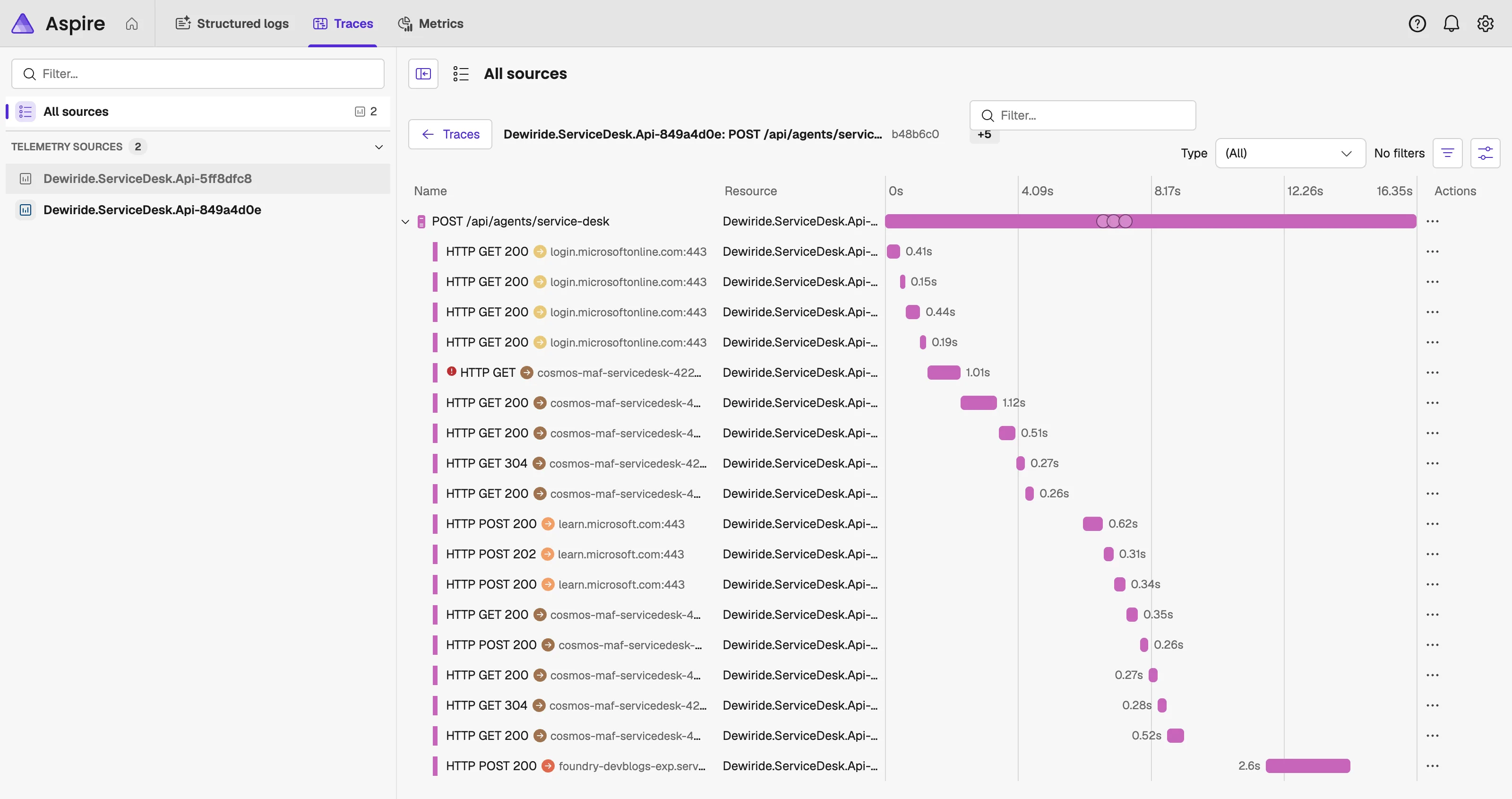
The dashboard adds a short ID to the service's name when the same app has run more than once while it was open, as here.
Under the request, each line is an HTTP call the API made while it answered, and they already tell part of the story:
- Four calls to
login.microsoftonline.com: Microsoft Entra ID's configuration documents and signing keys, which the API downloads on its first request so it can check the employee's token. - Calls to Cosmos DB: the account's details, the container's definition and where its data lives. Microsoft's guide Design resilient applications with Azure Cosmos DB SDKs explains why these are HTTP calls: Gateway mode is always used to fetch metadata such as the account, container, and routing information regardless of which mode SDK is configured for use.
- Three calls to
learn.microsoft.com: the Microsoft Learn MCP server connecting on the first run (Part 12). - One call to Foundry, 2.6 seconds: the model.
What this trace can't tell you is which of those calls belong to the agent, which model call or tool did what, and what filled the gaps between the calls. Steps 5 and 6 fill them in.
The red mark on a Cosmos DB call
One Cosmos DB call failed. Open it:
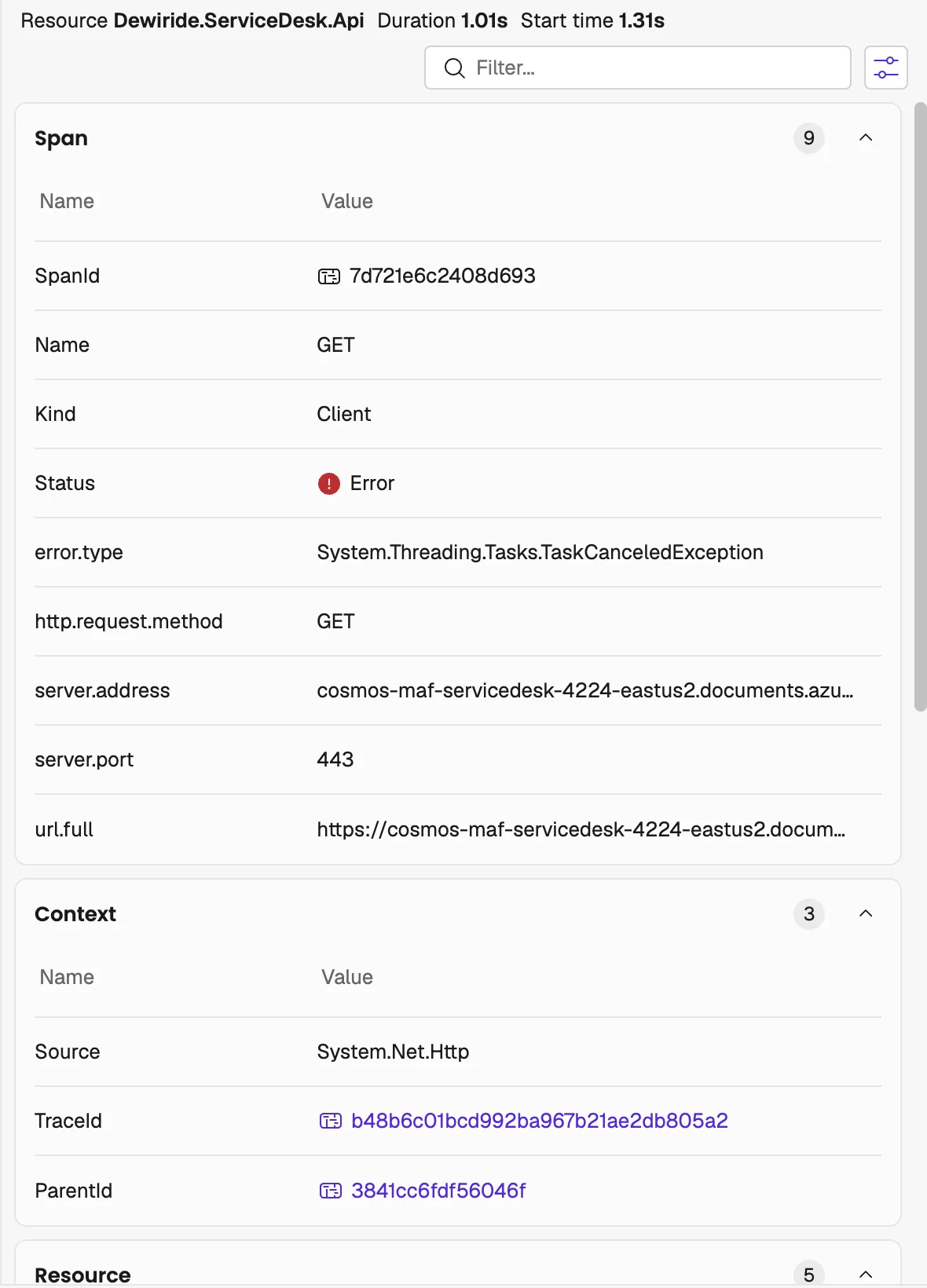
Its url.full ends in /dbs/servicedesk/colls/sessions: the SDK was reading the sessions container's definition, and it gave up after exactly one second. The next call, the same request again, succeeded. That's the Cosmos DB SDK doing its job. Its design notes in the SDK's repository, SdkDesign.md, explain it: Requests are canceled if latency is higher than expected to account for transient network delays (retrying would be faster than waiting for the request to fail). For the metadata it needs on the way to an operation, such as a container's definition or a query's plan, it waits 1 second, then 5, then 65. On my machine this happened in the first request after every start, and once in a later request, inside a query. The next try succeeded every time.
Step 5: Trace the Agent Itself
Agent Framework has its own OpenTelemetry layer for agents. It goes into the agent's pipeline, like the middleware from Part 17, and creates a span for each run, each model call and each tool call.
First, give the agent's telemetry a name. In src/Dewiride.ServiceDesk.Agent/ServiceDeskAgentExtensions.cs, add a constant below AgentName:
/// <summary>
/// The name the agent's traces and metrics are sent under: every run, every model call and every tool call.
/// A host that collects telemetry subscribes to it with AddSource and AddMeter.
/// </summary>
public const string TelemetrySourceName = "Dewiride.ServiceDesk.Agent";
Then add the layer to the agent's pipeline, after the secret guard and before UseLogging():
.AsBuilder()
// The secret guard comes first, so it's the outermost layer: everything after it,
// including the logging below, only ever sees messages without their secrets.
.Use(sharedFunc: secretGuard.RemoveSecretsFromMessagesAsync)
.Use(secretGuard.RemoveSecretsFromToolResultAsync)
// Traces and metrics for every run, model call and tool call: durations and token counts,
// never the messages themselves. After the guard, so even those could never hold a secret.
.UseOpenTelemetry(sourceName: TelemetrySourceName)
.UseLogging()
.Build(services);
UseOpenTelemetrywraps the agent in Agent Framework's OpenTelemetry layer. It creates aninvoke_agentspan for each run, and it also instruments the agent's chat client, so each request to the model gets achatspan and each tool call anexecute_toolspan, all under the same name.sourceNameis the name the spans and metrics are created under. Without one, Agent Framework usesExperimental.Microsoft.Agents.AI, and the API would have to subscribe to that name instead.- After the guard: by default the spans hold names, durations and token counts. The messages themselves, the tools' arguments and their results are what Microsoft's documentation calls sensitive data, and they're only recorded when you turn that on. With the layer after the guard, even then it would only see what the guard has already cleaned.
Last, the API has to subscribe to the agent's source and meter. In src/Dewiride.ServiceDesk.Api/ObservabilityExtensions.cs, add the agent library's namespace at the top:
using Dewiride.ServiceDesk.Agent;
Then add AddSource to the traces and AddMeter to the metrics, and widen their comments:
builder.Services.AddOpenTelemetry()
    // The name the dashboard shows for everything this API sends.
    .ConfigureResource(resource => resource.AddService(builder.Environment.ApplicationName))
    // Traces: the agent's runs, model calls and tool calls; every request the API answers;
    // and every call it makes over HTTP.
    .WithTracing(tracing => tracing
        .AddSource(ServiceDeskAgentExtensions.TelemetrySourceName)
        .AddAspNetCoreInstrumentation(options =>
            // Health checks run every few seconds and say nothing about the agent: leave them out.
            options.Filter = context => !context.Request.Path.StartsWithSegments("/health"))
        .AddHttpClientInstrumentation())
    // Metrics: the agent's token usage and durations, and how many requests the API answered
    // and made, and how long they took.
    .WithMetrics(metrics => metrics
        .AddMeter(ServiceDeskAgentExtensions.TelemetrySourceName)
        .AddAspNetCoreInstrumentation()
        .AddHttpClientInstrumentation());
OpenTelemetry only collects what you subscribe to. A source the API doesn't name is ignored, however much it creates. How to Trace a Microsoft Agent Framework Agent with OpenTelemetry in C# shows the same layer on a small agent of its own.
Step 6: Trace Cosmos DB and the Azure SDK
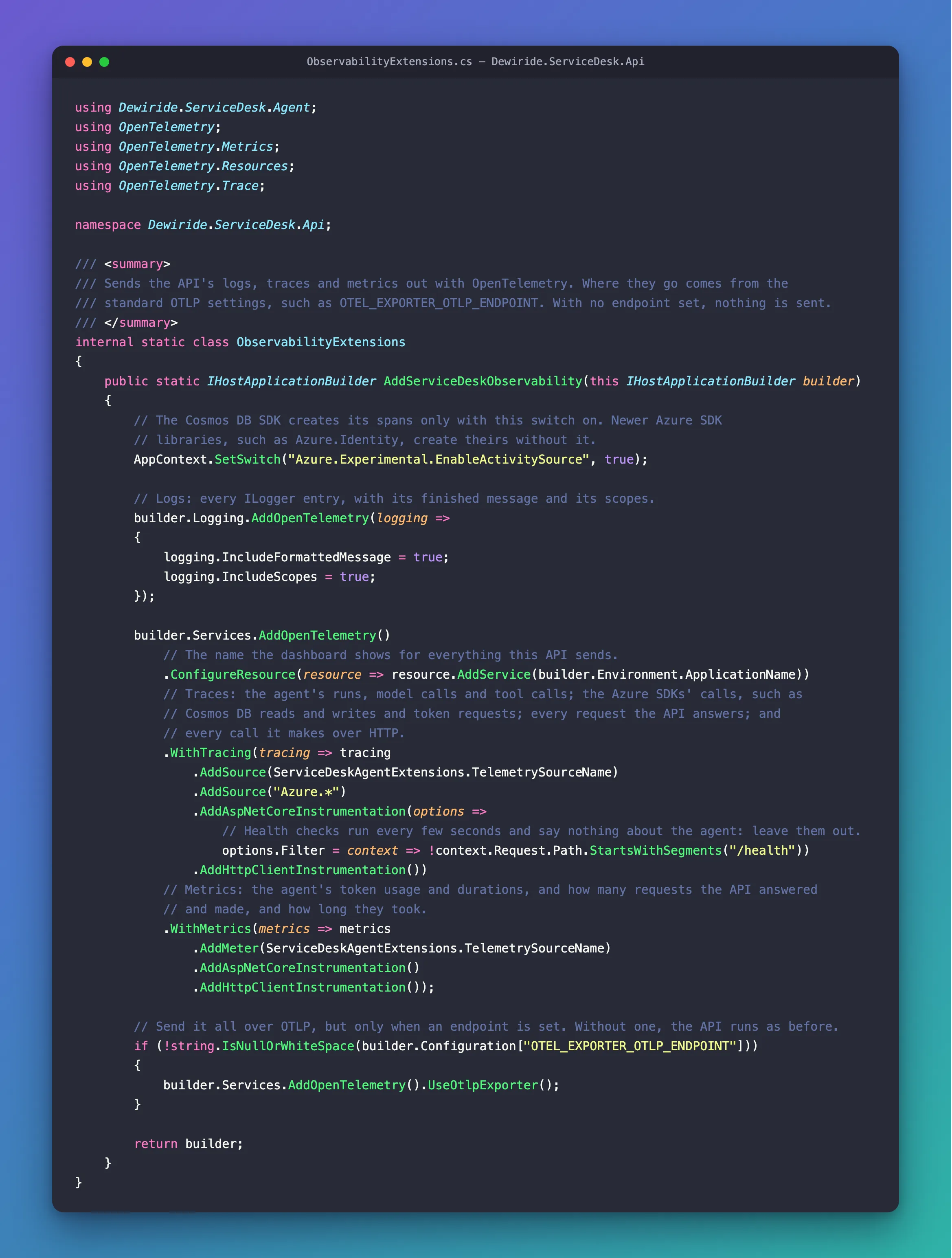
The trace in Step 4 showed Cosmos DB only as HTTP calls, and only some of them. The .NET SDK connects in Direct mode by default, so it reads and writes items over TCP connections of its own, and the HTTP instrumentation never sees those. But the SDK can create a span for every operation itself. In src/Dewiride.ServiceDesk.Agent/CosmosDbServiceCollectionExtensions.cs, switch that on where the client is created:
return new CosmosClient(cosmos.AccountEndpoint, credential, new CosmosClientOptions
{
    ApplicationName = "Dewiride.ServiceDesk",
    UseSystemTextJsonSerializerWithOptions = JsonSerializerOptions.Default,

    // A span for every read and write, under the source "Azure.Cosmos.Operation",
    // for a host that collects traces. Off by default in the SDK's stable releases.
    CosmosClientTelemetryOptions = new CosmosClientTelemetryOptions
    {
        DisableDistributedTracing = false,
    },
});
From Microsoft's Azure Cosmos DB SDK observability: For non-preview versions, it's off by default. You can enable tracing by setting DisableDistributedTracing = false in CosmosClientOptions.CosmosClientTelemetryOptions.
The complete file:
using System.Text.Json;
using Azure.Core;
using Microsoft.Azure.Cosmos;
using Microsoft.Extensions.DependencyInjection;
using Microsoft.Extensions.Options;

namespace Dewiride.ServiceDesk.Agent;

/// <summary>
/// The Azure Cosmos DB account that keeps conversations and memories: its settings and one client
/// for the whole app. Every feature that stores something there calls this first.
/// </summary>
internal static class CosmosDbServiceCollectionExtensions
{
    public static OptionsBuilder<CosmosDbOptions> AddServiceDeskCosmosDb(this IServiceCollection services)
    {
        // Another feature already added the account: share its settings and its client.
        if (services.Any(service => service.ServiceType == typeof(CosmosClient)))
        {
            return services.AddOptions<CosmosDbOptions>();
        }

        // One Cosmos DB client for the whole app. It signs in with the same Microsoft Entra ID credential
        // as the agent - no keys - and stores items with System.Text.Json.
        services.AddSingleton(provider =>
        {
            CosmosDbOptions cosmos = provider.GetRequiredService<IOptions<CosmosDbOptions>>().Value;
            TokenCredential credential = provider.GetRequiredService<TokenCredential>();

            return new CosmosClient(cosmos.AccountEndpoint, credential, new CosmosClientOptions
            {
                ApplicationName = "Dewiride.ServiceDesk",
                UseSystemTextJsonSerializerWithOptions = JsonSerializerOptions.Default,

                // A span for every read and write, under the source "Azure.Cosmos.Operation",
                // for a host that collects traces. Off by default in the SDK's stable releases.
                CosmosClientTelemetryOptions = new CosmosClientTelemetryOptions
                {
                    DisableDistributedTracing = false,
                },
            });
        });

        // Read the "CosmosDb" settings, and refuse to start if the account or the database is missing.
        return services.AddOptions<CosmosDbOptions>()
            .BindConfiguration(CosmosDbOptions.SectionName)
            .Validate(cosmos => Uri.TryCreate(cosmos.AccountEndpoint, UriKind.Absolute, out Uri? endpoint)
                    && endpoint.Scheme == Uri.UriSchemeHttps,
                "Set CosmosDb:AccountEndpoint to the URI of your Azure Cosmos DB account.")
            .Validate(cosmos => !string.IsNullOrWhiteSpace(cosmos.DatabaseName),
                "Set CosmosDb:DatabaseName to the name of your database.")
            .ValidateOnStart();
    }
}
Then, in ObservabilityExtensions.cs, two more lines. One at the top of the method:
// The Cosmos DB SDK creates its spans only with this switch on. Newer Azure SDK
// libraries, such as Azure.Identity, create theirs without it.
AppContext.SetSwitch("Azure.Experimental.EnableActivitySource", true);
And one more source, after the agent's:
.AddSource("Azure.*")
- The switch: without it, the Cosmos DB SDK creates no spans at all, even with
DisableDistributedTracing = false(Fixed: No Azure Cosmos DB Traces in OpenTelemetry Even with DisableDistributedTracing = false). How to Trace Azure Cosmos DB Calls with OpenTelemetry in .NET C# shows both runs, without the switch and with it. The name says Experimental because Azure SDK tracing started out that way. The Azure.Core changelog for version 1.36.0, from November 2023, says the flag is no longer required for most of the newly released libraries, and Azure.Identity's spans indeed appear without it. The Cosmos DB SDK still needs it. AddSource("Azure.*"): each Azure SDK library creates its spans under a source named after it, such asAzure.Cosmos.OperationorAzure.Identity. The*subscribes to all of them. How to Trace Azure SDK Calls with OpenTelemetry in .NET C# traces Azure.Identity on its own.
The complete file:
using Dewiride.ServiceDesk.Agent;
using OpenTelemetry;
using OpenTelemetry.Metrics;
using OpenTelemetry.Resources;
using OpenTelemetry.Trace;

namespace Dewiride.ServiceDesk.Api;

/// <summary>
/// Sends the API's logs, traces and metrics out with OpenTelemetry. Where they go comes from the
/// standard OTLP settings, such as OTEL_EXPORTER_OTLP_ENDPOINT. With no endpoint set, nothing is sent.
/// </summary>
internal static class ObservabilityExtensions
{
    public static IHostApplicationBuilder AddServiceDeskObservability(this IHostApplicationBuilder builder)
    {
        // The Cosmos DB SDK creates its spans only with this switch on. Newer Azure SDK
        // libraries, such as Azure.Identity, create theirs without it.
        AppContext.SetSwitch("Azure.Experimental.EnableActivitySource", true);

        // Logs: every ILogger entry, with its finished message and its scopes.
        builder.Logging.AddOpenTelemetry(logging =>
        {
            logging.IncludeFormattedMessage = true;
            logging.IncludeScopes = true;
        });

        builder.Services.AddOpenTelemetry()
            // The name the dashboard shows for everything this API sends.
            .ConfigureResource(resource => resource.AddService(builder.Environment.ApplicationName))
            // Traces: the agent's runs, model calls and tool calls; the Azure SDKs' calls, such as
            // Cosmos DB reads and writes and token requests; every request the API answers; and
            // every call it makes over HTTP.
            .WithTracing(tracing => tracing
                .AddSource(ServiceDeskAgentExtensions.TelemetrySourceName)
                .AddSource("Azure.*")
                .AddAspNetCoreInstrumentation(options =>
                    // Health checks run every few seconds and say nothing about the agent: leave them out.
                    options.Filter = context => !context.Request.Path.StartsWithSegments("/health"))
                .AddHttpClientInstrumentation())
            // Metrics: the agent's token usage and durations, and how many requests the API answered
            // and made, and how long they took.
            .WithMetrics(metrics => metrics
                .AddMeter(ServiceDeskAgentExtensions.TelemetrySourceName)
                .AddAspNetCoreInstrumentation()
                .AddHttpClientInstrumentation());

        // Send it all over OTLP, but only when an endpoint is set. Without one, the API runs as before.
        if (!string.IsNullOrWhiteSpace(builder.Configuration["OTEL_EXPORTER_OTLP_ENDPOINT"]))
        {
            builder.Services.AddOpenTelemetry().UseOtlpExporter();
        }

        return builder;
    }
}
Step 7: Compare the First Request with the Next
The first request after the API starts does work that later requests don't. Two new requests make that easy to see: the same message, each in a new conversation. Add them to the end of src/Dewiride.ServiceDesk.Api/Dewiride.ServiceDesk.Api.http:
# The first request after the API starts: raise a ticket in a new conversation. Open its trace
# in the Aspire Dashboard to see everything the API does only once after a start.
POST {{baseUrl}}/api/agents/service-desk
Authorization: Bearer {{$dotenv AGENT_API_TOKEN}}
Content-Type: application/json
Accept: text/event-stream

{
  "threadId": "thread-21",
  "runId": "run-1",
  "messages": [
    {
      "id": "message-1",
      "role": "user",
      "content": "My laptop is really slow, even after a restart. Please raise a ticket for it."
    }
  ]
}

###

# The same request in another new conversation, with the API still running. Compare the two traces:
# this one skips everything the first request did once, and the agent finds the ticket it raised.
POST {{baseUrl}}/api/agents/service-desk
Authorization: Bearer {{$dotenv AGENT_API_TOKEN}}
Content-Type: application/json
Accept: text/event-stream

{
  "threadId": "thread-22",
  "runId": "run-1",
  "messages": [
    {
      "id": "message-1",
      "role": "user",
      "content": "My laptop is really slow, even after a restart. Please raise a ticket for it."
    }
  ]
}

###
Each has a threadId that no earlier request used, so each starts a conversation of its own instead of continuing one the API stored in an earlier part.
Stop the API with Ctrl+C and start it again, so it runs the code from Steps 5 and 6 and the next request is the first one after a start. Send the thread-21 request. Its trace now has 34 spans, more than one screen holds:
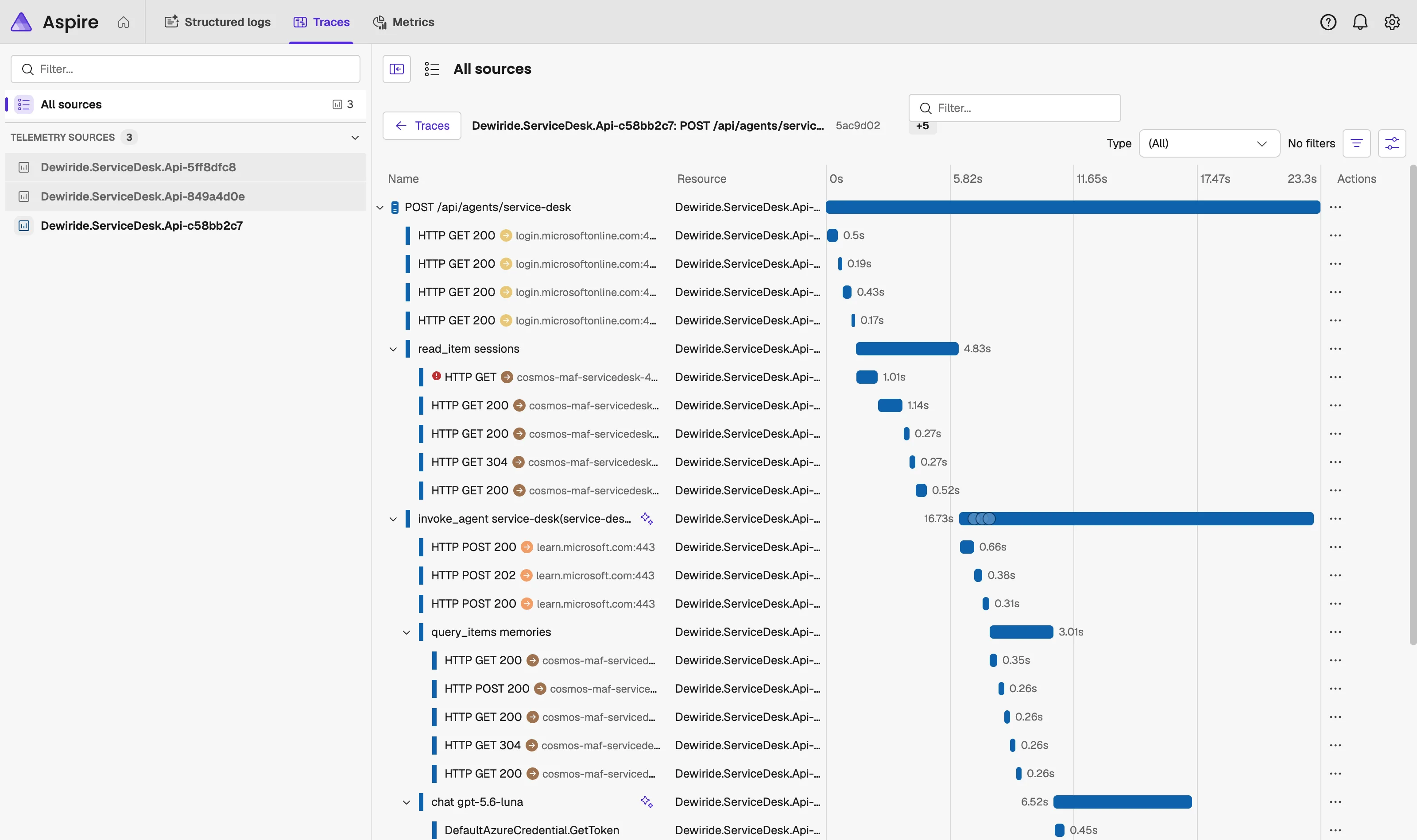
Now the gaps have names. Of the request's 23.3 seconds:
read_item sessions, 4.83 seconds: the API looking for the conversation in Cosmos DB. Inside it are the Cosmos DB calls you saw in Step 4, the one-second retry included, now under the operation that made them.invoke_agent service-desk, 16.73 seconds: the agent's run. It connected to Microsoft Learn, read the employee's memories (query_items memories, 3.01 seconds), and made three model calls of 6.52, 3.07 and 2.64 seconds, withget_my_tickets,get_my_devicesandcreate_ticketbetween them.create_ticketraised INC1004. Each tool took between 1.1 and 10.16 milliseconds.
Then send the thread-22 request, without restarting. Its trace is the one at the top of this part: 7.17 seconds and 14 spans. The sign-in documents, the Cosmos DB details and the Microsoft Learn connection were all fetched already, so read_item sessions took 0.28 seconds and query_items memories 0.57. The agent checked the employee's devices and tickets at the same moment, found INC1004, and answered without raising a duplicate:
You already have an open ticket for this issue: INC1004, “Laptop very slow after restart.”

It’s assigned to the Service Desk and is currently New. Your Surface Laptop 7 (DW-LT-1001) has only 6% free storage, which may be contributing to the slowness.

Also, a password was included in another ticket and removed before I could see it. Please change that password because it was written down. I can reset it for you if needed.
The spans worth knowing:
| Span | What it is |
|---|---|
POST /api/agents/service-desk | The request, from ASP.NET Core |
read_item sessions, upsert_item sessions | The conversation loaded and saved (Part 15), from the Cosmos DB SDK |
invoke_agent service-desk | The agent's run, from UseOpenTelemetry |
query_items memories | The employee's memories (Part 16) |
chat gpt-5.6-luna | One request to the model |
DefaultAzureCredential.GetToken | The credential getting a token for that request, from Azure.Identity |
execute_tool <name> | One tool call |
Every model call waits for a token
Each chat span starts with DefaultAzureCredential.GetToken: 0.5 and 0.42 seconds in the second request. On your machine the credential is the Azure CLI's, and it gets every token from the az command. The Azure SDK's own token caching guide lists AzureCliCredential with in-memory token caching Not Supported, and ManagedIdentityCredential, the one the API uses in Azure, as Supported. So this is a cost on your machine only: in Azure, the token comes from memory.
What a model call records
Select the first chat gpt-5.6-luna span of the second request:
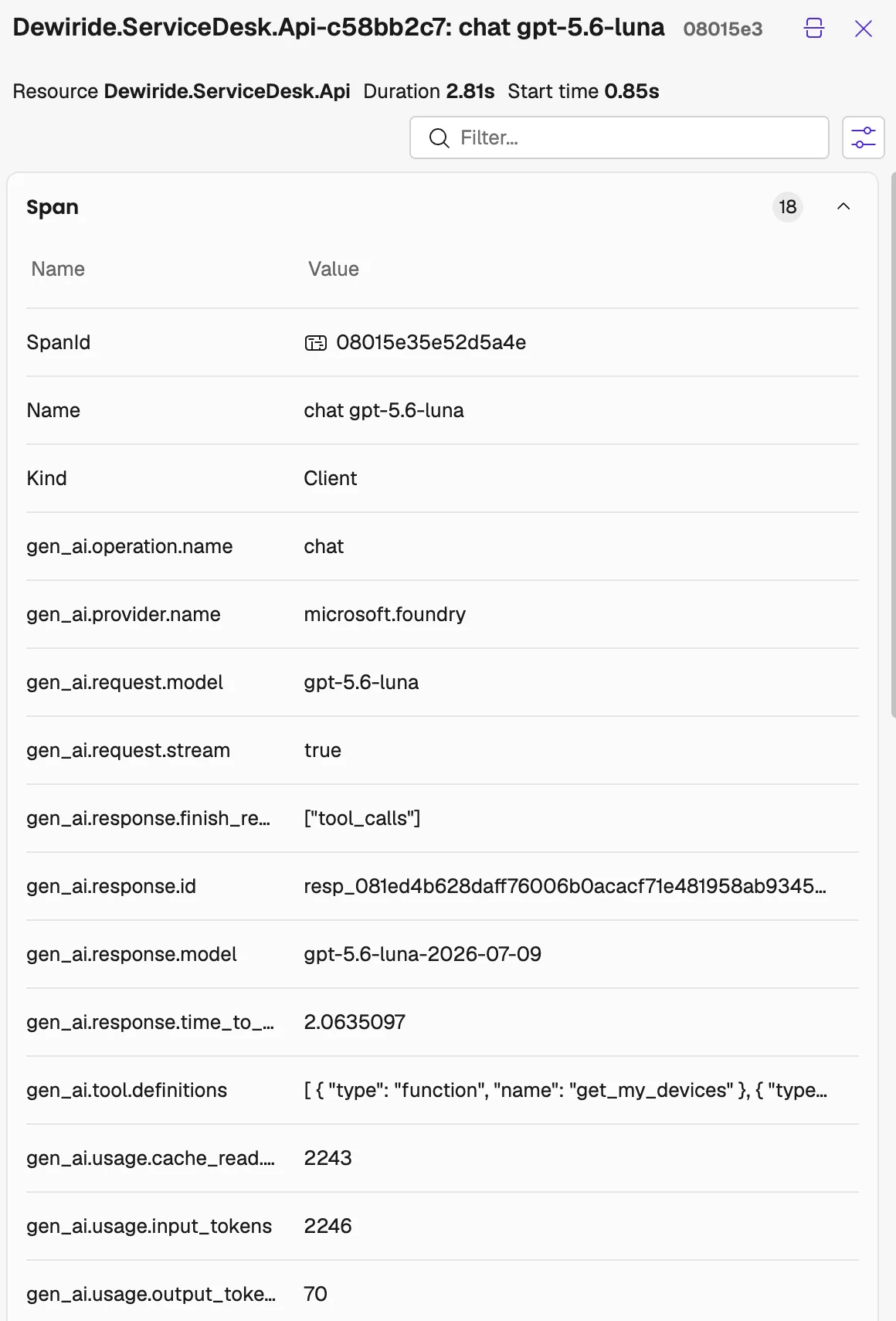
The span records the model and its exact version, gpt-5.6-luna-2026-07-09, why it stopped (tool_calls: it asked for tools), the response's ID in Foundry, and the tokens: 2,246 input tokens, of which 2,243 came from Foundry's prompt cache, and 70 output tokens, of which 22 were reasoning. The employee's message and the model's answer aren't there. That's the default, and it's what you want in telemetry that more people can read than the conversations themselves.
A tool call records its name, its description and its call ID, and again not its arguments or its result. Here is create_ticket from another run:
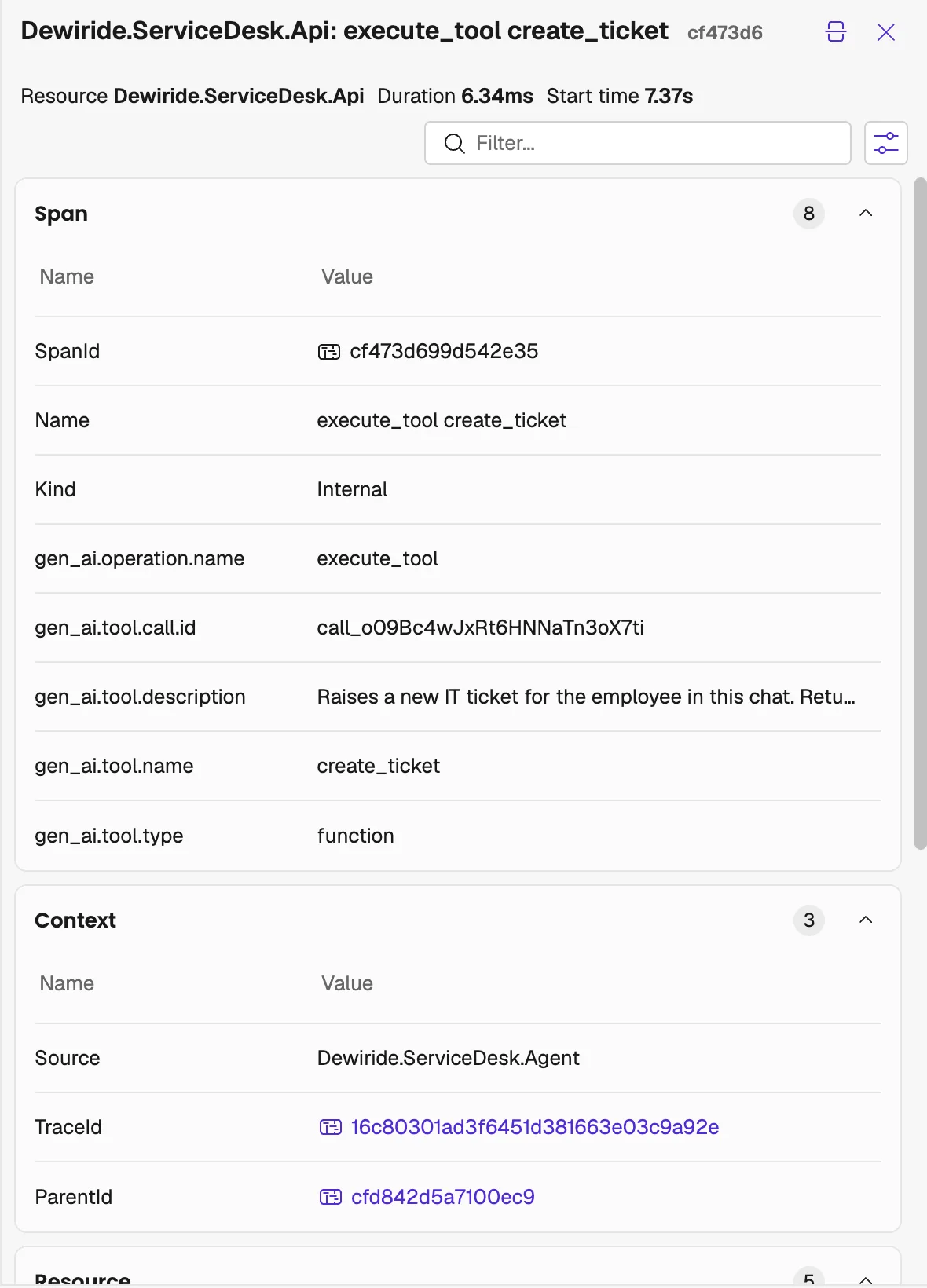
Step 8: Watch the Token Usage
The same layer records metrics. Metrics are sent once a minute, so give the dashboard a minute after your requests. Open Metrics, then the meter whose name starts with Dewiride.ServiceDesk. It has four instruments: gen_ai.client.operation.duration, gen_ai.client.operation.time_to_first_chunk, gen_ai.client.operation.time_per_output_chunk and gen_ai.client.token.usage. The last one is what the conversations cost:
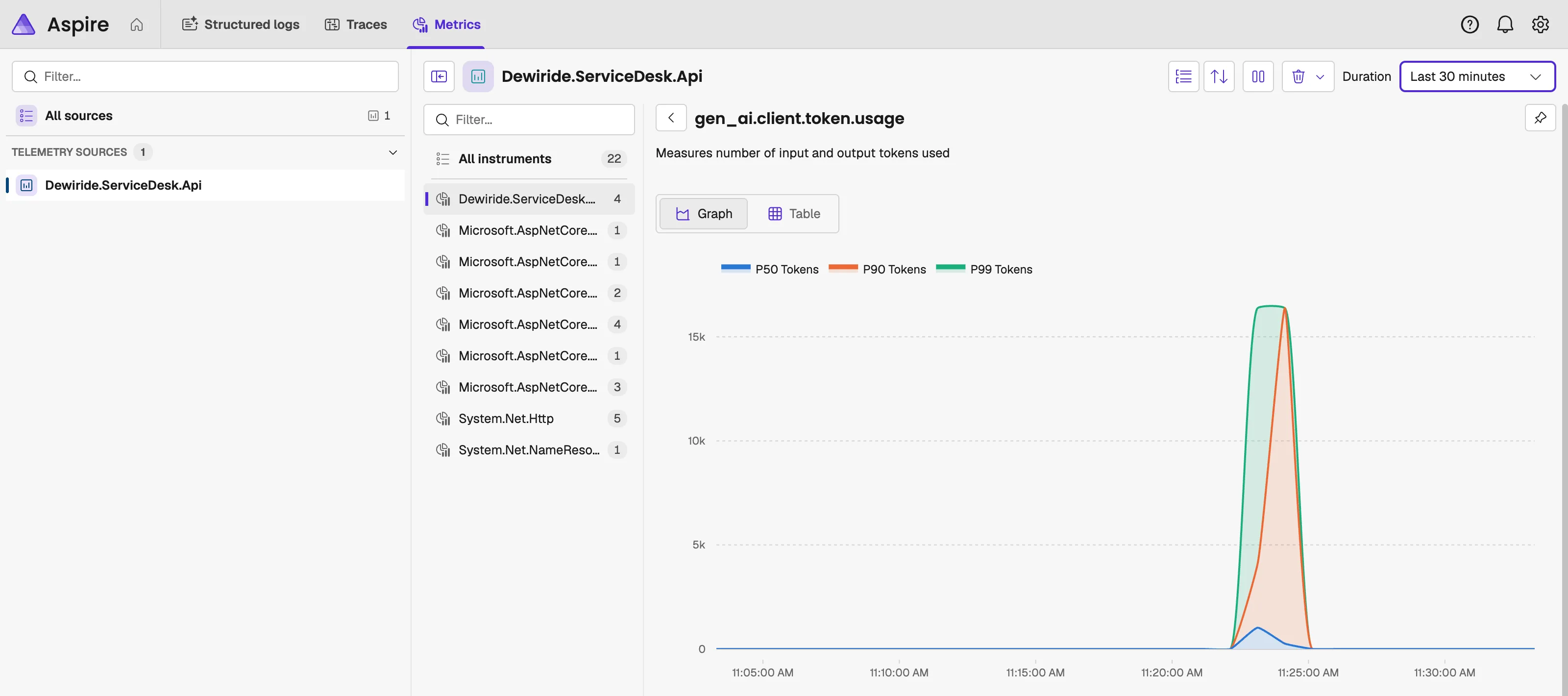
gen_ai.client.token.usage is a histogram: it counts how many model calls fell between fixed boundaries, and the dashboard works out the percentiles from those counts. So the lines move in steps at the boundaries rather than through the exact numbers. Read the chart as the shape of your token use over time, and the spans as the exact counts. Under the chart, Filters splits the data by operation, provider, requested model and model version, and by gen_ai.token.type, which separates input tokens from output tokens. How to See a Microsoft Agent Framework Agent's Token Usage in the Aspire Dashboard compares the graph and the exact counts on a small agent. A cost you can see per call is a cost you can bring down.
Step 9: Write the Audit Trail
The audit trail is a class in the agent library, so every host that runs the agent, the API today and a Teams bot later, writes the same entries. Create src/Dewiride.ServiceDesk.Agent/Auditing/ServiceDeskAudit.cs. Its first part names the category and the employee:
public sealed partial class ServiceDeskAudit(ILoggerFactory loggerFactory, ICurrentEmployee currentEmployee)
{
    /// <summary>The category every audit entry is logged under.</summary>
    public const string CategoryName = "Dewiride.ServiceDesk.Audit";

    private readonly ILogger logger = loggerFactory.CreateLogger(CategoryName);

    // Who did it always comes from the sign-in, never from the AI model.
    private string EmployeeId => currentEmployee.Id ?? "(no one signed in)";
CategoryName: the logger is created for a fixed category, not for the class, so every entry is easy to find, keep and protect, whichever class writes it.EmployeeIdcomes fromICurrentEmployee, the signed-in employee's object ID that the API already gives the tools (Part 10). The model never chooses who did something.
Each entry is a source-generated [LoggerMessage] method with its own event ID and name:
[LoggerMessage(EventId = 1, EventName = "TicketRaised", Level = LogLevel.Information,
    Message = "Raised ticket {TicketNumber} ({TicketType}) for employee {EmployeeId}.")]
private partial void LogTicketRaised(string employeeId, string ticketNumber, TicketType ticketType);

[LoggerMessage(EventId = 7, EventName = "SecretsRemoved", Level = LogLevel.Warning,
    Message = "Removed {Count} secret(s) from {Source} before the AI model saw it, for employee {EmployeeId}.")]
private partial void LogSecretsRemoved(string employeeId, int count, string source);
The source generator writes the method bodies when you build. Each value in braces becomes a field of its own in the log, so the dashboard can filter on TicketNumber or EmployeeId, and the event name, such as TicketRaised, is a field too. How to Write an Audit Log with LoggerMessage in .NET C# builds the same pattern in a small console app, and How to Log with the LoggerMessage Source Generator in .NET C# covers the generator itself.
The public methods fill in the employee themselves, so no caller can pass the wrong one:
public void TicketRaised(Ticket ticket, TicketType type) => LogTicketRaised(EmployeeId, ticket.Number, type);

public void PasswordResetSent(PasswordReset reset) => LogPasswordResetSent(EmployeeId, reset.SentTo, reset.LinkExpiresAt);

public void MemorySaved(MemoryItem memory) => LogMemorySaved(EmployeeId, memory.Id);

public void MemoryForgotten(string memoryId) => LogMemoryForgotten(EmployeeId, memoryId);

public void SecretsRemoved(int count, string source) => LogSecretsRemoved(EmployeeId, count, source);
The approval answers
A rejected password reset never runs the tool, so no tool can record it. The answer arrives in the run's messages instead, as a ToolApprovalResponseContent (Part 13). So the audit class has a small piece of agent run middleware that reads the answers before the run starts:
public Task RecordApprovalAnswersAsync(
    IEnumerable<ChatMessage> messages,
    AgentSession? session,
    AgentRunOptions? options,
    Func<IEnumerable<ChatMessage>, AgentSession?, AgentRunOptions?, CancellationToken, Task> next,
    CancellationToken cancellationToken)
{
    foreach (ToolApprovalResponseContent answer in messages
        .SelectMany(message => message.Contents)
        .OfType<ToolApprovalResponseContent>())
    {
        string toolName = answer.ToolCall is FunctionCallContent call ? call.Name : "(unknown tool)";

        if (answer.Approved)
        {
            LogToolCallApproved(EmployeeId, toolName, answer.ToolCall.CallId);
        }
        else
        {
            LogToolCallRejected(EmployeeId, toolName, answer.ToolCall.CallId);
        }
    }

    return next(messages, session, options, cancellationToken);
}
It has the same shape as the guard's message middleware from Part 17, and it always passes the messages on unchanged.
The complete file:
using Dewiride.ServiceDesk.Agent.Memory;
using Dewiride.ServiceDesk.Agent.Systems;
using Microsoft.Agents.AI;
using Microsoft.Extensions.AI;
using Microsoft.Extensions.Logging;

namespace Dewiride.ServiceDesk.Agent.Auditing;

/// <summary>
/// The audit trail: one log entry for every change the agent makes for an employee, every answer an employee
/// gives to an approval request, and every secret the guard removes. Each entry says who (the signed-in
/// employee's object ID, never a name or an email address), what happened and the outcome. The log itself
/// records when, and which trace the entry belongs to. Every entry goes to its own category, so the audit
/// trail can be kept, searched and protected apart from the other logs.
/// </summary>
public sealed partial class ServiceDeskAudit(ILoggerFactory loggerFactory, ICurrentEmployee currentEmployee)
{
    /// <summary>The category every audit entry is logged under.</summary>
    public const string CategoryName = "Dewiride.ServiceDesk.Audit";

    private readonly ILogger logger = loggerFactory.CreateLogger(CategoryName);

    // Who did it always comes from the sign-in, never from the AI model.
    private string EmployeeId => currentEmployee.Id ?? "(no one signed in)";

    public void TicketRaised(Ticket ticket, TicketType type) => LogTicketRaised(EmployeeId, ticket.Number, type);

    public void PasswordResetSent(PasswordReset reset) => LogPasswordResetSent(EmployeeId, reset.SentTo, reset.LinkExpiresAt);

    public void MemorySaved(MemoryItem memory) => LogMemorySaved(EmployeeId, memory.Id);

    public void MemoryForgotten(string memoryId) => LogMemoryForgotten(EmployeeId, memoryId);

    public void SecretsRemoved(int count, string source) => LogSecretsRemoved(EmployeeId, count, source);

    /// <summary>
    /// Agent run middleware: before a run starts, records the employee's answer to every approval
    /// request the run carries, approved or rejected.
    /// </summary>
    public Task RecordApprovalAnswersAsync(
        IEnumerable<ChatMessage> messages,
        AgentSession? session,
        AgentRunOptions? options,
        Func<IEnumerable<ChatMessage>, AgentSession?, AgentRunOptions?, CancellationToken, Task> next,
        CancellationToken cancellationToken)
    {
        foreach (ToolApprovalResponseContent answer in messages
            .SelectMany(message => message.Contents)
            .OfType<ToolApprovalResponseContent>())
        {
            string toolName = answer.ToolCall is FunctionCallContent call ? call.Name : "(unknown tool)";

            if (answer.Approved)
            {
                LogToolCallApproved(EmployeeId, toolName, answer.ToolCall.CallId);
            }
            else
            {
                LogToolCallRejected(EmployeeId, toolName, answer.ToolCall.CallId);
            }
        }

        return next(messages, session, options, cancellationToken);
    }

    [LoggerMessage(EventId = 1, EventName = "TicketRaised", Level = LogLevel.Information,
        Message = "Raised ticket {TicketNumber} ({TicketType}) for employee {EmployeeId}.")]
    private partial void LogTicketRaised(string employeeId, string ticketNumber, TicketType ticketType);

    [LoggerMessage(EventId = 2, EventName = "ToolCallApproved", Level = LogLevel.Information,
        Message = "Employee {EmployeeId} approved {ToolName} ({ToolCallId}).")]
    private partial void LogToolCallApproved(string employeeId, string toolName, string toolCallId);

    [LoggerMessage(EventId = 3, EventName = "ToolCallRejected", Level = LogLevel.Information,
        Message = "Employee {EmployeeId} rejected {ToolName} ({ToolCallId}).")]
    private partial void LogToolCallRejected(string employeeId, string toolName, string toolCallId);

    [LoggerMessage(EventId = 4, EventName = "PasswordResetSent", Level = LogLevel.Information,
        Message = "Sent a password reset link for employee {EmployeeId} to {SentTo}. It expires at {ExpiresAt:O}.")]
    private partial void LogPasswordResetSent(string employeeId, string sentTo, DateTimeOffset expiresAt);

    [LoggerMessage(EventId = 5, EventName = "MemorySaved", Level = LogLevel.Information,
        Message = "Saved memory {MemoryId} about employee {EmployeeId}.")]
    private partial void LogMemorySaved(string employeeId, string memoryId);

    [LoggerMessage(EventId = 6, EventName = "MemoryForgotten", Level = LogLevel.Information,
        Message = "Forgot memory {MemoryId} about employee {EmployeeId}.")]
    private partial void LogMemoryForgotten(string employeeId, string memoryId);

    [LoggerMessage(EventId = 7, EventName = "SecretsRemoved", Level = LogLevel.Warning,
        Message = "Removed {Count} secret(s) from {Source} before the AI model saw it, for employee {EmployeeId}.")]
    private partial void LogSecretsRemoved(string employeeId, int count, string source);
}
Where the entries are written
The tools record what they changed, after it's done. In src/Dewiride.ServiceDesk.Agent/ServiceDeskTools.cs, add the audit namespace at the top and the audit class to the constructor:
using Dewiride.ServiceDesk.Agent.Auditing;

// ...

public sealed class ServiceDeskTools(
    ICurrentEmployee currentEmployee,
    IDeviceInventory deviceInventory,
    ITicketSystem ticketSystem,
    IKnowledgeBase knowledgeBase,
    IAccountSystem accountSystem,
    ServiceDeskAudit audit)
Then create_ticket records the ticket it raised, and reset_my_password the link it sent, which makes it an async method:
Ticket ticket = await ticketSystem.CreateTicketAsync(
    employeeId, new NewTicket(type, title.Trim(), description.Trim()), cancellationToken);

audit.TicketRaised(ticket, type);
return new CreateTicketResult(Created: true, Ticket: ticket);
public async Task<PasswordReset> ResetMyPasswordAsync(CancellationToken cancellationToken)
{
    PasswordReset reset = await accountSystem.ResetPasswordAsync(SignedInEmployeeId(), cancellationToken);

    audit.PasswordResetSent(reset);
    return reset;
}
The complete file:
using System.ComponentModel;
using Dewiride.ServiceDesk.Agent.Auditing;
using Dewiride.ServiceDesk.Agent.Systems;
using Microsoft.Extensions.AI;

namespace Dewiride.ServiceDesk.Agent;

/// <summary>
/// The agent's tools: what it may look up in the company's IT systems, the tickets it may raise,
/// and the password reset it may ask for. The tools about "my" records always use the signed-in
/// employee, never an ID that the AI model chose.
/// </summary>
public sealed class ServiceDeskTools(
    ICurrentEmployee currentEmployee,
    IDeviceInventory deviceInventory,
    ITicketSystem ticketSystem,
    IKnowledgeBase knowledgeBase,
    IAccountSystem accountSystem,
    ServiceDeskAudit audit)
{
    /// <summary>The longest ticket title that create_ticket accepts.</summary>
    public const int MaxTitleLength = 100;

    /// <summary>The longest ticket description that create_ticket accepts.</summary>
    public const int MaxDescriptionLength = 1000;

    [Description("Gets the laptops and phones that IT gave to the employee in this chat: model, operating system, last check-in, compliance and free storage.")]
    public Task<IReadOnlyList<Device>> GetMyDevicesAsync(CancellationToken cancellationToken) =>
        deviceInventory.GetDevicesAsync(SignedInEmployeeId(), cancellationToken);

    [Description("Gets the open IT tickets of the employee in this chat: number, title, description, status, team and latest update.")]
    public Task<IReadOnlyList<Ticket>> GetMyTicketsAsync(CancellationToken cancellationToken) =>
        ticketSystem.GetOpenTicketsAsync(SignedInEmployeeId(), cancellationToken);

    [Description("Searches the IT knowledge base for articles with known fixes. Returns up to three articles.")]
    public Task<IReadOnlyList<KnowledgeArticle>> SearchKnowledgeBaseAsync(
        [Description("A few words about the problem, such as 'slow laptop' or 'VPN disconnects'.")] string query,
        CancellationToken cancellationToken) =>
        knowledgeBase.SearchAsync(query, cancellationToken);

    [Description("Raises a new IT ticket for the employee in this chat. Returns the new ticket with its number, or the problem to fix before it can be raised.")]
    public async Task<CreateTicketResult> CreateTicketAsync(
        [Description("Incident when something is broken or not working. Request when the employee needs something, such as new hardware, software or access.")] TicketType type,
        [Description("A one-line summary of at most 100 characters, such as 'Laptop very slow, only 6% free storage'.")] string title,
        [Description("The details the IT team needs: what happened or what is needed, the device, and what the employee already tried. At most 1,000 characters.")] string description,
        CancellationToken cancellationToken)
    {
        string employeeId = SignedInEmployeeId();

        // The AI model wrote these arguments, so check them like any input from outside.
        // When something is wrong, tell the model what to fix instead of failing.
        if (FindProblem(type, title, description) is string problem)
        {
            return new CreateTicketResult(Created: false, Problem: problem);
        }

        Ticket ticket = await ticketSystem.CreateTicketAsync(
            employeeId, new NewTicket(type, title.Trim(), description.Trim()), cancellationToken);

        audit.TicketRaised(ticket, type);
        return new CreateTicketResult(Created: true, Ticket: ticket);
    }

    [Description("Resets the password of the employee in this chat: texts a one-time link to their registered mobile phone, where they choose a new password. Returns where the link went and when it expires.")]
    public async Task<PasswordReset> ResetMyPasswordAsync(CancellationToken cancellationToken)
    {
        PasswordReset reset = await accountSystem.ResetPasswordAsync(SignedInEmployeeId(), cancellationToken);

        audit.PasswordResetSent(reset);
        return reset;
    }

    /// <summary>The tools as the agent sees them: a name, a description and the parameters the AI model fills in.</summary>
    public IList<AITool> AsAITools() =>
    [
        AIFunctionFactory.Create(GetMyDevicesAsync, name: "get_my_devices"),
        AIFunctionFactory.Create(GetMyTicketsAsync, name: "get_my_tickets"),
        AIFunctionFactory.Create(SearchKnowledgeBaseAsync, name: "search_knowledge_base"),
        AIFunctionFactory.Create(CreateTicketAsync, name: "create_ticket"),

        // A password reset changes the employee's account, so it waits for a person: the agent
        // can ask for it, but it runs only after the employee approves that exact call.
        new ApprovalRequiredAIFunction(AIFunctionFactory.Create(ResetMyPasswordAsync, name: "reset_my_password")),
    ];

    // Who is asking comes from the host's sign-in. With no one signed in, the tool fails
    // instead of guessing.
    private string SignedInEmployeeId() =>
        currentEmployee.Id ?? throw new InvalidOperationException("No employee is signed in.");

    // Checks a ticket that the AI model wrote. Returns what's wrong, in words the model
    // can act on, or null when the ticket can be raised.
    private static string? FindProblem(TicketType type, string title, string description)
    {
        if (!Enum.IsDefined(type))
        {
            return "The type must be Incident or Request.";
        }

        if (string.IsNullOrWhiteSpace(title))
        {
            return "The title is empty. Write a one-line summary of the problem or the need.";
        }

        if (title.Trim().Length > MaxTitleLength)
        {
            return $"The title has {title.Trim().Length} characters. Shorten it to {MaxTitleLength} characters or fewer.";
        }

        if (string.IsNullOrWhiteSpace(description))
        {
            return "The description is empty. Describe what happened or what is needed.";
        }

        if (description.Trim().Length > MaxDescriptionLength)
        {
            return $"The description has {description.Trim().Length} characters. Shorten it to {MaxDescriptionLength} characters or fewer.";
        }

        return null;
    }
}
EmployeeMemory does the same in its two tools. Add using Dewiride.ServiceDesk.Agent.Auditing; at the top and ServiceDeskAudit audit to its constructor, record the memory after it's saved, and record a forgotten memory only when one was really forgotten:
MemoryItem saved = await store.SaveMemoryAsync(employeeId, text, cancellationToken);

audit.MemorySaved(saved);
return new RememberResult(Saved: true, Memory: saved);
[Description("Forgets one memory about the employee in this chat. Returns true when it was forgotten, false when no memory has that ID.")]
public async Task<bool> ForgetAsync(
    [Description("The ID of the memory to forget, from the list of what you remember.")] string memoryId,
    CancellationToken cancellationToken)
{
    string id = memoryId.Trim();
    bool forgotten = await store.ForgetMemoryAsync(SignedInEmployeeId(), id, cancellationToken);

    if (forgotten)
    {
        audit.MemoryForgotten(id);
    }

    return forgotten;
}
The complete file:
using System.ComponentModel;
using System.Text;
using Dewiride.ServiceDesk.Agent.Auditing;
using Microsoft.Agents.AI;
using Microsoft.Extensions.AI;

namespace Dewiride.ServiceDesk.Agent.Memory;

/// <summary>
/// What the agent remembers about the signed-in employee, from one conversation to the next.
/// At the start of every run it adds the employee's memories to that run's instructions, and gives
/// the model two tools: one to remember something new, one to forget something. Memories always
/// belong to the signed-in employee, never to an ID that the AI model chose.
/// </summary>
public sealed class EmployeeMemory(ICurrentEmployee currentEmployee, IEmployeeMemoryStore store, ServiceDeskAudit audit)
    : AIContextProvider
{
    /// <summary>The most memories the agent keeps about one employee.</summary>
    public const int MaxMemories = 20;

    /// <summary>The longest memory that remember_about_me accepts.</summary>
    public const int MaxMemoryLength = 200;

    // The agent calls this at the start of every run, and adds what it returns to that run only.
    protected override async ValueTask<AIContext> ProvideAIContextAsync(
        InvokingContext context, CancellationToken cancellationToken)
    {
        // No one signed in: nothing to remember, and no memory tools.
        if (currentEmployee.Id is not string employeeId)
        {
            return new AIContext();
        }

        IReadOnlyList<MemoryItem> memories = await store.GetMemoriesAsync(employeeId, cancellationToken);

        return new AIContext
        {
            Instructions = DescribeMemories(memories),
            Tools =
            [
                AIFunctionFactory.Create(RememberAsync, name: "remember_about_me"),
                AIFunctionFactory.Create(ForgetAsync, name: "forget_memory"),
            ],
        };
    }

    [Description("Remembers one lasting fact or preference that the employee in this chat shared about themselves, for later conversations. Returns the saved memory, or the problem to fix first.")]
    public async Task<RememberResult> RememberAsync(
        [Description("One short sentence about the employee, at most 200 characters, such as 'Works from the Pune office on Tuesdays and Thursdays.'")] string memory,
        CancellationToken cancellationToken)
    {
        string employeeId = SignedInEmployeeId();
        string text = memory.Trim();

        // The AI model wrote this, so check it like any input from outside, and say what to fix.
        if (text.Length == 0)
        {
            return new RememberResult(Saved: false, Problem: "The memory is empty. Write it as one short sentence.");
        }

        if (text.Length > MaxMemoryLength)
        {
            return new RememberResult(Saved: false,
                Problem: $"The memory has {text.Length} characters. Shorten it to {MaxMemoryLength} or fewer.");
        }

        IReadOnlyList<MemoryItem> memories = await store.GetMemoriesAsync(employeeId, cancellationToken);

        // Already remembered: keep the one there is.
        if (memories.FirstOrDefault(item => string.Equals(item.Text, text, StringComparison.OrdinalIgnoreCase))
            is MemoryItem existing)
        {
            return new RememberResult(Saved: true, Memory: existing);
        }

        if (memories.Count >= MaxMemories)
        {
            return new RememberResult(Saved: false,
                Problem: $"You already remember {MaxMemories} things about this employee. Ask them which one to forget first.");
        }

        MemoryItem saved = await store.SaveMemoryAsync(employeeId, text, cancellationToken);

        audit.MemorySaved(saved);
        return new RememberResult(Saved: true, Memory: saved);
    }

    [Description("Forgets one memory about the employee in this chat. Returns true when it was forgotten, false when no memory has that ID.")]
    public async Task<bool> ForgetAsync(
        [Description("The ID of the memory to forget, from the list of what you remember.")] string memoryId,
        CancellationToken cancellationToken)
    {
        string id = memoryId.Trim();
        bool forgotten = await store.ForgetMemoryAsync(SignedInEmployeeId(), id, cancellationToken);

        if (forgotten)
        {
            audit.MemoryForgotten(id);
        }

        return forgotten;
    }

    // What the model reads at the start of the run: the memories as a list, each with its ID,
    // so it can forget the right one.
    private static string DescribeMemories(IReadOnlyList<MemoryItem> memories)
    {
        if (memories.Count == 0)
        {
            return "You don't remember anything about this employee from earlier conversations yet.";
        }

        StringBuilder text = new("What you remember about this employee from earlier conversations (ID: memory):");
        foreach (MemoryItem memory in memories)
        {
            text.Append($"\n- {memory.Id}: {memory.Text}");
        }

        return text.ToString();
    }

    // Who is asking comes from the host's sign-in. With no one signed in, the tool fails
    // instead of guessing.
    private string SignedInEmployeeId() =>
        currentEmployee.Id ?? throw new InvalidOperationException("No employee is signed in.");
}

/// <summary>
/// What remember_about_me tells the AI model: the saved memory, or, when it wasn't saved,
/// the problem to fix, in words the model can act on.
/// </summary>
public sealed record RememberResult(bool Saved, MemoryItem? Memory = null, string? Problem = null);
And Part 17's guard now writes its warnings through the audit trail, with the employee in them. In src/Dewiride.ServiceDesk.Agent/Guardrails/SecretGuard.cs, replace using Microsoft.Extensions.Logging; with using Dewiride.ServiceDesk.Agent.Auditing;, take the audit class in place of the logger, and change its two warnings:
public sealed class SecretGuard(ServiceDeskAudit audit)

// ...

audit.SecretsRemoved(removed, "the employee's message");

// ...

audit.SecretsRemoved(removed, $"the result of {context.Function.Name}");
The complete file:
using System.Text.Json;
using Dewiride.ServiceDesk.Agent.Auditing;
using Microsoft.Agents.AI;
using Microsoft.Extensions.AI;

namespace Dewiride.ServiceDesk.Agent.Guardrails;

/// <summary>
/// Keeps secrets away from the AI model. As agent run middleware, it takes them out of the messages
/// a run starts with. As function calling middleware, it takes them out of every tool's result.
/// What comes after it - the model, the conversation Foundry stores, the logs - never sees them.
/// </summary>
public sealed class SecretGuard(ServiceDeskAudit audit)
{
    /// <summary>Agent run middleware: passes the run's messages on with their secrets replaced.</summary>
    public Task RemoveSecretsFromMessagesAsync(
        IEnumerable<ChatMessage> messages,
        AgentSession? session,
        AgentRunOptions? options,
        Func<IEnumerable<ChatMessage>, AgentSession?, AgentRunOptions?, CancellationToken, Task> next,
        CancellationToken cancellationToken)
    {
        List<ChatMessage> safeMessages = [];
        int removed = 0;

        foreach (ChatMessage message in messages)
        {
            List<AIContent> safeContents = [];
            int removedFromMessage = 0;

            foreach (AIContent content in message.Contents)
            {
                if (content is TextContent text && SecretRedactor.Redact(text.Text) is { Removed: > 0 } safe)
                {
                    safeContents.Add(new TextContent(safe.Text));
                    removedFromMessage += safe.Removed;
                }
                else
                {
                    safeContents.Add(content);
                }
            }

            if (removedFromMessage == 0)
            {
                safeMessages.Add(message);
                continue;
            }

            // A copy with the safe text. A host that builds messages from another object model can keep
            // the original object in RawRepresentation, secret and all, so the copy drops it.
            ChatMessage safeMessage = message.Clone();
            safeMessage.Contents = safeContents;
            safeMessage.RawRepresentation = null;
            safeMessages.Add(safeMessage);
            removed += removedFromMessage;
        }

        if (removed > 0)
        {
            audit.SecretsRemoved(removed, "the employee's message");
        }

        return next(safeMessages, session, options, cancellationToken);
    }

    /// <summary>Function calling middleware: runs the tool, then passes its result on with its secrets replaced.</summary>
    public async ValueTask<object?> RemoveSecretsFromToolResultAsync(
        AIAgent agent,
        FunctionInvocationContext context,
        Func<FunctionInvocationContext, CancellationToken, ValueTask<object?>> next,
        CancellationToken cancellationToken)
    {
        object? result = await next(context, cancellationToken);

        int removed = 0;
        object? safeResult = WithoutSecrets(result, ref removed);

        if (removed == 0)
        {
            return result;
        }

        audit.SecretsRemoved(removed, $"the result of {context.Function.Name}");
        return safeResult;
    }

    // Tools made with AIFunctionFactory return JSON; MCP tools often return text. Returns the result
    // in the same form, with the secrets in its text replaced.
    private static object? WithoutSecrets(object? result, ref int removed)
    {
        switch (result)
        {
            case null:
                return null;

            case string text:
                return Redact(text, ref removed);

            case TextContent textContent:
                return new TextContent(Redact(textContent.Text, ref removed));

            case IEnumerable<AIContent> contents:
                List<AIContent> safeContents = [];
                foreach (AIContent content in contents)
                {
                    safeContents.Add(content is TextContent item ? new TextContent(Redact(item.Text, ref removed)) : content);
                }

                return safeContents;

            default:
                // Anything else as JSON: write a copy of it with every string checked.
                JsonElement json = result as JsonElement? ?? JsonSerializer.SerializeToElement(result, AIJsonUtilities.DefaultOptions);
                using (MemoryStream buffer = new())
                {
                    using (Utf8JsonWriter writer = new(buffer, new JsonWriterOptions { Encoder = AIJsonUtilities.DefaultOptions.Encoder }))
                    {
                        WriteWithoutSecrets(writer, json, ref removed);
                    }

                    return JsonSerializer.Deserialize<JsonElement>(buffer.ToArray());
                }
        }
    }

    // Copies a JSON value, replacing the secrets in each string, however deep it is.
    private static void WriteWithoutSecrets(Utf8JsonWriter writer, JsonElement element, ref int removed)
    {
        switch (element.ValueKind)
        {
            case JsonValueKind.Object:
                writer.WriteStartObject();
                foreach (JsonProperty property in element.EnumerateObject())
                {
                    writer.WritePropertyName(property.Name);
                    WriteWithoutSecrets(writer, property.Value, ref removed);
                }

                writer.WriteEndObject();
                break;

            case JsonValueKind.Array:
                writer.WriteStartArray();
                foreach (JsonElement item in element.EnumerateArray())
                {
                    WriteWithoutSecrets(writer, item, ref removed);
                }

                writer.WriteEndArray();
                break;

            case JsonValueKind.String:
                writer.WriteStringValue(Redact(element.GetString()!, ref removed));
                break;

            default:
                element.WriteTo(writer);
                break;
        }
    }

    private static string Redact(string text, ref int removed)
    {
        RedactedText safe = SecretRedactor.Redact(text);
        removed += safe.Removed;
        return safe.Text;
    }
}
Register it
In src/Dewiride.ServiceDesk.Agent/ServiceDeskAgentExtensions.cs, add using Dewiride.ServiceDesk.Agent.Auditing; at the top, and register the audit class as a new step 7, before the guard, which needs it. The guard and the agent become steps 8 and 9:
// 7. The audit trail: one log entry for every change the agent makes for an employee,
//    every approval answer and every secret the guard removes.
builder.Services.AddSingleton<ServiceDeskAudit>();
In the agent's factory, get the audit class with the other services, and put its middleware right after the guard:
ServiceDeskAudit audit = services.GetRequiredService<ServiceDeskAudit>();

// ...

.Use(sharedFunc: secretGuard.RemoveSecretsFromMessagesAsync)
.Use(secretGuard.RemoveSecretsFromToolResultAsync)
// Records every answer the employee gives to an approval request, approved or rejected.
.Use(sharedFunc: audit.RecordApprovalAnswersAsync)
.UseOpenTelemetry(sourceName: TelemetrySourceName)
.UseLogging()
.Build(services);
The complete file:
using Azure.AI.Projects;
using Azure.Core;
using Azure.Identity;
using Dewiride.ServiceDesk.Agent.Auditing;
using Dewiride.ServiceDesk.Agent.Guardrails;
using Dewiride.ServiceDesk.Agent.Memory;
using Dewiride.ServiceDesk.Agent.Systems;
using Microsoft.Agents.AI;
using Microsoft.Agents.AI.Hosting;
using Microsoft.Extensions.AI;
using Microsoft.Extensions.DependencyInjection;
using Microsoft.Extensions.DependencyInjection.Extensions;
using Microsoft.Extensions.Hosting;
using Microsoft.Extensions.Options;

namespace Dewiride.ServiceDesk.Agent;

/// <summary>
/// Adds the Dewiride Service Desk agent to any .NET host: the API today, a background job and a Teams bot later.
/// The host also registers <see cref="ICurrentEmployee"/>, so the agent's tools know who is signed in,
/// and an <see cref="IEmployeeMemoryStore"/>, where the agent keeps what it remembers about each employee.
/// </summary>
public static class ServiceDeskAgentExtensions
{
    /// <summary>The name the agent is registered under.</summary>
    public const string AgentName = "service-desk";

    /// <summary>
    /// The name the agent's traces and metrics are sent under: every run, every model call and every tool call.
    /// A host that collects telemetry subscribes to it with AddSource and AddMeter.
    /// </summary>
    public const string TelemetrySourceName = "Dewiride.ServiceDesk.Agent";

    public static IHostedAgentBuilder AddServiceDeskAgent(this IHostApplicationBuilder builder)
    {
        // 1. Read the "Foundry" settings, and refuse to start if one is missing.
        builder.Services.AddOptions<FoundryOptions>()
            .Bind(builder.Configuration.GetSection(FoundryOptions.SectionName))
            .Validate(foundry => Uri.TryCreate(foundry.ProjectEndpoint, UriKind.Absolute, out _),
                "Set Foundry:ProjectEndpoint to your Foundry project endpoint.")
            .Validate(foundry => !string.IsNullOrWhiteSpace(foundry.ModelDeployment),
                "Set Foundry:ModelDeployment to your model deployment name.")
            .ValidateOnStart();

        // 2. Read the "MicrosoftLearn" settings the same way. Wrong settings stop the API here;
        //    a server that can't be reached doesn't (see MicrosoftLearnTools).
        builder.Services.AddOptions<MicrosoftLearnOptions>()
            .Bind(builder.Configuration.GetSection(MicrosoftLearnOptions.SectionName))
            .Validate(learn => Uri.TryCreate(learn.McpEndpoint, UriKind.Absolute, out Uri? endpoint)
                    && endpoint.Scheme == Uri.UriSchemeHttps,
                "Set MicrosoftLearn:McpEndpoint to the https address of the Microsoft Learn MCP server.")
            .Validate(learn => !string.IsNullOrWhiteSpace(learn.ProtocolVersion),
                "Set MicrosoftLearn:ProtocolVersion to the MCP protocol version the server supports, such as 2025-06-18.")
            .ValidateOnStart();

        // 3. Sign in with Microsoft Entra ID - no API keys. The AZURE_TOKEN_CREDENTIALS
        //    environment variable decides how: your Azure CLI sign-in on your machine,
        //    a managed identity in Azure.
        builder.Services.AddSingleton<TokenCredential>(_ =>
            new DefaultAzureCredential(DefaultAzureCredential.DefaultEnvironmentVariableName));

        // 4. The company's IT systems that the tools read from. These are in-memory samples;
        //    a host that has the real systems registers its own versions first, and those win.
        builder.Services.TryAddSingleton(TimeProvider.System);
        builder.Services.TryAddSingleton<IDeviceInventory, SampleDeviceInventory>();
        builder.Services.TryAddSingleton<ITicketSystem, SampleTicketSystem>();
        builder.Services.TryAddSingleton<IKnowledgeBase, SampleKnowledgeBase>();
        builder.Services.TryAddSingleton<IAccountSystem, SampleAccountSystem>();
        builder.Services.AddSingleton<ServiceDeskTools>();

        // 5. The tools of the Microsoft Learn MCP server. One instance for the whole app, so every
        //    run shares one connection; the app disposes it when it stops.
        builder.Services.AddSingleton<MicrosoftLearnTools>();

        // 6. What the agent remembers about the signed-in employee, from one conversation to the next.
        //    One instance for the whole app: it keeps nothing about any employee itself, only in the store.
        builder.Services.AddSingleton<EmployeeMemory>();

        // 7. The audit trail: one log entry for every change the agent makes for an employee,
        //    every approval answer and every secret the guard removes.
        builder.Services.AddSingleton<ServiceDeskAudit>();

        // 8. The secret guard, which keeps passwords and recovery keys away from the AI model.
        builder.Services.AddSingleton<SecretGuard>();

        // 9. Register the agent with its tools. It talks to your model through the Foundry project,
        //    gets the Microsoft Learn tools and the employee's memories at the start of every run,
        //    takes secrets out of messages and tool results, records approval answers in the audit
        //    trail, traces every run, and logs every run that fails, so the API's console shows you why.
        return builder.AddAIAgent(AgentName, (services, name) =>
        {
            FoundryOptions foundry = services.GetRequiredService<IOptions<FoundryOptions>>().Value;
            TokenCredential credential = services.GetRequiredService<TokenCredential>();
            ServiceDeskTools tools = services.GetRequiredService<ServiceDeskTools>();
            MicrosoftLearnTools microsoftLearnTools = services.GetRequiredService<MicrosoftLearnTools>();
            EmployeeMemory employeeMemory = services.GetRequiredService<EmployeeMemory>();
            SecretGuard secretGuard = services.GetRequiredService<SecretGuard>();
            ServiceDeskAudit audit = services.GetRequiredService<ServiceDeskAudit>();

            AIProjectClient projectClient = new(new Uri(foundry.ProjectEndpoint), credential);

            return projectClient
                .AsAIAgent(new ChatClientAgentOptions
                {
                    // A fixed ID. Without one, every start gets a new random ID, and the session store,
                    // which keeps each conversation under the agent's ID, can't find yesterday's conversations.
                    Id = name,
                    Name = name,
                    ChatOptions = new ChatOptions
                    {
                        ModelId = foundry.ModelDeployment,
                        Instructions = ServiceDeskInstructions.Text,
                        Tools = tools.AsAITools(),
                    },
                    AIContextProviders = [microsoftLearnTools, employeeMemory],
                })
                .AsBuilder()
                // The secret guard comes first, so it's the outermost layer: everything after it,
                // including the logging below, only ever sees messages without their secrets.
                .Use(sharedFunc: secretGuard.RemoveSecretsFromMessagesAsync)
                .Use(secretGuard.RemoveSecretsFromToolResultAsync)
                // Records every answer the employee gives to an approval request, approved or rejected.
                .Use(sharedFunc: audit.RecordApprovalAnswersAsync)
                // Traces and metrics for every run, model call and tool call: durations and token counts,
                // never the messages themselves. After the guard, so even those could never hold a secret.
                .UseOpenTelemetry(sourceName: TelemetrySourceName)
                .UseLogging()
                .Build(services);
        });
    }
}
Last, keep the category's level explicit in src/Dewiride.ServiceDesk.Api/appsettings.json, so that a quieter default level later can't silence the audit trail:
{
  "Logging": {
    "LogLevel": {
      "Default": "Information",
      "Microsoft.AspNetCore": "Warning",
      "Microsoft.Identity": "Warning",
      "Dewiride.ServiceDesk.Audit": "Information"
    }
  },
  "AllowedHosts": "*",
  "AzureAd": {
    "Instance": "https://login.microsoftonline.com/",
    "TenantId": "11111111-1111-1111-1111-111111111111",
    "ClientId": "22222222-2222-2222-2222-222222222222"
  },
  "Foundry": {
    "ProjectEndpoint": "https://foundry-devblogs-exp.services.ai.azure.com/api/projects/proj-devblogs-exp",
    "ModelDeployment": "gpt-5.6-luna"
  },
  "MicrosoftLearn": {
    "McpEndpoint": "https://learn.microsoft.com/api/mcp?maxTokenBudget=2000",
    "ProtocolVersion": "2025-06-18"
  },
  "CosmosDb": {
    "AccountEndpoint": "https://cosmos-maf-servicedesk-4224.documents.azure.com:443/",
    "DatabaseName": "servicedesk",
    "SessionsContainerName": "sessions",
    "MemoriesContainerName": "memories"
  }
}
How to Set Different Log Levels per Environment in appsettings.json explains how these levels combine.
Step 10: Read the Audit Trail
Build again and restart the API. Before I sent the requests below, I deleted the items in the sessions and memories containers in Data Explorer, so every request started a new conversation and the agent remembered nothing yet, as on a new install. If yours still hold conversations and memories from earlier parts, the agent continues those conversations and knows what it remembered then, so its answers, and its entries, can differ from mine. How to View, Edit and Delete Items in Azure Cosmos DB Data Explorer shows how to delete items.
From Dewiride.ServiceDesk.Api.http, as in earlier parts: ask about your tickets, raise a ticket, ask for a password reset and approve it, ask for a reset again in a new conversation and reject it, tell the agent two things about yourself, ask what it remembers, ask it to forget one of them, share a password by mistake, and ask about the ticket that holds a password. The API's console shows the audit entries among its other lines:
warn: Dewiride.ServiceDesk.Audit[7]
      Removed 1 secret(s) from the result of get_my_tickets before the AI model saw it, for employee 00000000-0000-0000-0000-000000000000.
warn: Dewiride.ServiceDesk.Audit[7]
      Removed 1 secret(s) from the result of get_my_tickets before the AI model saw it, for employee 00000000-0000-0000-0000-000000000000.
info: Dewiride.ServiceDesk.Audit[1]
      Raised ticket INC1004 (Incident) for employee 00000000-0000-0000-0000-000000000000.
info: Dewiride.ServiceDesk.Audit[2]
      Employee 00000000-0000-0000-0000-000000000000 approved reset_my_password (call_yW6IKMYSsKG2WLkzXVqTiU4B).
info: Dewiride.ServiceDesk.Audit[4]
      Sent a password reset link for employee 00000000-0000-0000-0000-000000000000 to the mobile phone number ending in 42. It expires at 2026-11-28T11:38:35.8043790+00:00.
info: Dewiride.ServiceDesk.Audit[3]
      Employee 00000000-0000-0000-0000-000000000000 rejected reset_my_password (call_g79RbH2uxyDMHujKFmerW8q4).
info: Dewiride.ServiceDesk.Audit[5]
      Saved memory da37bd5e about employee 00000000-0000-0000-0000-000000000000.
info: Dewiride.ServiceDesk.Audit[5]
      Saved memory 0e4b03c6 about employee 00000000-0000-0000-0000-000000000000.
info: Dewiride.ServiceDesk.Audit[6]
      Forgot memory 0e4b03c6 about employee 00000000-0000-0000-0000-000000000000.
warn: Dewiride.ServiceDesk.Audit[7]
      Removed 1 secret(s) from the employee's message before the AI model saw it, for employee 00000000-0000-0000-0000-000000000000.
warn: Dewiride.ServiceDesk.Audit[7]
      Removed 1 secret(s) from the result of get_my_tickets before the AI model saw it, for employee 00000000-0000-0000-0000-000000000000.
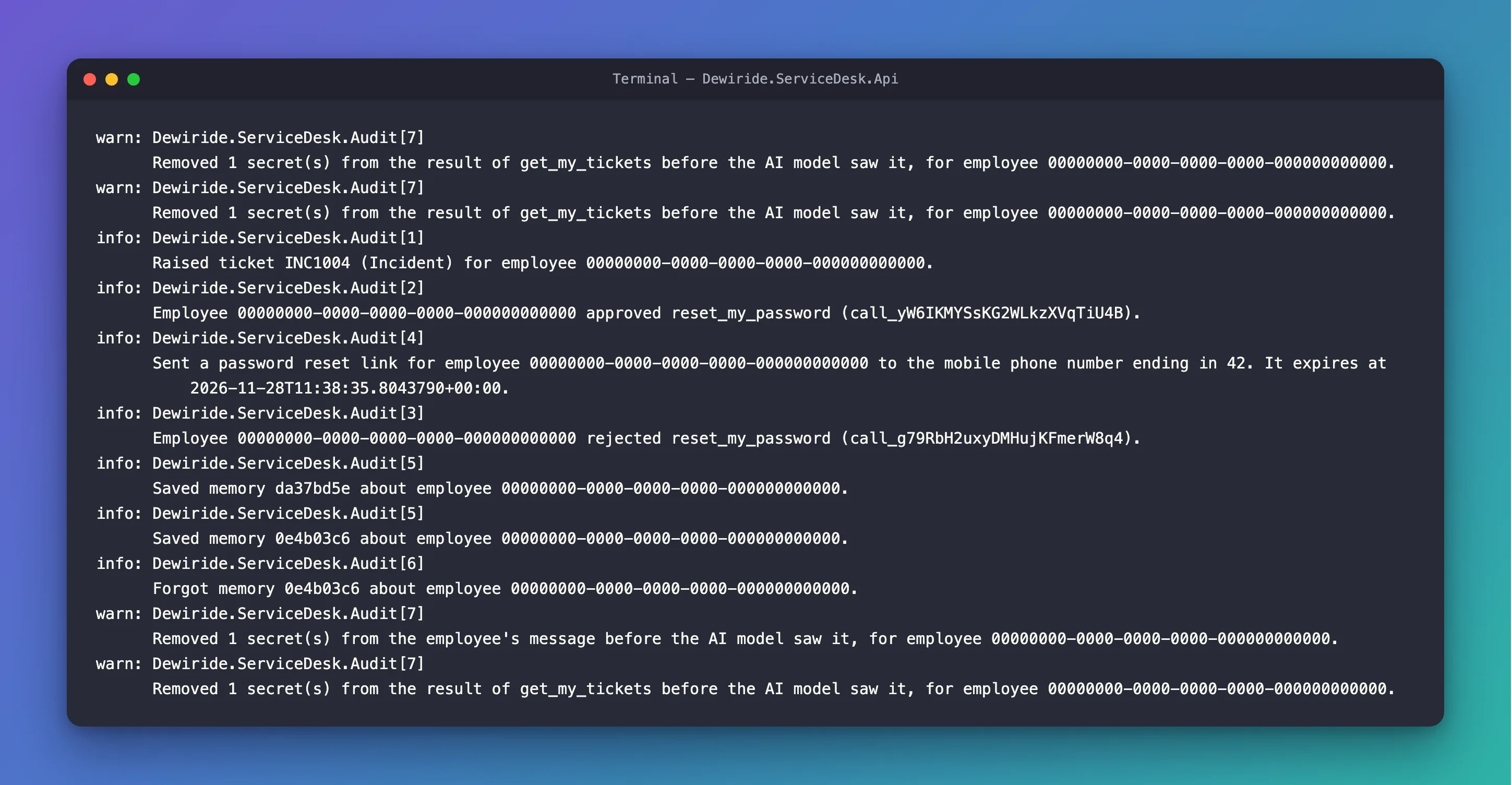
I've replaced my object ID with zeros. Every conversation that looked at the tickets removed the password from the sample ticket raised by email (Part 17), so that entry appears three times.
In the dashboard, open Structured logs and select the filter button next to the level list. In Add filter, choose Category, the condition ==, and the value Dewiride.ServiceDesk.Audit, which the list offers with the number of entries it holds:
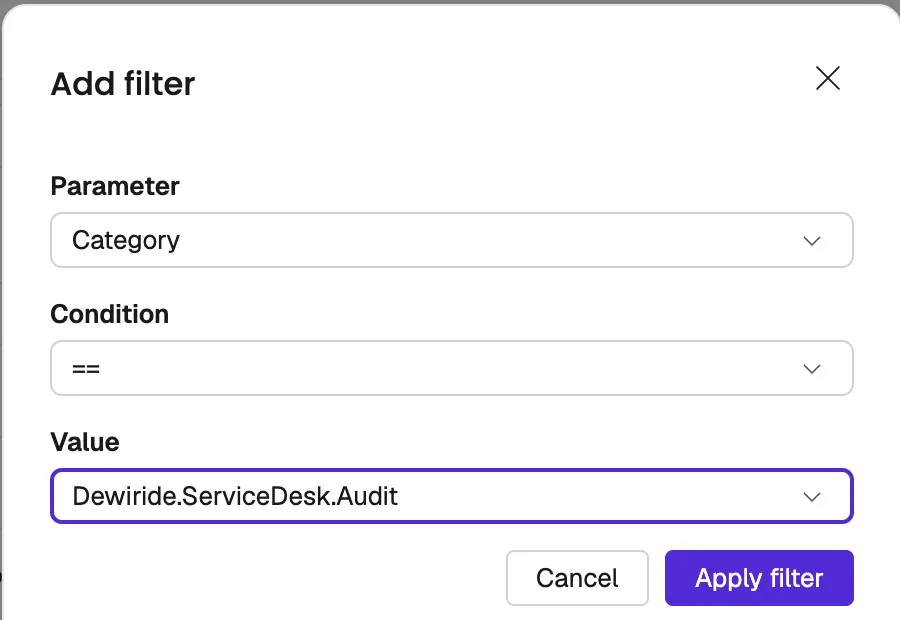
Select Apply filter, and only the audit trail is left, each entry with a link to its trace:
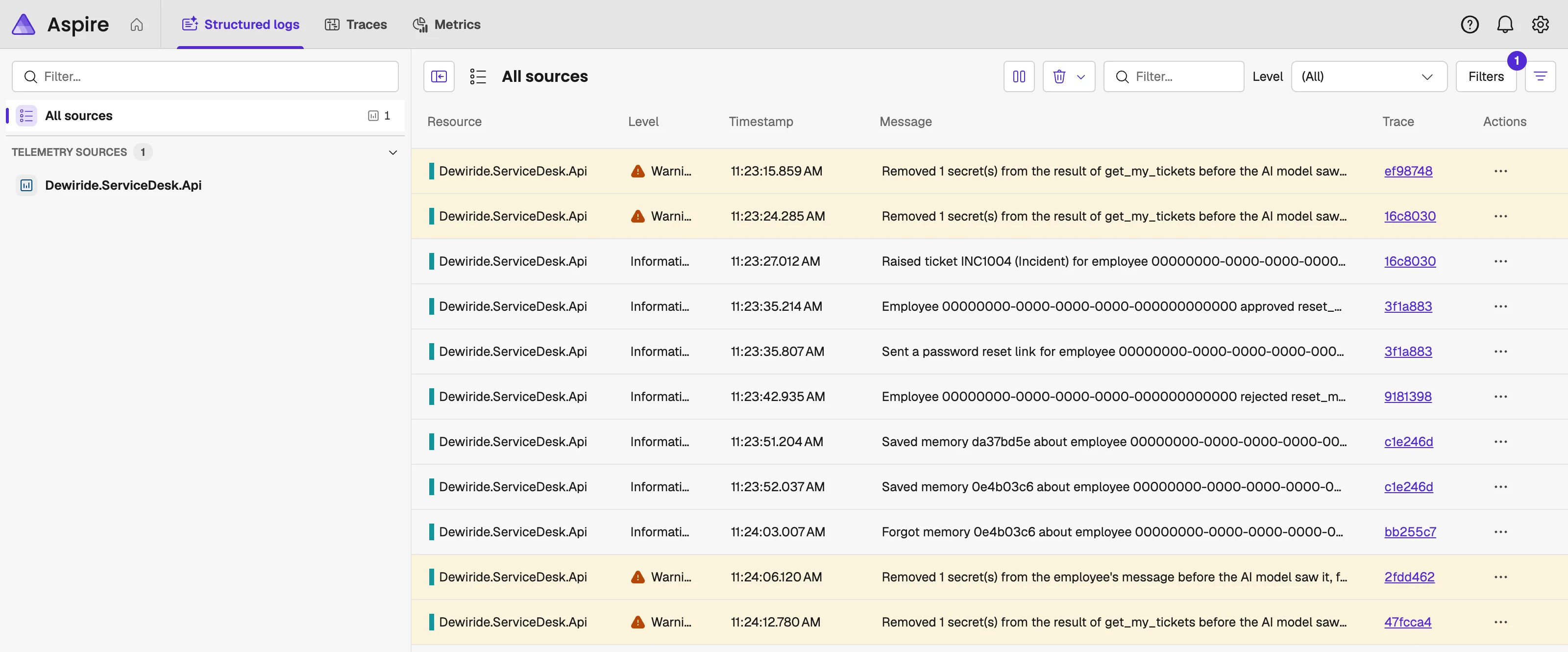
Select the Raised ticket INC1004 entry to see its fields:
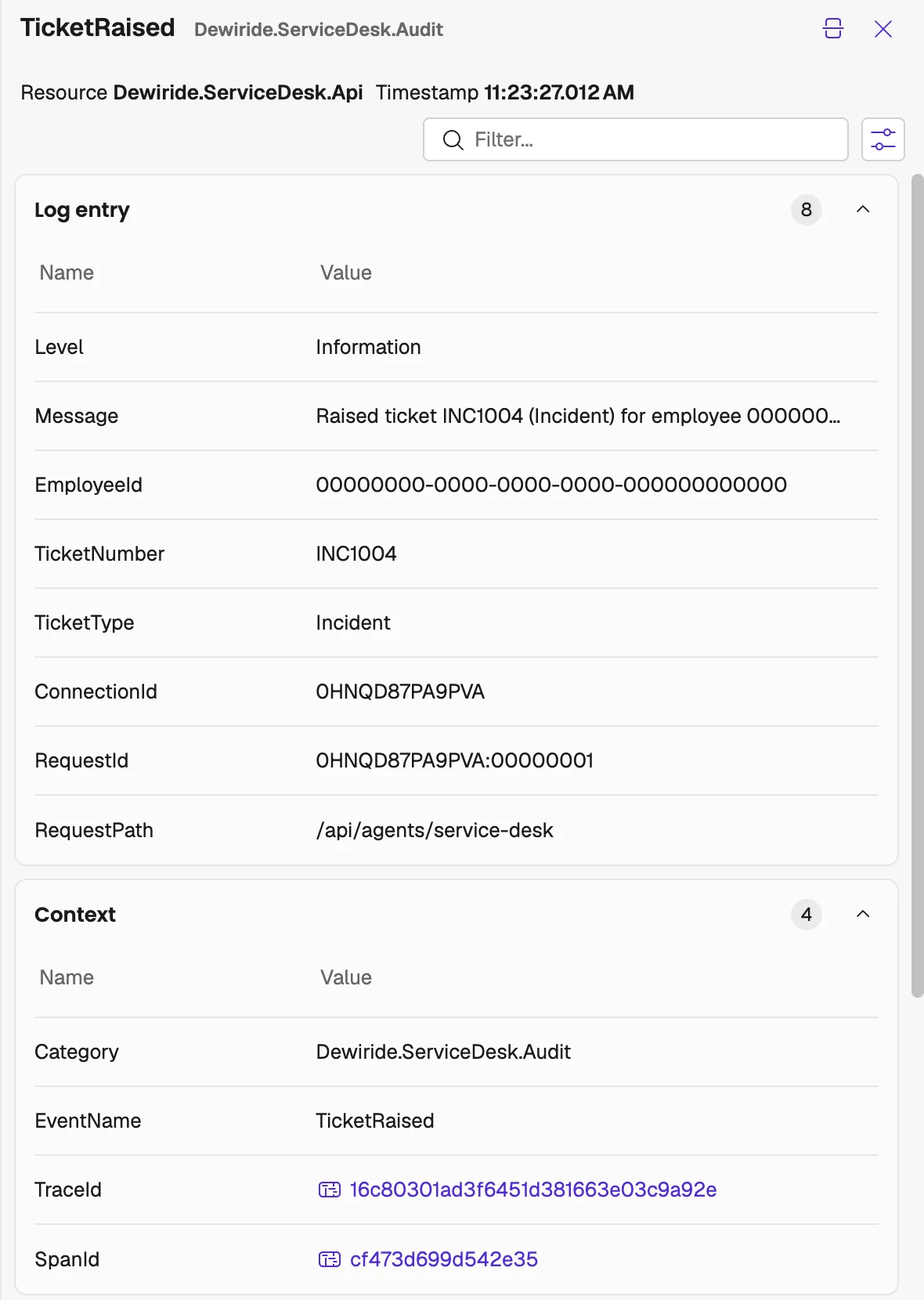
Every value from the message is a field: EmployeeId, TicketNumber, TicketType. The request's path comes from the scopes, and the TraceId links the entry to the trace of the request that raised the ticket, so from any audit entry you can open everything the agent did around it. How to Filter Structured Logs by Category in the Aspire Dashboard shows the filter on its own.
Your Solution Now Looks Like This
DewirideServiceDesk/
├── Directory.Packages.props                          ← four OpenTelemetry packages
├── src/
│   ├── Dewiride.ServiceDesk.Agent/
│   │   ├── Auditing/                                 ← new
│   │   │   └── ServiceDeskAudit.cs                   ← the audit trail and the approval answers
│   │   ├── Guardrails/
│   │   │   └── SecretGuard.cs                        ← writes through the audit trail
│   │   ├── Memory/
│   │   │   └── EmployeeMemory.cs                     ← records saved and forgotten memories
│   │   ├── CosmosDbServiceCollectionExtensions.cs    ← Cosmos DB spans on
│   │   ├── ServiceDeskAgentExtensions.cs             ← the source name, UseOpenTelemetry, the audit trail
│   │   └── ServiceDeskTools.cs                       ← records tickets and reset links
│   └── Dewiride.ServiceDesk.Api/
│       ├── Dewiride.ServiceDesk.Api.http             ← two requests in new conversations
│       ├── ObservabilityExtensions.cs                ← new: logs, traces and metrics over OTLP
│       ├── Program.cs                                ← AddServiceDeskObservability()
│       ├── appsettings.Development.json              ← the dashboard's address
│       └── appsettings.json                          ← the audit category's level
└── web/
    └── agent-chat-ui/                                ← unchanged
Cleanup (Only If You Stop Here)
Stop the dashboard with Ctrl+C in its terminal: everything it showed goes with it. This part creates nothing in Azure, so there's nothing new to delete there. If you are stopping here, clean up as described in Part 16.
The Aspire CLI and the dashboard stay in npm's cache and in the .aspire folder in your home folder, so the next start is quick. To get the space back, delete the .aspire folder; npm cleans its own cache.
Common Mistakes
| Mistake | What happens | Do this instead |
|---|---|---|
Leaving out AddSource for the agent's source name | No invoke_agent, chat or execute_tool spans: OpenTelemetry ignores sources it isn't told about | Add AddSource and AddMeter with TelemetrySourceName (Step 5) |
A different sourceName in the agent and in AddSource | The same as above | Use one constant for both |
| Turning on Cosmos DB tracing without the switch | No Cosmos DB spans | Add AppContext.SetSwitch("Azure.Experimental.EnableActivitySource", true) (Step 6) |
Putting UseOpenTelemetry before the secret guard | It sees messages that still hold the secret, which matters as soon as anyone turns on sensitive data | Put it after the guard (Step 5) |
| Turning on sensitive data to debug, and leaving it on | Employees' messages and tool results end up in telemetry | Keep the default; read conversations where they're stored |
| Taking the employee for an audit entry from the model's arguments | The model can name anyone | Take it from ICurrentEmployee (Step 9) |
| Writing audit entries only from tools | A rejected approval never runs a tool, so it's never recorded | Record approval answers in run middleware (Step 9) |
Setting "Default": "Warning" later | Audit entries at Information disappear | Keep "Dewiride.ServiceDesk.Audit": "Information" (Step 9) |
Troubleshooting
| Symptom | Likely cause | Fix |
|---|---|---|
| The dashboard shows nothing at all | The API isn't running in Development, or the dashboard isn't on port 4317 | Check OTEL_EXPORTER_OTLP_ENDPOINT and the dashboard's OTLP/gRPC address |
No read_item, query_items or upsert_item spans | The Azure SDK's experimental switch is off | Step 6 (Fixed) |
| Logs and traces arrive, metrics don't | Metrics are sent once a minute | Wait a minute, then open Metrics again |
| A red mark on a Cosmos DB HTTP call, usually in the first request after a start | The SDK cancels a slow metadata or query request after one second and tries again | Nothing to fix: check that the next call succeeded (Step 4) |
Every model call starts with a GetToken span of about half a second | The Azure CLI credential keeps no tokens in memory | Expected on your machine only (Step 7) |
| The service's name has a short ID after it | The same app ran more than once while the dashboard was open | Restart the dashboard for a clean list |
| The dashboard asks for a token again | The dashboard restarted, and its token changes every time | Open the new link from its terminal |
Frequently Asked Questions
Can I see what the employee wrote and what the model answered?
Not in this part's telemetry, on purpose. Agent Framework leaves messages out unless you turn on sensitive data, with EnableSensitiveData in UseOpenTelemetry's options or the OTEL_INSTRUMENTATION_GENAI_CAPTURE_MESSAGE_CONTENT environment variable. Microsoft's documentation warns: Only enable sensitive data in development or testing environments, as it might expose user information in production logs and traces. The conversations themselves are in Foundry and Cosmos DB, where access is already controlled.
Is the Aspire Dashboard enough in production?
No. It keeps telemetry in memory and loses it when it stops, and Microsoft calls it a developer tool. Part 22 deploys the API to Azure Container Apps and sends the same telemetry to Azure Monitor, where it's kept and can be searched.
Is a log category really an audit trail?
It's the start of one. Each entry has who, what, when and the trace it belongs to, in a category of its own. What makes it an audit trail in production is where it's kept: a store with its own retention period and its own access rules, such as a Log Analytics workspace that only auditors can read. That's Part 22's job.
Why is the first request so much slower than the next?
It does several things only once: it downloads Entra ID's signing keys, reads the Cosmos DB account's and containers' details, connects to the Microsoft Learn MCP server, and makes the first model call. In my runs, the first raise-a-ticket request took 23.3 seconds and the next one 7.17.
Why does the dashboard say the endpoint is unsecured?
Its OTLP endpoint accepts telemetry from any app that can reach it. That's the default for local use. The fixes post shows how to require an API key.
Conclusion
The API now shows what the agent does. ObservabilityExtensions sends logs, traces and metrics over OTLP whenever an endpoint is set, with health checks left out. UseOpenTelemetry adds a span for every run, model call and tool call, with token counts and without messages, after the secret guard. The Cosmos DB SDK and the other Azure SDK libraries add their own spans, so one trace shows a request from start to end, including what the first request after a start costs. And ServiceDeskAudit writes one entry, in its own category, for every ticket, approval answer, reset link, memory and removed secret, each with the employee and the trace it belongs to.
Next: Part 19: Ticket Triage Workflow (coming soon). So far the agent decides everything inside one conversation. Part 19 builds a workflow that triages new tickets: it categorizes each one and routes it the same way, every time.
Additional Resources
- Observability — Agent Framework's OpenTelemetry layer, its spans and metrics, and sensitive data.
- Use OpenTelemetry with OTLP and the Aspire Dashboard — the same setup in a small ASP.NET Core API.
- Standalone Aspire dashboard — running the dashboard with the Aspire CLI or a container.
- Azure Cosmos DB SDK observability — the Cosmos DB SDK's tracing and its attributes.
- Compile-time logging source generation —
[LoggerMessage]. - Semantic conventions for generative AI spans, version 1.41.0 — the names of the agent's spans and their attributes.
