Part 17: Guardrails — Keep Secrets Out of the Model
Employees paste passwords into IT chats all the time: my password is … and it says it's wrong. Since Part 3 the agent's instructions tell it to warn them, and it does. But by the time it warns them, the password has already reached the model, and Microsoft Foundry keeps it with the conversation. In this part the API takes passwords and BitLocker recovery keys out before anything else sees them: out of what employees type, and out of what the agent's tools return.
This is Part 17 of a 23-part series.
- Part 1: Overview, Architecture and Azure Setup
- Part 2: Create a Production-Grade .NET Solution
- Part 3: Your First Agent API with Microsoft Foundry
- Part 4: Multi-Turn Conversations with Sessions
- Part 5: Create a Next.js Chat App for Your Agent
- Part 6: Stream the Agent Through a Trusted Next.js Route Handler
- Part 7: Build a Streaming Chat Page with the AG-UI Client
- Part 8: Secure the Agent API with Microsoft Entra ID
- Part 9: Add Microsoft Entra ID Sign-In to the Next.js Chat App
- Part 10: Give the Agent Enterprise Tools
- Part 11: Let the Agent Create Tickets
- Part 12: Connect an MCP Server
- Part 13: Human Approval for Sensitive Actions
- Part 14: Approval Cards in the Chat UI
- Part 15: Persistent Conversations
- Part 16: Memory That Knows the Employee
- Part 17: Guardrails — Keep Secrets Out of the Model (you are here)
- Part 18: Audit Logs and Observability (coming soon)
- Part 19: Ticket Triage Workflow (coming soon)
- Part 20: Manager Approvals and Checkpoints (coming soon)
- Part 21: Agent Harness — Weekly Problem Report (coming soon)
- Part 22: Deploy to Azure Container Apps (coming soon)
- Part 23: Bring It to Microsoft Teams (coming soon)
What You Will Build
An employee who can't sign in pastes their password into the chat. The agent answers without ever receiving it:
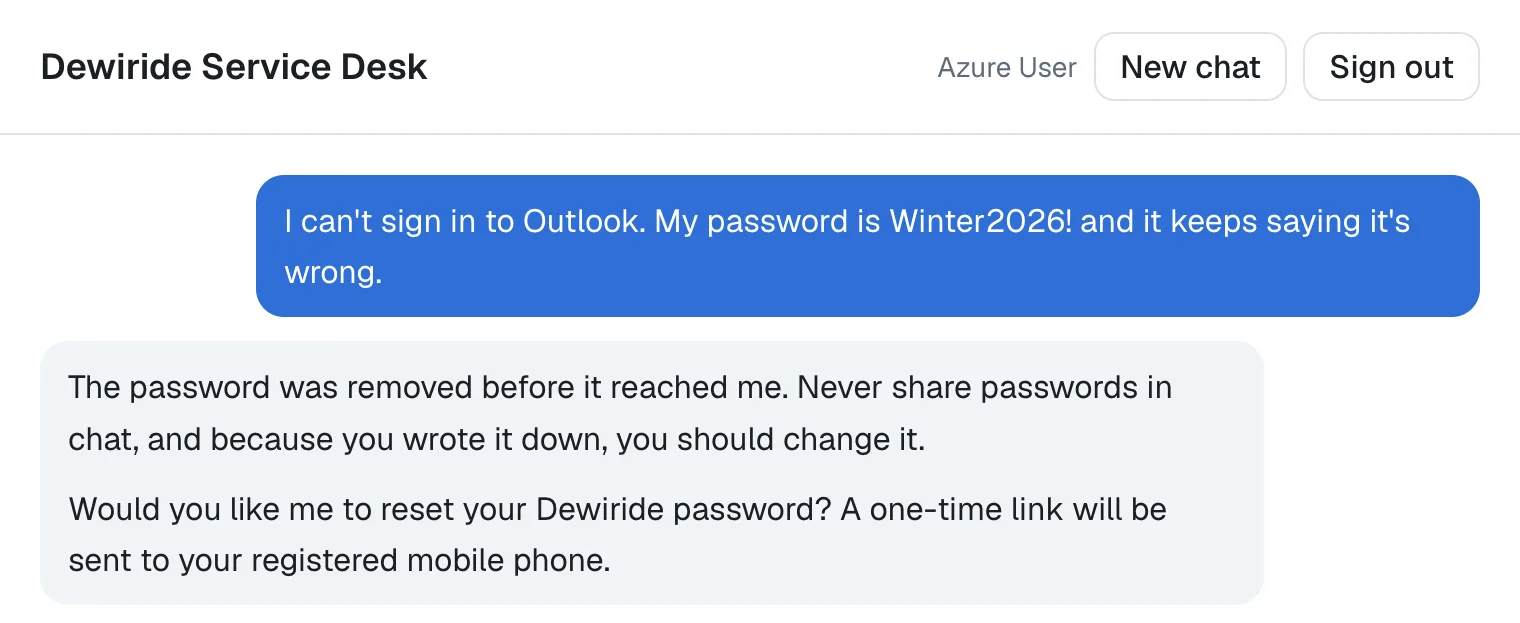
By the end of this part, the solution has:
SecretRedactor, which finds written-down passwords and BitLocker recovery keys in text and puts a placeholder where each one was.SecretGuard, middleware with two jobs: it takes secrets out of the messages a run starts with, and out of every tool's result.- The guard in front of everything else in the agent's pipeline, so the model, the conversation Foundry stores and the logs only ever see placeholders.
- Instructions that tell the model what the placeholders mean.
- A sample ticket raised by email that holds a password, so you can watch the guard clean a tool's result.
The chat app doesn't change: the guard lives in the API.
Why the Agent Needs a Guardrail
What happens to a password today
I sent this message to the API from Part 16:
I can't sign in to Outlook. My password is Winter2026! and it keeps saying it's wrong.
The agent did what its instructions say:
You shared a password here. Change it immediately and don’t use that password anywhere else. I won’t store or use it.

I can reset your Dewiride password by sending a one-time link to your registered mobile phone. You’ll choose a new password with that link. Would you like me to reset it?
I won’t store or use it. But the message had reached the model before the model could write a word. The conversation lives in Microsoft Foundry (Part 4 showed how), and How to See the Conversation History Microsoft Foundry Stored for a Response reads it back. Foundry had stored the message exactly as it was typed:
[
  {
    "item": "message",
    "role": "user",
    "text": "I can't sign in to Outlook. My password is Winter2026! and it keeps saying it's wrong."
  }
]
Foundry's documentation says: By default, response data is retained for 30 days. For a month, the password sits in your Foundry project, where anyone who can read the project's responses can read it too. Winter2026! is a made-up password, and every password in this part is made up; never test with a real one.
Two ways a secret reaches the model
The employee's message is one way in. The other is the agent's own tools. A ticket system holds whatever employees typed into emails and forms over the years, and some of it is passwords. When the agent looks up an employee's tickets, the tool's result goes to the model too.
To see that, I added a sample ticket raised by email (Step 1 adds it) and asked What's happening with my Teams ticket? The agent called get_my_tickets, and Foundry stored the tool's result, password included:
{
  "number": "INC1003",
  "title": "Teams signs me out every hour",
  "description": "Raised by email: Teams signs me out every hour and asks me to sign in again. My password is Spring2026# if you need to check my account.",
  "status": "New",
  "assignedTo": "Service desk",
  "opened": "2026-11-26",
  "latestUpdate": "The service desk will review the ticket and assign it to the right team."
}
The answer ended You included a password in the ticket description. Please change that password immediately; I won’t repeat it. The model is careful, but being careful comes too late: it has already read the password, and Foundry has stored it. A guard has to cover both ways in.
Middleware runs around every run and every tool call
Agent Framework has a place for code like this: middleware. In Microsoft's words, it provides a powerful way to intercept, modify, and enhance agent interactions, for cross-cutting concerns such as logging, security validation, error handling, and result transformation. There are three kinds:
| Kind | Runs around | This part uses it to |
|---|---|---|
| Agent run middleware | Every run of the agent: the messages it starts with, and its answer | Take secrets out of the employee's message |
| Function calling middleware | Every call of a tool: its arguments, and its result | Take secrets out of the tool's result |
IChatClient middleware | Every request to the model | Not needed here |
The Fundamentals tutorial Middleware explains all three with a small example of its own. Here is where the two this part uses sit in the service desk agent:
Why the guard goes first
You add middleware with AsBuilder(), one Use call at a time, and the order matters: the first one you add is the outermost layer, so it sees a run before anything else does. Part 3 already added one layer, UseLogging(), so that failed runs show up in the API's console. At its most detailed level, it logs a lot more. Microsoft's Agent Safety guidance warns: At log level Trace, the full ChatMessages collection is logged. This can include PII. Trace level should never be enabled in production.
I turned on Trace logging for it and sent the password message twice: once with the guard added after UseLogging(), and once with the guard first. With the guard after it, the log held the password:
trce: LoggingAgent[805843669]
      RunStreamingAsync invoked: [{"role":"user","contents":[{"$type":"text","text":"I can't sign in to Outlook. My password is Winter2026! and it keeps saying it's wrong."}],"messageId":"message-1"}]. Options: {}. Metadata: {"providerName":"microsoft.foundry"}.
With the guard first, the same line holds the placeholder:
trce: LoggingAgent[805843669]
      RunStreamingAsync invoked: [{"role":"user","contents":[{"$type":"text","text":"I can't sign in to Outlook. My password is [password removed] and it keeps saying it's wrong."}],"messageId":"message-1"}]. Options: {}. Metadata: {"providerName":"microsoft.foundry"}.
The series never turns Trace logging on, but a guard shouldn't depend on a log level. It goes first.
What the guard finds, and what it doesn't
The guard looks for two kinds of secret that turn up at a service desk:
- A written-down password: words that introduce one, such as password is, Password:, my PIN is or password for VPN is, followed by something that looks like a password.
- A BitLocker recovery key: 48 digits in eight groups of six, the key that unlocks an encrypted Windows laptop.
Patterns can't find every secret. In my tests, three kinds got through: a password made only of letters, a password with no words before it that introduce it (Here it is: Winter2026!), and a password with a space in it. The guard is one layer of several: the instructions still tell employees never to share secrets, and a password that gets through can still be changed.
What This Part Costs
Nothing new in Azure. The guard runs inside the API, and on my Mac it took about 3 microseconds to check a message and 20 microseconds to clean the three-ticket result, next to the seconds that a model request takes.
The new instructions add tokens. The password message had 2,105 input tokens with Part 16's instructions and 2,249 with this part's: about 144 more for every request to the model, roughly $0.00003 at the price from Part 1. The Teams ticket question takes two requests, one that calls the tool and one that answers, and went from 4,509 to 4,797 input tokens. When I sent the same requests again, Foundry took almost all of those tokens from its prompt cache.
Testing this part costs less than a cent.
Prerequisites
- The solution and the chat app from Part 16: Memory That Knows the Employee.
Step 1: Add a Ticket That Holds a Password
A real ticket system holds what employees wrote in their emails, passwords included. The sample ticket system from Part 11 stands in for one, so give it a ticket like that. Open src/Dewiride.ServiceDesk.Agent/Systems/SampleTicketSystem.cs and add a third ticket after the second-monitor request in CreateSampleTickets:
// Raised by email. Like many real tickets, it holds a password the employee typed.
new Ticket($"INC{++_lastNumber}", "Teams signs me out every hour",
    Description: "Raised by email: Teams signs me out every hour and asks me to sign in again. My password is Spring2026# if you need to check my account.",
    Status: "New", AssignedTo: "Service desk", Opened: today,
    LatestUpdate: "The service desk will review the ticket and assign it to the right team."),
The class comment counted the samples, so change two sample open tickets to three sample open tickets, and the comment above TicketsOf to starting with the samples. The complete file:
namespace Dewiride.ServiceDesk.Agent.Systems;

/// <summary>
/// A stand-in for a real ticket system, kept in memory. The first time it sees an employee,
/// it gives them three sample open tickets. New tickets start with the service desk.
/// </summary>
public sealed class SampleTicketSystem(TimeProvider timeProvider) : ITicketSystem
{
    // Requests can arrive at the same moment, so one lock guards all the tickets:
    // only one request at a time reads or changes them.
    private readonly Lock _lock = new();
    private readonly Dictionary<string, List<Ticket>> _ticketsByEmployee = [];
    private int _lastNumber = 1000;

    public Task<IReadOnlyList<Ticket>> GetOpenTicketsAsync(string employeeId, CancellationToken cancellationToken)
    {
        lock (_lock)
        {
            // A copy, so the list a caller holds never changes under it.
            IReadOnlyList<Ticket> tickets = [.. TicketsOf(employeeId)];
            return Task.FromResult(tickets);
        }
    }

    public Task<Ticket> CreateTicketAsync(string employeeId, NewTicket newTicket, CancellationToken cancellationToken)
    {
        lock (_lock)
        {
            List<Ticket> tickets = TicketsOf(employeeId);
            string prefix = newTicket.Type == TicketType.Incident ? "INC" : "REQ";

            Ticket ticket = new($"{prefix}{++_lastNumber}", newTicket.Title, newTicket.Description,
                Status: "New", AssignedTo: "Service desk", Opened: Today(),
                LatestUpdate: "The service desk will review the ticket and assign it to the right team.");

            tickets.Add(ticket);
            return Task.FromResult(ticket);
        }
    }

    // One employee's tickets, starting with the samples. Call it only inside the lock.
    private List<Ticket> TicketsOf(string employeeId)
    {
        if (!_ticketsByEmployee.TryGetValue(employeeId, out List<Ticket>? tickets))
        {
            tickets = CreateSampleTickets();
            _ticketsByEmployee.Add(employeeId, tickets);
        }

        return tickets;
    }

    private List<Ticket> CreateSampleTickets()
    {
        DateOnly today = Today();

        return
        [
            new Ticket($"INC{++_lastNumber}", "VPN disconnects every few minutes",
                Description: "The VPN connection drops every few minutes when working from home.",
                Status: "In progress", AssignedTo: "Network team", Opened: today.AddDays(-3),
                LatestUpdate: "The network team is checking the VPN gateway logs for your laptop."),
            new Ticket($"REQ{++_lastNumber}", "Second monitor for home office",
                Description: "A second monitor for working from home.",
                Status: "Waiting for approval", AssignedTo: "IT purchasing", Opened: today.AddDays(-1),
                LatestUpdate: "Waiting for your manager to approve the request."),

            // Raised by email. Like many real tickets, it holds a password the employee typed.
            new Ticket($"INC{++_lastNumber}", "Teams signs me out every hour",
                Description: "Raised by email: Teams signs me out every hour and asks me to sign in again. My password is Spring2026# if you need to check my account.",
                Status: "New", AssignedTo: "Service desk", Opened: today,
                LatestUpdate: "The service desk will review the ticket and assign it to the right team."),
        ];
    }

    private DateOnly Today() => DateOnly.FromDateTime(timeProvider.GetUtcNow().UtcDateTime);
}
Each employee now starts with three open tickets, and the Teams ticket is the one with the password.
Step 2: Find Secrets in Text
Create a folder named Guardrails in src/Dewiride.ServiceDesk.Agent, and in it a file named SecretRedactor.cs. It's a static class: it keeps nothing between calls, so the API can call it from many requests at once.
It starts with the two placeholders:
/// <summary>What a password is replaced with.</summary>
public const string PasswordPlaceholder = "[password removed]";

/// <summary>What a BitLocker recovery key is replaced with.</summary>
public const string RecoveryKeyPlaceholder = "[recovery key removed]";
A placeholder says what was there. Deleting the secret without a trace would leave the model reading My password is and it keeps saying it's wrong, with no way to tell the employee what happened to their message.
Redact makes two passes over the text, one per kind of secret:
/// <summary>Returns the text with a placeholder in place of every secret it found, and how many that was.</summary>
public static RedactedText Redact(string text)
{
    int removed = 0;

    // A BitLocker recovery key: 48 digits in eight groups of six.
    string safeText = RecoveryKey().Replace(text, _ =>
    {
        removed++;
        return RecoveryKeyPlaceholder;
    });

    // A password after words that introduce one, such as "password is", "PIN:" or "password for VPN is".
    safeText = WrittenPassword().Replace(safeText, match =>
    {
        if (!LooksLikePassword(match.Groups["value"].Value))
        {
            return match.Value;
        }

        removed++;
        return match.Groups["lead"].Value + PasswordPlaceholder;
    });

    return new RedactedText(safeText, removed);
}
Replacefinds every match of a pattern and calls the function you give it once per match. Whatever the function returns goes into the text in place of the match.- For a recovery key the function always returns the placeholder: 48 digits in that exact shape are never anything else.
- For a password, the pattern finds the words that introduce it and the value after them. The function replaces only the value, keeps the introducing words (
lead), and first asksLooksLikePasswordwhether the value is a password at all. removedcounts the replacements, so the caller can log how many secrets it removed without ever logging one.
LooksLikePassword is what keeps ordinary sentences intact:
// Plain words such as "wrong" or "expired" follow "password is" too. A value counts as a password
// when it has at least four characters, not counting the punctuation that ends a sentence,
// and at least one of them isn't a letter.
private static bool LooksLikePassword(string value)
{
    string word = value.TrimEnd('.', ',', ';', ':', '!', '?', ')');
    return word.Length >= 4 && word.Any(character => !char.IsLetter(character));
}
My password is wrong and my password is expired also put a value after password is. Requiring four or more characters, at least one of them a digit or a symbol, leaves those alone and still catches Winter2026!, hunter22 and a PIN like 4826. The punctuation that ends a sentence doesn't count, so expired. is still a plain word.
Then the patterns themselves:
// The patterns read text that comes from outside, so each one gives up after a second
// instead of running for ever on text it wasn't written for.
[GeneratedRegex(@"\b\d{6}(?:-\d{6}){7}\b", RegexOptions.None, matchTimeoutMilliseconds: 1000)]
private static partial Regex RecoveryKey();

[GeneratedRegex(
    @"(?<lead>\b(?:password|passcode|passwd|pwd|pw|pin)(?:\s+for(?:\s+[^\s:=]+){1,3}?)?(?:\s*[:=]\s*|\s+(?:is|was|to)\b\s*[:=]?\s*)[""'“‘]?)(?!\[(?:password|recovery key) removed\])(?<value>[^\s""'“”‘’<>]+)",
    RegexOptions.IgnoreCase | RegexOptions.CultureInvariant,
    matchTimeoutMilliseconds: 1000)]
private static partial Regex WrittenPassword();
[GeneratedRegex]asks the .NET compiler to generate the matching code from the pattern when the project builds, instead of building it while the API runs. The method ispartialbecause the generator writes its body.matchTimeoutMilliseconds: 1000stops a match that takes longer than a second. These patterns read text that comes from outside, and Microsoft's regular-expression guidance warns that unrestricted use of regular expressions with untrusted input can subject applications to denial-of-service attacks, and recommends a time-out. If a check ever times out,Replacethrows aRegexMatchTimeoutExceptionand the run stops with an error, instead of sending text that wasn't checked.RegexOptions.IgnoreCase | RegexOptions.CultureInvariantmatches Password, PASSWORD and password the same way on every machine.
The password pattern, piece by piece (in a C# verbatim string, "" stands for one "):
\b(?:password|passcode|passwd|pwd|pw|pin)matches a word that introduces a password, as a whole word, so spin or pinned don't count.(?:\s+for(?:\s+[^\s:=]+){1,3}?)?optionally allows for and one to three words, as in password for VPN or password for my old laptop.(?:\s*[:=]\s*|\s+(?:is|was|to)\b\s*[:=]?\s*)matches what joins those words to the value: a colon, an equals sign, is, was or to.["'“‘]?allows an opening quote.(?!\[(?:password|recovery key) removed\])refuses to match a placeholder, so text that was already cleaned stays as it is.(?<value>[^\s"'“”‘’<>]+)captures the value itself, up to the next space or quote, under the namevalue.
The file ends with a small type for the result: the safe text and the count, in one value the caller can't change. The complete file:
using System.Text.RegularExpressions;

namespace Dewiride.ServiceDesk.Agent.Guardrails;

/// <summary>
/// Finds secrets in text and puts a placeholder where each one was: passwords that someone wrote
/// down, and BitLocker recovery keys. It knows the common ways people write them; no set of
/// patterns finds every secret.
/// </summary>
public static partial class SecretRedactor
{
    /// <summary>What a password is replaced with.</summary>
    public const string PasswordPlaceholder = "[password removed]";

    /// <summary>What a BitLocker recovery key is replaced with.</summary>
    public const string RecoveryKeyPlaceholder = "[recovery key removed]";

    /// <summary>Returns the text with a placeholder in place of every secret it found, and how many that was.</summary>
    public static RedactedText Redact(string text)
    {
        int removed = 0;

        // A BitLocker recovery key: 48 digits in eight groups of six.
        string safeText = RecoveryKey().Replace(text, _ =>
        {
            removed++;
            return RecoveryKeyPlaceholder;
        });

        // A password after words that introduce one, such as "password is", "PIN:" or "password for VPN is".
        safeText = WrittenPassword().Replace(safeText, match =>
        {
            if (!LooksLikePassword(match.Groups["value"].Value))
            {
                return match.Value;
            }

            removed++;
            return match.Groups["lead"].Value + PasswordPlaceholder;
        });

        return new RedactedText(safeText, removed);
    }

    // Plain words such as "wrong" or "expired" follow "password is" too. A value counts as a password
    // when it has at least four characters, not counting the punctuation that ends a sentence,
    // and at least one of them isn't a letter.
    private static bool LooksLikePassword(string value)
    {
        string word = value.TrimEnd('.', ',', ';', ':', '!', '?', ')');
        return word.Length >= 4 && word.Any(character => !char.IsLetter(character));
    }

    // The patterns read text that comes from outside, so each one gives up after a second
    // instead of running for ever on text it wasn't written for.
    [GeneratedRegex(@"\b\d{6}(?:-\d{6}){7}\b", RegexOptions.None, matchTimeoutMilliseconds: 1000)]
    private static partial Regex RecoveryKey();

    [GeneratedRegex(
        @"(?<lead>\b(?:password|passcode|passwd|pwd|pw|pin)(?:\s+for(?:\s+[^\s:=]+){1,3}?)?(?:\s*[:=]\s*|\s+(?:is|was|to)\b\s*[:=]?\s*)[""'“‘]?)(?!\[(?:password|recovery key) removed\])(?<value>[^\s""'“”‘’<>]+)",
        RegexOptions.IgnoreCase | RegexOptions.CultureInvariant,
        matchTimeoutMilliseconds: 1000)]
    private static partial Regex WrittenPassword();
}

/// <summary>Text with its secrets replaced, and how many were replaced.</summary>
public readonly record struct RedactedText(string Text, int Removed);
Step 3: Take Secrets Out of the Employee's Messages
The first job is agent run middleware. Agent Framework offers three ways to add it, and the API's streaming decides which one fits. Microsoft's documentation says that when you give only the non-streaming version, Streaming will only run in non-streaming mode: the chat would get the answer in one piece instead of word by word. And about the third way: There's an additional overload, Use(sharedFunc: ...), that allows you to provide the same middleware for non-streaming and streaming without blocking the streaming. However, the shared middleware won't be able to intercept or override the output. This overload should be used for scenarios where you only need to inspect or modify the input before it reaches the agent.
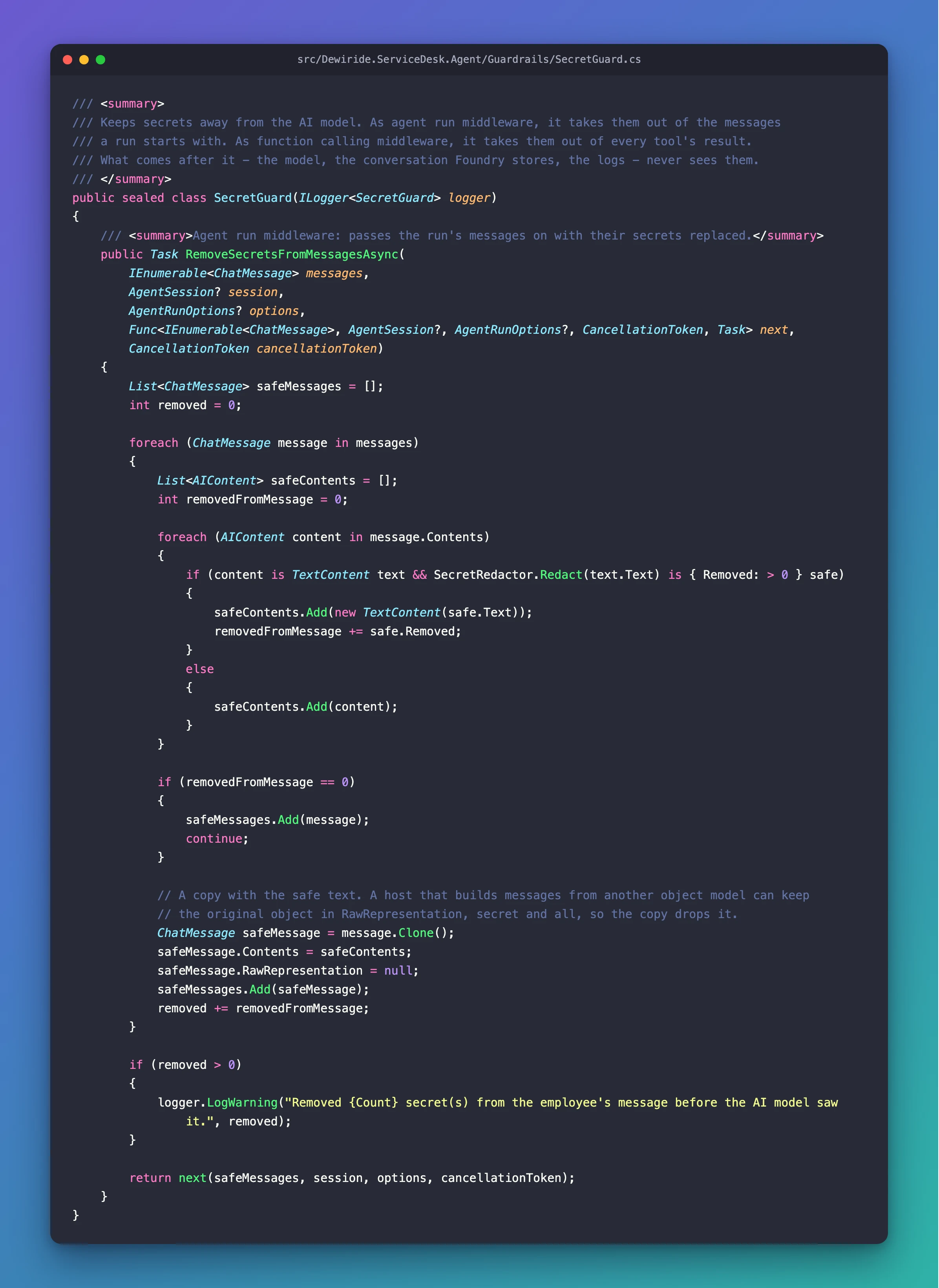
Changing the input is exactly this job, so the guard is a shared function. Create SecretGuard.cs in the Guardrails folder:
using Microsoft.Agents.AI;
using Microsoft.Extensions.AI;
using Microsoft.Extensions.Logging;

namespace Dewiride.ServiceDesk.Agent.Guardrails;

/// <summary>
/// Keeps secrets away from the AI model. As agent run middleware, it takes them out of the messages
/// a run starts with. As function calling middleware, it takes them out of every tool's result.
/// What comes after it - the model, the conversation Foundry stores, the logs - never sees them.
/// </summary>
public sealed class SecretGuard(ILogger<SecretGuard> logger)
{
    /// <summary>Agent run middleware: passes the run's messages on with their secrets replaced.</summary>
    public Task RemoveSecretsFromMessagesAsync(
        IEnumerable<ChatMessage> messages,
        AgentSession? session,
        AgentRunOptions? options,
        Func<IEnumerable<ChatMessage>, AgentSession?, AgentRunOptions?, CancellationToken, Task> next,
        CancellationToken cancellationToken)
    {
        List<ChatMessage> safeMessages = [];
        int removed = 0;

        foreach (ChatMessage message in messages)
        {
            List<AIContent> safeContents = [];
            int removedFromMessage = 0;

            foreach (AIContent content in message.Contents)
            {
                if (content is TextContent text && SecretRedactor.Redact(text.Text) is { Removed: > 0 } safe)
                {
                    safeContents.Add(new TextContent(safe.Text));
                    removedFromMessage += safe.Removed;
                }
                else
                {
                    safeContents.Add(content);
                }
            }

            if (removedFromMessage == 0)
            {
                safeMessages.Add(message);
                continue;
            }

            // A copy with the safe text. A host that builds messages from another object model can keep
            // the original object in RawRepresentation, secret and all, so the copy drops it.
            ChatMessage safeMessage = message.Clone();
            safeMessage.Contents = safeContents;
            safeMessage.RawRepresentation = null;
            safeMessages.Add(safeMessage);
            removed += removedFromMessage;
        }

        if (removed > 0)
        {
            logger.LogWarning("Removed {Count} secret(s) from the employee's message before the AI model saw it.", removed);
        }

        return next(safeMessages, session, options, cancellationToken);
    }
}
What it does:
- The signature is what
Use(sharedFunc:)expects: the messages the run starts with, the session, the run options,nextand a cancellation token.nextis the rest of the pipeline. The guard calls it once, with the safe messages, and the run goes on as if the employee had typed those. - Only text is checked. A message can hold other contents, such as the answers to the approval cards from Part 14. They go on unchanged.
- A message without secrets goes on as it came. Only a message that had one is replaced, by a copy.
Clone()copies the message with its author, ID and time. The copy gets the safe contents, and itsRawRepresentationis cleared. Microsoft's documentation describes that property: If a ChatMessage is created to represent some underlying object from another object model, this property can be used to store that original object. The AG-UI host leaves it empty (I checked), but a host that fills it would otherwise pass the original message on, secret and all.- The log line counts the secrets and never shows one. It's a warning, because someone shared a secret, and someone may want to know.
ILogger<SecretGuard> comes in through the class's primary constructor, so the app's dependency injection supplies it when Step 5 registers the guard.
Step 4: Take Secrets Out of Tool Results
The second job is function calling middleware. Microsoft's documentation notes that it is currently only supported with an AIAgent that uses FunctionInvokingChatClient, for example, ChatClientAgent. The service desk agent is a ChatClientAgent: AsAIAgent built one in Part 3.
Add this method to SecretGuard, after the first one:
/// <summary>Function calling middleware: runs the tool, then passes its result on with its secrets replaced.</summary>
public async ValueTask<object?> RemoveSecretsFromToolResultAsync(
    AIAgent agent,
    FunctionInvocationContext context,
    Func<FunctionInvocationContext, CancellationToken, ValueTask<object?>> next,
    CancellationToken cancellationToken)
{
    object? result = await next(context, cancellationToken);

    int removed = 0;
    object? safeResult = WithoutSecrets(result, ref removed);

    if (removed == 0)
    {
        return result;
    }

    logger.LogWarning("Removed {Count} secret(s) from the result of {Tool} before the AI model saw it.", removed, context.Function.Name);
    return safeResult;
}
- The signature is the one function calling middleware has: the agent, a
FunctionInvocationContextwith the tool (context.Function) and its arguments,nextand a cancellation token. - It calls
nextfirst. That runs the tool. The guard then cleans what the tool returned, before it goes back to the model. - When nothing was removed, it returns the tool's own result, the very same object.
Tools don't all return the same kind of result. Microsoft's documentation of AIFunctionFactory, which made the service desk's tools, says: By default, the return value of invoking the method wrapped into an AIFunction by AIFunctionFactory is then JSON serialized, with the resulting JsonElement returned. MCP tools are different. I logged the type of every result that passed through the guard: search_knowledge_base and the Microsoft Learn server's microsoft_docs_search returned a JsonElement, but microsoft_docs_fetch returned a TextContent. So the guard cleans each kind and keeps its form:
// Tools made with AIFunctionFactory return JSON; MCP tools often return text. Returns the result
// in the same form, with the secrets in its text replaced.
private static object? WithoutSecrets(object? result, ref int removed)
{
    switch (result)
    {
        case null:
            return null;

        case string text:
            return Redact(text, ref removed);

        case TextContent textContent:
            return new TextContent(Redact(textContent.Text, ref removed));

        case IEnumerable<AIContent> contents:
            List<AIContent> safeContents = [];
            foreach (AIContent content in contents)
            {
                safeContents.Add(content is TextContent item ? new TextContent(Redact(item.Text, ref removed)) : content);
            }

            return safeContents;

        default:
            // Anything else as JSON: write a copy of it with every string checked.
            JsonElement json = result as JsonElement? ?? JsonSerializer.SerializeToElement(result, AIJsonUtilities.DefaultOptions);
            using (MemoryStream buffer = new())
            {
                using (Utf8JsonWriter writer = new(buffer, new JsonWriterOptions { Encoder = AIJsonUtilities.DefaultOptions.Encoder }))
                {
                    WriteWithoutSecrets(writer, json, ref removed);
                }

                return JsonSerializer.Deserialize<JsonElement>(buffer.ToArray());
            }
    }
}
- Text stays text: a
string, aTextContentor a list of contents comes back as the same kind of thing. In a list, only text is checked; an image goes on unchanged. - Everything else is JSON. A
JsonElementis used as it is; any other object is turned into one first. - The JSON is rebuilt string by string, instead of running the patterns over the JSON text. Over the raw text the patterns would also read JSON's own quotes and escape sequences. Walking the JSON checks each string as the text it really is.
The walk itself is a method that calls itself for every object and array, however deep the JSON goes:
// Copies a JSON value, replacing the secrets in each string, however deep it is.
private static void WriteWithoutSecrets(Utf8JsonWriter writer, JsonElement element, ref int removed)
{
    switch (element.ValueKind)
    {
        case JsonValueKind.Object:
            writer.WriteStartObject();
            foreach (JsonProperty property in element.EnumerateObject())
            {
                writer.WritePropertyName(property.Name);
                WriteWithoutSecrets(writer, property.Value, ref removed);
            }

            writer.WriteEndObject();
            break;

        case JsonValueKind.Array:
            writer.WriteStartArray();
            foreach (JsonElement item in element.EnumerateArray())
            {
                WriteWithoutSecrets(writer, item, ref removed);
            }

            writer.WriteEndArray();
            break;

        case JsonValueKind.String:
            writer.WriteStringValue(Redact(element.GetString()!, ref removed));
            break;

        default:
            element.WriteTo(writer);
            break;
    }
}

private static string Redact(string text, ref int removed)
{
    RedactedText safe = SecretRedactor.Redact(text);
    removed += safe.Removed;
    return safe.Text;
}
Utf8JsonWriter writes the copy into a MemoryStream, with the same text encoder as AIJsonUtilities.DefaultOptions, the JSON settings Microsoft.Extensions.AI uses by default, and WithoutSecrets reads the finished bytes back into a JsonElement. ref int removed lets every level of the walk add to one count. The complete file:
using System.Text.Json;
using Microsoft.Agents.AI;
using Microsoft.Extensions.AI;
using Microsoft.Extensions.Logging;

namespace Dewiride.ServiceDesk.Agent.Guardrails;

/// <summary>
/// Keeps secrets away from the AI model. As agent run middleware, it takes them out of the messages
/// a run starts with. As function calling middleware, it takes them out of every tool's result.
/// What comes after it - the model, the conversation Foundry stores, the logs - never sees them.
/// </summary>
public sealed class SecretGuard(ILogger<SecretGuard> logger)
{
    /// <summary>Agent run middleware: passes the run's messages on with their secrets replaced.</summary>
    public Task RemoveSecretsFromMessagesAsync(
        IEnumerable<ChatMessage> messages,
        AgentSession? session,
        AgentRunOptions? options,
        Func<IEnumerable<ChatMessage>, AgentSession?, AgentRunOptions?, CancellationToken, Task> next,
        CancellationToken cancellationToken)
    {
        List<ChatMessage> safeMessages = [];
        int removed = 0;

        foreach (ChatMessage message in messages)
        {
            List<AIContent> safeContents = [];
            int removedFromMessage = 0;

            foreach (AIContent content in message.Contents)
            {
                if (content is TextContent text && SecretRedactor.Redact(text.Text) is { Removed: > 0 } safe)
                {
                    safeContents.Add(new TextContent(safe.Text));
                    removedFromMessage += safe.Removed;
                }
                else
                {
                    safeContents.Add(content);
                }
            }

            if (removedFromMessage == 0)
            {
                safeMessages.Add(message);
                continue;
            }

            // A copy with the safe text. A host that builds messages from another object model can keep
            // the original object in RawRepresentation, secret and all, so the copy drops it.
            ChatMessage safeMessage = message.Clone();
            safeMessage.Contents = safeContents;
            safeMessage.RawRepresentation = null;
            safeMessages.Add(safeMessage);
            removed += removedFromMessage;
        }

        if (removed > 0)
        {
            logger.LogWarning("Removed {Count} secret(s) from the employee's message before the AI model saw it.", removed);
        }

        return next(safeMessages, session, options, cancellationToken);
    }

    /// <summary>Function calling middleware: runs the tool, then passes its result on with its secrets replaced.</summary>
    public async ValueTask<object?> RemoveSecretsFromToolResultAsync(
        AIAgent agent,
        FunctionInvocationContext context,
        Func<FunctionInvocationContext, CancellationToken, ValueTask<object?>> next,
        CancellationToken cancellationToken)
    {
        object? result = await next(context, cancellationToken);

        int removed = 0;
        object? safeResult = WithoutSecrets(result, ref removed);

        if (removed == 0)
        {
            return result;
        }

        logger.LogWarning("Removed {Count} secret(s) from the result of {Tool} before the AI model saw it.", removed, context.Function.Name);
        return safeResult;
    }

    // Tools made with AIFunctionFactory return JSON; MCP tools often return text. Returns the result
    // in the same form, with the secrets in its text replaced.
    private static object? WithoutSecrets(object? result, ref int removed)
    {
        switch (result)
        {
            case null:
                return null;

            case string text:
                return Redact(text, ref removed);

            case TextContent textContent:
                return new TextContent(Redact(textContent.Text, ref removed));

            case IEnumerable<AIContent> contents:
                List<AIContent> safeContents = [];
                foreach (AIContent content in contents)
                {
                    safeContents.Add(content is TextContent item ? new TextContent(Redact(item.Text, ref removed)) : content);
                }

                return safeContents;

            default:
                // Anything else as JSON: write a copy of it with every string checked.
                JsonElement json = result as JsonElement? ?? JsonSerializer.SerializeToElement(result, AIJsonUtilities.DefaultOptions);
                using (MemoryStream buffer = new())
                {
                    using (Utf8JsonWriter writer = new(buffer, new JsonWriterOptions { Encoder = AIJsonUtilities.DefaultOptions.Encoder }))
                    {
                        WriteWithoutSecrets(writer, json, ref removed);
                    }

                    return JsonSerializer.Deserialize<JsonElement>(buffer.ToArray());
                }
        }
    }

    // Copies a JSON value, replacing the secrets in each string, however deep it is.
    private static void WriteWithoutSecrets(Utf8JsonWriter writer, JsonElement element, ref int removed)
    {
        switch (element.ValueKind)
        {
            case JsonValueKind.Object:
                writer.WriteStartObject();
                foreach (JsonProperty property in element.EnumerateObject())
                {
                    writer.WritePropertyName(property.Name);
                    WriteWithoutSecrets(writer, property.Value, ref removed);
                }

                writer.WriteEndObject();
                break;

            case JsonValueKind.Array:
                writer.WriteStartArray();
                foreach (JsonElement item in element.EnumerateArray())
                {
                    WriteWithoutSecrets(writer, item, ref removed);
                }

                writer.WriteEndArray();
                break;

            case JsonValueKind.String:
                writer.WriteStringValue(Redact(element.GetString()!, ref removed));
                break;

            default:
                element.WriteTo(writer);
                break;
        }
    }

    private static string Redact(string text, ref int removed)
    {
        RedactedText safe = SecretRedactor.Redact(text);
        removed += safe.Removed;
        return safe.Text;
    }
}
Step 5: Put the Guard in Front of Everything Else
Open src/Dewiride.ServiceDesk.Agent/ServiceDeskAgentExtensions.cs. Add the namespace at the top:
using Dewiride.ServiceDesk.Agent.Guardrails;
Register the guard as a new step 7, before the agent, and renumber the agent's registration to step 8:
// 7. The secret guard, which keeps passwords and recovery keys away from the AI model.
builder.Services.AddSingleton<SecretGuard>();

// 8. Register the agent with its tools. It talks to your model through the Foundry project,
//    gets the Microsoft Learn tools and the employee's memories at the start of every run,
//    takes secrets out of messages and tool results, and logs every run that fails,
//    so the API's console shows you why.
return builder.AddAIAgent(AgentName, (services, name) =>
One instance serves the whole app. It keeps nothing about any run, only its logger.
In the agent's factory, get the guard with the other services, and add it to the pipeline before UseLogging():
SecretGuard secretGuard = services.GetRequiredService<SecretGuard>();

// ...

return projectClient
    .AsAIAgent(new ChatClientAgentOptions
    {
        // ...
    })
    .AsBuilder()
    // The secret guard comes first, so it's the outermost layer: everything after it,
    // including the logging below, only ever sees messages without their secrets.
    .Use(sharedFunc: secretGuard.RemoveSecretsFromMessagesAsync)
    .Use(secretGuard.RemoveSecretsFromToolResultAsync)
    .UseLogging()
    .Build(services);
Use(sharedFunc: secretGuard.RemoveSecretsFromMessagesAsync)adds the agent run middleware. The namesharedFunc:picks the shared overload from Step 3.Use(secretGuard.RemoveSecretsFromToolResultAsync)adds the function calling middleware. C# picks that overload from the method's parameters: an agent, aFunctionInvocationContext, anextand a cancellation token.- Both come before
UseLogging(), so the logging layer, and everything after it, only sees what the guard let through.
UseLogging() logs under the category LoggingAgent, not under Microsoft.Agents.AI, so "Microsoft.Agents.AI": "Trace" in appsettings.json shows nothing (Fixed: Microsoft Agent Framework UseLogging Ignores the Microsoft.Agents.AI Log Level). Set "LoggingAgent": "Trace" on your machine while you check the order, and take it out again: Trace logs hold whole conversations.
The complete file:
using Azure.AI.Projects;
using Azure.Core;
using Azure.Identity;
using Dewiride.ServiceDesk.Agent.Guardrails;
using Dewiride.ServiceDesk.Agent.Memory;
using Dewiride.ServiceDesk.Agent.Systems;
using Microsoft.Agents.AI;
using Microsoft.Agents.AI.Hosting;
using Microsoft.Extensions.AI;
using Microsoft.Extensions.DependencyInjection;
using Microsoft.Extensions.DependencyInjection.Extensions;
using Microsoft.Extensions.Hosting;
using Microsoft.Extensions.Options;

namespace Dewiride.ServiceDesk.Agent;

/// <summary>
/// Adds the Dewiride Service Desk agent to any .NET host: the API today, a background job and a Teams bot later.
/// The host also registers <see cref="ICurrentEmployee"/>, so the agent's tools know who is signed in,
/// and an <see cref="IEmployeeMemoryStore"/>, where the agent keeps what it remembers about each employee.
/// </summary>
public static class ServiceDeskAgentExtensions
{
    /// <summary>The name the agent is registered under.</summary>
    public const string AgentName = "service-desk";

    public static IHostedAgentBuilder AddServiceDeskAgent(this IHostApplicationBuilder builder)
    {
        // 1. Read the "Foundry" settings, and refuse to start if one is missing.
        builder.Services.AddOptions<FoundryOptions>()
            .Bind(builder.Configuration.GetSection(FoundryOptions.SectionName))
            .Validate(foundry => Uri.TryCreate(foundry.ProjectEndpoint, UriKind.Absolute, out _),
                "Set Foundry:ProjectEndpoint to your Foundry project endpoint.")
            .Validate(foundry => !string.IsNullOrWhiteSpace(foundry.ModelDeployment),
                "Set Foundry:ModelDeployment to your model deployment name.")
            .ValidateOnStart();

        // 2. Read the "MicrosoftLearn" settings the same way. Wrong settings stop the API here;
        //    a server that can't be reached doesn't (see MicrosoftLearnTools).
        builder.Services.AddOptions<MicrosoftLearnOptions>()
            .Bind(builder.Configuration.GetSection(MicrosoftLearnOptions.SectionName))
            .Validate(learn => Uri.TryCreate(learn.McpEndpoint, UriKind.Absolute, out Uri? endpoint)
                    && endpoint.Scheme == Uri.UriSchemeHttps,
                "Set MicrosoftLearn:McpEndpoint to the https address of the Microsoft Learn MCP server.")
            .Validate(learn => !string.IsNullOrWhiteSpace(learn.ProtocolVersion),
                "Set MicrosoftLearn:ProtocolVersion to the MCP protocol version the server supports, such as 2025-06-18.")
            .ValidateOnStart();

        // 3. Sign in with Microsoft Entra ID - no API keys. The AZURE_TOKEN_CREDENTIALS
        //    environment variable decides how: your Azure CLI sign-in on your machine,
        //    a managed identity in Azure.
        builder.Services.AddSingleton<TokenCredential>(_ =>
            new DefaultAzureCredential(DefaultAzureCredential.DefaultEnvironmentVariableName));

        // 4. The company's IT systems that the tools read from. These are in-memory samples;
        //    a host that has the real systems registers its own versions first, and those win.
        builder.Services.TryAddSingleton(TimeProvider.System);
        builder.Services.TryAddSingleton<IDeviceInventory, SampleDeviceInventory>();
        builder.Services.TryAddSingleton<ITicketSystem, SampleTicketSystem>();
        builder.Services.TryAddSingleton<IKnowledgeBase, SampleKnowledgeBase>();
        builder.Services.TryAddSingleton<IAccountSystem, SampleAccountSystem>();
        builder.Services.AddSingleton<ServiceDeskTools>();

        // 5. The tools of the Microsoft Learn MCP server. One instance for the whole app, so every
        //    run shares one connection; the app disposes it when it stops.
        builder.Services.AddSingleton<MicrosoftLearnTools>();

        // 6. What the agent remembers about the signed-in employee, from one conversation to the next.
        //    One instance for the whole app: it keeps nothing about any employee itself, only in the store.
        builder.Services.AddSingleton<EmployeeMemory>();

        // 7. The secret guard, which keeps passwords and recovery keys away from the AI model.
        builder.Services.AddSingleton<SecretGuard>();

        // 8. Register the agent with its tools. It talks to your model through the Foundry project,
        //    gets the Microsoft Learn tools and the employee's memories at the start of every run,
        //    takes secrets out of messages and tool results, and logs every run that fails,
        //    so the API's console shows you why.
        return builder.AddAIAgent(AgentName, (services, name) =>
        {
            FoundryOptions foundry = services.GetRequiredService<IOptions<FoundryOptions>>().Value;
            TokenCredential credential = services.GetRequiredService<TokenCredential>();
            ServiceDeskTools tools = services.GetRequiredService<ServiceDeskTools>();
            MicrosoftLearnTools microsoftLearnTools = services.GetRequiredService<MicrosoftLearnTools>();
            EmployeeMemory employeeMemory = services.GetRequiredService<EmployeeMemory>();
            SecretGuard secretGuard = services.GetRequiredService<SecretGuard>();

            AIProjectClient projectClient = new(new Uri(foundry.ProjectEndpoint), credential);

            return projectClient
                .AsAIAgent(new ChatClientAgentOptions
                {
                    // A fixed ID. Without one, every start gets a new random ID, and the session store,
                    // which keeps each conversation under the agent's ID, can't find yesterday's conversations.
                    Id = name,
                    Name = name,
                    ChatOptions = new ChatOptions
                    {
                        ModelId = foundry.ModelDeployment,
                        Instructions = ServiceDeskInstructions.Text,
                        Tools = tools.AsAITools(),
                    },
                    AIContextProviders = [microsoftLearnTools, employeeMemory],
                })
                .AsBuilder()
                // The secret guard comes first, so it's the outermost layer: everything after it,
                // including the logging below, only ever sees messages without their secrets.
                .Use(sharedFunc: secretGuard.RemoveSecretsFromMessagesAsync)
                .Use(secretGuard.RemoveSecretsFromToolResultAsync)
                .UseLogging()
                .Build(services);
        });
    }
}
Step 6: Tell the Model What the Placeholders Mean
With the guard in place and Part 16's instructions, the model sees My password is [password removed] and doesn't know what that means. In my runs it answered as if it had received the password: Please don’t share passwords here. If that was your real password, change it immediately anywhere you use it. About the ticket it said I won’t use or repeat it, about a password it never saw (Fixed: Microsoft Agent Framework Agent Talks About a Removed Password as If It Saw It).
Open src/Dewiride.ServiceDesk.Agent/ServiceDeskInstructions.cs. Take Never ask for passwords, MFA codes or other secrets. If someone shares one, tell them to change it right away. out of Rules you always follow, and add a section before it:
Secrets:
- Never ask for passwords, MFA codes or other secrets.
- Dewiride removes passwords and BitLocker recovery keys from messages and tool results before you see them, and
  writes [password removed] or [recovery key removed] where they were. You never see the secret itself.
- When the employee's message has one, tell them it was removed before it reached you and that they should never
  share secrets in the chat. If it was a password, tell them to change it, because they wrote it down, and offer
  to reset it.
- When a tool result has one, such as a password in a ticket, tell them that a secret in it was removed. If it was
  a password, tell them to change it and offer to reset it.
- It says what the placeholders are, and that the model never sees the secret itself.
- It says what to tell the employee, for each way in: the secret was removed before it reached the agent, never to share secrets in the chat, and to change a password that was written down.
- It offers a reset, with the
reset_my_passwordtool from Part 13.
The reset rule from Part 13 offered a reset only when the employee forgot their password or was locked out, so add the new reason there:
- You can reset the password of the employee you are chatting with, and only theirs. Call reset_my_password
  when they ask for a reset, or agree when you offer one because they forgot their password, are locked out or
  wrote it down.
The complete file:
namespace Dewiride.ServiceDesk.Agent;

/// <summary>
/// The agent's instructions: who it is, what it helps with and the rules it always follows.
/// The model receives them with every request.
/// </summary>
internal static class ServiceDeskInstructions
{
    public const string Text = """
        You are the Dewiride IT Service Desk assistant. You help Dewiride employees with IT questions:
        laptops and phones, software, sign-in and passwords, email and Microsoft Teams, Wi-Fi and VPN,
        printers, and security.

        How you answer:
        - Be friendly, clear and brief.
        - Give fixes as short numbered steps.
        - If a request is unclear, ask one clarifying question first, such as which device or operating system.
        - If you are not sure, say so. Never invent Dewiride policies, ticket numbers or contact details.
        - Write plain text. Do not use Markdown formatting such as ** or #.

        What you can look up and do:
        - Use your tools to look up the employee's own devices and open tickets, and to search the IT knowledge base.
          Look things up instead of guessing, and base your answers on what the tools return.
        - You can only see the records of the employee you are chatting with. If someone asks about another
          person's devices or tickets, explain that you can only see their own.
        - When a knowledge base article fits the problem, follow its steps and mention its number, such as KB0001.
        - For questions about Microsoft products, such as Windows, Microsoft 365, Outlook, Teams, OneDrive and
          Microsoft Authenticator, that the knowledge base doesn't answer, search Microsoft Learn with your
          Microsoft Learn tools. Base your answer on what you find, and give the link to the page you used.
        - Searches of Microsoft Learn leave Dewiride. Describe the problem in general words only: never put names,
          email addresses, device names, ticket numbers or other details about the employee in them.
        - You can raise tickets for the employee you are chatting with. Raise one only when they ask for it or agree
          when you offer it. First check their open tickets: if one already covers the problem, give them its number
          instead of raising another.
        - Write the ticket's title and description from what the employee told you, what you remember about them
          and what your tools found. Never invent details. After raising it, give the employee the new ticket's number.
        - You can reset the password of the employee you are chatting with, and only theirs. Call reset_my_password
          when they ask for a reset, or agree when you offer one because they forgot their password, are locked out or
          wrote it down.
          Don't ask them to confirm it in your own words first: they approve the reset in the chat before it runs.
        - After a reset, tell them where the one-time link went and when it expires, and that they choose their new
          password with that link. If the reset is rejected, the employee declined it: say that their password
          wasn't reset and nothing changed. Don't call it a failure or ask them to try again.

        What you remember:
        - You remember things about the employee from earlier conversations, and each request tells you what they are.
          Use them when they help, so the employee doesn't have to repeat themselves. When you raise a ticket, include
          what you remember that helps the IT team, such as where the employee works or how they like to be contacted.
        - A preference you remember says what the employee would like, not what Dewiride will do. When you add one to
          a ticket, say that you added it, and don't promise how or when the IT team will contact them.
        - When the employee tells you something lasting about themselves that will help with later IT requests, such as
          where they work, which devices they use or how they like to be contacted, save it with remember_about_me as
          one short sentence, and tell them what you remembered.
        - Never remember passwords, codes or other secrets, health or money matters, or anything about other people.
        - When the employee asks what you remember, tell them. When they ask you to forget something, call forget_memory
          for each memory it covers, and tell them what you forgot. Never show the memories' IDs.

        Secrets:
        - Never ask for passwords, MFA codes or other secrets.
        - Dewiride removes passwords and BitLocker recovery keys from messages and tool results before you see them, and
          writes [password removed] or [recovery key removed] where they were. You never see the secret itself.
        - When the employee's message has one, tell them it was removed before it reached you and that they should never
          share secrets in the chat. If it was a password, tell them to change it, because they wrote it down, and offer
          to reset it.
        - When a tool result has one, such as a password in a ticket, tell them that a secret in it was removed. If it was
          a password, tell them to change it and offer to reset it.

        Rules you always follow:
        - Help only with IT topics. Politely decline anything else and say what you can help with.
        - You can look things up, raise tickets and reset the employee's own password, but you cannot change, close
          or reassign tickets, or change anything else. When a problem needs hands-on help, offer to raise a ticket.
        """;
}
Step 7: Build and Run
Build the solution from the DewirideServiceDesk folder:
dotnet build
Restore complete (0.4s)
  Dewiride.ServiceDesk.Agent net10.0 succeeded (0.2s) → src/Dewiride.ServiceDesk.Agent/bin/Debug/net10.0/Dewiride.ServiceDesk.Agent.dll
  Dewiride.ServiceDesk.Api net10.0 succeeded (0.1s) → src/Dewiride.ServiceDesk.Api/bin/Debug/net10.0/Dewiride.ServiceDesk.Api.dll
Build succeeded in 0.9s
Start the API and the chat app as in Part 16:
- VS Code
- Visual Studio
In a terminal, in the src/Dewiride.ServiceDesk.Api folder, run:
dotnet run
Make sure http is selected in the drop-down list next to the green Start button (▶), with Dewiride.ServiceDesk.Api as the startup project, and press Ctrl+F5 (Debug → Start Without Debugging).
For the chat, run npm run dev in the web/agent-chat-ui folder in a second terminal. Step 8 doesn't need it; Step 9 does.
Step 8: Try It from the .http File
Add two requests to the end of src/Dewiride.ServiceDesk.Api/Dewiride.ServiceDesk.Api.http, each in a new conversation:
###

# Share a password by mistake. The API's console warns that the secret guard removed it,
# and the agent answers without ever seeing it.
POST {{baseUrl}}/api/agents/service-desk
Authorization: Bearer {{$dotenv AGENT_API_TOKEN}}
Content-Type: application/json
Accept: text/event-stream

{
  "threadId": "thread-19",
  "runId": "run-1",
  "messages": [
    {
      "id": "message-1",
      "role": "user",
      "content": "I can't sign in to Outlook. My password is Winter2026! and it keeps saying it's wrong."
    }
  ]
}

###

# Ask about a ticket that holds a password: look for TOOL_CALL_RESULT with [password removed] in the stream.
POST {{baseUrl}}/api/agents/service-desk
Authorization: Bearer {{$dotenv AGENT_API_TOKEN}}
Content-Type: application/json
Accept: text/event-stream

{
  "threadId": "thread-20",
  "runId": "run-1",
  "messages": [
    {
      "id": "message-1",
      "role": "user",
      "content": "What's happening with my Teams ticket?"
    }
  ]
}

###
A password in the message
Send the first request. The response, shortened: the headers are left out, each rawEvent is replaced with {…}, long values are cut and most of the text events are left out:
data: {"type":"RUN_STARTED","threadId":"thread-19","runId":"run-1"}

data: {"type":"REASONING_ENCRYPTED_VALUE","subtype":"message","entityId":"msg_vxDZX1Twit6OJvwMf4tUpccY","encryptedValue":"gAAAAABr…","rawEvent":{…}}

data: {"type":"TEXT_MESSAGE_START","messageId":"msg_094a7e0d…","role":"assistant","name":"service-desk","rawEvent":{…}}

data: {"type":"TEXT_MESSAGE_CONTENT","messageId":"msg_094a7e0d…","delta":"The","rawEvent":{…}}

data: {"type":"TEXT_MESSAGE_CONTENT","messageId":"msg_094a7e0d…","delta":" password","rawEvent":{…}}

data: {"type":"TEXT_MESSAGE_CONTENT","messageId":"msg_094a7e0d…","delta":" was","rawEvent":{…}}

… 27 more TEXT_MESSAGE_CONTENT events …

data: {"type":"TEXT_MESSAGE_CONTENT","messageId":"msg_094a7e0d…","delta":" a new password.","rawEvent":{…}}

data: {"type":"TEXT_MESSAGE_END","messageId":"msg_094a7e0d…"}

data: {"type":"RUN_FINISHED","threadId":"thread-19","runId":"run-1","outcome":{"type":"success"},"usage":[{"model":"gpt-5.6-luna-2026-07-09","inputTokens":2249,"outputTokens":138,"totalTokens":2387,"reasoningTokens":76,"cachedInputTokens":2246}]}
The answer:
The password was removed before it reached me. Never share passwords in chat. Because you wrote it down, it should be changed.

Would you like me to reset your password? A one-time link will be sent to your registered mobile phone, where you can choose a new password.
At the same moment, the API's console shows the guard's warning:
warn: Dewiride.ServiceDesk.Agent.Guardrails.SecretGuard[0]
      Removed 1 secret(s) from the employee's message before the AI model saw it.
And this time Foundry stored only the placeholder. I read the conversation back as in the how-to from earlier in this part, with the conversationId from one of the rawEvents:
[
  {
    "item": "message",
    "role": "user",
    "text": "I can't sign in to Outlook. My password is [password removed] and it keeps saying it's wrong."
  }
]
A password in a tool's result
Send the second request. The agent calls get_my_tickets, and in the TOOL_CALL_RESULT event the third ticket now reads:
{
  "number": "INC1003",
  "title": "Teams signs me out every hour",
  "description": "Raised by email: Teams signs me out every hour and asks me to sign in again. My password is [password removed] if you need to check my account.",
  "status": "New",
  "assignedTo": "Service desk",
  "opened": "2026-11-26",
  "latestUpdate": "The service desk will review the ticket and assign it to the right team."
}
The answer:
Your Teams ticket is INC1003.

Status: New
Assigned to: Service desk
Latest update: The service desk will review it and assign it to the right team.

A password was included in the ticket and removed before I could see it. Never share passwords in chat or tickets. Because it was written down, you should change it. I can reset your password if you’d like.
The console names the tool:
warn: Dewiride.ServiceDesk.Agent.Guardrails.SecretGuard[0]
      Removed 1 secret(s) from the result of get_my_tickets before the AI model saw it.
Foundry's copy of the tool's result has the same placeholder, and neither password appears anywhere in either response stream.
Step 9: Try It in the Chat
Sign in to the chat and paste the password message from Step 8:
Then start a new chat and ask about the Teams ticket:
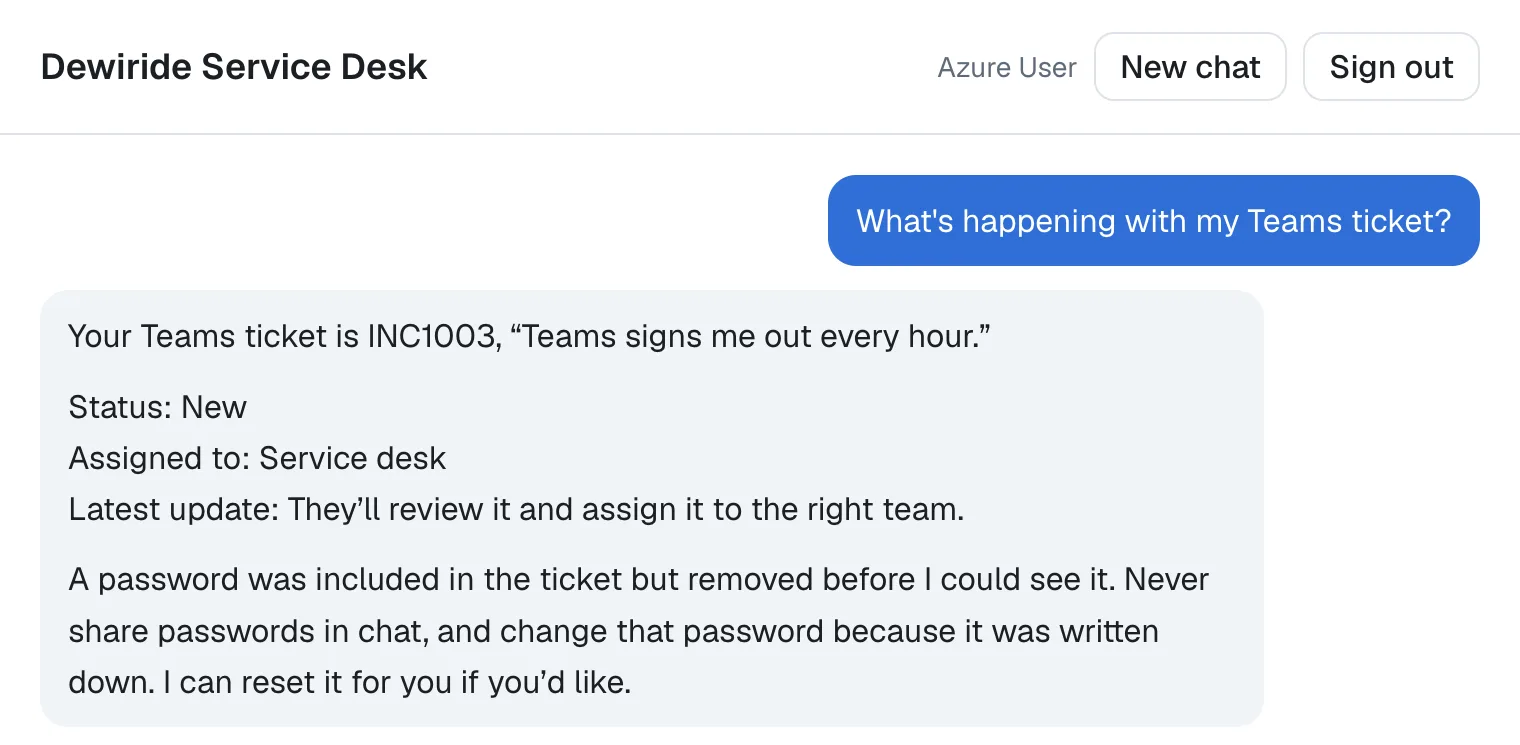
The employee still sees their own message as they typed it: it's on their screen. Nothing after the API's guard ever got the password.
Your Solution Now Looks Like This
DewirideServiceDesk/
├── src/
│   ├── Dewiride.ServiceDesk.Agent/
│   │   ├── Guardrails/                               ← new
│   │   │   ├── SecretGuard.cs                        ← the two middleware methods
│   │   │   └── SecretRedactor.cs                     ← finds passwords and recovery keys
│   │   ├── Memory/
│   │   ├── Sessions/
│   │   ├── Systems/
│   │   │   └── SampleTicketSystem.cs                 ← a third sample ticket, raised by email
│   │   ├── ServiceDeskAgentExtensions.cs             ← registers the guard, first in the pipeline
│   │   └── ServiceDeskInstructions.cs                ← secrets
│   └── Dewiride.ServiceDesk.Api/
│       └── Dewiride.ServiceDesk.Api.http             ← two requests with passwords
└── web/
    └── agent-chat-ui/                                ← unchanged
Cleanup (Only If You Stop Here)
This part creates nothing in Azure, so there's nothing new to delete. If you are stopping here, clean up as described in Part 16.
The conversations you send stay in Foundry for 30 days, then Foundry deletes them. The FAQ below shows how to delete one sooner.
Common Mistakes
| Mistake | What happens | Do this instead |
|---|---|---|
Adding the guard after UseLogging() | At Trace level, the log holds the password | Add it first (Step 5) |
Giving the message guard only as runFunc | Microsoft's documentation: Streaming will only run in non-streaming mode | Use Use(sharedFunc:) (Step 3) |
| Checking only the employee's messages | Secrets in tool results still reach the model | Add the function calling middleware (Step 4) |
| Deleting a secret without a placeholder | The model can't tell the employee what happened to their message | Put a placeholder in its place |
| Keeping Part 16's instructions | The model answers as if it had received the password | Add the Secrets section (Step 6) |
Changing only Contents of a message | A host that keeps the original object in RawRepresentation passes the secret on there | Clone the message and clear RawRepresentation (Step 3) |
| Logging the secret to show what was removed | The log holds what the guard kept from the model | Log how many secrets, never which |
Troubleshooting
| Symptom | Likely cause | Fix |
|---|---|---|
| The agent says If that was your real password, change it | The instructions don't explain the placeholders | Step 6 (Fixed) |
"Microsoft.Agents.AI": "Trace" shows no LoggingAgent lines | UseLogging() logs under the category LoggingAgent | Set "LoggingAgent": "Trace" (Fixed) |
| The Trace log shows the password | The guard comes after UseLogging() | Step 5 |
| A password reaches the model and no warning appears | It's written in a form the patterns don't know, such as a password of letters only | Add a rule to SecretRedactor, and ask the employee to change the password |
Frequently Asked Questions
Why not use Microsoft Foundry's guardrails?
Foundry's guardrails run inside the model service, so by the time they look at a message, it has already left your API. Foundry's personal-data filter also looks the other way: in its documentation's words, it scans the output of LLMs to identify and flag known personal information. The guard in this part runs in your API and checks what goes in.
Why replace the secret instead of blocking the whole message?
The employee still needs help. A blocked message would lose the question along with the password; a placeholder keeps the question and tells the model that a password was there.
Does the guard find every password?
No. It finds the common ways of writing one, and Step 2 lists the forms that get through. It's one layer: the instructions tell employees never to share secrets, the agent offers a reset when one was written down, and a password that got through can still be changed.
What about images and files?
The guard checks text only. The chat sends text today; a picture of a password would pass, and checking one needs a different kind of tool.
A real password reached the model before you added the guard. What now?
Change the password first: that makes the copy in Foundry useless. Then delete the stored response early: How to Delete a Stored Response in Microsoft Foundry with the Azure CLI does it with one command, and Foundry answers "deleted": true.
Conclusion
The agent's API now keeps secrets away from the model. SecretRedactor finds written-down passwords and BitLocker recovery keys with source-generated regular expressions that give up after a second. SecretGuard takes them out of the messages a run starts with, as agent run middleware added with Use(sharedFunc:), and out of every tool's result, as function calling middleware, keeping each result's form. It comes first in the pipeline, so even Trace logs see only placeholders, and the instructions tell the model what the placeholders mean.
Next: Part 18: Audit Logs and Observability (coming soon). The guard writes a warning each time it removes a secret, but those warnings only scroll past in a console. Part 18 sends the agent's logs, traces and metrics somewhere you can search them, with OpenTelemetry.
Additional Resources
- Agent Middleware — agent run, function calling and
IChatClientmiddleware, andUse(sharedFunc:). - Agent Safety — trust boundaries, and what Agent Framework logs at Trace level.
- Use the Azure OpenAI Responses API — how long Foundry keeps responses, and how to delete one.
- Best practices for regular expressions in .NET — time-outs and untrusted input.
- Personally identifiable information (PII) filter — what Foundry's personal-data filter checks.
