Part 16: Memory That Knows the Employee
Since Part 15, every conversation survives restarts. But a new conversation still starts from nothing: an employee who told the agent yesterday that they work from the Pune office has to say it again today. In this part the agent gets a memory that lasts from one conversation to the next. It remembers what the employee tells it about themselves, uses it in later conversations and tickets, and forgets it when they ask.
This is Part 16 of a 23-part series.
- Part 1: Overview, Architecture and Azure Setup
- Part 2: Create a Production-Grade .NET Solution
- Part 3: Your First Agent API with Microsoft Foundry
- Part 4: Multi-Turn Conversations with Sessions
- Part 5: Create a Next.js Chat App for Your Agent
- Part 6: Stream the Agent Through a Trusted Next.js Route Handler
- Part 7: Build a Streaming Chat Page with the AG-UI Client
- Part 8: Secure the Agent API with Microsoft Entra ID
- Part 9: Add Microsoft Entra ID Sign-In to the Next.js Chat App
- Part 10: Give the Agent Enterprise Tools
- Part 11: Let the Agent Create Tickets
- Part 12: Connect an MCP Server
- Part 13: Human Approval for Sensitive Actions
- Part 14: Approval Cards in the Chat UI
- Part 15: Persistent Conversations
- Part 16: Memory That Knows the Employee (you are here)
- Part 17: Guardrails — Keep Secrets Out of the Model (coming soon)
- Part 18: Audit Logs and Observability (coming soon)
- Part 19: Ticket Triage Workflow (coming soon)
- Part 20: Manager Approvals and Checkpoints (coming soon)
- Part 21: Agent Harness — Weekly Problem Report (coming soon)
- Part 22: Deploy to Azure Container Apps (coming soon)
- Part 23: Bring It to Microsoft Teams (coming soon)
What You Will Build
An employee tells the agent, once, that they work from the Pune office on Tuesdays and Thursdays and would rather hear about their tickets on Microsoft Teams. Days later, in a new conversation, they ask for a ticket about the office Wi-Fi, and they don't have to say any of it again:
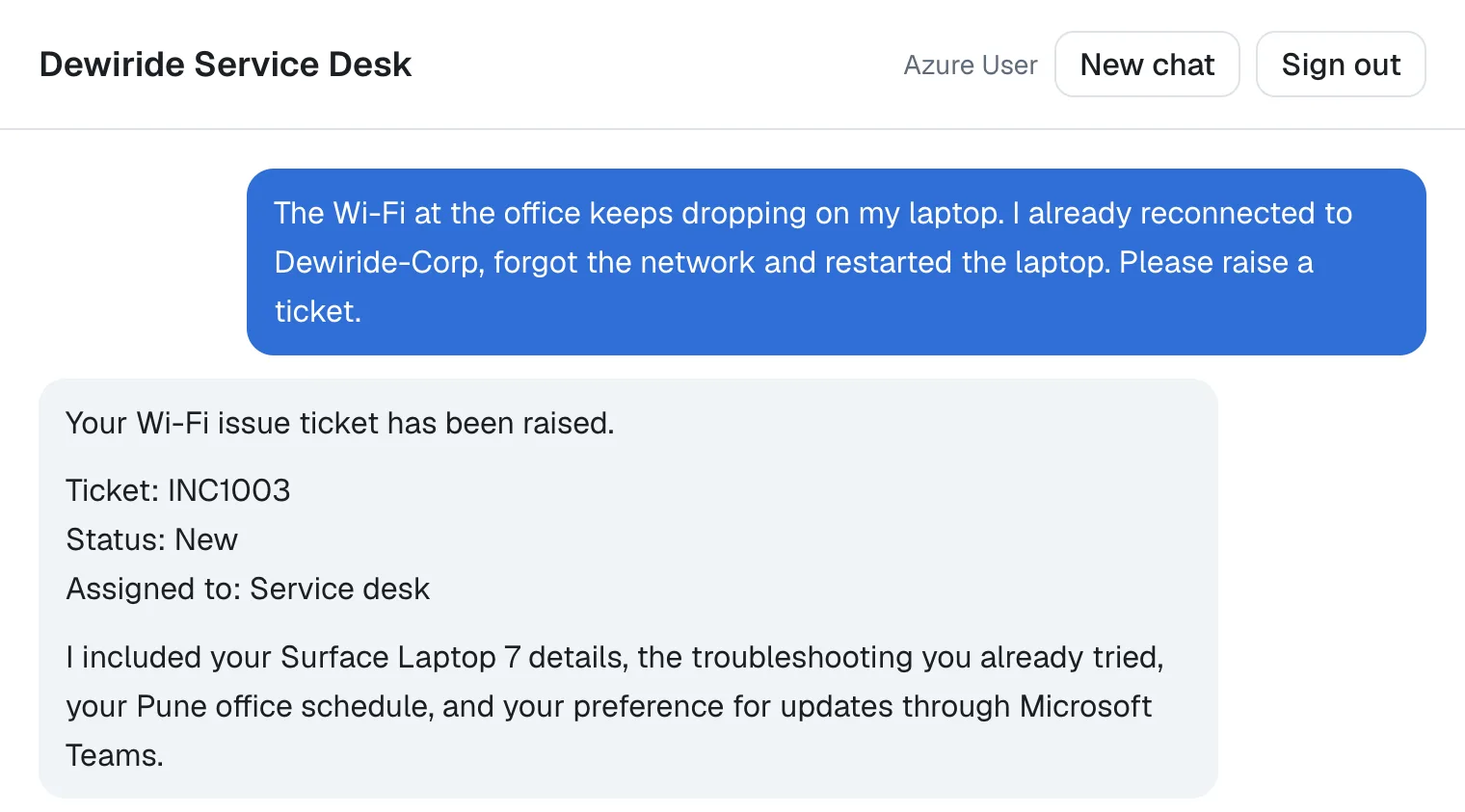
By the end of this part, the solution has:
- A
memoriescontainer in the Azure Cosmos DB account from Part 15, with one partition per employee. EmployeeMemory, a context provider that adds what the agent remembers about the signed-in employee to every run.- Two tools,
remember_about_meandforget_memory, so the model saves what the employee shares and forgets it when they ask. - Instructions that say what's worth remembering, what never is, and how memories may be used.
The chat app doesn't change: memory lives entirely in the API.
How Memory Works
A conversation isn't a memory
Part 15 stored conversations. A conversation is one thread of messages: open a new chat, and the agent starts a new one. Memory is different. Microsoft's documentation of context providers draws the line: conversation storage reloads and persists the exact message transcript, while memory extracts and recalls selected durable knowledge from prior interactions.
For a service desk, durable knowledge is the handful of facts that help with every later request: where the employee works, which devices they use, how they like to be contacted. It belongs to the employee, not to a conversation, so the agent needs it in every conversation that employee starts.
Context providers run around every run
Agent Framework adds that kind of knowledge with a context provider, a class that derives from AIContextProvider. In the words of its documentation, context providers run around each invocation to add context before execution and process data after execution. You met one in Part 12: MicrosoftLearnTools gives the agent the tools of an MCP server at the start of every run.
At the start of a run, the agent calls the provider's ProvideAIContextAsync. The provider returns an AIContext, and its three parts apply to that run only:
Part of AIContext | What it adds |
|---|---|
Instructions | Text added to the agent's instructions |
Messages | Messages added to the run's input |
Tools | Tools the model may call in this run |
One rule shapes the code: an AIContextProvider instance is attached to an agent and the same instance would be used for all sessions. The provider can't keep anything about one employee in its own fields. It asks who is signed in at the start of each run, the same way the tools from Part 10 do, and reads that employee's memories from a store.
Why not a ready-made memory provider
Agent Framework lists memory providers you can use instead of writing your own. On the day I wrote this, none of them suited a production .NET service desk:
| Provider | Why not here |
|---|---|
FoundryMemoryProvider (Microsoft Foundry) | The memory feature is in public preview, its C# SDK is a beta, it needs an extra embedding model deployment, and a memory store allows at most 100 scopes, so a company with more than 100 employees can't give each one their own |
| Azure Cosmos DB memory provider | Currently available for Python; .NET gets only the conversation-history provider |
| Mem0 | Python only |
| Neo4j | The .NET package is an independent, community-maintained .NET port |
AIContextProvider itself is generally available in Agent Framework 1.28, and Part 15 already set up Azure Cosmos DB. So this part builds memory from those two.
Who decides what to remember
The model does, through a tool. When the employee shares something lasting, the instructions tell the model to save it with remember_about_me as one short sentence and to say what it remembered, so nothing is stored behind the employee's back. When they ask the agent to forget something, it calls forget_memory. The code sets the limits: at most 20 memories per employee, 200 characters each.
Where the memories go in the request
The provider returns the memories as instructions, not as a message. Instructions travel with every request but aren't kept in the conversation. To check, I asked Foundry for one of these responses afterwards: its instructions ended with the provider's list, right after the agent's own instructions, and its stored input held only the employee's message. So memories never pile up in the conversation history. Every run gets the list as it is at that moment, and a memory the employee asks the agent to forget is gone from the next run on.
What This Part Costs
Memory adds work in two places:
- Azure Cosmos DB: reading one employee's memories at the start of a run cost 2.85 request units (RU) in my measurements, and saving or forgetting a memory 6.86 RU each. At the serverless price from Part 15, $0.25 per million RU, that's a million runs for about 71 cents.
- The model: I sent the same first message to the API from Part 15 and to this part's API, three times each. Without memory, the request had 1,696 input tokens. With memory and one remembered fact, it had 2,111: the instructions about memory, the two tools and the list add about 415 tokens to every request, roughly $0.00008 at the price from Part 1. On the second and third requests, Foundry took almost all of them from its prompt cache.
Testing this part costs less than a cent.
Prerequisites
- The solution and the chat app from Part 15: Persistent Conversations.
Step 1: Create the Memories Container
Memories get their own container in the servicedesk database from Part 15. The Azure CLI creates it in one command; How to Create a Database and Container in Azure Cosmos DB Data Explorer shows the same in the portal.
- bash / zsh
- PowerShell
az cosmosdb sql container create \
    --account-name cosmos-maf-servicedesk-4224 \
    --resource-group rg-maf-servicedesk \
    --database-name servicedesk \
    --name memories \
    --partition-key-path /employeeId \
    --ttl 31536000 \
    --query "{container:name, partitionKey:resource.partitionKey.paths, defaultTtl:resource.defaultTtl}"
az cosmosdb sql container create `
    --account-name cosmos-maf-servicedesk-4224 `
    --resource-group rg-maf-servicedesk `
    --database-name servicedesk `
    --name memories `
    --partition-key-path /employeeId `
    --ttl 31536000 `
    --query "{container:name, partitionKey:resource.partitionKey.paths, defaultTtl:resource.defaultTtl}"
Replace the account name with yours.
--partition-key-path /employeeId: every memory has anemployeeId, and all memories with the same value share a partition. One employee's memories are always read and changed together, so the store never has to look beyond one partition.--ttl 31536000: 365 days, in seconds. A memory nobody touches for a year disappears on its own. How to Set a Time to Live on an Azure Cosmos DB Container explains how Cosmos DB counts it.--querykeeps the output to the three settings that matter here.
It took 37 seconds:
{
  "container": "memories",
  "defaultTtl": 31536000,
  "partitionKey": [
    "/employeeId"
  ]
}
Step 2: Give Yourself Access to the Memories
In Part 15 your account got the Cosmos DB Built-in Data Contributor role on the sessions container only. The API now reads and writes memories too, so give the role on that container as well:
- bash / zsh
- PowerShell
az cosmosdb sql role assignment create \
    --resource-group rg-maf-servicedesk \
    --account-name cosmos-maf-servicedesk-4224 \
    --role-definition-id 00000000-0000-0000-0000-000000000002 \
    --principal-id "$(az ad signed-in-user show --query id --output tsv)" \
    --scope "/dbs/servicedesk/colls/memories"
az cosmosdb sql role assignment create `
    --resource-group rg-maf-servicedesk `
    --account-name cosmos-maf-servicedesk-4224 `
    --role-definition-id 00000000-0000-0000-0000-000000000002 `
    --principal-id "$(az ad signed-in-user show --query id --output tsv)" `
    --scope "/dbs/servicedesk/colls/memories"
It's the command from Part 15 with a new --scope: /dbs/servicedesk/colls/memories gives the role on the memories container and nothing else. How to Give Your Account Access to Azure Cosmos DB Data with the Azure CLI explains every option.
{
  "id": "…/databaseAccounts/cosmos-maf-servicedesk-4224/sqlRoleAssignments/00000000-0000-0000-0000-000000000000",
  "name": "00000000-0000-0000-0000-000000000000",
  "principalId": "00000000-0000-0000-0000-000000000000",
  "resourceGroup": "rg-maf-servicedesk",
  "roleDefinitionId": "…/databaseAccounts/cosmos-maf-servicedesk-4224/sqlRoleDefinitions/00000000-0000-0000-0000-000000000002",
  "scope": "…/databaseAccounts/cosmos-maf-servicedesk-4224/dbs/servicedesk/colls/memories",
  "systemData": null,
  "type": "Microsoft.DocumentDB/databaseAccounts/sqlRoleAssignments"
}
Without this role, the API still starts, but every run for a signed-in employee fails: the chat shows An error occurred while streaming the agent response., and the API's console shows CosmosException … Forbidden (403); Substatus: 5301 … readMetadata on resource [dbs/servicedesk/colls/…], the same error Part 15 showed for sessions.
Step 3: Share One Cosmos DB Client
Conversations and memories live in the same account, so they should share one CosmosClient. Microsoft's performance tips explain why: each client performs efficient connection management and address caching, and we recommend that you use a single instance per AppDomain for the lifetime of the application for each account your application interacts with. In Part 15, the session store registered that client itself. This step moves the client and the account's settings into one place that both features call.
First, the settings class. It's no longer only about sessions, so move CosmosDbOptions.cs from the Sessions folder up into the Dewiride.ServiceDesk.Agent project folder, next to FoundryOptions.cs:
- bash / zsh
- PowerShell
mv src/Dewiride.ServiceDesk.Agent/Sessions/CosmosDbOptions.cs src/Dewiride.ServiceDesk.Agent/
Move-Item src/Dewiride.ServiceDesk.Agent/Sessions/CosmosDbOptions.cs src/Dewiride.ServiceDesk.Agent/
Run it from the DewirideServiceDesk folder. Then replace the file's contents. The namespace loses .Sessions, and there's a setting for the new container:
namespace Dewiride.ServiceDesk.Agent;

/// <summary>
/// Where conversations and memories are kept. Filled from the "CosmosDb" section of the app's settings.
/// </summary>
public sealed class CosmosDbOptions
{
    public const string SectionName = "CosmosDb";

    /// <summary>The account's URI, for example https://your-account.documents.azure.com:443/.</summary>
    public string AccountEndpoint { get; set; } = string.Empty;

    /// <summary>The database that holds the containers, for example servicedesk.</summary>
    public string DatabaseName { get; set; } = string.Empty;

    /// <summary>The container that holds one item per conversation, for example sessions.</summary>
    public string SessionsContainerName { get; set; } = string.Empty;

    /// <summary>The container that holds what the agent remembers about each employee, for example memories.</summary>
    public string MemoriesContainerName { get; set; } = string.Empty;
}
Next, create CosmosDbServiceCollectionExtensions.cs in the same folder. It holds the client and the settings checks that Part 15 wrote inside the session store's registration:
using System.Text.Json;
using Azure.Core;
using Microsoft.Azure.Cosmos;
using Microsoft.Extensions.DependencyInjection;
using Microsoft.Extensions.Options;

namespace Dewiride.ServiceDesk.Agent;

/// <summary>
/// The Azure Cosmos DB account that keeps conversations and memories: its settings and one client
/// for the whole app. Every feature that stores something there calls this first.
/// </summary>
internal static class CosmosDbServiceCollectionExtensions
{
    public static OptionsBuilder<CosmosDbOptions> AddServiceDeskCosmosDb(this IServiceCollection services)
    {
        // Another feature already added the account: share its settings and its client.
        if (services.Any(service => service.ServiceType == typeof(CosmosClient)))
        {
            return services.AddOptions<CosmosDbOptions>();
        }

        // One Cosmos DB client for the whole app. It signs in with the same Microsoft Entra ID credential
        // as the agent - no keys - and stores items with System.Text.Json.
        services.AddSingleton(provider =>
        {
            CosmosDbOptions cosmos = provider.GetRequiredService<IOptions<CosmosDbOptions>>().Value;
            TokenCredential credential = provider.GetRequiredService<TokenCredential>();

            return new CosmosClient(cosmos.AccountEndpoint, credential, new CosmosClientOptions
            {
                ApplicationName = "Dewiride.ServiceDesk",
                UseSystemTextJsonSerializerWithOptions = JsonSerializerOptions.Default,
            });
        });

        // Read the "CosmosDb" settings, and refuse to start if the account or the database is missing.
        return services.AddOptions<CosmosDbOptions>()
            .BindConfiguration(CosmosDbOptions.SectionName)
            .Validate(cosmos => Uri.TryCreate(cosmos.AccountEndpoint, UriKind.Absolute, out Uri? endpoint)
                    && endpoint.Scheme == Uri.UriSchemeHttps,
                "Set CosmosDb:AccountEndpoint to the URI of your Azure Cosmos DB account.")
            .Validate(cosmos => !string.IsNullOrWhiteSpace(cosmos.DatabaseName),
                "Set CosmosDb:DatabaseName to the name of your database.")
            .ValidateOnStart();
    }
}
- The first
ifmakes the method safe to call twice. The session store calls it, the memory calls it, and only the first call registers the client and the settings. The second gets back the same settings, so it can add a check of its own. OptionsBuilder<CosmosDbOptions>is what it returns, so each caller can chain one more.Validate(...)for its own container name.internal: hosts never call this directly; they call the two public extensions that use it.
Now the session store's registration uses it. Replace Sessions/CosmosSessionStoreExtensions.cs with:
using Microsoft.Agents.AI.Hosting;
using Microsoft.Azure.Cosmos;
using Microsoft.Extensions.DependencyInjection;
using Microsoft.Extensions.Options;

namespace Dewiride.ServiceDesk.Agent.Sessions;

/// <summary>
/// Keeps the agent's conversations in Azure Cosmos DB, for any host that runs the agent.
/// </summary>
public static class CosmosSessionStoreExtensions
{
    public static IHostedAgentBuilder WithCosmosDbSessionStore(this IHostedAgentBuilder agent)
    {
        // 1. The Cosmos DB account and its client, shared with the employee memory.
        //    This store also needs the name of its own container.
        agent.ServiceCollection.AddServiceDeskCosmosDb()
            .Validate(cosmos => !string.IsNullOrWhiteSpace(cosmos.SessionsContainerName),
                "Set CosmosDb:SessionsContainerName to the name of the container that keeps conversations.");

        // 2. The store itself. WithSessionStore keeps isolation on: the hosting layer adds the signed-in
        //    user to every session key before the store sees it.
        return agent.WithSessionStore((services, _) =>
        {
            CosmosDbOptions cosmos = services.GetRequiredService<IOptions<CosmosDbOptions>>().Value;
            Container sessions = services.GetRequiredService<CosmosClient>()
                .GetContainer(cosmos.DatabaseName, cosmos.SessionsContainerName);

            return new CosmosAgentSessionStore(sessions);
        });
    }
}
Step 1 shrank to one call plus the check for SessionsContainerName. Everything else works as in Part 15.
Step 4: Describe a Memory and Its Store
Create a Memory folder in the Dewiride.ServiceDesk.Agent project. The first file says what one memory is:
namespace Dewiride.ServiceDesk.Agent.Memory;

/// <summary>One thing the agent remembers about an employee: a short ID, the memory itself and when it was saved.</summary>
public sealed record MemoryItem(string Id, string Text, DateTimeOffset SavedAt);
The second says what any memory store must do. The context provider only knows this interface, so a host could keep memories somewhere else by registering another implementation:
namespace Dewiride.ServiceDesk.Agent.Memory;

/// <summary>
/// Where the agent keeps what it remembers about each employee. Every method takes the employee's ID,
/// and only ever reads or changes that employee's memories.
/// </summary>
public interface IEmployeeMemoryStore
{
    /// <summary>The employee's memories, oldest first.</summary>
    Task<IReadOnlyList<MemoryItem>> GetMemoriesAsync(string employeeId, CancellationToken cancellationToken);

    /// <summary>Saves a new memory for the employee and returns it with its ID.</summary>
    Task<MemoryItem> SaveMemoryAsync(string employeeId, string text, CancellationToken cancellationToken);

    /// <summary>Deletes one of the employee's memories. Returns false when the employee has no memory with that ID.</summary>
    Task<bool> ForgetMemoryAsync(string employeeId, string memoryId, CancellationToken cancellationToken);
}
Every method takes the employee's ID. The store has no way to read or change memories without saying whose they are.
Step 5: Keep Memories in Cosmos DB
Create CosmosEmployeeMemoryStore.cs in the Memory folder. It stores one item per memory. The pieces first.
Reading an employee's memories:
    public async Task<IReadOnlyList<MemoryItem>> GetMemoriesAsync(string employeeId, CancellationToken cancellationToken)
    {
        // Read the employee's partition only. Without the partition key, the query would look through every partition.
        QueryDefinition query = new("SELECT * FROM c ORDER BY c.savedAt");
        using FeedIterator<MemoryDocument> feed = container.GetItemQueryIterator<MemoryDocument>(
            query, requestOptions: new QueryRequestOptions { PartitionKey = new PartitionKey(EmployeeKey(employeeId)) });

        List<MemoryItem> memories = [];
        while (feed.HasMoreResults)
        {
            foreach (MemoryDocument document in await feed.ReadNextAsync(cancellationToken))
            {
                memories.Add(new MemoryItem(document.Id, document.Text, document.SavedAt));
            }
        }

        return memories;
    }
QueryRequestOptions.PartitionKeylimits the query to the employee's partition. The query text,SELECT * FROM c, has no filter: without the partition key, it would return every employee's memories, from every partition. How to Query the Items of One Partition in Azure Cosmos DB with C# shows both.FeedIteratorreturns results a page at a time; thewhileloop reads every page.ORDER BY c.savedAtlists memories oldest first, the order in which the employee shared them.
Saving a memory:
    public async Task<MemoryItem> SaveMemoryAsync(string employeeId, string text, CancellationToken cancellationToken)
    {
        string employeeKey = EmployeeKey(employeeId);

        // A short random ID is enough among one employee's memories. If it's already taken (409 Conflict),
        // try another one.
        for (int attempt = 1; ; attempt++)
        {
            MemoryDocument document = new(NewMemoryId(), employeeKey, text, timeProvider.GetUtcNow());
            try
            {
                await container.CreateItemAsync(document, new PartitionKey(employeeKey), cancellationToken: cancellationToken);
                return new MemoryItem(document.Id, document.Text, document.SavedAt);
            }
            catch (CosmosException exception) when (exception.StatusCode == HttpStatusCode.Conflict && attempt < 3)
            {
            }
        }
    }
NewMemoryId()makes an ID of eight hex characters, such asec958a30. The model sees these IDs, so short ones cost fewer tokens than a 36-character GUID.CreateItemAsyncrefuses an ID that already exists in the partition with409 Conflict, whereUpsertItemAsyncwould quietly replace that item. Two of one employee's 20 memories getting the same random ID is very unlikely, but if it happens, the loop tries a new ID, up to three times. How to Create an Item Only If Its ID Is New in Azure Cosmos DB with C# shows the conflict.
Forgetting a memory:
    public async Task<bool> ForgetMemoryAsync(string employeeId, string memoryId, CancellationToken cancellationToken)
    {
        try
        {
            await container.DeleteItemAsync<MemoryDocument>(memoryId, new PartitionKey(EmployeeKey(employeeId)),
                cancellationToken: cancellationToken);
            return true;
        }
        catch (CosmosException exception) when (exception.StatusCode == HttpStatusCode.NotFound)
        {
            // No memory with that ID in this employee's partition: nothing to forget.
            return false;
        }
    }
DeleteItemAsync needs the item's ID and its partition key. Because the partition key is the employee's, an ID from another employee's partition finds nothing: one employee can't make the agent forget another's memory. Cosmos DB answers a missing item with 404 Not Found, and the store turns that into false. How to Delete an Item by ID in Azure Cosmos DB with C# covers both answers.
The employee's key:
    // The employee's object ID never goes into the item: a SHA-256 hash of it does,
    // and it's the same hash every time, so it still finds the employee's partition.
    private static string EmployeeKey(string employeeId) =>
        Convert.ToHexStringLower(SHA256.HashData(Encoding.UTF8.GetBytes(employeeId)));
As in Part 15, the employee's object ID never goes into Cosmos DB: the employeeId property holds a SHA-256 hash of it. The same object ID always gives the same hash, so it still finds the right partition. How to Hash Several Strings into One ID with SHA-256 in C# explains SHA256.HashData and Convert.ToHexStringLower.
The item type at the end of the class names every property in lowercase, because Cosmos DB requires the ID property to be called exactly id, and the client from Step 3 writes property names as they are.
The complete file:
using System.Net;
using System.Security.Cryptography;
using System.Text;
using System.Text.Json.Serialization;
using Microsoft.Azure.Cosmos;

namespace Dewiride.ServiceDesk.Agent.Memory;

/// <summary>
/// Keeps memories in an Azure Cosmos DB container whose partition key path is /employeeId: one item per memory,
/// and all of an employee's memories in one partition, so every read and delete stays inside it.
/// </summary>
public sealed class CosmosEmployeeMemoryStore(Container container, TimeProvider timeProvider) : IEmployeeMemoryStore
{
    public async Task<IReadOnlyList<MemoryItem>> GetMemoriesAsync(string employeeId, CancellationToken cancellationToken)
    {
        // Read the employee's partition only. Without the partition key, the query would look through every partition.
        QueryDefinition query = new("SELECT * FROM c ORDER BY c.savedAt");
        using FeedIterator<MemoryDocument> feed = container.GetItemQueryIterator<MemoryDocument>(
            query, requestOptions: new QueryRequestOptions { PartitionKey = new PartitionKey(EmployeeKey(employeeId)) });

        List<MemoryItem> memories = [];
        while (feed.HasMoreResults)
        {
            foreach (MemoryDocument document in await feed.ReadNextAsync(cancellationToken))
            {
                memories.Add(new MemoryItem(document.Id, document.Text, document.SavedAt));
            }
        }

        return memories;
    }

    public async Task<MemoryItem> SaveMemoryAsync(string employeeId, string text, CancellationToken cancellationToken)
    {
        string employeeKey = EmployeeKey(employeeId);

        // A short random ID is enough among one employee's memories. If it's already taken (409 Conflict),
        // try another one.
        for (int attempt = 1; ; attempt++)
        {
            MemoryDocument document = new(NewMemoryId(), employeeKey, text, timeProvider.GetUtcNow());
            try
            {
                await container.CreateItemAsync(document, new PartitionKey(employeeKey), cancellationToken: cancellationToken);
                return new MemoryItem(document.Id, document.Text, document.SavedAt);
            }
            catch (CosmosException exception) when (exception.StatusCode == HttpStatusCode.Conflict && attempt < 3)
            {
            }
        }
    }

    public async Task<bool> ForgetMemoryAsync(string employeeId, string memoryId, CancellationToken cancellationToken)
    {
        try
        {
            await container.DeleteItemAsync<MemoryDocument>(memoryId, new PartitionKey(EmployeeKey(employeeId)),
                cancellationToken: cancellationToken);
            return true;
        }
        catch (CosmosException exception) when (exception.StatusCode == HttpStatusCode.NotFound)
        {
            // No memory with that ID in this employee's partition: nothing to forget.
            return false;
        }
    }

    // The employee's object ID never goes into the item: a SHA-256 hash of it does,
    // and it's the same hash every time, so it still finds the employee's partition.
    private static string EmployeeKey(string employeeId) =>
        Convert.ToHexStringLower(SHA256.HashData(Encoding.UTF8.GetBytes(employeeId)));

    private static string NewMemoryId() => Convert.ToHexStringLower(RandomNumberGenerator.GetBytes(4));

    private sealed record MemoryDocument(
        [property: JsonPropertyName("id")] string Id,
        [property: JsonPropertyName("employeeId")] string EmployeeId,
        [property: JsonPropertyName("text")] string Text,
        [property: JsonPropertyName("savedAt")] DateTimeOffset SavedAt);
}
Step 6: Write the Context Provider
Create EmployeeMemory.cs in the Memory folder. This is the class that gives the agent its memory. The pieces first.
What the provider adds to every run:
public sealed class EmployeeMemory(ICurrentEmployee currentEmployee, IEmployeeMemoryStore store) : AIContextProvider
{
    /// <summary>The most memories the agent keeps about one employee.</summary>
    public const int MaxMemories = 20;

    /// <summary>The longest memory that remember_about_me accepts.</summary>
    public const int MaxMemoryLength = 200;

    // The agent calls this at the start of every run, and adds what it returns to that run only.
    protected override async ValueTask<AIContext> ProvideAIContextAsync(
        InvokingContext context, CancellationToken cancellationToken)
    {
        // No one signed in: nothing to remember, and no memory tools.
        if (currentEmployee.Id is not string employeeId)
        {
            return new AIContext();
        }

        IReadOnlyList<MemoryItem> memories = await store.GetMemoriesAsync(employeeId, cancellationToken);

        return new AIContext
        {
            Instructions = DescribeMemories(memories),
            Tools =
            [
                AIFunctionFactory.Create(RememberAsync, name: "remember_about_me"),
                AIFunctionFactory.Create(ForgetAsync, name: "forget_memory"),
            ],
        };
    }
AIContextProvideris the base class from Agent Framework, andProvideAIContextAsyncis the method the agent calls at the start of every run.currentEmployee.Idis the signed-in employee, filled by the API from the access token, as for the tools in Part 10. With no one signed in, the provider returns an emptyAIContext: no memories and no memory tools.Instructionsis the list of what the agent remembers, which the agent adds to its own instructions for this run.Toolsgives the model the two memory tools for this run only. The tools are created from this class's own methods, so they always work on the signed-in employee. How to Add Tools to Every Agent Run with an AIContextProvider in C# shows the same technique in a small app, and How to Add Instructions to Every Agent Run with an AIContextProvider in C# does the same for instructions.
Remembering something:
    [Description("Remembers one lasting fact or preference that the employee in this chat shared about themselves, for later conversations. Returns the saved memory, or the problem to fix first.")]
    public async Task<RememberResult> RememberAsync(
        [Description("One short sentence about the employee, at most 200 characters, such as 'Works from the Pune office on Tuesdays and Thursdays.'")] string memory,
        CancellationToken cancellationToken)
    {
        string employeeId = SignedInEmployeeId();
        string text = memory.Trim();

        // The AI model wrote this, so check it like any input from outside, and say what to fix.
        if (text.Length == 0)
        {
            return new RememberResult(Saved: false, Problem: "The memory is empty. Write it as one short sentence.");
        }

        if (text.Length > MaxMemoryLength)
        {
            return new RememberResult(Saved: false,
                Problem: $"The memory has {text.Length} characters. Shorten it to {MaxMemoryLength} or fewer.");
        }

        IReadOnlyList<MemoryItem> memories = await store.GetMemoriesAsync(employeeId, cancellationToken);

        // Already remembered: keep the one there is.
        if (memories.FirstOrDefault(item => string.Equals(item.Text, text, StringComparison.OrdinalIgnoreCase))
            is MemoryItem existing)
        {
            return new RememberResult(Saved: true, Memory: existing);
        }

        if (memories.Count >= MaxMemories)
        {
            return new RememberResult(Saved: false,
                Problem: $"You already remember {MaxMemories} things about this employee. Ask them which one to forget first.");
        }

        MemoryItem saved = await store.SaveMemoryAsync(employeeId, text, cancellationToken);
        return new RememberResult(Saved: true, Memory: saved);
    }
The model writes the memory, so the tool checks it like any input from outside, the way create_ticket checked tickets in Part 11. When something is wrong, it doesn't throw: it returns a RememberResult whose Problem tells the model what to fix, such as shortening the memory or asking the employee which memory to forget first. A memory the agent already has comes back as it is instead of being saved twice.
Forgetting something:
    [Description("Forgets one memory about the employee in this chat. Returns true when it was forgotten, false when no memory has that ID.")]
    public Task<bool> ForgetAsync(
        [Description("The ID of the memory to forget, from the list of what you remember.")] string memoryId,
        CancellationToken cancellationToken) =>
        store.ForgetMemoryAsync(SignedInEmployeeId(), memoryId.Trim(), cancellationToken);
The model passes the ID of the memory to forget. It finds the ID in the list the provider added to its instructions, which comes next.
The list the model reads:
    // What the model reads at the start of the run: the memories as a list, each with its ID,
    // so it can forget the right one.
    private static string DescribeMemories(IReadOnlyList<MemoryItem> memories)
    {
        if (memories.Count == 0)
        {
            return "You don't remember anything about this employee from earlier conversations yet.";
        }

        StringBuilder text = new("What you remember about this employee from earlier conversations (ID: memory):");
        foreach (MemoryItem memory in memories)
        {
            text.Append($"\n- {memory.Id}: {memory.Text}");
        }

        return text.ToString();
    }
For an employee with one memory, the model reads:
What you remember about this employee from earlier conversations (ID: memory):
- ec958a30: Works from the Pune office on Tuesdays and Thursdays.
An employee the agent knows nothing about yet gets one line saying so, so the model can answer What do you remember about me? honestly.
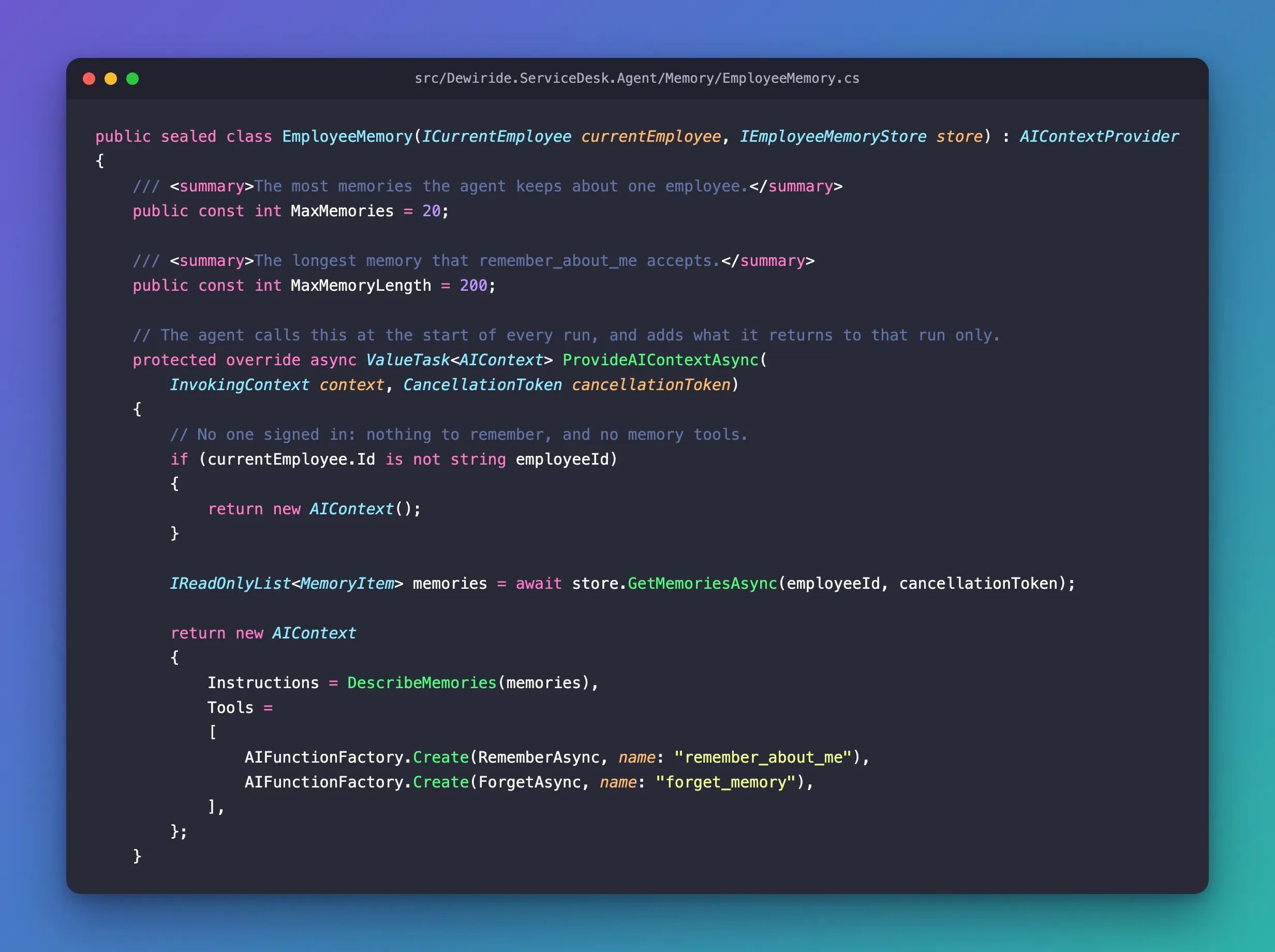
The complete file:
using System.ComponentModel;
using System.Text;
using Microsoft.Agents.AI;
using Microsoft.Extensions.AI;

namespace Dewiride.ServiceDesk.Agent.Memory;

/// <summary>
/// What the agent remembers about the signed-in employee, from one conversation to the next.
/// At the start of every run it adds the employee's memories to that run's instructions, and gives
/// the model two tools: one to remember something new, one to forget something. Memories always
/// belong to the signed-in employee, never to an ID that the AI model chose.
/// </summary>
public sealed class EmployeeMemory(ICurrentEmployee currentEmployee, IEmployeeMemoryStore store) : AIContextProvider
{
    /// <summary>The most memories the agent keeps about one employee.</summary>
    public const int MaxMemories = 20;

    /// <summary>The longest memory that remember_about_me accepts.</summary>
    public const int MaxMemoryLength = 200;

    // The agent calls this at the start of every run, and adds what it returns to that run only.
    protected override async ValueTask<AIContext> ProvideAIContextAsync(
        InvokingContext context, CancellationToken cancellationToken)
    {
        // No one signed in: nothing to remember, and no memory tools.
        if (currentEmployee.Id is not string employeeId)
        {
            return new AIContext();
        }

        IReadOnlyList<MemoryItem> memories = await store.GetMemoriesAsync(employeeId, cancellationToken);

        return new AIContext
        {
            Instructions = DescribeMemories(memories),
            Tools =
            [
                AIFunctionFactory.Create(RememberAsync, name: "remember_about_me"),
                AIFunctionFactory.Create(ForgetAsync, name: "forget_memory"),
            ],
        };
    }

    [Description("Remembers one lasting fact or preference that the employee in this chat shared about themselves, for later conversations. Returns the saved memory, or the problem to fix first.")]
    public async Task<RememberResult> RememberAsync(
        [Description("One short sentence about the employee, at most 200 characters, such as 'Works from the Pune office on Tuesdays and Thursdays.'")] string memory,
        CancellationToken cancellationToken)
    {
        string employeeId = SignedInEmployeeId();
        string text = memory.Trim();

        // The AI model wrote this, so check it like any input from outside, and say what to fix.
        if (text.Length == 0)
        {
            return new RememberResult(Saved: false, Problem: "The memory is empty. Write it as one short sentence.");
        }

        if (text.Length > MaxMemoryLength)
        {
            return new RememberResult(Saved: false,
                Problem: $"The memory has {text.Length} characters. Shorten it to {MaxMemoryLength} or fewer.");
        }

        IReadOnlyList<MemoryItem> memories = await store.GetMemoriesAsync(employeeId, cancellationToken);

        // Already remembered: keep the one there is.
        if (memories.FirstOrDefault(item => string.Equals(item.Text, text, StringComparison.OrdinalIgnoreCase))
            is MemoryItem existing)
        {
            return new RememberResult(Saved: true, Memory: existing);
        }

        if (memories.Count >= MaxMemories)
        {
            return new RememberResult(Saved: false,
                Problem: $"You already remember {MaxMemories} things about this employee. Ask them which one to forget first.");
        }

        MemoryItem saved = await store.SaveMemoryAsync(employeeId, text, cancellationToken);
        return new RememberResult(Saved: true, Memory: saved);
    }

    [Description("Forgets one memory about the employee in this chat. Returns true when it was forgotten, false when no memory has that ID.")]
    public Task<bool> ForgetAsync(
        [Description("The ID of the memory to forget, from the list of what you remember.")] string memoryId,
        CancellationToken cancellationToken) =>
        store.ForgetMemoryAsync(SignedInEmployeeId(), memoryId.Trim(), cancellationToken);

    // What the model reads at the start of the run: the memories as a list, each with its ID,
    // so it can forget the right one.
    private static string DescribeMemories(IReadOnlyList<MemoryItem> memories)
    {
        if (memories.Count == 0)
        {
            return "You don't remember anything about this employee from earlier conversations yet.";
        }

        StringBuilder text = new("What you remember about this employee from earlier conversations (ID: memory):");
        foreach (MemoryItem memory in memories)
        {
            text.Append($"\n- {memory.Id}: {memory.Text}");
        }

        return text.ToString();
    }

    // Who is asking comes from the host's sign-in. With no one signed in, the tool fails
    // instead of guessing.
    private string SignedInEmployeeId() =>
        currentEmployee.Id ?? throw new InvalidOperationException("No employee is signed in.");
}

/// <summary>
/// What remember_about_me tells the AI model: the saved memory, or, when it wasn't saved,
/// the problem to fix, in words the model can act on.
/// </summary>
public sealed record RememberResult(bool Saved, MemoryItem? Memory = null, string? Problem = null);
Step 7: Register the Memory
Hosts choose where memories are kept, the same way they choose the session store. Create CosmosEmployeeMemoryExtensions.cs in the Memory folder:
using Microsoft.Agents.AI.Hosting;
using Microsoft.Azure.Cosmos;
using Microsoft.Extensions.DependencyInjection;
using Microsoft.Extensions.Options;

namespace Dewiride.ServiceDesk.Agent.Memory;

/// <summary>
/// Keeps what the agent remembers about each employee in Azure Cosmos DB, for any host that runs the agent.
/// </summary>
public static class CosmosEmployeeMemoryExtensions
{
    public static IHostedAgentBuilder WithCosmosDbEmployeeMemory(this IHostedAgentBuilder agent)
    {
        // 1. The Cosmos DB account and its client, shared with the session store.
        //    The memories need the name of their own container.
        agent.ServiceCollection.AddServiceDeskCosmosDb()
            .Validate(cosmos => !string.IsNullOrWhiteSpace(cosmos.MemoriesContainerName),
                "Set CosmosDb:MemoriesContainerName to the name of the container that keeps the employees' memories.");

        // 2. The store that EmployeeMemory reads and writes.
        agent.ServiceCollection.AddSingleton<IEmployeeMemoryStore>(services =>
        {
            CosmosDbOptions cosmos = services.GetRequiredService<IOptions<CosmosDbOptions>>().Value;
            Container memories = services.GetRequiredService<CosmosClient>()
                .GetContainer(cosmos.DatabaseName, cosmos.MemoriesContainerName);

            return new CosmosEmployeeMemoryStore(memories, services.GetRequiredService<TimeProvider>());
        });

        return agent;
    }
}
It shares the account and the client from Step 3, checks that MemoriesContainerName is set, and registers the store for the memories container.
The agent itself gets the provider. In ServiceDeskAgentExtensions.cs, add a using for the Memory namespace and register EmployeeMemory after MicrosoftLearnTools:
        // 6. What the agent remembers about the signed-in employee, from one conversation to the next.
        //    One instance for the whole app: it keeps nothing about any employee itself, only in the store.
        builder.Services.AddSingleton<EmployeeMemory>();
Then hand it to the agent with the Microsoft Learn tools:
AIContextProviders = [microsoftLearnTools, employeeMemory],
EmployeeMemory needs an IEmployeeMemoryStore, and the agent's project doesn't register one by itself: like ICurrentEmployee, it comes from the host. The complete file:
using Azure.AI.Projects;
using Azure.Core;
using Azure.Identity;
using Dewiride.ServiceDesk.Agent.Memory;
using Dewiride.ServiceDesk.Agent.Systems;
using Microsoft.Agents.AI;
using Microsoft.Agents.AI.Hosting;
using Microsoft.Extensions.AI;
using Microsoft.Extensions.DependencyInjection;
using Microsoft.Extensions.DependencyInjection.Extensions;
using Microsoft.Extensions.Hosting;
using Microsoft.Extensions.Options;

namespace Dewiride.ServiceDesk.Agent;

/// <summary>
/// Adds the Dewiride Service Desk agent to any .NET host: the API today, a background job and a Teams bot later.
/// The host also registers <see cref="ICurrentEmployee"/>, so the agent's tools know who is signed in,
/// and an <see cref="IEmployeeMemoryStore"/>, where the agent keeps what it remembers about each employee.
/// </summary>
public static class ServiceDeskAgentExtensions
{
    /// <summary>The name the agent is registered under.</summary>
    public const string AgentName = "service-desk";

    public static IHostedAgentBuilder AddServiceDeskAgent(this IHostApplicationBuilder builder)
    {
        // 1. Read the "Foundry" settings, and refuse to start if one is missing.
        builder.Services.AddOptions<FoundryOptions>()
            .Bind(builder.Configuration.GetSection(FoundryOptions.SectionName))
            .Validate(foundry => Uri.TryCreate(foundry.ProjectEndpoint, UriKind.Absolute, out _),
                "Set Foundry:ProjectEndpoint to your Foundry project endpoint.")
            .Validate(foundry => !string.IsNullOrWhiteSpace(foundry.ModelDeployment),
                "Set Foundry:ModelDeployment to your model deployment name.")
            .ValidateOnStart();

        // 2. Read the "MicrosoftLearn" settings the same way. Wrong settings stop the API here;
        //    a server that can't be reached doesn't (see MicrosoftLearnTools).
        builder.Services.AddOptions<MicrosoftLearnOptions>()
            .Bind(builder.Configuration.GetSection(MicrosoftLearnOptions.SectionName))
            .Validate(learn => Uri.TryCreate(learn.McpEndpoint, UriKind.Absolute, out Uri? endpoint)
                    && endpoint.Scheme == Uri.UriSchemeHttps,
                "Set MicrosoftLearn:McpEndpoint to the https address of the Microsoft Learn MCP server.")
            .Validate(learn => !string.IsNullOrWhiteSpace(learn.ProtocolVersion),
                "Set MicrosoftLearn:ProtocolVersion to the MCP protocol version the server supports, such as 2025-06-18.")
            .ValidateOnStart();

        // 3. Sign in with Microsoft Entra ID - no API keys. The AZURE_TOKEN_CREDENTIALS
        //    environment variable decides how: your Azure CLI sign-in on your machine,
        //    a managed identity in Azure.
        builder.Services.AddSingleton<TokenCredential>(_ =>
            new DefaultAzureCredential(DefaultAzureCredential.DefaultEnvironmentVariableName));

        // 4. The company's IT systems that the tools read from. These are in-memory samples;
        //    a host that has the real systems registers its own versions first, and those win.
        builder.Services.TryAddSingleton(TimeProvider.System);
        builder.Services.TryAddSingleton<IDeviceInventory, SampleDeviceInventory>();
        builder.Services.TryAddSingleton<ITicketSystem, SampleTicketSystem>();
        builder.Services.TryAddSingleton<IKnowledgeBase, SampleKnowledgeBase>();
        builder.Services.TryAddSingleton<IAccountSystem, SampleAccountSystem>();
        builder.Services.AddSingleton<ServiceDeskTools>();

        // 5. The tools of the Microsoft Learn MCP server. One instance for the whole app, so every
        //    run shares one connection; the app disposes it when it stops.
        builder.Services.AddSingleton<MicrosoftLearnTools>();

        // 6. What the agent remembers about the signed-in employee, from one conversation to the next.
        //    One instance for the whole app: it keeps nothing about any employee itself, only in the store.
        builder.Services.AddSingleton<EmployeeMemory>();

        // 7. Register the agent with its tools. It talks to your model through the Foundry project,
        //    gets the Microsoft Learn tools and the employee's memories at the start of every run,
        //    and logs every run that fails, so the API's console shows you why.
        return builder.AddAIAgent(AgentName, (services, name) =>
        {
            FoundryOptions foundry = services.GetRequiredService<IOptions<FoundryOptions>>().Value;
            TokenCredential credential = services.GetRequiredService<TokenCredential>();
            ServiceDeskTools tools = services.GetRequiredService<ServiceDeskTools>();
            MicrosoftLearnTools microsoftLearnTools = services.GetRequiredService<MicrosoftLearnTools>();
            EmployeeMemory employeeMemory = services.GetRequiredService<EmployeeMemory>();

            AIProjectClient projectClient = new(new Uri(foundry.ProjectEndpoint), credential);

            return projectClient
                .AsAIAgent(new ChatClientAgentOptions
                {
                    // A fixed ID. Without one, every start gets a new random ID, and the session store,
                    // which keeps each conversation under the agent's ID, can't find yesterday's conversations.
                    Id = name,
                    Name = name,
                    ChatOptions = new ChatOptions
                    {
                        ModelId = foundry.ModelDeployment,
                        Instructions = ServiceDeskInstructions.Text,
                        Tools = tools.AsAITools(),
                    },
                    AIContextProviders = [microsoftLearnTools, employeeMemory],
                })
                .AsBuilder()
                .UseLogging()
                .Build(services);
        });
    }
}
In the API's Program.cs, add using Dewiride.ServiceDesk.Agent.Memory; and .WithCosmosDbEmployeeMemory() after the session store:
using Dewiride.ServiceDesk.Agent;
using Dewiride.ServiceDesk.Agent.Memory;
using Dewiride.ServiceDesk.Agent.Sessions;
using Dewiride.ServiceDesk.Api;
using Microsoft.Agents.AI.Hosting;
using Microsoft.Agents.AI.Hosting.AGUI.AspNetCore;
using Microsoft.AspNetCore.Authentication.JwtBearer;
using Microsoft.Identity.Web;

var builder = WebApplication.CreateBuilder(args);

// Health checks answer one question: "is this API up and running?"
builder.Services.AddHealthChecks();

// Sign-in: accept only access tokens that Microsoft Entra ID issued for this API.
builder.Services.AddAuthentication(JwtBearerDefaults.AuthenticationScheme)
    .AddMicrosoftIdentityWebApi(builder.Configuration.GetSection("AzureAd"));

// Permission: the token must also carry the access_as_user scope.
builder.Services.AddAuthorization(options =>
    options.AddPolicy("ServiceDeskUser", policy => policy.RequireScope("access_as_user")));

// Every conversation belongs to the person who signed in: their object ID (the oid claim)
// becomes part of each conversation's key in the session store.
builder.Services.AddHttpContextAccessor();
builder.Services.UseClaimsBasedAgentIsolation(new ClaimsIdentityAgentIsolationKeyProviderOptions
{
    ClaimType = ClaimConstants.ObjectId,
});

// The agent's tools look up the signed-in employee's own records, by the same object ID.
builder.Services.AddSingleton<ICurrentEmployee, SignedInEmployee>();

// The Dewiride Service Desk agent, and AG-UI: the protocol that streams its answers.
// Every conversation is kept in Azure Cosmos DB, separately for each user, so it
// survives restarts and every copy of the API sees it. What the agent remembers about
// each employee is kept there too, and lasts from one conversation to the next.
var serviceDeskAgent = builder.AddServiceDeskAgent()
    .WithCosmosDbSessionStore()
    .WithCosmosDbEmployeeMemory();
builder.Services.AddAGUIServer();

var app = builder.Build();

app.MapHealthChecks("/health");
app.MapAGUIServer(serviceDeskAgent, "/api/agents/service-desk")
    .RequireAuthorization("ServiceDeskUser");

app.Run();
Last, the container's name in the settings, below SessionsContainerName:
{
  "Logging": {
    "LogLevel": {
      "Default": "Information",
      "Microsoft.AspNetCore": "Warning",
      "Microsoft.Identity": "Warning"
    }
  },
  "AllowedHosts": "*",
  "AzureAd": {
    "Instance": "https://login.microsoftonline.com/",
    "TenantId": "11111111-1111-1111-1111-111111111111",
    "ClientId": "22222222-2222-2222-2222-222222222222"
  },
  "Foundry": {
    "ProjectEndpoint": "https://foundry-devblogs-exp.services.ai.azure.com/api/projects/proj-devblogs-exp",
    "ModelDeployment": "gpt-5.6-luna"
  },
  "MicrosoftLearn": {
    "McpEndpoint": "https://learn.microsoft.com/api/mcp?maxTokenBudget=2000",
    "ProtocolVersion": "2025-06-18"
  },
  "CosmosDb": {
    "AccountEndpoint": "https://cosmos-maf-servicedesk-4224.documents.azure.com:443/",
    "DatabaseName": "servicedesk",
    "SessionsContainerName": "sessions",
    "MemoriesContainerName": "memories"
  }
}
Step 8: Tell the Agent When to Remember
The tools exist, but the model still needs to know when to use them, and how to use what it remembers. Add a section to ServiceDeskInstructions.cs, just above Rules you always follow:
        What you remember:
        - You remember things about the employee from earlier conversations, and each request tells you what they are.
          Use them when they help, so the employee doesn't have to repeat themselves. When you raise a ticket, include
          what you remember that helps the IT team, such as where the employee works or how they like to be contacted.
        - A preference you remember says what the employee would like, not what Dewiride will do. When you add one to
          a ticket, say that you added it, and don't promise how or when the IT team will contact them.
        - When the employee tells you something lasting about themselves that will help with later IT requests, such as
          where they work, which devices they use or how they like to be contacted, save it with remember_about_me as
          one short sentence, and tell them what you remembered.
        - Never remember passwords, codes or other secrets, health or money matters, or anything about other people.
        - When the employee asks what you remember, tell them. When they ask you to forget something, call forget_memory
          for each memory it covers, and tell them what you forgot. Never show the memories' IDs.
My first version didn't have the sentence about tickets or the bullet about preferences. I learned both the hard way.
Memories left out of tickets. In a new conversation I asked for a ticket about the office Wi-Fi. The agent raised it, but the description ended with Issue persists at the office., with nothing about the Pune office or Microsoft Teams. Asked What do you remember about me? in another new conversation, it listed both facts, so the memories had reached the model. The cause was the ticket rule from Part 11: write the ticket from what the employee told you and what your tools found. A memory is neither, so the model left them out, exactly as told. Name memories as a source, in the ticket rule too:
        - Write the ticket's title and description from what the employee told you, what you remember about them
          and what your tools found. Never invent details. After raising it, give the employee the new ticket's number.
The next ticket's description ended with Employee works from the Pune office Tuesdays and Thursdays and prefers ticket updates on Microsoft Teams. Fixed: Microsoft Agent Framework Agent Leaves Its Memories Out of Tool Calls has the details.
A preference turned into a promise. The fixed agent included the Teams preference in the ticket, then told the employee Updates: Microsoft Teams, as preferred. Nothing in the service desk sends Teams messages: the IT team reads the preference in the ticket and decides. The memory said what the employee would like, and the model reported it as what would happen. The second bullet of the section says that plainly, and in three new runs the answer only said what the ticket included, such as I included the troubleshooting steps you already tried, your laptop details, Pune office days, and preference for updates via Microsoft Teams. Fixed: Microsoft Agent Framework Agent Turns a Remembered Preference into a Promise shows both answers.
The complete file:
namespace Dewiride.ServiceDesk.Agent;

/// <summary>
/// The agent's instructions: who it is, what it helps with and the rules it always follows.
/// The model receives them with every request.
/// </summary>
internal static class ServiceDeskInstructions
{
    public const string Text = """
        You are the Dewiride IT Service Desk assistant. You help Dewiride employees with IT questions:
        laptops and phones, software, sign-in and passwords, email and Microsoft Teams, Wi-Fi and VPN,
        printers, and security.

        How you answer:
        - Be friendly, clear and brief.
        - Give fixes as short numbered steps.
        - If a request is unclear, ask one clarifying question first, such as which device or operating system.
        - If you are not sure, say so. Never invent Dewiride policies, ticket numbers or contact details.
        - Write plain text. Do not use Markdown formatting such as ** or #.

        What you can look up and do:
        - Use your tools to look up the employee's own devices and open tickets, and to search the IT knowledge base.
          Look things up instead of guessing, and base your answers on what the tools return.
        - You can only see the records of the employee you are chatting with. If someone asks about another
          person's devices or tickets, explain that you can only see their own.
        - When a knowledge base article fits the problem, follow its steps and mention its number, such as KB0001.
        - For questions about Microsoft products, such as Windows, Microsoft 365, Outlook, Teams, OneDrive and
          Microsoft Authenticator, that the knowledge base doesn't answer, search Microsoft Learn with your
          Microsoft Learn tools. Base your answer on what you find, and give the link to the page you used.
        - Searches of Microsoft Learn leave Dewiride. Describe the problem in general words only: never put names,
          email addresses, device names, ticket numbers or other details about the employee in them.
        - You can raise tickets for the employee you are chatting with. Raise one only when they ask for it or agree
          when you offer it. First check their open tickets: if one already covers the problem, give them its number
          instead of raising another.
        - Write the ticket's title and description from what the employee told you, what you remember about them
          and what your tools found. Never invent details. After raising it, give the employee the new ticket's number.
        - You can reset the password of the employee you are chatting with, and only theirs. Call reset_my_password
          when they ask for a reset, or agree when you offer one because they forgot their password or are locked out.
          Don't ask them to confirm it in your own words first: they approve the reset in the chat before it runs.
        - After a reset, tell them where the one-time link went and when it expires, and that they choose their new
          password with that link. If the reset is rejected, the employee declined it: say that their password
          wasn't reset and nothing changed. Don't call it a failure or ask them to try again.

        What you remember:
        - You remember things about the employee from earlier conversations, and each request tells you what they are.
          Use them when they help, so the employee doesn't have to repeat themselves. When you raise a ticket, include
          what you remember that helps the IT team, such as where the employee works or how they like to be contacted.
        - A preference you remember says what the employee would like, not what Dewiride will do. When you add one to
          a ticket, say that you added it, and don't promise how or when the IT team will contact them.
        - When the employee tells you something lasting about themselves that will help with later IT requests, such as
          where they work, which devices they use or how they like to be contacted, save it with remember_about_me as
          one short sentence, and tell them what you remembered.
        - Never remember passwords, codes or other secrets, health or money matters, or anything about other people.
        - When the employee asks what you remember, tell them. When they ask you to forget something, call forget_memory
          for each memory it covers, and tell them what you forgot. Never show the memories' IDs.

        Rules you always follow:
        - Help only with IT topics. Politely decline anything else and say what you can help with.
        - Never ask for passwords, MFA codes or other secrets. If someone shares one, tell them to change it right away.
        - You can look things up, raise tickets and reset the employee's own password, but you cannot change, close
          or reassign tickets, or change anything else. When a problem needs hands-on help, offer to raise a ticket.
        """;
}
Step 9: Build and Run
Build the solution from the DewirideServiceDesk folder:
dotnet build
Restore complete (0.4s)
  Dewiride.ServiceDesk.Agent net10.0 succeeded (0.2s) → src/Dewiride.ServiceDesk.Agent/bin/Debug/net10.0/Dewiride.ServiceDesk.Agent.dll
  Dewiride.ServiceDesk.Api net10.0 succeeded (0.1s) → src/Dewiride.ServiceDesk.Api/bin/Debug/net10.0/Dewiride.ServiceDesk.Api.dll

Build succeeded in 0.8s
Start the API and the chat app as in Part 15:
- VS Code
- Visual Studio
In a terminal, in the src/Dewiride.ServiceDesk.Api folder, run:
dotnet run
Make sure http is selected in the drop-down list next to the green Start button (▶), with Dewiride.ServiceDesk.Api as the startup project, and press Ctrl+F5 (Debug → Start Without Debugging).
For the chat, run npm run dev in the web/agent-chat-ui folder in a second terminal. Step 10 doesn't need it; Step 12 does.
Step 10: Try It from the .http File
Add four requests to the end of src/Dewiride.ServiceDesk.Api/Dewiride.ServiceDesk.Api.http. Each one starts a new conversation, with its own threadId, so you can see that memory carries across conversations:
###

# Tell the agent something lasting about yourself. It saves each fact with remember_about_me:
# look for TOOL_CALL_START with remember_about_me in the stream.
POST {{baseUrl}}/api/agents/service-desk
Authorization: Bearer {{$dotenv AGENT_API_TOKEN}}
Content-Type: application/json
Accept: text/event-stream

{
  "threadId": "thread-15",
  "runId": "run-1",
  "messages": [
    {
      "id": "message-1",
      "role": "user",
      "content": "I work from the Pune office on Tuesdays and Thursdays. And when there's news about one of my tickets, I'd rather hear about it on Microsoft Teams than by email."
    }
  ]
}

###

# A new conversation, and the agent still knows. Ask for a ticket, and read the description
# in TOOL_CALL_ARGS of create_ticket.
POST {{baseUrl}}/api/agents/service-desk
Authorization: Bearer {{$dotenv AGENT_API_TOKEN}}
Content-Type: application/json
Accept: text/event-stream

{
  "threadId": "thread-16",
  "runId": "run-1",
  "messages": [
    {
      "id": "message-1",
      "role": "user",
      "content": "The Wi-Fi at the office keeps dropping on my laptop. I already reconnected to Dewiride-Corp, forgot the network and restarted the laptop. Please raise a ticket."
    }
  ]
}

###

# Ask what the agent remembers about you.
POST {{baseUrl}}/api/agents/service-desk
Authorization: Bearer {{$dotenv AGENT_API_TOKEN}}
Content-Type: application/json
Accept: text/event-stream

{
  "threadId": "thread-17",
  "runId": "run-1",
  "messages": [
    {
      "id": "message-1",
      "role": "user",
      "content": "What do you remember about me?"
    }
  ]
}

###

# Ask it to forget something: look for TOOL_CALL_START with forget_memory in the stream.
POST {{baseUrl}}/api/agents/service-desk
Authorization: Bearer {{$dotenv AGENT_API_TOKEN}}
Content-Type: application/json
Accept: text/event-stream

{
  "threadId": "thread-18",
  "runId": "run-1",
  "messages": [
    {
      "id": "message-1",
      "role": "user",
      "content": "Please forget how I like to hear about my tickets."
    }
  ]
}
The token comes from the .env file next to it, as in Part 8. If the token from an earlier part has expired, get a new one the same way.
Tell the agent something lasting
Send the first request. The response, shortened: the headers are left out, each rawEvent is replaced with {…}, long values are cut and most of the text events are left out:
data: {"type":"RUN_STARTED","threadId":"thread-15","runId":"run-1"}

data: {"type":"REASONING_ENCRYPTED_VALUE","subtype":"message","entityId":"msg_5sZlPgGajUFBVHlBoScuLMu6","encryptedValue":"gAAAAABr…","rawEvent":{…}}

data: {"type":"TOOL_CALL_START","toolCallId":"call_2FtjRrU8usvnBBK3HphIHKb3","toolCallName":"remember_about_me","rawEvent":{…}}

data: {"type":"TOOL_CALL_ARGS","toolCallId":"call_2FtjRrU8usvnBBK3HphIHKb3","delta":"{\"memory\":\"Works from the Pune office on Tuesdays and Thursdays.\"}","rawEvent":{…}}

data: {"type":"TOOL_CALL_END","toolCallId":"call_2FtjRrU8usvnBBK3HphIHKb3","rawEvent":{…}}

data: {"type":"TOOL_CALL_START","toolCallId":"call_uRfl3hoX9kQRQLygiuaCVSMd","toolCallName":"remember_about_me","rawEvent":{…}}

data: {"type":"TOOL_CALL_ARGS","toolCallId":"call_uRfl3hoX9kQRQLygiuaCVSMd","delta":"{\"memory\":\"Prefers to hear ticket updates on Microsoft Teams rather than email.\"}","rawEvent":{…}}

data: {"type":"TOOL_CALL_END","toolCallId":"call_uRfl3hoX9kQRQLygiuaCVSMd","rawEvent":{…}}

data: {"type":"TOOL_CALL_RESULT","messageId":"call_2FtjRrU8usvnBBK3HphIHKb3","toolCallId":"call_2FtjRrU8usvnBBK3HphIHKb3","content":"{\n  \"saved\": true,\n  \"memory\": {\n    \"id\": \"8c7f701f\",\n    \"text\": \"Works from the Pune office on Tuesdays and Thursdays.\",\n    \"savedAt\": \"2026-11-25T06:23:06.…","rawEvent":{…}}

data: {"type":"TOOL_CALL_RESULT","messageId":"call_uRfl3hoX9kQRQLygiuaCVSMd","toolCallId":"call_uRfl3hoX9kQRQLygiuaCVSMd","content":"{\n  \"saved\": true,\n  \"memory\": {\n    \"id\": \"682e8693\",\n    \"text\": \"Prefers to hear ticket updates on Microsoft Teams rather than email.\",\n    \"savedAt\": \"2026-…","rawEvent":{…}}

data: {"type":"TEXT_MESSAGE_START","messageId":"msg_04a381ea…","role":"assistant","name":"service-desk","rawEvent":{…}}

data: {"type":"TEXT_MESSAGE_CONTENT","messageId":"msg_04a381ea…","delta":"I","rawEvent":{…}}

data: {"type":"TEXT_MESSAGE_CONTENT","messageId":"msg_04a381ea…","delta":"’ll","rawEvent":{…}}

data: {"type":"TEXT_MESSAGE_CONTENT","messageId":"msg_04a381ea…","delta":" remember","rawEvent":{…}}

… 18 more TEXT_MESSAGE_CONTENT events …

data: {"type":"TEXT_MESSAGE_CONTENT","messageId":"msg_04a381ea…","delta":" email.","rawEvent":{…}}

data: {"type":"TEXT_MESSAGE_END","messageId":"msg_04a381ea…"}

data: {"type":"RUN_FINISHED","threadId":"thread-15","runId":"run-1","outcome":{"type":"success"},"usage":[{"model":"gpt-5.6-luna-2026-07-09","inputTokens":4487,"outputTokens":124,"totalTokens":4611,"reasoningTokens":17,"cachedInputTokens":2114}]}
The model called remember_about_me twice in one turn, once for each fact, and wrote each memory as one short sentence. The answer:
I’ll remember that you work from the Pune office on Tuesdays and Thursdays, and that you prefer ticket updates through Microsoft Teams rather than email.
A new conversation, and a ticket
Send the second request: a new threadId, so the agent has none of the first conversation. It calls get_my_devices, get_my_tickets and create_ticket, and the description it writes in TOOL_CALL_ARGS of create_ticket is:
Office Wi-Fi connection to Dewiride-Corp keeps dropping on laptop DW-LT-1001 (Surface Laptop 7, Windows 11 Enterprise). Employee works from the Pune office on Tuesdays and Thursdays and prefers ticket updates on Microsoft Teams rather than email. Already reconnected to Dewiride-Corp, forgot the network, and restarted the laptop.
The office days and the Teams preference came from memory; the employee didn't repeat them. The answer:
Your ticket has been raised:

INC1003 — Office Wi-Fi keeps dropping on laptop

It’s currently New and assigned to the Service Desk. I added your Pune office schedule and preference for updates through Microsoft Teams.
What the agent remembers
The third request asks it directly:
I remember:

- You work from the Pune office on Tuesdays and Thursdays.
- You prefer to receive ticket updates on Microsoft Teams rather than email.
Forget something
The fourth asks it to forget the contact preference. The tool call, shortened:
data: {"type":"TOOL_CALL_START","toolCallId":"call_ICkEeH2d2ZE87kAa5Z5waTmE","toolCallName":"forget_memory","rawEvent":{…}}

data: {"type":"TOOL_CALL_ARGS","toolCallId":"call_ICkEeH2d2ZE87kAa5Z5waTmE","delta":"{\"memoryId\":\"682e8693\"}","rawEvent":{…}}

data: {"type":"TOOL_CALL_RESULT","messageId":"call_ICkEeH2d2ZE87kAa5Z5waTmE","toolCallId":"call_ICkEeH2d2ZE87kAa5Z5waTmE","content":"true","rawEvent":{…}}
The model found the memory's ID in its list and passed it to forget_memory, which returned true. The answer:
I forgot that you prefer ticket updates on Microsoft Teams.
Ask again in a new conversation, and only the Pune office is left.
Step 11: See the Memories in Data Explorer
In the portal, open your Cosmos DB account's Data Explorer, expand memories and select Items. How to View, Edit and Delete Items in Azure Cosmos DB Data Explorer shows the way around. Each memory is one item. After Step 10's fourth request you have one, the Pune office; I took this picture while the container held both memories, with the first one selected:

id: the memory's short ID, the one the model passes toforget_memory.employeeId: the SHA-256 hash of the employee's object ID, and the partition key. Both items share it, because both memories belong to one employee.textandsavedAt: the memory and when it was saved._ts: when the item was last written. The 365 days of the time to live count from here.
Step 12: Try It in the Chat
Open http://localhost:3000 and sign in. Tell the agent something about yourself:
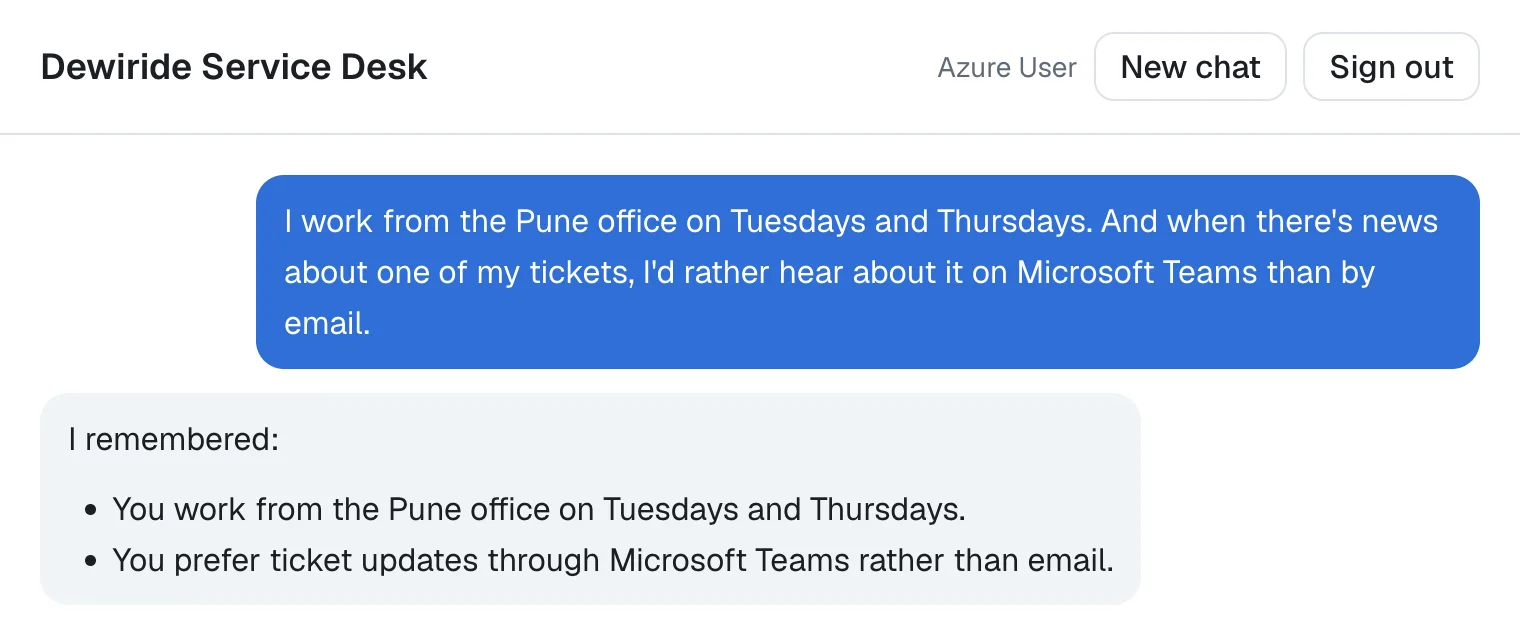
Select New chat, which starts a new conversation, and ask for a ticket without repeating anything. The ticket in the picture at the top of this part is the answer: the agent added the office days and the Teams preference by itself.
Select New chat again, ask what it remembers, and ask it to forget the preference:
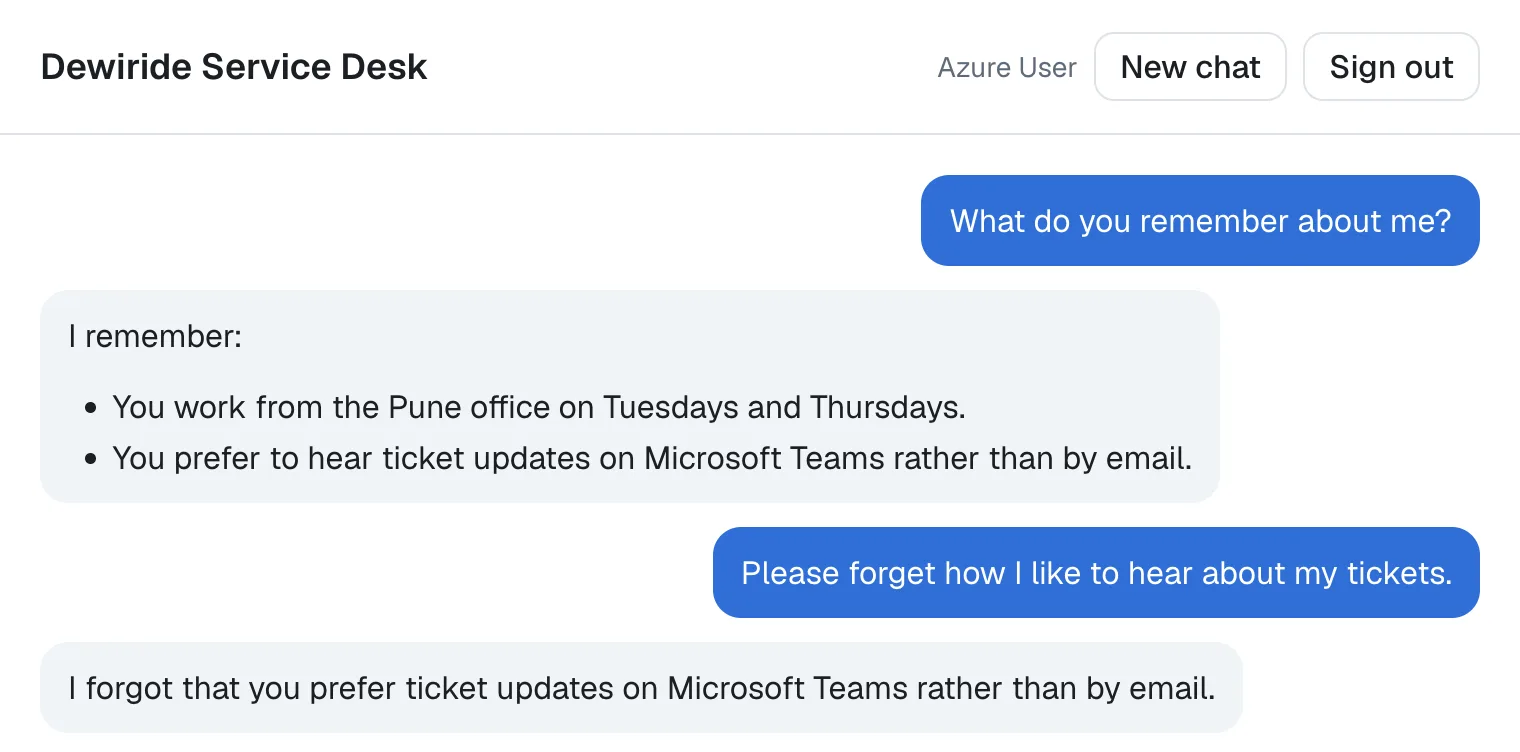
Memory makes the answers personal without any change to the chat app: everything happens in the API, between the conversation and the model.
Your Solution Now Looks Like This
DewirideServiceDesk/
├── src/
│   ├── Dewiride.ServiceDesk.Agent/
│   │   ├── Memory/                                   ← new
│   │   │   ├── CosmosEmployeeMemoryExtensions.cs     ← WithCosmosDbEmployeeMemory
│   │   │   ├── CosmosEmployeeMemoryStore.cs          ← one item per memory, one partition per employee
│   │   │   ├── EmployeeMemory.cs                     ← the context provider and its two tools
│   │   │   ├── IEmployeeMemoryStore.cs
│   │   │   └── MemoryItem.cs
│   │   ├── Sessions/
│   │   │   ├── CosmosAgentSessionStore.cs
│   │   │   └── CosmosSessionStoreExtensions.cs       ← uses the shared client
│   │   ├── CosmosDbOptions.cs                        ← moved from Sessions, + MemoriesContainerName
│   │   ├── CosmosDbServiceCollectionExtensions.cs    ← new: one client for the whole app
│   │   ├── ServiceDeskAgentExtensions.cs             ← registers EmployeeMemory
│   │   └── ServiceDeskInstructions.cs                ← what you remember
│   └── Dewiride.ServiceDesk.Api/
│       ├── appsettings.json                          ← MemoriesContainerName
│       ├── Dewiride.ServiceDesk.Api.http             ← four memory requests
│       └── Program.cs                                ← WithCosmosDbEmployeeMemory
└── web/
    └── agent-chat-ui/                                ← unchanged
Cleanup (Only If You Stop Here)
Later parts keep using the memories. If you are stopping here, delete the account as described in Part 15: the memories container and its role assignment go with it.
To keep the account and remove only this part's container, delete the container:
az cosmosdb sql container delete --account-name cosmos-maf-servicedesk-4224 --resource-group rg-maf-servicedesk --database-name servicedesk --name memories --yes
--yes skips the confirmation. The command works the same in bash, zsh and PowerShell.
Common Mistakes
| Mistake | What happens | Do this instead |
|---|---|---|
| Keeping the employee's memories in fields of the provider | One provider serves every employee and every conversation, so memories end up with the wrong person | Read the signed-in employee at the start of each run and keep memories in the store |
Giving remember_about_me an employee parameter | The model could save or forget memories of someone else | Take the employee from ICurrentEmployee, as the provider does |
| Writing the ticket rule as what the employee told you and what your tools found | Tickets leave out everything the agent remembers | Name memories as a source (Step 8) |
| Telling the model nothing about preferences | It reports a preference as a promise, such as updates on Teams | Say a preference is what the employee would like, not what will happen (Step 8) |
Saving new memories with UpsertItemAsync | A repeated ID silently replaces another memory | Use CreateItemAsync and handle 409 Conflict |
| Querying memories without the partition key | SELECT * FROM c returns every employee's memories | Set QueryRequestOptions.PartitionKey |
Giving the data role the scope / | The API can read and write every container in the account | Scope it to /dbs/servicedesk/colls/memories |
Forgetting .WithCosmosDbEmployeeMemory() in Program.cs | The API doesn't start | Add it after .WithCosmosDbSessionStore() |
Troubleshooting
| Symptom | Likely cause | Fix |
|---|---|---|
| The API stops at startup with Unhandled exception. Microsoft.Extensions.Options.OptionsValidationException: Set CosmosDb:MemoriesContainerName to the name of the container that keeps the employees' memories. | The setting is missing or empty | Add it to appsettings.json (Step 7) |
| The API stops at startup with Unable to resolve service for type 'Dewiride.ServiceDesk.Agent.Memory.IEmployeeMemoryStore' while attempting to activate 'Dewiride.ServiceDesk.Agent.Memory.EmployeeMemory' | No memory store is registered | Add .WithCosmosDbEmployeeMemory() in Program.cs (Step 7) |
Every answer is An error occurred while streaming the agent response., and the API's console shows CosmosException … Forbidden (403); Substatus: 5301 … on resource [dbs/servicedesk/colls/…] | Your account has no data role on that container | Step 2 |
| The agent remembers, but tickets don't mention it | The ticket rule doesn't name memories as a source | Step 8 |
| The agent promises how the IT team will contact the employee | Nothing tells it that a preference isn't a promise | Step 8 |
Frequently Asked Questions
Can one employee see another employee's memories?
No. The provider reads the signed-in employee from the access token at the start of every run, every store method takes that employee's ID, and the partition key is its hash. The model never chooses whose memories it reads or changes.
Why does the model decide what to remember, instead of saving every conversation?
A memory is meant to be small and lasting: the facts that help with every later request. The model already understands what the employee said, so it's well placed to pick those out, and the instructions make it tell the employee each time. Saving whole conversations is what Part 15 does, and an automatic extractor would need an extra model call after every run.
What happens when an employee has 20 memories?
remember_about_me refuses the 21st and tells the model to ask the employee which memory to forget first. The limit keeps the list that goes into every request short.
Do memories expire?
Yes. The container's time to live deletes a memory 365 days after it was saved, because memories are never updated. An employee can also ask the agent to forget one at any time.
Does memory work without sign-in?
No. With no employee signed in, the provider adds nothing to the run: no memories and no memory tools.
Conclusion
The agent now knows the employee from one conversation to the next. EmployeeMemory, an AIContextProvider, adds what the agent remembers to every run's instructions and gives the model remember_about_me and forget_memory. The memories live in their own Cosmos DB container, one partition per employee, keyed by a hash of the object ID. The instructions say what's worth remembering, what never is, that memories belong in tickets, and that a preference isn't a promise.
Next: Part 17: Guardrails — Keep Secrets Out of the Model (coming soon). If an employee pastes a password into the chat, the agent tells them to change it, but the password has already reached the model. Part 17 adds middleware that catches secrets before they leave the API.
Additional Resources
- Context Providers —
AIContextProvider,ProvideAIContextAsyncand keeping state out of the provider. - Context provider integrations — the ready-made memory providers and which languages they support.
- Memory in Microsoft Foundry Agent Service — the preview memory service, its quotas and its pricing.
- Performance tips for Azure Cosmos DB and .NET — one
CosmosClientfor the lifetime of the application. - Partitioning and horizontal scaling in Azure Cosmos DB — how partition keys group items.
