Part 14: Approval Cards in the Chat UI
Part 13 put the password reset behind an approval, but the only way to approve it was a request in the .http file. In this part the request reaches the employee where they are: in the chat, as a card with Approve and Reject, right under their own message. Their click goes back to the agent through the trusted route, and the conversation keeps a line that says what they decided.
This is Part 14 of a 23-part series.
- Part 1: Overview, Architecture and Azure Setup
- Part 2: Create a Production-Grade .NET Solution
- Part 3: Your First Agent API with Microsoft Foundry
- Part 4: Multi-Turn Conversations with Sessions
- Part 5: Create a Next.js Chat App for Your Agent
- Part 6: Stream the Agent Through a Trusted Next.js Route Handler
- Part 7: Build a Streaming Chat Page with the AG-UI Client
- Part 8: Secure the Agent API with Microsoft Entra ID
- Part 9: Add Microsoft Entra ID Sign-In to the Next.js Chat App
- Part 10: Give the Agent Enterprise Tools
- Part 11: Let the Agent Create Tickets
- Part 12: Connect an MCP Server
- Part 13: Human Approval for Sensitive Actions
- Part 14: Approval Cards in the Chat UI (you are here)
- Part 15: Persistent Conversations (coming soon)
- Part 16: Memory That Knows the Employee (coming soon)
- Part 17: Guardrails — Keep Secrets Out of the Model (coming soon)
- Part 18: Audit Logs and Observability (coming soon)
- Part 19: Ticket Triage Workflow (coming soon)
- Part 20: Manager Approvals and Checkpoints (coming soon)
- Part 21: Agent Harness — Weekly Problem Report (coming soon)
- Part 22: Deploy to Azure Container Apps (coming soon)
- Part 23: Bring It to Microsoft Teams (coming soon)
What You Will Build
An employee writes I forgot my password and I'm locked out. Can you reset it? The agent calls reset_my_password, and the run stops for approval, as in Part 13. This time the chat shows the request:
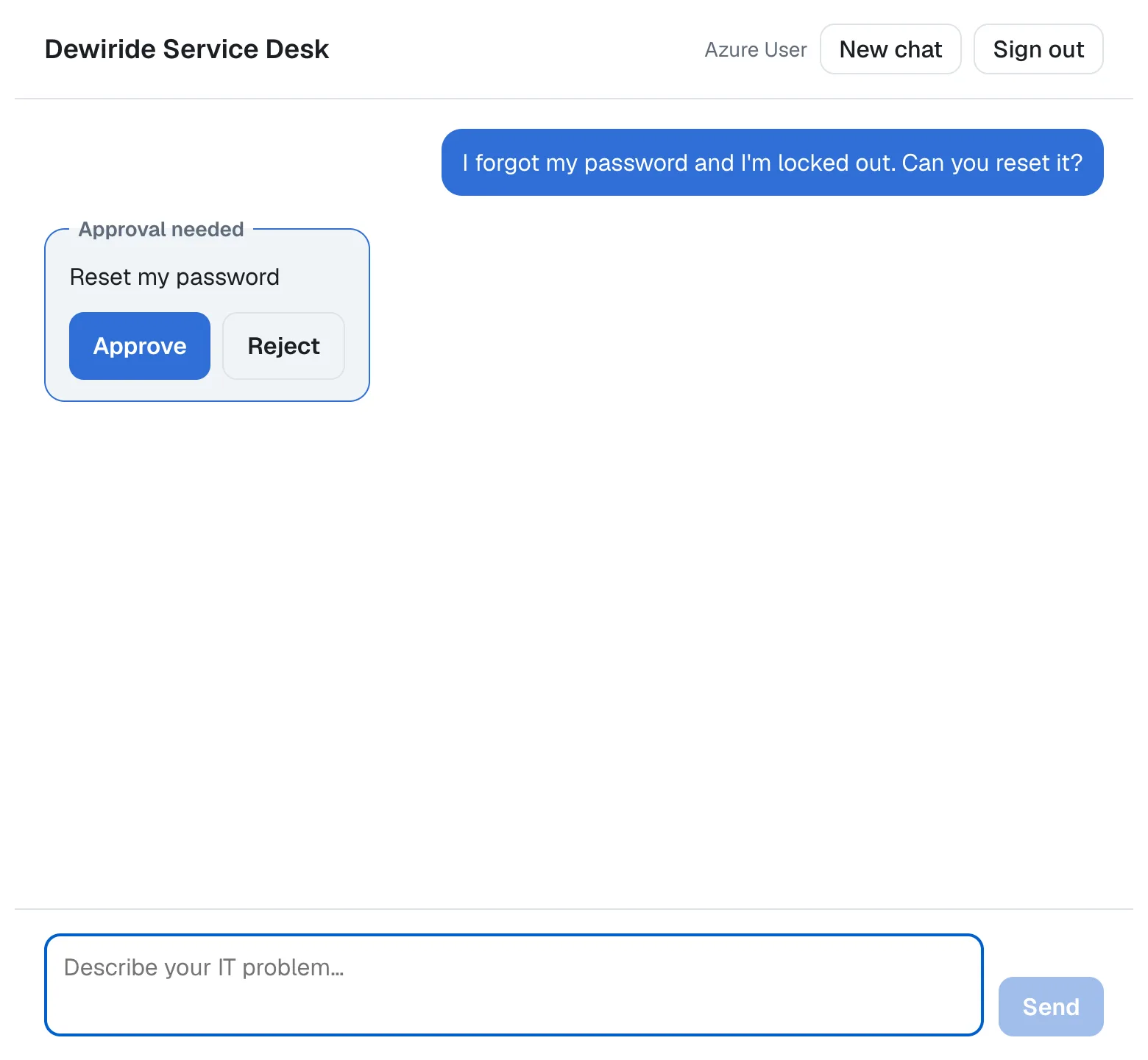
By the end of this part, the chat app has:
- A route that lets the tool calls through. The browser learns which tool the agent wants to run, but never sees a tool's result.
- A route that accepts the employee's answer, checked with zod, and passes it to the agent as an AG-UI
resumeentry. - An approval card where the agent asked, with Approve and Reject.
- A line in the conversation for every decision: Approved, Rejected, or Not answered when the employee wrote something else instead.
Nothing changes in the .NET solution. The API from Part 13 already asks for approval, and it already checks every answer.
How the Card Works
What reaches the browser
The route from Part 6 sends the browser only the events it needs: the start and end of a run, and the answer's text. When a run stops for approval, its last event, RUN_FINISHED, already carries the interrupt from Part 13: its id, its reason, tool_call, and the toolCallId of the call that waits. What the browser doesn't get is the call itself, because the route drops the tool-call events. Without them, the chat knows that something waits, but not what.
So the route now also forwards TOOL_CALL_START, TOOL_CALL_ARGS and TOOL_CALL_END: the name of the tool the model called and its arguments. TOOL_CALL_RESULT still stays on the server. A tool's result can hold the employee's devices, their tickets or the reset's details, and the employee reads all of that in the agent's answer anyway.
The AG-UI client in the browser does the rest. It turns the tool-call events into an assistant message whose toolCalls hold each call's name and arguments, and when a run ends with an interrupt, it keeps the interrupts in agent.pendingInterrupts until a later run finishes.
What goes back
An answer is a new run in the same conversation, with no new message and one resume entry for each request: the interrupt's id, status: "resolved", and a payload with approved set to true or false. The payload also echoes the tool call. That's for Agent Framework's AG-UI server, AGUI.Server 1.0.0, which treats an answer without it as no answer at all (Fixed: No approval response was provided for this approval required tool call).
Who decides
The browser is not trusted, so neither is its answer. The route checks the answer's shape, but it has no way to know whether the call is real. The API decides, as it did in Part 13: an answer only counts for a call that is waiting in the same conversation, and the API runs the call the model made, not the one the answer describes. I checked that from the API's side: I approved a waiting reset with an answer whose toolCall named get_my_tickets instead. The API ran reset_my_password, the call that was waiting, and its arguments were ignored the same way in Part 13. A changed answer can approve or reject the waiting call, and nothing else.
When the employee writes instead of answering
AG-UI has a rule for this: a run that continues an interrupted one must answer every request the interrupted run left open. Its specification adds that Omission is not abandonment: a request the person moved past must still be answered, with the status cancelled. The AG-UI client enforces the rule before anything is sent, so the chat sends a new message together with a cancelled answer for every open request. Agent Framework rejects the waiting call, and the agent answers the new message.
What This Part Costs
Nothing new in Azure. An answer is one more run, so one more call to the model, as any message is. In my test of the API, the run after an approval read 1,779 input tokens, 1,694 of them cached, and wrote 48 output tokens.
Prerequisites
- The solution and the chat app from Part 13: Human Approval for Sensitive Actions.
Step 1: Let the Tool Calls Through the Route
Open web/agent-chat-ui/app/api/chat/route.ts. The list of events the browser may receive gets three more:
// All the browser receives. Every other event stays on this server.
const eventsForTheBrowser = new Set<string>([
  EventType.RUN_STARTED,
  EventType.TEXT_MESSAGE_START,
  EventType.TEXT_MESSAGE_CONTENT,
  EventType.TEXT_MESSAGE_END,
  EventType.TOOL_CALL_START,
  EventType.TOOL_CALL_ARGS,
  EventType.TOOL_CALL_END,
  EventType.RUN_FINISHED,
  EventType.RUN_ERROR,
]);
| Event | What it carries |
|---|---|
TOOL_CALL_START | The call's ID, toolCallId, and the tool's name, toolCallName |
TOOL_CALL_ARGS | The arguments, as JSON text, in one or more pieces |
TOOL_CALL_END | The end of the arguments |
The rest of the route still removes rawEvent and usage from every event it forwards, so these three carry only what the table shows.
Step 2: Accept the Employee's Answer
Until now the route accepted exactly one thing from the browser: a message. An answer to an approval is a run without a message, so the body gets a second, optional part. Replace ChatRequestSchema with these two schemas:
// An answer to one approval the agent asked for: approved or rejected, with
// the tool call it is about, or cancelled when the person moved on.
const ResumeEntrySchema = z.discriminatedUnion("status", [
  z.strictObject({
    interruptId: z.string().min(1).max(200),
    status: z.literal("resolved"),
    payload: z.strictObject({
      approved: z.boolean(),
      toolCall: z.strictObject({
        callId: z.string().min(1).max(200),
        name: z.string().min(1).max(200),
        arguments: z.record(z.string(), z.unknown()),
      }),
    }),
  }),
  z.strictObject({
    interruptId: z.string().min(1).max(200),
    status: z.literal("cancelled"),
  }),
]);

// All the browser may send: the conversation, the run, the run it
// continues, the text, and its answers to the agent's approval requests.
const ChatRequestSchema = z
  .object({
    threadId: z.uuid(),
    runId: z.uuid(),
    parentRunId: z.uuid().optional(),
    message: z.string().trim().min(1).max(4000).optional(),
    resume: z.array(ResumeEntrySchema).min(1).max(10).optional(),
  })
  .refine((body) => body.message !== undefined || body.resume !== undefined);
| Code | What it does |
|---|---|
z.discriminatedUnion("status", […]) | An answer is one of two shapes, and its status says which: resolved or cancelled |
z.strictObject(…) | Accepts exactly the listed properties. An answer with anything else, such as a payload on a cancelled answer, is refused |
payload | approved, and the tool call it's about: its ID, name and arguments |
max(200), max(10) | Upper limits, so a browser can't send huge values |
message and resume | Both optional now. refine requires at least one of them; a new message while a request is open sends both |
The two shapes of an answer, and the way zod picks one by its status, are explained on their own in How to Validate One of Several JSON Shapes with a Zod Discriminated Union.
Then change the part of POST that builds the AG-UI request. It reads resume too, and sends no message when the browser only answered:
  const { threadId, runId, parentRunId, message, resume } = parsed.data;

  // The AG-UI request is built here, on the server: only the newest
  // message, always with the user role, the answers to the agent's
  // approval requests, and no tools, context or state.
  const input: RunAgentInput = {
    threadId,
    runId,
    parentRunId,
    messages: message
      ? [{ id: randomUUID(), role: "user", content: message }]
      : [],
    resume,
    tools: [],
    context: [],
    state: {},
    forwardedProps: {},
  };
The route still writes the request itself: the browser's values go into the fields this code chooses, never in as they came. Update the error message for a body that doesn't match too, since a message is no longer required:
{ error: "Send a threadId, a runId, and a message or a resume." },
I sent the route three bodies it should refuse, each with a made-up bearer token to get past the sign-in check: one without a message or an answer, a resolved answer without its toolCall, and a cancelled answer with a payload. All three got the same answer, before anything reached the API:
{"error":"Send a threadId, a runId, and a message or a resume."}
The complete file:
import { randomUUID } from "node:crypto";
import { HttpAgent } from "@ag-ui/client";
import {
  type BaseEvent,
  EventType,
  type RunAgentInput,
  type RunErrorEvent,
} from "@ag-ui/core";
import { EventEncoder } from "@ag-ui/encoder";
import { z } from "zod";
import { getAgentSettings } from "@/lib/agent-settings";

// An answer to one approval the agent asked for: approved or rejected, with
// the tool call it is about, or cancelled when the person moved on.
const ResumeEntrySchema = z.discriminatedUnion("status", [
  z.strictObject({
    interruptId: z.string().min(1).max(200),
    status: z.literal("resolved"),
    payload: z.strictObject({
      approved: z.boolean(),
      toolCall: z.strictObject({
        callId: z.string().min(1).max(200),
        name: z.string().min(1).max(200),
        arguments: z.record(z.string(), z.unknown()),
      }),
    }),
  }),
  z.strictObject({
    interruptId: z.string().min(1).max(200),
    status: z.literal("cancelled"),
  }),
]);

// All the browser may send: the conversation, the run, the run it
// continues, the text, and its answers to the agent's approval requests.
const ChatRequestSchema = z
  .object({
    threadId: z.uuid(),
    runId: z.uuid(),
    parentRunId: z.uuid().optional(),
    message: z.string().trim().min(1).max(4000).optional(),
    resume: z.array(ResumeEntrySchema).min(1).max(10).optional(),
  })
  .refine((body) => body.message !== undefined || body.resume !== undefined);

// All the browser receives. Every other event stays on this server.
const eventsForTheBrowser = new Set<string>([
  EventType.RUN_STARTED,
  EventType.TEXT_MESSAGE_START,
  EventType.TEXT_MESSAGE_CONTENT,
  EventType.TEXT_MESSAGE_END,
  EventType.TOOL_CALL_START,
  EventType.TOOL_CALL_ARGS,
  EventType.TOOL_CALL_END,
  EventType.RUN_FINISHED,
  EventType.RUN_ERROR,
]);

export async function POST(request: Request) {
  // Only signed-in people may chat: the browser sends its access token for
  // the agent's API, and the API checks it.
  const authorization = request.headers.get("authorization");
  if (!authorization?.startsWith("Bearer ")) {
    return Response.json(
      { error: "Sign in to chat." },
      { status: 401, headers: { "WWW-Authenticate": "Bearer" } },
    );
  }

  const parsed = ChatRequestSchema.safeParse(
    await request.json().catch(() => null),
  );
  if (!parsed.success) {
    return Response.json(
      { error: "Send a threadId, a runId, and a message or a resume." },
      { status: 400 },
    );
  }
  const { threadId, runId, parentRunId, message, resume } = parsed.data;

  // The AG-UI request is built here, on the server: only the newest
  // message, always with the user role, the answers to the agent's
  // approval requests, and no tools, context or state.
  const input: RunAgentInput = {
    threadId,
    runId,
    parentRunId,
    messages: message
      ? [{ id: randomUUID(), role: "user", content: message }]
      : [],
    resume,
    tools: [],
    context: [],
    state: {},
    forwardedProps: {},
  };

  // The call to the agent lives exactly as long as the browser's request.
  // It carries the person's token, so the API knows who is asking.
  const agent = new HttpAgent({
    url: getAgentSettings().url,
    headers: { Authorization: authorization },
    fetch: (url, init) => fetch(url, { ...init, signal: request.signal }),
  });
  const encoder = new EventEncoder();
  const bytes = new TextEncoder();
  let subscription: { unsubscribe(): void } | undefined;

  const stream = new ReadableStream<Uint8Array>({
    start(controller) {
      const send = (event: BaseEvent) =>
        controller.enqueue(bytes.encode(encoder.encodeSSE(event)));

      subscription = agent.run(input).subscribe({
        next(event) {
          if (!eventsForTheBrowser.has(event.type)) {
            return;
          }
          // rawEvent and usage carry the model provider's own data: Foundry's
          // response IDs, the exact model version and the token counts.
          const { rawEvent: _rawEvent, usage: _usage, ...forBrowser } = event;
          send(forBrowser);
        },
        error(error: unknown) {
          if (request.signal.aborted) {
            return; // The browser went away or the user pressed Stop.
          }
          console.error(
            `Agent run ${runId} in thread ${threadId} failed.`,
            error,
          );
          // The API answers 401 when the token is missing, expired or not
          // meant for it, and 403 when it lacks the access_as_user scope.
          const status = (error as { status?: number }).status;
          const failed: RunErrorEvent =
            status === 401 || status === 403
              ? {
                  type: EventType.RUN_ERROR,
                  code: "unauthorized",
                  message:
                    "Your sign-in isn't valid anymore. Please sign in again.",
                }
              : {
                  type: EventType.RUN_ERROR,
                  message:
                    "The agent isn't available right now. Please try again in a moment.",
                };
          send(failed);
          controller.close();
        },
        complete() {
          controller.close();
        },
      });
    },
    cancel() {
      subscription?.unsubscribe();
    },
  });

  return new Response(stream, {
    headers: {
      "Content-Type": encoder.getContentType(),
      "Cache-Control": "no-cache, no-transform",
    },
  });
}
Step 3: Send the Answer from the Browser
The browser talks to the route through ChatAgent, the AG-UI agent from Part 7, which builds the body the route accepts. It now sends the answers too. Replace requestInit in web/agent-chat-ui/lib/chat-agent.ts; the complete file:
import { HttpAgent, type RunAgentInput } from "@ag-ui/client";

// An AG-UI agent for the browser. It talks to this app's own /api/chat
// route, never to the agent itself, and sends only what that route accepts:
// the conversation, the run, the run it continues, the newest text, and the
// answers to the agent's approval requests.
export class ChatAgent extends HttpAgent {
  private previousRunId: string | undefined;

  constructor() {
    super({ url: "/api/chat" });
  }

  protected requestInit(input: RunAgentInput): RequestInit {
    // A run that only answers an approval request has no new text: the
    // newest message is then the agent's tool call, not the person's words.
    const newest = input.messages.at(-1);
    const body = {
      threadId: input.threadId,
      runId: input.runId,
      parentRunId: this.previousRunId,
      message:
        newest?.role === "user" && typeof newest.content === "string"
          ? newest.content
          : undefined,
      resume: input.resume,
    };
    this.previousRunId = input.runId;

    return {
      method: "POST",
      headers: {
        ...this.headers, // the signed-in user's access token, set before each run
        "Content-Type": "application/json",
        Accept: "text/event-stream",
      },
      body: JSON.stringify(body),
      signal: this.abortController.signal,
    };
  }
}
| Code | What it does |
|---|---|
newest?.role === "user" | A run that only answers a request has no new text. Its newest message is then the agent's tool call, so the body gets no message |
resume: input.resume | The answers this run carries, from runAgent({ resume }) in Step 6. On an ordinary run it's undefined, and JSON.stringify leaves it out |
Step 4: Keep Track of Requests and Answers
The rest of the work is in web/agent-chat-ui/app/chat.tsx. First, two more names from the AG-UI client, a type for the employee's decisions, and two pieces of state:
import {
  type Interrupt,
  type Message,
  type ResumeEntry,
  randomUUID,
} from "@ag-ui/client";

// What the person did with an approval request: answered it, or moved on
// to a new message without answering.
type Decision = "approved" | "rejected" | "cancelled";

  // The approval requests the agent is waiting for, and the person's answers,
  // by tool call.
  const [interrupts, setInterrupts] = useState<Interrupt[]>([]);
  const [decisions, setDecisions] = useState<Record<string, Decision>>({});
The two useState lines go inside the component, under the error state. interrupts mirrors the AG-UI client's pendingInterrupts, so the page redraws when the requests change. decisions remembers each answer by the tool call's ID, and stays for the whole conversation.
New chat forgets both. Add two lines at the end of newChat:
  function newChat() {
    agentRef.current?.abortRun();
    agentRef.current = null;
    setMessages([]);
    setDraft("");
    setError(null);
    setInterrupts([]);
    setDecisions({});
  }
Step 5: Show a Card Where the Agent Asked
The card belongs where the agent asked: right after the employee's message, in the place of the tool call. ChatMessage from Part 7 shows an assistant message's text; it now also looks at the message's tool calls. Give it the requests, the decisions and an answer function, and pass them in where the page lists the messages:
        {messages.map((message) => (
          <ChatMessage
            key={message.id}
            message={message}
            interrupts={interrupts}
            decisions={decisions}
            isRunning={isRunning}
            onAnswer={answer}
          />
        ))}
Then replace ChatMessage:
type ChatMessageProps = {
  message: Message;
  interrupts: Interrupt[];
  decisions: Record<string, Decision>;
  isRunning: boolean;
  onAnswer: (interrupt: Interrupt, approved: boolean) => void;
};

function ChatMessage({
  message,
  interrupts,
  decisions,
  isRunning,
  onAnswer,
}: ChatMessageProps) {
  if (message.role === "user" && typeof message.content === "string") {
    return <p className={styles.user}>{message.content}</p>;
  }
  if (message.role !== "assistant") {
    return null;
  }
  return (
    <>
      {message.content && (
        <div className={styles.assistant}>
          <Markdown
            remarkPlugins={[remarkGfm, remarkBreaks]}
            components={{
              a: ({ node: _node, ...props }) => (
                <a {...props} target="_blank" rel="noreferrer" />
              ),
            }}
          >
            {message.content}
          </Markdown>
        </div>
      )}
      {message.toolCalls?.map((call) => {
        const action = describeTool(call.function.name);
        const decision = decisions[call.id];
        if (decision) {
          return (
            <p key={call.id} className={styles.decision}>
              {decisionLabels[decision]}: {action}
            </p>
          );
        }
        // Tool calls the agent made by itself get nothing: only the ones
        // it is waiting to have approved get a card.
        const interrupt = interrupts.find((i) => i.toolCallId === call.id);
        return (
          interrupt && (
            <ApprovalCard
              key={call.id}
              action={action}
              disabled={isRunning}
              onAnswer={(approved) => onAnswer(interrupt, approved)}
            />
          )
        );
      })}
    </>
  );
}
For each tool call there are three cases. The employee already answered it: a line says what they decided. The agent is waiting for it: the card. Neither, because the agent called the tool by itself, such as get_my_devices: nothing, as before.
Add the card and its helpers below ChatMessage:
type ApprovalCardProps = {
  action: string;
  disabled: boolean;
  onAnswer: (approved: boolean) => void;
};

function ApprovalCard({ action, disabled, onAnswer }: ApprovalCardProps) {
  // A fieldset groups the request with its buttons, its legend names the
  // group for screen readers, and disabled turns off both buttons at once.
  return (
    <fieldset className={styles.approval} disabled={disabled}>
      <legend>Approval needed</legend>
      <p>{action}</p>
      <div className={styles.approvalButtons}>
        <button type="button" onClick={() => onAnswer(true)}>
          Approve
        </button>
        <button
          type="button"
          className={styles.reject}
          onClick={() => onAnswer(false)}
        >
          Reject
        </button>
      </div>
    </fieldset>
  );
}

const decisionLabels: Record<Decision, string> = {
  approved: "Approved",
  rejected: "Rejected",
  cancelled: "Not answered",
};

// The tool call an approval request is about, from the conversation.
function findToolCall(messages: Message[], toolCallId: string | undefined) {
  for (const message of messages) {
    if (message.role === "assistant") {
      const call = message.toolCalls?.find((c) => c.id === toolCallId);
      if (call) {
        return call;
      }
    }
  }
  return undefined;
}

// A tool's name in words: reset_my_password becomes "Reset my password".
function describeTool(name: string) {
  const words = name
    .replace(/([a-z0-9])([A-Z])/g, "$1 $2")
    .replace(/[_-]+/g, " ")
    .trim()
    .toLowerCase();
  return words.charAt(0).toUpperCase() + words.slice(1);
}
| Code | What it does |
|---|---|
<fieldset> and <legend> | Group the request with its buttons. The legend, Approval needed, names the group for screen readers |
disabled={disabled} | On a fieldset, turns off every button inside it at once, so nobody can answer twice while a run is going |
decisionLabels | The words for each decision |
findToolCall | Finds the tool call an interrupt is about, by its ID, in the conversation |
describeTool | Turns a tool's name into words: reset_my_password becomes Reset my password, and so would resetMyPassword. How its two regular expressions work: How to Turn a snake_case or camelCase Name into Words in JavaScript |
Because the card is built from the tool's name, any tool that needs approval gets a card, from this agent or another one, without a change to the page.
My first card was a <div> with role="group" and an aria-label. Biome refused it in Step 9: a <fieldset> is the HTML element for a group of controls, and an element with built-in meaning is better than a role. The whole story is in Fixed: Biome "The elements with this role can be changed to the following elements: <fieldset>".
Step 6: Send Approve or Reject
In Part 9, send held the whole run: the token, runAgent and the error handling. The answers need the same run, so that part moves into its own function, run, which takes the answers. Replace send with these three functions:
  function send(text: string) {
    agentRef.current ??= new ChatAgent();
    const agent = agentRef.current;
    agent.addMessage({ id: randomUUID(), role: "user", content: text });
    setMessages([...agent.messages]);
    setDraft("");

    // A new message while the agent waits for approval moves on without
    // answering. The run must still say so for every open request: AG-UI
    // doesn't start a run that leaves one unanswered.
    const skipped = [...agent.pendingInterrupts];
    setDecisions((current) => {
      const next = { ...current };
      for (const open of skipped) {
        if (open.toolCallId) {
          next[open.toolCallId] = "cancelled";
        }
      }
      return next;
    });
    void run(
      agent,
      skipped.length > 0
        ? skipped.map((open) => ({ interruptId: open.id, status: "cancelled" }))
        : undefined,
    );
  }

  // The person's answer to an approval request. The agent waits for an
  // answer to every request it made, so they all go back in one run.
  function answer(interrupt: Interrupt, approved: boolean) {
    const agent = agentRef.current;
    if (!agent || !interrupt.toolCallId) {
      return;
    }
    const answered: Record<string, Decision> = {
      ...decisions,
      [interrupt.toolCallId]: approved ? "approved" : "rejected",
    };
    setDecisions(answered);

    const resume: ResumeEntry[] = [];
    for (const open of agent.pendingInterrupts) {
      const call = findToolCall(agent.messages, open.toolCallId);
      const decision = open.toolCallId ? answered[open.toolCallId] : undefined;
      if (!call || !decision) {
        return; // Wait until the person has answered every request.
      }
      resume.push({
        interruptId: open.id,
        status: "resolved",
        payload: {
          approved: decision === "approved",
          // The tool call goes back with the answer: Agent Framework's AG-UI
          // server treats an answer without it as no answer at all.
          toolCall: {
            callId: call.id,
            name: call.function.name,
            arguments: JSON.parse(call.function.arguments || "{}"),
          },
        },
      });
    }
    void run(agent, resume);
  }

  async function run(agent: ChatAgent, resume?: ResumeEntry[]) {
    setError(null);
    setIsRunning(true);

    try {
      const accessToken = await getAccessToken();
      if (!accessToken) {
        return; // MSAL is taking the person to Microsoft to sign in again.
      }
      agent.headers = { Authorization: `Bearer ${accessToken}` };

      await agent.runAgent(
        { resume },
        {
          onMessagesChanged: ({ messages }) => setMessages([...messages]),
          onRunErrorEvent: ({ event }) => {
            // Stop ends the run with the client's own "abort" event: not an error.
            if (event.code !== "abort") {
              setError(event.message);
            }
          },
        },
      );
    } catch (error) {
      if (!agent.abortController.signal.aborted) {
        console.error("The agent run failed.", error);
        setError(
          (current) =>
            current ?? "The chat couldn't reach the agent. Please try again.",
        );
      }
    } finally {
      // The requests the agent is still waiting for: none after a run that
      // finished, and the new ones after a run that stopped to ask.
      setInterrupts([...agent.pendingInterrupts]);
      setIsRunning(false);
    }
  }
answer records the decision at once, so the card turns into its line. Then it builds one resume entry for each open request, with the tool call from the conversation. When several requests are open, it waits until the employee has answered all of them, because the AG-UI client sends a run only when every open request has an answer.
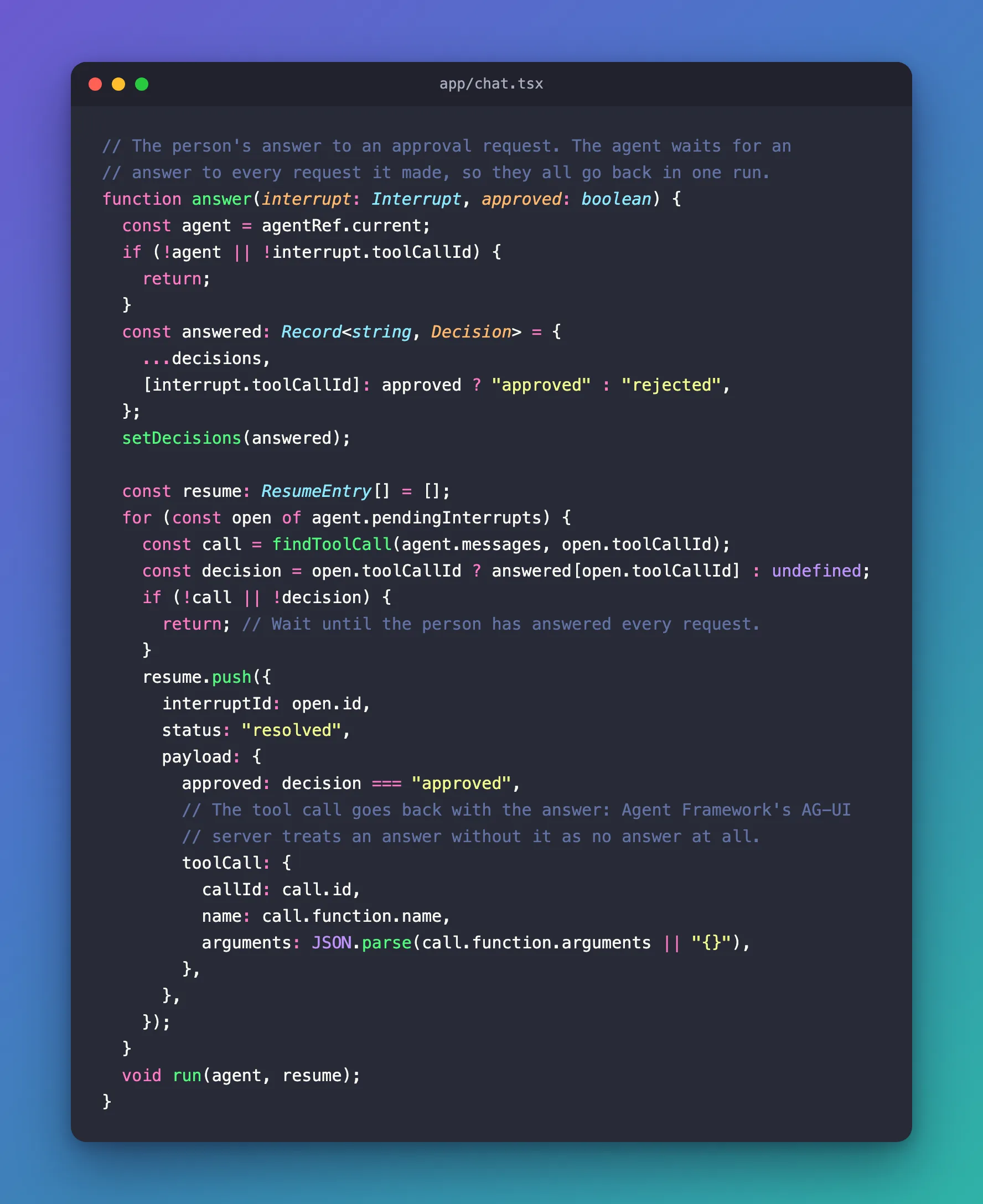
run is Part 9's try block, unchanged, plus three things:
| Code | What it does |
|---|---|
runAgent({ resume }, …) | Starts the run with the answers, if there are any |
console.error(…) | Writes the real error to the browser's console. The employee still sees the friendly message, and a developer can see why |
setInterrupts([...agent.pendingInterrupts]) | After every run, success or not, the page shows the requests the client still holds: none after a run that finished, the new ones after a run that stopped to ask |
send now also answers every open request as cancelled, the next step's subject.
Step 7: Move On When the Employee Writes Instead
My first send didn't do that. I asked for a reset, ignored the card, and wrote Before that, is my laptop compliant? The chat said The chat couldn't reach the agent. Please try again., and the browser's console said why:
The agent run failed. AGUIError: Thread has 1 pending interrupt(s) not addressed by resume: ficc_call_GIAr8usHuKCbpSKqrscQoM0U
The AG-UI client refused to start the run, and nothing reached the route: the chat app's terminal logged no request. That's AG-UI's rule from the start of this page, and the send in Step 6 follows it: a new message goes out with a cancelled answer for every open request. The full story is in Fixed: Thread has 1 pending interrupt(s) not addressed by resume.
One more line changes: the is typing… indicator. It used to show while the newest message was the employee's own. After an answer, the newest message is the agent's tool call, so the condition now says what it means: until the answer's first words arrive.
  // Until the answer's first words arrive, the newest message is the
  // person's own, or the agent's tool call.
  const newest = messages.at(-1);
  const waitingForAnswer =
    isRunning && !(newest?.role === "assistant" && newest.content);
onSubmit calls send(text) without void now, because send no longer returns a promise. The complete file:
"use client";

import {
  type Interrupt,
  type Message,
  type ResumeEntry,
  randomUUID,
} from "@ag-ui/client";
import { InteractionRequiredAuthError } from "@azure/msal-browser";
import { useMsal } from "@azure/msal-react";
import {
  type FormEvent,
  type KeyboardEvent,
  useEffect,
  useRef,
  useState,
} from "react";
import Markdown from "react-markdown";
import remarkBreaks from "remark-breaks";
import remarkGfm from "remark-gfm";
import { ChatAgent } from "@/lib/chat-agent";
import styles from "./chat.module.css";

type ChatProps = {
  agentName: string;
  welcome: string;
  scope: string;
};

// What the person did with an approval request: answered it, or moved on
// to a new message without answering.
type Decision = "approved" | "rejected" | "cancelled";

export function Chat({ agentName, welcome, scope }: ChatProps) {
  const { instance, accounts } = useMsal();
  const account = accounts[0];
  const agentRef = useRef<ChatAgent | null>(null);
  const endRef = useRef<HTMLDivElement>(null);
  const [messages, setMessages] = useState<Message[]>([]);
  const [draft, setDraft] = useState("");
  const [isRunning, setIsRunning] = useState(false);
  const [error, setError] = useState<string | null>(null);
  // The approval requests the agent is waiting for, and the person's answers,
  // by tool call.
  const [interrupts, setInterrupts] = useState<Interrupt[]>([]);
  const [decisions, setDecisions] = useState<Record<string, Decision>>({});

  // Keep the newest words, or an error, in view while an answer streams in.
  useEffect(() => {
    if (messages.length > 0 || error) {
      endRef.current?.scrollIntoView({ block: "end" });
    }
  }, [messages, error]);

  // An access token for the agent's API: from MSAL's cache while it is
  // valid, otherwise a fresh one. If Microsoft needs the person to sign in
  // again, MSAL takes them there and this returns nothing.
  async function getAccessToken(): Promise<string | undefined> {
    try {
      const result = await instance.acquireTokenSilent({
        scopes: [scope],
        account,
      });
      return result.accessToken;
    } catch (error) {
      if (error instanceof InteractionRequiredAuthError) {
        await instance.acquireTokenRedirect({ scopes: [scope], account });
        return undefined;
      }
      throw error;
    }
  }

  function send(text: string) {
    agentRef.current ??= new ChatAgent();
    const agent = agentRef.current;
    agent.addMessage({ id: randomUUID(), role: "user", content: text });
    setMessages([...agent.messages]);
    setDraft("");

    // A new message while the agent waits for approval moves on without
    // answering. The run must still say so for every open request: AG-UI
    // doesn't start a run that leaves one unanswered.
    const skipped = [...agent.pendingInterrupts];
    setDecisions((current) => {
      const next = { ...current };
      for (const open of skipped) {
        if (open.toolCallId) {
          next[open.toolCallId] = "cancelled";
        }
      }
      return next;
    });
    void run(
      agent,
      skipped.length > 0
        ? skipped.map((open) => ({ interruptId: open.id, status: "cancelled" }))
        : undefined,
    );
  }

  // The person's answer to an approval request. The agent waits for an
  // answer to every request it made, so they all go back in one run.
  function answer(interrupt: Interrupt, approved: boolean) {
    const agent = agentRef.current;
    if (!agent || !interrupt.toolCallId) {
      return;
    }
    const answered: Record<string, Decision> = {
      ...decisions,
      [interrupt.toolCallId]: approved ? "approved" : "rejected",
    };
    setDecisions(answered);

    const resume: ResumeEntry[] = [];
    for (const open of agent.pendingInterrupts) {
      const call = findToolCall(agent.messages, open.toolCallId);
      const decision = open.toolCallId ? answered[open.toolCallId] : undefined;
      if (!call || !decision) {
        return; // Wait until the person has answered every request.
      }
      resume.push({
        interruptId: open.id,
        status: "resolved",
        payload: {
          approved: decision === "approved",
          // The tool call goes back with the answer: Agent Framework's AG-UI
          // server treats an answer without it as no answer at all.
          toolCall: {
            callId: call.id,
            name: call.function.name,
            arguments: JSON.parse(call.function.arguments || "{}"),
          },
        },
      });
    }
    void run(agent, resume);
  }

  async function run(agent: ChatAgent, resume?: ResumeEntry[]) {
    setError(null);
    setIsRunning(true);

    try {
      const accessToken = await getAccessToken();
      if (!accessToken) {
        return; // MSAL is taking the person to Microsoft to sign in again.
      }
      agent.headers = { Authorization: `Bearer ${accessToken}` };

      await agent.runAgent(
        { resume },
        {
          onMessagesChanged: ({ messages }) => setMessages([...messages]),
          onRunErrorEvent: ({ event }) => {
            // Stop ends the run with the client's own "abort" event: not an error.
            if (event.code !== "abort") {
              setError(event.message);
            }
          },
        },
      );
    } catch (error) {
      if (!agent.abortController.signal.aborted) {
        console.error("The agent run failed.", error);
        setError(
          (current) =>
            current ?? "The chat couldn't reach the agent. Please try again.",
        );
      }
    } finally {
      // The requests the agent is still waiting for: none after a run that
      // finished, and the new ones after a run that stopped to ask.
      setInterrupts([...agent.pendingInterrupts]);
      setIsRunning(false);
    }
  }

  function stop() {
    agentRef.current?.abortRun();
  }

  function newChat() {
    agentRef.current?.abortRun();
    agentRef.current = null;
    setMessages([]);
    setDraft("");
    setError(null);
    setInterrupts([]);
    setDecisions({});
  }

  function signOut() {
    void instance.logoutRedirect({ account });
  }

  function onSubmit(event: FormEvent<HTMLFormElement>) {
    event.preventDefault();
    const text = draft.trim();
    if (text && !isRunning) {
      send(text);
    }
  }

  // Enter sends the message. Shift+Enter starts a new line.
  function onKeyDown(event: KeyboardEvent<HTMLTextAreaElement>) {
    if (
      event.key === "Enter" &&
      !event.shiftKey &&
      !event.nativeEvent.isComposing
    ) {
      event.preventDefault();
      event.currentTarget.form?.requestSubmit();
    }
  }

  // Until the answer's first words arrive, the newest message is the
  // person's own, or the agent's tool call.
  const newest = messages.at(-1);
  const waitingForAnswer =
    isRunning && !(newest?.role === "assistant" && newest.content);

  return (
    <div className={styles.chat}>
      <header className={styles.header}>
        <h1>{agentName}</h1>
        <div className={styles.account}>
          <span>{account?.name}</span>
          <button
            type="button"
            onClick={newChat}
            disabled={messages.length === 0}
          >
            New chat
          </button>
          <button type="button" onClick={signOut}>
            Sign out
          </button>
        </div>
      </header>

      <div
        className={styles.messages}
        role="log"
        aria-live="polite"
        aria-busy={isRunning}
        aria-label={`Conversation with ${agentName}`}
      >
        {messages.length === 0 && <p className={styles.welcome}>{welcome}</p>}
        {messages.map((message) => (
          <ChatMessage
            key={message.id}
            message={message}
            interrupts={interrupts}
            decisions={decisions}
            isRunning={isRunning}
            onAnswer={answer}
          />
        ))}
        {waitingForAnswer && (
          <p className={styles.typing}>{agentName} is typing…</p>
        )}
        {error && (
          <p className={styles.error} role="alert">
            {error}
          </p>
        )}
        <div ref={endRef} />
      </div>

      <form className={styles.composer} onSubmit={onSubmit}>
        <textarea
          aria-label={`Message ${agentName}`}
          placeholder="Describe your IT problem…"
          value={draft}
          onChange={(event) => setDraft(event.target.value)}
          onKeyDown={onKeyDown}
          maxLength={4000}
          rows={2}
        />
        {isRunning ? (
          <button type="button" onClick={stop}>
            Stop
          </button>
        ) : (
          <button type="submit" disabled={!draft.trim()}>
            Send
          </button>
        )}
      </form>
    </div>
  );
}

type ChatMessageProps = {
  message: Message;
  interrupts: Interrupt[];
  decisions: Record<string, Decision>;
  isRunning: boolean;
  onAnswer: (interrupt: Interrupt, approved: boolean) => void;
};

function ChatMessage({
  message,
  interrupts,
  decisions,
  isRunning,
  onAnswer,
}: ChatMessageProps) {
  if (message.role === "user" && typeof message.content === "string") {
    return <p className={styles.user}>{message.content}</p>;
  }
  if (message.role !== "assistant") {
    return null;
  }
  return (
    <>
      {message.content && (
        <div className={styles.assistant}>
          <Markdown
            remarkPlugins={[remarkGfm, remarkBreaks]}
            components={{
              a: ({ node: _node, ...props }) => (
                <a {...props} target="_blank" rel="noreferrer" />
              ),
            }}
          >
            {message.content}
          </Markdown>
        </div>
      )}
      {message.toolCalls?.map((call) => {
        const action = describeTool(call.function.name);
        const decision = decisions[call.id];
        if (decision) {
          return (
            <p key={call.id} className={styles.decision}>
              {decisionLabels[decision]}: {action}
            </p>
          );
        }
        // Tool calls the agent made by itself get nothing: only the ones
        // it is waiting to have approved get a card.
        const interrupt = interrupts.find((i) => i.toolCallId === call.id);
        return (
          interrupt && (
            <ApprovalCard
              key={call.id}
              action={action}
              disabled={isRunning}
              onAnswer={(approved) => onAnswer(interrupt, approved)}
            />
          )
        );
      })}
    </>
  );
}

type ApprovalCardProps = {
  action: string;
  disabled: boolean;
  onAnswer: (approved: boolean) => void;
};

function ApprovalCard({ action, disabled, onAnswer }: ApprovalCardProps) {
  // A fieldset groups the request with its buttons, its legend names the
  // group for screen readers, and disabled turns off both buttons at once.
  return (
    <fieldset className={styles.approval} disabled={disabled}>
      <legend>Approval needed</legend>
      <p>{action}</p>
      <div className={styles.approvalButtons}>
        <button type="button" onClick={() => onAnswer(true)}>
          Approve
        </button>
        <button
          type="button"
          className={styles.reject}
          onClick={() => onAnswer(false)}
        >
          Reject
        </button>
      </div>
    </fieldset>
  );
}

const decisionLabels: Record<Decision, string> = {
  approved: "Approved",
  rejected: "Rejected",
  cancelled: "Not answered",
};

// The tool call an approval request is about, from the conversation.
function findToolCall(messages: Message[], toolCallId: string | undefined) {
  for (const message of messages) {
    if (message.role === "assistant") {
      const call = message.toolCalls?.find((c) => c.id === toolCallId);
      if (call) {
        return call;
      }
    }
  }
  return undefined;
}

// A tool's name in words: reset_my_password becomes "Reset my password".
function describeTool(name: string) {
  const words = name
    .replace(/([a-z0-9])([A-Z])/g, "$1 $2")
    .replace(/[_-]+/g, " ")
    .trim()
    .toLowerCase();
  return words.charAt(0).toUpperCase() + words.slice(1);
}
Step 8: Style the Card
Add these rules at the end of web/agent-chat-ui/app/chat.module.css:
.approval {
  align-self: flex-start;
  display: flex;
  flex-direction: column;
  gap: 8px;
  min-width: 0;
  max-width: 85%;
  padding: 10px 16px 14px;
  border: 1px solid var(--accent);
  border-radius: 14px;
  background: var(--surface);
  line-height: 1.5;
}

.approval legend {
  padding: 0 6px;
  color: var(--muted);
  font-size: 0.875rem;
  font-weight: 600;
}

.approvalButtons {
  display: flex;
  gap: 8px;
  margin-top: 4px;
}

.chat .reject {
  border: 1px solid var(--border);
  background: transparent;
  color: inherit;
}

.decision {
  align-self: flex-start;
  color: var(--muted);
  font-size: 0.875rem;
}
The card uses the chat's own colors, so it follows light and dark mode like the rest of the page. The legend sits in the card's top border, where a fieldset puts it by default. A fieldset also has a minimum width of min-content by default; min-width: 0 removes it, so the card follows max-width like the messages.
Step 9: Check the Code
npm run lint
My first run failed on the <div> from Step 5:
npm notice run agent-chat-ui@0.1.0 lint
npm notice run biome check
app/chat.tsx:347:38 lint/a11y/useSemanticElements ━━━━━━━━━━━━━━━━━━━━━━━━━━━━━━━━━━━━━━━━━━━━━━━━━━

  ✖ The elements with this role can be changed to the following elements:
    <fieldset>

    345 │ function ApprovalCard({ action, disabled, onAnswer }: ApprovalCardProps) {
    346 │   return (
  > 347 │     <div className={styles.approval} role="group" aria-label="Approval needed">
        │                                      ^^^^^^^^^^^^
    348 │       <p className={styles.approvalTitle}>Approval needed</p>
    349 │       <p>{action}</p>

  ℹ For examples and more information, see WAI-ARIA Roles

  ℹ Replace with one of these elements:

  - <fieldset>


Checked 18 files in 74ms. No fixes applied.
Found 1 error.
check ━━━━━━━━━━━━━━━━━━━━━━━━━━━━━━━━━━━━━━━━━━━━━━━━━━━━━━━━━━━━━━━━━━━━━━━━━━━━━━━━━━━━━━━━━━━━━━

  ✖ Some errors were emitted while running checks.
With the <fieldset> from Step 5, the check is clean:
npm notice run agent-chat-ui@0.1.0 lint
npm notice run biome check
Checked 18 files in 46ms. No fixes applied.
Then build the app, which also checks the types:
npm run build
✓ Compiled successfully in 4.2s
  Running TypeScript ...
  Finished TypeScript in 636ms ...
  Collecting page data using 7 workers ...
✓ Collecting page data using 7 workers in 410ms
  Generating static pages using 7 workers (0/6) ...
✓ Generating static pages using 7 workers (6/6) in 474ms
  Finalizing page optimization ...
✓ Finalizing page optimization in 14ms
Route (app)
┌ ◐ /
├ ○ /_not-found
├ ƒ /api/chat
└ ○ /redirect
Step 10: Approve a Reset in the Chat
Start the API and the chat app, each in its own terminal, as in Part 9. First the API:
- VS Code
- Visual Studio
In VS Code's terminal, from the solution root, run:
dotnet run --project src/Dewiride.ServiceDesk.Api
Make sure http is selected in the drop-down list next to the green Start button (▶), with Dewiride.ServiceDesk.Api as the startup project, and press Ctrl+F5 (Debug → Start Without Debugging).
Then the chat app, in a second terminal:
cd web/agent-chat-ui
npm run dev
Open http://localhost:3000, sign in, and write I forgot my password and I'm locked out. Can you reset it? After 2.7 seconds the card from the top of this page appears. Select Approve. The card turns into the line Approved: Reset my password, and 2.7 seconds later the agent's answer is there:
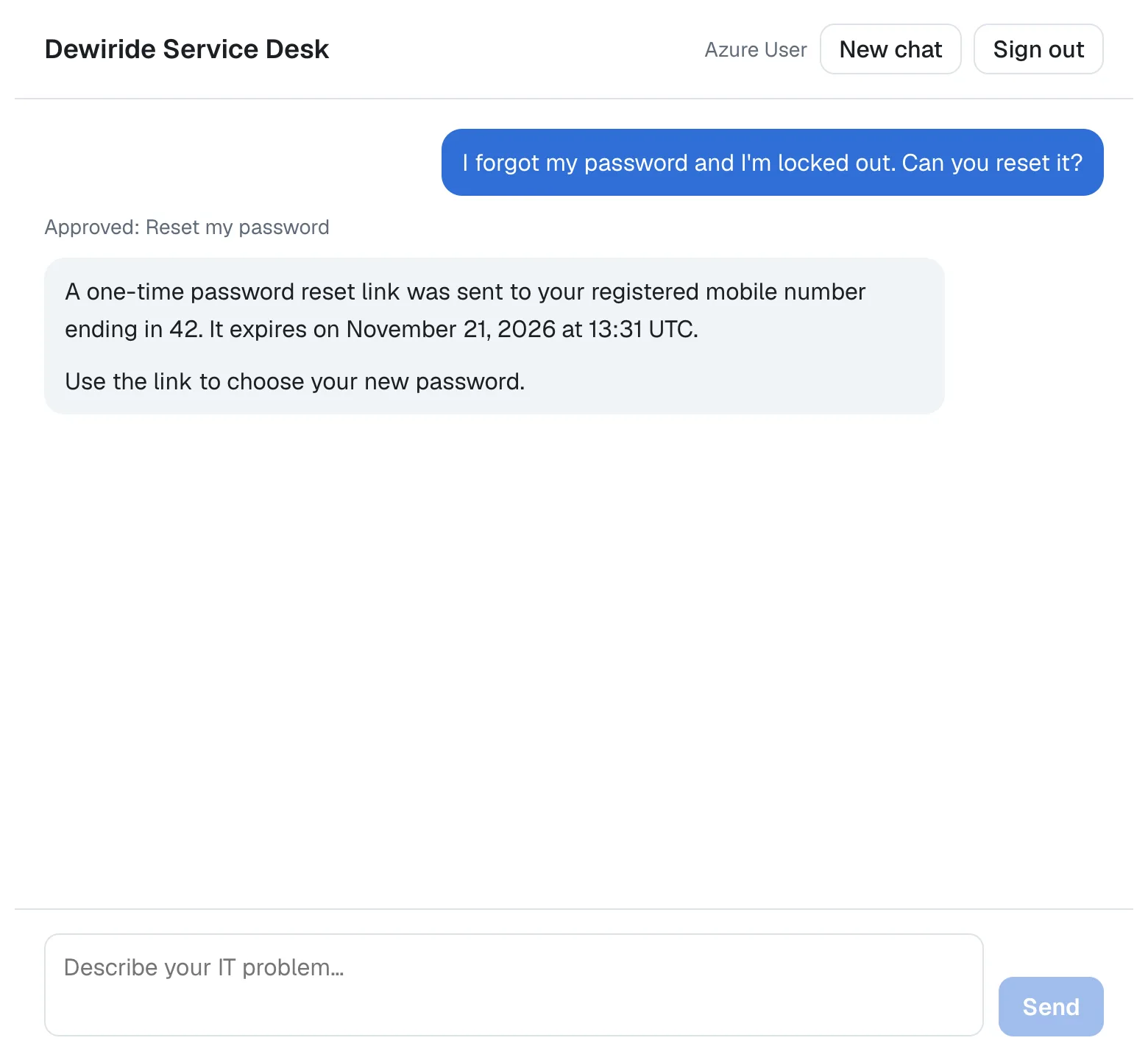
This is what the browser sent to the route when I selected Approve, with the IDs of the conversation and the runs shortened:
{
  "threadId": "…",
  "runId": "…",
  "parentRunId": "…",
  "resume": [
    {
      "interruptId": "ficc_call_SQWrYllxuQoMqZVVhuqBFETx",
      "status": "resolved",
      "payload": {
        "approved": true,
        "toolCall": {
          "callId": "call_SQWrYllxuQoMqZVVhuqBFETx",
          "name": "reset_my_password",
          "arguments": {}
        }
      }
    }
  ]
}
No message: the run only answers. The chat app's terminal shows the two requests, the question and the answer:
 POST /api/chat 200 in 2.3s (next.js: 3ms, application-code: 2.3s)
 POST /api/chat 200 in 2.6s (next.js: 8ms, application-code: 2.5s)
The browser received the reset's call, but not its result: the events of the first run were RUN_STARTED, TOOL_CALL_START with reset_my_password, TOOL_CALL_ARGS with {}, TOOL_CALL_END and RUN_FINISHED with the interrupt. Where the link went reached the employee only in the agent's sentence.
Step 11: Reject a Reset
Select New chat, write Please reset my password., and select Reject this time:
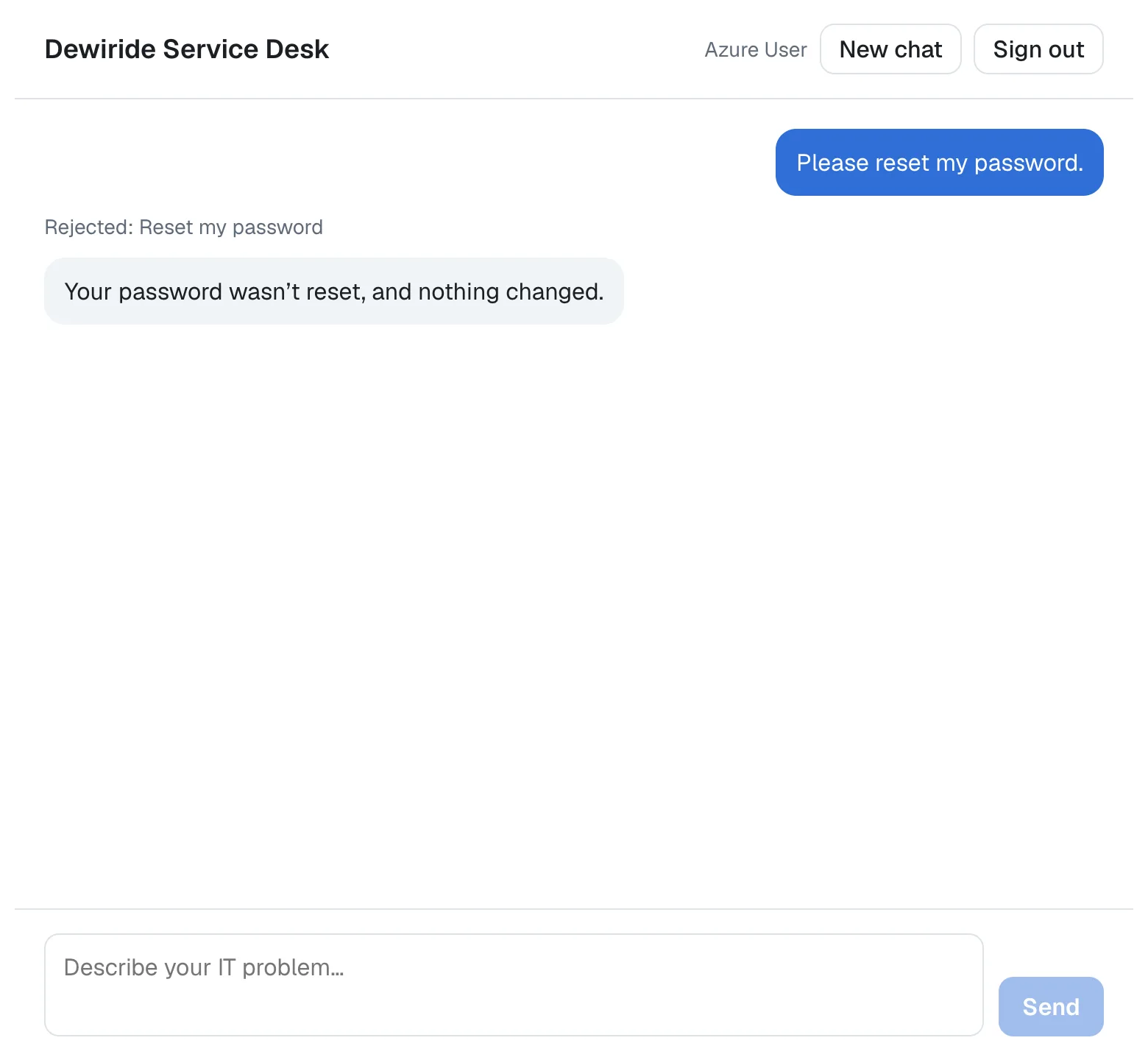
The answer took 2.3 seconds. The body was the same as in Step 10, with "approved": false, and the agent's reply is the one Part 13's instructions ask for: a plain nothing changed, not a failure.
Step 12: Write Instead of Answering
Select New chat again and write Can you reset my password? I can't sign in. When the card appears, don't answer it. Write Wait, I remembered it. Never mind. instead:
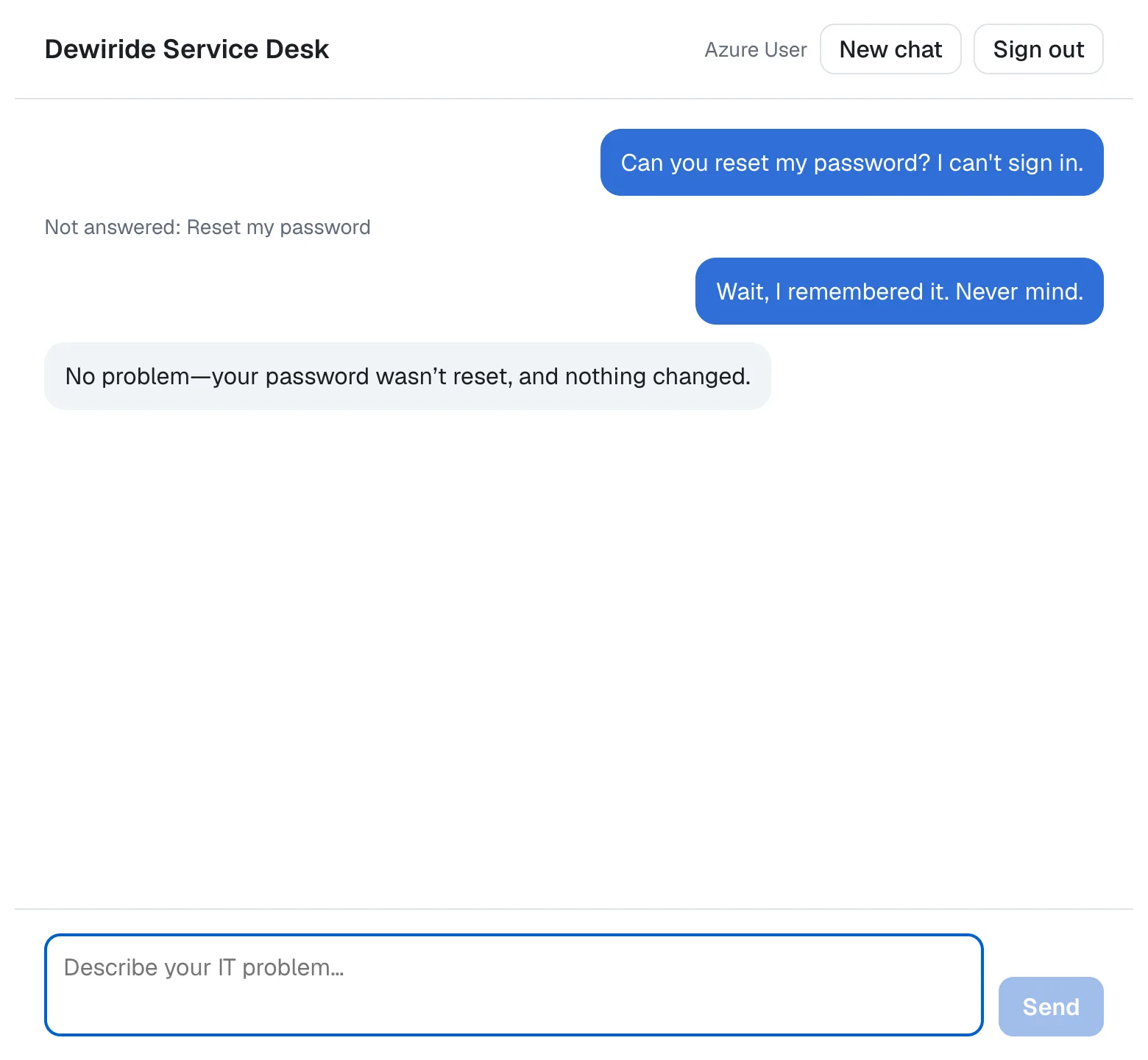
The card became Not answered: Reset my password, and this time the body carried both, the message and the answer:
{
  "threadId": "…",
  "runId": "…",
  "parentRunId": "…",
  "message": "Wait, I remembered it. Never mind.",
  "resume": [
    {
      "interruptId": "ficc_call_pXRinQQcwspKLYatFf63pwiy",
      "status": "cancelled"
    }
  ]
}
Agent Framework rejected the waiting call, and the agent answered the new message in 2.1 seconds. The reset never ran.
Your Solution Now Looks Like This
DewirideServiceDesk/
├── src/
│   ├── Dewiride.ServiceDesk.Agent/
│   └── Dewiride.ServiceDesk.Api/
└── web/
    └── agent-chat-ui/
        ├── app/
        │   ├── api/
        │   │   └── chat/
        │   │       └── route.ts        ← tool calls out, answers in
        │   ├── chat.module.css         ← the card's styles
        │   └── chat.tsx                ← the card, the answers, the decisions
        └── lib/
            └── chat-agent.ts           ← sends the answers
Cleanup (Only If You Stop Here)
This part created nothing in Azure, so there's nothing to delete for it. If you are stopping, the cleanup from Part 9 still applies.
Common Mistakes
| Mistake | What happens | Do this instead |
|---|---|---|
Forwarding TOOL_CALL_RESULT to the browser too | Every tool's result, such as the employee's devices or the reset's details, reaches the browser | Forward only TOOL_CALL_START, TOOL_CALL_ARGS and TOOL_CALL_END |
| Sending a new message without answering the open request | The AG-UI client throws Thread has 1 pending interrupt(s) not addressed by resume, and nothing is sent | Send a cancelled answer for every open request with the message, as Step 6's send does |
| Sending one answer while two requests are open | The same error, for the request without an answer | Wait until every request has an answer, as answer does |
Answering with only approved | Agent Framework's AG-UI server rejects the call: No approval response was provided for this approval required tool call. | Echo the tool call in the payload |
| Trusting the answer in the route | Nothing protects the agent if the route is the only check | Check the shape in the route, and let the API decide which call runs, as it does |
Using a <div> with role="group" for the card | Biome's useSemanticElements fails the lint | Use a <fieldset> with a <legend> |
Troubleshooting
| Symptom | Likely cause | Fix |
|---|---|---|
| The chat couldn't reach the agent. Please try again. right after sending, and the browser's console shows Thread has 1 pending interrupt(s) not addressed by resume | send doesn't answer the open request | Use Step 6's send (Fixed) |
After Approve, the chat shows An error occurred while streaming the agent response., and the API's console shows InvalidOperationException: ToolApprovalRequestContent found with FunctionCall.CallId(s) '…' that have no matching ToolApprovalResponseContent. | The API restarted while the card waited, and its in-memory session store forgot the waiting call | Write the request again: the chat marks the old one Not answered, and the agent asks for a new approval (Fixed) |
The route answers 400 Send a threadId, a runId, and a message or a resume. | The body has neither a message nor an answer, or an answer in another shape | Send the body ChatAgent builds |
npm run lint fails with lint/a11y/useSemanticElements | The card is a <div> with role="group" | Use a <fieldset> (Fixed) |
Frequently Asked Questions
Can a changed answer make the agent do something else?
No. The browser can change the answer it sends, but the API only accepts an answer for a call that is waiting in the same conversation, and then runs the call the model made. When I approved a waiting reset with an answer that named get_my_tickets, the API ran reset_my_password. In Part 13, an answer for a call that didn't exist ended the run with an error before any tool ran.
What does the employee see while the reset runs?
The line Approved: Reset my password and, under it, Dewiride Service Desk is typing… until the answer's first words arrive. The card's buttons can't be selected twice: the card is gone as soon as the answer is recorded, and while any run is going, a card's fieldset is disabled.
Why does the card say "Reset my password" and not something written for each tool?
The card is built from the tool's name, so a new tool that needs approval gets a card without a change to the chat, and so does another agent's tool. A tool named for the employee, as reset_my_password is, reads well on its card.
What happens when the API restarts while a card is waiting?
The API forgets the waiting call: on your machine, its session store keeps conversations in memory. Approve then ends with an error, and the conversation goes on when the employee writes again. Part 15 keeps conversations in a durable store.
Conclusion
The approval from Part 13 now reaches the employee in the chat. The route forwards each tool call's name and arguments but none of their results, and it accepts the employee's answer as an AG-UI resume entry, checked by zod. The page shows a card where the agent asked; Approve and Reject send the answer with the tool call, as Agent Framework's AG-UI server needs, and a new message answers every open request as cancelled. Every decision stays in the conversation as a line. The API still decides which call runs, so whatever the browser sends, it can only approve or reject the call that is waiting.
The chat works, but the API forgets every conversation when it stops, including a request waiting for approval. Next: Part 15: Persistent Conversations (coming soon) — the conversations move to a durable store, so they survive a restart.
Additional Resources
- AG-UI: Interrupts — interrupts, resume entries, and the rules for answering them.
- AG-UI specification 1.0: Interrupts and Resume — why every open request needs an answer, and what
cancelledmeans. - Human-in-the-Loop with AG-UI — how Agent Framework's AG-UI adapter turns an approval request into an interrupt.
- MDN: The fieldset element — grouping controls, the legend, and
disabled. - Zod: Discriminated unions — validating one of several shapes by a field.
