Part 13: Human Approval for Sensitive Actions
So far, everything the agent did was safe to do on its own: look things up, search Microsoft Learn, raise a ticket. In this part it gets a tool that changes something that matters, an employee's password, and that tool never runs on the model's word alone. When the model calls it, the run stops and asks for approval. Only when the employee approves that exact call does the reset happen. Agent Framework enforces this in code, not in the instructions.
This is Part 13 of a 23-part series.
- Part 1: Overview, Architecture and Azure Setup
- Part 2: Create a Production-Grade .NET Solution
- Part 3: Your First Agent API with Microsoft Foundry
- Part 4: Multi-Turn Conversations with Sessions
- Part 5: Create a Next.js Chat App for Your Agent
- Part 6: Stream the Agent Through a Trusted Next.js Route Handler
- Part 7: Build a Streaming Chat Page with the AG-UI Client
- Part 8: Secure the Agent API with Microsoft Entra ID
- Part 9: Add Microsoft Entra ID Sign-In to the Next.js Chat App
- Part 10: Give the Agent Enterprise Tools
- Part 11: Let the Agent Create Tickets
- Part 12: Connect an MCP Server
- Part 13: Human Approval for Sensitive Actions (you are here)
- Part 14: Approval Cards in the Chat UI
- Part 15: Persistent Conversations (coming soon)
- Part 16: Memory That Knows the Employee (coming soon)
- Part 17: Guardrails — Keep Secrets Out of the Model (coming soon)
- Part 18: Audit Logs and Observability (coming soon)
- Part 19: Ticket Triage Workflow (coming soon)
- Part 20: Manager Approvals and Checkpoints (coming soon)
- Part 21: Agent Harness — Weekly Problem Report (coming soon)
- Part 22: Deploy to Azure Container Apps (coming soon)
- Part 23: Bring It to Microsoft Teams (coming soon)
What You Will Build
An employee writes I'm locked out, please reset my password. The agent calls its new reset_my_password tool, but nothing is reset yet: the run ends with an interrupt, a request for approval that names the exact call. The employee approves it in a second request. Only then does the reset run, and the agent says where the one-time link went:
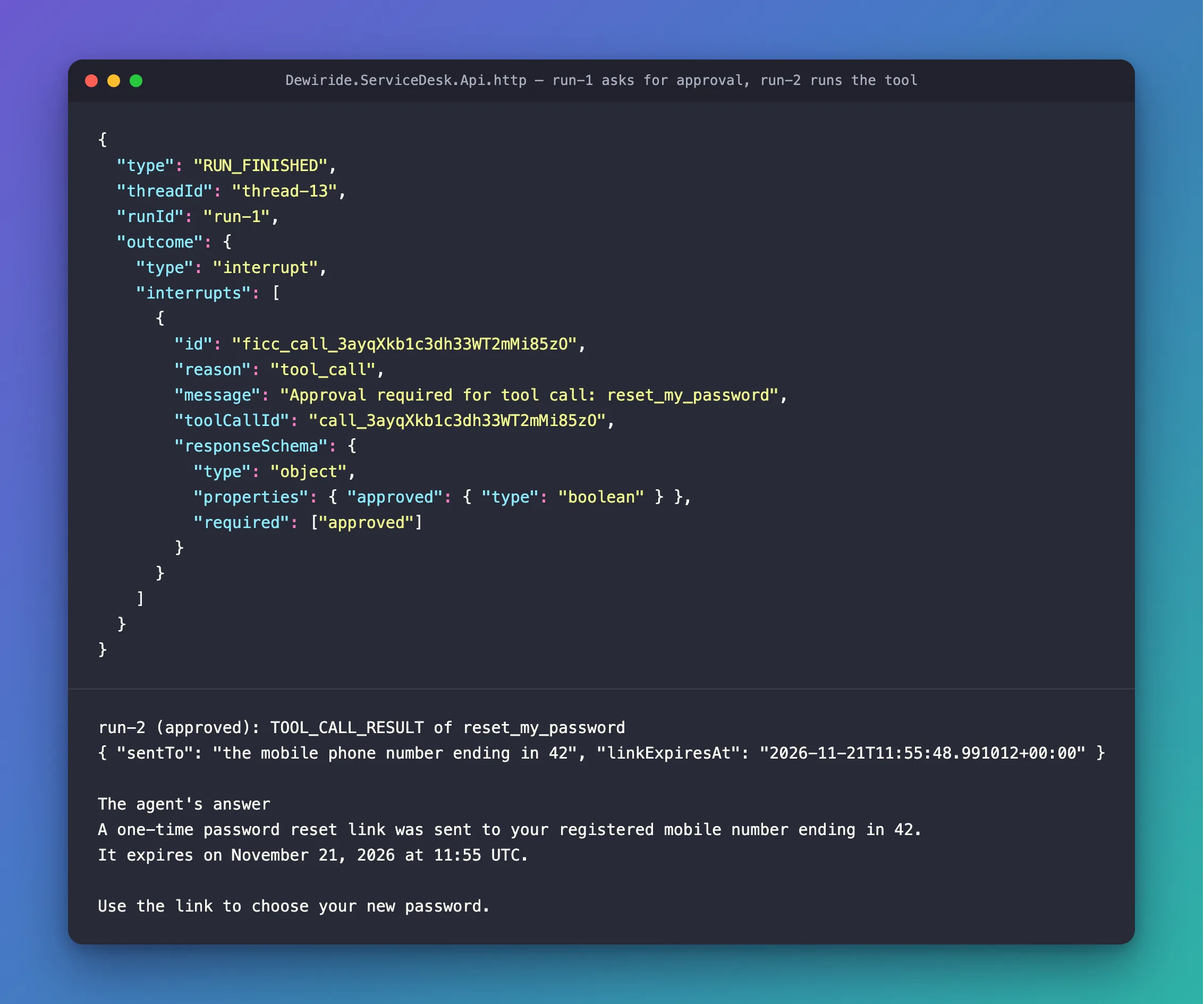
By the end of this part, the brain and the API have:
- An account system,
IAccountSystem, with an in-memory sample, like the systems from Part 10. - A
reset_my_passwordtool that only ever resets the signed-in employee's own password. It returns where the reset link went, never a password or the link itself. - An approval around that tool, with Agent Framework's
ApprovalRequiredAIFunction: the model can ask for a reset, but it can't make one happen. - New rules in the instructions: when to reset, and how to report a reset or a refusal.
- Four new requests in the
.httpfile: ask for a reset, approve it, ask again, reject it.
You test it from the .http file in this part. Part 14 shows the same request in the chat, as an approval card.
How Tool Approval Works
A tool that waits for a person
Agent Framework's documentation calls this pattern human-in-the-loop: When agents require any user input, for example to approve a function call, this is referred to as a human-in-the-loop pattern. You mark a tool by wrapping its AIFunction in an ApprovalRequiredAIFunction. The model still sees the tool and can call it. But when it does, the agent doesn't run it. The run ends with a ToolApprovalRequestContent that holds the call the model made: the tool's name, its arguments and the call's ID. Whoever runs the agent shows that to a person, and sends the person's answer back in the next run of the same session: request.CreateResponse(true) to approve, false to reject.
That's the difference between this and a line in the instructions such as "always ask before resetting a password". A line in the instructions asks the model to behave. The wrapper doesn't ask: the tool can't run until an approval for that exact call arrives.
What it looks like over AG-UI
The API speaks AG-UI, so the request and the answer travel as AG-UI events and requests. Microsoft's guide for AG-UI in C# says: When the model calls the tool, the AG-UI adapter finishes the run with a tool-call interrupt instead of executing the function. The interrupt is in the run's last event, RUN_FINISHED, as an outcome of type interrupt. The client answers in a new run of the same thread: no new message, and a resume entry that names the interrupt and carries the answer.
Who can approve, and what
The approval comes from whoever answers the interrupt: here, the signed-in employee, in their own conversation, with their own token. Part 8 keeps every person's conversations apart, so nobody else can answer it. An answer also only counts for a call that is actually waiting. Agent Framework keeps approval-response binding turned on by default, so an approval for a call the model never made doesn't run anything; the FAQ shows what happened when I tried. And because the tool has no parameters and always uses the signed-in employee, even an approved call can only reset that employee's own password.
What the model sees
A password reset handles a secret, so the design keeps the secret away from the model. The tool doesn't create a password, and it doesn't return the reset link. It returns where the link went, already masked, and when the link expires: everything the model needs to answer, and nothing worth stealing. The employee chooses the new password with the link, outside the chat.
What This Part Costs
No new Azure resources, and the sample account system sends nothing. The cost is in tokens, and a reset takes two runs. In Step 4, asking took one trip to the model: 1,696 input tokens and 31 output tokens. Approving in Step 5 took another: 1,783 input tokens, 1,693 of them cached, and 48 output tokens. At the prices from Part 1, $0.20 per million input tokens and $1.20 per million output tokens, with cached tokens at a tenth of the input price, a reset costs about $0.0005.
Prerequisites
- The solution and the chat app from Part 12: Connect an MCP Server.
Step 1: Add the Account System
Part 10 gave the brain three company systems, each behind an interface with an in-memory sample: the device inventory, the ticket system and the knowledge base. A password reset belongs to a fourth one, the account system. Add it to the same folder, src/Dewiride.ServiceDesk.Agent/Systems/, in three small files.
First the interface. It has one method, because resetting a password is the only thing the agent may do to an account:
namespace Dewiride.ServiceDesk.Agent.Systems;

/// <summary>The company's account system: each employee's sign-in account and its password.</summary>
public interface IAccountSystem
{
    /// <summary>Resets one employee's password: sends them a one-time link to choose a new password.</summary>
    Task<PasswordReset> ResetPasswordAsync(string employeeId, CancellationToken cancellationToken);
}
Then what a reset returns. This record is what reaches the model, so it carries only two things:
namespace Dewiride.ServiceDesk.Agent.Systems;

/// <summary>
/// A password reset that was sent: where the one-time link went, and until when it works.
/// It never holds a password or the link itself, so neither can reach the AI model.
/// </summary>
public sealed record PasswordReset(string SentTo, DateTimeOffset LinkExpiresAt);
SentTosays where the link went, in words the agent can repeat, with the phone number already masked.LinkExpiresAtsays until when the link works, so the agent can tell the employee how long they have.
And the sample. A real account system would create the link and send it as a text message. The sample sends nothing: it answers the way the real one would.
namespace Dewiride.ServiceDesk.Agent.Systems;

/// <summary>
/// A stand-in for a real account system. It sends nothing: it answers the way the real system
/// would, with where the one-time link went and when it expires.
/// </summary>
public sealed class SampleAccountSystem(TimeProvider timeProvider) : IAccountSystem
{
    /// <summary>How long a reset link works.</summary>
    public static readonly TimeSpan LinkLifetime = TimeSpan.FromMinutes(15);

    public Task<PasswordReset> ResetPasswordAsync(string employeeId, CancellationToken cancellationToken)
    {
        PasswordReset reset = new(
            SentTo: "the mobile phone number ending in 42",
            LinkExpiresAt: timeProvider.GetUtcNow().Add(LinkLifetime));

        return Task.FromResult(reset);
    }
}
TimeProvideris the clock that the other samples use, registered in Part 10, so the link expires 15 minutes after the reset.- The employee's ID arrives from the tool, never from the model. The next step shows where it comes from.
Now register the sample. In src/Dewiride.ServiceDesk.Agent/ServiceDeskAgentExtensions.cs, add one line to the company systems in section 4:
        // 4. The company's IT systems that the tools read from. These are in-memory samples;
        //    a host that has the real systems registers its own versions first, and those win.
        builder.Services.TryAddSingleton(TimeProvider.System);
        builder.Services.TryAddSingleton<IDeviceInventory, SampleDeviceInventory>();
        builder.Services.TryAddSingleton<ITicketSystem, SampleTicketSystem>();
        builder.Services.TryAddSingleton<IKnowledgeBase, SampleKnowledgeBase>();
        builder.Services.TryAddSingleton<IAccountSystem, SampleAccountSystem>();
        builder.Services.AddSingleton<ServiceDeskTools>();
TryAddSingleton works as in Part 10: a host that registers the real account system first keeps its own, and the sample is only used when nothing else is registered.
Step 2: Add the Reset Tool, Behind an Approval
Open src/Dewiride.ServiceDesk.Agent/ServiceDeskTools.cs. Three changes: the tools get the account system, a new tool resets the password, and the list of tools wraps that one in an approval.
The account system arrives in the constructor, like the other systems:
public sealed class ServiceDeskTools(
    ICurrentEmployee currentEmployee,
    IDeviceInventory deviceInventory,
    ITicketSystem ticketSystem,
    IKnowledgeBase knowledgeBase,
    IAccountSystem accountSystem)
The tool itself goes after CreateTicketAsync:
    [Description("Resets the password of the employee in this chat: texts a one-time link to their registered mobile phone, where they choose a new password. Returns where the link went and when it expires.")]
    public Task<PasswordReset> ResetMyPasswordAsync(CancellationToken cancellationToken) =>
        accountSystem.ResetPasswordAsync(SignedInEmployeeId(), cancellationToken);
- No parameters. Like
get_my_devicesandget_my_tickets, the tool always acts on the signed-in employee, fromSignedInEmployeeId(). The model has no way to name anyone else. - The description tells the model what the reset does and what comes back, so it can explain both to the employee.
Last, the list of tools. The new tool goes in wrapped:
    /// <summary>The tools as the agent sees them: a name, a description and the parameters the AI model fills in.</summary>
    public IList<AITool> AsAITools() =>
    [
        AIFunctionFactory.Create(GetMyDevicesAsync, name: "get_my_devices"),
        AIFunctionFactory.Create(GetMyTicketsAsync, name: "get_my_tickets"),
        AIFunctionFactory.Create(SearchKnowledgeBaseAsync, name: "search_knowledge_base"),
        AIFunctionFactory.Create(CreateTicketAsync, name: "create_ticket"),

        // A password reset changes the employee's account, so it waits for a person: the agent
        // can ask for it, but it runs only after the employee approves that exact call.
        new ApprovalRequiredAIFunction(AIFunctionFactory.Create(ResetMyPasswordAsync, name: "reset_my_password")),
    ];
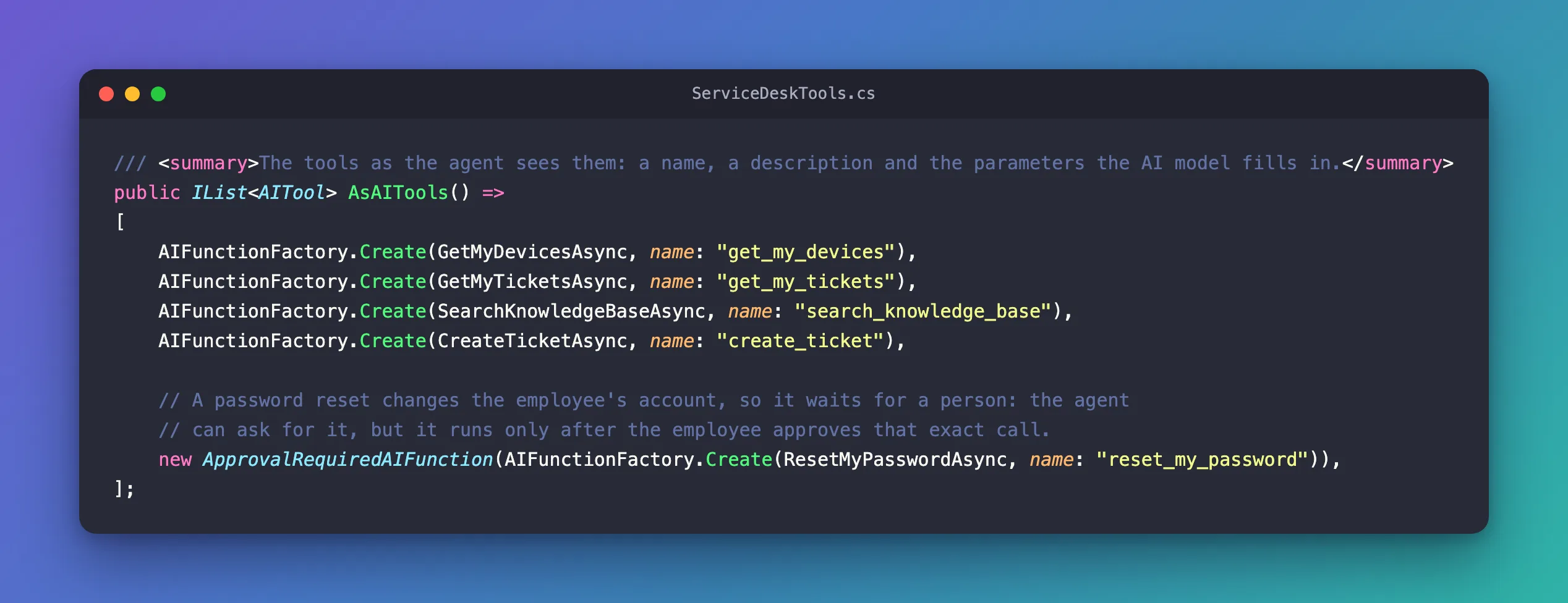
AIFunctionFactory.Create turns the method into a tool, as it does for the other four. new ApprovalRequiredAIFunction(...) wraps that tool: to the model, it looks the same, with the same name, description and parameters. The difference is in what happens when the model calls it. Agent Framework sees the wrapper and ends the run with an approval request instead of running the method. That's the whole change: one wrapper, and no if anywhere in your code decides whether the reset runs. The wrapper is in Microsoft.Extensions.AI, which ServiceDeskTools.cs already uses, so there's no new package or using. For the same wrapper in a small console app, without the API around it, see How to Require Human Approval Before a Microsoft Agent Framework Agent Calls a Tool in C#.
The complete file:
using System.ComponentModel;
using Dewiride.ServiceDesk.Agent.Systems;
using Microsoft.Extensions.AI;

namespace Dewiride.ServiceDesk.Agent;

/// <summary>
/// The agent's tools: what it may look up in the company's IT systems, the tickets it may raise,
/// and the password reset it may ask for. The tools about "my" records always use the signed-in
/// employee, never an ID that the AI model chose.
/// </summary>
public sealed class ServiceDeskTools(
    ICurrentEmployee currentEmployee,
    IDeviceInventory deviceInventory,
    ITicketSystem ticketSystem,
    IKnowledgeBase knowledgeBase,
    IAccountSystem accountSystem)
{
    /// <summary>The longest ticket title that create_ticket accepts.</summary>
    public const int MaxTitleLength = 100;

    /// <summary>The longest ticket description that create_ticket accepts.</summary>
    public const int MaxDescriptionLength = 1000;

    [Description("Gets the laptops and phones that IT gave to the employee in this chat: model, operating system, last check-in, compliance and free storage.")]
    public Task<IReadOnlyList<Device>> GetMyDevicesAsync(CancellationToken cancellationToken) =>
        deviceInventory.GetDevicesAsync(SignedInEmployeeId(), cancellationToken);

    [Description("Gets the open IT tickets of the employee in this chat: number, title, description, status, team and latest update.")]
    public Task<IReadOnlyList<Ticket>> GetMyTicketsAsync(CancellationToken cancellationToken) =>
        ticketSystem.GetOpenTicketsAsync(SignedInEmployeeId(), cancellationToken);

    [Description("Searches the IT knowledge base for articles with known fixes. Returns up to three articles.")]
    public Task<IReadOnlyList<KnowledgeArticle>> SearchKnowledgeBaseAsync(
        [Description("A few words about the problem, such as 'slow laptop' or 'VPN disconnects'.")] string query,
        CancellationToken cancellationToken) =>
        knowledgeBase.SearchAsync(query, cancellationToken);

    [Description("Raises a new IT ticket for the employee in this chat. Returns the new ticket with its number, or the problem to fix before it can be raised.")]
    public async Task<CreateTicketResult> CreateTicketAsync(
        [Description("Incident when something is broken or not working. Request when the employee needs something, such as new hardware, software or access.")] TicketType type,
        [Description("A one-line summary of at most 100 characters, such as 'Laptop very slow, only 6% free storage'.")] string title,
        [Description("The details the IT team needs: what happened or what is needed, the device, and what the employee already tried. At most 1,000 characters.")] string description,
        CancellationToken cancellationToken)
    {
        string employeeId = SignedInEmployeeId();

        // The AI model wrote these arguments, so check them like any input from outside.
        // When something is wrong, tell the model what to fix instead of failing.
        if (FindProblem(type, title, description) is string problem)
        {
            return new CreateTicketResult(Created: false, Problem: problem);
        }

        Ticket ticket = await ticketSystem.CreateTicketAsync(
            employeeId, new NewTicket(type, title.Trim(), description.Trim()), cancellationToken);

        return new CreateTicketResult(Created: true, Ticket: ticket);
    }

    [Description("Resets the password of the employee in this chat: texts a one-time link to their registered mobile phone, where they choose a new password. Returns where the link went and when it expires.")]
    public Task<PasswordReset> ResetMyPasswordAsync(CancellationToken cancellationToken) =>
        accountSystem.ResetPasswordAsync(SignedInEmployeeId(), cancellationToken);

    /// <summary>The tools as the agent sees them: a name, a description and the parameters the AI model fills in.</summary>
    public IList<AITool> AsAITools() =>
    [
        AIFunctionFactory.Create(GetMyDevicesAsync, name: "get_my_devices"),
        AIFunctionFactory.Create(GetMyTicketsAsync, name: "get_my_tickets"),
        AIFunctionFactory.Create(SearchKnowledgeBaseAsync, name: "search_knowledge_base"),
        AIFunctionFactory.Create(CreateTicketAsync, name: "create_ticket"),

        // A password reset changes the employee's account, so it waits for a person: the agent
        // can ask for it, but it runs only after the employee approves that exact call.
        new ApprovalRequiredAIFunction(AIFunctionFactory.Create(ResetMyPasswordAsync, name: "reset_my_password")),
    ];

    // Who is asking comes from the host's sign-in. With no one signed in, the tool fails
    // instead of guessing.
    private string SignedInEmployeeId() =>
        currentEmployee.Id ?? throw new InvalidOperationException("No employee is signed in.");

    // Checks a ticket that the AI model wrote. Returns what's wrong, in words the model
    // can act on, or null when the ticket can be raised.
    private static string? FindProblem(TicketType type, string title, string description)
    {
        if (!Enum.IsDefined(type))
        {
            return "The type must be Incident or Request.";
        }

        if (string.IsNullOrWhiteSpace(title))
        {
            return "The title is empty. Write a one-line summary of the problem or the need.";
        }

        if (title.Trim().Length > MaxTitleLength)
        {
            return $"The title has {title.Trim().Length} characters. Shorten it to {MaxTitleLength} characters or fewer.";
        }

        if (string.IsNullOrWhiteSpace(description))
        {
            return "The description is empty. Describe what happened or what is needed.";
        }

        if (description.Trim().Length > MaxDescriptionLength)
        {
            return $"The description has {description.Trim().Length} characters. Shorten it to {MaxDescriptionLength} characters or fewer.";
        }

        return null;
    }
}
Step 3: Tell the Agent When to Reset
The approval decides whether a reset runs. The instructions decide when the agent asks for one, and what it says afterwards. Open src/Dewiride.ServiceDesk.Agent/ServiceDeskInstructions.cs and add two bullets at the end of What you can look up and do:
        - You can reset the password of the employee you are chatting with, and only theirs. Call reset_my_password
          when they ask for a reset, or agree when you offer one because they forgot their password or are locked out.
          Don't ask them to confirm it in your own words first: they approve the reset in the chat before it runs.
        - After a reset, tell them where the one-time link went and when it expires, and that they choose their new
          password with that link. If the reset is rejected, the employee declined it: say that their password
          wasn't reset and nothing changed. Don't call it a failure or ask them to try again.
- Only theirs. The tool can't reset anyone else's password anyway. The rule lets the agent say so clearly when someone asks for a colleague.
- No confirmation in words. The approval is the confirmation. If the agent also asked Are you sure?, the employee would have to say yes twice.
- A rejection isn't a failure. This sentence came from a test. My first version only said If they decline the reset, accept it and say nothing changed. When I rejected a reset with it, the agent answered: I couldn't complete the password reset. No changes were made. Please try again later or contact the IT Service Desk for help. The tool's result for a rejection says rejected by the approver, and the model read that as an error. Saying who rejected it, and what not to say, fixed the answer, as Step 6 shows.
The last rule in the instructions said the agent can't change anything. It can now change one thing, so update it:
        - You can look things up, raise tickets and reset the employee's own password, but you cannot change, close
          or reassign tickets, or change anything else. When a problem needs hands-on help, offer to raise a ticket.
The rule above it, Never ask for passwords, MFA codes or other secrets, stays as it is. A reset never needs the old password. The complete file:
namespace Dewiride.ServiceDesk.Agent;

/// <summary>
/// The agent's instructions: who it is, what it helps with and the rules it always follows.
/// The model receives them with every request.
/// </summary>
internal static class ServiceDeskInstructions
{
    public const string Text = """
        You are the Dewiride IT Service Desk assistant. You help Dewiride employees with IT questions:
        laptops and phones, software, sign-in and passwords, email and Microsoft Teams, Wi-Fi and VPN,
        printers, and security.

        How you answer:
        - Be friendly, clear and brief.
        - Give fixes as short numbered steps.
        - If a request is unclear, ask one clarifying question first, such as which device or operating system.
        - If you are not sure, say so. Never invent Dewiride policies, ticket numbers or contact details.
        - Write plain text. Do not use Markdown formatting such as ** or #.

        What you can look up and do:
        - Use your tools to look up the employee's own devices and open tickets, and to search the IT knowledge base.
          Look things up instead of guessing, and base your answers on what the tools return.
        - You can only see the records of the employee you are chatting with. If someone asks about another
          person's devices or tickets, explain that you can only see their own.
        - When a knowledge base article fits the problem, follow its steps and mention its number, such as KB0001.
        - For questions about Microsoft products, such as Windows, Microsoft 365, Outlook, Teams, OneDrive and
          Microsoft Authenticator, that the knowledge base doesn't answer, search Microsoft Learn with your
          Microsoft Learn tools. Base your answer on what you find, and give the link to the page you used.
        - Searches of Microsoft Learn leave Dewiride. Describe the problem in general words only: never put names,
          email addresses, device names, ticket numbers or other details about the employee in them.
        - You can raise tickets for the employee you are chatting with. Raise one only when they ask for it or agree
          when you offer it. First check their open tickets: if one already covers the problem, give them its number
          instead of raising another.
        - Write the ticket's title and description from what the employee told you and what your tools found.
          Never invent details. After raising it, give the employee the new ticket's number.
        - You can reset the password of the employee you are chatting with, and only theirs. Call reset_my_password
          when they ask for a reset, or agree when you offer one because they forgot their password or are locked out.
          Don't ask them to confirm it in your own words first: they approve the reset in the chat before it runs.
        - After a reset, tell them where the one-time link went and when it expires, and that they choose their new
          password with that link. If the reset is rejected, the employee declined it: say that their password
          wasn't reset and nothing changed. Don't call it a failure or ask them to try again.

        Rules you always follow:
        - Help only with IT topics. Politely decline anything else and say what you can help with.
        - Never ask for passwords, MFA codes or other secrets. If someone shares one, tell them to change it right away.
        - You can look things up, raise tickets and reset the employee's own password, but you cannot change, close
          or reassign tickets, or change anything else. When a problem needs hands-on help, offer to raise a ticket.
        """;
}
Step 4: Build and Ask for a Reset
From the solution root:
dotnet build
Restore complete (0.8s)
  Dewiride.ServiceDesk.Agent net10.0 succeeded (0.1s) → src/Dewiride.ServiceDesk.Agent/bin/Debug/net10.0/Dewiride.ServiceDesk.Agent.dll
  Dewiride.ServiceDesk.Api net10.0 succeeded (0.3s) → src/Dewiride.ServiceDesk.Api/bin/Debug/net10.0/Dewiride.ServiceDesk.Api.dll

Build succeeded in 1.5s
In Visual Studio, select Build → Build Solution. No warnings: ApprovalRequiredAIFunction needs no extra setting. Then add the first new request to Dewiride.ServiceDesk.Api.http, after the requests from Part 12 and before the requests to the chat app's route:
###

# Ask for a password reset. reset_my_password needs approval, so the run doesn't reset anything:
# it ends with RUN_FINISHED carrying an interrupt that asks you to approve the call.
POST {{baseUrl}}/api/agents/service-desk
Authorization: Bearer {{$dotenv AGENT_API_TOKEN}}
Content-Type: application/json
Accept: text/event-stream

{
  "threadId": "thread-13",
  "runId": "run-1",
  "messages": [
    {
      "id": "message-1",
      "role": "user",
      "content": "I'm locked out, please reset my password."
    }
  ]
}
Get a fresh token into .env with Part 8's commands if yours is older than about an hour. Then start the API:
- VS Code
- Visual Studio
In VS Code's terminal, from the solution root, run:
dotnet run --project src/Dewiride.ServiceDesk.Api
Make sure http is selected in the drop-down list next to the green Start button (▶), with Dewiride.ServiceDesk.Api as the startup project, and press Ctrl+F5 (Debug → Start Without Debugging).
Send the new request: Send Request above its POST line in VS Code, Send request in Visual Studio. The response, shortened as in the earlier parts, with each rawEvent replaced with {…}:
data: {"type":"RUN_STARTED","threadId":"thread-13","runId":"run-1"}

data: {"type":"REASONING_ENCRYPTED_VALUE","subtype":"message","entityId":"msg_sP5UkV12Mp6whH7vwqhWFcWE","encryptedValue":"gAAAAABr…","rawEvent":{…}}

data: {"type":"TOOL_CALL_START","toolCallId":"call_3ayqXkb1c3dh33WT2mMi85zO","toolCallName":"reset_my_password","rawEvent":{…}}

data: {"type":"TOOL_CALL_ARGS","toolCallId":"call_3ayqXkb1c3dh33WT2mMi85zO","delta":"{}","rawEvent":{…}}

data: {"type":"TOOL_CALL_END","toolCallId":"call_3ayqXkb1c3dh33WT2mMi85zO","rawEvent":{…}}

data: {"type":"RUN_FINISHED","threadId":"thread-13","runId":"run-1","outcome":{"type":"interrupt","interrupts":[{"id":"ficc_call_3ayqXkb1c3dh33WT2mMi85zO","reason":"tool_call","message":"Approval required for tool call: reset_my_password","toolCallId":"call_3ayqXkb1c3dh33WT2mMi85zO","responseSchema":{"type":"object","properties":{"approved":{"type":"boolean"}},"required":["approved"]}}]},"usage":[{"model":"gpt-5.6-luna-2026-07-09","inputTokens":1696,"outputTokens":31,"totalTokens":1727,"reasoningTokens":14,"cachedInputTokens":0}]}
Read it from the top:
- The model called the tool.
TOOL_CALL_START,TOOL_CALL_ARGSandTOOL_CALL_ENDshow the call:reset_my_password, with no arguments,{}. - The tool didn't run. There's no
TOOL_CALL_RESULT, and no text either. The call is waiting. - The run ended with an interrupt.
RUN_FINISHEDusually has anoutcomeof typesuccess. This one is of typeinterrupt, with one entry ininterrupts:
| Field | Here | What it is |
|---|---|---|
id | ficc_call_3ayqXkb1c3dh33WT2mMi85zO | The interrupt's ID. The answer names it. |
reason | tool_call | What the interrupt waits for: a decision about a tool call |
message | Approval required for tool call: reset_my_password | A message a client can show to the person |
toolCallId | call_3ayqXkb1c3dh33WT2mMi85zO | The call it's about: the same ID as in the TOOL_CALL_* events |
responseSchema | approved, a boolean | The shape of the answer it expects |
Your IDs are different on every run. Keep the response open: the next step needs its id and toolCallId.
Step 5: Approve the Reset
The answer is another run of the same conversation. Add this request after the one from Step 4:
###

# Approve the reset: the same threadId, a new runId, no new messages, and a resume entry that
# answers the interrupt. From run-1's RUN_FINISHED event, paste the interrupt's id in place of
# PASTE-THE-INTERRUPT-ID and its toolCallId in place of PASTE-THE-TOOL-CALL-ID.
POST {{baseUrl}}/api/agents/service-desk
Authorization: Bearer {{$dotenv AGENT_API_TOKEN}}
Content-Type: application/json
Accept: text/event-stream

{
  "threadId": "thread-13",
  "runId": "run-2",
  "parentRunId": "run-1",
  "messages": [],
  "resume": [
    {
      "interruptId": "PASTE-THE-INTERRUPT-ID",
      "status": "resolved",
      "payload": {
        "approved": true,
        "toolCall": {
          "callId": "PASTE-THE-TOOL-CALL-ID",
          "name": "reset_my_password",
          "arguments": {}
        }
      }
    }
  ]
}
threadId,runIdandparentRunIdcontinue the conversation as in Part 4: the same thread, a new run, and the run it follows.messagesis empty. The employee isn't saying anything new; they're answering a question.resumeis the answer.interruptIdnames the interrupt, andstatusisresolvedbecause the employee decided.payloadis the decision:approvedistrue, andtoolCallrepeats the call that was approved. ItscallIdis thetoolCallIdfrom the interrupt,nameis the tool, andargumentsare the ones fromTOOL_CALL_ARGS, here{}.
Replace the two placeholders with the id and the toolCallId from your Step 4 response. You paste them by hand because they're new on every run.
approved, but send the toolCall tooThe interrupt's responseSchema asks only for approved, so my first answer was "payload": { "approved": true }. The reset didn't run. The tool's result said Tool call invocation was rejected by the approver and must not be retried. No approval response was provided for this approval required tool call., and the agent told the employee it couldn't reset the password. The API logged nothing.
The cause is in AG-UI's .NET server library, AGUI.Server 1.0.0, which Agent Framework's AG-UI hosting package uses. It turns a resume entry into an approval only when the payload also has the toolCall. Anything else reaches the agent as an answer it can't match, and the waiting call is rejected. The AG-UI project tracks this as issue #2815 and has fixed it in its source, but no released version has the fix yet; 1.0.1 doesn't. AG-UI's own .NET client, AGUIChatClient, which Microsoft's guide uses for .NET clients, sends the toolCall with every answer, and the fixed source still accepts it. So sending it is the supported way, and it keeps working once the fix ships. The whole investigation is in Fixed: No approval response was provided for this approval required tool call.
Send it:
data: {"type":"RUN_STARTED","threadId":"thread-13","runId":"run-2","parentRunId":"run-1"}

data: {"type":"TOOL_CALL_START","toolCallId":"call_3ayqXkb1c3dh33WT2mMi85zO","toolCallName":"reset_my_password","parentMessageId":"04f2882fa356451fa0db8ff06c1702cd","rawEvent":{…}}

data: {"type":"TOOL_CALL_ARGS","toolCallId":"call_3ayqXkb1c3dh33WT2mMi85zO","delta":"{}","rawEvent":{…}}

data: {"type":"TOOL_CALL_END","toolCallId":"call_3ayqXkb1c3dh33WT2mMi85zO","rawEvent":{…}}

data: {"type":"TOOL_CALL_RESULT","messageId":"call_3ayqXkb1c3dh33WT2mMi85zO","toolCallId":"call_3ayqXkb1c3dh33WT2mMi85zO","content":"{\n  \"sentTo\": \"the mobile phone number ending in 42\",\n  \"linkExpiresAt\": \"2026-11-21T11:55:48.991012+00:00\"\n}","rawEvent":{…}}

data: {"type":"TEXT_MESSAGE_START","messageId":"msg_0641d8ff…","role":"assistant","name":"service-desk","rawEvent":{…}}

data: {"type":"TEXT_MESSAGE_CONTENT","messageId":"msg_0641d8ff…","delta":"A","rawEvent":{…}}

data: {"type":"TEXT_MESSAGE_CONTENT","messageId":"msg_0641d8ff…","delta":" one","rawEvent":{…}}

data: {"type":"TEXT_MESSAGE_CONTENT","messageId":"msg_0641d8ff…","delta":"-time","rawEvent":{…}}

… 24 more TEXT_MESSAGE_CONTENT events …

data: {"type":"TEXT_MESSAGE_CONTENT","messageId":"msg_0641d8ff…","delta":" password.","rawEvent":{…}}

data: {"type":"TEXT_MESSAGE_END","messageId":"msg_0641d8ff…"}

data: {"type":"RUN_FINISHED","threadId":"thread-13","runId":"run-2","outcome":{"type":"success"},"usage":[{"model":"gpt-5.6-luna-2026-07-09","inputTokens":1783,"outputTokens":48,"totalTokens":1831,"reasoningTokens":0,"cachedInputTokens":1693}]}
This time the reset ran. The approved call comes first: TOOL_CALL_START, TOOL_CALL_ARGS and TOOL_CALL_END repeat it with the same toolCallId, and TOOL_CALL_RESULT carries what reset_my_password returned: where the link went and when it expires. Then the model writes the answer from that result, and the run ends with success. Put together, the text events say:
A one-time password reset link was sent to your registered mobile number ending in 42. It expires on November 21, 2026 at 11:55 UTC.

Use the link to choose your new password.
No password and no link appear anywhere in the stream, so they never reached the model or Foundry's copy of the conversation.
Step 6: Reject a Reset
Now the other answer, in a new conversation. Add two more requests after the one from Step 5:
###

# Ask for a reset again, in a new conversation, to try the other answer.
POST {{baseUrl}}/api/agents/service-desk
Authorization: Bearer {{$dotenv AGENT_API_TOKEN}}
Content-Type: application/json
Accept: text/event-stream

{
  "threadId": "thread-14",
  "runId": "run-1",
  "messages": [
    {
      "id": "message-1",
      "role": "user",
      "content": "I forgot my password. Can you reset it?"
    }
  ]
}

###

# Reject the reset: the same resume entry with "approved": false. The tool doesn't run.
# Paste the interrupt's id and toolCallId from this conversation's run-1, as before.
POST {{baseUrl}}/api/agents/service-desk
Authorization: Bearer {{$dotenv AGENT_API_TOKEN}}
Content-Type: application/json
Accept: text/event-stream

{
  "threadId": "thread-14",
  "runId": "run-2",
  "parentRunId": "run-1",
  "messages": [],
  "resume": [
    {
      "interruptId": "PASTE-THE-INTERRUPT-ID",
      "status": "resolved",
      "payload": {
        "approved": false,
        "toolCall": {
          "callId": "PASTE-THE-TOOL-CALL-ID",
          "name": "reset_my_password",
          "arguments": {}
        }
      }
    }
  ]
}
Send the first one. It ends with an interrupt, like Step 4. Paste its id and toolCallId into the second one, and send it:
data: {"type":"RUN_STARTED","threadId":"thread-14","runId":"run-2","parentRunId":"run-1"}

data: {"type":"TOOL_CALL_START","toolCallId":"call_ZQVUi24ydEMGHTOgwUrDXWdd","toolCallName":"reset_my_password","parentMessageId":"14ecaf7a3972481ba30838d6feaeff7e","rawEvent":{…}}

data: {"type":"TOOL_CALL_ARGS","toolCallId":"call_ZQVUi24ydEMGHTOgwUrDXWdd","delta":"{}","rawEvent":{…}}

data: {"type":"TOOL_CALL_END","toolCallId":"call_ZQVUi24ydEMGHTOgwUrDXWdd","rawEvent":{…}}

data: {"type":"TOOL_CALL_RESULT","messageId":"call_ZQVUi24ydEMGHTOgwUrDXWdd","toolCallId":"call_ZQVUi24ydEMGHTOgwUrDXWdd","content":"Tool call invocation was rejected by the approver and must not be retried.","rawEvent":{…}}

data: {"type":"REASONING_ENCRYPTED_VALUE","subtype":"message","entityId":"msg_Kjyjvk3hiB5aY3VKJmfgU9xK","encryptedValue":"gAAAAABr…","rawEvent":{…}}

data: {"type":"TEXT_MESSAGE_START","messageId":"msg_0207e164…","role":"assistant","name":"service-desk","rawEvent":{…}}

data: {"type":"TEXT_MESSAGE_CONTENT","messageId":"msg_0207e164…","delta":"Your","rawEvent":{…}}

data: {"type":"TEXT_MESSAGE_CONTENT","messageId":"msg_0207e164…","delta":" password","rawEvent":{…}}

data: {"type":"TEXT_MESSAGE_CONTENT","messageId":"msg_0207e164…","delta":" wasn","rawEvent":{…}}

… 6 more TEXT_MESSAGE_CONTENT events …

data: {"type":"TEXT_MESSAGE_CONTENT","messageId":"msg_0207e164…","delta":".","rawEvent":{…}}

data: {"type":"TEXT_MESSAGE_END","messageId":"msg_0207e164…"}

data: {"type":"RUN_FINISHED","threadId":"thread-14","runId":"run-2","outcome":{"type":"success"},"usage":[{"model":"gpt-5.6-luna-2026-07-09","inputTokens":1756,"outputTokens":34,"totalTokens":1790,"reasoningTokens":18,"cachedInputTokens":1694}]}
reset_my_password didn't run. Agent Framework gave the model a result in its place: Tool call invocation was rejected by the approver and must not be retried. The last words matter, because they tell the model not to call the tool again by itself. And thanks to the rule from Step 3, the answer is the one an employee who said no expects:
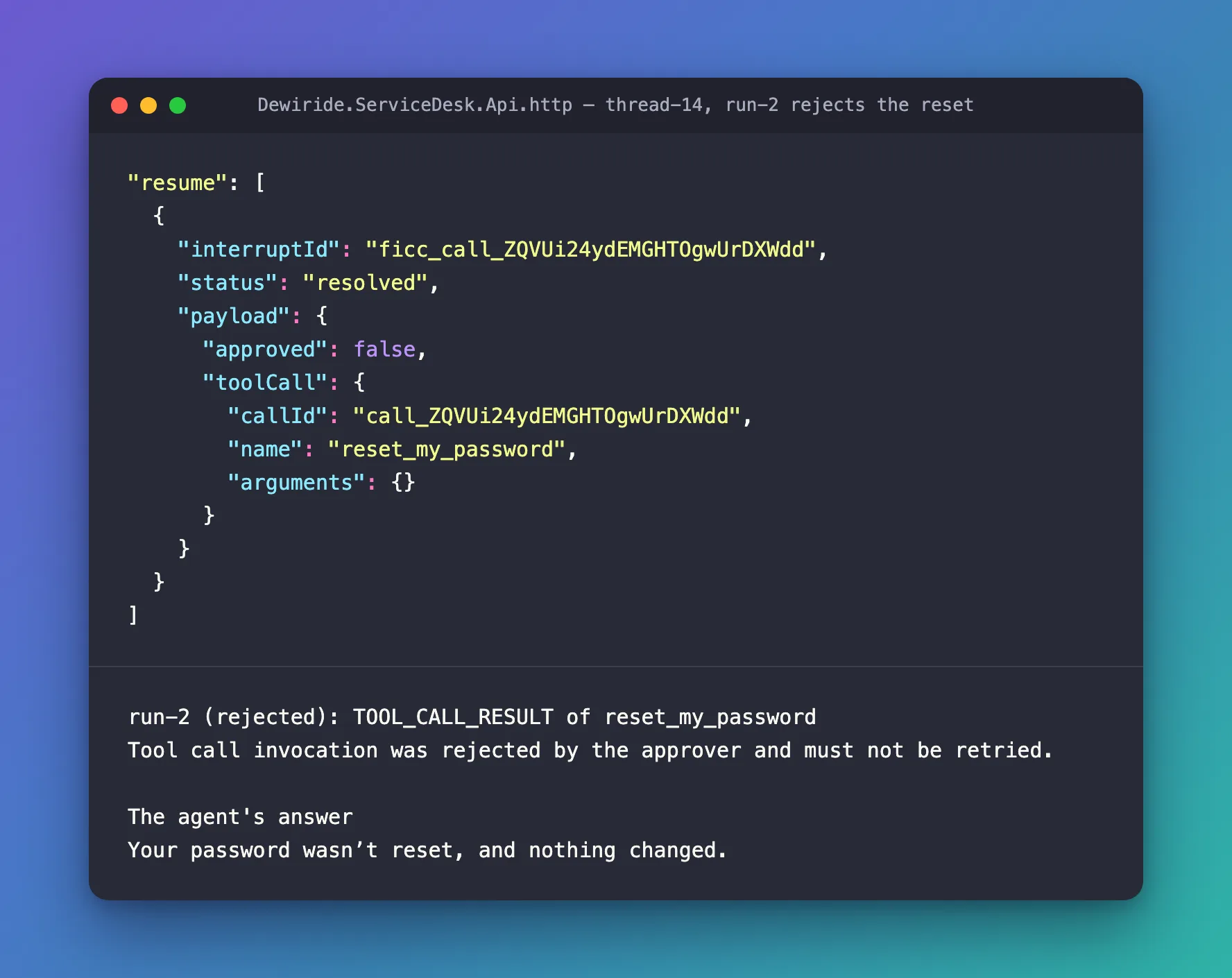
The trusted route from Part 6 passes only text and run events to the browser, and the chat page from Part 7 shows only text. Neither knows about interrupts yet, so try resets from the .http file for now. Part 14 shows the approval request in the chat as a card with Approve and Reject, and sends the answer through the route.
Your Solution Now Looks Like This
DewirideServiceDesk/
├── Directory.Packages.props                          unchanged
├── src/
│   ├── Dewiride.ServiceDesk.Agent/
│   │   ├── Systems/
│   │   │   ├── IAccountSystem.cs                     new: the account system
│   │   │   ├── PasswordReset.cs                      new: where the link went, and until when
│   │   │   ├── SampleAccountSystem.cs                new: the in-memory sample
│   │   │   └── …                                     unchanged
│   │   ├── CreateTicketResult.cs
│   │   ├── Dewiride.ServiceDesk.Agent.csproj
│   │   ├── FoundryOptions.cs
│   │   ├── ICurrentEmployee.cs
│   │   ├── MicrosoftLearnOptions.cs
│   │   ├── MicrosoftLearnTools.cs
│   │   ├── ServiceDeskAgentExtensions.cs             + the sample account system
│   │   ├── ServiceDeskInstructions.cs                when to reset, and what to say
│   │   └── ServiceDeskTools.cs                       + reset_my_password, behind an approval
│   └── Dewiride.ServiceDesk.Api/
│       ├── appsettings.json
│       ├── Dewiride.ServiceDesk.Api.http             + four requests
│       ├── Program.cs
│       └── SignedInEmployee.cs
└── web/
    └── agent-chat-ui/                                unchanged
Cleanup (Only If You Stop Here)
Continuing to Part 14? Keep everything.
This part created nothing in Azure, and the sample account system sends nothing, so there's nothing to delete for it. If you are stopping, the cleanup from Part 9 still applies.
Common Mistakes
| Mistake | What happens | Do this instead |
|---|---|---|
| Asking for approval in the instructions instead of wrapping the tool | The model is asked to wait, but nothing stops it from calling the tool | Wrap the tool in ApprovalRequiredAIFunction, and use the instructions for what to say |
| Returning the new password or the reset link from the tool | The secret goes to the model and into Foundry's copy of the conversation | Return only where the link went and when it expires |
| Giving the tool an employee parameter | The model chooses whose password to reset | Use the signed-in employee, as every "my" tool does |
Answering the interrupt with only "approved": true | The tool's result says No approval response was provided for this approval required tool call. | Send the toolCall in the payload too, as Step 5 does |
| Pasting the IDs from another run | The answer doesn't match the waiting call, and the run fails | Paste the id and toolCallId from the run you're answering |
| Restarting the API between asking and answering | The in-memory session store forgets the waiting call, and the answer fails | Answer before you restart; Part 15 keeps conversations in a durable store |
Troubleshooting
| Symptom | Likely cause | Fix |
|---|---|---|
| The tool's result is Tool call invocation was rejected by the approver and must not be retried. No approval response was provided for this approval required tool call. | The resume payload has no toolCall, or a new message was sent instead of an answer | Answer with Step 5's payload (Fixed) |
The answer ends with RUN_ERROR An error occurred while streaming the agent response., and the API's console shows InvalidOperationException: ToolApprovalRequestContent found with FunctionCall.CallId(s) '…' that have no matching ToolApprovalResponseContent. | No call is waiting in that conversation with those IDs: a different threadId, IDs from another run, or the API restarted | Ask again, and answer with the IDs from the new interrupt (Fixed) |
The .http requests answer 401 Unauthorized | The token in .env expired | Get a fresh one with Part 8's commands |
Frequently Asked Questions
What if the employee writes a new message instead of answering?
The waiting call is rejected. I asked for a reset and, instead of answering the interrupt, sent Actually, never mind. in the same thread. The next run started with the tool's result: Tool call invocation was rejected by the approver and must not be retried. No approval response was provided for this approval required tool call. The agent answered Your password was not reset; nothing changed. So an unanswered approval never stays open behind a conversation that moved on.
Can someone approve a call that the model never made?
Not in Agent Framework's default setup. I sent an approval, with an invented toolCall, to a new conversation where nothing was waiting. The run ended with RUN_ERROR before any tool ran, and the API's console showed why: ToolApprovalRequestContent found with FunctionCall.CallId(s) 'call_forged123' that have no matching ToolApprovalResponseContent. The call stack under it names the guard, ApprovalResponseBindingChatClient: approval-response binding, which Agent Framework's documentation says remains enabled by default. An answer counts only when it matches a call that is waiting in the same session.
Why doesn't the agent ask "Are you sure?" first?
Because the approval already asks. An Are you sure? in words would make the employee confirm twice, and only the approval is enforced. Step 3's instructions tell the agent to call the tool and let the approval do the asking.
Can the agent reset a colleague's password?
No. I asked Please reset my colleague Asha's password. and the agent didn't call the tool: I can only reset the password of the employee I'm chatting with, not someone else's. Even if it called the tool, reset_my_password has no parameter for another person, and always uses the signed-in employee.
What happens to a waiting approval when the API restarts?
It's gone. The waiting call lives in the conversation's session, and on your machine the session store keeps conversations in memory. I asked for a reset, restarted the API, and sent the approval: the run ended with the same RUN_ERROR and InvalidOperationException as an approval for a call that never existed. Part 15 moves conversations to a durable store.
Why do the tool-call events appear twice?
The first time, in run-1, they show the call the model made, the one waiting for approval. The second time, at the start of run-2, they show the approved call starting, just before its result. Both use the same toolCallId, so a client can tell they're the same call.
Conclusion
The agent can now do something that matters, and it can't do it alone. ApprovalRequiredAIFunction wraps reset_my_password, so when the model calls it, the run ends with an AG-UI interrupt instead of a reset. The employee answers in the same conversation with a resume entry, which carries the toolCall as well, because AGUI.Server 1.0.0 needs it. An approval runs the reset, which returns only where the link went and when it expires. A rejection gives the model a result that says not to try again, and the instructions turn that into a plain nothing changed. Agent Framework only accepts answers that match a waiting call, and the tool only ever acts on the signed-in employee.
The approval works, but only from the .http file. Next: Part 14: Approval Cards in the Chat UI — the chat shows the request as a card with Approve and Reject, and the click goes back to the agent as the resume entry from this part.
Additional Resources
- Using function tools with human in the loop approvals —
ApprovalRequiredAIFunction,ToolApprovalRequestContentandCreateResponse, and the defaults that protect approvals. - Human-in-the-Loop with AG-UI — how the AG-UI adapter turns an approval request into an interrupt.
- AG-UI Integration with Agent Framework — what the .NET integration maps to AG-UI events.
- AG-UI issue #2815 — why the
resumepayload needs thetoolCallwithAGUI.Server1.0.0.
