Part 11: Let the Agent Create Tickets
In Part 10 the agent learned to look things up. Now it does something: when an employee asks for it, the agent raises an IT ticket for them. This is its first tool that changes something, so the tool gets the care such a tool needs. It can only raise tickets for the person who is asking, and it checks every value the AI model wrote before anything reaches the ticket system.
This is Part 11 of a 23-part series.
- Part 1: Overview, Architecture and Azure Setup
- Part 2: Create a Production-Grade .NET Solution
- Part 3: Your First Agent API with Microsoft Foundry
- Part 4: Multi-Turn Conversations with Sessions
- Part 5: Create a Next.js Chat App for Your Agent
- Part 6: Stream the Agent Through a Trusted Next.js Route Handler
- Part 7: Build a Streaming Chat Page with the AG-UI Client
- Part 8: Secure the Agent API with Microsoft Entra ID
- Part 9: Add Microsoft Entra ID Sign-In to the Next.js Chat App
- Part 10: Give the Agent Enterprise Tools
- Part 11: Let the Agent Create Tickets (you are here)
- Part 12: Connect an MCP Server (coming soon)
- Part 13: Human Approval for Sensitive Actions (coming soon)
- Part 14: Approval Cards in the Chat UI (coming soon)
- Part 15: Persistent Conversations (coming soon)
- Part 16: Memory That Knows the Employee (coming soon)
- Part 17: Guardrails — Keep Secrets Out of the Model (coming soon)
- Part 18: Audit Logs and Observability (coming soon)
- Part 19: Ticket Triage Workflow (coming soon)
- Part 20: Manager Approvals and Checkpoints (coming soon)
- Part 21: Agent Harness — Weekly Problem Report (coming soon)
- Part 22: Deploy to Azure Container Apps (coming soon)
- Part 23: Bring It to Microsoft Teams (coming soon)
By the end of this part, an employee whose laptop stays slow can say Yes, please raise a ticket and get a ticket number back, with the laptop's details already in the ticket. The agent first checks whether an open ticket already covers the problem, and when the model writes a ticket that breaks the rules, the tool says what's wrong instead of failing. Every step works in VS Code and in Visual Studio; where they differ, the page shows a tab for each. Every output and screenshot on this page is real, captured while building the project.
What You Will Build
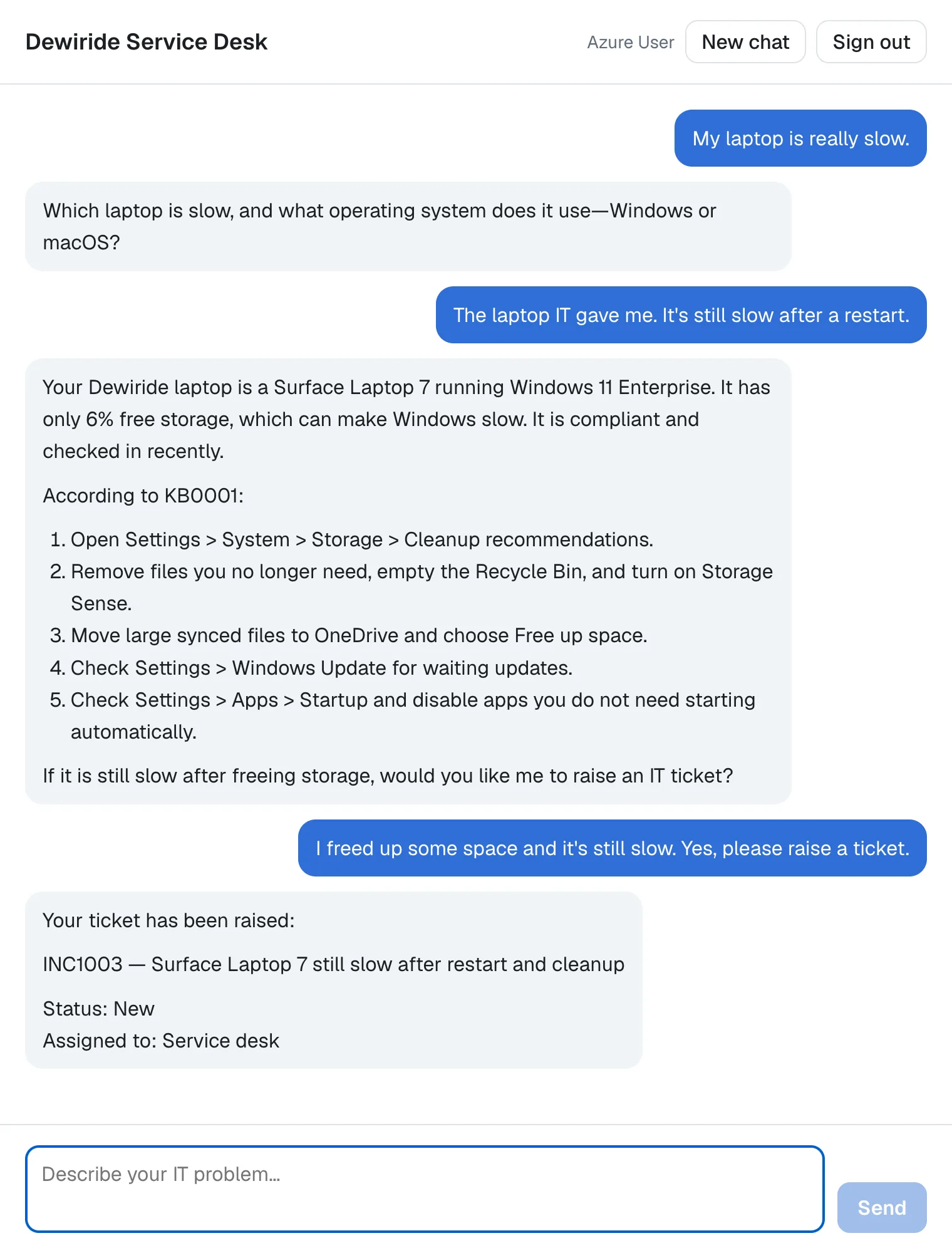
The agent looked up the laptop, offered a ticket, and raised it only when the employee said yes. This is how a request to raise a ticket travels:
These are the changes, all in the agent's brain and the .http file:
| Where | What changes |
|---|---|
Dewiride.ServiceDesk.Agent/Systems/TicketType.cs (new) | The two kinds of ticket: incident and request |
Dewiride.ServiceDesk.Agent/Systems/NewTicket.cs (new) | A ticket to raise |
Dewiride.ServiceDesk.Agent/Systems/Ticket.cs | A ticket gets a description |
Dewiride.ServiceDesk.Agent/Systems/ITicketSystem.cs | The ticket system can create tickets |
Dewiride.ServiceDesk.Agent/Systems/SampleTicketSystem.cs | The sample creates them, safely when requests arrive at the same moment |
Dewiride.ServiceDesk.Agent/CreateTicketResult.cs (new) | What the tool tells the model |
Dewiride.ServiceDesk.Agent/ServiceDeskTools.cs | The create_ticket tool and its checks |
Dewiride.ServiceDesk.Agent/ServiceDeskInstructions.cs | When to raise a ticket |
Dewiride.ServiceDesk.Api.http | Four new requests |
The API's Program.cs and the chat app don't change: the agent picks up the new tool through AsAITools(), which Part 10 already passes to it.
How a Tool That Changes Things Is Different
Reading versus changing
Part 10's tools only read. If the model calls one of them at the wrong moment, the worst case is an answer with more detail than needed. create_ticket writes: every call puts a ticket in the queue of a real team. Microsoft's tools documentation opens with the warning that matters most now:
Tool calls and arguments are generated by the model. Validate and authorize them before application code performs side effects. Use approval and least-privileged execution for high-risk tools.
A side effect is exactly what this tool has: it changes something outside the conversation. So the tool follows four rules.
- It raises tickets only for the person who is asking. Like the tools in Part 10, it has no parameter for an employee. The ticket always goes to the signed-in employee, taken from the access token.
- It checks every argument. The documentation of
AIFunctionFactory.Create, the method that turns C# methods into tools, says it plainly: the data supplied via an AIFunctionArguments's dictionary is supplied from an AI service and should be considered unvalidated and untrusted. The title, the description and the type come from the model, so the tool checks them like any input from outside. - It tells the model what to fix. When a tool throws an exception, the model only learns that the call failed (Part 10 showed why). That's right for unexpected failures, but a title that's too long is something the model can fix. Microsoft's guide to adding tools lists it as a common pitfall: Tools can fail (network errors, invalid input). Return clear error messages so the model can reason about what went wrong and try again or inform the user.
- The instructions say when to use it. Only when the employee asks for a ticket or agrees to one, and only after checking that no open ticket already covers the problem.
Why no approval step yet
The same guide warns about missing approval on sensitive actions: If a tool can make irreversible changes, add tool approval to keep a human in the loop. Raising a ticket for yourself, about your own problem, after you said yes in the chat, isn't that kind of action: the employee is the human in the loop. Actions that are riskier, such as installing software or resetting access, get a real approval step in Part 13.
What This Part Costs
No new Azure resources: the sample ticket system runs inside the API. The fourth tool's name, description and parameters, and the longer instructions, go to the model with every request: Hi! What can you help me with? took 487 input tokens in Part 10 and takes 726 now. Raising the ticket in Step 5 took three trips to the model, one to look things up, one to call create_ticket and one to answer: 3,335 input tokens, 1,168 of them cached, and 227 output tokens. At the full input price from Part 1, $0.20 per million input tokens and $1.20 per million output tokens, that's about $0.0009 for the whole ticket.
Prerequisites
- The solution and the chat app from Part 10: Give the Agent Enterprise Tools.
Step 1: Let the Ticket System Raise Tickets
The ticket system from Part 10 can only list an employee's open tickets. First it learns to create one. All five files in this step are in the Systems folder of the Dewiride.ServiceDesk.Agent project. Create the two new ones the same way as in Part 10: in VS Code, right-click Systems and select New File…; in Visual Studio, right-click Systems and select Add → Class…. Replace everything in each file with the code shown.
The two kinds of ticket
A service desk tells incidents, something that is broken, from requests, something that someone needs. The ticket numbers already show it: INC1001 and REQ1002. Create TicketType.cs:
namespace Dewiride.ServiceDesk.Agent.Systems;

/// <summary>The two kinds of ticket: an incident (something is broken) or a request (something is needed).</summary>
public enum TicketType
{
    Incident,
    Request,
}
An enum is a type with a fixed list of named values. Step 2 shows why that's the right type for a value the model fills in.
A ticket to raise
The ticket system needs three things to raise a ticket: its type, a one-line title and a description. Create NewTicket.cs:
namespace Dewiride.ServiceDesk.Agent.Systems;

/// <summary>A ticket to raise: what kind it is, a one-line title and the details the IT team needs.</summary>
public sealed record NewTicket(TicketType Type, string Title, string Description);
The number, the status and the team aren't in it: the ticket system decides those.
A ticket gets a description
A ticket the agent raises carries the details the IT team needs, so a ticket now has a description. Open Ticket.cs and add the Description line after Title:
namespace Dewiride.ServiceDesk.Agent.Systems;

/// <summary>An IT ticket: an incident (something is broken) or a request (something is needed).</summary>
public sealed record Ticket(
    string Number,
    string Title,
    string Description,
    string Status,
    string AssignedTo,
    DateOnly Opened,
    string LatestUpdate);
The ticket system creates tickets
Open ITicketSystem.cs and add the second method:
namespace Dewiride.ServiceDesk.Agent.Systems;

/// <summary>The company's ticket system, where the IT team tracks every incident and request.</summary>
public interface ITicketSystem
{
    /// <summary>Gets one employee's open tickets.</summary>
    Task<IReadOnlyList<Ticket>> GetOpenTicketsAsync(string employeeId, CancellationToken cancellationToken);

    /// <summary>Raises a new ticket for one employee and returns it, with the number the ticket system gave it.</summary>
    Task<Ticket> CreateTicketAsync(string employeeId, NewTicket newTicket, CancellationToken cancellationToken);
}
Like GetOpenTicketsAsync, it takes the employee as a parameter. That's safe here: the ticket system is called by your code, never by the model, and Step 2 makes sure your code passes the signed-in employee.
The sample, now with a lock
The sample from Part 10 kept every employee's tickets in a ConcurrentDictionary, and nothing ever changed a list once it was there. Now CreateTicketAsync adds to an employee's list, and the API serves several requests at the same moment: two browser tabs can raise two tickets at once. A ConcurrentDictionary keeps only itself safe, not the lists inside it, and Microsoft's reference for List<T> is clear about what a list needs: It is safe to perform multiple read operations on a List<T>, but issues can occur if the collection is modified while it's being read. To ensure thread safety, lock the collection during a read or write operation.
So the sample now keeps everything behind one lock. Replace everything in SampleTicketSystem.cs:
namespace Dewiride.ServiceDesk.Agent.Systems;

/// <summary>
/// A stand-in for a real ticket system, kept in memory. The first time it sees an employee,
/// it gives them two sample open tickets. New tickets start with the service desk.
/// </summary>
public sealed class SampleTicketSystem(TimeProvider timeProvider) : ITicketSystem
{
    // Requests can arrive at the same moment, so one lock guards all the tickets:
    // only one request at a time reads or changes them.
    private readonly Lock _lock = new();
    private readonly Dictionary<string, List<Ticket>> _ticketsByEmployee = [];
    private int _lastNumber = 1000;

    public Task<IReadOnlyList<Ticket>> GetOpenTicketsAsync(string employeeId, CancellationToken cancellationToken)
    {
        lock (_lock)
        {
            // A copy, so the list a caller holds never changes under it.
            IReadOnlyList<Ticket> tickets = [.. TicketsOf(employeeId)];
            return Task.FromResult(tickets);
        }
    }

    public Task<Ticket> CreateTicketAsync(string employeeId, NewTicket newTicket, CancellationToken cancellationToken)
    {
        lock (_lock)
        {
            List<Ticket> tickets = TicketsOf(employeeId);
            string prefix = newTicket.Type == TicketType.Incident ? "INC" : "REQ";

            Ticket ticket = new($"{prefix}{++_lastNumber}", newTicket.Title, newTicket.Description,
                Status: "New", AssignedTo: "Service desk", Opened: Today(),
                LatestUpdate: "The service desk will review the ticket and assign it to the right team.");

            tickets.Add(ticket);
            return Task.FromResult(ticket);
        }
    }

    // One employee's tickets, starting with the two samples. Call it only inside the lock.
    private List<Ticket> TicketsOf(string employeeId)
    {
        if (!_ticketsByEmployee.TryGetValue(employeeId, out List<Ticket>? tickets))
        {
            tickets = CreateSampleTickets();
            _ticketsByEmployee.Add(employeeId, tickets);
        }

        return tickets;
    }

    private List<Ticket> CreateSampleTickets()
    {
        DateOnly today = Today();

        return
        [
            new Ticket($"INC{++_lastNumber}", "VPN disconnects every few minutes",
                Description: "The VPN connection drops every few minutes when working from home.",
                Status: "In progress", AssignedTo: "Network team", Opened: today.AddDays(-3),
                LatestUpdate: "The network team is checking the VPN gateway logs for your laptop."),
            new Ticket($"REQ{++_lastNumber}", "Second monitor for home office",
                Description: "A second monitor for working from home.",
                Status: "Waiting for approval", AssignedTo: "IT purchasing", Opened: today.AddDays(-1),
                LatestUpdate: "Waiting for your manager to approve the request."),
        ];
    }

    private DateOnly Today() => DateOnly.FromDateTime(timeProvider.GetUtcNow().UtcDateTime);
}
What changed:
private readonly Lock _lock = new();is the lock, and eachlock (_lock) { … }block lets one request at a time in. C#'s documentation recommends exactly this type: Starting with .NET 9 and C# 13, lock a dedicated object instance of the System.Threading.Lock type for best performance.Locklives inSystem.Threading, which the project's implicitusinglines already include.- A plain
DictionaryandList. With every read and change inside the lock, the collections no longer need to be safe on their own. [.. TicketsOf(employeeId)]returns a copy. The caller gets the tickets as they were at that moment, and a ticket raised a moment later can't change the list while the caller reads it.++_lastNumberreplacesInterlocked.Increment. Inside the lock, a plain increment can't run twice at once.- New tickets start with the service desk, with the status New. Sorting tickets to the right team is the job of the triage workflow in Part 19.
- The two methods aren't
async. They don't wait for anything, so they returnTask.FromResult(...). That suits the lock too: the documentation of thelockstatement says You can't use the await expression in the body of a lock statement.
The Lock type on its own, in a small console app that shows what goes wrong without it, is in How to Use System.Threading.Lock with the lock Statement in C#.
Step 2: Write the create_ticket Tool
The tool needs to tell the model one of two things: here is your new ticket, or this is what you need to fix. Create CreateTicketResult.cs directly in the Dewiride.ServiceDesk.Agent project, next to ServiceDeskTools.cs:
using Dewiride.ServiceDesk.Agent.Systems;

namespace Dewiride.ServiceDesk.Agent;

/// <summary>
/// What create_ticket tells the AI model: the new ticket, or, when it wasn't raised,
/// the problem to fix, in words the model can act on.
/// </summary>
public sealed record CreateTicketResult(bool Created, Ticket? Ticket = null, string? Problem = null);
A tool's result reaches the model as JSON: AIFunctionFactory writes it with AIJsonUtilities.DefaultOptions, and the documentation of those options lists what those options turn on, among them WhenWritingNull as the default ignore condition for properties: a property that is null is left out. So the model reads either {"created": true, "ticket": {…}} or {"created": false, "problem": "…"}, never an empty field.
Now open ServiceDeskTools.cs. The pieces first, then the complete file.
1. The limits. Add two constants at the top of the class, before the first tool:
    /// <summary>The longest ticket title that create_ticket accepts.</summary>
    public const int MaxTitleLength = 100;

    /// <summary>The longest ticket description that create_ticket accepts.</summary>
    public const int MaxDescriptionLength = 1000;
A real ticket system has limits like these on its fields. Checking them in the tool means the model hears about a problem in words it understands, instead of the ticket system's error.
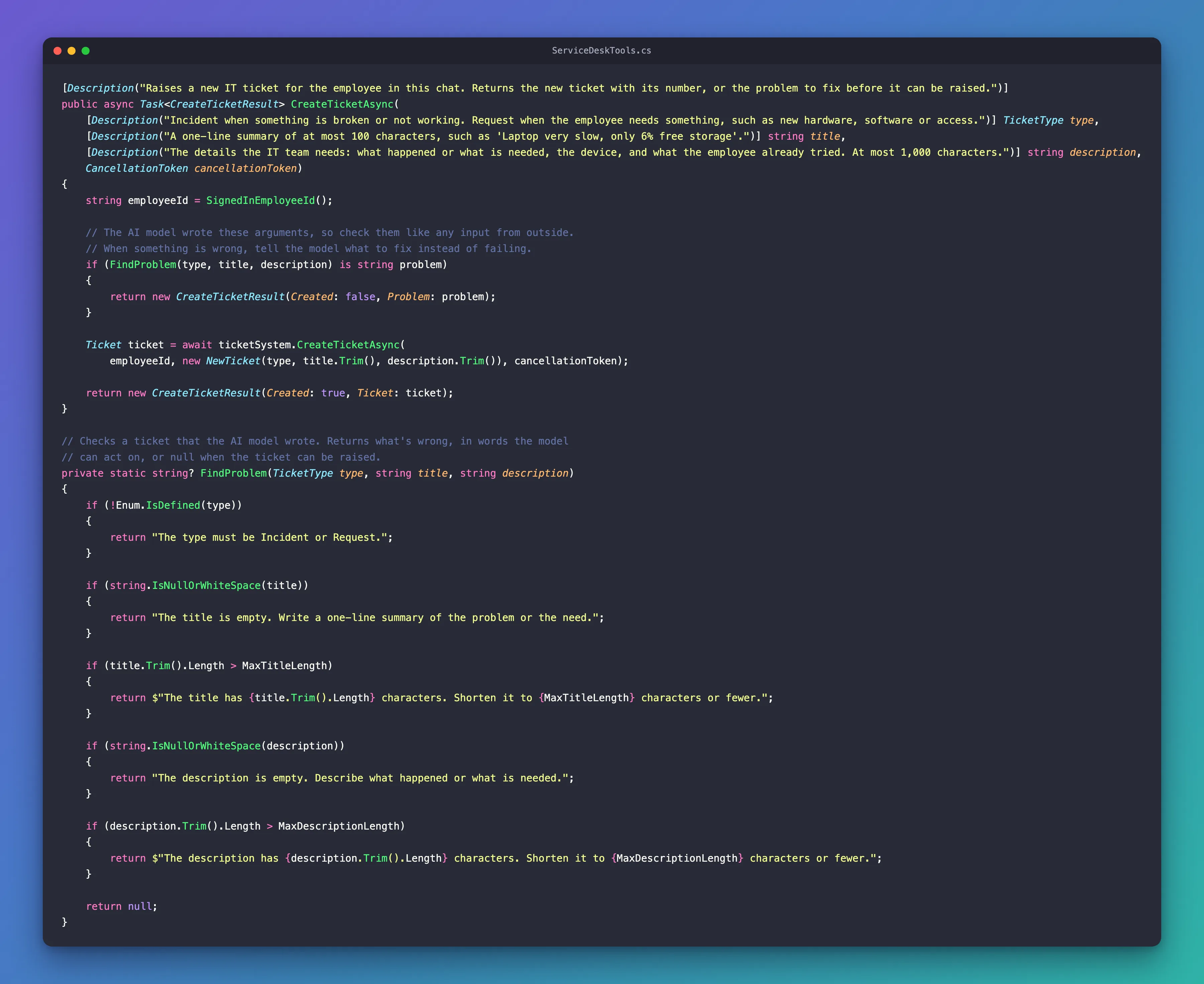
2. The tool. Add it after SearchKnowledgeBaseAsync:
    [Description("Raises a new IT ticket for the employee in this chat. Returns the new ticket with its number, or the problem to fix before it can be raised.")]
    public async Task<CreateTicketResult> CreateTicketAsync(
        [Description("Incident when something is broken or not working. Request when the employee needs something, such as new hardware, software or access.")] TicketType type,
        [Description("A one-line summary of at most 100 characters, such as 'Laptop very slow, only 6% free storage'.")] string title,
        [Description("The details the IT team needs: what happened or what is needed, the device, and what the employee already tried. At most 1,000 characters.")] string description,
        CancellationToken cancellationToken)
    {
        string employeeId = SignedInEmployeeId();

        // The AI model wrote these arguments, so check them like any input from outside.
        // When something is wrong, tell the model what to fix instead of failing.
        if (FindProblem(type, title, description) is string problem)
        {
            return new CreateTicketResult(Created: false, Problem: problem);
        }

        Ticket ticket = await ticketSystem.CreateTicketAsync(
            employeeId, new NewTicket(type, title.Trim(), description.Trim()), cancellationToken);

        return new CreateTicketResult(Created: true, Ticket: ticket);
    }
- Three parameters the model fills in, each with a
Descriptionthat says what a good value looks like, including the limits. The model reads these descriptions, not your code. TicketType type. Because the parameter is anenum, the model is told the allowed values: the JSON schema below listsIncidentandRequest, and nothing else.SignedInEmployeeId()comes first. Who is asking is settled before anything else happens, and with no one signed in the tool fails, as in Part 10.FindProblem(...) is string problemruns the checks below. When it returns a message, the tool returns it to the model and raises nothing.title.Trim()removes spaces at the start and the end, so a ticket never gets a title such as" Laptop slow ".
Enum parameters on their own, including what happens when the model sends a value that isn't in the list, are in How to Use an Enum Parameter in a Microsoft Agent Framework Function Tool in C#.
3. The checks. Add this method at the end of the class, after SignedInEmployeeId:
    // Checks a ticket that the AI model wrote. Returns what's wrong, in words the model
    // can act on, or null when the ticket can be raised.
    private static string? FindProblem(TicketType type, string title, string description)
    {
        if (!Enum.IsDefined(type))
        {
            return "The type must be Incident or Request.";
        }

        if (string.IsNullOrWhiteSpace(title))
        {
            return "The title is empty. Write a one-line summary of the problem or the need.";
        }

        if (title.Trim().Length > MaxTitleLength)
        {
            return $"The title has {title.Trim().Length} characters. Shorten it to {MaxTitleLength} characters or fewer.";
        }

        if (string.IsNullOrWhiteSpace(description))
        {
            return "The description is empty. Describe what happened or what is needed.";
        }

        if (description.Trim().Length > MaxDescriptionLength)
        {
            return $"The description has {description.Trim().Length} characters. Shorten it to {MaxDescriptionLength} characters or fewer.";
        }

        return null;
    }
Each message says what is wrong and what to do about it, with the numbers, so the model can fix the ticket in one try. Two of the checks look unnecessary, and aren't:
Enum.IsDefined(type). The JSON options turn on string based enum serialization as implemented by JsonStringEnumConverter, and that converter'sallowIntegerValuessetting istrueby default, to allow undefined enum values. So if the model sends the number7as the type, it reaches your method as aTicketTypethat doesn't exist. I checked by calling the tool with"type": 7: without this line, the ticket would have been raised; with it, the result isThe type must be Incident or Request.string.IsNullOrWhiteSpace(title).titleis declared as astringthat can't benull, but the model can still send"title": null. I checked: thenullreaches the method, and this check answers The title is empty.
Some mistakes never reach your method at all. A type that isn't a number or one of the two names, such as "Bug", makes the tool call throw while the arguments are read, and so does a missing title: The arguments dictionary is missing a value for the required parameter 'title'. I called the tool directly to see both. For a tool call that throws, the model gets the generic error from Part 10. The schema's list of allowed values makes the first one rare, and the model fills in every required parameter.
The same pattern in a small agent of its own, with the model fixing its own mistake, is in How to Validate a Function Tool's Arguments in C# with Microsoft Agent Framework.
4. The tool list. Add create_ticket to AsAITools:
    /// <summary>The tools as the agent sees them: a name, a description and the parameters the AI model fills in.</summary>
    public IList<AITool> AsAITools() =>
    [
        AIFunctionFactory.Create(GetMyDevicesAsync, name: "get_my_devices"),
        AIFunctionFactory.Create(GetMyTicketsAsync, name: "get_my_tickets"),
        AIFunctionFactory.Create(SearchKnowledgeBaseAsync, name: "search_knowledge_base"),
        AIFunctionFactory.Create(CreateTicketAsync, name: "create_ticket"),
    ];
5. Two smaller changes. Tickets have a description now, so the description of get_my_tickets mentions it:
[Description("Gets the open IT tickets of the employee in this chat: number, title, description, status, team and latest update.")]
And the class comment says what the tools may do now: look things up, and raise tickets.
This is what the model receives for the new tool. I printed it from the AIFunction's Name, Description and JsonSchema properties:
| Name | Description | Parameters |
|---|---|---|
create_ticket | Raises a new IT ticket for the employee in this chat. Returns the new ticket with its number, or the problem to fix before it can be raised. | {"type":"object","properties":{"type":{"description":"Incident when something is broken or not working. Request when the employee needs something, such as new hardware, software or access.","type":"string","enum":["Incident","Request"]},"title":{"description":"A one-line summary of at most 100 characters, such as 'Laptop very slow, only 6% free storage'.","type":"string"},"description":{"description":"The details the IT team needs: what happened or what is needed, the device, and what the employee already tried. At most 1,000 characters.","type":"string"}},"required":["type","title","description"]} |
"enum":["Incident","Request"] is the TicketType enum. And, as in Part 10, there is no parameter for an employee: whoever the model thinks it's writing for, the ticket goes to the person who signed in. I called the tool with an extra employeeId argument naming another employee too: the ticket went to the signed-in employee, and the extra argument was ignored.
The complete file:
using System.ComponentModel;
using Dewiride.ServiceDesk.Agent.Systems;
using Microsoft.Extensions.AI;

namespace Dewiride.ServiceDesk.Agent;

/// <summary>
/// The agent's tools: what it may look up in the company's IT systems, and the tickets it may raise.
/// The tools about "my" records always use the signed-in employee, never an ID that the AI model chose.
/// </summary>
public sealed class ServiceDeskTools(
    ICurrentEmployee currentEmployee,
    IDeviceInventory deviceInventory,
    ITicketSystem ticketSystem,
    IKnowledgeBase knowledgeBase)
{
    /// <summary>The longest ticket title that create_ticket accepts.</summary>
    public const int MaxTitleLength = 100;

    /// <summary>The longest ticket description that create_ticket accepts.</summary>
    public const int MaxDescriptionLength = 1000;

    [Description("Gets the laptops and phones that IT gave to the employee in this chat: model, operating system, last check-in, compliance and free storage.")]
    public Task<IReadOnlyList<Device>> GetMyDevicesAsync(CancellationToken cancellationToken) =>
        deviceInventory.GetDevicesAsync(SignedInEmployeeId(), cancellationToken);

    [Description("Gets the open IT tickets of the employee in this chat: number, title, description, status, team and latest update.")]
    public Task<IReadOnlyList<Ticket>> GetMyTicketsAsync(CancellationToken cancellationToken) =>
        ticketSystem.GetOpenTicketsAsync(SignedInEmployeeId(), cancellationToken);

    [Description("Searches the IT knowledge base for articles with known fixes. Returns up to three articles.")]
    public Task<IReadOnlyList<KnowledgeArticle>> SearchKnowledgeBaseAsync(
        [Description("A few words about the problem, such as 'slow laptop' or 'VPN disconnects'.")] string query,
        CancellationToken cancellationToken) =>
        knowledgeBase.SearchAsync(query, cancellationToken);

    [Description("Raises a new IT ticket for the employee in this chat. Returns the new ticket with its number, or the problem to fix before it can be raised.")]
    public async Task<CreateTicketResult> CreateTicketAsync(
        [Description("Incident when something is broken or not working. Request when the employee needs something, such as new hardware, software or access.")] TicketType type,
        [Description("A one-line summary of at most 100 characters, such as 'Laptop very slow, only 6% free storage'.")] string title,
        [Description("The details the IT team needs: what happened or what is needed, the device, and what the employee already tried. At most 1,000 characters.")] string description,
        CancellationToken cancellationToken)
    {
        string employeeId = SignedInEmployeeId();

        // The AI model wrote these arguments, so check them like any input from outside.
        // When something is wrong, tell the model what to fix instead of failing.
        if (FindProblem(type, title, description) is string problem)
        {
            return new CreateTicketResult(Created: false, Problem: problem);
        }

        Ticket ticket = await ticketSystem.CreateTicketAsync(
            employeeId, new NewTicket(type, title.Trim(), description.Trim()), cancellationToken);

        return new CreateTicketResult(Created: true, Ticket: ticket);
    }

    /// <summary>The tools as the agent sees them: a name, a description and the parameters the AI model fills in.</summary>
    public IList<AITool> AsAITools() =>
    [
        AIFunctionFactory.Create(GetMyDevicesAsync, name: "get_my_devices"),
        AIFunctionFactory.Create(GetMyTicketsAsync, name: "get_my_tickets"),
        AIFunctionFactory.Create(SearchKnowledgeBaseAsync, name: "search_knowledge_base"),
        AIFunctionFactory.Create(CreateTicketAsync, name: "create_ticket"),
    ];

    // Who is asking comes from the host's sign-in. With no one signed in, the tool fails
    // instead of guessing.
    private string SignedInEmployeeId() =>
        currentEmployee.Id ?? throw new InvalidOperationException("No employee is signed in.");

    // Checks a ticket that the AI model wrote. Returns what's wrong, in words the model
    // can act on, or null when the ticket can be raised.
    private static string? FindProblem(TicketType type, string title, string description)
    {
        if (!Enum.IsDefined(type))
        {
            return "The type must be Incident or Request.";
        }

        if (string.IsNullOrWhiteSpace(title))
        {
            return "The title is empty. Write a one-line summary of the problem or the need.";
        }

        if (title.Trim().Length > MaxTitleLength)
        {
            return $"The title has {title.Trim().Length} characters. Shorten it to {MaxTitleLength} characters or fewer.";
        }

        if (string.IsNullOrWhiteSpace(description))
        {
            return "The description is empty. Describe what happened or what is needed.";
        }

        if (description.Trim().Length > MaxDescriptionLength)
        {
            return $"The description has {description.Trim().Length} characters. Shorten it to {MaxDescriptionLength} characters or fewer.";
        }

        return null;
    }
}
Step 3: Tell the Agent When to Raise a Ticket
The tool decides how a ticket is raised. The instructions decide when. The instructions from Part 10 end with a rule that is no longer true:
        - You can look things up, but you cannot change anything or raise tickets yet. When a problem needs
          hands-on help, tell the employee to raise a ticket with the IT Service Desk.
Replace it, rename the section What you can look up to What you can look up and do, and add two lines at the end of that section. The complete file:
namespace Dewiride.ServiceDesk.Agent;

/// <summary>
/// The agent's instructions: who it is, what it helps with and the rules it always follows.
/// The model receives them with every request.
/// </summary>
internal static class ServiceDeskInstructions
{
    public const string Text = """
        You are the Dewiride IT Service Desk assistant. You help Dewiride employees with IT questions:
        laptops and phones, software, sign-in and passwords, email and Microsoft Teams, Wi-Fi and VPN,
        printers, and security.

        How you answer:
        - Be friendly, clear and brief.
        - Give fixes as short numbered steps.
        - If a request is unclear, ask one clarifying question first, such as which device or operating system.
        - If you are not sure, say so. Never invent Dewiride policies, ticket numbers or contact details.
        - Write plain text. Do not use Markdown formatting such as ** or #.

        What you can look up and do:
        - Use your tools to look up the employee's own devices and open tickets, and to search the IT knowledge base.
          Look things up instead of guessing, and base your answers on what the tools return.
        - You can only see the records of the employee you are chatting with. If someone asks about another
          person's devices or tickets, explain that you can only see their own.
        - When a knowledge base article fits the problem, follow its steps and mention its number, such as KB0001.
        - You can raise tickets for the employee you are chatting with. Raise one only when they ask for it or agree
          when you offer it. First check their open tickets: if one already covers the problem, give them its number
          instead of raising another.
        - Write the ticket's title and description from what the employee told you and what your tools found.
          Never invent details. After raising it, give the employee the new ticket's number.

        Rules you always follow:
        - Help only with IT topics. Politely decline anything else and say what you can help with.
        - Never ask for passwords, MFA codes or other secrets. If someone shares one, tell them to change it right away.
        - You can look things up and raise tickets, but you cannot change, close or reassign tickets, or change
          anything else. When a problem needs hands-on help, offer to raise a ticket.
        """;
}
- Raise one only when they ask for it or agree when you offer it keeps tickets from appearing that nobody wanted. The agent may offer; the employee decides.
- First check their open tickets stops the same problem from being reported twice. It's an instruction, not a guarantee: the model judges whether an open ticket covers the problem. Step 5 shows it at work.
- Write the ticket's title and description from what the employee told you and what your tools found is why the ticket in the picture at the top already names the laptop and its 6% free storage: the agent copied them from
get_my_devices, so the IT team doesn't have to ask. - The last rule tells the agent what it still can't do. There is no tool to close or change a ticket, so the model couldn't anyway; the rule makes it say so politely instead of trying.
Step 4: Build the Solution
From the solution root:
dotnet build
Restore complete (4.1s)
  Dewiride.ServiceDesk.Agent net10.0 succeeded (1.4s) → src/Dewiride.ServiceDesk.Agent/bin/Debug/net10.0/Dewiride.ServiceDesk.Agent.dll
  Dewiride.ServiceDesk.Api net10.0 succeeded (1.6s) → src/Dewiride.ServiceDesk.Api/bin/Debug/net10.0/Dewiride.ServiceDesk.Api.dll

Build succeeded in 7.2s
In Visual Studio, select Build → Build Solution. No warnings, and no new packages: the Lock type comes with .NET, and everything else with the packages you already have.
Step 5: Raise Tickets from the .http File
Add four requests to Dewiride.ServiceDesk.Api.http, after the request about Asha's tickets from Part 10 and before the requests to the chat app's route:
###

# Ask the agent to raise a ticket. It checks your open tickets first, then calls create_ticket:
# the new ticket is in the TOOL_CALL_RESULT event of create_ticket.
POST {{baseUrl}}/api/agents/service-desk
Authorization: Bearer {{$dotenv AGENT_API_TOKEN}}
Content-Type: application/json
Accept: text/event-stream

{
  "threadId": "thread-7",
  "runId": "run-1",
  "messages": [
    {
      "id": "message-1",
      "role": "user",
      "content": "My laptop is really slow, even after a restart. Please raise a ticket for it."
    }
  ]
}

###

# Ask for a ticket about a problem that already has one. The agent gives you that ticket's number instead.
POST {{baseUrl}}/api/agents/service-desk
Authorization: Bearer {{$dotenv AGENT_API_TOKEN}}
Content-Type: application/json
Accept: text/event-stream

{
  "threadId": "thread-8",
  "runId": "run-1",
  "messages": [
    {
      "id": "message-1",
      "role": "user",
      "content": "My VPN keeps disconnecting. Please raise a ticket."
    }
  ]
}

###

# A title that is too long. create_ticket refuses it and says why, and the agent shortens it.
POST {{baseUrl}}/api/agents/service-desk
Authorization: Bearer {{$dotenv AGENT_API_TOKEN}}
Content-Type: application/json
Accept: text/event-stream

{
  "threadId": "thread-9",
  "runId": "run-1",
  "messages": [
    {
      "id": "message-1",
      "role": "user",
      "content": "Please raise a request with exactly this title: Access to the Finance shared mailbox so I can help the finance team with the month-end close and answer supplier questions on invoices"
    }
  ]
}

###

# Accept the agent's shorter title, in the same conversation: run-2 continues run-1.
POST {{baseUrl}}/api/agents/service-desk
Authorization: Bearer {{$dotenv AGENT_API_TOKEN}}
Content-Type: application/json
Accept: text/event-stream

{
  "threadId": "thread-9",
  "runId": "run-2",
  "parentRunId": "run-1",
  "messages": [
    {
      "id": "message-2",
      "role": "user",
      "content": "Yes, use your suggested title."
    }
  ]
}
Get a fresh token into .env with Part 8's commands if yours is older than about an hour. Then start the API:
- VS Code
- Visual Studio
In VS Code's terminal, from the solution root, run:
dotnet run --project src/Dewiride.ServiceDesk.Api
Make sure http is selected in the drop-down list next to the green Start button (▶), with Dewiride.ServiceDesk.Api as the startup project, and press Ctrl+F5 (Debug → Start Without Debugging).
Send the requests in order, from top to bottom: the sample ticket system numbers tickets in the order they are raised, and it starts over every time the API starts.
Raise a ticket
Send the first new request: Send Request above its POST line in VS Code, Send request in Visual Studio. The response, shortened as in Part 10: the headers are left out, each rawEvent is replaced with {…}, the first two results are cut after their first lines, and most of the text events are replaced with one line:
data: {"type":"RUN_STARTED","threadId":"thread-7","runId":"run-1"}

data: {"type":"REASONING_ENCRYPTED_VALUE","subtype":"message","entityId":"msg_WmwhBlbMwviRgpWvtjpotwf5","encryptedValue":"gAAAAABr…","rawEvent":{…}}

data: {"type":"TOOL_CALL_START","toolCallId":"call_nECfjWIjAvOW6Upo10dpics0","toolCallName":"get_my_devices","rawEvent":{…}}

data: {"type":"TOOL_CALL_ARGS","toolCallId":"call_nECfjWIjAvOW6Upo10dpics0","delta":"{}","rawEvent":{…}}

data: {"type":"TOOL_CALL_END","toolCallId":"call_nECfjWIjAvOW6Upo10dpics0","rawEvent":{…}}

data: {"type":"TOOL_CALL_START","toolCallId":"call_UVBKZrGdLazEFiYw8Tlp95Kq","toolCallName":"get_my_tickets","rawEvent":{…}}

data: {"type":"TOOL_CALL_ARGS","toolCallId":"call_UVBKZrGdLazEFiYw8Tlp95Kq","delta":"{}","rawEvent":{…}}

data: {"type":"TOOL_CALL_END","toolCallId":"call_UVBKZrGdLazEFiYw8Tlp95Kq","rawEvent":{…}}

data: {"type":"TOOL_CALL_RESULT","messageId":"call_nECfjWIjAvOW6Upo10dpics0","toolCallId":"call_nECfjWIjAvOW6Upo10dpics0","content":"[\n  {\n    \"name\": \"DW-LT-1001\",\n    \"type\": \"Laptop\", …","rawEvent":{…}}

data: {"type":"TOOL_CALL_RESULT","messageId":"call_UVBKZrGdLazEFiYw8Tlp95Kq","toolCallId":"call_UVBKZrGdLazEFiYw8Tlp95Kq","content":"[\n  {\n    \"number\": \"INC1001\",\n    \"title\": \"VPN disconnects every few minutes\", …","rawEvent":{…}}

data: {"type":"REASONING_ENCRYPTED_VALUE","subtype":"message","entityId":"msg_G3zbAn4ldkAGJYD4wgao68Dh","encryptedValue":"gAAAAABr…","rawEvent":{…}}

data: {"type":"TOOL_CALL_START","toolCallId":"call_lRjEebBM5I2WgU2T8CgetiXn","toolCallName":"create_ticket","rawEvent":{…}}

data: {"type":"TOOL_CALL_ARGS","toolCallId":"call_lRjEebBM5I2WgU2T8CgetiXn","delta":"{\"type\":\"Incident\",\"title\":\"Laptop very slow after restart, 6% free storage\",\"description\":\"The employee reports that their laptop is really slow even after a restart. Device: DW-LT-1001, Surface Laptop 7 running Windows 11 Enterprise. Device record shows 6% free storage. No other troubleshooting tried was reported.\"}","rawEvent":{…}}

data: {"type":"TOOL_CALL_END","toolCallId":"call_lRjEebBM5I2WgU2T8CgetiXn","rawEvent":{…}}

data: {"type":"TOOL_CALL_RESULT","messageId":"call_lRjEebBM5I2WgU2T8CgetiXn","toolCallId":"call_lRjEebBM5I2WgU2T8CgetiXn","content":"{\n  \"created\": true,\n  \"ticket\": {\n    \"number\": \"INC1003\",\n    \"title\": \"Laptop very slow after restart, 6% free storage\",\n    \"description\": \"The employee reports that their laptop is really slow even after a restart. Device: DW-LT-1001, Surface Laptop 7 running Windows 11 Enterprise. Device record shows 6% free storage. No other troubleshooting tried was reported.\",\n    \"status\": \"New\",\n    \"assignedTo\": \"Service desk\",\n    \"opened\": \"2026-11-20\",\n    \"latestUpdate\": \"The service desk will review the ticket and assign it to the right team.\"\n  }\n}","rawEvent":{…}}

data: {"type":"TEXT_MESSAGE_START","messageId":"msg_0cc3a206…","role":"assistant","name":"service-desk","rawEvent":{…}}

data: {"type":"TEXT_MESSAGE_CONTENT","messageId":"msg_0cc3a206…","delta":"Your","rawEvent":{…}}

data: {"type":"TEXT_MESSAGE_CONTENT","messageId":"msg_0cc3a206…","delta":" ticket","rawEvent":{…}}

data: {"type":"TEXT_MESSAGE_CONTENT","messageId":"msg_0cc3a206…","delta":" has","rawEvent":{…}}

… 28 more TEXT_MESSAGE_CONTENT events …

data: {"type":"TEXT_MESSAGE_CONTENT","messageId":"msg_0cc3a206…","delta":".","rawEvent":{…}}

data: {"type":"TEXT_MESSAGE_END","messageId":"msg_0cc3a206…"}

data: {"type":"RUN_FINISHED","threadId":"thread-7","runId":"run-1","outcome":{"type":"success"},"usage":[{"model":"gpt-5.6-luna-2026-07-09","inputTokens":3335,"outputTokens":227,"totalTokens":3562,"reasoningTokens":32,"cachedInputTokens":1168}]}
The agent worked in two rounds:
- It looked things up, two tools in the same turn: the employee's devices, for the laptop's details, and their open tickets, to check that none already covers a slow laptop.
- It called
create_ticket.TOOL_CALL_ARGSshows everything the model wrote: the typeIncident, a 47-character title, and a description with the laptop's name, model and 6% free storage, all fromget_my_devices.TOOL_CALL_RESULTshows what your code sent back:"created": trueand the new ticket,INC1003, New, with the service desk.
The model never chose whose ticket this is: nothing in TOOL_CALL_ARGS names an employee. The answer, put together:
Your ticket has been raised:

INC1003 — Laptop very slow after restart, 6% free storage
Status: New
Assigned to: Service desk

It’s for your Surface Laptop 7 (DW-LT-1001), which currently has 6% free storage.
Ask for a ticket you already have
Send the second request, My VPN keeps disconnecting. Please raise a ticket. The agent called get_my_tickets and get_my_devices, and no create_ticket:
You already have an open ticket covering this issue:

INC1001 — VPN disconnects every few minutes
Status: In progress
Assigned to: Network team

The latest update says the network team is checking the VPN gateway logs for your laptop, so I didn’t create a duplicate ticket.
That's the instruction First check their open tickets at work. It's the model's judgment, though, and the judgment can go further than you expect. In my first try at the next request, the title asked for a replacement laptop, and the agent refused to raise it: the slow-laptop ticket was already open, covering the Surface Laptop 7’s low storage and performance problems. Arguably right, but not what the employee asked for. I changed the request to a need that no open ticket covers.
A title that's too long
Send the third request. The title the employee insists on, exactly this title, is 134 characters long. The model passed it on word for word, and the tool refused it:
data: {"type":"TOOL_CALL_ARGS","toolCallId":"call_UWsOMKkoSC1D05iHuo4101CB","delta":"{\"type\":\"Request\",\"title\":\"Access to the Finance shared mailbox so I can help the finance team with the month-end close and answer supplier questions on invoices\",\"description\":\"Please grant me access to the Finance shared mailbox so I can help the finance team with the month-end close and answer supplier questions on invoices.\"}","rawEvent":{…}}

data: {"type":"TOOL_CALL_END","toolCallId":"call_UWsOMKkoSC1D05iHuo4101CB","rawEvent":{…}}

data: {"type":"TOOL_CALL_RESULT","messageId":"call_UWsOMKkoSC1D05iHuo4101CB","toolCallId":"call_UWsOMKkoSC1D05iHuo4101CB","content":"{\n  \"created\": false,\n  \"problem\": \"The title has 134 characters. Shorten it to 100 characters or fewer.\"\n}","rawEvent":{…}}
The model read the problem and, because the employee had asked for that exact title, didn't quietly change it. It asked instead:
I couldn’t raise the request because the exact title is 134 characters, but titles are limited to 100 characters.

Suggested title:
Finance shared mailbox access for month-end close and supplier invoice questions

No ticket was created.
This is the choice Microsoft's guide describes: with a clear message, the model can try again or inform the user. Here it informed the employee and proposed a fix. Send the fourth request, Yes, use your suggested title., which continues the same conversation. The agent called get_my_tickets and create_ticket again, with the 80-character title it suggested, and answered:
Your request has been raised.

Ticket: REQ1004
Title: Finance shared mailbox access for month-end close and supplier invoice questions
Status: New
REQ, because the model chose the type Request: the employee needs access, nothing is broken.
Step 6: Raise a Ticket in the Chat
Start the chat app with npm run dev in web/agent-chat-ui, open http://localhost:3000 and sign in. The chat app doesn't change in this part: its route from Part 6 still forwards only text and run events, so the tool calls you saw in the .http file stay on the server.
Write My laptop is really slow. The conversation in the picture at the top of this page went like this:
- The agent asked one clarifying question first, Which laptop is slow, and what operating system does it use? The instructions from Part 3 allow that for an unclear request. The same question in Part 10 made the agent look the laptop up right away: the model doesn't decide the same way every time.
- The answer The laptop IT gave me. It's still slow after a restart. was enough. The agent found the Surface Laptop 7 with 6% free storage, gave the steps from KB0001 and offered a ticket instead of raising one.
- After Yes, please raise a ticket. it raised
INC1003, with a title of its own: Surface Laptop 7 still slow after restart and cleanup.
Then try the title that's too long. Select New chat and send the same request as the third one in the .http file:
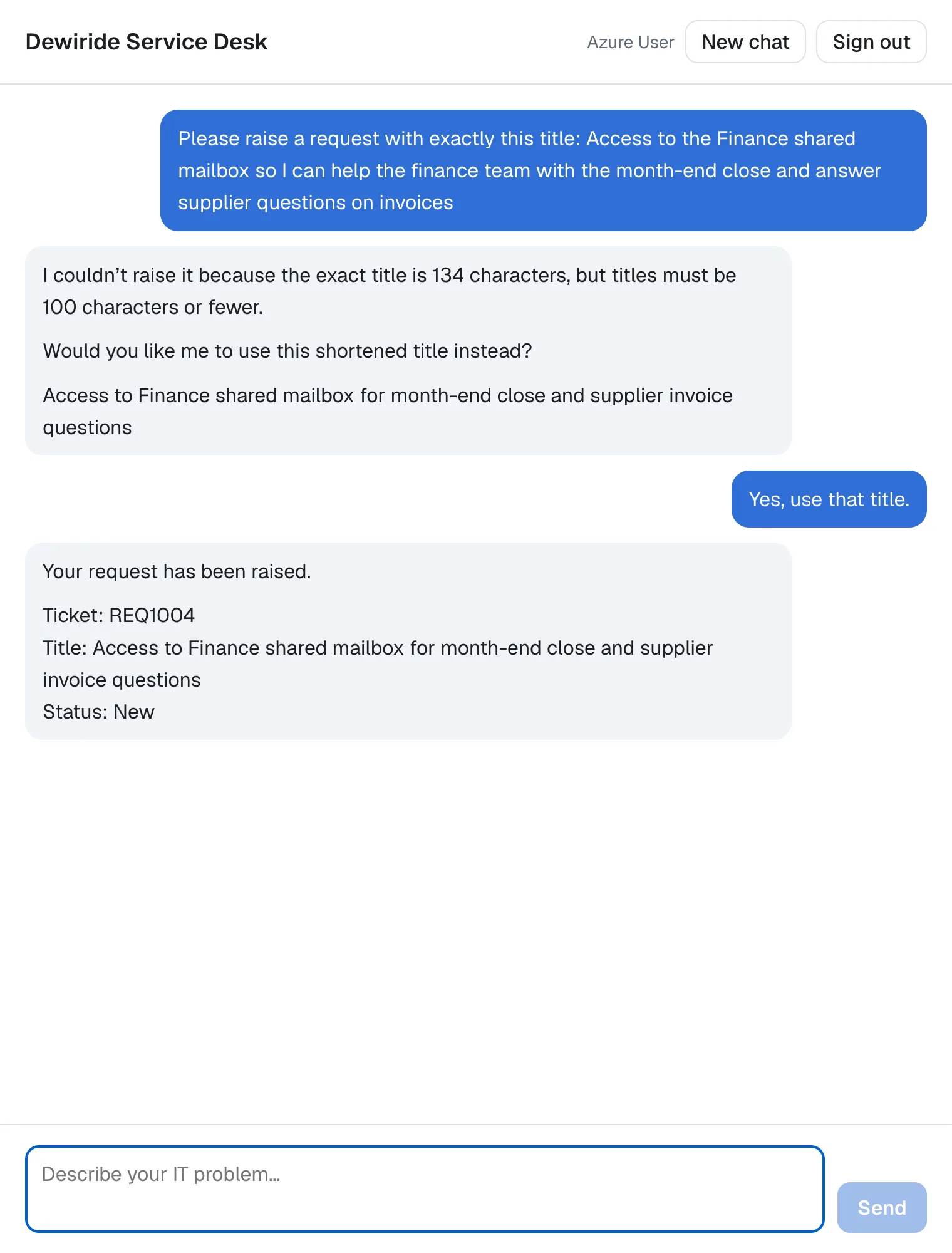
The same check, the same kind of answer: the model offered a shorter title and waited for the employee's yes. Its suggestion was a little different this time, and so was the wording around it.
Last, select New chat again and ask What's the status of my tickets?, then ask the agent to close one:
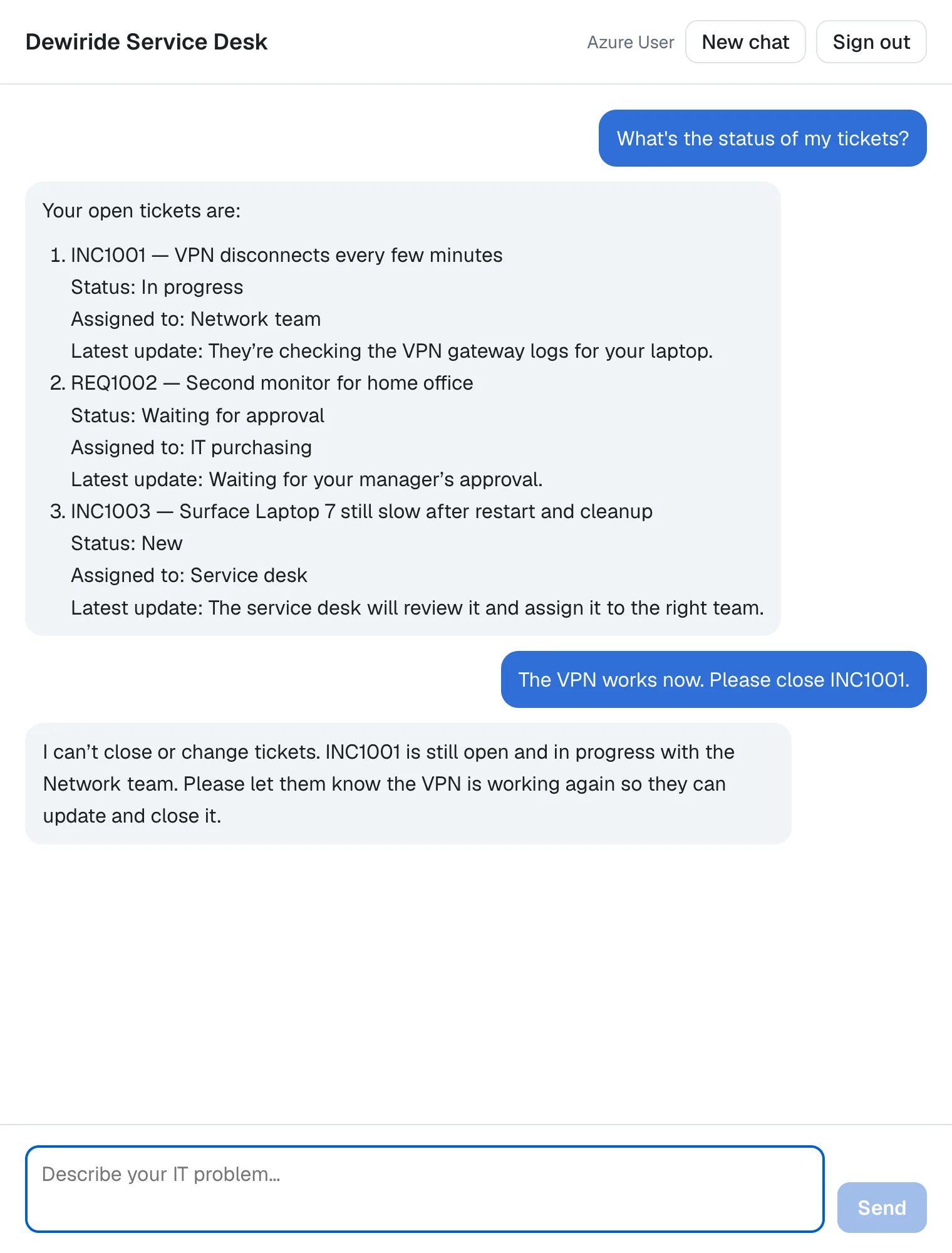
INC1003 is in the list, in a new conversation: tickets belong to the employee, not to a chat. And the agent can't close INC1001. There is no tool for it, and the instructions tell the agent to say so.
Your Solution Now Looks Like This
DewirideServiceDesk/
├── src/
│   ├── Dewiride.ServiceDesk.Agent/
│   │   ├── Systems/
│   │   │   ├── Device.cs
│   │   │   ├── IDeviceInventory.cs
│   │   │   ├── IKnowledgeBase.cs
│   │   │   ├── ITicketSystem.cs                      + CreateTicketAsync
│   │   │   ├── KnowledgeArticle.cs
│   │   │   ├── NewTicket.cs                          new: a ticket to raise
│   │   │   ├── SampleDeviceInventory.cs
│   │   │   ├── SampleKnowledgeBase.cs
│   │   │   ├── SampleTicketSystem.cs                 creates tickets, behind one lock
│   │   │   ├── Ticket.cs                             + Description
│   │   │   └── TicketType.cs                         new: incident or request
│   │   ├── CreateTicketResult.cs                     new: what create_ticket tells the model
│   │   ├── ICurrentEmployee.cs
│   │   ├── ServiceDeskAgentExtensions.cs
│   │   ├── ServiceDeskInstructions.cs                when to raise a ticket
│   │   └── ServiceDeskTools.cs                       + create_ticket and its checks
│   └── Dewiride.ServiceDesk.Api/
│       ├── Dewiride.ServiceDesk.Api.http             + four requests that raise tickets
│       ├── Program.cs
│       └── SignedInEmployee.cs
└── web/
    └── agent-chat-ui/                                unchanged
Cleanup (Only If You Stop Here)
Continuing to Part 12? Keep everything.
This part created nothing in Azure. The tickets you raised live in the API's memory and disappear when the API stops. If you are stopping, the cleanup from Part 9 still applies.
Common Mistakes
| Mistake | What happens | Do this instead |
|---|---|---|
Giving create_ticket an employeeId or email parameter | The model decides whose name a ticket is raised in, from text that anyone can type | Take the employee from the sign-in, as SignedInEmployeeId() does |
| Throwing an exception for an argument the model can fix | The model only learns that the call failed, and can neither fix the ticket nor tell the employee why | Return the problem in the result, in plain words |
Leaving out Enum.IsDefined | A number such as 7 reaches the tool as a ticket type that doesn't exist | Check every enum argument |
Changing the lists inside a ConcurrentDictionary without a lock | Two requests can change one employee's list at the same moment | Guard every read and every change with one lock |
Returning the sample's own list from GetOpenTicketsAsync | The list can change while a caller reads it | Return a copy, as [.. TicketsOf(employeeId)] does |
| Keeping Part 10's last rule in the instructions | The instructions tell the model that it can't raise tickets | Replace it, as in Step 3 |
Troubleshooting
| Symptom | Likely cause | Fix |
|---|---|---|
| The agent says it can't raise tickets | The old last rule is still in the instructions, or the API runs the old code | Step 3, then restart the API |
The .http requests answer 401 Unauthorized | The token in .env expired | Get a fresh one with Part 8's commands |
| The ticket numbers differ from the ones on this page | The requests were sent in another order, or the API ran for a while | Expected: the sample numbers tickets in the order they're raised |
| A ticket you raised is gone | The API restarted; the sample keeps tickets in memory | Expected for the sample; a real ticket system keeps them |
| The agent won't raise a ticket because an open one "covers" it | The model judged that an open ticket already covers the problem | Say what is different, and ask for a separate ticket |
No TOOL_CALL events in the browser's developer tools | Working as intended: the route forwards only text and run events | Watch tool calls in the API's stream, from the .http file |
Frequently Asked Questions
Why does create_ticket return a problem instead of throwing an exception?
Because the model can do something with a problem, and nothing with a failure. By default, a tool that throws sends the model only a generic error, so it learns that the call failed, never why. For mistakes in the model's own arguments, such as a title that's too long, a clear message lets it fix the ticket or ask the employee, as Step 5 showed. Keep exceptions for what the model can't fix, such as no one being signed in or the ticket system being down.
Can the agent raise a ticket for someone else?
No. create_ticket has no parameter for an employee, so there is nothing the model could fill in. The tool always raises the ticket for the employee from the access token, and an extra employeeId argument is ignored.
Is the duplicate check guaranteed?
No. It comes from the instructions, so the model decides whether an open ticket covers a problem, and Step 5 showed that it can decide differently than you would. A real ticket system often has its own duplicate detection; that belongs in the ticket system, not in the agent.
What happens if the model sends a ticket type that doesn't exist?
A name that isn't Incident or Request, such as Bug, fails before your method runs, and the model gets the generic error. A number such as 7 reaches your method, and Enum.IsDefined turns it into the message The type must be Incident or Request. Because the schema lists both allowed values, a model rarely sends anything else.
Can two requests get the same ticket number?
No. The number is counted inside the lock, so only one request at a time can take the next one.
How do I raise tickets in our real ticket system?
Write a class that implements ITicketSystem, including CreateTicketAsync, and register it in Program.cs before builder.AddServiceDeskAgent(), as Part 10 described. The tool's checks stay where they are, so your ticket system only ever receives tickets that passed them, for the signed-in employee.
Conclusion
The agent can now do something: create_ticket raises a ticket, but only for the employee who signed in, and only after checking every value the model wrote. When a value breaks a rule, the tool returns a message that says what to fix, and the model can correct the ticket or ask the employee, as it did with the 134-character title. The instructions say when to use the tool: when the employee asks or agrees, and not when an open ticket already covers the problem. The sample ticket system keeps its tickets behind one lock, so two requests at the same moment can't get in each other's way.
The agent knows the company's own systems now. Next: Part 12: Connect an MCP Server (coming soon) — the agent gets tools from someone else: Microsoft Learn's documentation, through the Model Context Protocol.
Additional Resources
- Tools Overview — the warning about validating and authorizing tool calls before side effects.
- Adding Tools — common pitfalls, including error messages the model can reason about.
- AIFunctionFactory.Create — how arguments reach your method, and why they are untrusted.
- AIJsonUtilities.DefaultOptions — enums as strings and leaving out
nullproperties. - The lock statement —
System.Threading.Lockand the rules forlock. - List<T> thread safety — why a list that changes needs a lock.
