Your First Agent
An agent in Microsoft Agent Framework is a C# object that you give a model and instructions, then ask questions. This tutorial creates one in a small console app, runs it, looks at everything that comes back, and asks it a follow-up question, which shows the first thing an agent can't do on its own: remember.
What an Agent Is in Code
Every agent in Agent Framework is an AIAgent, which the reference calls the base abstraction for all AI agents. It has a name, optional instructions and tools, and one method you use all the time: RunAsync, which takes a message and returns an AgentResponse.
The agent in this tutorial comes from a Microsoft Foundry project. The method AsAIAgent on an AIProjectClient creates it, and its reference describes what you get: a non-versioned ChatClientAgent backed by the project's Responses API using the specified model and instructions. In other words, the agent lives in your program and talks to your model through the project. Microsoft's quickstart puts it plainly: Because the agent is ephemeral, no definition is persisted to the service — it exists only for the lifetime of the process. Nothing is created in Foundry, and your instructions stay in your code.
This is what happens when you call RunAsync:
The agent sends the instructions every time, with the message. The model reads them first, which is how Answer in at most two sentences shapes every answer.
The Example
A console app called TravelGuide creates a friendly travel guide agent, asks What should I see first in Lisbon?, prints the answer and what else the response holds, then asks a follow-up in a second run.
Prerequisites
- The setup from Set Up Your C# Development Environment: the .NET 10 SDK, the Azure CLI signed in, a Foundry project endpoint, a model deployment and the Foundry User role.
Step 1: Create a Console App
In a terminal, in the folder where you keep your projects, run:
dotnet new console -n TravelGuide
cd TravelGuide
dotnet add package Microsoft.Agents.AI.Foundry --version 1.28.0-preview.261106.1
dotnet add package Azure.Identity --version 1.21.0
The template "Console App" was created successfully.

Processing post-creation actions...
Restoring /Users/you/source/TravelGuide/TravelGuide.csproj:
Restore succeeded.

info : PackageReference for package 'Microsoft.Agents.AI.Foundry' version '1.28.0-preview.261106.1' added to file '/Users/you/source/TravelGuide/TravelGuide.csproj'.
log  : Restored /Users/you/source/TravelGuide/TravelGuide.csproj (in 2.05 sec).
info : PackageReference for package 'Azure.Identity' version '1.21.0' added to file '/Users/you/source/TravelGuide/TravelGuide.csproj'.
log  : Restored /Users/you/source/TravelGuide/TravelGuide.csproj (in 2.01 sec).
| Package | What it gives the app |
|---|---|
Microsoft.Agents.AI.Foundry | AsAIAgent, which turns a model in a Foundry project into an agent. It brings in Agent Framework itself, Microsoft.Agents.AI |
Azure.Identity | AzureCliCredential, which signs the app in with your Azure CLI sign-in |
Agent Framework 1.28.0 is generally available, but its Foundry package ships only as a preview of the same release, so it needs its exact --version. Open the TravelGuide folder in VS Code, or TravelGuide.csproj in Visual Studio.
Step 2: Create the Agent
Replace everything in Program.cs with:
using Azure.AI.Projects;
using Azure.Identity;
using Microsoft.Agents.AI;

// 1. Where the model is: your Foundry project. The Azure CLI signs you in.
AIProjectClient project = new(
    new Uri("https://foundry-devblogs-exp.services.ai.azure.com/api/projects/proj-devblogs-exp"),
    new AzureCliCredential());

// 2. The agent: a model deployment, instructions and a name.
AIAgent agent = project.AsAIAgent(
    model: "gpt-5.6-luna",
    instructions: "You are a friendly travel guide. Answer in at most two sentences.",
    name: "TravelGuide");
AIProjectClientknows your project: its endpoint, and how to sign in. Use your own project endpoint from the setup tutorial.AzureCliCredentialgets tokens from the Azure CLI, for the account you signed in withaz login. No key appears anywhere in the code.AsAIAgentcreates the agent.modelis your deployment name,instructionstell the model who it is and how to answer, andnameidentifies the agent in logs and, later, among other agents.
Microsoft's own samples often use DefaultAzureCredential, with a warning next to them: DefaultAzureCredential is convenient for development but requires careful consideration in production. It tries several ways to sign in, one after another. AzureCliCredential does exactly one thing, which is all this app needs. How to Make DefaultAzureCredential Use Only the Azure CLI with AZURE_TOKEN_CREDENTIALS shows how an app that also runs in Azure can have both.
Step 3: Run It
Add these lines to the end of Program.cs:
// 3. Run it with a question, and print the answer.
AgentResponse response = await agent.RunAsync("What should I see first in Lisbon?");
Console.WriteLine(response.Text);
RunAsync sends the instructions and the question to the model and waits for the whole answer. await lets the program wait without blocking; top-level code in Program.cs can use it directly. Run the app:
- VS Code
- Visual Studio
In the terminal, in the TravelGuide folder, run:
dotnet run
Press Ctrl+F5 (Debug → Start Without Debugging). The output appears in a console window.
Start with the historic Alfama district, where you can wander steep lanes, hear fado music, and visit São Jorge Castle for sweeping city views. Then head to Belém to see the Jerónimos Monastery and Belém Tower, and enjoy a pastéis de nata.
Two sentences, as the instructions asked. Your answer will be different: the model writes a new one every time, and the next runs on this page each got their own.
Step 4: Look Inside the Response
response.Text is only part of what came back. Add these lines to the end of Program.cs:
// 4. What else the response holds.
Console.WriteLine();
Console.WriteLine($"Agent:         {agent.Name}");
Console.WriteLine($"Messages:      {response.Messages.Count}, from the {response.Messages[0].Role}");
Console.WriteLine($"Tokens:        {response.Usage?.InputTokenCount} in, {response.Usage?.OutputTokenCount} out");
Run the app again:
Start in **Baixa and Praça do Comércio**, then wander uphill through **Alfama** to the **Miradouro de Santa Luzia** for beautiful city and river views. If you have extra time, visit **Belém** for the Jerónimos Monastery and a pastel de nata.

Agent:         TravelGuide
Messages:      1, from the assistant
Tokens:        32 in, 110 out
| What | What it means |
|---|---|
Text | The concatenated text content of all messages in this response, in the reference's words: the answer, ready to print |
Messages | The messages the run produced. A run without tools produces one, from the assistant, which is the model's side of the conversation. A run with tools also holds the tool calls and their results |
Usage | The tokens the run used. 32 went in: the instructions and the question. The 110 that came out include any reasoning the model did before it answered, which is billed like the answer |
agent.Name | The name you gave the agent |
This time the model wrote parts of its answer in bold, with **. That's Markdown, a way to format text with plain characters. A console prints the asterisks as they are; a chat page can turn them into bold text. The model chooses, unless your instructions say otherwise.
Step 5: Ask a Follow-Up
Ask the agent something that builds on the first question. Add these lines to the end:
// 5. A second run, with a follow-up question. It starts with nothing from the first run.
AgentResponse followUp = await agent.RunAsync("How many days do I need there?");
Console.WriteLine();
Console.WriteLine(followUp.Text);
Run the app again. The last line is the answer to the follow-up:
Start in **Alfama**, Lisbon’s oldest neighborhood, and wander its steep, atmospheric lanes up to **São Jorge Castle** for sweeping city views. Then visit **Praça do Comércio** and stroll along the Tagus waterfront, ideally near sunset.

Agent:         TravelGuide
Messages:      1, from the assistant
Tokens:        32 in, 55 out

Which destination are you planning to visit? Tell me your interests and pace, and I’ll suggest the ideal number of days.
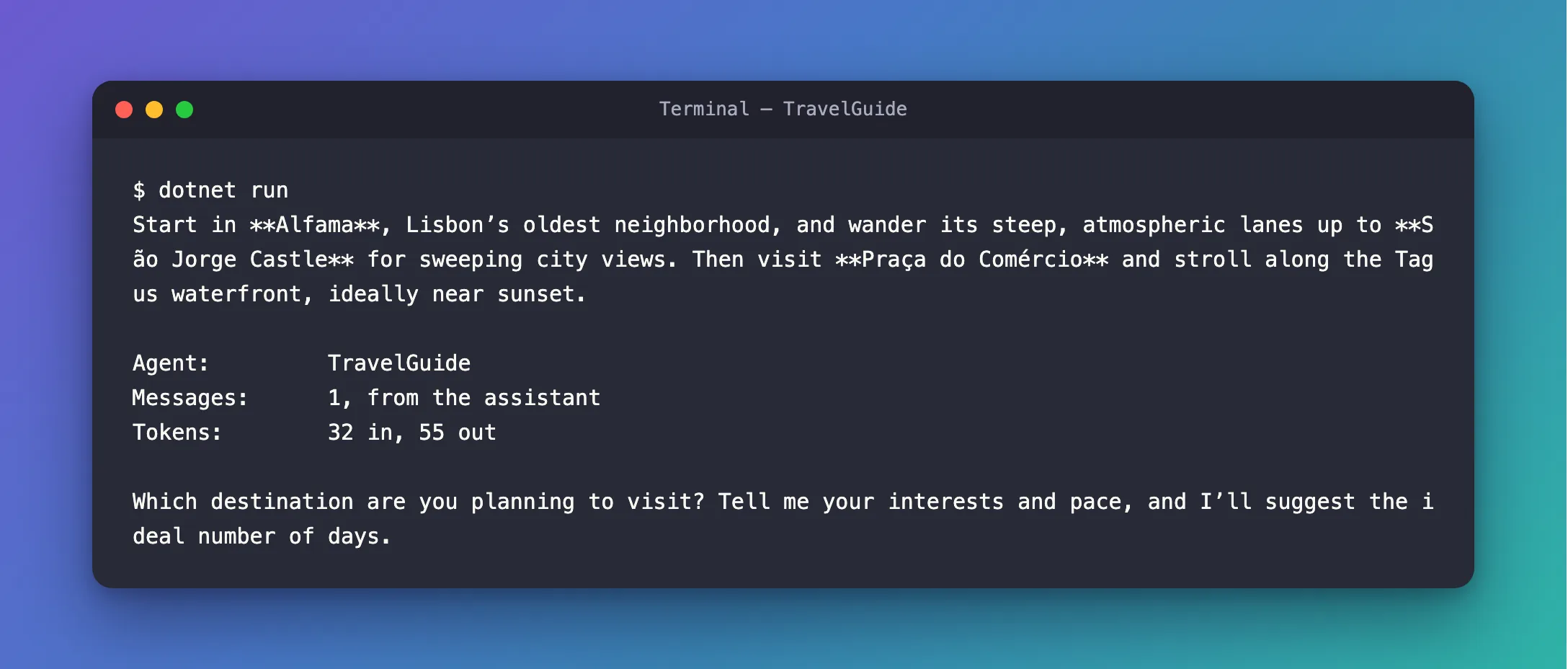
Which destination are you planning to visit? The agent has no idea what there means. Each RunAsync sends only the instructions and the message you pass it, so the second run never heard about Lisbon. A model doesn't remember anything between requests; the conversation has to be sent along. Agent Framework does that with a session, the subject of Sessions, later in this track.
The Complete File
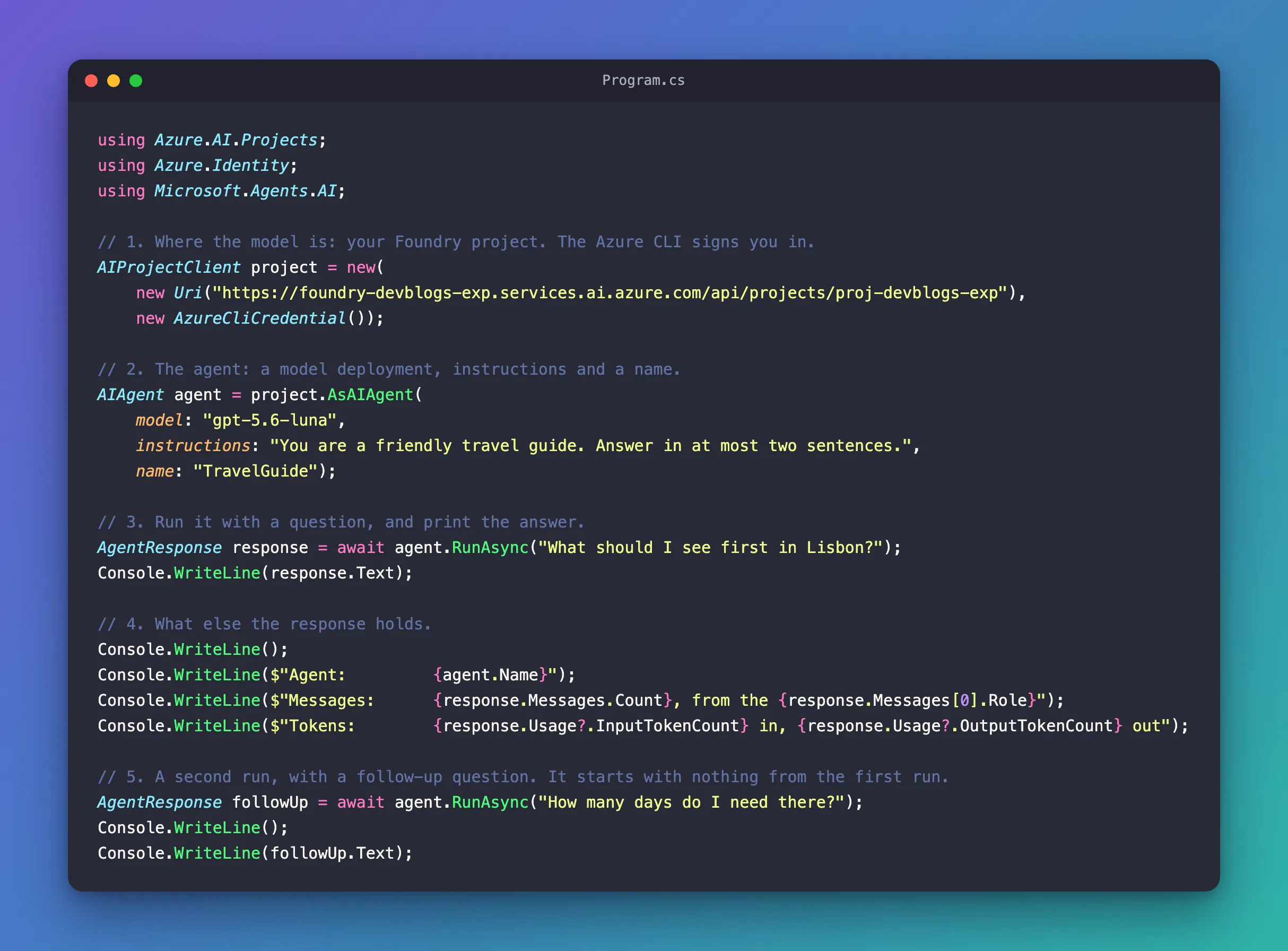
using Azure.AI.Projects;
using Azure.Identity;
using Microsoft.Agents.AI;

// 1. Where the model is: your Foundry project. The Azure CLI signs you in.
AIProjectClient project = new(
    new Uri("https://foundry-devblogs-exp.services.ai.azure.com/api/projects/proj-devblogs-exp"),
    new AzureCliCredential());

// 2. The agent: a model deployment, instructions and a name.
AIAgent agent = project.AsAIAgent(
    model: "gpt-5.6-luna",
    instructions: "You are a friendly travel guide. Answer in at most two sentences.",
    name: "TravelGuide");

// 3. Run it with a question, and print the answer.
AgentResponse response = await agent.RunAsync("What should I see first in Lisbon?");
Console.WriteLine(response.Text);

// 4. What else the response holds.
Console.WriteLine();
Console.WriteLine($"Agent:         {agent.Name}");
Console.WriteLine($"Messages:      {response.Messages.Count}, from the {response.Messages[0].Role}");
Console.WriteLine($"Tokens:        {response.Usage?.InputTokenCount} in, {response.Usage?.OutputTokenCount} out");

// 5. A second run, with a follow-up question. It starts with nothing from the first run.
AgentResponse followUp = await agent.RunAsync("How many days do I need there?");
Console.WriteLine();
Console.WriteLine(followUp.Text);
What You Can Do Now
- Create an agent from a model in your Foundry project, with
AIProjectClientandAsAIAgent. - Shape its answers with instructions.
- Run it with
RunAsync, and read the answer, the messages and the token counts from theAgentResponse. - Explain why the agent forgot the first question: each run stands alone until you give it a session.
The run in Step 4 cost very little: 32 input tokens and 110 output tokens come to about $0.00014 at gpt-5.6-luna's prices of $0.20 and $1.20 per million.
Common Mistakes
| Mistake | What happens | Do this instead |
|---|---|---|
| Passing the model's name instead of the deployment's name | The project has no deployment by that name | Use the Name of your deployment |
Installing Microsoft.Agents.AI.Foundry without --version | You get the old stable 1.5.0 instead of the release that goes with Agent Framework 1.28.0 | Install it with --version 1.28.0-preview.261106.1 |
| Expecting the second run to remember the first | The agent asks what you mean | Keep a conversation in a session, as Sessions shows |
| Putting an API key in the code | Anyone who reads the code can use it | Sign in with AzureCliCredential, as here |
Troubleshooting
| Symptom | Likely cause | Fix |
|---|---|---|
An AzureCliCredential authentication failed error that says the Azure CLI isn't installed | The Azure CLI isn't installed, or isn't on the path | Install it, then open a new terminal |
An AzureCliCredential authentication failed error that asks you to run az login | The Azure CLI isn't signed in | Run az login |
AzureCliCredential authentication failed: Azure CLI authentication failed due to an unknown error. | The CLI's sign-in has expired or needs a new consent | Fixed: AzureCliCredential authentication failed |
Frequently Asked Questions
Where does the agent live?
In your program. AsAIAgent creates an agent object in memory that calls your model through the Foundry project; nothing is saved in Foundry, and the agent is gone when the program ends.
Why do the answers change every time I run it?
The model writes each answer fresh, choosing its words as it goes. Instructions keep the answers within limits, such as two sentences, but not identical.
Can I see the answer while it's being written?
Yes, with RunStreamingAsync instead of RunAsync. Streaming is the next tutorial in this track.
Conclusion
You created an agent from a model in your Foundry project in two statements, ran it with RunAsync, and read the AgentResponse: the answer in Text, the assistant's message in Messages, and the tokens in Usage. You also saw the agent's first limit: each run stands alone, so a follow-up question needs the conversation sent along with it.
Next: Streaming — show the answer while the model is still writing it, with RunStreamingAsync.
Additional Resources
- Step 1: Your First Agent — Microsoft's own first agent, in a few lines.
- Quickstart: Build agents using the Responses API — agents that live in your code and use a Foundry project's Responses API.
- Running Agents —
RunAsync,RunStreamingAsyncand the responses they return. - AgentResponse class — every property of a response.
