Tool Approval
Some tools only look things up. Others change the world: they spend money, send messages or delete data. For those, a model's decision to call them shouldn't be enough, and a person should say yes first. Tool approval does that: you mark a tool as needing approval, and when the model calls it, the run stops and asks, instead of running it. This tutorial gives an agent one tool that runs freely and one that needs approval, and shows each step of the conversation between the agent and the person.
How Tool Approval Works
Microsoft's documentation calls this the human-in-the-loop pattern: An agent run that requires user input, will complete with a response that indicates what input is required from the user, instead of completing with a final answer. The caller of the agent is then responsible for getting the required input from the user, and passing it back to the agent as part of a new agent run.
Three types do the work:
ApprovalRequiredAIFunctionwraps a tool and marks it as needing approval. The model sees the same tool as before; nothing changes until it calls it.ToolApprovalRequestContentis what a run returns, instead of an answer, when the model called such a tool. ItsToolCallholds the call: the tool's name and its arguments.ToolApprovalResponseContentis the person's answer, made with the request'sCreateResponse: approved or rejected, with an optional reason.
The approval happens between two runs, in the same session:
The Example
A console app called OfficeSupplies has an agent that looks after an office's supplies, with two tools: get_stock, which looks up how much of an item is left and runs whenever the model asks, and place_order, which orders more and needs approval. The app asks for 10 boxes of printer paper and 5 packs of sticky notes, approves the paper and rejects the sticky notes, with a reason.
Prerequisites
- The agent from Function Tools, and the setup it uses: the .NET 10 SDK, the Azure CLI signed in, a Foundry project endpoint, a model deployment and the Foundry User role.
Step 1: Create a Console App
In a terminal, in the folder where you keep your projects, run:
dotnet new console -n OfficeSupplies
cd OfficeSupplies
dotnet add package Microsoft.Agents.AI.Foundry --version 1.28.0-preview.261106.1
dotnet add package Azure.Identity --version 1.21.0
The template "Console App" was created successfully.

Processing post-creation actions...
Restoring /Users/you/source/OfficeSupplies/OfficeSupplies.csproj:
Restore succeeded.

info : PackageReference for package 'Microsoft.Agents.AI.Foundry' version '1.28.0-preview.261106.1' added to file '/Users/you/source/OfficeSupplies/OfficeSupplies.csproj'.
log  : Restored /Users/you/source/OfficeSupplies/OfficeSupplies.csproj (in 1.32 sec).
info : PackageReference for package 'Azure.Identity' version '1.21.0' added to file '/Users/you/source/OfficeSupplies/OfficeSupplies.csproj'.
log  : Restored /Users/you/source/OfficeSupplies/OfficeSupplies.csproj (in 1.05 sec).
The same two packages as in the previous tutorials. Open the OfficeSupplies folder in VS Code, or OfficeSupplies.csproj in Visual Studio.
Step 2: Mark the Tool That Needs Approval
Replace everything in Program.cs with the two tools and the agent:
using System.ComponentModel;
using Azure.AI.Projects;
using Azure.Identity;
using Microsoft.Agents.AI;
using Microsoft.Extensions.AI;

// 1. Looking up the stock is harmless, so this tool runs whenever the model asks.
AIFunction stockTool = AIFunctionFactory.Create(GetStock, name: "get_stock");

// 2. Ordering spends money, so this tool waits for a person to approve each call.
AITool orderTool = new ApprovalRequiredAIFunction(AIFunctionFactory.Create(PlaceOrder, name: "place_order"));

AIAgent agent = new AIProjectClient(
        new Uri("https://foundry-devblogs-exp.services.ai.azure.com/api/projects/proj-devblogs-exp"),
        new AzureCliCredential())
    .AsAIAgent(
        model: "gpt-5.6-luna",
        instructions: "You look after an office's supplies. Check the stock before you order. Answer in one sentence.",
        name: "OfficeSupplies",
        tools: [stockTool, orderTool]);
And the two methods behind the tools, at the end of the file:
[Description("Gets how many units of an item are in the stock room.")]
static int GetStock([Description("The item, such as printer paper.")] string item)
{
    int units = item.ToLowerInvariant() switch { "printer paper" => 2, "sticky notes" => 40, _ => 0 };
    Console.WriteLine($"  get_stock ran: {item} = {units}");
    return units;
}

[Description("Orders more of an item from the supplier.")]
static string PlaceOrder(
    [Description("The item to order.")] string item,
    [Description("How many units to order.")] int quantity)
{
    Console.WriteLine($"  place_order ran: {quantity} x {item}");
    return $"Ordered {quantity} x {item}.";
}
get_stockis an ordinary function tool, as in Function Tools. It runs as soon as the model asks.new ApprovalRequiredAIFunction(...)wrapsplace_order. It's the only difference between the two tools, and the model can't tell them apart: it sees a name, a description and parameters for both.- Both methods print a line when they run, so the output shows exactly which calls ran, and when.
- The instructions ask the agent to check the stock first, so it has a reason to use both tools.
Step 3: Ask a Person about Every Call
Add the conversation between the two parts:
// 3. One session for the whole conversation: the answers must go back to the run that asked.
AgentSession session = await agent.CreateSessionAsync();
AgentResponse response = await agent.RunAsync("Order 10 boxes of printer paper and 5 packs of sticky notes.", session);

// 4. While a run ends with approval requests instead of an answer, answer every request,
//    and send all the answers back together in the same session.
List<ToolApprovalRequestContent> requests = ApprovalRequests(response);
while (requests.Count > 0)
{
    List<AIContent> answers = [];
    foreach (ToolApprovalRequestContent request in requests)
    {
        // The call the model wants to make: the tool's name and its arguments.
        FunctionCallContent call = (FunctionCallContent)request.ToolCall;
        string arguments = string.Join(", ", call.Arguments?.Select(a => $"{a.Key}: {a.Value}") ?? []);
        Console.Write($"Approve {call.Name}({arguments})? (y/n): ");
        if (Console.ReadLine()?.Trim().Equals("y", StringComparison.OrdinalIgnoreCase) == true)
        {
            answers.Add(request.CreateResponse(approved: true));
        }
        else
        {
            Console.Write("Why not? ");
            answers.Add(request.CreateResponse(approved: false, reason: Console.ReadLine()));
        }
    }

    response = await agent.RunAsync(new ChatMessage(ChatRole.User, answers), session);
    requests = ApprovalRequests(response);
}

// 6. No approvals left: this is the agent's answer.
Console.WriteLine(response.Text);

static List<ToolApprovalRequestContent> ApprovalRequests(AgentResponse response) =>
    response.Messages
        .SelectMany(message => message.Contents)
        .OfType<ToolApprovalRequestContent>()
        .ToList();
- One
AgentSessionholds the conversation, and the waiting calls with it. The answers only count for calls that are waiting in the same session, so every run usessession. ApprovalRequestsfinds theToolApprovalRequestContentitems in a response. When there are none, the run finished with an answer.request.ToolCallis the call the model wants to make, as aFunctionCallContent: itsNameand itsArguments. Showing the arguments matters: a person approves this order, not ordering in general.request.CreateResponse(approved: true)approves the call.CreateResponse(approved: false, reason: ...)rejects it, with a reason.- All the answers go back in one message, a
ChatMessagefrom the user with oneToolApprovalResponseContentper request. Every request needs an answer: Microsoft's guide says to check forToolApprovalRequestContentinstances in the response, after each agent run, until all function calls have been approved or rejected. A request left without one doesn't fail the run: Agent Framework rejects that call itself, and tells the model No approval response was provided for this approval required tool call. - The
whileloop repeats that, because a run that continues after the answers can call another tool that needs approval.
Step 5 fills in the comment numbered 5.
Step 4: Run It
- VS Code
- Visual Studio
In the terminal, in the OfficeSupplies folder, run:
dotnet run
Press Ctrl+F5 (Debug → Start Without Debugging). The questions appear in a console window; type the answers there.
Use your own project endpoint and model deployment. When the app asks, type y for the printer paper, n for the sticky notes, and a reason:
  get_stock ran: printer paper = 2
  get_stock ran: sticky notes = 40
Approve place_order(item: printer paper, quantity: 10)? (y/n): y
Approve place_order(item: sticky notes, quantity: 5)? (y/n): n
Why not? We still have 40 packs.
  place_order ran: 10 x printer paper
I checked stock and ordered 10 boxes of printer paper; the 40 packs of sticky notes already in stock meant no additional packs were ordered.
Read it from the top:
get_stockran twice before anyone was asked. The model checked both items first, as the instructions said, and those calls didn't need approval.- Then the run stopped with two approval requests, one per order, each with its arguments. Nothing had been ordered yet.
place_orderran once, for the approved call. The rejected call never reachedPlaceOrder.- The answer says what happened to both orders.
Step 5: See What the Model Was Told
The model wrote its answer after the second run. Print what that run told it about each call. Add this block at the comment numbered 5, before the answer is printed:
// 5. What the model was told about each call: the approved call's result, and the rejection.
foreach (FunctionResultContent result in response.Messages.SelectMany(message => message.Contents).OfType<FunctionResultContent>())
{
    Console.WriteLine($"  result: {result.Result}");
}
Run it again, with the same answers:
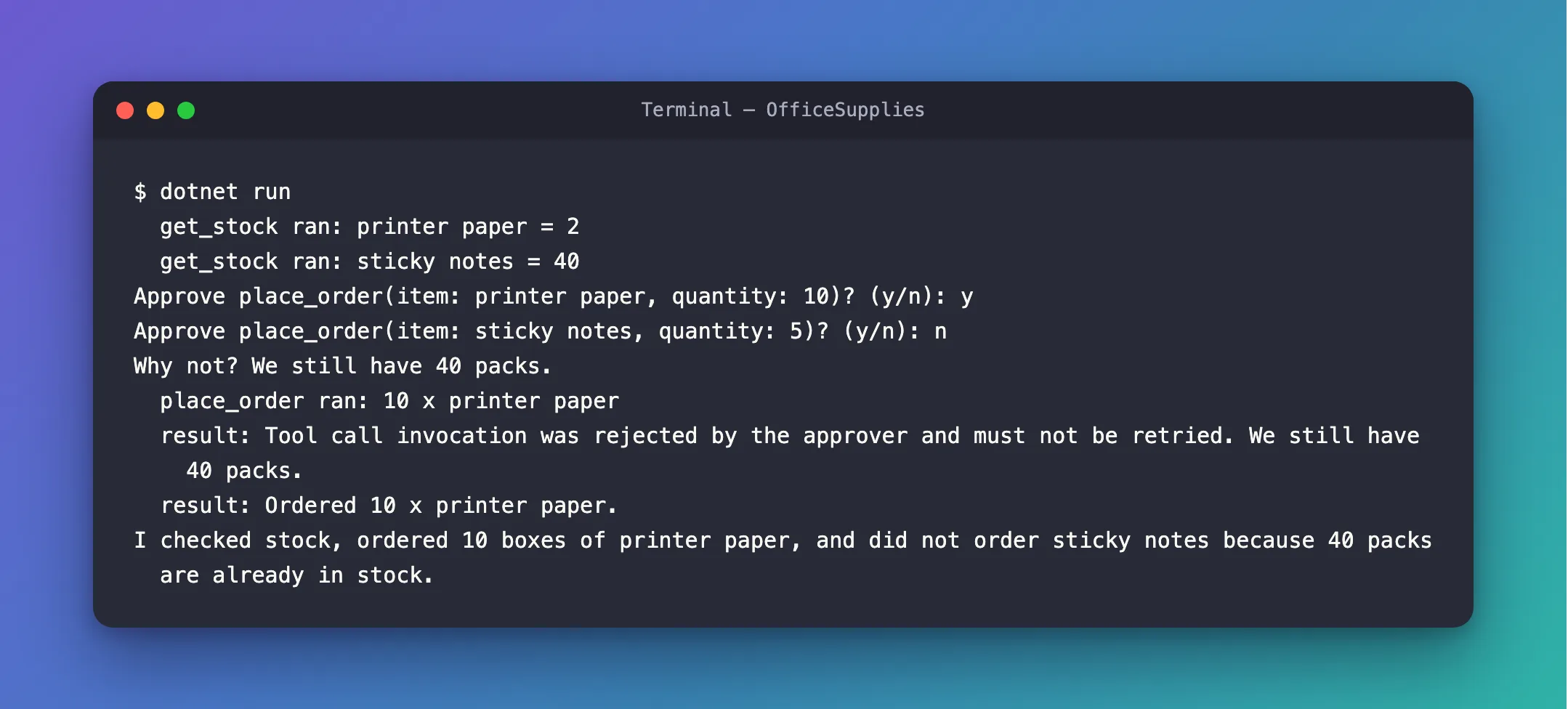
  place_order ran: 10 x printer paper
  result: Tool call invocation was rejected by the approver and must not be retried. We still have 40 packs.
  result: Ordered 10 x printer paper.
I checked stock, ordered 10 boxes of printer paper, and did not order sticky notes because 40 packs are already in stock.
A rejected call still gets a result, written by Agent Framework instead of your method: Tool call invocation was rejected by the approver and must not be retried., followed by the reason the person typed. The approved call's result is what PlaceOrder returned. The model answers from both, so a reason is worth giving: it's the only thing the model learns about why.
The Complete File
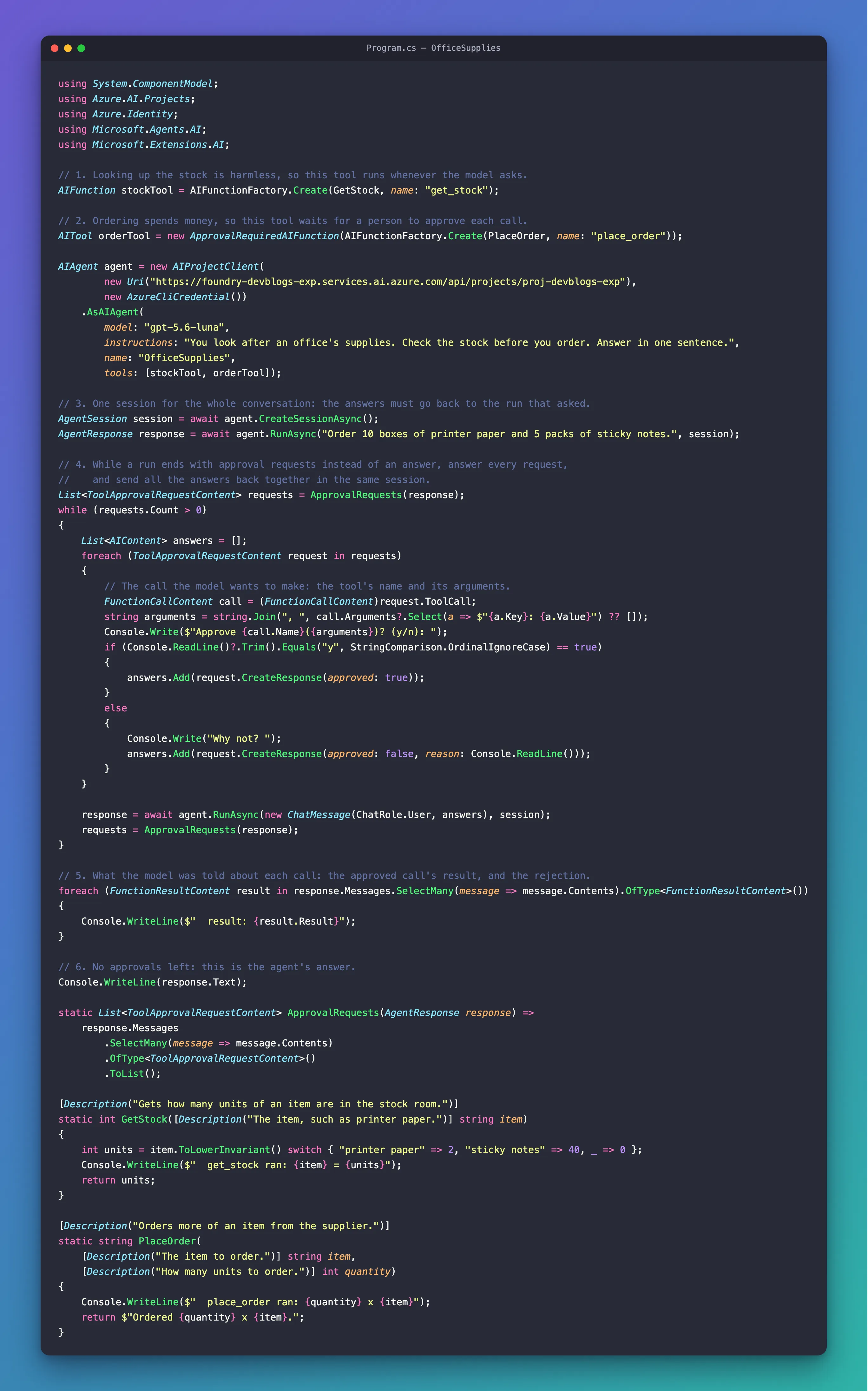
Program.cs with Step 5 added is the whole program:
using System.ComponentModel;
using Azure.AI.Projects;
using Azure.Identity;
using Microsoft.Agents.AI;
using Microsoft.Extensions.AI;

// 1. Looking up the stock is harmless, so this tool runs whenever the model asks.
AIFunction stockTool = AIFunctionFactory.Create(GetStock, name: "get_stock");

// 2. Ordering spends money, so this tool waits for a person to approve each call.
AITool orderTool = new ApprovalRequiredAIFunction(AIFunctionFactory.Create(PlaceOrder, name: "place_order"));

AIAgent agent = new AIProjectClient(
        new Uri("https://foundry-devblogs-exp.services.ai.azure.com/api/projects/proj-devblogs-exp"),
        new AzureCliCredential())
    .AsAIAgent(
        model: "gpt-5.6-luna",
        instructions: "You look after an office's supplies. Check the stock before you order. Answer in one sentence.",
        name: "OfficeSupplies",
        tools: [stockTool, orderTool]);

// 3. One session for the whole conversation: the answers must go back to the run that asked.
AgentSession session = await agent.CreateSessionAsync();
AgentResponse response = await agent.RunAsync("Order 10 boxes of printer paper and 5 packs of sticky notes.", session);

// 4. While a run ends with approval requests instead of an answer, answer every request,
//    and send all the answers back together in the same session.
List<ToolApprovalRequestContent> requests = ApprovalRequests(response);
while (requests.Count > 0)
{
    List<AIContent> answers = [];
    foreach (ToolApprovalRequestContent request in requests)
    {
        // The call the model wants to make: the tool's name and its arguments.
        FunctionCallContent call = (FunctionCallContent)request.ToolCall;
        string arguments = string.Join(", ", call.Arguments?.Select(a => $"{a.Key}: {a.Value}") ?? []);
        Console.Write($"Approve {call.Name}({arguments})? (y/n): ");
        if (Console.ReadLine()?.Trim().Equals("y", StringComparison.OrdinalIgnoreCase) == true)
        {
            answers.Add(request.CreateResponse(approved: true));
        }
        else
        {
            Console.Write("Why not? ");
            answers.Add(request.CreateResponse(approved: false, reason: Console.ReadLine()));
        }
    }

    response = await agent.RunAsync(new ChatMessage(ChatRole.User, answers), session);
    requests = ApprovalRequests(response);
}

// 5. What the model was told about each call: the approved call's result, and the rejection.
foreach (FunctionResultContent result in response.Messages.SelectMany(message => message.Contents).OfType<FunctionResultContent>())
{
    Console.WriteLine($"  result: {result.Result}");
}

// 6. No approvals left: this is the agent's answer.
Console.WriteLine(response.Text);

static List<ToolApprovalRequestContent> ApprovalRequests(AgentResponse response) =>
    response.Messages
        .SelectMany(message => message.Contents)
        .OfType<ToolApprovalRequestContent>()
        .ToList();

[Description("Gets how many units of an item are in the stock room.")]
static int GetStock([Description("The item, such as printer paper.")] string item)
{
    int units = item.ToLowerInvariant() switch { "printer paper" => 2, "sticky notes" => 40, _ => 0 };
    Console.WriteLine($"  get_stock ran: {item} = {units}");
    return units;
}

[Description("Orders more of an item from the supplier.")]
static string PlaceOrder(
    [Description("The item to order.")] string item,
    [Description("How many units to order.")] int quantity)
{
    Console.WriteLine($"  place_order ran: {quantity} x {item}");
    return $"Ordered {quantity} x {item}.";
}
What You Can Do Now
- Mark a tool as needing approval with
ApprovalRequiredAIFunction, and leave harmless tools as they are. - Find the approval requests in a response, and show a person each call's name and arguments.
- Approve or reject each call with
CreateResponse, with a reason the model reads, and send all the answers back in the same session. - Keep asking until a run ends with an answer instead of requests.
Common Mistakes
| Mistake | What happens | Do this instead |
|---|---|---|
| Answering in a new session | The answers match no waiting call, and the run fails (Fixed) | Send them in the session that asked |
| Answering only some of the requests | Agent Framework rejects the calls nobody answered, so they never run although no person decided (Fixed) | Answer every request, in one message |
| Showing the tool's name without its arguments | The person approves a call without knowing what it does | Show the arguments, as the example does |
| Rejecting without a reason | The model only learns that the call was rejected | Pass a reason |
| Wrapping every tool | Every lookup waits for a person | Wrap only tools that change something |
Troubleshooting
| Symptom | Likely cause | Fix |
|---|---|---|
ToolApprovalRequestContent found with FunctionCall.CallId(s) that have no matching ToolApprovalResponseContent | An answer reached a session where its call isn't waiting, such as a new session (Fixed) | Send the answers in the session that asked |
| The run returns an answer and never asks | The model didn't call the wrapped tool | That's its choice; check that the question needed it |
error MEAI001: 'Microsoft.Extensions.AI.ToolApprovalRequestContent.RequiresConfirmation' is for evaluation purposes only | The property is experimental (Fixed) | Suppress MEAI001 where you use it, or leave the property out, as the example does |
Frequently Asked Questions
What if the model calls both tools at once?
In another run, I asked How many packs of sticky notes do we have? Also order 3 boxes of pens., without the instruction to check the stock first. The model called get_stock and place_order in the same turn. Only place_order came back as an approval request; get_stock waited, and ran right after I approved the order, before the answer. You only answer calls that need approval.
Why did my run ask about only one order?
The model decides what to order. In two later runs of the same app, it ordered 8 boxes of printer paper, enough to make 10 with the 2 in stock, and left the sticky notes out on its own: one call, so one request. Every run is the model's own decision; the approval only lets a person stop the calls it makes.
Can the model try the rejected call again?
The rejection tells it not to: must not be retried. It's an instruction to the model, written into the conversation, so keep the approval on the tool: if the model called it again, the run would stop and ask again.
How does this work in a web app?
The same way, with the questions and answers going over a protocol instead of a console. The IT Service Desk series does it over AG-UI: Part 13 on the API, and Part 14 with approval cards in the chat.
Conclusion
Tool approval lets a person decide before a tool runs. Wrap the tool in ApprovalRequiredAIFunction; when the model calls it, the run ends with ToolApprovalRequestContent instead of an answer. Show the call's name and arguments, answer each request with CreateResponse, approved or rejected with a reason, and send all the answers back in the same session until a run ends with an answer. A rejected call never runs, and the model learns why.
Next: Structured Output — get a typed C# object back from an agent instead of text.
Additional Resources
- Using function tools with human in the loop approvals —
ApprovalRequiredAIFunctionand the approval loop. - ToolApprovalRequestContent — the request and
CreateResponse. - Human-in-the-Loop with AG-UI — the same approvals over AG-UI.
