Structured Output
An agent's answer is text, written for a person. Code needs something else: fields with names and types, such as a date, an amount or a category, that it can store, add up or check. Structured output asks the model to answer in the shape of a C# type, and gives you back an instance of that type instead of text. This tutorial turns a café receipt into a typed Expense, and shows what travels between your code and the model on the way.
How Structured Output Works
You describe the result as a C# type. Agent Framework turns the type into a JSON schema, a description of the JSON it expects: the property names, their types, which are required, and the allowed values. The schema goes to the model with the question, and a model that supports structured outputs answers with JSON that follows it. Agent Framework then turns that JSON into your type:
There are two ways to ask for it:
RunAsync<T>, the main one. Microsoft's documentation: It accepts a generic type parameter that specifies the structured outputs type. This approach is applicable when the structured outputs type is known at compile time and a typed result instance is needed. It supports primitives, arrays, and complex types. It returns anAgentResponse<T>, with the object inResult.- A response format in the run's options,
ResponseFormat. The answer comes back as JSON text, and you turn it into an object yourself, or don't: it suits cases where the schema is represented as raw JSON or only the raw JSON text is needed without deserialization.
Not every agent can do it: Not all agent types support structured outputs natively. The ChatClientAgent supports structured outputs when used with compatible chat clients. The agents in this track, made with AsAIAgent on a Microsoft Foundry project, are ChatClientAgents.
The Example
A console app called ExpenseReader has an agent that reads receipts. It gets the text of a café receipt, with two lines and a total, and returns an Expense: the merchant, the date, a category, the currency, the lines and the total. The app prints the expense and checks in code that the lines add up to the total.
Prerequisites
- The agent from Tool Approval, and the setup it uses: the .NET 10 SDK, the Azure CLI signed in, a Foundry project endpoint, a model deployment and the Foundry User role.
Step 1: Create a Console App
In a terminal, in the folder where you keep your projects, run:
dotnet new console -n ExpenseReader
cd ExpenseReader
dotnet add package Microsoft.Agents.AI.Foundry --version 1.28.0-preview.261106.1
dotnet add package Azure.Identity --version 1.21.0
The template "Console App" was created successfully.

Processing post-creation actions...
Restoring /Users/you/source/ExpenseReader/ExpenseReader.csproj:
Restore succeeded.

info : PackageReference for package 'Microsoft.Agents.AI.Foundry' version '1.28.0-preview.261106.1' added to file '/Users/you/source/ExpenseReader/ExpenseReader.csproj'.
log  : Restored /Users/you/source/ExpenseReader/ExpenseReader.csproj (in 1.25 sec).
info : PackageReference for package 'Azure.Identity' version '1.21.0' added to file '/Users/you/source/ExpenseReader/ExpenseReader.csproj'.
log  : Restored /Users/you/source/ExpenseReader/ExpenseReader.csproj (in 1.66 sec).
The same two packages as in the previous tutorials. Open the ExpenseReader folder in VS Code, or ExpenseReader.csproj in Visual Studio.
Step 2: Describe the Result as C# Types
Replace everything in Program.cs. Start at the end of the file, with the types the agent will fill in:
[Description("An expense read from a receipt.")]
record Expense(
    [property: Description("The shop or restaurant.")] string Merchant,
    [property: Description("The date of the purchase.")] DateOnly Date,
    [property: Description("What kind of expense it is.")] ExpenseCategory Category,
    [property: Description("The three-letter currency code, such as EUR.")] string Currency,
    [property: Description("Every line of the receipt.")] List<LineItem> Items,
    [property: Description("The total paid.")] decimal Total);

[Description("One line of a receipt.")]
record LineItem(
    [property: Description("What was bought.")] string Description,
    [property: Description("How many.")] int Quantity,
    [property: Description("The price of the whole line.")] decimal Amount);

enum ExpenseCategory { Meals, Travel, Office, Other }
record Expenseandrecord LineItemare ordinary C# types. Their properties become the JSON schema's properties, with JSON types that match:string,DateOnlyas a date,decimalandintas numbers, andList<LineItem>as an array of objects.[Description]on a type or a property becomes a description in the schema, which the model reads, as it reads a tool's descriptions.[property: Description(...)]puts the attribute on the property a record creates from that parameter.ExpenseCategoryis an enum, so the category can only be one of four values.
Step 3: Ask for an Expense with RunAsync<T>
Add the agent, the receipt and the run at the start of the file:
using System.ComponentModel;
using Azure.AI.Projects;
using Azure.Identity;
using Microsoft.Agents.AI;

AIAgent agent = new AIProjectClient(
        new Uri("https://foundry-devblogs-exp.services.ai.azure.com/api/projects/proj-devblogs-exp"),
        new AzureCliCredential())
    .AsAIAgent(
        model: "gpt-5.6-luna",
        instructions: "You read receipts and extract the expense from them.",
        name: "ExpenseReader");

const string Receipt = """
    CORNER CAFE
    12 Market Street
    2026-11-20 08:42
    2 x Cappuccino          7.00
    1 x Almond croissant    3.50
    TOTAL EUR              10.50
    Paid by card
    """;

// 1. RunAsync<T>: the model must answer with JSON in the shape of Expense, and the agent turns it into one.
AgentResponse<Expense> response = await agent.RunAsync<Expense>($"Extract the expense from this receipt:\n{Receipt}");
Expense expense = response.Result;

// 2. A typed object: no parsing, no guessing at field names.
Console.WriteLine($"{expense.Merchant}, {expense.Date:yyyy-MM-dd}, {expense.Category}");
foreach (LineItem item in expense.Items)
{
    Console.WriteLine($"  {item.Quantity} x {item.Description}: {item.Amount} {expense.Currency}");
}

Console.WriteLine($"Total: {expense.Total} {expense.Currency}");

// 3. Code can check what the model read: do the lines add up to the total?
decimal sum = expense.Items.Sum(item => item.Amount);
Console.WriteLine(sum == expense.Total ? "The lines add up to the total." : $"The lines add up to {sum}, not {expense.Total}.");
Receiptis the receipt's text, a raw string literal: everything between the"""lines, with the indentation of the closing"""removed.agent.RunAsync<Expense>(...)is the only new call. It sends the question with the schema ofExpense, and returns anAgentResponse<Expense>.response.Resultis theExpense. From here on, it's plain C#:expense.Dateis aDateOnly,expense.Categoryan enum andexpense.Totaladecimal.- The sum check is the point of having typed data: code can do arithmetic on what the model read, and catch a misread receipt.
Use your own project endpoint and model deployment. Run it:
- VS Code
- Visual Studio
In the terminal, in the ExpenseReader folder, run:
dotnet run
Press Ctrl+F5 (Debug → Start Without Debugging). The output appears in a console window.
CORNER CAFE, 2026-11-20, Meals
  2 x Cappuccino: 7 EUR
  1 x Almond croissant: 3.5 EUR
Total: 10.5 EUR
The lines add up to the total.
Every value came from the receipt, in the right C# type. The model chose Meals from the four categories on its own: nothing on the receipt says meals, but a café bill fits it. The amounts print as 7 and 3.5 because a decimal keeps the digits it was given, and the JSON had 7 and 3.5.
Step 4: See the JSON Behind It
response.Text still holds what the model wrote. Print it after the check:
// 4. The JSON the model answered with, before it became an Expense.
Console.WriteLine();
Console.WriteLine(response.Text);
{"merchant":"CORNER CAFE","date":"2026-11-20","category":"Meals","currency":"EUR","items":[{"description":"Cappuccino","quantity":2,"amount":7},{"description":"Almond croissant","quantity":1,"amount":3.5}],"total":10.5}
That's the model's whole answer: no greeting and no explanation, only JSON. The property names are in camelCase, merchant for Merchant; the date is a string in the yyyy-MM-dd form; the category is the enum value's name, "Meals"; and the amounts are plain numbers. RunAsync<T> read this JSON into the Expense.
Step 5: Use a Response Format Instead
A response format puts the schema in the run's options, and leaves the JSON to you. Add using System.Text.Json; and using Microsoft.Extensions.AI; at the top, and this at the end of the statements:
// 5. The same with a response format: the schema goes in the run options, and the JSON comes back as text.
//    Build the schema and read the JSON with the same options, so enums are strings both ways.
JsonSerializerOptions jsonOptions = AIJsonUtilities.DefaultOptions;
ChatResponseFormatJson format = ChatResponseFormat.ForJsonSchema<Expense>(jsonOptions);
Console.WriteLine();
Console.WriteLine(format.Schema);

AgentResponse textResponse = await agent.RunAsync(
    $"Extract the expense from this receipt:\n{Receipt}",
    options: new AgentRunOptions { ResponseFormat = format });
Expense? fromText = JsonSerializer.Deserialize<Expense>(textResponse.Text, jsonOptions);
Console.WriteLine();
Console.WriteLine($"From text: {fromText?.Merchant}, {fromText?.Total} {fromText?.Currency}");
ChatResponseFormat.ForJsonSchema<Expense>(jsonOptions)builds the schema ofExpenseand wraps it in a response format. Printingformat.Schemashows the schema itself.new AgentRunOptions { ResponseFormat = format }asks for that format in this run only. The plainRunAsyncreturns an ordinaryAgentResponse, with the JSON inText.JsonSerializer.Deserialize<Expense>(textResponse.Text, jsonOptions)reads the JSON into anExpense, with the same options that built the schema.
The options matter. AIJsonUtilities.DefaultOptions are what ForJsonSchema uses when you pass none, and they write enums as their names, "Meals". Microsoft's example reads the JSON with JsonSerializerOptions.Web, which expects enums as numbers: with this Expense, that threw The JSON value could not be converted to Expense. Path: $.category (Fixed). Building the schema and reading the JSON with one options object keeps the two in step.
Run it again:
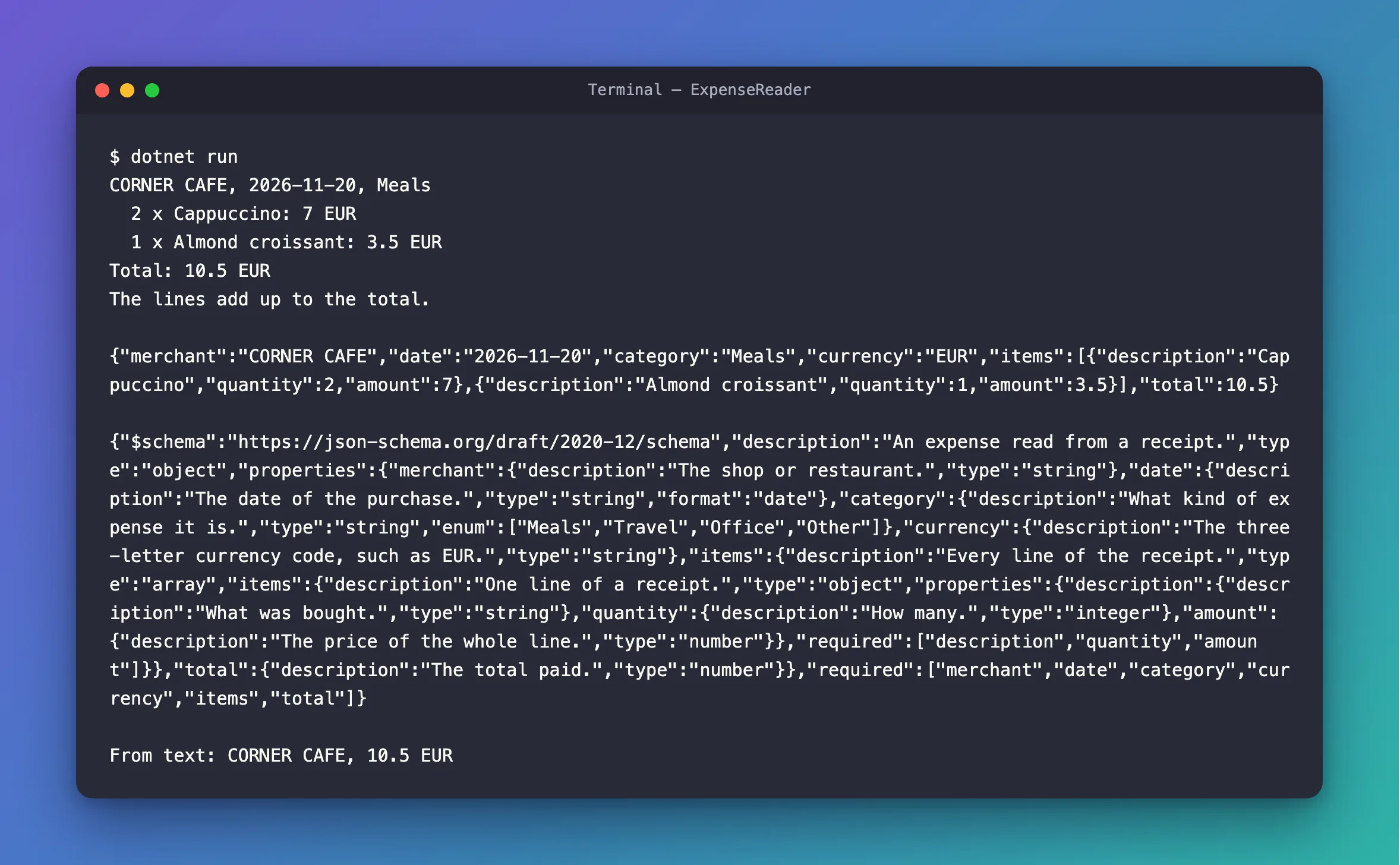
{"$schema":"https://json-schema.org/draft/2020-12/schema","description":"An expense read from a receipt.","type":"object","properties":{"merchant":{"description":"The shop or restaurant.","type":"string"},"date":{"description":"The date of the purchase.","type":"string","format":"date"},"category":{"description":"What kind of expense it is.","type":"string","enum":["Meals","Travel","Office","Other"]},"currency":{"description":"The three-letter currency code, such as EUR.","type":"string"},"items":{"description":"Every line of the receipt.","type":"array","items":{"description":"One line of a receipt.","type":"object","properties":{"description":{"description":"What was bought.","type":"string"},"quantity":{"description":"How many.","type":"integer"},"amount":{"description":"The price of the whole line.","type":"number"}},"required":["description","quantity","amount"]}},"total":{"description":"The total paid.","type":"number"}},"required":["merchant","date","category","currency","items","total"]}

From text: CORNER CAFE, 10.5 EUR
The schema is the type, written for the model: every [Description] is in it, date has "format":"date", category lists the four values of the enum, and every property is listed as required. The second run's JSON became an Expense too.
The Complete File
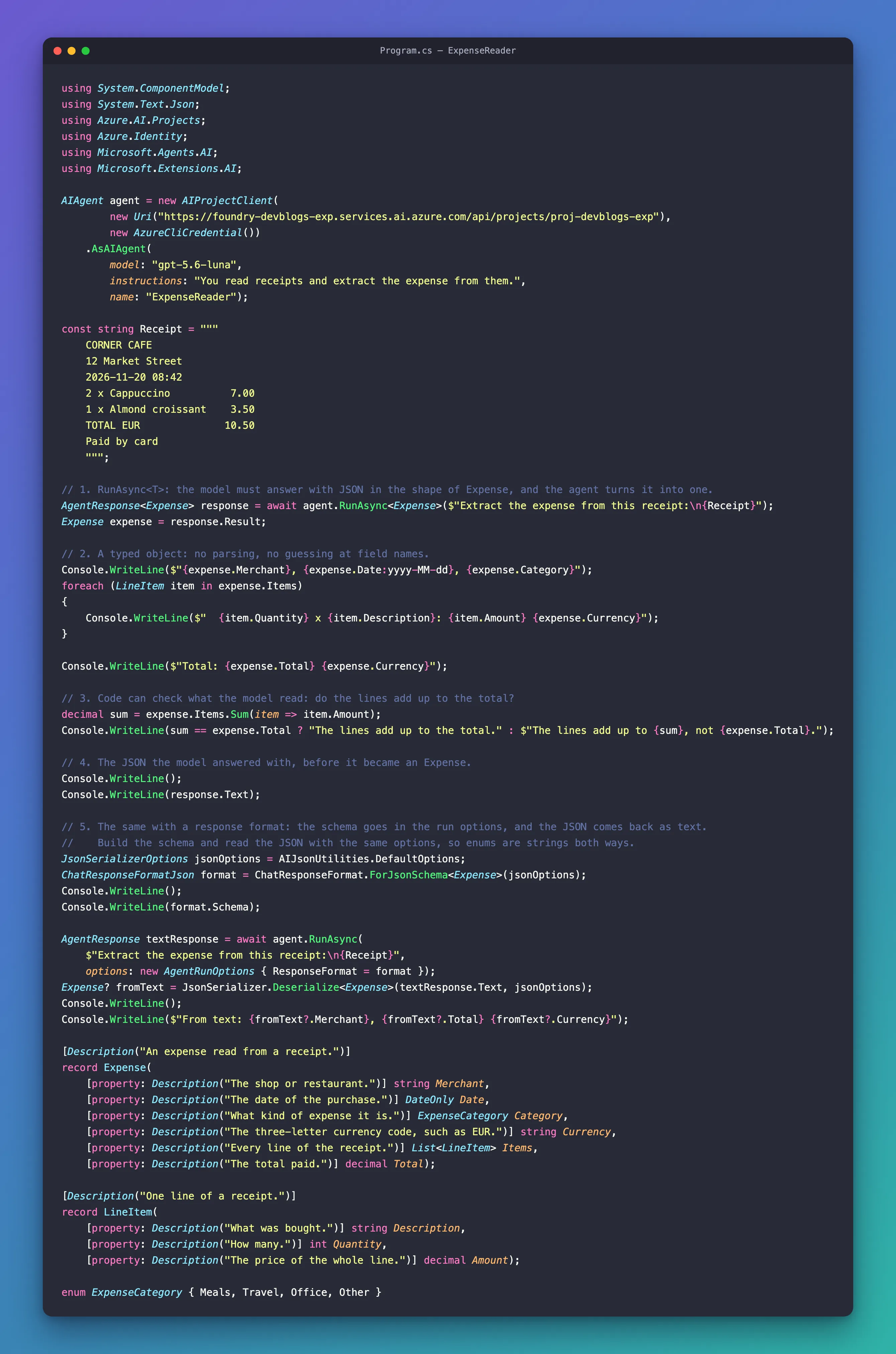
Program.cs with Steps 4 and 5 added is the whole program:
using System.ComponentModel;
using System.Text.Json;
using Azure.AI.Projects;
using Azure.Identity;
using Microsoft.Agents.AI;
using Microsoft.Extensions.AI;

AIAgent agent = new AIProjectClient(
        new Uri("https://foundry-devblogs-exp.services.ai.azure.com/api/projects/proj-devblogs-exp"),
        new AzureCliCredential())
    .AsAIAgent(
        model: "gpt-5.6-luna",
        instructions: "You read receipts and extract the expense from them.",
        name: "ExpenseReader");

const string Receipt = """
    CORNER CAFE
    12 Market Street
    2026-11-20 08:42
    2 x Cappuccino          7.00
    1 x Almond croissant    3.50
    TOTAL EUR              10.50
    Paid by card
    """;

// 1. RunAsync<T>: the model must answer with JSON in the shape of Expense, and the agent turns it into one.
AgentResponse<Expense> response = await agent.RunAsync<Expense>($"Extract the expense from this receipt:\n{Receipt}");
Expense expense = response.Result;

// 2. A typed object: no parsing, no guessing at field names.
Console.WriteLine($"{expense.Merchant}, {expense.Date:yyyy-MM-dd}, {expense.Category}");
foreach (LineItem item in expense.Items)
{
    Console.WriteLine($"  {item.Quantity} x {item.Description}: {item.Amount} {expense.Currency}");
}

Console.WriteLine($"Total: {expense.Total} {expense.Currency}");

// 3. Code can check what the model read: do the lines add up to the total?
decimal sum = expense.Items.Sum(item => item.Amount);
Console.WriteLine(sum == expense.Total ? "The lines add up to the total." : $"The lines add up to {sum}, not {expense.Total}.");

// 4. The JSON the model answered with, before it became an Expense.
Console.WriteLine();
Console.WriteLine(response.Text);

// 5. The same with a response format: the schema goes in the run options, and the JSON comes back as text.
//    Build the schema and read the JSON with the same options, so enums are strings both ways.
JsonSerializerOptions jsonOptions = AIJsonUtilities.DefaultOptions;
ChatResponseFormatJson format = ChatResponseFormat.ForJsonSchema<Expense>(jsonOptions);
Console.WriteLine();
Console.WriteLine(format.Schema);

AgentResponse textResponse = await agent.RunAsync(
    $"Extract the expense from this receipt:\n{Receipt}",
    options: new AgentRunOptions { ResponseFormat = format });
Expense? fromText = JsonSerializer.Deserialize<Expense>(textResponse.Text, jsonOptions);
Console.WriteLine();
Console.WriteLine($"From text: {fromText?.Merchant}, {fromText?.Total} {fromText?.Currency}");

[Description("An expense read from a receipt.")]
record Expense(
    [property: Description("The shop or restaurant.")] string Merchant,
    [property: Description("The date of the purchase.")] DateOnly Date,
    [property: Description("What kind of expense it is.")] ExpenseCategory Category,
    [property: Description("The three-letter currency code, such as EUR.")] string Currency,
    [property: Description("Every line of the receipt.")] List<LineItem> Items,
    [property: Description("The total paid.")] decimal Total);

[Description("One line of a receipt.")]
record LineItem(
    [property: Description("What was bought.")] string Description,
    [property: Description("How many.")] int Quantity,
    [property: Description("The price of the whole line.")] decimal Amount);

enum ExpenseCategory { Meals, Travel, Office, Other }
What You Can Do Now
- Describe the result you need as C# records, with
[Description]attributes the model reads, and an enum where only a few values are valid. - Get a typed object back with
RunAsync<T>andresponse.Result, and see the model's JSON inresponse.Text. - Ask for the same with a response format,
ChatResponseFormat.ForJsonSchema<T>inAgentRunOptions, and read the JSON with the options that built the schema. - Check what the model read with ordinary code, because a schema fixes the shape of the answer, not its truth.
Common Mistakes
| Mistake | What happens | Do this instead |
|---|---|---|
Reading response-format JSON with JsonSerializerOptions.Web when the type has an enum | JsonException: The JSON value could not be converted to ... at the enum (Fixed) | Read it with the options that built the schema |
| Trusting the values because they have the right types | A misread amount is still a valid decimal | Check what you can, as the sum check does |
| Asking a response format for a list or a number directly | Microsoft's documentation: Primitives and arrays are not supported by the ResponseFormat approach | Use RunAsync<T>, or wrap the list in a record |
Leaving out [Description] | The model has only the property names to go on | Describe the type and every property |
Troubleshooting
| Symptom | Likely cause | Fix |
|---|---|---|
System.Text.Json.JsonException: The JSON value could not be converted to Expense. Path: $.category | The JSON has the enum as a string, and the options expect a number | Use the same options for the schema and the JSON |
Frequently Asked Questions
Does structured output work with streaming?
Yes, but only at the end. Microsoft's documentation: you can only deserialize the response once all the updates have been received. You must assemble all the updates into a single response before deserializing it. A part of a JSON document isn't JSON.
Does the model always follow the schema?
In my runs, every answer did, and RunAsync<T> turned each one into an Expense. The schema is what the model is asked to follow; check the values your code depends on, as the sum check does.
Can a tool return structured data too?
A tool's result is already what your method returns: Function Tools covers that. Structured output is about the agent's own answer.
Conclusion
Structured output turns an agent's answer into a C# object. Describe the result as records with [Description] attributes, call RunAsync<T>, and read response.Result: Agent Framework sends a JSON schema of the type, the model answers with JSON that follows it, and the JSON becomes your object. For JSON text instead, put ChatResponseFormat.ForJsonSchema<T> in the run's AgentRunOptions, and read the JSON with the same serializer options that built the schema.
Next: Images and Files (coming soon) — send pictures and documents to the model.
Additional Resources
- Producing Structured Outputs with Agents —
RunAsync<T>, response formats and streaming. - ChatResponseFormat.ForJsonSchema — building a schema from a type.
- AIJsonUtilities.DefaultOptions — the serializer options used by default.
