Streaming
RunAsync waits until the model has written its whole answer, and only then hands it to you. Streaming hands it over piece by piece, while the model is still writing, so people see words instead of a blank screen. This tutorial turns the same small agent from waiting into streaming, times both, and puts the streamed pieces back together.
What Streaming Is
A model doesn't produce its answer in one go: it writes a few characters at a time. RunAsync, from Your First Agent, collects all of them and returns one AgentResponse at the end. RunStreamingAsync returns the pieces as they come, as a stream of AgentResponseUpdate objects. Microsoft's reference describes what that gives you: Each AgentResponseUpdate represents a portion of the complete response, allowing consumers to display partial results, implement progressive loading, or provide immediate feedback to users.
Not every piece is text. Microsoft's guide to running agents says: Each update might contain a part of the result from the agent, and also various other content items. An update has the same two views as a whole response: Text, the part of the answer it carries, and Contents, everything it carries.
C# reads a stream like this with await foreach: the loop runs once for every update, as soon as that update arrives, and ends when the answer is complete.
The Example
A console app called RainbowGuide has an agent that explains science to kids in short numbered steps. It asks How does a rainbow form? three times, as the program grows: first with RunAsync, then streamed, then streamed and put back together.
Prerequisites
- The agent from Your First Agent, and the setup it uses: the .NET 10 SDK, the Azure CLI signed in, a Foundry project endpoint, a model deployment and the Foundry User role.
Step 1: Create a Console App
In a terminal, in the folder where you keep your projects, run:
dotnet new console -n RainbowGuide
cd RainbowGuide
dotnet add package Microsoft.Agents.AI.Foundry --version 1.28.0-preview.261106.1
dotnet add package Azure.Identity --version 1.21.0
The template "Console App" was created successfully.

Processing post-creation actions...
Restoring /Users/you/source/RainbowGuide/RainbowGuide.csproj:
Restore succeeded.

info : PackageReference for package 'Microsoft.Agents.AI.Foundry' version '1.28.0-preview.261106.1' added to file '/Users/you/source/RainbowGuide/RainbowGuide.csproj'.
log  : Restored /Users/you/source/RainbowGuide/RainbowGuide.csproj (in 1.38 sec).
info : PackageReference for package 'Azure.Identity' version '1.21.0' added to file '/Users/you/source/RainbowGuide/RainbowGuide.csproj'.
log  : Restored /Users/you/source/RainbowGuide/RainbowGuide.csproj (in 1.01 sec).
These are the same two packages as in the previous tutorial: the Foundry package brings in Agent Framework, and Azure.Identity signs you in with the Azure CLI. Open the RainbowGuide folder in VS Code, or RainbowGuide.csproj in Visual Studio.
Step 2: Wait for the Whole Answer
Start with RunAsync, timed, so there's something to compare streaming with. Replace everything in Program.cs:
using System.Diagnostics;
using Azure.AI.Projects;
using Azure.Identity;
using Microsoft.Agents.AI;

AIAgent agent = new AIProjectClient(
        new Uri("https://foundry-devblogs-exp.services.ai.azure.com/api/projects/proj-devblogs-exp"),
        new AzureCliCredential())
    .AsAIAgent(
        model: "gpt-5.6-luna",
        instructions: "You explain science to curious kids, in short numbered steps.",
        name: "RainbowGuide");

// Without streaming: nothing to show until the whole answer is ready.
Stopwatch clock = Stopwatch.StartNew();
AgentResponse response = await agent.RunAsync("How does a rainbow form?");
Console.WriteLine(response.Text);
Console.WriteLine();
Console.WriteLine($"The whole answer after {clock.Elapsed.TotalSeconds:0.0} s.");
The agent is created as in the previous tutorial: use your own project endpoint and model deployment. Stopwatch measures how long RunAsync takes, from the moment it's called until the whole answer is back. Run it:
- VS Code
- Visual Studio
In the terminal, in the RainbowGuide folder, run:
dotnet run
Press Ctrl+F5 (Debug → Start Without Debugging). The output appears in a console window.
1. Sunlight looks white, but it is made of many colors.

2. When sunlight enters a raindrop, the drop bends the light. This is called **refraction**.

3. The raindrop separates the light into its colors—red, orange, yellow, green, blue, and violet.

4. The light bounces off the inside of the raindrop, like a tiny mirror.

5. As the light leaves the drop, it bends again and travels toward your eyes.

6. When sunlight, raindrops, and your eyes are in the right positions—with the Sun behind you—you see a rainbow!

The whole answer after 4.4 s.
For 4.4 seconds, the console showed nothing; then the whole answer appeared at once. A second run took 3.8 seconds. Your times will differ, but the pattern won't: with RunAsync, the wait is the whole answer. The ** around some words is Markdown that the model chose; a chat page would show those words in bold.
Step 3: Stream It
Now let the answer appear as it's written. Replace everything after the agent, from the // Without streaming comment to the end, with:
// With streaming: print each piece of the answer as soon as it arrives.
TimeSpan? firstText = null;
Stopwatch clock = Stopwatch.StartNew();
await foreach (AgentResponseUpdate update in agent.RunStreamingAsync("How does a rainbow form?"))
{
    if (firstText is null && !string.IsNullOrEmpty(update.Text))
    {
        firstText = clock.Elapsed;
    }

    Console.Write(update.Text);
}

Console.WriteLine();
Console.WriteLine();
Console.WriteLine($"The first words after {firstText?.TotalSeconds:0.0} s, the whole answer after {clock.Elapsed.TotalSeconds:0.0} s.");
RunStreamingAsynctakes the same question asRunAsync, but returns the updates instead of a finished response.await foreachruns the loop body once for each update, as it arrives. The loop ends when the agent has sent the last one.Console.Write(update.Text)prints the update's piece of the answer, without a line break, so the pieces join up on screen. An update without text has an emptyText, which prints nothing.firstTextremembers when the first piece of text arrived. That's the moment a person would see something.
Run it again. The steps appear a few words at a time instead of all at once, and then:
1. Sunlight looks white, but it is made of many colors.

2. When sunlight enters a raindrop, it bends. This is called **refraction**.

3. The raindrop spreads the light into its different colors—red, orange, yellow, green, blue, indigo, and violet.

4. The light reflects off the inside of the raindrop.

5. As the light leaves the drop, it bends again and travels toward your eyes.

6. Millions of raindrops do this at once, making a colorful arc called a **rainbow**. The Sun must be behind you and rain must be in front of you.

The first words after 2.9 s, the whole answer after 3.8 s.
The first words appeared after 2.9 seconds, almost a second before the answer was complete; a second run said 2.7 and 3.5. The whole answer took about as long as before: streaming doesn't make the model faster. What it changes is when people start reading. Here the answer is short, so the gain is under a second: the 2.9 seconds pass before the model writes its first word, and then the whole answer streams in under a second. The longer an answer is, the more of it people can read while the rest is still being written.
Step 4: Keep the Updates, and Put Them Back Together
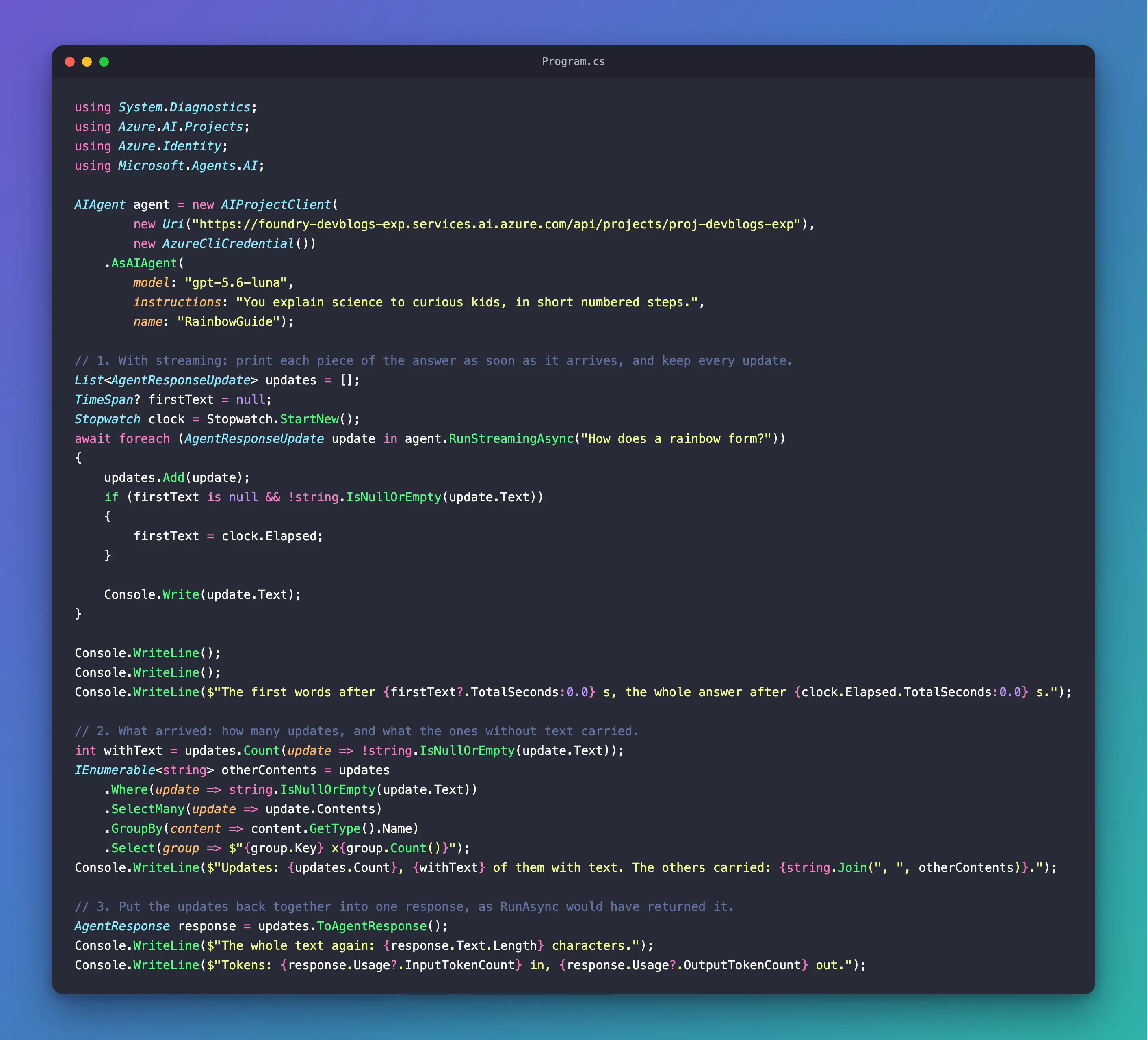
Streaming gives you pieces, but sometimes you also need the whole: to save the answer, or to read the token count. Keep every update in a list while you print it, and combine them at the end. The final program, with the new lines marked by the comments 1., 2. and 3.:
// 1. With streaming: print each piece of the answer as soon as it arrives, and keep every update.
List<AgentResponseUpdate> updates = [];
TimeSpan? firstText = null;
Stopwatch clock = Stopwatch.StartNew();
await foreach (AgentResponseUpdate update in agent.RunStreamingAsync("How does a rainbow form?"))
{
    updates.Add(update);
    if (firstText is null && !string.IsNullOrEmpty(update.Text))
    {
        firstText = clock.Elapsed;
    }

    Console.Write(update.Text);
}

Console.WriteLine();
Console.WriteLine();
Console.WriteLine($"The first words after {firstText?.TotalSeconds:0.0} s, the whole answer after {clock.Elapsed.TotalSeconds:0.0} s.");

// 2. What arrived: how many updates, and what the ones without text carried.
int withText = updates.Count(update => !string.IsNullOrEmpty(update.Text));
IEnumerable<string> otherContents = updates
    .Where(update => string.IsNullOrEmpty(update.Text))
    .SelectMany(update => update.Contents)
    .GroupBy(content => content.GetType().Name)
    .Select(group => $"{group.Key} x{group.Count()}");
Console.WriteLine($"Updates: {updates.Count}, {withText} of them with text. The others carried: {string.Join(", ", otherContents)}.");

// 3. Put the updates back together into one response, as RunAsync would have returned it.
AgentResponse response = updates.ToAgentResponse();
Console.WriteLine($"The whole text again: {response.Text.Length} characters.");
Console.WriteLine($"Tokens: {response.Usage?.InputTokenCount} in, {response.Usage?.OutputTokenCount} out.");
updates.Add(update)keeps every update, including the ones without text.- Section 2 counts the updates, and lists what the ones without text carried, by the type of each content item.
updates.ToAgentResponse()combines the updates into oneAgentResponse, the same kind of objectRunAsyncreturns:Textwith the whole answer,Messages, andUsagewith the token count.
Run it:
1. Sunlight looks white, but it is actually made of many colors.

2. When sunlight enters a raindrop, it bends. This is called **refraction**.

3. The raindrop spreads the light into its different colors—red, orange, yellow, green, blue, and violet.

4. The light reflects off the inside of the raindrop and bends again as it leaves. The colors travel toward your eyes, making a rainbow.

You usually see a rainbow when the **Sun is behind you** and rain is in front of you.

The first words after 3.0 s, the whole answer after 3.8 s.
Updates: 53, 43 of them with text. The others carried: TextReasoningContent x1, UsageContent x1.
The whole text again: 474 characters.
Tokens: 28 in, 164 out.
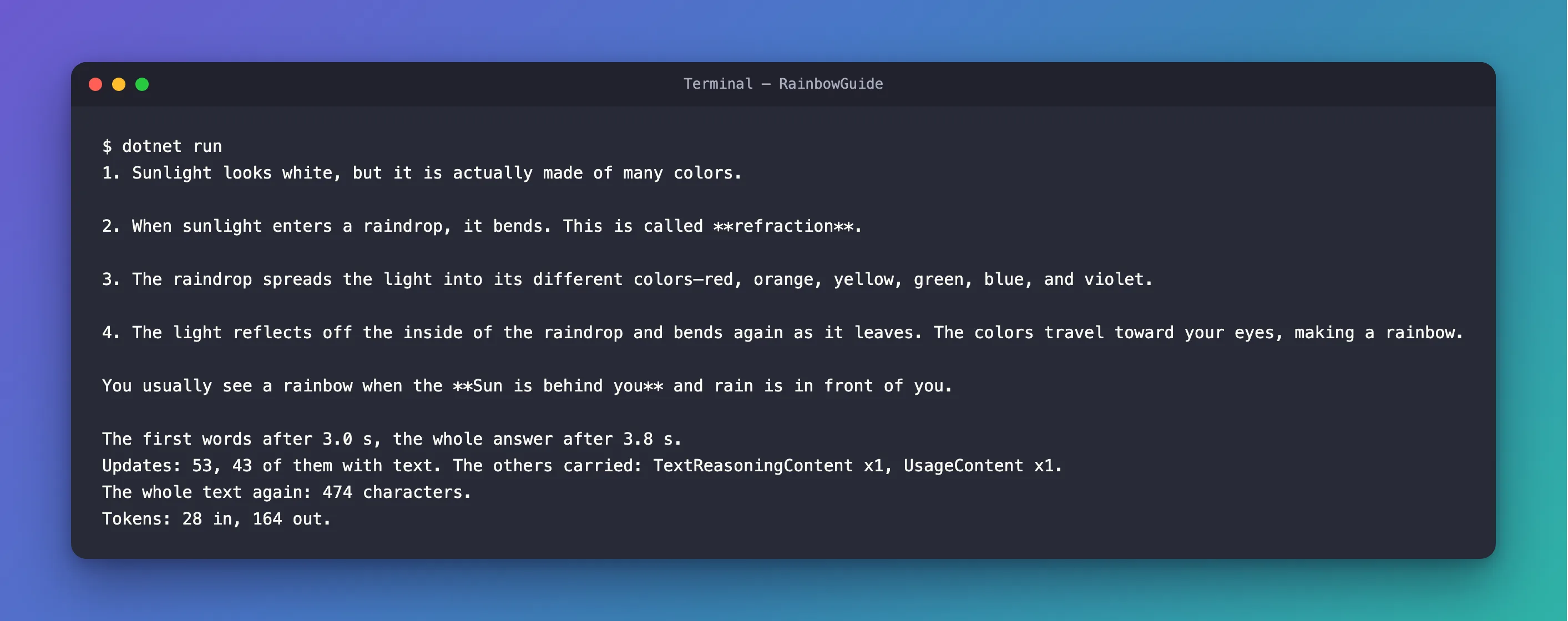
The answer arrived in 53 updates. 43 carried a piece of text. The other ten carried two content items between them, so eight carried nothing at all:
TextReasoningContentis the model's reasoning. It isn't part of the answer, so the update'sTextstays empty.UsageContentis the token count. It arrives in its own update, near the end, and that's whereresponse.Usagegets its numbers: 28 tokens in, 164 out.
That's why the program keeps every update, not just the ones with text: the token count is in an update without any. How to Get the Token Usage of a Streaming Microsoft Agent Framework Agent Run in C# shows what happens when you keep only the text.
The Complete File
using System.Diagnostics;
using Azure.AI.Projects;
using Azure.Identity;
using Microsoft.Agents.AI;

AIAgent agent = new AIProjectClient(
        new Uri("https://foundry-devblogs-exp.services.ai.azure.com/api/projects/proj-devblogs-exp"),
        new AzureCliCredential())
    .AsAIAgent(
        model: "gpt-5.6-luna",
        instructions: "You explain science to curious kids, in short numbered steps.",
        name: "RainbowGuide");

// 1. With streaming: print each piece of the answer as soon as it arrives, and keep every update.
List<AgentResponseUpdate> updates = [];
TimeSpan? firstText = null;
Stopwatch clock = Stopwatch.StartNew();
await foreach (AgentResponseUpdate update in agent.RunStreamingAsync("How does a rainbow form?"))
{
    updates.Add(update);
    if (firstText is null && !string.IsNullOrEmpty(update.Text))
    {
        firstText = clock.Elapsed;
    }

    Console.Write(update.Text);
}

Console.WriteLine();
Console.WriteLine();
Console.WriteLine($"The first words after {firstText?.TotalSeconds:0.0} s, the whole answer after {clock.Elapsed.TotalSeconds:0.0} s.");

// 2. What arrived: how many updates, and what the ones without text carried.
int withText = updates.Count(update => !string.IsNullOrEmpty(update.Text));
IEnumerable<string> otherContents = updates
    .Where(update => string.IsNullOrEmpty(update.Text))
    .SelectMany(update => update.Contents)
    .GroupBy(content => content.GetType().Name)
    .Select(group => $"{group.Key} x{group.Count()}");
Console.WriteLine($"Updates: {updates.Count}, {withText} of them with text. The others carried: {string.Join(", ", otherContents)}.");

// 3. Put the updates back together into one response, as RunAsync would have returned it.
AgentResponse response = updates.ToAgentResponse();
Console.WriteLine($"The whole text again: {response.Text.Length} characters.");
Console.WriteLine($"Tokens: {response.Usage?.InputTokenCount} in, {response.Usage?.OutputTokenCount} out.");
What You Can Do Now
- Stream an agent's answer with
RunStreamingAsyncandawait foreach, and show each piece as it arrives. - Explain what streaming changes, when people start reading, and what it doesn't, how long the whole answer takes.
- Tell the updates apart: most carry a piece of text in
Text, and some carry other content, such as the model's reasoning or the token count. - Put the updates back together with
ToAgentResponse(), to get the whole answer and its token count.
The run in Step 4 cost about as much as the run in the previous tutorial: 28 input tokens and 164 output tokens come to about $0.0002 at gpt-5.6-luna's prices of $0.20 and $1.20 per million.
Common Mistakes
| Mistake | What happens | Do this instead |
|---|---|---|
Printing each update with Console.WriteLine | Every few characters land on a new line | Use Console.Write, and add the line breaks after the loop |
| Keeping only the updates that have text | Usage is null when you put them back together, because the token count is in an update without text | Keep every update, and filter only what you print |
| Expecting streaming to make the answer faster | The whole answer takes about as long as with RunAsync | Use streaming so people can start reading sooner |
Calling RunAsync and then RunStreamingAsync for the same question | Two runs, two answers and twice the tokens | Stream once, and use ToAgentResponse() when you need the whole |
Troubleshooting
| Symptom | Likely cause | Fix |
|---|---|---|
| Nothing appears, then the whole answer at once | The program still calls RunAsync | Use RunStreamingAsync with await foreach, as in Step 3 |
| The first words take several seconds | That time passes before the model writes its first word, so no loop can show anything sooner | Nothing to fix in the loop: streaming helps from the first word on |
Frequently Asked Questions
Does streaming cost more?
No. Foundry charges for the tokens the model reads and writes, whether they arrive at once or in pieces. Streaming changes how they're delivered, not how many there are.
Can I stop a stream halfway?
Yes. Pass a CancellationToken to RunStreamingAsync, and cancel it when you have enough: How to Stop a Streaming Microsoft Agent Framework Agent Run Early in C# shows it with a counting agent.
Does streaming work with conversations?
Yes. RunStreamingAsync takes the same session as RunAsync, so a streamed answer becomes part of the conversation the same way. Sessions get their own tutorial in this track.
Where else does this series stream?
Everywhere a person waits for an answer. The IT Service Desk's API streams the agent's answer over AG-UI in Part 3, and its chat page shows the pieces as they arrive in Part 7.
Conclusion
RunStreamingAsync returns an agent's answer as a stream of AgentResponseUpdate objects, which await foreach reads one by one, as they arrive. Print each update's Text, and people start reading while the model is still writing; keep every update, and ToAgentResponse() gives you back the whole answer and its token count. Streaming changes when the answer appears, not how long it takes or what it costs.
Next: Instructions, Messages and Run Options — tell the agent how to behave, send it more than one message, and change its settings for a single run.
Additional Resources
- Running Agents —
RunAsync,RunStreamingAsyncand the responses and updates they return. - AIAgent.RunStreamingAsync — every overload, and what the updates represent.
- AgentResponseUpdate class — what an update carries.
- Generate and consume async streams —
await foreachandIAsyncEnumerable<T>in C#.
