Instructions, Messages and Run Options
An agent's answer depends on three things you control: the instructions it follows in every run, the messages you send it in a run, and the run options that change a single run. This tutorial uses all three on one small agent, and the token counts show what each one sends to the model.
Three Places to Shape an Answer
Instructions belong to the agent. You give them once, when you create it, and they go with every run. Microsoft's reference describes them as the system instructions that guide the agent's behavior during conversations, which are typically provided to the AI model as system messages. Put in them what the agent is and the rules it always follows.
Messages belong to a run. Microsoft's guide to running agents says Callers can choose to supply zero, one, or many input messages. A string, as in the previous tutorials, becomes one message: The provided text will be wrapped in a ChatMessage with the User role. For more than one, you build the ChatMessage objects yourself, each with a role:
| Role | Who says it |
|---|---|
ChatRole.User | The person using the agent |
ChatRole.Assistant | The agent, earlier in the conversation |
ChatRole.System | You, the developer, with instructions |
Microsoft's reference adds a warning about the last one: System-role messages must be developer-controlled and should never contain end-user input.
Run options also belong to a run. An agent created from a model, a ChatClientAgent, takes a ChatClientAgentRunOptions with ChatOptions in it. The guide explains what happens to them: they are merged with any agent level options before being passed to the IChatClient. So a run can add to what the agent already has, for that run only.
The Example
A console app called WordCoach has an agent that explains English words to learners, with three rules: simple words, one example sentence, and Keep practising! at the end of every answer. That last rule is easy to spot, which makes it easy to see when the agent's instructions apply. The app runs the agent four times: with one message, with several messages, with run options, and once more without them.
Prerequisites
- The agent from Streaming, and the setup it uses: the .NET 10 SDK, the Azure CLI signed in, a Foundry project endpoint, a model deployment and the Foundry User role.
Step 1: Create a Console App
In a terminal, in the folder where you keep your projects, run:
dotnet new console -n WordCoach
cd WordCoach
dotnet add package Microsoft.Agents.AI.Foundry --version 1.28.0-preview.261106.1
dotnet add package Azure.Identity --version 1.21.0
The template "Console App" was created successfully.

Processing post-creation actions...
Restoring /Users/you/source/WordCoach/WordCoach.csproj:
Restore succeeded.

info : PackageReference for package 'Microsoft.Agents.AI.Foundry' version '1.28.0-preview.261106.1' added to file '/Users/you/source/WordCoach/WordCoach.csproj'.
log  : Restored /Users/you/source/WordCoach/WordCoach.csproj (in 1.75 sec).
info : PackageReference for package 'Azure.Identity' version '1.21.0' added to file '/Users/you/source/WordCoach/WordCoach.csproj'.
log  : Restored /Users/you/source/WordCoach/WordCoach.csproj (in 1.29 sec).
The same two packages as in the previous tutorials. Open the WordCoach folder in VS Code, or WordCoach.csproj in Visual Studio.
Step 2: Write the Instructions, and Send One Message
Replace everything in Program.cs:
using Azure.AI.Projects;
using Azure.Identity;
using Microsoft.Agents.AI;
using Microsoft.Extensions.AI;

// 1. Instructions: who the agent is, and the rules it follows in every run.
AIAgent agent = new AIProjectClient(
        new Uri("https://foundry-devblogs-exp.services.ai.azure.com/api/projects/proj-devblogs-exp"),
        new AzureCliCredential())
    .AsAIAgent(
        model: "gpt-5.6-luna",
        instructions: """
            You explain English words to people who are learning English.
            Use simple words, and give one example sentence.
            End every answer with this line: Keep practising!
            """,
        name: "WordCoach");

// 2. One message: a string becomes a single message from the user.
Print("One message", await agent.RunAsync("What does 'reluctant' mean?"));

static void Print(string title, AgentResponse response)
{
    Console.WriteLine($"--- {title} ({response.Usage?.InputTokenCount} tokens in) ---");
    Console.WriteLine(response.Text);
    Console.WriteLine();
}
instructionsholds the agent's three rules, in a raw string literal ("""), which keeps the lines readable. Short, direct sentences work best: the model reads them before every run.using Microsoft.Extensions.AIbrings inChatMessage,ChatRoleandChatOptions, which the next steps use. Agent Framework uses these types from Microsoft.Extensions.AI for its messages.Printshows each answer under a title, with the number of input tokens, the tokens that went to the model. It's the easiest way to see how much each step sends.
Use your own project endpoint and model deployment. Run it:
- VS Code
- Visual Studio
In the terminal, in the WordCoach folder, run:
dotnet run
Press Ctrl+F5 (Debug → Start Without Debugging). The output appears in a console window.
--- One message (50 tokens in) ---
**Reluctant** means not wanting to do something.

**Example:** She was reluctant to speak in front of the class.

Keep practising!
The agent followed all three rules: simple words, one example sentence, and the last line. The 50 input tokens are the instructions and the question together. The ** around some words is Markdown that the model chose, which a chat page would show in bold.
Step 3: Send Several Messages
One message asks a question. Several messages can also show the agent what a good answer looks like: a short example exchange, before the real question. Add this after the first run, before static void Print:
// 3. Several messages: an example exchange to copy, then the real question.
List<ChatMessage> messages =
[
    new(ChatRole.User, "What does 'eager' mean?"),
    new(ChatRole.Assistant, """
        eager (adjective): wanting very much to do something.
        Example: She was eager to start her new job.
        Keep practising!
        """),
    new(ChatRole.User, "What does 'reluctant' mean?"),
];
Print("Several messages", await agent.RunAsync(messages));
- The first two messages are an exchange that never happened: a question from the user, and an answer from the agent in the exact format you want, with the word type in brackets and no bold.
- The last message is the real question.
RunAsync(messages)sends all three. The model reads them as the conversation so far, and answers the last one.
Run it. The first answer is the same kind as before, and then:
--- Several messages (95 tokens in) ---
reluctant (adjective): not wanting to do something; unsure or unwilling.

Example: He was reluctant to speak in front of the class.

Keep practising!
The answer copied the example: the word, its type in brackets, a plain definition and no bold, which no instruction asked for. Showing one answer is often clearer to a model than describing it. It isn't free: the example took the input from 50 tokens to 95, and it's sent with every run that includes it.
Step 4: Change One Run with Run Options
Now ask for one answer in Spanish, without changing the agent. Add:
// 4. Run options: extra instructions for this one run only.
ChatClientAgentRunOptions inSpanish = new(new ChatOptions { Instructions = "Answer in Spanish." });
Print("One run in Spanish", await agent.RunAsync("What does 'reluctant' mean?", options: inSpanish));

// 5. The next run is back to normal: run options don't stay with the agent.
Print("The next run", await agent.RunAsync("What does 'curious' mean?"));
ChatOptionsholds settings for a model call. Here it has one:Instructions, an extra instruction for this run.ChatClientAgentRunOptionswraps those settings for aChatClientAgent, the kind of agentAsAIAgentcreates.options: inSpanishpasses them to this oneRunAsync. The last run has no options.
Run it:
--- One run in Spanish (54 tokens in) ---
**Reluctant** significa **reacio**, **poco dispuesto** o **que no quiere hacer algo**.

**Ejemplo:** *She was reluctant to speak in public.*
**Traducción:** Ella era reacia a hablar en público.

Keep practising!

--- The next run (49 tokens in) ---
**Curious** means wanting to know or learn something.

**Example:** I am curious about how airplanes fly.

Keep practising!
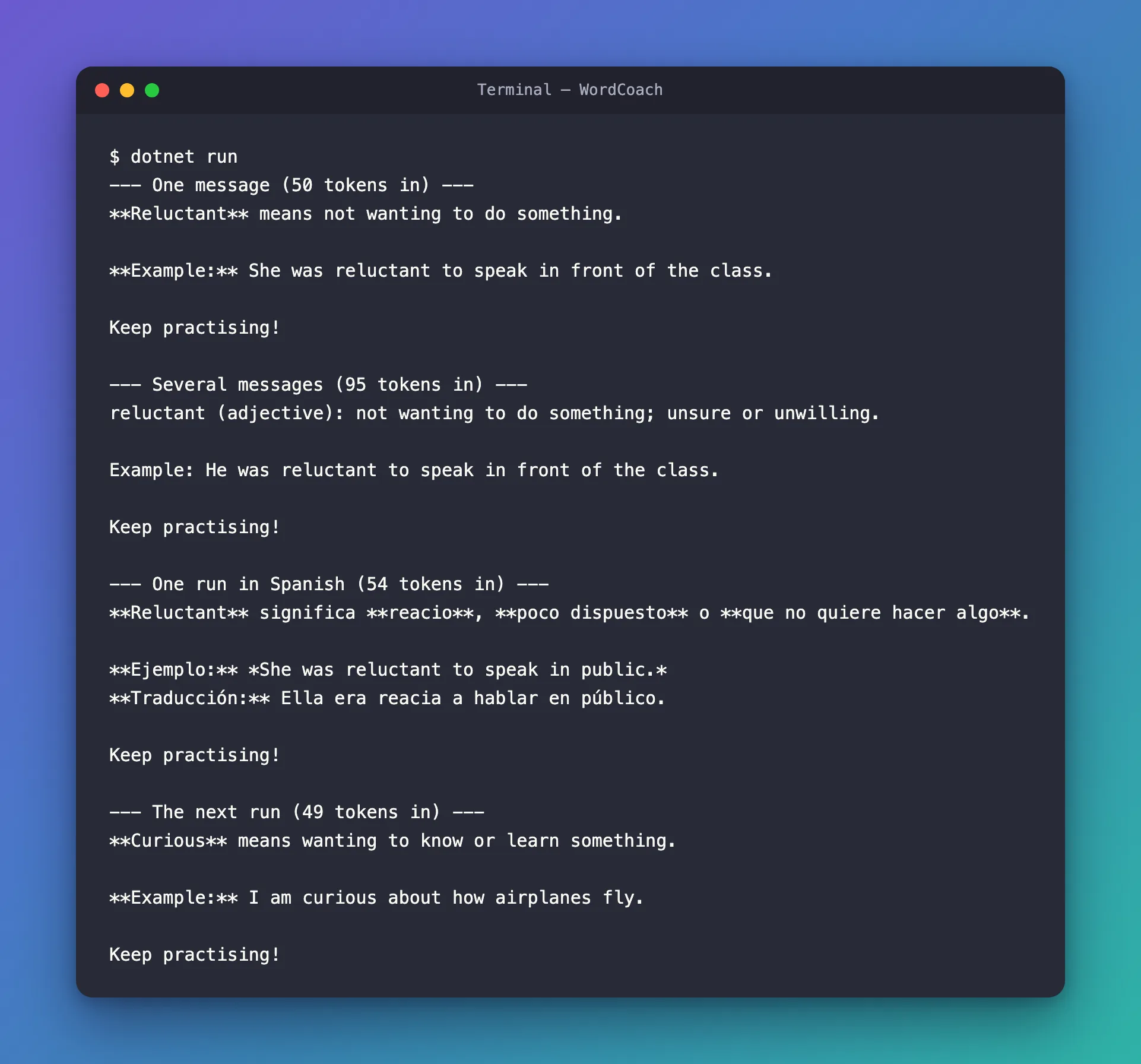
Two things show how run options work:
- They're added to the agent's instructions, not swapped in. The Spanish answer still ends with Keep practising!, a rule from the agent's own instructions. And the token counts agree: the same question took 50 tokens without options and 54 with them, four more for Answer in Spanish. If the run's instructions had replaced the agent's, the count would have dropped, not grown.
- They last for one run. The next run, with no options, is back in English. Nothing about the agent changed.
That's the guide's merged with any agent level options in practice. A second run of the app gave the same token counts: 50, 95, 54 and 49.
The Complete File
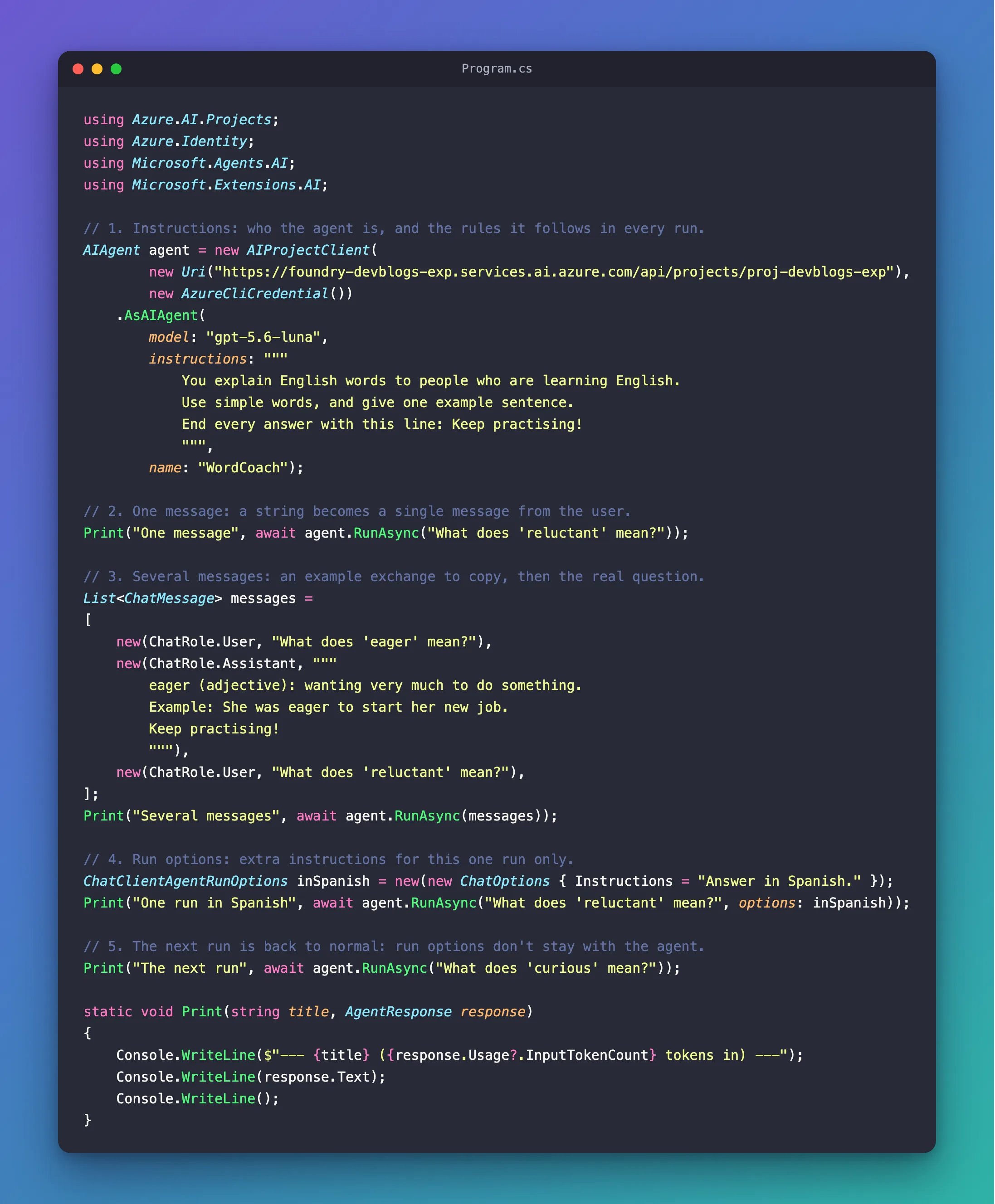
using Azure.AI.Projects;
using Azure.Identity;
using Microsoft.Agents.AI;
using Microsoft.Extensions.AI;

// 1. Instructions: who the agent is, and the rules it follows in every run.
AIAgent agent = new AIProjectClient(
        new Uri("https://foundry-devblogs-exp.services.ai.azure.com/api/projects/proj-devblogs-exp"),
        new AzureCliCredential())
    .AsAIAgent(
        model: "gpt-5.6-luna",
        instructions: """
            You explain English words to people who are learning English.
            Use simple words, and give one example sentence.
            End every answer with this line: Keep practising!
            """,
        name: "WordCoach");

// 2. One message: a string becomes a single message from the user.
Print("One message", await agent.RunAsync("What does 'reluctant' mean?"));

// 3. Several messages: an example exchange to copy, then the real question.
List<ChatMessage> messages =
[
    new(ChatRole.User, "What does 'eager' mean?"),
    new(ChatRole.Assistant, """
        eager (adjective): wanting very much to do something.
        Example: She was eager to start her new job.
        Keep practising!
        """),
    new(ChatRole.User, "What does 'reluctant' mean?"),
];
Print("Several messages", await agent.RunAsync(messages));

// 4. Run options: extra instructions for this one run only.
ChatClientAgentRunOptions inSpanish = new(new ChatOptions { Instructions = "Answer in Spanish." });
Print("One run in Spanish", await agent.RunAsync("What does 'reluctant' mean?", options: inSpanish));

// 5. The next run is back to normal: run options don't stay with the agent.
Print("The next run", await agent.RunAsync("What does 'curious' mean?"));

static void Print(string title, AgentResponse response)
{
    Console.WriteLine($"--- {title} ({response.Usage?.InputTokenCount} tokens in) ---");
    Console.WriteLine(response.Text);
    Console.WriteLine();
}
What You Can Do Now
- Give an agent instructions that apply to every run, and check that it follows them.
- Send one message as a string, or several as
ChatMessageobjects with roles. - Show an agent an example answer to copy, and weigh it against the tokens it adds to every run.
- Add settings to a single run with
ChatClientAgentRunOptions, knowing they're merged with the agent's own and last for that run only.
The four runs sent 248 input tokens in total, about $0.00005 at gpt-5.6-luna's price of $0.20 per million input tokens. The answers, and the model's reasoning before it writes, are output tokens at $1.20 per million on top.
Common Mistakes
| Mistake | What happens | Do this instead |
|---|---|---|
Putting the person's text in a ChatRole.System message | User input gets the weight of your own instructions, and can change the rules | Put user input only in ChatRole.User messages |
| Repeating the agent's instructions in every run's options | Every run sends them twice | Keep lasting rules in the agent's instructions, and use run options for exceptions |
| Expecting run options to change the agent | The next run is back to normal | Create another agent when the change should last |
| Long example exchanges in every run | Every run pays for them in input tokens | Keep examples short, and only where the format matters |
Troubleshooting
| Symptom | Likely cause | Fix |
|---|---|---|
error CS0246: The type or namespace name 'ChatMessage' could not be found (are you missing a using directive or an assembly reference?), and the same for ChatOptions | using Microsoft.Extensions.AI; is missing | Add it at the top of Program.cs |
| The agent ignores a rule in its instructions | The rule is vague, or another message contradicts it | Make the rule short and direct, and check your example messages |
| A run's options seem to do nothing | The options were created but not passed | Pass them as options: to that RunAsync |
Frequently Asked Questions
Instructions or a system message: which should I use?
For the agent's own rules, instructions. They're set once, in one place, and go with every run. A ChatRole.System message in a run's messages is for the rare case where you, not the user, need to add instructions for that run only, and never with text that came from the user.
Do the example messages become part of the agent?
No. They're part of the run you send them with. A run without them gets the agent's usual answers, as the last run in this tutorial shows.
What else can run options change?
Anything ChatOptions holds that the model supports, such as the most tokens an answer may use, with MaxOutputTokens. Microsoft's guide also shows a run that adds a tool, with ChatOptions.Tools. Tools have their own tutorial in this track.
Why did the answers use Markdown?
Nothing in the instructions said not to. The agent in the IT Service Desk series, written for a chat page, has a rule for it: Write plain text. Do not use Markdown formatting such as ** or #.
Conclusion
Instructions, messages and run options shape an agent's answers at three levels. Instructions go with every run, and set who the agent is and its rules. Messages carry what one run sends: one question, or an example exchange to copy before the question. Run options add settings to a single run: ChatClientAgentRunOptions with ChatOptions, merged with the agent's own, and gone by the next run.
Next: Sessions — keep a conversation going across several runs, so the agent remembers what was said.
Additional Resources
- Running Agents — messages, run options and the message types.
- ChatClientAgent.Instructions — how an agent's instructions reach the model.
- ChatClientAgentRunOptions class — run options for agents created from a model.
- ChatOptions class — every setting a run can change.
