Images and Files
So far every message to an agent has been text. A message can hold more: a picture, a scanned receipt, a PDF. The model reads them together with your question, as long as it can see images. This tutorial sends one picture two ways, from a file and by its address on the web, and then a PDF, and shows what each costs.
How Images and Files Reach the Model
A ChatMessage isn't just a string. It's a list of contents, and RunAsync has an overload that takes a whole message. Three kinds of content cover text, files and pictures:
| Content | What it holds | Good for |
|---|---|---|
TextContent | Text | The question |
DataContent | Bytes, with their media type, such as image/png or application/pdf | A file on disk or an upload |
UriContent | The address of hosted content, with its media type | A picture already on the web |
The reference describes the difference: DataContent represents binary content with an associated media type, and for references to data at a remote URI, use UriContent instead.
Agent Framework hands the message to the model service. With a Microsoft Foundry project, that's the Responses API, and each content becomes one input item:
I checked this afterwards by asking Foundry for each request's stored input: the questions arrived as input_text, both pictures as input_image, and the PDF as input_file.
The model has to be able to see. Microsoft's documentation of the Responses API: vision-enabled models can interpret images alongside text, the accepted image types are PNG, JPEG, WebP and non-animated GIF, and only models that support both text and image inputs can accept PDF files as input. The gpt-5.6-luna deployment used in this track accepts both.
The Example
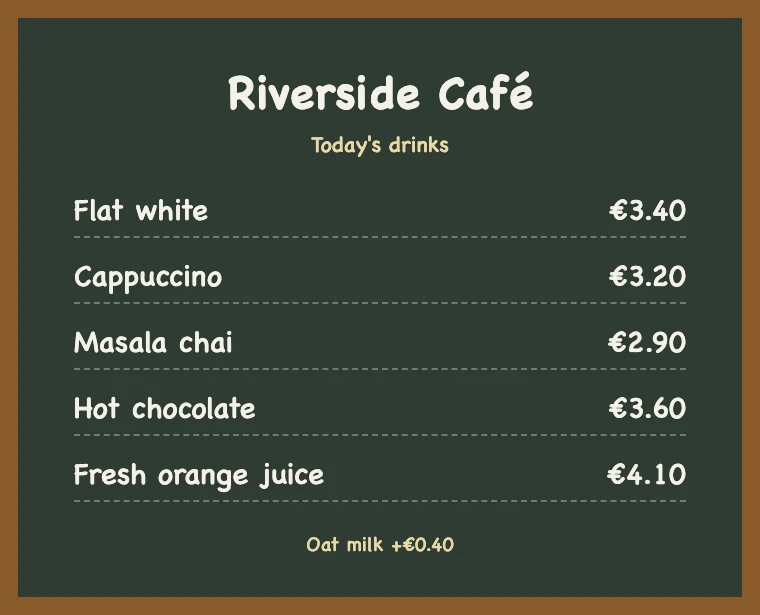
A console app called CafeHelper has an agent that answers questions about the Riverside Café, in one sentence, from what it's shown. It gets the café's menu board, first as a file and then by its URL, and asks about prices. Then it gets the café's opening hours as a PDF and asks when it opens on Sunday. This is the menu board:
The opening hours are a one-page PDF with a small table: Monday to Friday 7:30 – 18:00, Saturday 8:00 – 17:00, Sunday 9:00 – 14:00, and closed on public holidays.
Prerequisites
- The agent from Structured Output, and the setup it uses: the .NET 10 SDK, the Azure CLI signed in, a Foundry project endpoint, a model deployment that accepts images, and the Foundry User role.
Step 1: Create a Console App
In a terminal, in the folder where you keep your projects, run:
dotnet new console -n CafeHelper
cd CafeHelper
dotnet add package Microsoft.Agents.AI.Foundry --version 1.28.0-preview.261106.1
dotnet add package Azure.Identity --version 1.21.0
The same two packages as in the previous tutorials. Then put the two files the app reads into the CafeHelper folder:
menu-board.webp: the menu board above. Save the picture with that name.opening-hours.pdf: download the opening hours and keep the name.
dotnet run runs the app in its project folder, so it finds both files there.
Step 2: Send an Image from a File
Replace everything in Program.cs, starting with the agent and the first message:
using Azure.AI.Projects;
using Azure.Identity;
using Microsoft.Agents.AI;
using Microsoft.Extensions.AI;

AIAgent agent = new AIProjectClient(
        new Uri("https://foundry-devblogs-exp.services.ai.azure.com/api/projects/proj-devblogs-exp"),
        new AzureCliCredential())
    .AsAIAgent(
        model: "gpt-5.6-luna",
        instructions: "You answer questions about the Riverside Café from the pictures and documents you're given. Answer in one sentence.",
        name: "CafeHelper");

// 1. An image from a file: its bytes travel in the request.
byte[] menu = await File.ReadAllBytesAsync("menu-board.webp");
ChatMessage fromFile = new(ChatRole.User,
[
    new TextContent("Which drink is the cheapest, and what does it cost?"),
    new DataContent(menu, "image/webp"),
]);
Print("An image from a file", await agent.RunAsync(fromFile));
File.ReadAllBytesAsyncreads the picture into memory.new ChatMessage(ChatRole.User, [...])builds one message from a list of contents: the question first, then the picture.new DataContent(menu, "image/webp")holds the bytes and says what they are. The media type has to match the file:image/pngfor a PNG,image/jpegfor a photo.agent.RunAsync(fromFile)sends the whole message.
Print, at the end of the file, shows each answer with its input tokens:
static void Print(string title, AgentResponse response)
{
    Console.WriteLine($"--- {title} ({response.Usage?.InputTokenCount} tokens in) ---");
    Console.WriteLine(response.Text);
    Console.WriteLine();
}
Step 3: Send an Image by Its URL
// 2. An image by its URL: the model service downloads it.
ChatMessage fromUrl = new(ChatRole.User,
[
    new TextContent("How much is a cappuccino with oat milk?"),
    new UriContent("https://strdewiridedevblogsprod.blob.core.windows.net/images/docs/ai/microsoft-agent-framework/fundamentals/riverside-menu-board.webp", "image/webp"),
]);
Print("An image by URL", await agent.RunAsync(fromUrl));
UriContent sends only the address. The model service downloads the picture itself, so the address has to be reachable from the internet: a picture on your own computer or behind a sign-in won't work this way. Use DataContent for those.
Step 4: Send a PDF
// 3. A PDF from a file: a document, sent the same way as an image.
byte[] hours = await File.ReadAllBytesAsync("opening-hours.pdf");
ChatMessage withPdf = new(ChatRole.User,
[
    new TextContent("When does the café open on Sunday?"),
    new DataContent(hours, "application/pdf") { Name = "opening-hours.pdf" },
]);
Print("A PDF from a file", await agent.RunAsync(withPdf));
A PDF goes in a DataContent too, with the media type application/pdf. Name is the file name the service receives. Without it, the request I sent carried a made-up name, 262ec430c0d74cb18ebc141fc5839cfe.pdf; with it, opening-hours.pdf. The reference says a service might use this name as part of citations or to help infer the type of data.
Step 5: Run It
dotnet run
--- An image from a file (619 tokens in) ---
Masala chai is the cheapest drink at €2.90.

--- An image by URL (617 tokens in) ---
A cappuccino with oat milk costs €3.60.

--- A PDF from a file (119 tokens in) ---
The café opens at 9:00 on Sunday.
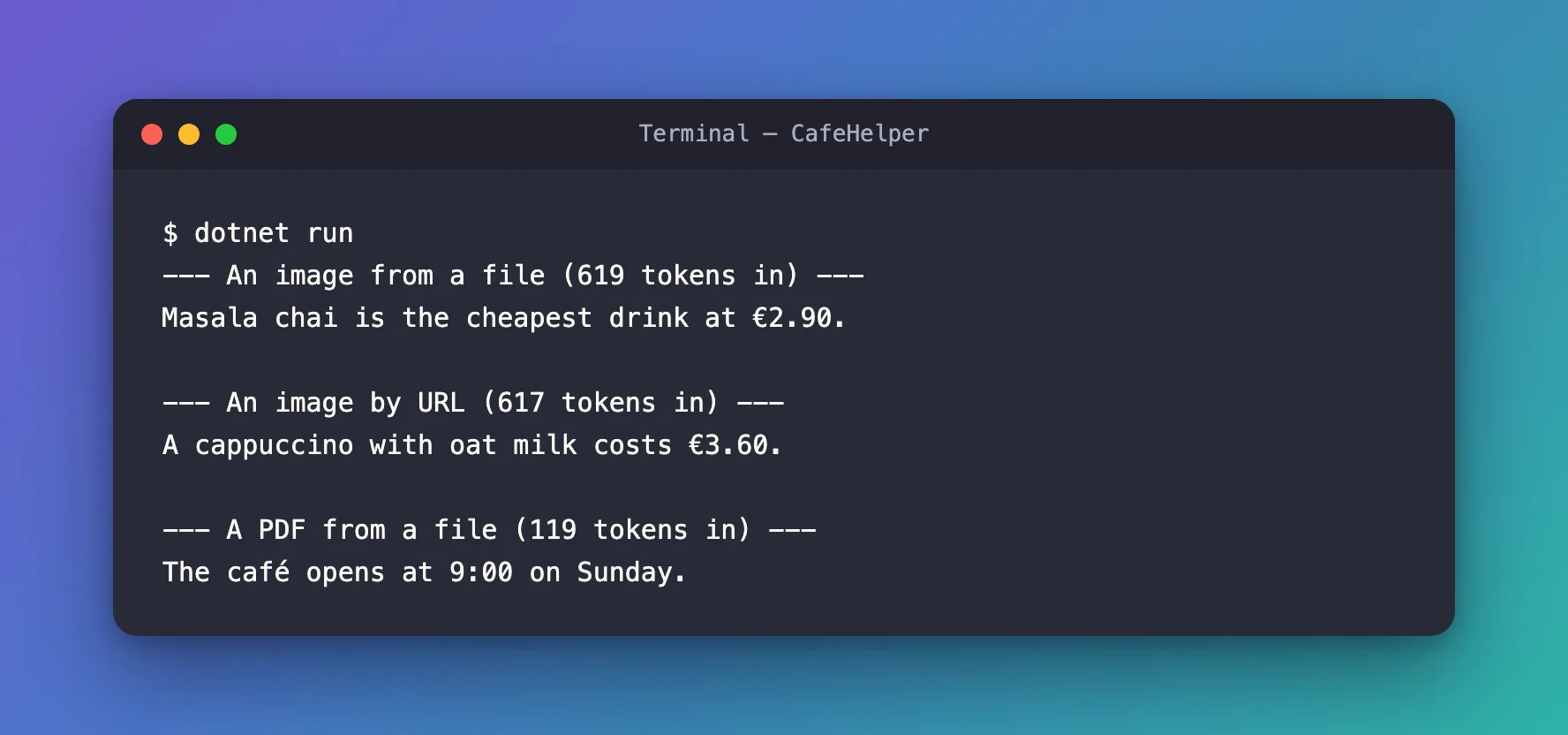
- The image from a file: masala chai at €2.90, read off the board.
- The image by URL: €3.20 for the cappuccino plus €0.40 for oat milk. The model combined two lines of the board.
- The PDF: 9:00, the Sunday row of the table.
The input tokens show what a picture costs: about 620 tokens with the menu board, at the model prices from What Is Microsoft Agent Framework a small fraction of a cent. The PDF request was reported as 119 input tokens. Microsoft says the model's context gets both the extracted text and an image of each page of a PDF; for this one-page file, Foundry still reported fewer tokens than for either picture.
The Complete File
using Azure.AI.Projects;
using Azure.Identity;
using Microsoft.Agents.AI;
using Microsoft.Extensions.AI;

AIAgent agent = new AIProjectClient(
        new Uri("https://foundry-devblogs-exp.services.ai.azure.com/api/projects/proj-devblogs-exp"),
        new AzureCliCredential())
    .AsAIAgent(
        model: "gpt-5.6-luna",
        instructions: "You answer questions about the Riverside Café from the pictures and documents you're given. Answer in one sentence.",
        name: "CafeHelper");

// 1. An image from a file: its bytes travel in the request.
byte[] menu = await File.ReadAllBytesAsync("menu-board.webp");
ChatMessage fromFile = new(ChatRole.User,
[
    new TextContent("Which drink is the cheapest, and what does it cost?"),
    new DataContent(menu, "image/webp"),
]);
Print("An image from a file", await agent.RunAsync(fromFile));

// 2. An image by its URL: the model service downloads it.
ChatMessage fromUrl = new(ChatRole.User,
[
    new TextContent("How much is a cappuccino with oat milk?"),
    new UriContent("https://strdewiridedevblogsprod.blob.core.windows.net/images/docs/ai/microsoft-agent-framework/fundamentals/riverside-menu-board.webp", "image/webp"),
]);
Print("An image by URL", await agent.RunAsync(fromUrl));

// 3. A PDF from a file: a document, sent the same way as an image.
byte[] hours = await File.ReadAllBytesAsync("opening-hours.pdf");
ChatMessage withPdf = new(ChatRole.User,
[
    new TextContent("When does the café open on Sunday?"),
    new DataContent(hours, "application/pdf") { Name = "opening-hours.pdf" },
]);
Print("A PDF from a file", await agent.RunAsync(withPdf));

static void Print(string title, AgentResponse response)
{
    Console.WriteLine($"--- {title} ({response.Usage?.InputTokenCount} tokens in) ---");
    Console.WriteLine(response.Text);
    Console.WriteLine();
}
What You Can Do Now
- Build a
ChatMessagefrom several contents and send it withRunAsync. - Send a picture from a file with
DataContentand the right media type, or by its address withUriContent. - Send a PDF with
DataContent,application/pdfand aName. - Check the cost of pictures and documents in
response.Usage.InputTokenCount.
Common Mistakes
| Mistake | What happens | Do this instead |
|---|---|---|
A media type that doesn't match the file, such as image/png for a JPEG | The content is described as something it isn't | Use the file's real media type |
UriContent with an address only you can open | The service can't download it | Send the bytes with DataContent |
| Sending a picture to a model that can't see | The model can't use the picture | Use a model deployment that accepts images |
Leaving Name off a document | The service receives a made-up file name | Set Name to the real file name |
Troubleshooting
| Symptom | Likely cause | Fix |
|---|---|---|
FileNotFoundException for menu-board.webp | The file isn't in the folder the app runs in | Put it in the project folder, next to Program.cs |
| The answer describes something other than your picture | The app read another file than you expect | Check the file name the code reads |
Frequently Asked Questions
How big can a picture or a PDF be?
The Responses API documentation allows up to 50 pictures in one request, each under 512 MB, and files under 50 MB each, 50 MB in total. Larger pictures cost more tokens, so send what the question needs.
Can I send several pictures in one message?
Yes: add one DataContent or UriContent for each. They're all part of the same message.
Does the agent keep the picture for later questions?
Within a session, the picture is part of the conversation, which Sessions explains. Without a session, each RunAsync stands alone, as in this tutorial. How to Ask Follow-Up Questions About an Image with Microsoft Agent Framework in C# shows both, and what a follow-up costs.
Conclusion
A message to an agent is a list of contents. Put the question in a TextContent, a file's bytes in a DataContent with their media type, or a picture's address in a UriContent, and send the message with RunAsync. A model that can see reads them together: here, a menu board twice and a PDF once.
Next: MCP Tools — give the agent the tools of an MCP server.
Additional Resources
- Using images with an agent — Microsoft's version with
UriContent. - Use the Azure OpenAI Responses API — image input, file input, supported types and limits.
- DataContent — the content type for bytes.
