Function Tools
A model only knows what it learned and what you send it. It doesn't know your prices, your stock or your calendar, and it can't look anything up. A function tool changes that: you give the agent a C# method, and the model can ask for it to run whenever a question needs it. This tutorial gives an agent one tool, and shows each step of what the model does with it.
How a Tool Call Works
Microsoft's documentation puts it simply: Function tools are just custom code that you want the agent to be able to call when needed. You can turn any C# method into a function tool, by using the AIFunctionFactory.Create method to create an AIFunction instance from the method. The AIFunction carries what the model needs to know about your method: its name, a description, and a JSON schema of its parameters.
The model never runs your code. It can only ask for it, and Agent Framework does the rest, all inside one run:
A run with a tool call is two calls to the model: one that asks for the tool, and one that writes the answer with its result. When a question doesn't need the tool, the model answers right away.
Because the model chooses the call and its arguments, treat them like any other input. Microsoft's documentation warns: Tool calls and arguments are generated by the model. Validate and authorize them before application code performs side effects.
The Example
A console app called PizzaShop has an agent that takes pizza orders, and one tool, get_pizza_price, that knows the prices. The app asks three questions: the price of a large pizza, which needs the tool once; which toppings go with mushrooms, which doesn't need it; and the price of one small and two large pizzas, which needs it twice.
Prerequisites
- The agent from Sessions, and the setup it uses: the .NET 10 SDK, the Azure CLI signed in, a Foundry project endpoint, a model deployment and the Foundry User role.
Step 1: Create a Console App
In a terminal, in the folder where you keep your projects, run:
dotnet new console -n PizzaShop
cd PizzaShop
dotnet add package Microsoft.Agents.AI.Foundry --version 1.28.0-preview.261106.1
dotnet add package Azure.Identity --version 1.21.0
The template "Console App" was created successfully.

Processing post-creation actions...
Restoring /Users/you/source/PizzaShop/PizzaShop.csproj:
Restore succeeded.

info : PackageReference for package 'Microsoft.Agents.AI.Foundry' version '1.28.0-preview.261106.1' added to file '/Users/you/source/PizzaShop/PizzaShop.csproj'.
log  : Restored /Users/you/source/PizzaShop/PizzaShop.csproj (in 1.43 sec).
info : PackageReference for package 'Azure.Identity' version '1.21.0' added to file '/Users/you/source/PizzaShop/PizzaShop.csproj'.
log  : Restored /Users/you/source/PizzaShop/PizzaShop.csproj (in 1.59 sec).
The same two packages as in the previous tutorials. Open the PizzaShop folder in VS Code, or PizzaShop.csproj in Visual Studio.
Step 2: Turn a Method into a Tool
Replace everything in Program.cs:
using System.ComponentModel;
using Azure.AI.Projects;
using Azure.Identity;
using Microsoft.Agents.AI;
using Microsoft.Extensions.AI;

// 1. A C# method becomes a tool: AIFunctionFactory reads its name, description and parameters.
AIFunction priceTool = AIFunctionFactory.Create(GetPizzaPrice, name: "get_pizza_price");

// 2. The agent gets the tool. The model decides when to call it.
AIAgent agent = new AIProjectClient(
        new Uri("https://foundry-devblogs-exp.services.ai.azure.com/api/projects/proj-devblogs-exp"),
        new AzureCliCredential())
    .AsAIAgent(
        model: "gpt-5.6-luna",
        instructions: "You take orders for a pizza shop. Answer in one sentence.",
        name: "PizzaShop",
        tools: [priceTool]);

await Ask("How much is a large pizza?");
await Ask("What toppings go well with mushrooms?");

async Task Ask(string question)
{
    AgentResponse response = await agent.RunAsync(question);
    Console.WriteLine($"> {question}");

    // 3. The run's tool calls and their results, from the response's messages.
    foreach (AIContent content in response.Messages.SelectMany(message => message.Contents))
    {
        if (content is FunctionCallContent call)
        {
            string arguments = string.Join(", ", call.Arguments?.Select(a => $"{a.Key}: {a.Value}") ?? []);
            Console.WriteLine($"  called {call.Name}({arguments})");
        }
        else if (content is FunctionResultContent result)
        {
            Console.WriteLine($"  result {result.Result}");
        }
    }

    Console.WriteLine($"{response.Text} ({response.Usage?.InputTokenCount} tokens in)");
    Console.WriteLine();
}

[Description("Gets the price of one pizza, in US dollars.")]
static decimal GetPizzaPrice([Description("The size of the pizza.")] PizzaSize size) => size switch
{
    PizzaSize.Small => 9.50m,
    PizzaSize.Medium => 12.00m,
    PizzaSize.Large => 14.50m,
    _ => throw new ArgumentOutOfRangeException(nameof(size)),
};

enum PizzaSize { Small, Medium, Large }
GetPizzaPriceis an ordinary C# method: a size in, a price out. Its[Description]attributes, on the method and on its parameter, are what the model reads to decide when to call it and with what. Microsoft's documentation: use them so that it can more accurately choose between different functions.PizzaSizeis an enum, so the model can only pick one of three sizes. Step 3 shows how that reaches the model, and How to Use an Enum Parameter in a Microsoft Agent Framework Function Tool in C# goes deeper.AIFunctionFactory.Create(GetPizzaPrice, name: "get_pizza_price")turns the method into a tool.namesets the name the model sees, and here it matters:GetPizzaPriceis a local function of the top-level program, and withoutname:the same tool was called_Main_g_GetPizzaPrice_0_0, built from the name the C# compiler gives a local function. How to Give a Microsoft Agent Framework Function Tool a Clean Name in C# shows the other ways to name one.tools: [priceTool]gives the agent the tool. From now on, every run offers it to the model.Askprints what the run did: theFunctionCallContentitems in the response's messages are the model's requests to call a tool, with their arguments, and theFunctionResultContentitems are what the method returned. How to See Every Message in a Microsoft Agent Framework Agent Run in C# shows the messages in full.
Use your own project endpoint and model deployment. Run it:
- VS Code
- Visual Studio
In the terminal, in the PizzaShop folder, run:
dotnet run
Press Ctrl+F5 (Debug → Start Without Debugging). The output appears in a console window.
> How much is a large pizza?
  called get_pizza_price(size: Large)
  result 14.50
A large pizza costs $14.50. (214 tokens in)

> What toppings go well with mushrooms?
Mushrooms pair well with pepperoni, sausage, onions, bell peppers, spinach, olives, garlic, and extra cheese. (89 tokens in)
- The price question made the model call
get_pizza_pricewithsize: Large. The method returned14.50, and the model wrote the answer from it. - The toppings question didn't need a price, so the model answered right away, without a call.
- The token counts show the difference: 214 input tokens for the run with a tool call, 89 for the one without. The first run called the model twice, and its second call read everything again, plus the call and its result.
Step 3: See What the Model Sees
The model never sees your C# code, only what AIFunctionFactory made of it. Print that. Add these lines before the first Ask:
// What the model sees of the tool: its name, its description and its parameters.
Console.WriteLine($"{priceTool.Name}: {priceTool.Description}");
Console.WriteLine(priceTool.JsonSchema);
Console.WriteLine();
get_pizza_price: Gets the price of one pizza, in US dollars.
{"type":"object","properties":{"size":{"description":"The size of the pizza.","type":"string","enum":["Small","Medium","Large"]}},"required":["size"]}
NameandDescriptioncome fromname:and the method's[Description].JsonSchemadescribes the parameters: one,size, astringthat must be one ofSmall,MediumorLarge, the names of the enum's values. Its description comes from the parameter's[Description], andrequiredsays the model must always send it.
Step 4: Let the Model Call the Tool Twice
One question can need the tool more than once. Add a third question after the second Ask:
await Ask("What do one small and two large pizzas cost?");
Run the app again:
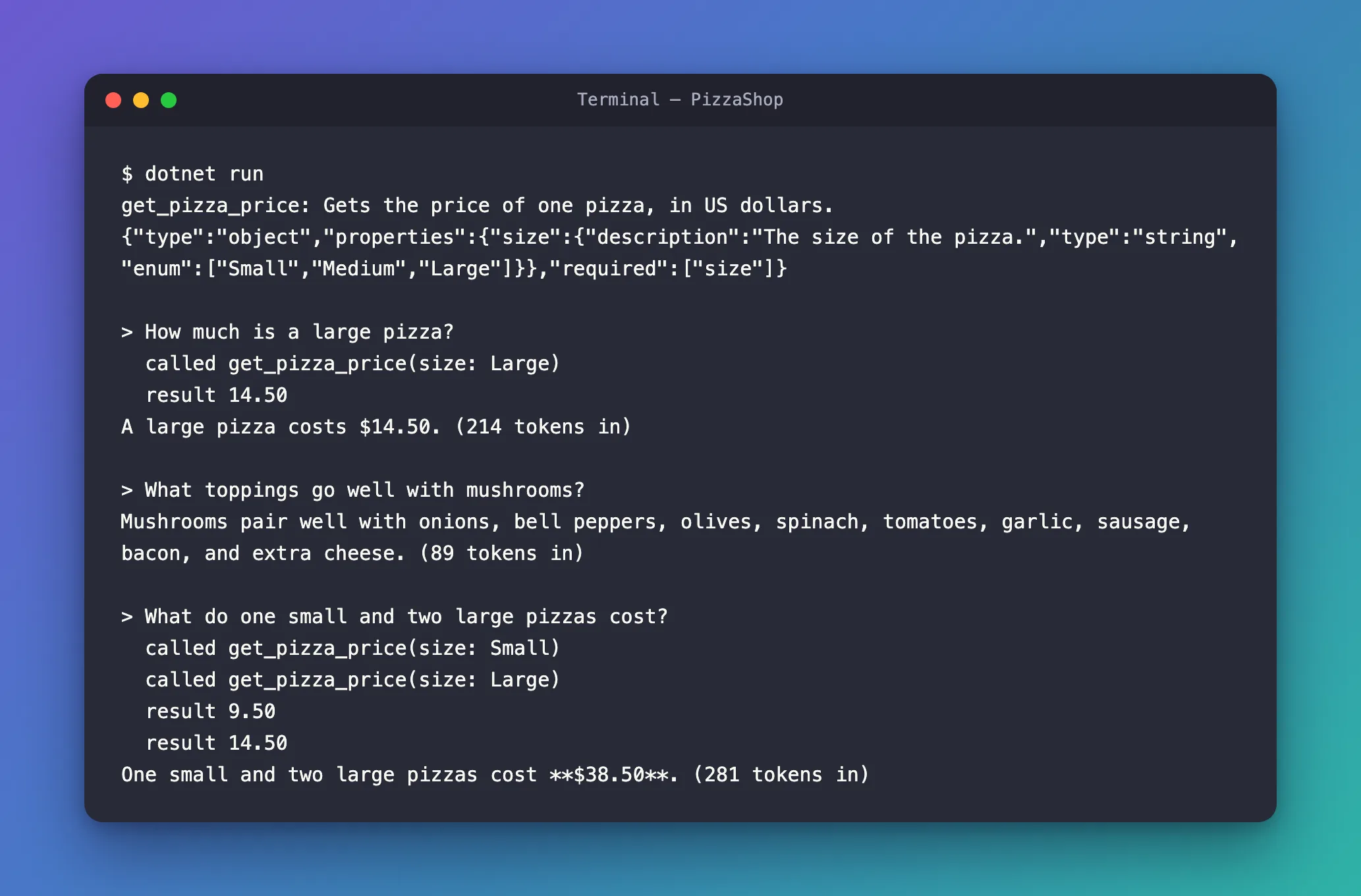
The last run is the new one:
> What do one small and two large pizzas cost?
  called get_pizza_price(size: Small)
  called get_pizza_price(size: Large)
  result 9.50
  result 14.50
One small and two large pizzas cost **$38.50**. (281 tokens in)
The model asked for both prices at once: two calls, one for Small and one for Large, before either result. Agent Framework ran both and sent both results back in one go. The model did the arithmetic itself: 9.50 plus two times 14.50 is $38.50. It asked for the price of a large pizza once, even though the order has two, because the price is the same. The ** around the total is Markdown the model chose; a chat page would show it in bold.
The Complete File
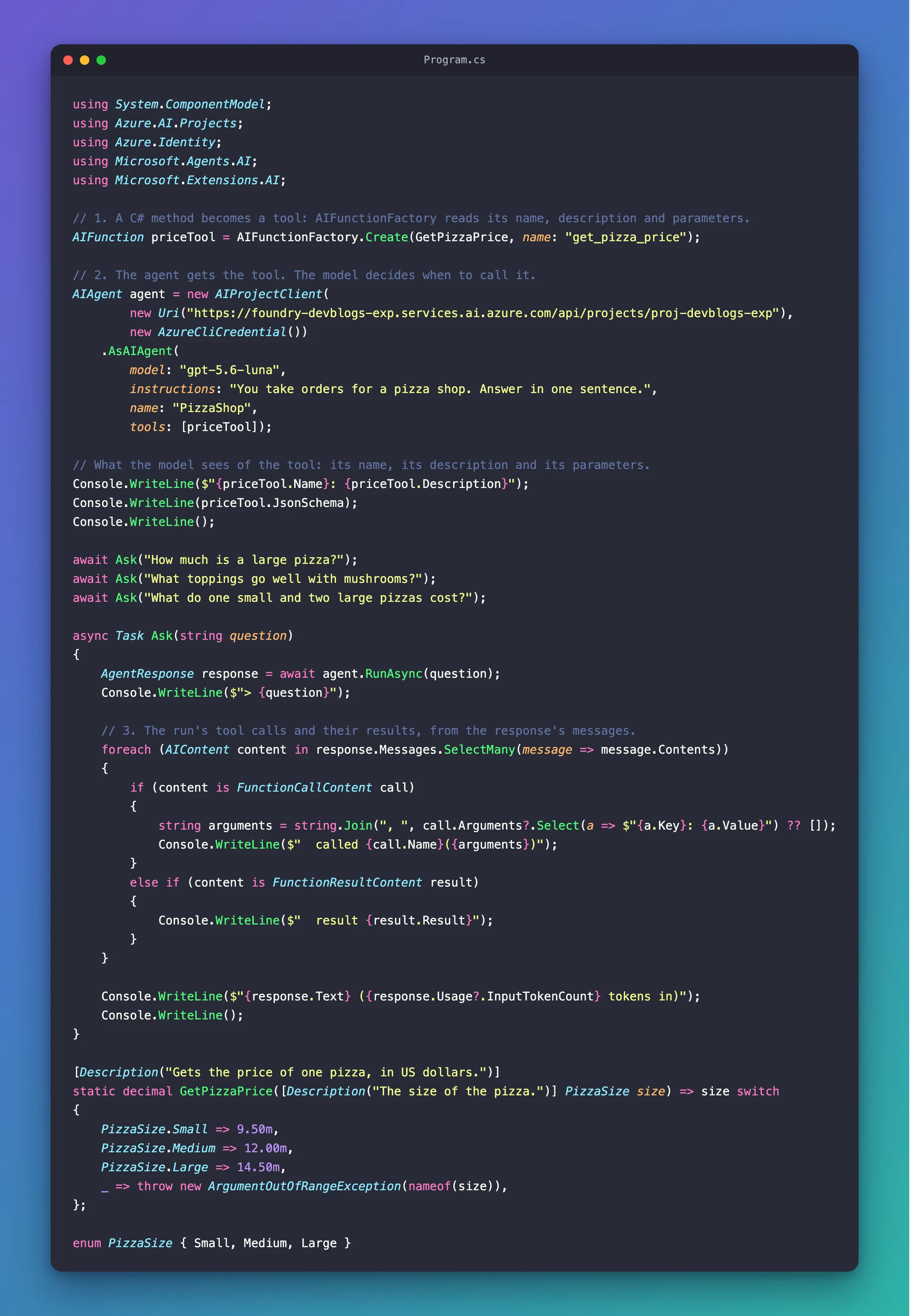
Program.cs with Steps 3 and 4 added is the whole program:
using System.ComponentModel;
using Azure.AI.Projects;
using Azure.Identity;
using Microsoft.Agents.AI;
using Microsoft.Extensions.AI;

// 1. A C# method becomes a tool: AIFunctionFactory reads its name, description and parameters.
AIFunction priceTool = AIFunctionFactory.Create(GetPizzaPrice, name: "get_pizza_price");

// 2. The agent gets the tool. The model decides when to call it.
AIAgent agent = new AIProjectClient(
        new Uri("https://foundry-devblogs-exp.services.ai.azure.com/api/projects/proj-devblogs-exp"),
        new AzureCliCredential())
    .AsAIAgent(
        model: "gpt-5.6-luna",
        instructions: "You take orders for a pizza shop. Answer in one sentence.",
        name: "PizzaShop",
        tools: [priceTool]);

// What the model sees of the tool: its name, its description and its parameters.
Console.WriteLine($"{priceTool.Name}: {priceTool.Description}");
Console.WriteLine(priceTool.JsonSchema);
Console.WriteLine();

await Ask("How much is a large pizza?");
await Ask("What toppings go well with mushrooms?");
await Ask("What do one small and two large pizzas cost?");

async Task Ask(string question)
{
    AgentResponse response = await agent.RunAsync(question);
    Console.WriteLine($"> {question}");

    // 3. The run's tool calls and their results, from the response's messages.
    foreach (AIContent content in response.Messages.SelectMany(message => message.Contents))
    {
        if (content is FunctionCallContent call)
        {
            string arguments = string.Join(", ", call.Arguments?.Select(a => $"{a.Key}: {a.Value}") ?? []);
            Console.WriteLine($"  called {call.Name}({arguments})");
        }
        else if (content is FunctionResultContent result)
        {
            Console.WriteLine($"  result {result.Result}");
        }
    }

    Console.WriteLine($"{response.Text} ({response.Usage?.InputTokenCount} tokens in)");
    Console.WriteLine();
}

[Description("Gets the price of one pizza, in US dollars.")]
static decimal GetPizzaPrice([Description("The size of the pizza.")] PizzaSize size) => size switch
{
    PizzaSize.Small => 9.50m,
    PizzaSize.Medium => 12.00m,
    PizzaSize.Large => 14.50m,
    _ => throw new ArgumentOutOfRangeException(nameof(size)),
};

enum PizzaSize { Small, Medium, Large }
What You Can Do Now
- Turn a C# method into a tool with
AIFunctionFactory.Create, and give it to an agent withtools:. - Describe a tool and its parameters with
[Description], and use an enum to limit what the model can send. - Read what the model sees of a tool: its name, description and JSON schema.
- Find the tool calls and their results in a response, and explain why a run with a tool call reads more tokens.
The three runs of Step 4 read 584 input tokens in total, about $0.00012 at gpt-5.6-luna's price of $0.20 per million input tokens. The answers, and the model's reasoning before it writes, are output tokens at $1.20 per million on top.
Common Mistakes
| Mistake | What happens | Do this instead |
|---|---|---|
Leaving out the [Description] attributes | The model has only the names to guess what the tool does | Describe the method and every parameter |
Leaving out name: for a local function | The model sees a name like _Main_g_GetPizzaPrice_0_0 | Pass name: to AIFunctionFactory.Create |
Using a string where only a few values are valid | The model can send any text | Use an enum, which becomes a list of allowed values |
| Trusting the arguments because they passed the schema | The model chose them; a schema only checks their shape | Check them in the method, as you would any input (How to Validate a Function Tool's Arguments) |
| Doing the arithmetic in a tool when the model only needs facts | Extra tools to describe and maintain | Let tools return facts, such as a price, and let the model combine them |
Troubleshooting
| Symptom | Likely cause | Fix |
|---|---|---|
| The tool isn't offered at all | It was created but not passed to AsAIAgent | Add it to tools: |
No FunctionCallContent in the response | The model answered without a tool | That's its choice; check that the question needed the tool |
Frequently Asked Questions
Does the model run my code?
No. The model only answers with a request to call the tool, with its arguments. Agent Framework runs your method on your machine, and sends the model the result.
How many tools can an agent have?
As many as you pass in tools:. Each one is described to the model in every run, so every tool adds input tokens, whether it's called or not.
Can a tool change things, not just look them up?
Yes, and then it's worth deciding who may let it run. The IT Service Desk series has both: Part 10 gives its agent tools that look things up, Part 11 one that creates tickets, and Part 13 one that only runs after a person approves it.
Conclusion
A function tool is a C# method the model can ask for. AIFunctionFactory.Create turns the method into an AIFunction with a name, a description and a JSON schema; tools: gives it to the agent. In a run, the model decides whether to call it and with which arguments, Agent Framework runs it and sends back the result, and the model answers from it, one call or several at once. The calls and results are in the response's messages, as FunctionCallContent and FunctionResultContent.
Next: Tool Approval (coming soon) — make a person approve a tool call before it runs.
Additional Resources
- Using function tools with an agent —
AIFunctionFactory.Create, descriptions, and passing tools to an agent. - Tools Overview — every kind of tool, and which providers support them.
- AIFunctionFactory.Create — the options for turning a method into a tool.
