Context Providers and Memory
A context provider is a class that runs before and after every run of an agent. Before the run it can add instructions, messages and tools; after it, it can look at what the run produced. That's where an agent's memory lives. This tutorial writes a context provider that remembers a café customer's usual order, keeps it in the conversation's session, and shows what happens to it in a new session and in a saved one.
How Context Providers Work
Before and after every run
Microsoft's documentation describes them in one line: Context providers run around each invocation to add context before execution and process data after execution. And for memory: AIContextProvider is the built-in extension point for memory/context enrichment.
A provider is a class that derives from AIContextProvider, and the simplest one overrides two methods:
| Method | When it runs | What it does |
|---|---|---|
ProvideAIContextAsync | Before the agent calls the model | Returns an AIContext: instructions, messages or tools for this run |
StoreAIContextAsync | After the run | Sees the run's request and response messages, to remember what matters |
Microsoft's documentation: ProvideAIContextAsync - Load relevant data and return additional instructions, messages or tools. And StoreAIContextAsync - Extract any relevant data from new messages and store.
What a provider can add
An AIContext has three properties, and they don't last equally long:
| Property | Lasts |
|---|---|
Instructions | This run only |
Tools | This run only |
Messages | The rest of the conversation |
The API documentation of AIContext: Context information is transient by default and applies only to the current invocation, however messages added through the Messages property will be permanently incorporated into the conversation history. So text the model needs on every run, such as what it remembers, belongs in Instructions: the provider adds it again on the next run, instead of piling copies into the conversation.
Where a provider keeps what it remembers
One provider object serves every conversation the agent has. Microsoft's documentation: An AIContextProvider instance is attached to an agent and the same instance would be used for all sessions. This means that the AIContextProvider should not store any session specific state in the provider instance.
Instead, each conversation's AgentSession has a state bag, and ProviderSessionState<T> keeps a provider's state in it, under a key of its own. What's in the state bag is saved with the session: when you serialize a session and restore it later, the provider's state comes back with it.
That makes this kind of memory last as long as the session does. Memory that follows a person from one conversation to the next, the way the IT Service Desk's memory follows an employee in Part 16, lives in a database instead, and the provider reads it by who is signed in.
The Example
A console app called CoffeeBuddy has an agent that takes orders at a small café, with one context provider, UsualOrderMemory. Before every run, the provider tells the model the customer's usual order, if it knows it, and gives the model a tool to save one. After every run, it counts the visit. The app then:
- Visits twice in one session: the customer names their usual, then orders it.
- Prints what the provider has kept in the session's state bag.
- Orders the usual in a new session, and asks about it in the first session after saving and restoring it.
Prerequisites
- The agent from Middleware, and the setup it uses: the .NET 10 SDK, the Azure CLI signed in, a Foundry project endpoint, a model deployment and the Foundry User role.
Step 1: Create a Console App
In a terminal, in the folder where you keep your projects, run:
dotnet new console -n CoffeeBuddy
cd CoffeeBuddy
dotnet add package Microsoft.Agents.AI.Foundry --version 1.28.0-preview.261106.1
dotnet add package Azure.Identity --version 1.21.0
Both packages are the ones from the earlier tutorials. AIContextProvider and everything it uses come with them.
Step 2: Write the Context Provider
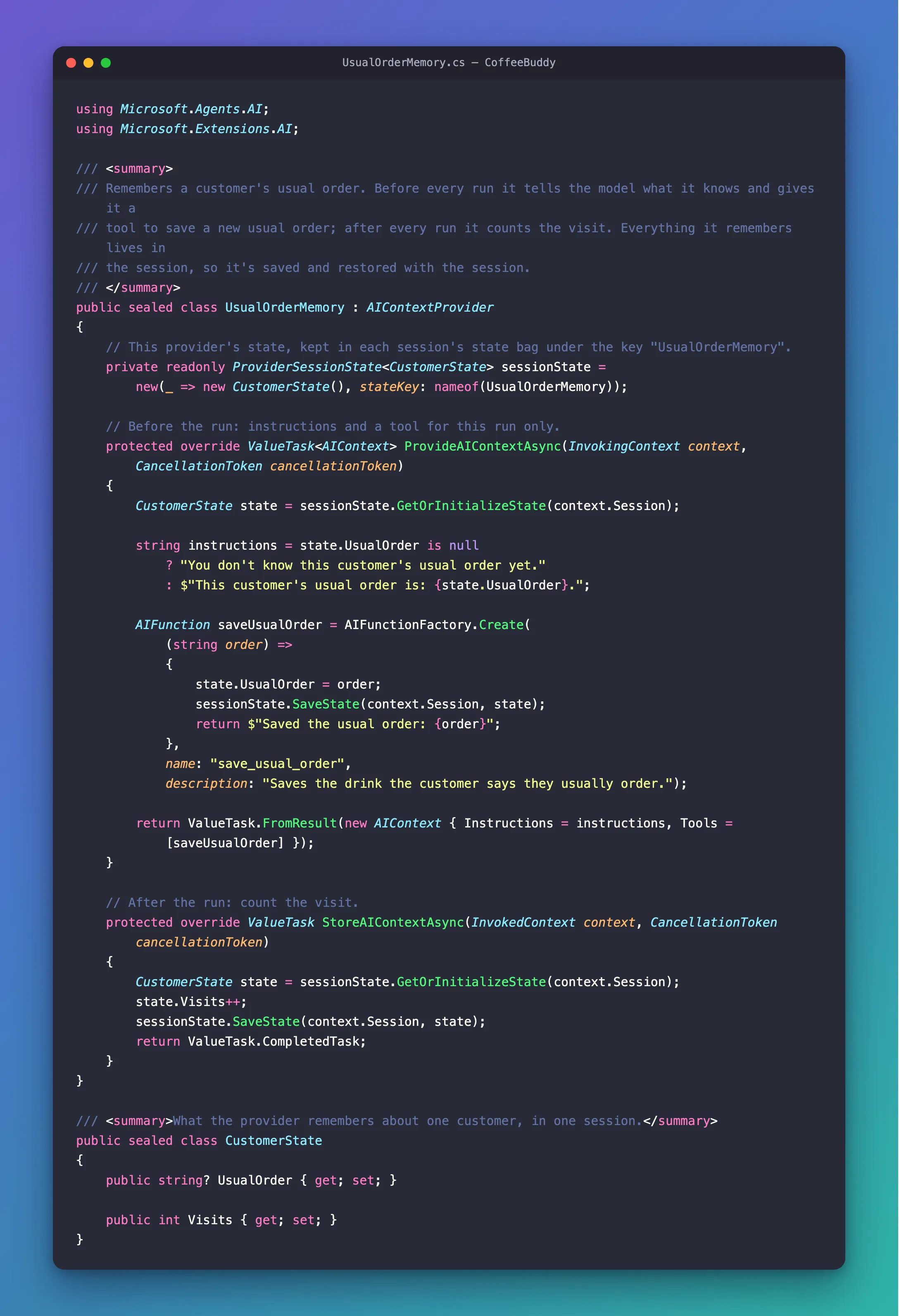
Create UsualOrderMemory.cs. It starts with the class and its state:
public sealed class UsualOrderMemory : AIContextProvider
{
    // This provider's state, kept in each session's state bag under the key "UsualOrderMemory".
    private readonly ProviderSessionState<CustomerState> sessionState =
        new(_ => new CustomerState(), stateKey: nameof(UsualOrderMemory));
: AIContextProvidermakes the class a context provider.ProviderSessionState<CustomerState>reads and saves aCustomerStatein the state bag of whichever session the run belongs to. Its first argument creates the state for a session that doesn't have one yet, andstateKey:is the name it's kept under.
Before the run, the provider builds the instructions from what it knows, and a tool that saves a new usual order:
protected override ValueTask<AIContext> ProvideAIContextAsync(InvokingContext context, CancellationToken cancellationToken)
{
    CustomerState state = sessionState.GetOrInitializeState(context.Session);

    string instructions = state.UsualOrder is null
        ? "You don't know this customer's usual order yet."
        : $"This customer's usual order is: {state.UsualOrder}.";

    AIFunction saveUsualOrder = AIFunctionFactory.Create(
        (string order) =>
        {
            state.UsualOrder = order;
            sessionState.SaveState(context.Session, state);
            return $"Saved the usual order: {order}";
        },
        name: "save_usual_order",
        description: "Saves the drink the customer says they usually order.");

    return ValueTask.FromResult(new AIContext { Instructions = instructions, Tools = [saveUsualOrder] });
}
GetOrInitializeState(context.Session)returns this session's state, and creates it the first time.- The instructions say what the provider knows. The agent adds them to its own instructions for this run.
save_usual_orderis a function tool made from a lambda, as in Function Tools. When the model calls it, it updates the state and saves it into the session withSaveState.new AIContext { Instructions = ..., Tools = [...] }is what the provider adds to this run.
After the run, the provider counts the visit:
protected override ValueTask StoreAIContextAsync(InvokedContext context, CancellationToken cancellationToken)
{
    CustomerState state = sessionState.GetOrInitializeState(context.Session);
    state.Visits++;
    sessionState.SaveState(context.Session, state);
    return ValueTask.CompletedTask;
}
A real provider would look at context.RequestMessages and context.ResponseMessages here to decide what to remember. Counting visits keeps the example small and shows that the method runs after every run.
The state itself is a plain class, which the state bag stores as JSON:
public sealed class CustomerState
{
    public string? UsualOrder { get; set; }

    public int Visits { get; set; }
}
The complete file:
using Microsoft.Agents.AI;
using Microsoft.Extensions.AI;

/// <summary>
/// Remembers a customer's usual order. Before every run it tells the model what it knows and gives it a
/// tool to save a new usual order; after every run it counts the visit. Everything it remembers lives in
/// the session, so it's saved and restored with the session.
/// </summary>
public sealed class UsualOrderMemory : AIContextProvider
{
    // This provider's state, kept in each session's state bag under the key "UsualOrderMemory".
    private readonly ProviderSessionState<CustomerState> sessionState =
        new(_ => new CustomerState(), stateKey: nameof(UsualOrderMemory));

    // Before the run: instructions and a tool for this run only.
    protected override ValueTask<AIContext> ProvideAIContextAsync(InvokingContext context, CancellationToken cancellationToken)
    {
        CustomerState state = sessionState.GetOrInitializeState(context.Session);

        string instructions = state.UsualOrder is null
            ? "You don't know this customer's usual order yet."
            : $"This customer's usual order is: {state.UsualOrder}.";

        AIFunction saveUsualOrder = AIFunctionFactory.Create(
            (string order) =>
            {
                state.UsualOrder = order;
                sessionState.SaveState(context.Session, state);
                return $"Saved the usual order: {order}";
            },
            name: "save_usual_order",
            description: "Saves the drink the customer says they usually order.");

        return ValueTask.FromResult(new AIContext { Instructions = instructions, Tools = [saveUsualOrder] });
    }

    // After the run: count the visit.
    protected override ValueTask StoreAIContextAsync(InvokedContext context, CancellationToken cancellationToken)
    {
        CustomerState state = sessionState.GetOrInitializeState(context.Session);
        state.Visits++;
        sessionState.SaveState(context.Session, state);
        return ValueTask.CompletedTask;
    }
}

/// <summary>What the provider remembers about one customer, in one session.</summary>
public sealed class CustomerState
{
    public string? UsualOrder { get; set; }

    public int Visits { get; set; }
}
Step 3: Attach It to the Agent
Replace everything in Program.cs with the agent:
using System.Text.Json;
using Azure.AI.Projects;
using Azure.Identity;
using Microsoft.Agents.AI;
using Microsoft.Extensions.AI;

AIAgent agent = new AIProjectClient(
        new Uri("https://foundry-devblogs-exp.services.ai.azure.com/api/projects/proj-devblogs-exp"),
        new AzureCliCredential())
    .AsAIAgent(new ChatClientAgentOptions
    {
        Name = "CoffeeBuddy",
        ChatOptions = new ChatOptions
        {
            ModelId = "gpt-5.6-luna",
            Instructions = "You take coffee orders at a small cafe. Answer in one short sentence.",
        },
        // Runs around every run of this agent.
        AIContextProviders = [new UsualOrderMemory()],
    });
AsAIAgent(new ChatClientAgentOptions { ... })creates the agent from an options object, instead of the separate arguments the earlier tutorials used. The options object is where an agent's context providers go.ChatOptions.ModelIdis the model deployment, andChatOptions.Instructionsthe agent's own instructions. The provider's instructions are added to these on every run.AIContextProviders = [new UsualOrderMemory()]attaches one provider object. The agent uses it for every session.
Use your own project endpoint and model deployment.
Step 4: Visit Twice in One Session
// 1. One session, two visits.
AgentSession session = await agent.CreateSessionAsync();
Console.WriteLine($"Visit 1: {(await agent.RunAsync("Hi! My usual is a flat white with oat milk.", session)).Text}");
Console.WriteLine($"Visit 2: {(await agent.RunAsync("I'll have my usual, please.", session)).Text}");
On the first visit, the provider doesn't know a usual order yet, and the model can save the one the customer names. On the second, the provider tells the model what it saved.
Step 5: Look at the Saved Session
// 2. What the provider remembered, as it's saved with the session.
JsonElement saved = await agent.SerializeSessionAsync(session);
Console.WriteLine($"State bag: {saved.GetProperty("stateBag")}");
SerializeSessionAsync turns the session into JSON, the form you'd save in a file or a database, as in Sessions. The app prints only its state bag.
Step 6: A New Session and a Restored One
// 3. A new session knows nothing. The saved session, restored, still knows.
AgentSession newSession = await agent.CreateSessionAsync();
Console.WriteLine($"New session: {(await agent.RunAsync("I'll have my usual, please.", newSession)).Text}");

AgentSession restored = await agent.DeserializeSessionAsync(saved);
Console.WriteLine($"Restored session: {(await agent.RunAsync("What's my usual?", restored)).Text}");
DeserializeSessionAsync turns the saved JSON back into a session, state bag included.
The complete file:
using System.Text.Json;
using Azure.AI.Projects;
using Azure.Identity;
using Microsoft.Agents.AI;
using Microsoft.Extensions.AI;

AIAgent agent = new AIProjectClient(
        new Uri("https://foundry-devblogs-exp.services.ai.azure.com/api/projects/proj-devblogs-exp"),
        new AzureCliCredential())
    .AsAIAgent(new ChatClientAgentOptions
    {
        Name = "CoffeeBuddy",
        ChatOptions = new ChatOptions
        {
            ModelId = "gpt-5.6-luna",
            Instructions = "You take coffee orders at a small cafe. Answer in one short sentence.",
        },
        // Runs around every run of this agent.
        AIContextProviders = [new UsualOrderMemory()],
    });

// 1. One session, two visits.
AgentSession session = await agent.CreateSessionAsync();
Console.WriteLine($"Visit 1: {(await agent.RunAsync("Hi! My usual is a flat white with oat milk.", session)).Text}");
Console.WriteLine($"Visit 2: {(await agent.RunAsync("I'll have my usual, please.", session)).Text}");

// 2. What the provider remembered, as it's saved with the session.
JsonElement saved = await agent.SerializeSessionAsync(session);
Console.WriteLine($"State bag: {saved.GetProperty("stateBag")}");

// 3. A new session knows nothing. The saved session, restored, still knows.
AgentSession newSession = await agent.CreateSessionAsync();
Console.WriteLine($"New session: {(await agent.RunAsync("I'll have my usual, please.", newSession)).Text}");

AgentSession restored = await agent.DeserializeSessionAsync(saved);
Console.WriteLine($"Restored session: {(await agent.RunAsync("What's my usual?", restored)).Text}");
Step 7: Run It
dotnet run
Visit 1: Got it—I’ll remember your usual: a flat white with oat milk.
Visit 2: One flat white with oat milk coming right up.
State bag: {"InMemoryChatHistoryProvider":{"messages":[]},"UsualOrderMemory":{"usualOrder":"flat white with oat milk","visits":2}}
New session: I don’t have your usual saved yet—what would you like today?
Restored session: Your usual is a flat white with oat milk.
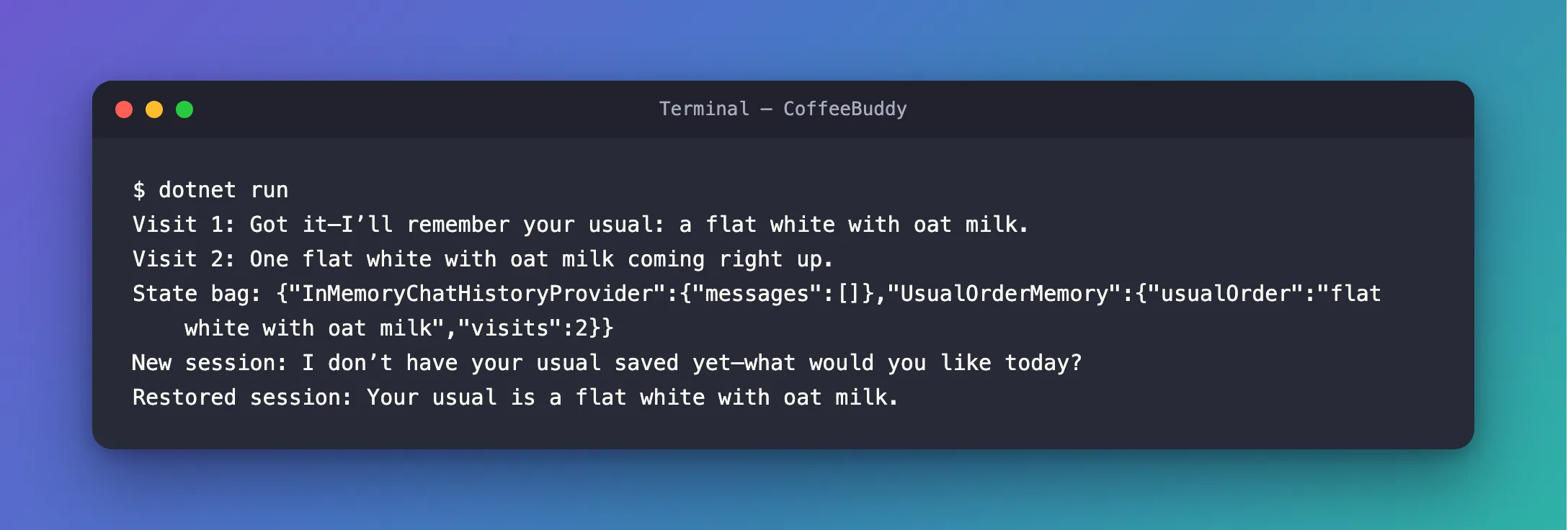
Line by line:
- Visit 1: the model called
save_usual_order. The state bag shows it: only that tool setsusualOrder. - Visit 2: the provider's instructions now said This customer's usual order is: flat white with oat milk., and the model ordered it.
- State bag: two entries.
UsualOrderMemoryholds the usual order and"visits":2, becauseStoreAIContextAsyncran after both visits.InMemoryChatHistoryProviderbelongs to the agent itself, and its list of messages is empty: this agent's conversation is kept by Foundry, not in the session. Chat History Storage and Compaction explains why. - New session: a new state bag, so the provider said You don't know this customer's usual order yet.
- Restored session: the state bag came back with the session, so the provider's instructions named the usual order again. The restored session also brings back its conversation, which Foundry keeps, so the model had both to go on.
What You Can Do Now
- Write a context provider that adds instructions and tools before every run, with
ProvideAIContextAsync. - Run code after every run with
StoreAIContextAsync. - Keep a provider's state in the session with
ProviderSessionState<T>, so it's saved and restored with the session. - Attach providers to an agent with
ChatClientAgentOptions.AIContextProviders.
Common Mistakes
| Mistake | What happens | Do this instead |
|---|---|---|
| Keeping a conversation's data in a field of the provider | Every session shares it: one provider object serves them all | Keep it in the session with ProviderSessionState<T> |
Adding what the provider remembers as Messages | Microsoft's documentation: messages will be permanently incorporated into the conversation history | Add it as Instructions, which last one run |
| Expecting a new session to remember | Its state bag starts empty | Save and restore the session, or keep the memory in a database by user |
| Changing the state without saving it | The session's state bag still has the old value | Call SaveState after a change |
Frequently Asked Questions
Where does the IT Service Desk use context providers?
Twice. Part 12 uses one to give the agent the Microsoft Learn MCP server's tools at the start of every run, and Part 16 uses one to give it what it remembers about the signed-in employee, from Azure Cosmos DB.
Can a context provider be trusted with anything?
Whatever it returns goes to the model as it is. The API documentation of AIContextProvider: Developers must ensure that all providers attached to an agent are trusted. Agent Framework does not validate or filter the data returned by providers. When a provider reads from a database or another service, treat that data like any other input.
Is a context provider the same as middleware?
No. Middleware wraps a run, a tool call or a request to the model, and can change or stop it. A context provider adds to a run before it starts, and looks at it after it ends.
Conclusion
A context provider runs around every run: ProvideAIContextAsync adds instructions, messages or tools before it, and StoreAIContextAsync sees what the run produced. One provider object serves every session, so it keeps each conversation's state in that session's state bag, with ProviderSessionState<T>, and the state is saved and restored with the session. Attach it with ChatClientAgentOptions.AIContextProviders.
Next: Chat History Storage and Compaction — keep conversations where you choose, and within the model's limits.
Additional Resources
- Context Providers — the two methods, the advanced ones, and provider state.
- Context provider integrations — the providers that come ready-made.
- AIContextProvider — the class, and its security considerations.
