Chat History Storage and Compaction
Every conversation has a history, and the model needs it on every run to know what was said before. Some model services keep that history themselves. For those that don't, the agent keeps it, in a chat history provider you can choose and replace. This tutorial uses a service that keeps no history, looks at where the agent stores it, shrinks it with compaction, and moves it into files of its own.
How Chat History Works
Two places a conversation can live
Microsoft's documentation: By default, agents will store chat history in an InMemoryChatHistoryProvider or in the underlying AI service, depending on what the underlying service requires.
| Where | How it works | Used by |
|---|---|---|
| In the service | The service keeps the messages, and the session holds the conversation's ID | The Foundry agents in the earlier tutorials, which use the Responses API |
| In the agent | A chat history provider keeps the messages and sends them with every run | Services that don't keep conversations, such as Chat Completions |
So far every agent in this track has used the Responses API through AIProjectClient.AsAIAgent, and Foundry kept the conversation. That's why the state bag in Context Providers and Memory had an empty list of messages. A chat history provider only comes into play with a service that keeps nothing. The API documentation of ChatHistoryProvider: A ChatHistoryProvider is only relevant for scenarios where the underlying AI service that the agent is using does not use in-service chat history storage.
What a chat history provider does
It works like a context provider, but for the conversation itself:
| Method | When it runs | What it does |
|---|---|---|
ProvideChatHistoryAsync | Before the run | Returns the stored messages, which the agent sends ahead of the new one |
StoreChatHistoryAsync | After the run | Stores the run's new messages: the request and the response |
Microsoft's documentation: ProvideChatHistoryAsync - Load relevant chat history and return the loaded messages. And StoreChatHistoryAsync - Store request and response messages, all of which should be new.
The default, InMemoryChatHistoryProvider, keeps the messages in the session's state bag, so they're saved and restored with the session. Like a context provider, one chat history provider object serves every session, and keeps what belongs to one conversation in that session.
Compaction
The history grows with every run, and the whole of it goes to the model each time: more tokens, a higher bill, and eventually more than the model accepts. Compaction shrinks it. Microsoft's storage guide: If history grows too large for model limits, apply a reducer.
A reducer takes the stored messages and returns fewer. MessageCountingChatReducer keeps the most recent ones. Its API documentation: The reducer always includes the first encountered system message, if any, and then retains up to the specified number of the most recent non-system messages. Messages containing function call or function result content are excluded from the reduced output. InMemoryChatHistoryProvider runs it before it gives the agent the history, and keeps only what the reducer returned.
The Example
A console app called Notebook has an agent that keeps notes about the user. It talks to the model through the Foundry project's Chat Completions API, which keeps no conversation, so the agent keeps the history. The app tells the agent three things, My cat is called Mochi., My favourite colour is teal. and I live in Pune., and then asks What's my cat called?, three times:
- With the default history.
- With compaction that keeps only the four most recent messages.
- With a chat history provider of its own that keeps each conversation in a JSON file, saving the session and restoring it in a new agent object, as after a restart.
Prerequisites
- The agent from Context Providers and Memory, and the setup it uses: the .NET 10 SDK, the Azure CLI signed in, a Foundry project endpoint, a model deployment and the Foundry User role.
Step 1: Create a Console App
In a terminal, in the folder where you keep your projects, run:
dotnet new console -n Notebook
cd Notebook
dotnet add package Microsoft.Agents.AI.Foundry --version 1.28.0-preview.261106.1
dotnet add package Azure.Identity --version 1.21.0
The same two packages again. The Chat Completions client and the reducer come with them.
Step 2: Use a Model Service That Keeps No History
Replace everything in Program.cs with a chat client for the project's Chat Completions API:
using System.Text.Json;
using Azure.AI.Projects;
using Azure.Identity;
using Microsoft.Agents.AI;
using Microsoft.Extensions.AI;

// A chat client for the project's Chat Completions API. That API keeps no conversation on the service,
// so the agent keeps the chat history itself.
IChatClient chatClient = new AIProjectClient(
        new Uri("https://foundry-devblogs-exp.services.ai.azure.com/api/projects/proj-devblogs-exp"),
        new AzureCliCredential())
    .GetProjectOpenAIClient()
    .GetChatClient("gpt-5.6-luna")
    .AsIChatClient();

ChatOptions chatOptions = new() { Instructions = "You keep notes about the user. Answer in one short sentence." };
string[] notes = ["My cat is called Mochi.", "My favourite colour is teal.", "I live in Pune."];
GetProjectOpenAIClient()returns an OpenAI client for the Foundry project, signed in with the same credential.GetChatClient("gpt-5.6-luna")picks the Chat Completions API for your model deployment, instead of the Responses API thatAsAIAgenton the project uses.AsIChatClient()turns it into anIChatClient, which any agent can use.
Use your own project endpoint and model deployment. Microsoft's getting-started guide describes this kind of service: OpenAI Chat Completion, which neither supports nor requires in-service chat history storage so therefore automatically creates and uses an InMemoryChatHistoryProvider.
Step 3: The Default History
// 1. The default: the agent keeps the history in the session, in memory.
ChatClientAgent agent = chatClient.AsAIAgent(new ChatClientAgentOptions { Name = "Notebook", ChatOptions = chatOptions });
await AskAboutTheCatAsync(agent, "Default history");
chatClient.AsAIAgent(...) creates an agent around the chat client. It gets no chat history provider, so it uses InMemoryChatHistoryProvider. AskAboutTheCatAsync is a small function at the end of the file:
// Tells the agent three things, asks about the first, and reports the answer and what's stored.
async Task AskAboutTheCatAsync(ChatClientAgent notebook, string label)
{
    AgentSession conversation = await notebook.CreateSessionAsync();
    foreach (string note in notes)
    {
        await notebook.RunAsync(note, conversation);
    }

    AgentResponse answer = await notebook.RunAsync("What's my cat called?", conversation);
    int count = notebook.GetService<InMemoryChatHistoryProvider>()!.GetMessages(conversation).Count;
    Console.WriteLine($"{label}: {answer.Text} ({answer.Usage?.InputTokenCount} input tokens, {count} messages stored)");
}
- Four runs in one session: three notes, then the question.
answer.Usage?.InputTokenCountis how many input tokens the last run sent to the model, the cost of the history.GetService<InMemoryChatHistoryProvider>()returns the agent's chat history provider, andGetMessages(conversation)the messages it keeps for that session.
Step 4: Compaction
// 2. Compaction: before every run, keep only the 4 most recent messages.
#pragma warning disable MEAI001 // MessageCountingChatReducer is experimental.
ChatClientAgent compactingAgent = chatClient.AsAIAgent(new ChatClientAgentOptions
{
    Name = "Notebook",
    ChatOptions = chatOptions,
    ChatHistoryProvider = new InMemoryChatHistoryProvider(new InMemoryChatHistoryProviderOptions
    {
        ChatReducer = new MessageCountingChatReducer(4),
    }),
});
#pragma warning restore MEAI001
await AskAboutTheCatAsync(compactingAgent, "With compaction");
ChatHistoryProvider = new InMemoryChatHistoryProvider(...)gives the agent its chat history provider explicitly, so it can take options.ChatReducer = new MessageCountingChatReducer(4)keeps the four most recent messages.#pragma warning disable MEAI001andrestore: Microsoft marks the reducer as experimental, with the diagnostic ID MEAI001, and its guide to chat reduction warns: This feature is experimental and subject to change. The two lines turn that diagnostic off for this statement only.
Step 5: Write a Chat History Provider of Your Own
The in-memory provider keeps the whole conversation in the session, so the session grows with it. This provider keeps each conversation in a JSON file instead, and the session holds only the file's name. Create FileChatHistoryProvider.cs. It starts with its state:
public sealed class FileChatHistoryProvider(string folder) : ChatHistoryProvider
{
    // This provider's state in each session: the name of that session's history file.
    private readonly ProviderSessionState<FileHistoryState> sessionState =
        new(_ => new FileHistoryState { FileName = $"{Guid.NewGuid():N}.json" }, stateKey: nameof(FileChatHistoryProvider));
: ChatHistoryProvidermakes the class a chat history provider, and(string folder)is the folder for its files.ProviderSessionState<FileHistoryState>keeps the file's name in each session's state bag, as in Context Providers and Memory. A new session gets a new name, from a new GUID.
Microsoft's storage guide explains why the name lives in the session, not in a field: The ChatHistoryProvider may have a reference to a database client in a field, but shouldn't have a database key for the chat history in a field. The folder is the same for every session; the file's name isn't.
Before the run, it reads the session's file:
// Before the run: the stored messages, oldest first. The agent sends them ahead of the new message.
protected override async ValueTask<IEnumerable<ChatMessage>> ProvideChatHistoryAsync(
    InvokingContext context, CancellationToken cancellationToken) =>
    await LoadAsync(PathFor(context.Session), cancellationToken);
After the run, it adds the run's new messages and writes the file again:
// After the run: append this run's new messages, the request and the response.
protected override async ValueTask StoreChatHistoryAsync(InvokedContext context, CancellationToken cancellationToken)
{
    string path = PathFor(context.Session);
    List<ChatMessage> messages = await LoadAsync(path, cancellationToken);
    messages.AddRange(context.RequestMessages.Concat(context.ResponseMessages ?? []));

    Directory.CreateDirectory(folder);
    await File.WriteAllTextAsync(path, JsonSerializer.Serialize(messages, AIJsonUtilities.DefaultOptions), cancellationToken);
}
context.RequestMessagesandcontext.ResponseMessagesare this run's new messages: the question, and the model's answer.ResponseMessagesisnullwhen a run fails, hence the?? [].AIJsonUtilities.DefaultOptionsare the JSON settings that read and writeChatMessageobjects, with their text and their other contents.
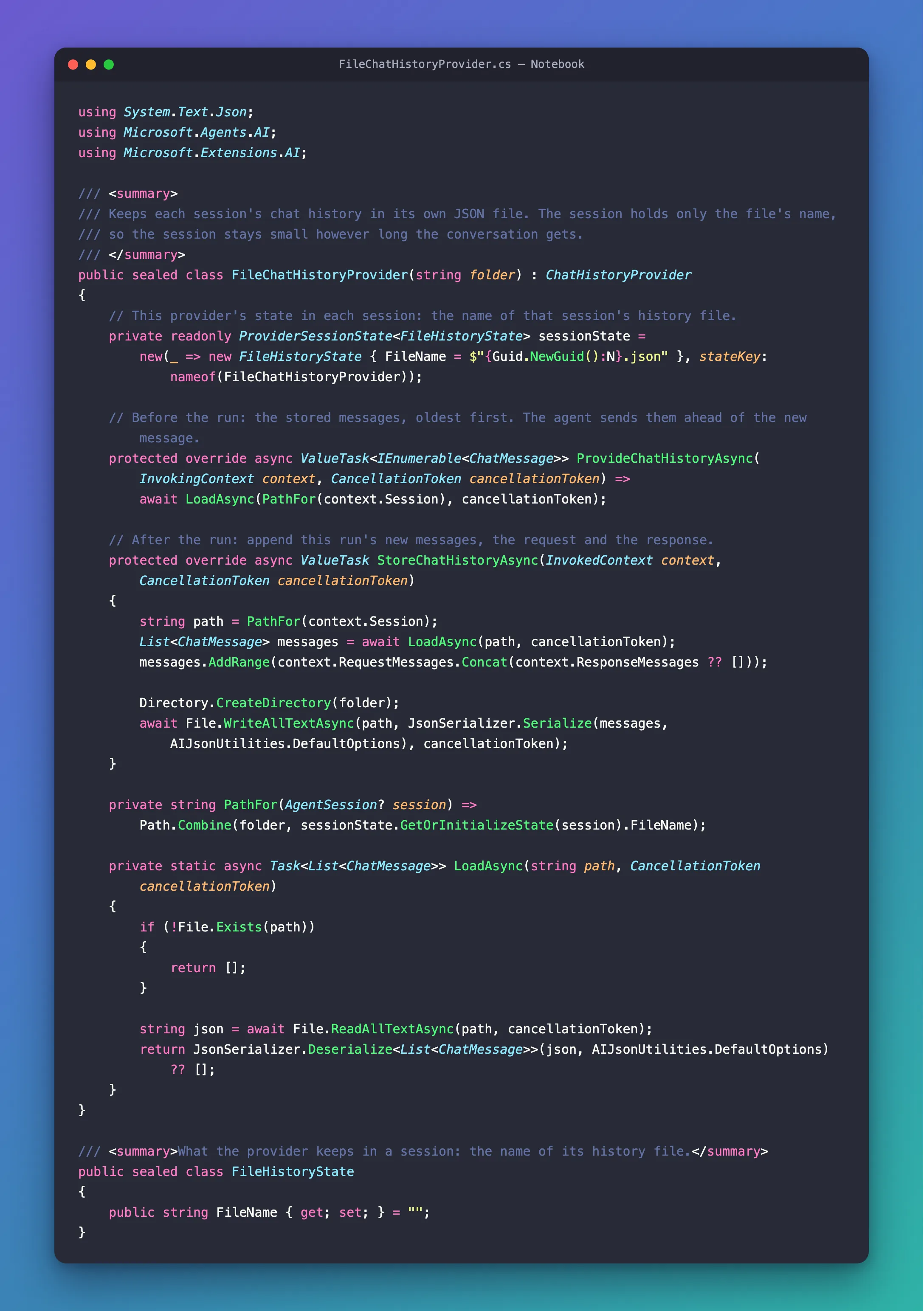
PathFor and LoadAsync are two small helpers: one puts the folder and the session's file name together, the other reads a file and returns an empty list when there's none yet. The complete file:
using System.Text.Json;
using Microsoft.Agents.AI;
using Microsoft.Extensions.AI;

/// <summary>
/// Keeps each session's chat history in its own JSON file. The session holds only the file's name,
/// so the session stays small however long the conversation gets.
/// </summary>
public sealed class FileChatHistoryProvider(string folder) : ChatHistoryProvider
{
    // This provider's state in each session: the name of that session's history file.
    private readonly ProviderSessionState<FileHistoryState> sessionState =
        new(_ => new FileHistoryState { FileName = $"{Guid.NewGuid():N}.json" }, stateKey: nameof(FileChatHistoryProvider));

    // Before the run: the stored messages, oldest first. The agent sends them ahead of the new message.
    protected override async ValueTask<IEnumerable<ChatMessage>> ProvideChatHistoryAsync(
        InvokingContext context, CancellationToken cancellationToken) =>
        await LoadAsync(PathFor(context.Session), cancellationToken);

    // After the run: append this run's new messages, the request and the response.
    protected override async ValueTask StoreChatHistoryAsync(InvokedContext context, CancellationToken cancellationToken)
    {
        string path = PathFor(context.Session);
        List<ChatMessage> messages = await LoadAsync(path, cancellationToken);
        messages.AddRange(context.RequestMessages.Concat(context.ResponseMessages ?? []));

        Directory.CreateDirectory(folder);
        await File.WriteAllTextAsync(path, JsonSerializer.Serialize(messages, AIJsonUtilities.DefaultOptions), cancellationToken);
    }

    private string PathFor(AgentSession? session) =>
        Path.Combine(folder, sessionState.GetOrInitializeState(session).FileName);

    private static async Task<List<ChatMessage>> LoadAsync(string path, CancellationToken cancellationToken)
    {
        if (!File.Exists(path))
        {
            return [];
        }

        string json = await File.ReadAllTextAsync(path, cancellationToken);
        return JsonSerializer.Deserialize<List<ChatMessage>>(json, AIJsonUtilities.DefaultOptions) ?? [];
    }
}

/// <summary>What the provider keeps in a session: the name of its history file.</summary>
public sealed class FileHistoryState
{
    public string FileName { get; set; } = "";
}
Step 6: Save the Session, Restore It and Read the File
Back in Program.cs, an agent with the file provider takes the three notes, and the app saves its session:
// 3. Your own storage: one JSON file per session, in the "history" folder.
ChatClientAgent fileAgent = chatClient.AsAIAgent(new ChatClientAgentOptions
{
    Name = "Notebook",
    ChatOptions = chatOptions,
    ChatHistoryProvider = new FileChatHistoryProvider("history"),
});

AgentSession session = await fileAgent.CreateSessionAsync();
foreach (string note in notes)
{
    await fileAgent.RunAsync(note, session);
}

JsonElement saved = await fileAgent.SerializeSessionAsync(session);
Console.WriteLine($"File history, saved session: {saved.GetProperty("stateBag")}");
Then a new agent object, as after a restart, restores the session and asks about the cat. Last, the app counts the messages in the file:
// Later, a new agent object (as after a restart) restores the session, and the provider reads the file.
ChatClientAgent laterAgent = chatClient.AsAIAgent(new ChatClientAgentOptions
{
    Name = "Notebook",
    ChatOptions = chatOptions,
    ChatHistoryProvider = new FileChatHistoryProvider("history"),
});

AgentSession restored = await laterAgent.DeserializeSessionAsync(saved);
AgentResponse reply = await laterAgent.RunAsync("What's my cat called?", restored);
Console.WriteLine($"File history, restored: {reply.Text}");

string file = Directory.GetFiles("history").Single();
List<ChatMessage> stored = JsonSerializer.Deserialize<List<ChatMessage>>(File.ReadAllText(file), AIJsonUtilities.DefaultOptions)!;
Console.WriteLine($"File history, {Path.GetFileName(file)}: {stored.Count} messages");
The complete file:
using System.Text.Json;
using Azure.AI.Projects;
using Azure.Identity;
using Microsoft.Agents.AI;
using Microsoft.Extensions.AI;

// A chat client for the project's Chat Completions API. That API keeps no conversation on the service,
// so the agent keeps the chat history itself.
IChatClient chatClient = new AIProjectClient(
        new Uri("https://foundry-devblogs-exp.services.ai.azure.com/api/projects/proj-devblogs-exp"),
        new AzureCliCredential())
    .GetProjectOpenAIClient()
    .GetChatClient("gpt-5.6-luna")
    .AsIChatClient();

ChatOptions chatOptions = new() { Instructions = "You keep notes about the user. Answer in one short sentence." };
string[] notes = ["My cat is called Mochi.", "My favourite colour is teal.", "I live in Pune."];

// 1. The default: the agent keeps the history in the session, in memory.
ChatClientAgent agent = chatClient.AsAIAgent(new ChatClientAgentOptions { Name = "Notebook", ChatOptions = chatOptions });
await AskAboutTheCatAsync(agent, "Default history");

// 2. Compaction: before every run, keep only the 4 most recent messages.
#pragma warning disable MEAI001 // MessageCountingChatReducer is experimental.
ChatClientAgent compactingAgent = chatClient.AsAIAgent(new ChatClientAgentOptions
{
    Name = "Notebook",
    ChatOptions = chatOptions,
    ChatHistoryProvider = new InMemoryChatHistoryProvider(new InMemoryChatHistoryProviderOptions
    {
        ChatReducer = new MessageCountingChatReducer(4),
    }),
});
#pragma warning restore MEAI001
await AskAboutTheCatAsync(compactingAgent, "With compaction");

// 3. Your own storage: one JSON file per session, in the "history" folder.
ChatClientAgent fileAgent = chatClient.AsAIAgent(new ChatClientAgentOptions
{
    Name = "Notebook",
    ChatOptions = chatOptions,
    ChatHistoryProvider = new FileChatHistoryProvider("history"),
});

AgentSession session = await fileAgent.CreateSessionAsync();
foreach (string note in notes)
{
    await fileAgent.RunAsync(note, session);
}

JsonElement saved = await fileAgent.SerializeSessionAsync(session);
Console.WriteLine($"File history, saved session: {saved.GetProperty("stateBag")}");

// Later, a new agent object (as after a restart) restores the session, and the provider reads the file.
ChatClientAgent laterAgent = chatClient.AsAIAgent(new ChatClientAgentOptions
{
    Name = "Notebook",
    ChatOptions = chatOptions,
    ChatHistoryProvider = new FileChatHistoryProvider("history"),
});

AgentSession restored = await laterAgent.DeserializeSessionAsync(saved);
AgentResponse reply = await laterAgent.RunAsync("What's my cat called?", restored);
Console.WriteLine($"File history, restored: {reply.Text}");

string file = Directory.GetFiles("history").Single();
List<ChatMessage> stored = JsonSerializer.Deserialize<List<ChatMessage>>(File.ReadAllText(file), AIJsonUtilities.DefaultOptions)!;
Console.WriteLine($"File history, {Path.GetFileName(file)}: {stored.Count} messages");

// Tells the agent three things, asks about the first, and reports the answer and what's stored.
async Task AskAboutTheCatAsync(ChatClientAgent notebook, string label)
{
    AgentSession conversation = await notebook.CreateSessionAsync();
    foreach (string note in notes)
    {
        await notebook.RunAsync(note, conversation);
    }

    AgentResponse answer = await notebook.RunAsync("What's my cat called?", conversation);
    int count = notebook.GetService<InMemoryChatHistoryProvider>()!.GetMessages(conversation).Count;
    Console.WriteLine($"{label}: {answer.Text} ({answer.Usage?.InputTokenCount} input tokens, {count} messages stored)");
}
Step 7: Run It
dotnet run
Default history: Your cat is called Mochi. (112 input tokens, 8 messages stored)
With compaction: I don’t know your cat’s name. (82 input tokens, 6 messages stored)
File history, saved session: {"FileChatHistoryProvider":{"fileName":"8bea6f73a0ac4bf194321a0e833f0b0c.json"}}
File history, restored: Your cat is called Mochi.
File history, 8bea6f73a0ac4bf194321a0e833f0b0c.json: 8 messages
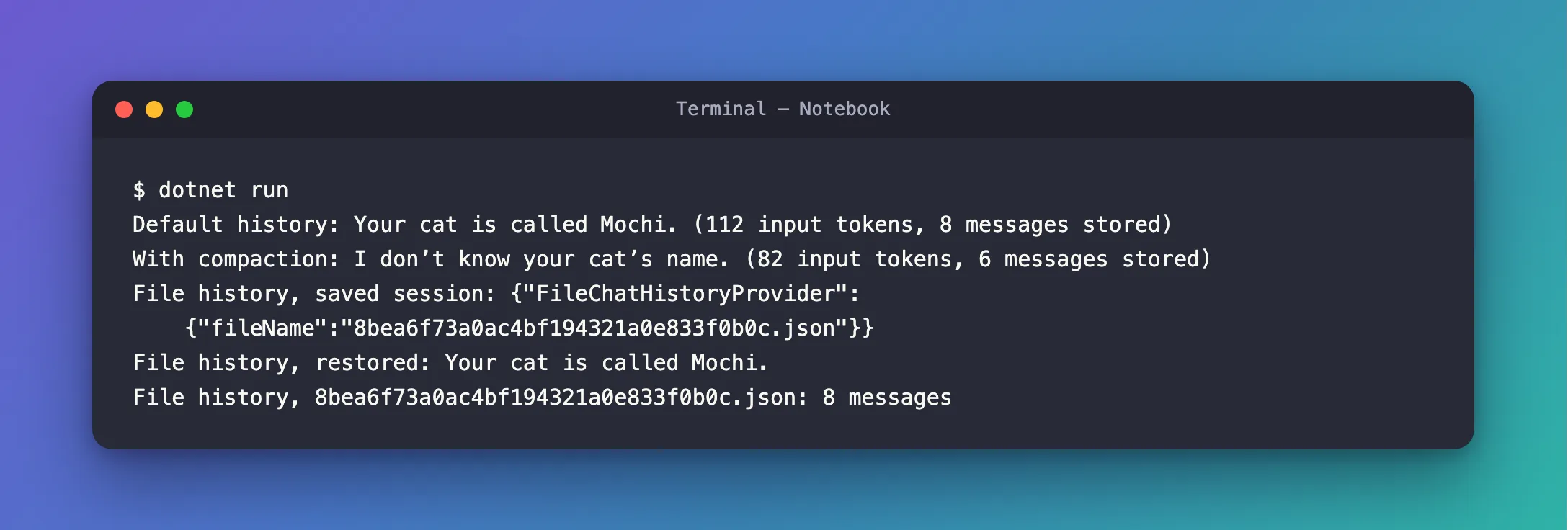
Line by line:
- Default history: four runs, a question and an answer each, so 8 messages stored. The last run sent the whole conversation: 112 input tokens.
- With compaction: the agent forgot the cat. Before the fourth run, six messages were stored, and the reducer kept the four most recent, which no longer included My cat is called Mochi. The question and its answer then made six again. The run sent 82 input tokens instead of 112: compaction saves tokens by forgetting.
- Saved session: the state bag holds the file's name and nothing else. The conversation itself is in the file.
- Restored: a new agent object, with a new provider object, read the file through the restored session and knew the cat's name.
- The file holds 8 messages: the three notes and the question, each with its answer.
Each message in the file is the JSON form of a ChatMessage. The first two:
[
  {
    "role": "user",
    "contents": [
      {
        "$type": "text",
        "text": "My cat is called Mochi."
      }
    ]
  },
  {
    "authorName": "Notebook",
    "createdAt": "2026-11-28T12:13:19+00:00",
    "role": "assistant",
    "contents": [
      {
        "$type": "text",
        "text": "Got it—your cat is named Mochi."
      }
    ],
    "messageId": "chatcmpl-EpBapjzAzykWRhDYBwZm5ByE0DAnY"
  },
What You Can Do Now
- Tell whether an agent's history lives in the service or in the agent.
- Read the messages an agent keeps with
InMemoryChatHistoryProvider.GetMessages. - Shrink the history before every run with a reducer, and see what it costs in memory.
- Write a chat history provider that keeps conversations where you choose, with the key in the session.
Common Mistakes
| Mistake | What happens | Do this instead |
|---|---|---|
| Expecting a chat history provider to keep a Foundry agent's conversation | That agent's service keeps it: the provider is only relevant when the service doesn't | Use a client whose service keeps no history, as in Step 2 |
| Keeping the file name or database key in a field of the provider | Every session would share one history | Keep it in the session, with ProviderSessionState<T> |
| Reducing too hard | The agent forgets what it was told, as it forgot the cat here | Keep enough messages for the conversations you expect |
| Restoring a session with a differently set-up agent | Microsoft's storage guide: restore it with the same agent/provider configuration that created it | Restore a session with the same kind of agent that created it |
Frequently Asked Questions
Where does the IT Service Desk keep its conversations?
In Foundry: its agent uses the Responses API, which keeps each conversation, and Part 15 keeps each session, with its conversation's ID, in Azure Cosmos DB, so conversations survive restarts.
Is there a ready-made provider for a database?
Microsoft's API reference lists CosmosChatHistoryProvider among the classes derived from ChatHistoryProvider, for Azure Cosmos DB. Microsoft's storage guide gives the pattern for any other store: For database/Redis/blob-backed history, implement a custom history provider.
Does Agent Framework have compaction of its own?
Yes, in the Microsoft.Agents.AI.Compaction namespace, with strategies beyond counting messages. Microsoft's documentation: The compaction framework is currently experimental. To use it, you will need to add #pragma warning disable MAAI001.
What about privacy?
The history holds everything the user said. The API documentation of ChatHistoryProvider: Messages stored in chat history may contain PII and sensitive conversation content; implementers should consider encryption at rest and appropriate access controls for the storage backend.
Conclusion
A conversation's history lives in the service or in the agent. With a service that keeps none, the agent's chat history provider sends the stored messages before every run and stores the new ones after it. InMemoryChatHistoryProvider keeps them in the session, a reducer keeps them within limits at the price of forgetting, and a provider of your own can keep them anywhere, with only a key in the session.
Next: Runtime Model Routing (coming soon) — move a conversation to another model or service without losing it.
Additional Resources
- Storage — local and service-managed history, reducers, and custom providers.
- Step 4: Memory and Persistence — where the default history goes.
- Compaction — Agent Framework's compaction strategies.
- Chat reduction — the reducers in Microsoft.Extensions.AI.
